Windows 7 Power Options Issue

KungFuPanda

New member
Local time
8:42 AM
Messages
6
Location
Philippines
Hello guys,

The Windows 7 Power Options window doesn't show up. I attached the video of it.

Thanks in advance.


My Computer

Computer Manufacturer/Model Number
Sony VAIO CW26FA
OS
Windows 7 Home Premium 64-bit

My Computer

Computer type
PC/Desktop
Computer Manufacturer/Model Number
Custom Build
OS
Windows 7 Professional SP1 - x64 [Non-UEFI Boot]
CPU
Ivy Bridge Core i5 3570K (Delidded)
Motherboard
Asus P8Z77-V LE PLUS
Memory
G.Skill "Ares" DDR3 PC3-12800 - 1600MHz (16Gb)
Graphics Card(s)
Asus Dual-RX480-O4G
Sound Card
Creative Sound Blaster Z w/5.1 sound system
Monitor(s) Displays
Asus IPS 23"
Screen Resolution
16/9
Hard Drives
Internal:
500Go Sata 6Gb/s (x2)
500Go Sata 3Gb/s (x2)
SSD 60Go Sata 6Gb/s
PSU
In Win C 900W Series 80+ Platinum
Case
Thermaltake Chaser A71
Cooling
Custom Water Cooling Loop
Keyboard
Cooler Master QuickFire XTi
Mouse
Razer Imperator 2012 (4G)
Antivirus
MSE
Browser
IE 11.0.xxx Rtm
Other Info
"Raid0" with Intel Smart Response Technology (HDD/SSD)

My Computer

Computer Manufacturer/Model Number
Custom Build
OS
Windows 7 Ultimate x64/Windows 8 Consumer Preview x64/Ubuntu 11.04
CPU
Intel Pentium Dual Core E6700 3.2GHz
Motherboard
ASUS P5G41T-M LX
Memory
Strontium 8192MB DDR3 1333Mhz
Graphics Card(s)
msi GeForce N560GTX-M2D1GD5 1GB
Sound Card
Realtek HD Audio
Monitor(s) Displays
CHIMEI CMV 221D 22"
Screen Resolution
1680x1050
Hard Drives
Seagate Barracuda LP Green 3.5'' 2TB Internal HDD 5900RPM + WD Elements Desktop 1TB External HDD 7200RPM
PSU
SHAW Viper-1500w Gaming PSU
Case
Black eMaxx ATX Mini Tower Case
Keyboard
Microsoft Wireless Keyboard 1000
Mouse
Microsoft Wireless Optical Mouse 2000
Internet Speed
100GB @ 4.76Mbps
Welcome KungFuPanda. One more thing to try is to go to your Sony System Recovery options. This should be in All Programs and an option in the boot sequence to press an "F" key to enter. This will take the system back to the out-of-box condition. Make back ups of all your personal files since this will erase them.

Are you using an Administrator-level account?
 

My Computer

Computer type
PC/Desktop
Computer Manufacturer/Model Number
Home Built Desktop By DataTech
OS
Windows 7 Ultimate X64 SP1
CPU
Intel i5-2550K, Differing ~4.4-4.8GHz No built in GPU
Motherboard
ASUS P8Z68-V PRO/GEN3
Memory
16GB G.Skill Sniper 1866MHz @ 2133MHz 2x8GB
Graphics Card(s)
ASUS GTX650TIB-DC2OC-2GD5, (650TI Boost)
Sound Card
Onboard Realtek 5-1
Monitor(s) Displays
Samsung P2570HD
Screen Resolution
1920x1080
Hard Drives
Samsung 840 Pro 256GB SSD for OS, 500GB Seagate Constellation (Enterprise drive) for Data
PSU
Corsair HX650W
Case
Inwin Dragon Rider
Cooling
Hyper 212 EVO w/two Noctua fans, push-pull, @1300 RPM
Keyboard
E-Z Eyes, bright yellow keys with large characters
Mouse
steelseries SENSEI Laser Pro Gaming
Internet Speed
48-51Mbs Mbs down, 11 Mbs up Xfinity Cable
Antivirus
Norton Internet Security 2013
Browser
IE 10, Opera, Pale Moon if needed
Other Info
4 case fans, LG BluRay-RE, ASUS DVD-RW, Mr. Fusion power supply, 1.21 gigawatts.
Hi KungFuPanda,

How long has this issue persisted? Do you have a restore point before the problem started?

Try the following fixes and see if they help:
1. Open the Power Troubleshooter.
Open the Power troubleshooter
2. Run the sfc/scannow command.
http://www.sevenforums.com/tutorials/1538-sfc-scannow-command-system-file-checker.html

Both links above are tutorials on how to complete the actions above them. They should guide you through the steps.

Hope this helps,
Jaidyn

Yes, my system restore is turned on, but I don't know what happened to it.
There's no restore points available.

So let me try to use the System File Checker first then I'll post what happened. :)
 

My Computer

Computer Manufacturer/Model Number
Sony VAIO CW26FA
OS
Windows 7 Home Premium 64-bit
Welcome KungFuPanda. One more thing to try is to go to your Sony System Recovery options. This should be in All Programs and an option in the boot sequence to press an "F" key to enter. This will take the system back to the out-of-box condition. Make back ups of all your personal files since this will erase them.

Are you using an Administrator-level account?

Sorry I can't do that now. I don't have an external drive to back up my files.
 

My Computer

Computer Manufacturer/Model Number
Sony VAIO CW26FA
OS
Windows 7 Home Premium 64-bit
OK, you can also save personal files by burning to DVD's too, then copy back from it. this is my preferred way since a DVD has a life of 100 years or so. The drawback is the DVD capacity, 4.7GB single layer. If you have the good fortune to have a Bluray burner, you have 25GB on a BD-R disk.
 

My Computer

Computer type
PC/Desktop
Computer Manufacturer/Model Number
Home Built Desktop By DataTech
OS
Windows 7 Ultimate X64 SP1
CPU
Intel i5-2550K, Differing ~4.4-4.8GHz No built in GPU
Motherboard
ASUS P8Z68-V PRO/GEN3
Memory
16GB G.Skill Sniper 1866MHz @ 2133MHz 2x8GB
Graphics Card(s)
ASUS GTX650TIB-DC2OC-2GD5, (650TI Boost)
Sound Card
Onboard Realtek 5-1
Monitor(s) Displays
Samsung P2570HD
Screen Resolution
1920x1080
Hard Drives
Samsung 840 Pro 256GB SSD for OS, 500GB Seagate Constellation (Enterprise drive) for Data
PSU
Corsair HX650W
Case
Inwin Dragon Rider
Cooling
Hyper 212 EVO w/two Noctua fans, push-pull, @1300 RPM
Keyboard
E-Z Eyes, bright yellow keys with large characters
Mouse
steelseries SENSEI Laser Pro Gaming
Internet Speed
48-51Mbs Mbs down, 11 Mbs up Xfinity Cable
Antivirus
Norton Internet Security 2013
Browser
IE 10, Opera, Pale Moon if needed
Other Info
4 case fans, LG BluRay-RE, ASUS DVD-RW, Mr. Fusion power supply, 1.21 gigawatts.
OK, you can also save personal files by burning to DVD's too, then copy back from it. this is my preferred way since a DVD has a life of 100 years or so. The drawback is the DVD capacity, 4.7GB single layer. If you have the good fortune to have a Bluray burner, you have 25GB on a BD-R disk.

My laptop's hard drive is actually 500 GB. Imagine how many DVDs that I need to use... :cry:
 

My Computer

Computer Manufacturer/Model Number
Sony VAIO CW26FA
OS
Windows 7 Home Premium 64-bit
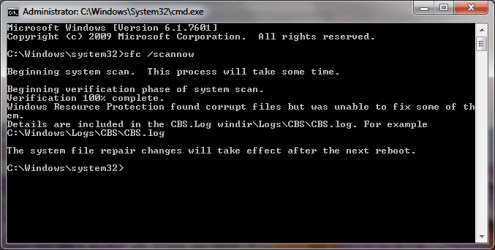
Anyway, here is the result of the SFC scan.

CommandPromptSFC.png
 

My Computer

Computer Manufacturer/Model Number
Sony VAIO CW26FA
OS
Windows 7 Home Premium 64-bit
LOL, That is the HDD size, your files are probably much less than 500GB.:)
You'd need to burn your Documents, Music, Video, and Picture folders and have the installers for installed programs.

How did SFC /scannow go? OOPS! Just saw your post. Try it at least 3 times followed by a reboot.
 

My Computer

Computer type
PC/Desktop
Computer Manufacturer/Model Number
Home Built Desktop By DataTech
OS
Windows 7 Ultimate X64 SP1
CPU
Intel i5-2550K, Differing ~4.4-4.8GHz No built in GPU
Motherboard
ASUS P8Z68-V PRO/GEN3
Memory
16GB G.Skill Sniper 1866MHz @ 2133MHz 2x8GB
Graphics Card(s)
ASUS GTX650TIB-DC2OC-2GD5, (650TI Boost)
Sound Card
Onboard Realtek 5-1
Monitor(s) Displays
Samsung P2570HD
Screen Resolution
1920x1080
Hard Drives
Samsung 840 Pro 256GB SSD for OS, 500GB Seagate Constellation (Enterprise drive) for Data
PSU
Corsair HX650W
Case
Inwin Dragon Rider
Cooling
Hyper 212 EVO w/two Noctua fans, push-pull, @1300 RPM
Keyboard
E-Z Eyes, bright yellow keys with large characters
Mouse
steelseries SENSEI Laser Pro Gaming
Internet Speed
48-51Mbs Mbs down, 11 Mbs up Xfinity Cable
Antivirus
Norton Internet Security 2013
Browser
IE 10, Opera, Pale Moon if needed
Other Info
4 case fans, LG BluRay-RE, ASUS DVD-RW, Mr. Fusion power supply, 1.21 gigawatts.
Hello KungFuPanda, welcome to Seven Forums!


Try booting to the sfc /scan it may help where the other won't because while Windows is 'running' it may not be able to repair some of the 'running' files and be sure to do the boot-scan several times, sometime that's necessary to complete successfully.


Have a look at this tutorial at the link below and be sure to post back with any further questions you may have and to keep us informed.

SFC /SCANNOW : Run in Command Prompt at Boot
 

My Computer

Computer Manufacturer/Model Number
* BFK Customs *
OS
W 7 64-bit Ultimate
CPU
Intel Q9550 Yorkfield
Motherboard
ASUS P5Q Pro
Memory
8GB Dominator 8500C5D
Graphics Card(s)
ATI : XFX 5870
Sound Card
Realtek HD Audio 7-1
Monitor(s) Displays
1x 47" LCD HDMI & 3x 26" LCD HDMI
Screen Resolution
1920x1080P & 1920x1200
Hard Drives
1x 80GB Intel X25-M G2 SSD : 1x 500GB & 1x 640GB WD Caviar Black(s)
PSU
Corsair 620HX
Case
Cooler Master RC-690
Cooling
Tuniq Tower 120, 2x 140mm and 3x 120mm case fans
Keyboard
Microsoft 500
Mouse
Razer Diamondback 3G
Internet Speed
14 Mb/s
Other Info
1x Koutech 3Gb/s SATA HDD Hot Swap Rack

My Computer

Computer type
PC/Desktop
Computer Manufacturer/Model Number
Custom Build
OS
Windows 10 Pro x64, Arch Linux
CPU
Intel Core 2 Quad Q8200 OC'd 3.08GHz
Motherboard
Asus Rampage formula LGA775
Memory
8GB DDR2 900Mhz
Graphics Card(s)
MSI GT730 2GB GDDR5 (Kepler)
Sound Card
Supreme FX2
Monitor(s) Displays
Samsung LS22F350 LED
Screen Resolution
1080P
Hard Drives
Kingston SSDNow UV400 120GB, 500GB Hitachi, 2TB Samsung, 500GB Seagate FreeAgent, 640GB Samsung, 160GB Toshiba (Arch)
PSU
AeroCool 500W Bronze
Cooling
Cooler Master V6 + 3X fans
Keyboard
Prolink keyboard
Mouse
Logitech M705
Internet Speed
1MiB/s
Browser
Chrome Beta
LOL, That is the HDD size, your files are probably much less than 500GB.:)
You'd need to burn your Documents, Music, Video, and Picture folders and have the installers for installed programs.

How did SFC /scannow go? OOPS! Just saw your post. Try it at least 3 times followed by a reboot.

To be exact it's like 430-460 GB worth of files. Literally.
 

My Computer

Computer Manufacturer/Model Number
Sony VAIO CW26FA
OS
Windows 7 Home Premium 64-bit
Back
Top