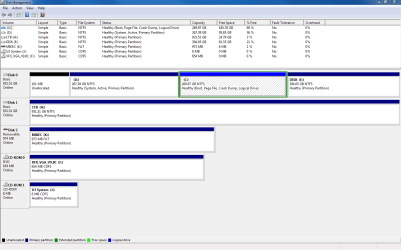
Windows 7 showing two installed locations!

mconn127

New member
Local time
2:27 AM
Messages
12
Location
Los Angeles
Sorry if this is a re-post but I tried searching for this problem but haven't found one exactly like this.

I recently deleted, reformatted, and installed windows 7 ultimate on my hard drive. Everything installed great and seems to run okay but I noticed there are two copies showing up in "My Computer" and Drive D: Local Disk is an exact copy of my old systems windows and program files. I can still run the programs installed on this disk. What is really odd is that my computer is showing the hard drive which has both installs of windows at 1000GB, when in reality it is only a 500GB drive. This old windows copy seems to be living on a disk that doesn't exist.

I suppose I could have reformatting wrong but I have done this many times. I deleted the old partition and re-formatted. I have no idea how this information is even still on the drive.

I also noticed that as my C drive (new install on win7) begins to be filled up with installing software the D drive is depleting. As if they are sharing the 500GB drive and windows somehow is confused and showing them separately - doubling up the hard drive space that really isnt there.

If this makes any sense and you think you can help it would be much appreciated! I figure I'm going to have to re-install windows again but if I somehow missed something I don't want to run into a system with 3 installs of windows 7. Thanks!
 

My Computer My Computer

At a glance

Win7 Ultimate x64Intel Core i5-2500K 3.30GHz8 GBATI Radeon HD 5700 Series
OS
Win7 Ultimate x64
CPU
Intel Core i5-2500K 3.30GHz
Memory
8 GB
Graphics Card(s)
ATI Radeon HD 5700 Series
Sound Card
Sound Blasters Audigy 2

My Computer My Computer

At a glance

Windows 7 Home Premium 32-Bit - Build 7600 SP1Intel Core i3-2120 3.30GhzKingston 4 GB DDR3 1333 mhzAMD Radeon HD6670
Computer type
PC/Desktop
Computer Manufacturer/Model Number
Custom Build
OS
Windows 7 Home Premium 32-Bit - Build 7600 SP1
CPU
Intel Core i3-2120 3.30Ghz
Motherboard
Asus P8Z68-V LX Intel Z68 Socket H2 ATX
Memory
Kingston 4 GB DDR3 1333 mhz
Graphics Card(s)
AMD Radeon HD6670
Sound Card
Sound Blaster Audigy SE 24-Bit
Monitor(s) Displays
Asus VE228
Screen Resolution
1440 X 900
Hard Drives
OCZ Vertex 3 120 GB Sata 3 SSD ==
Kingston SH103/S3 120 G Hyper X 120 GB SSD ==
Western Digital 500 GB Caviar Green 7200 RPM ==
PSU
Corsair CX600M == 600 Watt
Case
NZXT Apollo - Silver with Clear Side Panel
Cooling
Three 120 mm Fans
Keyboard
Microsoft Natural 4000
Mouse
Microsoft Custom Optical 3000
Internet Speed
AT&T Fiber Optic Wireless Network
Antivirus
Microsoft Security Essentials
Browser
Chrome
Other Info
120 mm Blue LED Fan -- Three Blue LED Lazer Light Sticks
Here is the screen shot. Disk C and Disk E should be sharing a 500 GB hard drive. Im not sure why it shows a Disk 0 with 931GB of space. Disk D is the old installation of windows.
 

Attachments

  • 2012-11-14 11_39_14-Disk Management.png
    2012-11-14 11_39_14-Disk Management.png
    28.7 KB · Views: 26

My Computer My Computer

At a glance

Win7 Ultimate x64Intel Core i5-2500K 3.30GHz8 GBATI Radeon HD 5700 Series
OS
Win7 Ultimate x64
CPU
Intel Core i5-2500K 3.30GHz
Memory
8 GB
Graphics Card(s)
ATI Radeon HD 5700 Series
Sound Card
Sound Blasters Audigy 2
I am guessing when you installed Windows, you did not unplug all disks, except disk 0 from your motherboard. It appears files have gotten on other drives. == Your C: drive should be Primary and have the System Active settings on it. Drive D still shows System Active so when you boot, you are actually still booting from D, your old Windows and not the new one. If you could confirm that you did not unplug all drives except for Disk 0, then we can make a plan to correct things.
 

My Computer My Computer

At a glance

Windows 7 Home Premium 32-Bit - Build 7600 SP1Intel Core i3-2120 3.30GhzKingston 4 GB DDR3 1333 mhzAMD Radeon HD6670
Computer type
PC/Desktop
Computer Manufacturer/Model Number
Custom Build
OS
Windows 7 Home Premium 32-Bit - Build 7600 SP1
CPU
Intel Core i3-2120 3.30Ghz
Motherboard
Asus P8Z68-V LX Intel Z68 Socket H2 ATX
Memory
Kingston 4 GB DDR3 1333 mhz
Graphics Card(s)
AMD Radeon HD6670
Sound Card
Sound Blaster Audigy SE 24-Bit
Monitor(s) Displays
Asus VE228
Screen Resolution
1440 X 900
Hard Drives
OCZ Vertex 3 120 GB Sata 3 SSD ==
Kingston SH103/S3 120 G Hyper X 120 GB SSD ==
Western Digital 500 GB Caviar Green 7200 RPM ==
PSU
Corsair CX600M == 600 Watt
Case
NZXT Apollo - Silver with Clear Side Panel
Cooling
Three 120 mm Fans
Keyboard
Microsoft Natural 4000
Mouse
Microsoft Custom Optical 3000
Internet Speed
AT&T Fiber Optic Wireless Network
Antivirus
Microsoft Security Essentials
Browser
Chrome
Other Info
120 mm Blue LED Fan -- Three Blue LED Lazer Light Sticks
You left the old Win7 on the HD instead of installing over it. It is shown in the screenshot as D, with it's old 100mb boot partition immediately to its left and now abandoned.

This would be okay - we could just have you delete D and the small boot partition and resize C into its space - except that you installed to a Logical data partition which cannot host boot files, so it placed them on the old Win7 partition D.

Your choices are to start over by booting the installer to use Custom drive options to delete all partitions, create and format New one(s) as you wish as shown in Step 6-7 in Clean Install Windows 7.

Or you can boot free Partition Wizard bootable CD, righclick on C to Modify>Set to Primary, click OK. Then rightclick C again to Modify>Set to Active, OK. Then click on the HD to highlight it and from Disk tab select Rebuild MBR, click OK, Apply all steps.

If Win7 doesn't start boot into WIn7 installer to run Startup Repair - Run up to 3 Separate Times until Win7 starts and holds the System boot files.

Now that you know Win7 will boot from C partition, you can boot again into PW CD, rightclick D and the 100mb partitions to delete, click OK after each, then rightclick C to Resize, drag left border all the way to the left to take up the space you deleted, OK, apply all steps.

How to set partition as Primary with partition manager?
How to Set Active/Inactive partition -Partition Wizard Video Help.
Partition Wizard Move/Resize Partition Video Help.
Partition Wizard Rebuild MBR Video Help.
 
Thanks for the help.. I did delete the disk though and that is what I don't understand. But I think I left the 100mb boot partition there because it would not let me delete it and I was rushing to get my comp back up and running to finish some maya 3d homework. Lol.

Which option do you think is better? To reinstall windows correctly? Or the second option?

I would prefer to have a clean install so I'm guessing starting over is the best option for that, right?
 

My Computer My Computer

At a glance

Win7 Ultimate x64Intel Core i5-2500K 3.30GHz8 GBATI Radeon HD 5700 Series
OS
Win7 Ultimate x64
CPU
Intel Core i5-2500K 3.30GHz
Memory
8 GB
Graphics Card(s)
ATI Radeon HD 5700 Series
Sound Card
Sound Blasters Audigy 2
I'd do it over especially so you can stick closely to the Best Practices in Clean Reinstall - Factory OEM Windows 7 which guarantee a perfect install.

I only gave the repair steps if you'd grown attached to it already, or for others who find this thread.
 
Last edited:
Cool.. Haven't grown attached to it, lol. It makes me feel dirty. I've done it many times but I wasn't paying enough attention because I was going madly insane and rushed it.

Thanks for the help!
 

My Computer My Computer

At a glance

Win7 Ultimate x64Intel Core i5-2500K 3.30GHz8 GBATI Radeon HD 5700 Series
OS
Win7 Ultimate x64
CPU
Intel Core i5-2500K 3.30GHz
Memory
8 GB
Graphics Card(s)
ATI Radeon HD 5700 Series
Sound Card
Sound Blasters Audigy 2
If you study the steps and prepare, ask back any questions, make all the preparations, then do it in slow motion using only the methods and tools to get and maintain a perfect install, it will live on if you want for the life of the OS in a backup image.
 
Yeah, I'm already looking into the links you posted. Really like this ninite installer! I might backup this time, might as well since I still have a copy of the old windows install.
 

My Computer My Computer

At a glance

Win7 Ultimate x64Intel Core i5-2500K 3.30GHz8 GBATI Radeon HD 5700 Series
OS
Win7 Ultimate x64
CPU
Intel Core i5-2500K 3.30GHz
Memory
8 GB
Graphics Card(s)
ATI Radeon HD 5700 Series
Sound Card
Sound Blasters Audigy 2
Okay windows 7 will not let me boot from cd. Even when changing the boot order in the bios. How can I fix this?
 

My Computer My Computer

At a glance

Win7 Ultimate x64Intel Core i5-2500K 3.30GHz8 GBATI Radeon HD 5700 Series
OS
Win7 Ultimate x64
CPU
Intel Core i5-2500K 3.30GHz
Memory
8 GB
Graphics Card(s)
ATI Radeon HD 5700 Series
Sound Card
Sound Blasters Audigy 2
How to Boot A Computer from CD or DVD - YouTube

Where did you get the Win7 DVD? Did you burn it yourself?

Are you getting a prompt to "Press any key to boot disk?" Try triggering the DVD to boot by tapping the one-time BIOS Boot Menu key given on first screen at boot? Does it prompt you now? If there is no prompt then the disk is not bootable.

Make sure the DVD is clean and unscratched. If you burned it then burn another using ImgBurn at 4x speed using latest official installer ISO from Clean Reinstall - Factory OEM Windows 7.

If that fails try writing the latest ISO to flash stick, booting it using Boot Menu F-key under USB, Removable or HD's. Set HDD first to boot in BIOS setup.
 
No I am not getting a prompt to boot. I did burn the cd but not at 4x. Is it important to burn the cd at the slowest speed?

Thanks
 

My Computer My Computer

At a glance

Win7 Ultimate x64Intel Core i5-2500K 3.30GHz8 GBATI Radeon HD 5700 Series
OS
Win7 Ultimate x64
CPU
Intel Core i5-2500K 3.30GHz
Memory
8 GB
Graphics Card(s)
ATI Radeon HD 5700 Series
Sound Card
Sound Blasters Audigy 2
No I am not getting a prompt to boot. I did burn the cd but not at 4x. Is it important to burn the cd at the slowest speed?

Thanks

Just to be sure on this, are you putting the DVD in your drive, shutting down the PC and then rebooting with the DVD in the drive?
 

My Computer My Computer

At a glance

Windows 7 Home Premium 32-Bit - Build 7600 SP1Intel Core i3-2120 3.30GhzKingston 4 GB DDR3 1333 mhzAMD Radeon HD6670
Computer type
PC/Desktop
Computer Manufacturer/Model Number
Custom Build
OS
Windows 7 Home Premium 32-Bit - Build 7600 SP1
CPU
Intel Core i3-2120 3.30Ghz
Motherboard
Asus P8Z68-V LX Intel Z68 Socket H2 ATX
Memory
Kingston 4 GB DDR3 1333 mhz
Graphics Card(s)
AMD Radeon HD6670
Sound Card
Sound Blaster Audigy SE 24-Bit
Monitor(s) Displays
Asus VE228
Screen Resolution
1440 X 900
Hard Drives
OCZ Vertex 3 120 GB Sata 3 SSD ==
Kingston SH103/S3 120 G Hyper X 120 GB SSD ==
Western Digital 500 GB Caviar Green 7200 RPM ==
PSU
Corsair CX600M == 600 Watt
Case
NZXT Apollo - Silver with Clear Side Panel
Cooling
Three 120 mm Fans
Keyboard
Microsoft Natural 4000
Mouse
Microsoft Custom Optical 3000
Internet Speed
AT&T Fiber Optic Wireless Network
Antivirus
Microsoft Security Essentials
Browser
Chrome
Other Info
120 mm Blue LED Fan -- Three Blue LED Lazer Light Sticks
Back
Top