Windows 7 sounds disappear.

Virtuozas

New member
Local time
4:01 AM
Messages
12
Location
Klaipėda, Lithuania
Hello. Two days ago I installed Windows 7 on my new computer and till then I had serious problem with sound. In playback section it shows that sounds are playing and everything is ok, but I can't hear them and they only appear for a second or 2 and disappear again. Tried to install all kind of drivers but there's no luck with it. If you need any information of my PC just tell me and I'll give it. Thanks.
 

My Computer

OS
Windows 7 Ultimate x32
Memory
2GB
Graphics Card(s)
ATI Radeon HD 4250
Sound Card
High Definition Audio Controller
Monitor(s) Displays
Generic PnP Monitor
Hard Drives
Hitachi HDS5C1050CLA382 ATA Device
Hi and welcome to Seven Forums!

You might try installing the audio codecs:
Realtek
After accpeting the terms you need to download the first driver from any of the 3 servers on the right.
 

My Computer

Computer type
PC/Desktop
Computer Manufacturer/Model Number
Custom Built PC
OS
Windows 7 Ultimate 64 bit SP1
CPU
Intel(R) Core(TM) i5-2500K
Motherboard
Gigabyte Technology Co., Ltd. Z68X-UD3-B3
Memory
12GB Kingston Hyperx 1600MHz
Graphics Card(s)
Asus GTS 450
PSU
500W Coolink
Other Info
Genius G-Pen F610 (PenPad)
Hi, thanks for answer. When I agree to the terms and push next it takes me to new page witch says ""Object moved to here" and when I push "here" it takes me back to the terms accepting.
 

My Computer

OS
Windows 7 Ultimate x32
Memory
2GB
Graphics Card(s)
ATI Radeon HD 4250
Sound Card
High Definition Audio Controller
Monitor(s) Displays
Generic PnP Monitor
Hard Drives
Hitachi HDS5C1050CLA382 ATA Device
Sorry it was their fault, this method worked days before...
anyway here is the page after the terms and stuff
Realtek
 

My Computer

Computer type
PC/Desktop
Computer Manufacturer/Model Number
Custom Built PC
OS
Windows 7 Ultimate 64 bit SP1
CPU
Intel(R) Core(TM) i5-2500K
Motherboard
Gigabyte Technology Co., Ltd. Z68X-UD3-B3
Memory
12GB Kingston Hyperx 1600MHz
Graphics Card(s)
Asus GTS 450
PSU
500W Coolink
Other Info
Genius G-Pen F610 (PenPad)
OK. Installed "32bit_Vista_Win7_R266" and still nothing. Playback still shows that Speakers are working but I can't hear a sound.
 

My Computer

OS
Windows 7 Ultimate x32
Memory
2GB
Graphics Card(s)
ATI Radeon HD 4250
Sound Card
High Definition Audio Controller
Monitor(s) Displays
Generic PnP Monitor
Hard Drives
Hitachi HDS5C1050CLA382 ATA Device
Try restarting the machine, I'll be back in a sec.
 

My Computer

Computer type
PC/Desktop
Computer Manufacturer/Model Number
Custom Built PC
OS
Windows 7 Ultimate 64 bit SP1
CPU
Intel(R) Core(TM) i5-2500K
Motherboard
Gigabyte Technology Co., Ltd. Z68X-UD3-B3
Memory
12GB Kingston Hyperx 1600MHz
Graphics Card(s)
Asus GTS 450
PSU
500W Coolink
Other Info
Genius G-Pen F610 (PenPad)
Tried, 'couse installed asked to do so. :)
 

My Computer

OS
Windows 7 Ultimate x32
Memory
2GB
Graphics Card(s)
ATI Radeon HD 4250
Sound Card
High Definition Audio Controller
Monitor(s) Displays
Generic PnP Monitor
Hard Drives
Hitachi HDS5C1050CLA382 ATA Device
Just found and installed drivers from CD I was given when bought computer. Now sounds are OK, but I'll try to restart PC now and will say if it stays good.

UPDATE
Restart and again, no sounds. And one strange thing is that when I installed new drivers in my Playback devices section there was Headphones selection and after restart it gone away.
 

My Computer

OS
Windows 7 Ultimate x32
Memory
2GB
Graphics Card(s)
ATI Radeon HD 4250
Sound Card
High Definition Audio Controller
Monitor(s) Displays
Generic PnP Monitor
Hard Drives
Hitachi HDS5C1050CLA382 ATA Device
Uninstall the HD audio drivers then, and reinstall the drivers that you were given.
 

My Computer

Computer type
PC/Desktop
Computer Manufacturer/Model Number
Custom Built PC
OS
Windows 7 Ultimate 64 bit SP1
CPU
Intel(R) Core(TM) i5-2500K
Motherboard
Gigabyte Technology Co., Ltd. Z68X-UD3-B3
Memory
12GB Kingston Hyperx 1600MHz
Graphics Card(s)
Asus GTS 450
PSU
500W Coolink
Other Info
Genius G-Pen F610 (PenPad)
OK, I'll try.
And one more thing. Now, after restart two svchost.exe's are using really big amount of CPU. CPU stays ~95%.
One question: there's any way to find all installed sound driveres somewhere?
 

My Computer

OS
Windows 7 Ultimate x32
Memory
2GB
Graphics Card(s)
ATI Radeon HD 4250
Sound Card
High Definition Audio Controller
Monitor(s) Displays
Generic PnP Monitor
Hard Drives
Hitachi HDS5C1050CLA382 ATA Device
Open control panel, select device manager. Expand the entry called "Sound, Video and Game Controllers".
Now right click and select uninstall on each of the audio devices (so the ones that's name is high def audio or realtek audio or similar)

Then install the drivers that you have on the CD
 

My Computer

Computer type
PC/Desktop
Computer Manufacturer/Model Number
Custom Built PC
OS
Windows 7 Ultimate 64 bit SP1
CPU
Intel(R) Core(TM) i5-2500K
Motherboard
Gigabyte Technology Co., Ltd. Z68X-UD3-B3
Memory
12GB Kingston Hyperx 1600MHz
Graphics Card(s)
Asus GTS 450
PSU
500W Coolink
Other Info
Genius G-Pen F610 (PenPad)
On startup after restart Windows automaticlly installs Digital Audio (HDMI). I think this got something to do with all this, because when I uninstall it from Device Manager I can hear sounds. :)
 

My Computer

OS
Windows 7 Ultimate x32
Memory
2GB
Graphics Card(s)
ATI Radeon HD 4250
Sound Card
High Definition Audio Controller
Monitor(s) Displays
Generic PnP Monitor
Hard Drives
Hitachi HDS5C1050CLA382 ATA Device

My Computer

Computer type
PC/Desktop
Computer Manufacturer/Model Number
Custom Built PC
OS
Windows 7 Ultimate 64 bit SP1
CPU
Intel(R) Core(TM) i5-2500K
Motherboard
Gigabyte Technology Co., Ltd. Z68X-UD3-B3
Memory
12GB Kingston Hyperx 1600MHz
Graphics Card(s)
Asus GTS 450
PSU
500W Coolink
Other Info
Genius G-Pen F610 (PenPad)
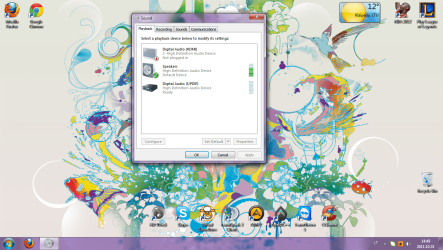
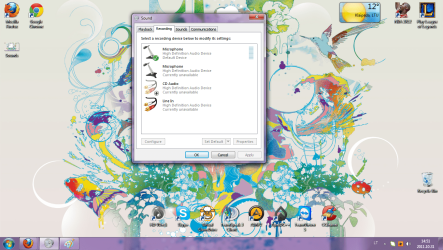
Here's Playback devices and Recording devices. And I can hear sound now but it takes about 1 minute to appear when Windows starts.
 

Attachments

  • Sounds.png
    Sounds.png
    287.9 KB · Views: 24
  • Recording.png
    Recording.png
    290.3 KB · Views: 12

My Computer

OS
Windows 7 Ultimate x32
Memory
2GB
Graphics Card(s)
ATI Radeon HD 4250
Sound Card
High Definition Audio Controller
Monitor(s) Displays
Generic PnP Monitor
Hard Drives
Hitachi HDS5C1050CLA382 ATA Device
What if you would disable that digital audio device there? ( Don't worry if it disappears you can still take it back if you right click to a blank area inside the box, you will find out how )
 

My Computer

Computer type
PC/Desktop
Computer Manufacturer/Model Number
Custom Built PC
OS
Windows 7 Ultimate 64 bit SP1
CPU
Intel(R) Core(TM) i5-2500K
Motherboard
Gigabyte Technology Co., Ltd. Z68X-UD3-B3
Memory
12GB Kingston Hyperx 1600MHz
Graphics Card(s)
Asus GTS 450
PSU
500W Coolink
Other Info
Genius G-Pen F610 (PenPad)
Now happens nothing, because I can hear sounds now. But I said, it takes about one minute for them to appear after Windows starts. That Digital Audio does nothing and is necessary, I think.
 

My Computer

OS
Windows 7 Ultimate x32
Memory
2GB
Graphics Card(s)
ATI Radeon HD 4250
Sound Card
High Definition Audio Controller
Monitor(s) Displays
Generic PnP Monitor
Hard Drives
Hitachi HDS5C1050CLA382 ATA Device
Open start and type in Services, click on the gear icon. Scroll down to Windows Audio and double click it. Make sure it is set to automatic start and not to delayed start.
 

My Computer

Computer type
PC/Desktop
Computer Manufacturer/Model Number
Custom Built PC
OS
Windows 7 Ultimate 64 bit SP1
CPU
Intel(R) Core(TM) i5-2500K
Motherboard
Gigabyte Technology Co., Ltd. Z68X-UD3-B3
Memory
12GB Kingston Hyperx 1600MHz
Graphics Card(s)
Asus GTS 450
PSU
500W Coolink
Other Info
Genius G-Pen F610 (PenPad)
It is set to Automatic. We just have to find a way to disable that device appearence on start up.
 

My Computer

OS
Windows 7 Ultimate x32
Memory
2GB
Graphics Card(s)
ATI Radeon HD 4250
Sound Card
High Definition Audio Controller
Monitor(s) Displays
Generic PnP Monitor
Hard Drives
Hitachi HDS5C1050CLA382 ATA Device
Could you please describe exactly what is happenning when you start windows and then the sound comes alive :D
 

My Computer

Computer type
PC/Desktop
Computer Manufacturer/Model Number
Custom Built PC
OS
Windows 7 Ultimate 64 bit SP1
CPU
Intel(R) Core(TM) i5-2500K
Motherboard
Gigabyte Technology Co., Ltd. Z68X-UD3-B3
Memory
12GB Kingston Hyperx 1600MHz
Graphics Card(s)
Asus GTS 450
PSU
500W Coolink
Other Info
Genius G-Pen F610 (PenPad)
When I start Windows at the bottom corner there's a icon witch says "Device are being installed." There's no Windows startup sound, no Skype sound when it comes online or anything. Then after ~1 minute sound comes from nowhere. :)
 

My Computer

OS
Windows 7 Ultimate x32
Memory
2GB
Graphics Card(s)
ATI Radeon HD 4250
Sound Card
High Definition Audio Controller
Monitor(s) Displays
Generic PnP Monitor
Hard Drives
Hitachi HDS5C1050CLA382 ATA Device
Back
Top