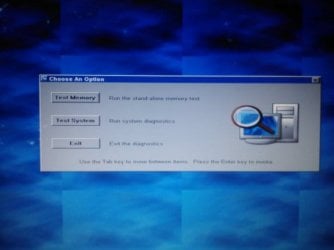
Windows 7 Stuck in diagnostic loop

lostlimit

New member
Local time
5:30 AM
Messages
12
I have windows 7 home premium 64bit. My dell laptop is currently stuck at the diagnostic startup whenever I load up the computer. I have ran both memory test and memory system, and both indicated no error. I have tried going into safe mode using F8 but that didn't work. I tried reinstalling the system using my Windows 7 CD but apparently I can't boot from the CD either. The CD doesn't automatically read nor does it work from the F12 boot up. I can't access the command prompt either. No matter what I do, it keep returning to the diagnostic screen.

Please help!
 

My Computer

Computer type
Laptop
Computer Manufacturer/Model Number
Dell
OS
Windows 7 Home Premium 64 bit
I have ran both memory test and memory system, and both indicated no error=>What are the two tests ... never headr about 2 test.

Can't you enter the BIOS whatsoever?
Post camshot of diagnostics screen plz.
 

My Computer

Computer type
Laptop
Computer Manufacturer/Model Number
ACER ASPIRE 5742G
OS
Microsoft Windows 7 Home Premium 64-bits 7601 Multiprocessor Free Service Pack 1
CPU
Intel(R) Core(TM) i3 CPU M 370 @ 2.40GHz
Motherboard
Acer Aspire 5742G
Memory
4,00 GB
Graphics Card(s)
ATI Mobility Radeon HD 5400 Series
Sound Card
(1) AMD High Definition Audio Device (2) Realtek High Defi
Screen Resolution
1366 x 768 x 32 bits (4294967296 colors) @ 60 Hz
Hard Drives
WDC WD5000BEVT-22ZAT0
Sorry, I for the tests, I meant Test Memory and Test System, both of which I ran and had no errors.

This is the screen I get everytime.
 

Attachments

  • IMG1343.jpg
    IMG1343.jpg
    49.4 KB · Views: 16

My Computer

Computer type
Laptop
Computer Manufacturer/Model Number
Dell
OS
Windows 7 Home Premium 64 bit
Last edited:

My Computer

Computer type
Laptop
Computer Manufacturer/Model Number
ACER ASPIRE 5742G
OS
Microsoft Windows 7 Home Premium 64-bits 7601 Multiprocessor Free Service Pack 1
CPU
Intel(R) Core(TM) i3 CPU M 370 @ 2.40GHz
Motherboard
Acer Aspire 5742G
Memory
4,00 GB
Graphics Card(s)
ATI Mobility Radeon HD 5400 Series
Sound Card
(1) AMD High Definition Audio Device (2) Realtek High Defi
Screen Resolution
1366 x 768 x 32 bits (4294967296 colors) @ 60 Hz
Hard Drives
WDC WD5000BEVT-22ZAT0
I can't go into either.
 

My Computer

Computer type
Laptop
Computer Manufacturer/Model Number
Dell
OS
Windows 7 Home Premium 64 bit

My Computer

Computer type
Laptop
Computer Manufacturer/Model Number
ACER ASPIRE 5742G
OS
Microsoft Windows 7 Home Premium 64-bits 7601 Multiprocessor Free Service Pack 1
CPU
Intel(R) Core(TM) i3 CPU M 370 @ 2.40GHz
Motherboard
Acer Aspire 5742G
Memory
4,00 GB
Graphics Card(s)
ATI Mobility Radeon HD 5400 Series
Sound Card
(1) AMD High Definition Audio Device (2) Realtek High Defi
Screen Resolution
1366 x 768 x 32 bits (4294967296 colors) @ 60 Hz
Hard Drives
WDC WD5000BEVT-22ZAT0
Did you read the manual how to enter bios? did you read manual how to set "boot device order"?
Did you ever before bot from cd/dvd or enter bios?
 

My Computer

Computer type
Laptop
Computer Manufacturer/Model Number
ACER ASPIRE 5742G
OS
Microsoft Windows 7 Home Premium 64-bits 7601 Multiprocessor Free Service Pack 1
CPU
Intel(R) Core(TM) i3 CPU M 370 @ 2.40GHz
Motherboard
Acer Aspire 5742G
Memory
4,00 GB
Graphics Card(s)
ATI Mobility Radeon HD 5400 Series
Sound Card
(1) AMD High Definition Audio Device (2) Realtek High Defi
Screen Resolution
1366 x 768 x 32 bits (4294967296 colors) @ 60 Hz
Hard Drives
WDC WD5000BEVT-22ZAT0
Did you read the manual how to enter bios? did you read manual how to set "boot device order"?
Did you ever before bot from cd/dvd or enter bios?

Yes, i know how to enter bios and boot from cd as i have stated in my first post. But none of those worked.
 

My Computer

Computer type
Laptop
Computer Manufacturer/Model Number
Dell
OS
Windows 7 Home Premium 64 bit
Did you read the manual how to enter bios? did you read manual how to set "boot device order"?
Did you ever before bot from cd/dvd or enter bios?

Yes, i know how to enter bios and boot from cd as i have stated in my first post. But none of those worked.
So you want to say the "diagnostics memory and system checks" you see on boot are displayed before you can even enter the BIOS? What happens if you press exit there?
 

My Computer

Computer type
Laptop
Computer Manufacturer/Model Number
ACER ASPIRE 5742G
OS
Microsoft Windows 7 Home Premium 64-bits 7601 Multiprocessor Free Service Pack 1
CPU
Intel(R) Core(TM) i3 CPU M 370 @ 2.40GHz
Motherboard
Acer Aspire 5742G
Memory
4,00 GB
Graphics Card(s)
ATI Mobility Radeon HD 5400 Series
Sound Card
(1) AMD High Definition Audio Device (2) Realtek High Defi
Screen Resolution
1366 x 768 x 32 bits (4294967296 colors) @ 60 Hz
Hard Drives
WDC WD5000BEVT-22ZAT0
Power on the pc/laptop and press F12 a few times until the BIOS appears on screen. Works?
 

My Computer

Computer type
Laptop
Computer Manufacturer/Model Number
ACER ASPIRE 5742G
OS
Microsoft Windows 7 Home Premium 64-bits 7601 Multiprocessor Free Service Pack 1
CPU
Intel(R) Core(TM) i3 CPU M 370 @ 2.40GHz
Motherboard
Acer Aspire 5742G
Memory
4,00 GB
Graphics Card(s)
ATI Mobility Radeon HD 5400 Series
Sound Card
(1) AMD High Definition Audio Device (2) Realtek High Defi
Screen Resolution
1366 x 768 x 32 bits (4294967296 colors) @ 60 Hz
Hard Drives
WDC WD5000BEVT-22ZAT0
Did you read the manual how to enter bios? did you read manual how to set "boot device order"?
Did you ever before bot from cd/dvd or enter bios?

Yes, i know how to enter bios and boot from cd as i have stated in my first post. But none of those worked.
So you want to say the "diagnostics memory and system checks" you see on boot are displayed before you can even enter the BIOS? What happens if you press exit there?

It restarts again and go back to the same diagnostic screen.
 

My Computer

Computer type
Laptop
Computer Manufacturer/Model Number
Dell
OS
Windows 7 Home Premium 64 bit
I have windows 7 home premium 64bit. My dell laptop is currently stuck at the diagnostic startup whenever I load up the computer. I have ran both memory test and memory system, and both indicated no error. I have tried going into safe mode using F8 but that didn't work. I tried reinstalling the system using my Windows 7 CD but apparently I can't boot from the CD either. The CD doesn't automatically read nor does it work from the F12 boot up. I can't access the command prompt either. No matter what I do, it keep returning to the diagnostic screen.

Please help!
You must force somehow to boot from usb stick or dvd with win7 install and "system rescue disk".
Since F8 is not working anymore... it looks like the wrong partition is ACTIVE. The system boots directly to the recovery partition.

After booting from DVD or USB stick... you can enter "command prompt". Then
Code:
diskpart
list volumes
exit
Depending on the output I can give you further instructions. Any idea why the wrong partition is active?
 

My Computer

Computer type
Laptop
Computer Manufacturer/Model Number
ACER ASPIRE 5742G
OS
Microsoft Windows 7 Home Premium 64-bits 7601 Multiprocessor Free Service Pack 1
CPU
Intel(R) Core(TM) i3 CPU M 370 @ 2.40GHz
Motherboard
Acer Aspire 5742G
Memory
4,00 GB
Graphics Card(s)
ATI Mobility Radeon HD 5400 Series
Sound Card
(1) AMD High Definition Audio Device (2) Realtek High Defi
Screen Resolution
1366 x 768 x 32 bits (4294967296 colors) @ 60 Hz
Hard Drives
WDC WD5000BEVT-22ZAT0
There was something wrong with my external HHD. It wouldnt load up on my computer so I searched online and some guy posted a program that have helped others solved the issue. So I downloaded and I think I may have tampered with the partition. Currently, I do not have my laptop with me. I have brought it to an expert who is trying to fix the issue. At the time being, he does not know what is the problem with the pre-testings, but I should know more by tomorrow.
 

My Computer

Computer type
Laptop
Computer Manufacturer/Model Number
Dell
OS
Windows 7 Home Premium 64 bit
http://www.sevenforums.com/tutorials/71432-partition-mark-active.html METHOD TWO.
Just make another primary partition ACTIVE. It's not the current ACTIVE partition. There are a maximum of 4 primary partitions on a disk. So you have 3 partitions to choose from (maybe less). One of the three should work.

So can be solved in 5 minutes.... if you can boot from DVD.
 

My Computer

Computer type
Laptop
Computer Manufacturer/Model Number
ACER ASPIRE 5742G
OS
Microsoft Windows 7 Home Premium 64-bits 7601 Multiprocessor Free Service Pack 1
CPU
Intel(R) Core(TM) i3 CPU M 370 @ 2.40GHz
Motherboard
Acer Aspire 5742G
Memory
4,00 GB
Graphics Card(s)
ATI Mobility Radeon HD 5400 Series
Sound Card
(1) AMD High Definition Audio Device (2) Realtek High Defi
Screen Resolution
1366 x 768 x 32 bits (4294967296 colors) @ 60 Hz
Hard Drives
WDC WD5000BEVT-22ZAT0
The problem is I can't boot from the CD/DVD.
 

My Computer

Computer type
Laptop
Computer Manufacturer/Model Number
Dell
OS
Windows 7 Home Premium 64 bit
The problem is I can't boot from the CD/DVD.
The diagnostics screen you see has been loaded from your hard drive. Once again... the wrong partition is marked ACTIVE. Force boot from dvd. Or change boot device order in bios. There must be a hotkey for it. Maybe DEL or F12. Maybe keyboard keys are not working(?)

How did you boot from DVD in the past? just insert it and boot? Or did you have to change the boot device order?
 

My Computer

Computer type
Laptop
Computer Manufacturer/Model Number
ACER ASPIRE 5742G
OS
Microsoft Windows 7 Home Premium 64-bits 7601 Multiprocessor Free Service Pack 1
CPU
Intel(R) Core(TM) i3 CPU M 370 @ 2.40GHz
Motherboard
Acer Aspire 5742G
Memory
4,00 GB
Graphics Card(s)
ATI Mobility Radeon HD 5400 Series
Sound Card
(1) AMD High Definition Audio Device (2) Realtek High Defi
Screen Resolution
1366 x 768 x 32 bits (4294967296 colors) @ 60 Hz
Hard Drives
WDC WD5000BEVT-22ZAT0
The problem is I can't boot from the CD/DVD.
The diagnostics screen you see has been loaded from your hard drive. Once again... the wrong partition is marked ACTIVE. Force boot from dvd. Or change boot device order in bios. There must be a hotkey for it. Maybe DEL or F12. Maybe keyboard keys are not working(?)

How did you boot from DVD in the past? just insert it and boot? Or did you have to change the boot device order?

My keyboard is working fine. I even ran the diagnostics for it. In the past, the cd would boot automatically after insertion, but now it doesnt. Even when I boot it using F12, it didn't do anything.
 

My Computer

Computer type
Laptop
Computer Manufacturer/Model Number
Dell
OS
Windows 7 Home Premium 64 bit
Sorry... what is F12 supposed to do normally? One time boot device?

Maybe burn another CD/DVD. Although F12 must work as it did before
 

My Computer

Computer type
Laptop
Computer Manufacturer/Model Number
ACER ASPIRE 5742G
OS
Microsoft Windows 7 Home Premium 64-bits 7601 Multiprocessor Free Service Pack 1
CPU
Intel(R) Core(TM) i3 CPU M 370 @ 2.40GHz
Motherboard
Acer Aspire 5742G
Memory
4,00 GB
Graphics Card(s)
ATI Mobility Radeon HD 5400 Series
Sound Card
(1) AMD High Definition Audio Device (2) Realtek High Defi
Screen Resolution
1366 x 768 x 32 bits (4294967296 colors) @ 60 Hz
Hard Drives
WDC WD5000BEVT-22ZAT0
Sorry... what is F12 supposed to do normally? One time boot device?

Maybe burn another CD/DVD. Although F12 must work as it did before

It allows me to either run diagnostic or boot from my CD/DVD, network, USB, or HHD.
 

My Computer

Computer type
Laptop
Computer Manufacturer/Model Number
Dell
OS
Windows 7 Home Premium 64 bit
Back
Top