Windows 7 unable to boot after installing Intel graphics driver

a2l007

New member
Local time
8:02 PM
Messages
11
Hi All,
My laptop is a dell inspiron 14r N4010 which is installed on win 7. One day, all of a sudden my windows was unable to boot. I force powered off the computer and upon restarting i got an error message that a recent h/w or s/w change has caused windows unable to boot. I tried system restore but no avail. I went ahead and reinstalled Windows 7 on my laptop and i could see that upon installing the Intel Graphics driver , I started to face the same issue again. Upon startup recovery, i get the following message:
Root cause found:
"A recent driver installation or upgrade may be preventing the system from starting "
Repair action: System files integrity check and repair
Result: Failed . Error code= 0x4005

Since I've zeroed in on identifying it to be the graphics driver issue, the question is how do i get the driver installed and have my system working. Without the driver, my screen looks ugly with the 800x600 resolution.
Also, I've been usng the same driver till the day my system first crashed with this issue. Can anyone please comment on how to get over this issue?

Thanks,
Atul
 

My Computer My Computer

Computer type
Laptop
Computer Manufacturer/Model Number
Dell Inspiron 14R N4010
OS
Windows 7 Ultimate x64
CPU
Intel i3 processor
Memory
2GB RAM
Hi Welcome to Seven Forums .. Which Driver have you been using ... ?

Was the Driver from the Dell Website ... You are looking for the Latest Intel series 4 Chipset Driver ..

Or do you just use Windows to update your Drivers ... ?
 

My Computer My Computer

Computer Manufacturer/Model Number
W530-3630QM1
OS
windows 7 home 64bit
CPU
INTEL-CORE I7
Memory
16GB
Hard Drives
750GB
Browser
Chrome
Hi Maxie,
Thanks for replying. The driver that i've been using is the old Intel Graphics Media Accelerator driver. This has worked for me before, but now after installation, Windows fails to boot. Here is the URL of the driver:
http://downloads.dell.com/video/R268991.exe

I tried updating the drivers via the Windows update as well, but this is also giving me the same problem. Any further advice on this?

Thanks,
Atul
 

My Computer My Computer

Computer type
Laptop
Computer Manufacturer/Model Number
Dell Inspiron 14R N4010
OS
Windows 7 Ultimate x64
CPU
Intel i3 processor
Memory
2GB RAM

My Computer My Computer

Computer Manufacturer/Model Number
W530-3630QM1
OS
windows 7 home 64bit
CPU
INTEL-CORE I7
Memory
16GB
Hard Drives
750GB
Browser
Chrome
Hi Maxie,
As per your suggestion, i installed the 3 chipset drivers and then installed the video driver again. I'm still facing the same issue.:cry:
Anything else that i can try out?

Thanks,
Atul
 

My Computer My Computer

Computer type
Laptop
Computer Manufacturer/Model Number
Dell Inspiron 14R N4010
OS
Windows 7 Ultimate x64
CPU
Intel i3 processor
Memory
2GB RAM
Which Video Driver did you Install ?...
 

My Computer My Computer

Computer Manufacturer/Model Number
W530-3630QM1
OS
windows 7 home 64bit
CPU
INTEL-CORE I7
Memory
16GB
Hard Drives
750GB
Browser
Chrome

My Computer My Computer

Computer type
Laptop
Computer Manufacturer/Model Number
Dell Inspiron 14R N4010
OS
Windows 7 Ultimate x64
CPU
Intel i3 processor
Memory
2GB RAM

My Computer My Computer

Computer Manufacturer/Model Number
W530-3630QM1
OS
windows 7 home 64bit
CPU
INTEL-CORE I7
Memory
16GB
Hard Drives
750GB
Browser
Chrome
Hi Maxie,
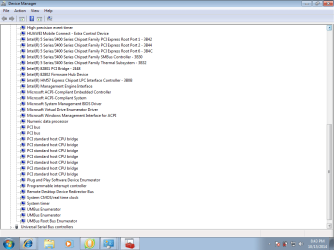
As you have suggested, I'm uploading the screenshots of my device manager page. Please review.

Devicescreen1.png

Devicescreen2.png


Thanks,
Atul
 

My Computer My Computer

Computer type
Laptop
Computer Manufacturer/Model Number
Dell Inspiron 14R N4010
OS
Windows 7 Ultimate x64
CPU
Intel i3 processor
Memory
2GB RAM
Thanks for Posting that ... Did your Computer ever have a second Graphics Card ? ..
 

My Computer My Computer

Computer Manufacturer/Model Number
W530-3630QM1
OS
windows 7 home 64bit
CPU
INTEL-CORE I7
Memory
16GB
Hard Drives
750GB
Browser
Chrome
Hi Maxie,
I've not had any second graphics card. Most of the time, the Intel Graphics Media Accelerator driver helps me get the correct resolution. But since it is now crashing my system, i dunno what else to do.
 

My Computer My Computer

Computer type
Laptop
Computer Manufacturer/Model Number
Dell Inspiron 14R N4010
OS
Windows 7 Ultimate x64
CPU
Intel i3 processor
Memory
2GB RAM
I tried installing the driver you suggested, but still no avail. I also tried updating the existing Standard VGA driver via windows. It went ahead and installed the Intel HD driver. On reboot, I still face the same issue. Do you think this could be a hardware issue? Anyway that i can check the same?
 

My Computer My Computer

Computer type
Laptop
Computer Manufacturer/Model Number
Dell Inspiron 14R N4010
OS
Windows 7 Ultimate x64
CPU
Intel i3 processor
Memory
2GB RAM
Which Driver Version did Windows Install ? ..
 

My Computer My Computer

Computer Manufacturer/Model Number
W530-3630QM1
OS
windows 7 home 64bit
CPU
INTEL-CORE I7
Memory
16GB
Hard Drives
750GB
Browser
Chrome
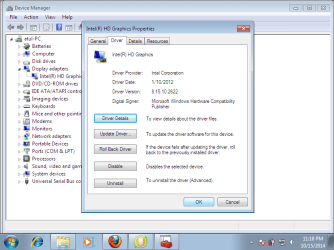
The driver version is 8.5. Following screenshot has the updated driver details:

Driver3.png

Thanks,
Atul
 

My Computer My Computer

Computer type
Laptop
Computer Manufacturer/Model Number
Dell Inspiron 14R N4010
OS
Windows 7 Ultimate x64
CPU
Intel i3 processor
Memory
2GB RAM
My apologies for jumping in. :o

Atul, do you know when this problem first appeared? A few days ago? A couple of weeks ago? You might be able to roll back your computer to a date/time prior to when the problem first appeared by using a restore point.

http://www.sevenforums.com/tutorials/700-system-restore.html
 

My Computer My Computer

Computer type
Laptop
Computer Manufacturer/Model Number
Sony Vaio VPCEB47GM Laptop
OS
Win 7 Pro 64-bit
CPU
Intel i5 2.4 Ghz
Memory
8GB DDR3
Graphics Card(s)
Intel HD 3000
Sound Card
IDT High Definition
Monitor(s) Displays
15.6 WGXA Anti-Glare LED
Screen Resolution
1280x800
Hard Drives
640Gb 7200rpm
Antivirus
MSE
Browser
Opera (primary) with IE9 backup
Thanks for helping out Maxie. I guess i'll have to get in touch with a local dell service center.
Hi marsmimar,
Unfortunately, i reinstalled my windows after i started seeing this issue. From then on, whenever i install the intel graphics driver, i'm hitting this. So, i dont have any restore points as of now :(
 

My Computer My Computer

Computer type
Laptop
Computer Manufacturer/Model Number
Dell Inspiron 14R N4010
OS
Windows 7 Ultimate x64
CPU
Intel i3 processor
Memory
2GB RAM

My Computer My Computer

Computer Manufacturer/Model Number
W530-3630QM1
OS
windows 7 home 64bit
CPU
INTEL-CORE I7
Memory
16GB
Hard Drives
750GB
Browser
Chrome
Hi marsmimar,
Unfortunately, i reinstalled my windows after i started seeing this issue. From then on, whenever i install the intel graphics driver, i'm hitting this. So, i dont have any restore points as of now :(

Maybe doing a Clean Install might help .... I know you have recently done an Install .. This could be different though as it would not contain the Dell Bloatware ..

Read the Tutorial below ... It contains every thing you need including the ISO to get the perfect Install ...

http://www.sevenforums.com/tutorials/219487-clean-reinstall-factory-oem-windows-7-a.html

Sorry, Atul. I completely misread your first post in which you said you reinstalled Windows 7 but continued to have the same issues. Sometimes my one remaining brain cell gets overloaded. :(

I agree with maxie about doing one more clean reinstall using gregrocker's tutorial. If the problem continues then it might be a case of the graphics card going bad.
 

My Computer My Computer

Computer type
Laptop
Computer Manufacturer/Model Number
Sony Vaio VPCEB47GM Laptop
OS
Win 7 Pro 64-bit
CPU
Intel i5 2.4 Ghz
Memory
8GB DDR3
Graphics Card(s)
Intel HD 3000
Sound Card
IDT High Definition
Monitor(s) Displays
15.6 WGXA Anti-Glare LED
Screen Resolution
1280x800
Hard Drives
640Gb 7200rpm
Antivirus
MSE
Browser
Opera (primary) with IE9 backup
Back
Top