Windows 7 Update Errors Codes 80073712 and 9C57

g3ck0

New member
Local time
1:37 AM
Messages
10
Hi guys,

I ran into Windows Update Errors Codes 80073712 and 9C57 when I try to run Windows Update on Windows 7 Professional SP1.

I've attached with this post a screenshot of the Windows Update error as well as the CBS logs.

I ran the latest System Update Readiness Tool (Feb 2014) before trying Windows Update again but it still gave me errors.

I also ran a SFC Scan using Admin privileges and attached a screenshot of it (which produced no errors although it finished in less than 10 seconds).

Please let me know how I can fix it and if you guys need anymore info to aid in your diagnostics please let me know.

I appreciate all the help! :)
 

My Computer

Computer type
PC/Desktop
Computer Manufacturer/Model Number
Custom Build
OS
Windows 7 Professional SP1
You have registry corruption.

CheckSUR shows..
Code:
Checking Packages
(f) CSI Unable to Query Store Version 0x00000002
the background CBS log shows this..
Code:
2014-02-27 00:12:33, Error                 CSI    0000004c (F) STATUS_SXS_COMPONENT_STORE_CORRUPT #94731# from CCSDirectTransaction::OperateEnding at index 0 of 32 (0x0000000000000020) operations, disposition 0[gle=0xd015001a]
2014-02-27 00:12:33, Error                 CSI    0000004d (F) HRESULT_FROM_WIN32(14098) #93784# from Windows::ServicingAPI::CCSITransaction::ICSITransaction2_AddComponents(Flags = 4, a = @0x2a26f70, mp = @0x2a27770, disp = 0)[gle=0x80073712]
2014-02-27 00:12:33, Info                  CBS    Failed to add one or more component [HRESULT = 0x80073712 - ERROR_SXS_COMPONENT_STORE_CORRUPT]
2014-02-27 00:12:33, Error                 CBS    Failed to complete component closure [HRESULT = 0x80073712 - ERROR_SXS_COMPONENT_STORE_CORRUPT]

The SFC log is only 6 components long - it should be 6000++ !


I need to have a look at your COMPONENTS registry hive

Please copy the C:\Windows\System32\config\COMPONENTS file (no extension) to your desktop and then compress it - upload the compressed file to your favoured fileshare site (preferably Dropbox or OneDrive) and post a link.
 

My Computer

Computer type
Laptop
Computer Manufacturer/Model Number
Asus K52F or Lenovo B51-80
OS
Win 7 x64 Home Premium (and x86 VirtualBox VM)/Win10
CPU
i3 370M/i7 6500U
Motherboard
Asus/Lenovo
Memory
8GB - finally :)/8GB
Graphics Card(s)
it's an i3, dude!/dual Intel&nVidia
Sound Card
onboard
Monitor(s) Displays
15.6" built-in
Screen Resolution
1366x768/1920x1080
Hard Drives
750GB Seagate internal
Sundry external drives attached to other computers on the local network
1TB SSD on the Lenovo
PSU
n/a
Internet Speed
as much as I can get - usually on a dongle/phone, so <1MB/s
Antivirus
MSE/Defender
Browser
IE11/12/Edge/Chrome/FF(if I must)
I have a feeling that this isn't going to do any good - there may well be too much damage - but we'll try it anyhow...


I've uploaded a file - gkoaa.zip - to my OneDrive at Noel's OneDrive
Please download and save it to your desktop.
Right-click on the file and select Extract All, and save to the default destination (which should be a folder on the desktop)

Create a new System Restore point

Open an Elevated Command Prompt, and run the following commands.

REN C:\Windows\System32\config\COMPONENTS COMPONENTS.OLD1
COPY %userprofile%\desktop\gkoaa\COMPONENTS C:\Windows\System32\config

If you get an error with either command, STOP THERE - reboot to Safe Mode, try again, and if it still fails, post for instructions.

Assuming both commands go OK, reboot, and run another CheckSUR scan - post the new CheckSUR.log file.
 

My Computer

Computer type
Laptop
Computer Manufacturer/Model Number
Asus K52F or Lenovo B51-80
OS
Win 7 x64 Home Premium (and x86 VirtualBox VM)/Win10
CPU
i3 370M/i7 6500U
Motherboard
Asus/Lenovo
Memory
8GB - finally :)/8GB
Graphics Card(s)
it's an i3, dude!/dual Intel&nVidia
Sound Card
onboard
Monitor(s) Displays
15.6" built-in
Screen Resolution
1366x768/1920x1080
Hard Drives
750GB Seagate internal
Sundry external drives attached to other computers on the local network
1TB SSD on the Lenovo
PSU
n/a
Internet Speed
as much as I can get - usually on a dongle/phone, so <1MB/s
Antivirus
MSE/Defender
Browser
IE11/12/Edge/Chrome/FF(if I must)
Ok, I ran the System Update Readiness Tool again and here are the logs.

Again, I appreciate you help!
 
Last edited:

My Computer

Computer type
PC/Desktop
Computer Manufacturer/Model Number
Custom Build
OS
Windows 7 Professional SP1
Hmm - that's an unexpected response!....
Code:
Checking Packages
(f) CSI Unexpected Servicing Store Version 0x00000000 0.⸰ ⸀㘀 0.0.0.6

I was pretty certain I got it right - but obviously my typing is worse than I thought :)

Please try the same procedure with the new gkab.zip file I've just uploaded - it should be right this time!
 

My Computer

Computer type
Laptop
Computer Manufacturer/Model Number
Asus K52F or Lenovo B51-80
OS
Win 7 x64 Home Premium (and x86 VirtualBox VM)/Win10
CPU
i3 370M/i7 6500U
Motherboard
Asus/Lenovo
Memory
8GB - finally :)/8GB
Graphics Card(s)
it's an i3, dude!/dual Intel&nVidia
Sound Card
onboard
Monitor(s) Displays
15.6" built-in
Screen Resolution
1366x768/1920x1080
Hard Drives
750GB Seagate internal
Sundry external drives attached to other computers on the local network
1TB SSD on the Lenovo
PSU
n/a
Internet Speed
as much as I can get - usually on a dongle/phone, so <1MB/s
Antivirus
MSE/Defender
Browser
IE11/12/Edge/Chrome/FF(if I must)
Nice! CheckSUR.log looks a lot cleaner this time :)
 

My Computer

Computer type
PC/Desktop
Computer Manufacturer/Model Number
Custom Build
OS
Windows 7 Professional SP1
Phew :)
That looks fine now.
Please try another SFC /SCANNOW - post the new CBS.log and we'll see where we are.
 

My Computer

Computer type
Laptop
Computer Manufacturer/Model Number
Asus K52F or Lenovo B51-80
OS
Win 7 x64 Home Premium (and x86 VirtualBox VM)/Win10
CPU
i3 370M/i7 6500U
Motherboard
Asus/Lenovo
Memory
8GB - finally :)/8GB
Graphics Card(s)
it's an i3, dude!/dual Intel&nVidia
Sound Card
onboard
Monitor(s) Displays
15.6" built-in
Screen Resolution
1366x768/1920x1080
Hard Drives
750GB Seagate internal
Sundry external drives attached to other computers on the local network
1TB SSD on the Lenovo
PSU
n/a
Internet Speed
as much as I can get - usually on a dongle/phone, so <1MB/s
Antivirus
MSE/Defender
Browser
IE11/12/Edge/Chrome/FF(if I must)
I ran SFC /SCANNOW again and attached the logs. Let me know if it's what you are looking for!
 

My Computer

Computer type
PC/Desktop
Computer Manufacturer/Model Number
Custom Build
OS
Windows 7 Professional SP1
The SFC is still failing because of registry corruption :(
There are over 12000 entries of the following type of error...
Code:
2014-03-01 03:13:00, Info                  CSI    00000147 Install-map entry missing component key in populate: [l:116{58}]"amd64_.netframework_31bf3856ad364e35_none_f5dd4e94975c8e4e" [l:28{14}]"6.1.7600.16385"

I can really see no alternative to a repair install.


Follow the instructions in this tutorial - http://www.sevenforums.com/tutorials/3413-repair-install.html
- and they should help you get through it (it's not as difficult as it looks!)
 

My Computer

Computer type
Laptop
Computer Manufacturer/Model Number
Asus K52F or Lenovo B51-80
OS
Win 7 x64 Home Premium (and x86 VirtualBox VM)/Win10
CPU
i3 370M/i7 6500U
Motherboard
Asus/Lenovo
Memory
8GB - finally :)/8GB
Graphics Card(s)
it's an i3, dude!/dual Intel&nVidia
Sound Card
onboard
Monitor(s) Displays
15.6" built-in
Screen Resolution
1366x768/1920x1080
Hard Drives
750GB Seagate internal
Sundry external drives attached to other computers on the local network
1TB SSD on the Lenovo
PSU
n/a
Internet Speed
as much as I can get - usually on a dongle/phone, so <1MB/s
Antivirus
MSE/Defender
Browser
IE11/12/Edge/Chrome/FF(if I must)
Ok thanks, I will follow your advice. Do you think that a repair install will definitely fix this? What was the cause behind the registry corruption so that I can prevent it next time?

Also will I need to backup any data files before I do the repair install?

Thanks again for all your help.
 

My Computer

Computer type
PC/Desktop
Computer Manufacturer/Model Number
Custom Build
OS
Windows 7 Professional SP1
This type of this can be caused by disk failure, or by power failure during a read/write of the file involved.
It can also be caused by injudicious use of so-called registry cleaners.

A repair install should certainly fix it.
 

My Computer

Computer type
Laptop
Computer Manufacturer/Model Number
Asus K52F or Lenovo B51-80
OS
Win 7 x64 Home Premium (and x86 VirtualBox VM)/Win10
CPU
i3 370M/i7 6500U
Motherboard
Asus/Lenovo
Memory
8GB - finally :)/8GB
Graphics Card(s)
it's an i3, dude!/dual Intel&nVidia
Sound Card
onboard
Monitor(s) Displays
15.6" built-in
Screen Resolution
1366x768/1920x1080
Hard Drives
750GB Seagate internal
Sundry external drives attached to other computers on the local network
1TB SSD on the Lenovo
PSU
n/a
Internet Speed
as much as I can get - usually on a dongle/phone, so <1MB/s
Antivirus
MSE/Defender
Browser
IE11/12/Edge/Chrome/FF(if I must)
I tried to do a repair install and it didn't seem to make any difference.

After repeating the process a couple more times, it seems like after the upgrade is done, it tries to restart the computer but then I encounter a BSOD DRIVER_POWER_STATE_FAILURE, after which Windows tries to revert back to the original Windows version.

Anyone know what causes this BSOD?
 

My Computer

Computer type
PC/Desktop
Computer Manufacturer/Model Number
Custom Build
OS
Windows 7 Professional SP1
Here's an article on it - Bug Check 0x9F: DRIVER_POWER_STATE_FAILURE (Windows Debuggers)

Because you're getting the error only under specific circumstances, I suspect that the problem is a bad driver somewhere - open Device Manager and check to see if any devices are disabled/flagged with either yellow warning triangles or red crosses

If they are, uninstall the driver involved.
 

My Computer

Computer type
Laptop
Computer Manufacturer/Model Number
Asus K52F or Lenovo B51-80
OS
Win 7 x64 Home Premium (and x86 VirtualBox VM)/Win10
CPU
i3 370M/i7 6500U
Motherboard
Asus/Lenovo
Memory
8GB - finally :)/8GB
Graphics Card(s)
it's an i3, dude!/dual Intel&nVidia
Sound Card
onboard
Monitor(s) Displays
15.6" built-in
Screen Resolution
1366x768/1920x1080
Hard Drives
750GB Seagate internal
Sundry external drives attached to other computers on the local network
1TB SSD on the Lenovo
PSU
n/a
Internet Speed
as much as I can get - usually on a dongle/phone, so <1MB/s
Antivirus
MSE/Defender
Browser
IE11/12/Edge/Chrome/FF(if I must)
Ok, the only icon that had a "!" mark on it was my mouse driver. I updated it and the "!" is no longer there.

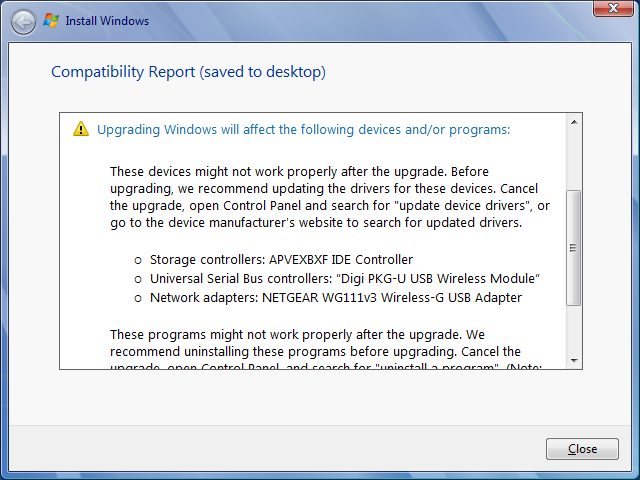
Now I have another question. During the upgrade/repair install, I came across this message:

3m0OEeD.png


Could these 3 drivers also be causing the BSOD? The thing is I don't see any of these drivers listed under Device Manager and these are old peripherals that I no longer use (well except for maybe the Storage Controller). Are there any way to remove these drivers manually and safely?

Thanks.
 

My Computer

Computer type
PC/Desktop
Computer Manufacturer/Model Number
Custom Build
OS
Windows 7 Professional SP1
If you open Device Manager, and click on the View option in the Menu bar, tick the Show Hidden Devices entry in the dropdown.

See if the devices appear there now - if so, uninstall them, and see if that helps.
 

My Computer

Computer type
Laptop
Computer Manufacturer/Model Number
Asus K52F or Lenovo B51-80
OS
Win 7 x64 Home Premium (and x86 VirtualBox VM)/Win10
CPU
i3 370M/i7 6500U
Motherboard
Asus/Lenovo
Memory
8GB - finally :)/8GB
Graphics Card(s)
it's an i3, dude!/dual Intel&nVidia
Sound Card
onboard
Monitor(s) Displays
15.6" built-in
Screen Resolution
1366x768/1920x1080
Hard Drives
750GB Seagate internal
Sundry external drives attached to other computers on the local network
1TB SSD on the Lenovo
PSU
n/a
Internet Speed
as much as I can get - usually on a dongle/phone, so <1MB/s
Antivirus
MSE/Defender
Browser
IE11/12/Edge/Chrome/FF(if I must)
I tried hitting Show Hidden Devices but it doesn't show up either.

For example, I was looking for "NETGEAR WG111v3 Wireless-G USB Adapter" under the Network Adapters menu and it wasn't in the list. Maybe the Windows Setup is just blindly scanning a bunch of dll files instead?
 

My Computer

Computer type
PC/Desktop
Computer Manufacturer/Model Number
Custom Build
OS
Windows 7 Professional SP1
Anybody have any clue? :)
 

My Computer

Computer type
PC/Desktop
Computer Manufacturer/Model Number
Custom Build
OS
Windows 7 Professional SP1
Back
Top