Windows 7's partition problem

Lebon14

Gomen ne Jenna-chan
Guru
VIP
Local time
9:15 AM
Messages
1,324
Location
Canada


Proof that's only a beta... something's wrong. If you know a workaround to this problem, I think people would be happy. Also, taking ownership or setting permission doesn't work...

khat17 said:
I've tried taking ownership and setting the permissions. None of which worked.

Discuss the problem....
 

My Computer

Computer type
PC/Desktop
Computer Manufacturer/Model Number
Custom build
OS
Windows 10 Professional 64-bit
CPU
Ryzen 9 5900X
Motherboard
Gigabyte X570 Aorus Master
Memory
G.Skill 3600Mhz CL16 16GB × 4
Graphics Card(s)
EVGA GeForce RTX 3070 Ti FTW3 Ultra Gaming
Sound Card
On-board
Monitor(s) Displays
Dell Alienware AW3418DW
Screen Resolution
3440x1440
Hard Drives
1×Sabrent Rocket 4 Plus 2TB nvme SSD (System, internal)
2x4TB Western Digital Blue (Internal)
1x4TB HDST 7200RPM (Internal)
PSU
Seasonic Focus Plus 850W Platinum
Case
Corsair 680X
Cooling
Stock fans + 3× Corsair QL120, Corsair H100i Platinum
Keyboard
Logitech K350
Mouse
Logitech M510
Internet Speed
120Mbits dl - 20Mbits up
Antivirus
ESET NOD32 Antivirus
Browser
Firefox (latest version)
Other Info
Headphones : Audio-Technica ATH-M50x
Scanner : Canon Canoscan LiDE 220 + Plustek OptiBook 4800
Have you tried changing drive letter from Control Panel - All Control Panel Items - Administrative Tools - Computer Management - Disk Management?

You have lots of partitions, I don't know if they 're external on internal drives, but try changing the drive letter and let us know of what happens.
 

My Computer

Computer Manufacturer/Model Number
ENIAC
OS
Windows 7 RC 7100 32bit/64bit
CPU
Intel Core2Duo E4500 2.20 GHz
Motherboard
ASUS P5LD2-X/1333
Memory
2x1GB Kinsgston DDR2 800MHz
Graphics Card(s)
Nvidia 8500GT
Sound Card
Onboard High Definition Audio Device
Monitor(s) Displays
Sony Bravia 42"
Case
LINKW 2222
Cooling
Standard Intel
Keyboard
Some cheap one
Mouse
Microsoft Intellimouse something
Internet Speed
24MBps ADSL
Have you tried changing drive letter from Control Panel - All Control Panel Items - Administrative Tools - Computer Management - Disk Management?

You have lots of partitions, I don't know if they 're external on internal drives, but try changing the drive letter and let us know of what happens.

The one that got the problem, the authour of the video above, tried it without avail.

P.S It was not my problem but the author of the video, Khat, which is one of my contact.

P.S2 Also, he's back on XP. :\
 

My Computer

Computer type
PC/Desktop
Computer Manufacturer/Model Number
Custom build
OS
Windows 10 Professional 64-bit
CPU
Ryzen 9 5900X
Motherboard
Gigabyte X570 Aorus Master
Memory
G.Skill 3600Mhz CL16 16GB × 4
Graphics Card(s)
EVGA GeForce RTX 3070 Ti FTW3 Ultra Gaming
Sound Card
On-board
Monitor(s) Displays
Dell Alienware AW3418DW
Screen Resolution
3440x1440
Hard Drives
1×Sabrent Rocket 4 Plus 2TB nvme SSD (System, internal)
2x4TB Western Digital Blue (Internal)
1x4TB HDST 7200RPM (Internal)
PSU
Seasonic Focus Plus 850W Platinum
Case
Corsair 680X
Cooling
Stock fans + 3× Corsair QL120, Corsair H100i Platinum
Keyboard
Logitech K350
Mouse
Logitech M510
Internet Speed
120Mbits dl - 20Mbits up
Antivirus
ESET NOD32 Antivirus
Browser
Firefox (latest version)
Other Info
Headphones : Audio-Technica ATH-M50x
Scanner : Canon Canoscan LiDE 220 + Plustek OptiBook 4800
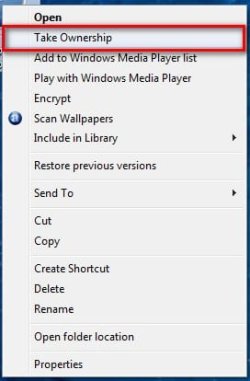
To take ownership of files and folders you can use this Tweak and it will give you the option to take ownership when you right click on a file or folder or drive.

Just open the zip file and right click on the file and click on merge.

Then right click on whatever you want to own and and select take ownership, it works and I have used it heaps.

View attachment TakeOwnership.zip

2009-01-13_130115.jpg
 

My Computer

Computer Manufacturer/Model Number
Home Brew
OS
Windows 7 Ultimate Vista Ultimate x64
CPU
Core 2 Duo E8500 3.16Ghz @ 3.8Ghz
Motherboard
eVGA 750i FTW
Memory
2x2Gigs Patriot PC2-6400 LL
Graphics Card(s)
Inno3D GeForce GTX260 216 SP
Monitor(s) Displays
ASUS VW222U 22" 2ms Response time
Screen Resolution
1680x1050
Hard Drives
SATA 150GB
SATA II 250GB
USB IDE 750GB Ext.
PSU
HYTEC 600W & Thermaltake 650W Toughpower Power Exp
Case
Thermaltake Armor LCS (Liquid Cooling System)
Cooling
Liquid Cooling System
Keyboard
Logitech G15 Gaming Keyboard
Mouse
Logitech G9 Gaming Mouse
Good day to all. I tried taking ownership and replacing ownership on all subcontainers (the long way) and also tried setting the permissions - remove all user permissions and set them back. Does this tweak you have do anything different from what I've stated? Or is it just a shortcut to TAKE and REPLACE OWNER on the folder/drive and all sub-containers?

If your workaround does something different then I'll backup and try it again. If not, then maybe I'll try it next time I decide to format. If U want me to try it just for trying sake, then I'll backup and try it tomorrow evening.
 

My Computer

OS
XP
It's a shortcut but a very good one and will save you a ton of time and head aches!
 

My Computer

Computer Manufacturer/Model Number
Home Brew
OS
Windows 7 Ultimate Vista Ultimate x64
CPU
Core 2 Duo E8500 3.16Ghz @ 3.8Ghz
Motherboard
eVGA 750i FTW
Memory
2x2Gigs Patriot PC2-6400 LL
Graphics Card(s)
Inno3D GeForce GTX260 216 SP
Monitor(s) Displays
ASUS VW222U 22" 2ms Response time
Screen Resolution
1680x1050
Hard Drives
SATA 150GB
SATA II 250GB
USB IDE 750GB Ext.
PSU
HYTEC 600W & Thermaltake 650W Toughpower Power Exp
Case
Thermaltake Armor LCS (Liquid Cooling System)
Cooling
Liquid Cooling System
Keyboard
Logitech G15 Gaming Keyboard
Mouse
Logitech G9 Gaming Mouse
ok - well tomorrow evening after work I'll prolly backup and try it out again. Will post results thereafter.
 

My Computer

OS
XP
+1 for the takeown shortcut. It owns. Pun intended :p

It's still a good idea to know how to do it manually though ;)
 

My Computer

Computer type
PC/Desktop
Computer Manufacturer/Model Number
Systems by SmartEyeball
OS
8 Pro x64
CPU
i7 3770K 4.6GHz
Motherboard
ASUS P8Z77 WS
Memory
16GB G.Skill Trident X 2666mhz
Graphics Card(s)
x2 EVGA 780 Ti Superclocked SLI
Sound Card
SB X-FI Surround 5.1 PRO USB / ATH-AD900 Headphones
Monitor(s) Displays
x3 Dell U2410 / 58" Samsung
Screen Resolution
5760*1200/ 1920*1200
Hard Drives
2x Intel 520 240GB (RAID 0) * 2x WD Caviar Blacks 2TB (RAID 0) * 2TB WD Caviar Black * Sony Optirac DVD
PSU
Silverstone Strider Evolution 1200W
Case
Thermaltake Level 10 GT Snow Edition
Cooling
Noctua NH-D14
Keyboard
Topre Realforce // Ducky Shine MX Black // Filco Ninja TKL
Mouse
Thermaltake Theron (Highly Recommended) + Razer Imperator
Antivirus
MSE
Browser
IE, FF, WaterFox
Other Info
GT Extreme V2 Sim Racing Cockpit + 40" LCD and K/B Mouse stand ▼
Fanatec CSR Elite Wheel + Clubsport V1 Pedals + CSR shifter/7G-H ▼Saitek X52 Pro ▼ TrackIR 5 Pro
Buttkicker v2 Seat Rumbler with Dedicated 5.1 and Sub Woofer attached to frame ▼
=
Bloody Big Grin
+1 for the takeown shortcut. It owns. Pun intended :p

It's still a good idea to know how to do it manually though ;)

The fix is in Brinks tutorials. It was originally written for the Vista Betas. It could be done manually, by adding some items to the registry, but the fix was a darned sight easier. but this was quite long winded and could lead to a disaster, if there was a typo.
But there are a couple of ways to do it manually. The easiest is through the Command prompt. You may need to select Administrator mode.
If you type Takeown/? in the command prompt, it will give you the syntax but here is an example of a workthrough.
You can also do it through the properties/advanced, which takes even longer!


At the command prompt, navigate to the file concerned., for example,type in: takeown /f c:\windows\system32\sti.dll (or any other file for which you wish to gain control )
Press Enter
A message will pop upand say something like "your user name now has ownership of the file". You still will not have any permissions to modify the filebut now you do have permission to alter that state.

Still in the command prompt, type in: icacls c:\windows\system32\sti.dll/grant username:f
(or the file name in which you are interested, of course)
Enter again
A messagewill pop up "the command completed successfully".
You now have total control/ownership of the file and can rename it, or anything else.
 

My Computer

Computer Manufacturer/Model Number
Three desktops and one laptop with good specs..
OS
Vista and now 7 in 32 and 64 bit.
Just turn off UAC!!!
 

My Computer

Computer Manufacturer/Model Number
Dell M1330 XPS - Laptop
OS
Windows 7 Build 7100
CPU
Core 2 Duo T7250
Motherboard
Dell Inc. 0U8042
Memory
2GB PC2-5300
Graphics Card(s)
NVIDIA 8400M GS
Sound Card
Standard HD Audio
Monitor(s) Displays
13" LCD Widescreen
Screen Resolution
1280x800
Hard Drives
160GB
Internet Speed
25 Mbit
I don't think turning off the UAC will give you ownership of system files.
 

My Computer

Computer Manufacturer/Model Number
Three desktops and one laptop with good specs..
OS
Vista and now 7 in 32 and 64 bit.
Switching off UAC actually worked. The TAKE OWNERSHIP method did not. I RIGHT-CLICKED on the drive but the option wasn't there. I tried it a few other ways manually:

- Drive Properties / remove & replace users.
- Drive Properties / Advanced / Permissions and tried to set them.
- Drive Properties / Advanced / Owner and tried to take ownership of the drive.

None of which worked. Turning off UAC worked instantly. After a reboot. At least I know that for the next time I try to install 7. Going to restore my drive back to XP for now. Thanx again. (UAC disabled seems to fix a lot of crap).

I'm guessing then that ownership is not the issue - considering it works on XP and VISTA. I wonder what in UAC could be causing the stress? When next you have suggestions I'll format and put back 7 for testing.
 

My Computer

OS
XP
With 'Take Ownership' I'm pretty sure it's shift+right click.
 

My Computer

Computer Manufacturer/Model Number
HP G60-230US Notebook
OS
Seven 7000 64-Bit
CPU
Intel Mobile Core 2 Duo P7350
Motherboard
Winstron 3612
Memory
3GB DDR2
Graphics Card(s)
Intel Mobile 45 Express
Sound Card
Conexant High Definition
Monitor(s) Displays
HP 16" Widescreen
Screen Resolution
1366x768
Hard Drives
Western Digital 320 GB
PSU
Microsoft AC Adapter*
Case
HP Notebook Imprint Finish Case
Keyboard
Standard PS/2 Keyboard*
Mouse
Synaptics Touch Pad
Internet Speed
Verizon DSL
Other Info
* Indicates actual brand unknown
That I didn't try. I just used RIGHT CLICK. Used RIGHT CLICK on some folders and got the item showing in the menu. Later on in the week or weekend I'll go back to 7 and see how it works out.
 

My Computer

OS
XP
Just turn off UAC!!!
I had the same issue and turning off UAC didnot work either. I had to create that partition using windows xp cd though.;)
 

My Computer

Computer Manufacturer/Model Number
Samsung NP530U4B-S02IN
OS
Windows® 8 Pro (64-bit)
CPU
Intel® Core™ i5 Processor 2467M (1.60GHz, 3MB L3 Cache)
Motherboard
Samsung Electronics
Memory
6GB DDR3 System Memory at 1,333MHz (on BD 4GB + 2GB x 1)
Graphics Card(s)
AMD Radeon™ HD7550M 1GB DDR3 (Ext. Graphic)
Sound Card
Realtek High Definition Audio
Monitor(s) Displays
35.56cm (14.0) SuperBright 300nit HD LED Display
Screen Resolution
1366x768
Hard Drives
1TB S-ATA II Hard Drive (5400RPM) with ExpressCache 16GB SSD
Internet Speed
sucks
Antivirus
Microsoft Security Essentials
Browser
Google Chrome (Sync enabled)
I had the same issue and turning off UAC didnot work either. I had to create that partition using windows xp cd though.;)

Switching off UAC actually worked.


Worked for me as I said before. Have you tried the TAKE OWNERSHIP method for your problem? And are you sure you're having the exact same problem? Did you watch the video posted?
 

My Computer

OS
XP
With 'Take Ownership' I'm pretty sure it's shift+right click.

I checked it again. Currently running W7 in VIRTUALBOX for my testing purposes, so I can run checks there. 'Take Ownership' works on FOLDERS and not on DRIVES from what I've seen there, and it's just regular right-click. I got it working still while turning off UAC. Thanks for the assist though everyone.

I like 7, but I think I'll wait for an official release. I kinda feel sorry for all those who went and got Vista - 7 is better IMO. Can't wait for the final release!
 

My Computer

OS
XP
I checked it again. Currently running W7 in VIRTUALBOX for my testing purposes, so I can run checks there. 'Take Ownership' works on FOLDERS and not on DRIVES from what I've seen there, and it's just regular right-click. I got it working still while turning off UAC. Thanks for the assist though everyone.

I like 7, but I think I'll wait for an official release. I kinda feel sorry for all those who went and got Vista - 7 is better IMO. Can't wait for the final release!

just for my own curiousity of the setup i seen in the video... how are these drives connected? usb, sata/ide, network? how many drives? is O:\ a primary or extended partiton? fat32 or ntfs? what did you use to format that disk? Have you tried other programs to check the disks integrity? spinrite, paragon, pmagic, acronis..... is it possible to remove this drive and plug into another "control" pc with 7 to see if you can access the drive?

I notice that O:\ its already showing in the navi pane, so... i guess you already went to "organize"/search and folder options/ navi pane/ show all folders? .... just to make sure...
 

My Computer

Computer Manufacturer/Model Number
CUSTOM
OS
XP/win7 x86 build 7127
CPU
Athlon64 X2 DUAL 4200+ 2.21ghz
Motherboard
ASUS K8 PRO SLI
Memory
2GB Dual Chan DDR2 Corsair
Graphics Card(s)
Nvidia 6800GT
Sound Card
nvidia
Monitor(s) Displays
19' LCD
Screen Resolution
1280x1024
Hard Drives
WD 250, 2x500, 2x1TB IDE/USB
WD 250 SATA (system)
SEAGATE 120 Sata
PSU
coolermaster 450
Case
SUPERFLOWER
Cooling
1 HDD bay fan, 5x80mm Case Fans, AEROGATE II Fan/Temp
Keyboard
MS wireless
Mouse
MS Wireless
Internet Speed
fassssssssst
Back
Top