
Solved "Windows cannot find...Task Manager"

hArLtRoN

New member
Power User
Local time
3:50 PM
Messages
188
Location
Denver, Colorado
I was using Process Explorer in place of Task Manager. I decided that I no longer wanted Process Explorer so I just deleted the files (it was a standalone .exe). Now when I press <CTRL>+<SHIFT>+<ESC> nothing happens, no error message, no task manager. The same thing happens when I press <CTRL>+<ALT>+<DELETE> and choose "Start Task Manager."

Now if I go to C:\Windows\System32\taskmgr.exe and try and open it I get this error:
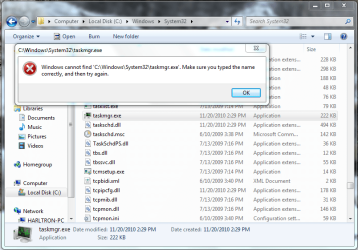
no task manager.PNG

Any ideas??

Thanks!

P.S. This is happening on my laptop running Windows 7 Ultimate x86
 

My Computer

Computer type
PC/Desktop
Computer Manufacturer/Model Number
Custom Built
OS
Windows 7 Ultimate x64
CPU
AMD Phenom 9850 x4 2.50GHz
Motherboard
ASUS M4A785-M
Memory
4GB DDR2
Graphics Card(s)
nVidia GeFore 210
Sound Card
Onboard
Monitor(s) Displays
Samsung SyncMaster BX2031 20" LED
Screen Resolution
1600x900
Hard Drives
Western Digital Caviar Blue 500 GB SATA III 7200 RPM
PSU
450 Watt
Case
Raygo R12-40835 ATX Mid-Tower Case
Cooling
Air
Antivirus
Microsoft Security Essentials
Browser
Google Chrome
Other Info
Laptop:
Intel Core Duo T2450 @ 2.00GHz
2GB RAM
Windows 7 Ultimate x86
Open registry . Navigate to

Code:
HKLM\SOFTWARE\Microsoft\Windows NT\CurrentVersion\Image File Execution Options\taskmgr.exe

What does it say for Debugger ?

If that doesn't work try this


:ar: Find and run procexp.exe.

:ar:Click in Options menu on Replace Task Manager and than Restore Task Manager.
 

My Computer

Computer Manufacturer/Model Number
Custom Built
OS
Windows 7 Ultimate 32-Bit & Windows 7 Ultimate 64-Bit
CPU
Intel Core i7 CPU 950 @ 3.07GHz
Motherboard
ASUS P6T DELUXE V2
Memory
OCZ 6GB (3 x 2GB) 240-Pin DDR3 SDRAM DDR3 1600 OCZ3X1600R2
Graphics Card(s)
ATI Radeon HD 5700 Series
Sound Card
OnBoard
Hard Drives
WD6400AACS-00M3B0 (640GB SATA )
PSU
CORSAIR 850w
Case
NZXT LEXA
Cooling
Intel Stock Heatsink Fan
Keyboard
Microsoft Wireless Laser Keyboard 7000
Mouse
Microsoft Wireless Laser Mouse 7000
It's shows the file path for Process Explorer that no longer exists.

Is it as simple as putting the file path for taskmgr.exe located in the system32 folder?


EDIT: There is no option in Process Explorer to "Restore Task Manager."
 

My Computer

Computer type
PC/Desktop
Computer Manufacturer/Model Number
Custom Built
OS
Windows 7 Ultimate x64
CPU
AMD Phenom 9850 x4 2.50GHz
Motherboard
ASUS M4A785-M
Memory
4GB DDR2
Graphics Card(s)
nVidia GeFore 210
Sound Card
Onboard
Monitor(s) Displays
Samsung SyncMaster BX2031 20" LED
Screen Resolution
1600x900
Hard Drives
Western Digital Caviar Blue 500 GB SATA III 7200 RPM
PSU
450 Watt
Case
Raygo R12-40835 ATX Mid-Tower Case
Cooling
Air
Antivirus
Microsoft Security Essentials
Browser
Google Chrome
Other Info
Laptop:
Intel Core Duo T2450 @ 2.00GHz
2GB RAM
Windows 7 Ultimate x86
Delete the debugger key
 

My Computer

Computer Manufacturer/Model Number
Custom Built
OS
Windows 7 Ultimate 32-Bit & Windows 7 Ultimate 64-Bit
CPU
Intel Core i7 CPU 950 @ 3.07GHz
Motherboard
ASUS P6T DELUXE V2
Memory
OCZ 6GB (3 x 2GB) 240-Pin DDR3 SDRAM DDR3 1600 OCZ3X1600R2
Graphics Card(s)
ATI Radeon HD 5700 Series
Sound Card
OnBoard
Hard Drives
WD6400AACS-00M3B0 (640GB SATA )
PSU
CORSAIR 850w
Case
NZXT LEXA
Cooling
Intel Stock Heatsink Fan
Keyboard
Microsoft Wireless Laser Keyboard 7000
Mouse
Microsoft Wireless Laser Mouse 7000
Thank you! Deleting the debugger key worked. Task Manager is working again.

Thanks again!
 

My Computer

Computer type
PC/Desktop
Computer Manufacturer/Model Number
Custom Built
OS
Windows 7 Ultimate x64
CPU
AMD Phenom 9850 x4 2.50GHz
Motherboard
ASUS M4A785-M
Memory
4GB DDR2
Graphics Card(s)
nVidia GeFore 210
Sound Card
Onboard
Monitor(s) Displays
Samsung SyncMaster BX2031 20" LED
Screen Resolution
1600x900
Hard Drives
Western Digital Caviar Blue 500 GB SATA III 7200 RPM
PSU
450 Watt
Case
Raygo R12-40835 ATX Mid-Tower Case
Cooling
Air
Antivirus
Microsoft Security Essentials
Browser
Google Chrome
Other Info
Laptop:
Intel Core Duo T2450 @ 2.00GHz
2GB RAM
Windows 7 Ultimate x86
You're welcome . You could even delete the taskmgr.exe folder under the folder Image File Execution Options
 

My Computer

Computer Manufacturer/Model Number
Custom Built
OS
Windows 7 Ultimate 32-Bit & Windows 7 Ultimate 64-Bit
CPU
Intel Core i7 CPU 950 @ 3.07GHz
Motherboard
ASUS P6T DELUXE V2
Memory
OCZ 6GB (3 x 2GB) 240-Pin DDR3 SDRAM DDR3 1600 OCZ3X1600R2
Graphics Card(s)
ATI Radeon HD 5700 Series
Sound Card
OnBoard
Hard Drives
WD6400AACS-00M3B0 (640GB SATA )
PSU
CORSAIR 850w
Case
NZXT LEXA
Cooling
Intel Stock Heatsink Fan
Keyboard
Microsoft Wireless Laser Keyboard 7000
Mouse
Microsoft Wireless Laser Mouse 7000
I simply had to reply and say that people like you are gold dust! That registry fix has saved me many hours of valuable time not having to restoring my system after stupidly installing process hacker. Thank you!
 

My Computer

Computer type
PC/Desktop
OS
Win 10 64 bit
What's the debugger key, how do I delete it? I need a step by step.
 

My Computer

Computer type
PC/Desktop
OS
Windows 7 Ultimate x64
Back
Top