Solved Windows Catalog Website

copiman

New member
Power User
VIP
Local time
5:21 AM
Messages
261
In a post a while back UsernameIssues referred to the Windows Catalog Website. http://www.sevenforums.com/windows-updates-activation/385734-update-issues.html. It is in post #6.

What I am trying to get a handle on is when a KB update is updated, how can you find out what KB number is for the updated version? For example KB3102810 appears to have been updated to a newer one. I accidently found it searching around the web. Instead of using the older KB3102810, I would prefer to use the latest update rather than the KB3102810. I could not find the answer to this question by visiting the Windows Catalog Website. https://catalog.update.microsoft.com/v7/site/Home.aspx
 

My Computer

Computer type
PC/Desktop
Computer Manufacturer/Model Number
All
OS
Windows 7 Home Premium
Other Info
I work on many PCs/Laptops for people to get hands on experience. I am a student at a technical college learning about computers and networks.
I'm assuming that you have to do the updates in sequence. The update may have been changed as a response to newer updates etc. You can always use Disk cleanup to remove obsolete updates.
 
Last edited:

My Computer

Computer type
Laptop
Computer Manufacturer/Model Number
MSI GE72VR Apache Pro-416
OS
Windows 10x64 Build 1709
CPU
Intel i7 7700HQ Kaby Lake
Motherboard
Micro-Star Intl. MS-179B (U3C1)
Memory
16 GB DDR4 @2400
Graphics Card(s)
Nvidia Geforce GTX 1060
Screen Resolution
1920x1080 120Hz
Hard Drives
256 GB Nvme M.2 SSD

1TB HDD@7200
Cooling
Cooler Blast 4
Keyboard
Steel Series
Antivirus
Bit Defender Free
Browser
Edge
Actually I wanted to find out if need be if a KB has a newer one. For instance lets say a fix was introduced 6-1-15 and in 9-1-15 a newer version came out. How can I check to see if a newer version came out? An example is KB3083324 (Sept. 2015) was updated with KB3102810 (Nov. 2015). I know this only because UsernameIssues told me. I want to be able to check and see if one has been updated should I need to.
 

My Computer

Computer type
PC/Desktop
Computer Manufacturer/Model Number
All
OS
Windows 7 Home Premium
Other Info
I work on many PCs/Laptops for people to get hands on experience. I am a student at a technical college learning about computers and networks.

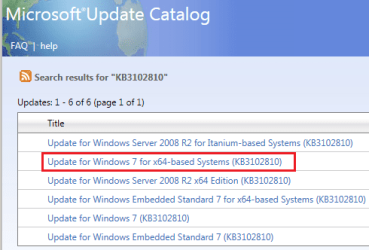
Use IE to visit the Microsoft®Update Catalog.

Search for the KB of interest.
0.PNG

Select the applicable version for your computer:
1.png

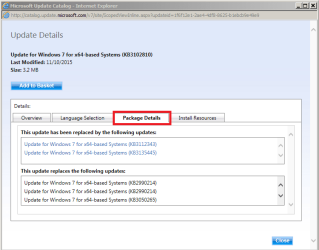
Select the tab named Package Details:
2.png
 

My Computer

Computer type
Laptop
Computer Manufacturer/Model Number
Employer provided Dell Latitude
OS
W7 Pro SP1 64bit
CPU
i7
Memory
8GB
Graphics Card(s)
Intel HD Graphics
Hard Drives
crappy SSD
Antivirus
Employer mandated Symantec Endpoint Protection
Browser
Pale Moon 64bit, IE11 64bit & Chrome 64bit
Thank soooo much. This will be extremely helpful in my quest to become a computer/network tech. maybe others will see this as well. Great stuff.
 

My Computer

Computer type
PC/Desktop
Computer Manufacturer/Model Number
All
OS
Windows 7 Home Premium
Other Info
I work on many PCs/Laptops for people to get hands on experience. I am a student at a technical college learning about computers and networks.
I'm assuming that you have to do the updates in sequence. The update may have been changed as a response to newer updates etc. You can always use Disk cleanup to remove obsolete updates.
If an new version of an update has been issued, sometimes MS uses the same KB number and sometimes MS issues a new KB number. Either way, most of the time, you can install the most recent one and it will contain all (most*) of the fixes in the previous versions.

*sometimes the revised version actually drops a particular fix because it was causing problems for some users.

Some KBs have prerequisites that must be installed first. Some KB installers will download and install those KBs for you (i.e. the KB for IE11 on a fresh install of W7),


The KB for the Windows Update Client is a good example. I installed 200+ updates for a fresh W7 install yesterday without manually installing the latest version of the Windows Update Client first. The list of updates to be applied did not contain the 8 old versions of the Windows Update Client. The list only offered me the most recent version: KB3135445
 

My Computer

Computer type
Laptop
Computer Manufacturer/Model Number
Employer provided Dell Latitude
OS
W7 Pro SP1 64bit
CPU
i7
Memory
8GB
Graphics Card(s)
Intel HD Graphics
Hard Drives
crappy SSD
Antivirus
Employer mandated Symantec Endpoint Protection
Browser
Pale Moon 64bit, IE11 64bit & Chrome 64bit
Back
Top