Solved Windows fails to boot

BJC1992

New member
Member
Local time
6:32 AM
Messages
94
Recently the computer has been running at a snails pace, to the point where the computer is pretty much unusable, I did run a checkdisk and everything was fine for a short while, but now it's worse than ever, I tried to do another disk check to see if it would help, but now the computer won't boot up, it says 'starting windows' and then it shows a blue screen with a load of writing, but it only shows for half a second so I don't have time to read it, then it takes me to a screen where it gives me two options, to run the windows repair tool or to start windows normally, if I use the repair tool it says it cannot find any problems, if I run windows as normal I end up full circle at the list of two options, any ideas what might be happening, the PC is looked after and regularly cleaned of junk etc, and until recently has run fine for the eight years that I've had it. I know it won't last forever but I want to try and fix this pc before I consider buying another.
 

My Computer

Computer type
PC/Desktop
Computer Manufacturer/Model Number
Advent SE 1101
OS
Windows 7 32 Bit
CPU
AMD Sempron(tm) 140 Processor 2.70Ghz
Memory
4GB (3.12GB Usable)
Graphics Card(s)
Nvidia GeForce 210
Sound Card
Nvidia High Definition Audio
Monitor(s) Displays
Compaq 7500
Hard Drives
320GB
Keyboard
Standard PS/2 Keyboard
Mouse
Microsoft PS/2 Mouse
Antivirus
Avast Antivirus Free
Browser
Google Chrome
Other Info
ACPI x86 Based PC
Hi BJC1992,

Have you got an installation DVD?
If so, you could try running the System Repair from there to see if it makes a difference!

I hope this helps!
 

My Computer

Computer type
Laptop
Computer Manufacturer/Model Number
Fujitsu LIFEBOOK
OS
Win 7 HP SP1 64-bit Vista HB SP2 32-bit Linux Mint 18.3
CPU
Intel(R) Pentium(R) CPU P6200 @ 2.13GHz
Motherboard
FUJITSU FJNBB06
Memory
4.00 GB
Graphics Card(s)
Intel(R) Graphics Media Accelerator HD
Sound Card
[1] Realtek High Definition Audio [2] Intel(R) Display Audio
Screen Resolution
1366 x 768 x 32 bits (4294967296 colors) @ 59 Hz
Hard Drives
TOSHIBA MK5076GSX
Antivirus
AVG FREE
You can try booting into Safe Mode.

If you booted successfully to Safe Mode, you can go to Control Panel > System > Advanced System Settings > Click the Settings button in the Startup and Recovery section, and uncheck Automatically Restart under System Failure. This way you can see the error code in the "blue screen".

If you didn't boot successfully to Safe Mode, you can also go to the Advanced Boot Options and choose > "Disable automatic restart on system failure". This way you can see the error code without needing to make any changes in the Control Panel.

Share the error code with us and we may be able to help you.
 
When turning on the computer this morning it booted up normally, after selecting the option to boot up, but I didn't expect it to. It is still as slow as it was before, but have managed to get up the Event Log, and am surprised by how many entries there are, for yesterday there were 19 warnings/errors, and today there are 26. Below are the ones that look the most important.

04/07/18
The following boot - start or system - start driver(s) failed to load:
prodrv06
prohlp02
prosync1
sfhlp01

I also keep seeing the below message throughout the event log:
The application (StarForce Protection, from vendor StarForce) has the following problem: The installed StarForce Protection driver is not compatible with this version of Windows and will be disabled. Applications that require this driver will not function properly without a patch.

This one below I have no idea what this is:
1) The driver \Driver\WUDFRd failed to load for the device WpdBusEnumRoot\UMB\2&37c186b&2&STORAGE#VOLUME#_??_USBSTOR#DISK&VEN_GENERIC&PROD_USB_CF_READER&REV_F002#00000000F002&1#.

2) Volume Shadow Copy Service error: Unexpected error calling routine ConvertStringSidToSid(S-1-5-21-3520928872-3528221943-3009729447-1000.bak). hr = 0x80070539, The security ID structure is invalid.

3) Windows detected your registry file is still in use by other applications or services. The file will be unloaded now. The applications or services that hold your registry file may not function properly afterwards.

4) The server did not register with DCOM within the required timeout.

There are even 'warnings' about things I no longer have, for example it says my Lexmark X73 Driver MFP scanner service wont start even though the printer itself has long gone, how would I remove these?

I know I've listed a lot but I have no idea which of these relates to the problem that I have. Hope what I have written is of help.
 

My Computer

Computer type
PC/Desktop
Computer Manufacturer/Model Number
Advent SE 1101
OS
Windows 7 32 Bit
CPU
AMD Sempron(tm) 140 Processor 2.70Ghz
Memory
4GB (3.12GB Usable)
Graphics Card(s)
Nvidia GeForce 210
Sound Card
Nvidia High Definition Audio
Monitor(s) Displays
Compaq 7500
Hard Drives
320GB
Keyboard
Standard PS/2 Keyboard
Mouse
Microsoft PS/2 Mouse
Antivirus
Avast Antivirus Free
Browser
Google Chrome
Other Info
ACPI x86 Based PC
I will recommend you to reinstall your Windows.

You have many errors with native Windows services and the system itself, and it it will probaby take you much time to get to the root of the problem. You have junk files remaining from things you don't have now. Really, these problems are time taking, and it isn't guaranteed you will fix all of the problems with the solutions that the people here will suggest. Your computer is slow, as you said, and this can be caused by many things too, like malware, adware, etc. Not to mention the BSoDs you're getting too...

Not only you will need much time to fix all of these problems (if some of them are fixable anyway), but you will also probably get a headache. If I was you, without even thinking of fixing these problems I would reinstall Windows.
 
When selecting the system repair option and I'm taken to the next menu there is a list of options, one of which is a heading that says 'reinstall windows', if I did that would I have to erase the hard drive first or will the setup take care of that?
 

My Computer

Computer type
PC/Desktop
Computer Manufacturer/Model Number
Advent SE 1101
OS
Windows 7 32 Bit
CPU
AMD Sempron(tm) 140 Processor 2.70Ghz
Memory
4GB (3.12GB Usable)
Graphics Card(s)
Nvidia GeForce 210
Sound Card
Nvidia High Definition Audio
Monitor(s) Displays
Compaq 7500
Hard Drives
320GB
Keyboard
Standard PS/2 Keyboard
Mouse
Microsoft PS/2 Mouse
Antivirus
Avast Antivirus Free
Browser
Google Chrome
Other Info
ACPI x86 Based PC
Before booting up the computer, point your camera at the screen and get it recording, then boot the computer. In this way, if a message flashes across the screen, you can play back the video to see the message.

If the computer runs well in Safe Mode, you may have a misbehaving program slowing everything down. Here's how to check for this and how to disable such a program:

PC getting slow - does my Chkdsk scan results tell you anything?
 

My Computer

Computer type
PC/Desktop
Computer Manufacturer/Model Number
Dell
OS
Linux Mint 18.2 xfce 64-bit (VMWare host) / Windows 8.1 Pro 32-bit (VMWare guest)
CPU
Haswell
Memory
4 GB
Monitor(s) Displays
Acer 23"
Screen Resolution
1920 x 1080
Hard Drives
Two hard drives, 1TB each: One for Linux, one for my data.
Keyboard
IBM Model M
Antivirus
Sophos (Linux), Trend Micro (Windows)
Browser
Firefox, Opera
Other Info
I use Samba to share my data drive with the other computers at my house and with my guest session in VMWare Workstation Player.
I've used my W7, 2009 computer without fail for many years and avoided W10. However, W7 in many respects is no longer compatible with current programing causing slow downs and poor performance with web sites, etc... So despite keeping your W7 computer current, you are most likely inflicting upon yourself the issues you are experiencing.

My W7 started running poorly about a year ago and progressively got worse with every Windows update. It became bad enough I considered buying a new system. My fix was to spend 120 dollars (USA) an installed W10. The installation was flawless and took 30 minutes or so to complete. The personalization took several hours as it would with any new purchase and considering I have three monitors, etc., it wasn't that bad.

If you are avoiding a W10 upgrade because of the user interface, you can download this software which will let you install a W7 type menu an W7 Start button while getting use to W10 UI.

Classic Shell - Start menu and other Windows enhancements

After upgrading to W10 I couldn't believe the performance improvement in every respect. Checking Event Logs shows a much better integration with windows upgrades and components. W10 has MS Edge which has improved but if you want to use explorer 11 it is hidden inside W10 (use search to find it) but doesn't run as well as Edge.


Installing W10 will also fix any corrupt W7 components that you are experiencing. So should you want to uninstall W10 for any reason the W7 errors you had will remain fixed but I believe you will enjoy your system with W10 and will most likely work well enough for another five years.
 

My Computer

Computer type
PC/Desktop
Computer Manufacturer/Model Number
Dell Alienware Aurora 2009
OS
W10 Home 64 bit
CPU
i7 990x
Motherboard
LGA 1366 Intel X58 Express
Memory
Corsair 12G 1866 MXP CMT12GX3M6A1866C9
Graphics Card(s)
EVGA 980ti
Sound Card
Bose Speakers
Monitor(s) Displays
Three ASUS 27in PG278Q
Screen Resolution
2K
Hard Drives
Samsung 860evo 2TB
PSU
850W
Cooling
Liquid Cooled
Internet Speed
235 megabit/s
I've used my W7, 2009 computer without fail for many years and avoided W10. However, W7 in many respects is no longer compatible with current programing causing slow downs and poor performance with web sites, etc... So despite keeping your W7 computer current, you are most likely inflicting upon yourself the issues you are experiencing.

My W7 started running poorly about a year ago and progressively got worse with every Windows update. It became bad enough I considered buying a new system. My fix was to spend 120 dollars (USA) an installed W10. The installation was flawless and took 30 minutes or so to complete. The personalization took several hours as it would with any new purchase and considering I have three monitors, etc., it wasn't that bad.

If you are avoiding a W10 upgrade because of the user interface, you can download this software which will let you install a W7 type menu an W7 Start button while getting use to W10 UI.

Classic Shell - Start menu and other Windows enhancements

After upgrading to W10 I couldn't believe the performance improvement in every respect. Checking Event Logs shows a much better integration with windows upgrades and components. W10 has MS Edge which has improved but if you want to use explorer 11 it is hidden inside W10 (use search to find it) but doesn't run as well as Edge.


Installing W10 will also fix any corrupt W7 components that you are experiencing. So should you want to uninstall W10 for any reason the W7 errors you had will remain fixed but I believe you will enjoy your system with W10 and will most likely work well enough for another five years.
Firstly I thought I would try safe mode, the pc runs ok and I started by disabling all the non Microsoft services, I restarted the pc and to start with things are not too bad, but when looking on task manager the CPU still often gets to 100% even with no programmes running. And it's still not running as fast as it should be.
I'm using Avast Antivirus and it doesn't seem to run right, it keeps saying "UI FAILED" and to click "RESTART SERVICE", which it fails to restart, but after several minutes it's suddenly back up and running. I've done a virus scan and there are no viruses. This isn't the first time this has happened. Not sure if this is part of the problem.
So next o thought I'd re-enable each service one by one, starting with an avast service, when rebooting it went to the blue screen saying:
A PROBLEM HAS BEEN DETECTED AND WINDOWS HAS BEEN SHUT DOWN TO PREVENT DAMAGE TO YOUR COMPUTER.
IF THIS IS THE FIRST TIME YOUVE SEEN THIS STOP ERROR SCREEN, RESTART YOUR COMPUTER. IF THIS SCREEN APPEARS AGAIN, FOLLOW THESE STEPS;
CHECK FOR VIRUSES ON YOUR COMPUTER. REMOVE ANY NEWLY INSTALLED HARD DRIVES OR HARD DRIVE CONTROLLERS. CHECK YOUR HARD DRIVE TO MAKE SURE IT IS PROPERLY CONFIGURED AND TERMINATED.
RUN CHDSK /F TO CHECK FOR HARD DRIVE CORRUPTION, AND THEN RESTART YOUR COMPUTER.
TECHNICAL INFORMATION;
*** STOP : 0.0000007B (0*807868049, 0*C0000034, 0*00000000, 0*00000000)

I then tried to restart again but in safe mode, and was presented again with the blue screen.

I've wrote the technical information as accurately as I could, as the screenshot I took was slightly fuzzy towards the bottom. I can run it again if the technical information is needed.
And if nothing works then I may well upgrade to W10.
 

My Computer

Computer type
PC/Desktop
Computer Manufacturer/Model Number
Advent SE 1101
OS
Windows 7 32 Bit
CPU
AMD Sempron(tm) 140 Processor 2.70Ghz
Memory
4GB (3.12GB Usable)
Graphics Card(s)
Nvidia GeForce 210
Sound Card
Nvidia High Definition Audio
Monitor(s) Displays
Compaq 7500
Hard Drives
320GB
Keyboard
Standard PS/2 Keyboard
Mouse
Microsoft PS/2 Mouse
Antivirus
Avast Antivirus Free
Browser
Google Chrome
Other Info
ACPI x86 Based PC
04/07/18
The following boot - start or system - start driver(s) failed to load:
prodrv06
prohlp02
prosync1
sfhlp01

They could be drivers from a game of some kind.

One way is to install a fresh copy of windows 7 ( it is very easy to do )
You just need:
1 the license key ( should be on a sticker on your machine somewhere)
2 Installation media, which is easy to find. What edidtion and bit version are you running? Your specs say 32 bit

Another way is to boot winpe media,

I have 32 bit boot media here:
A23x86.iso
64 bit boot media here:
17514x64-v9.iso

Then either load the system hive from your windows\system32\config folder and change the start type on those drivers to 4.

OR you can use Dism++ ( included in the boot media ) to remove the drivers from your installation.
 
Last edited:

My Computers

System One System Two

  • Computer type
    PC/Desktop
    OS
    7 X64
    CPU
    i5 8400
    Motherboard
    gigabyte b365m ds3h
    Memory
    2x8gb 3200mhz
    Hard Drives
    various
    PSU
    pure power 11 400w cm
    Case
    Coolermaster
    Cooling
    cryorig m9i
  • Computer type
    PC/Desktop
    OS
    7x64
    CPU
    g5400
    Motherboard
    ga b365m ds3h
    Memory
    8gb ddr4 2400
    PSU
    xfx pro 450w
They could be drivers from a game of some kind.

One way is to install a fresh copy of windows 7 ( it is very easy to do )
You just need:
1 the license key ( should be on a sticker on your machine somewhere)
2 Installation media, which is easy to find. What edidtion and bit version are you running? Your specs say 32 bit

Another way is to boot winpe media,

I have 32 bit boot media here:
A23x86.iso
64 bit boot media here:
17514x64-v6.iso

Then either load the system hive from your windows\system32\config folder and change the start type on those drivers to 4.

OR you can use Dism++ ( included in the boot media ) to remove the drivers from your installation.
I think to reinstall windows is the best way, but I just wanted to try everything else before I did that.
I don't have an original Windows disc, when I bought the PC it asked me to create a disc of some kind when I first started windows, so I'm assuming this would be the correct disc, if not I can use the link in the previous reply.
 

My Computer

Computer type
PC/Desktop
Computer Manufacturer/Model Number
Advent SE 1101
OS
Windows 7 32 Bit
CPU
AMD Sempron(tm) 140 Processor 2.70Ghz
Memory
4GB (3.12GB Usable)
Graphics Card(s)
Nvidia GeForce 210
Sound Card
Nvidia High Definition Audio
Monitor(s) Displays
Compaq 7500
Hard Drives
320GB
Keyboard
Standard PS/2 Keyboard
Mouse
Microsoft PS/2 Mouse
Antivirus
Avast Antivirus Free
Browser
Google Chrome
Other Info
ACPI x86 Based PC
Hi BJC1992,

I don't have an original Windows disc, when I bought the PC it asked me to create a disc of some kind when I first started windows, so I'm assuming this would be the correct disc?

The disc it asked you to create is probably a backup recovery disc which is not the same as an installation disc.
What version of Windows 7 are you using?

I hope this helps!
 

My Computer

Computer type
Laptop
Computer Manufacturer/Model Number
Fujitsu LIFEBOOK
OS
Win 7 HP SP1 64-bit Vista HB SP2 32-bit Linux Mint 18.3
CPU
Intel(R) Pentium(R) CPU P6200 @ 2.13GHz
Motherboard
FUJITSU FJNBB06
Memory
4.00 GB
Graphics Card(s)
Intel(R) Graphics Media Accelerator HD
Sound Card
[1] Realtek High Definition Audio [2] Intel(R) Display Audio
Screen Resolution
1366 x 768 x 32 bits (4294967296 colors) @ 59 Hz
Hard Drives
TOSHIBA MK5076GSX
Antivirus
AVG FREE
I'm using the 32-bit version
 

My Computer

Computer type
PC/Desktop
Computer Manufacturer/Model Number
Advent SE 1101
OS
Windows 7 32 Bit
CPU
AMD Sempron(tm) 140 Processor 2.70Ghz
Memory
4GB (3.12GB Usable)
Graphics Card(s)
Nvidia GeForce 210
Sound Card
Nvidia High Definition Audio
Monitor(s) Displays
Compaq 7500
Hard Drives
320GB
Keyboard
Standard PS/2 Keyboard
Mouse
Microsoft PS/2 Mouse
Antivirus
Avast Antivirus Free
Browser
Google Chrome
Other Info
ACPI x86 Based PC

My Computer

Computer type
Laptop
Computer Manufacturer/Model Number
Fujitsu LIFEBOOK
OS
Win 7 HP SP1 64-bit Vista HB SP2 32-bit Linux Mint 18.3
CPU
Intel(R) Pentium(R) CPU P6200 @ 2.13GHz
Motherboard
FUJITSU FJNBB06
Memory
4.00 GB
Graphics Card(s)
Intel(R) Graphics Media Accelerator HD
Sound Card
[1] Realtek High Definition Audio [2] Intel(R) Display Audio
Screen Resolution
1366 x 768 x 32 bits (4294967296 colors) @ 59 Hz
Hard Drives
TOSHIBA MK5076GSX
Antivirus
AVG FREE
Hi

if Avast is experiencing problems then your comp will slow down.
Its likely churning away trying to fix its self, could be file corruption or malware

Before you run the clean install remove it
(via safe mode using their own tool)
see if that helps

Roy
 

My Computer

Computer type
PC/Desktop
Computer Manufacturer/Model Number
medionl/Aspire 6930G/acer x55a
OS
W7 home premium 32bit/W7HP 64bit/w10 tp insider ring
CPU
E5300 dual core
Motherboard
medion MS7366
Memory
3gb
Graphics Card(s)
Nvidia Geforce 7100 Nforce 630i
Monitor(s) Displays
avixc
Internet Speed
n (isp resticted to 72)
Antivirus
mse/pands
Browser
palemoon
Other Info
Belkin Fd7050 n USB using Railink RT2870 drivers, more upto date
Am using Home Premium.
Firstly though I will remove Avast and see if that has any affect, otherwise I will do a reinstall of windows.

If I used one of the files above to download windows 7 I'm assuming I would just need to enter my product key to activate it?
 

My Computer

Computer type
PC/Desktop
Computer Manufacturer/Model Number
Advent SE 1101
OS
Windows 7 32 Bit
CPU
AMD Sempron(tm) 140 Processor 2.70Ghz
Memory
4GB (3.12GB Usable)
Graphics Card(s)
Nvidia GeForce 210
Sound Card
Nvidia High Definition Audio
Monitor(s) Displays
Compaq 7500
Hard Drives
320GB
Keyboard
Standard PS/2 Keyboard
Mouse
Microsoft PS/2 Mouse
Antivirus
Avast Antivirus Free
Browser
Google Chrome
Other Info
ACPI x86 Based PC
Hi SIW2,

Another way is to boot winpe media,

I have 32 bit boot media here:
A23x86.iso

I have 64 bit boot media here:
17514x64-v6.iso

Then either load the system hive from your windows\system32\config folder and change the start type on those drivers to 4.

Could you explain in a little bit more detail please as I am interested in this option method!
 

My Computer

Computer type
Laptop
Computer Manufacturer/Model Number
Fujitsu LIFEBOOK
OS
Win 7 HP SP1 64-bit Vista HB SP2 32-bit Linux Mint 18.3
CPU
Intel(R) Pentium(R) CPU P6200 @ 2.13GHz
Motherboard
FUJITSU FJNBB06
Memory
4.00 GB
Graphics Card(s)
Intel(R) Graphics Media Accelerator HD
Sound Card
[1] Realtek High Definition Audio [2] Intel(R) Display Audio
Screen Resolution
1366 x 768 x 32 bits (4294967296 colors) @ 59 Hz
Hard Drives
TOSHIBA MK5076GSX
Antivirus
AVG FREE
1. Boot into winpe
2. Open regedit
3. Click Hkey_Local_Machine key to highlight it
3. Click File >Load hive
4. Browse to your windows partition ( it might show as C from winpe, more likely D). You browse to d:\windows\system32\config and select the SYSTEM hive.
5. Regedit will ask you give it a name, anything you like e.g. SYS will do.
Now look under the Hkey_Local_Machine key and you will see SYS is loaded.

You can then browse through SYS making any changes to keys and values, when you have finished, click SYS to highlight it. Then File>Unload hive.

Sounds like a lot of steps, but only takes a few seconds to do.
 

My Computers

System One System Two

  • Computer type
    PC/Desktop
    OS
    7 X64
    CPU
    i5 8400
    Motherboard
    gigabyte b365m ds3h
    Memory
    2x8gb 3200mhz
    Hard Drives
    various
    PSU
    pure power 11 400w cm
    Case
    Coolermaster
    Cooling
    cryorig m9i
  • Computer type
    PC/Desktop
    OS
    7x64
    CPU
    g5400
    Motherboard
    ga b365m ds3h
    Memory
    8gb ddr4 2400
    PSU
    xfx pro 450w
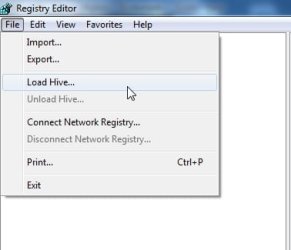
Boot into winpe. Open Regedit.


Highlight HKLM
LOADHIVE1.jpg


Click File>Load Hive
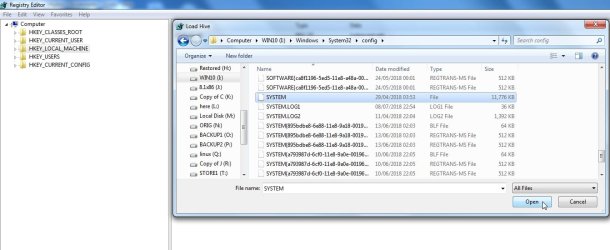
LOADHIVE2.jpg

Browse to your \Windows\System32\config folder and select the SYSTEM hive
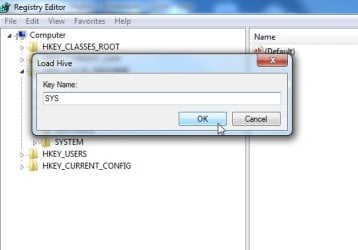
LOADHIVE3.jpg


Give it a name e.g. SYS
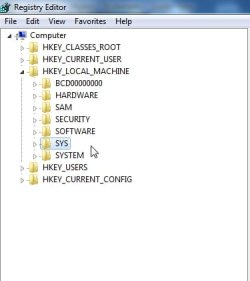
LOADHIVE4.jpg


And there she is
LOADHIVE.jpg

Then you can search SYS for the driver name and change the start type to 4 (disabled), You can use the EDIT>FIND function to search the hive.The Driver name might be in more than one place, so have a good look.

3rd party tools can help. After you have loaded the hive, you can use regscanner to find things ( regscanner is included in my winpe media)
 

My Computers

System One System Two

  • Computer type
    PC/Desktop
    OS
    7 X64
    CPU
    i5 8400
    Motherboard
    gigabyte b365m ds3h
    Memory
    2x8gb 3200mhz
    Hard Drives
    various
    PSU
    pure power 11 400w cm
    Case
    Coolermaster
    Cooling
    cryorig m9i
  • Computer type
    PC/Desktop
    OS
    7x64
    CPU
    g5400
    Motherboard
    ga b365m ds3h
    Memory
    8gb ddr4 2400
    PSU
    xfx pro 450w
Thanks for the detailed instructions SIW2, it is very much appreciated.
 

My Computer

Computer type
Laptop
Computer Manufacturer/Model Number
Fujitsu LIFEBOOK
OS
Win 7 HP SP1 64-bit Vista HB SP2 32-bit Linux Mint 18.3
CPU
Intel(R) Pentium(R) CPU P6200 @ 2.13GHz
Motherboard
FUJITSU FJNBB06
Memory
4.00 GB
Graphics Card(s)
Intel(R) Graphics Media Accelerator HD
Sound Card
[1] Realtek High Definition Audio [2] Intel(R) Display Audio
Screen Resolution
1366 x 768 x 32 bits (4294967296 colors) @ 59 Hz
Hard Drives
TOSHIBA MK5076GSX
Antivirus
AVG FREE
Back
Top