Windows Live SkyDrive - Map Drive

How to Map Windows Live SkyDrive in Windows Explorer

   Information
This tutorial is a quick tutorial on showing you how to map you Windows Live SkyDrive in Windows Explorer.

For this to work you will need a Windows Live ID - See:

https://signup.live.com/signup.aspx...EACQ_CIMS015888_Hotmail_EN-GB_0x0_36222&lic=1

   Tip
You may also want to add Windows Live SkyDrive to the Context menu - http://www.sevenforums.com/tutorials/19765-skydrive-upload-windows-7-desktop.html
   Warning
SkyDrive will soon be called OneDrive instead.

OneDrive for Everything in Your Life | OneDrive Blog


Method 1

Add as a network drive


Here's How:

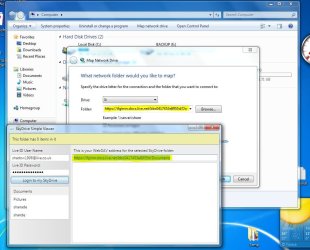
1. Download this small .exe file from the link below to find your Windows Live SkyDrive server.SkyDrive Simple Viewer for WebDAV - Download: WPF Application
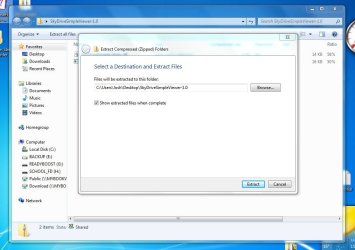
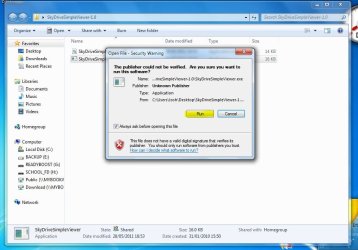
a). Once done Extract to a temp location and then Run the ExecutableExtract.JPG

Run.JPG
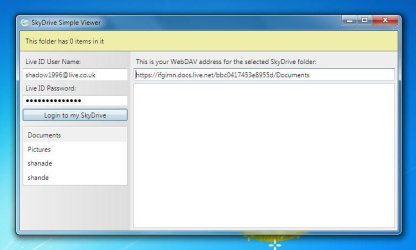
b). Then enter your Windows Live ID Credentials and select a Folder that you would like to MapServer.JPG
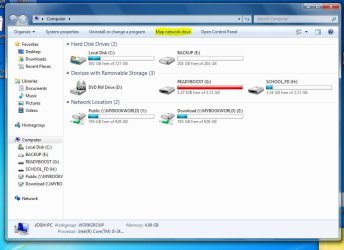
2. Click Start > My Computera). Then click "Map network drive"Computer.JPG
b). Now copy and paste the Link from the Executable to the Folder area of the Dialog boxMap.JPG
c). Now you will need to change the directory. Change the "/" to "\" And Delete the "Https://" And replace with "\\"
NOTE: Do not include the Speech marks.For example:
Before
https://ifgimn.docs.live.net/bbc0417453e8955d/Documents

After
\\ifgimn.docs.live.net\bbc0417453e8955d\Documents
d). Set the Drive Letter you want and then click Finish
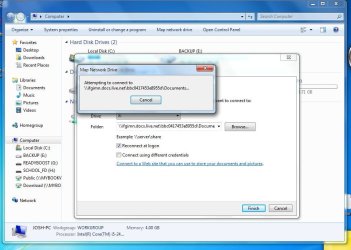
3. It will now connect
NOTE: This could take up to 5 Minutes depending on your Network Connection.Connect.JPG

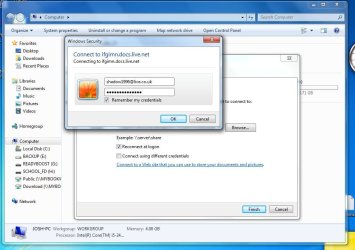
a). Now just enter your Windows Live ID CredentialsCredentials.JPG
b). And your done :)
NOTE: You could change the Name of the Mapped Drive by Pressing F2 while the drive is Highlighted.Mapped Drive.JPG
   Warning
Any changes or uploads made to this Drive will be made to your skydrive Storage


Method 2

Add as a network location


   Information
If you are recieving problems with connection after Reboot then try this method as it will set Skydrive as a folder and not a drive


Here's How:

1.Follow steps 1 and 2aa).Click Map a network Drive

Computer.JPG
b).Now click on "Connect to a website that you can use to store your documents and pictures
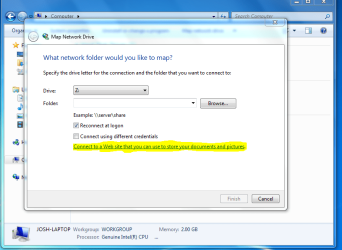
Connect webservice.PNG
c).This will open a wizard - Click Next
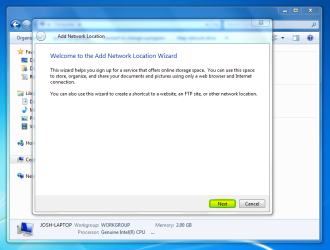
Next - Wizard.PNG
d).Then select "Custom Location"
e).Now copy and Paste the Link in the Executable to the Folder path box also you will need to make some changes

Change the "/" to "\" And Delete the "Https://" And replace with "\\"
NOTE: Do not include the Speech marks.For example:
Before
https://ifgimn.docs.live.net/bbc0417453e8955d/Documents

After
\\ifgimn.docs.live.net\bbc0417453e8955d\Documents
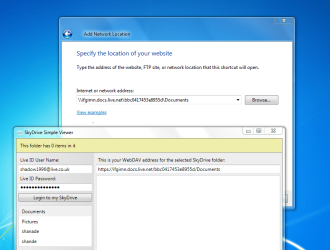
Connect 2.PNG

3.Now click Next and if it asks enter your Windows Live Credentials ina).It will now ask you to enter a name for the location - you could use something like Skydrive
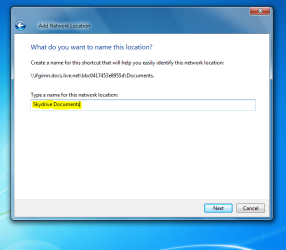
Name Location.PNG
b).You are now done! Instead of Skydrive being a Drive it is now a folder
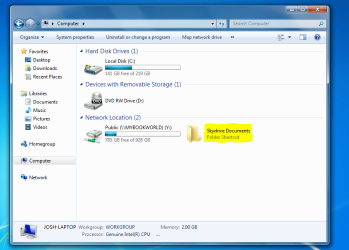
Folder.PNG
Josh


Last edited by a moderator:
Nice tutorial, Josh. Must give it a try.
 

My Computer

Computer Manufacturer/Model Number
Custom/DIY
OS
Windows 7 Ultimate x64
CPU
Intel C2D E8400@4Ghz OC
Motherboard
ASUS P5Q-E, bios 2101
Memory
4x2GB Kingston HyperX 8500@1066Mhz
Graphics Card(s)
Nvidia GTS450 OC
Sound Card
Onboard SoundMax
Monitor(s) Displays
Samsung Syncmaster 17"
Screen Resolution
1280x1024
Hard Drives
WD6402AAEX-640GB(system), WD10EALX-1TB(storage), other external disks & docking stations
PSU
Corsair TX-750 V2
Case
Custom Tower
Cooling
Air: Arctic Cooling 2xF8 & F12; Akasa AK-968, 2xAK-HD-BL
Mouse
Gigabyte M6900
Internet Speed
10M/1M
No Problem :) - Hope it works out okay for you - please post if you have any questions
 

My Computer

Computer type
PC/Desktop
Computer Manufacturer/Model Number
Custom Built
OS
Windows 7 Professional x64 SP1 ; Windows Server 2012 R2 Standard
CPU
Intel Core i5 2400 @ 3.10GHz
Motherboard
Foxconn H67MP-S/-V/H67MP
Memory
8.0GB DDR3 @ 665MHz (2GBx4)
Graphics Card(s)
AMD Radeon HD 6870
Sound Card
Realtek High Definition Audio
Monitor(s) Displays
AOC 2243W & SMB1930NW
Screen Resolution
1440x900 & 1920x1080
Hard Drives
977GB Seagate ST31000524AS ATA Drive (SATA)
250GB WD iSCSI attached Drive
PSU
750W Gaming PSU
Case
Novatech Night
Cooling
Fan
Keyboard
Dell Standard PS/2 Keyboard
Mouse
R.A.T 07 Gaming Mouse
Internet Speed
Download: 10 Mbps Ping: 30ms Upload: 0.81 Mbps
Browser
Google Chrome
Other Info
Optiarc DVD RW AD-5260S ATA Device
Will do, thanks again.
 

My Computer

Computer Manufacturer/Model Number
Custom/DIY
OS
Windows 7 Ultimate x64
CPU
Intel C2D E8400@4Ghz OC
Motherboard
ASUS P5Q-E, bios 2101
Memory
4x2GB Kingston HyperX 8500@1066Mhz
Graphics Card(s)
Nvidia GTS450 OC
Sound Card
Onboard SoundMax
Monitor(s) Displays
Samsung Syncmaster 17"
Screen Resolution
1280x1024
Hard Drives
WD6402AAEX-640GB(system), WD10EALX-1TB(storage), other external disks & docking stations
PSU
Corsair TX-750 V2
Case
Custom Tower
Cooling
Air: Arctic Cooling 2xF8 & F12; Akasa AK-968, 2xAK-HD-BL
Mouse
Gigabyte M6900
Internet Speed
10M/1M
Shadowjk.. this is a very nice tutorial .. I may try this on my Windows 7 laptop..
I don't really care for SkyDrive since attaching anything in my old Windows XP is ruined with SkyDrive.. unless I have this confused with the one used by Windows Live Hotmail.
Thanks so much.:thumbsup:
 

My Computer

Computer type
Laptop
Computer Manufacturer/Model Number
Gateway 17.3" LCD Intel Dual-Core, 8GB RAM 1TB HDD Windows 8 Laptop
OS
Windows 8 - 64-bit
CPU
2.2GHz Intel Pentium dual-core B960 processor with 2MB L3 ca
Memory
8GB DDR3
Graphics Card(s)
Intel HD Graphics with 128MB of dedicated system memory
Monitor(s) Displays
17.3" Ultrabright HD widescreen LED-backlit LCD
Screen Resolution
1280 X 1024
Hard Drives
1TB hard drive-1000 GB HDD
DVD-Super Multi DL drive
PSU
Intel B960 processor
Case
XXXXX
Cooling
XXXXX
Keyboard
Multi Gesture Touchpad
Mouse
USB - portable mouse... I added this
Antivirus
Avast
Browser
I E 10
Other Info
I see nothing about Motherboard info.
I'm not sure about Sound Card
Ports :(3) USB 2.0, (1) HDMI, (1) VGA, (1) Headphone out, (1) Microphone in, (1) Ethernet LAN

•Fast Wi-Fi wireless and wired Gigabit Ethernet networking
•HDMI output
•Kensington lock slot
I have no idea what all this actually means
Worked for me. Have a question though. I do not want to use the space on my C: Drive to put files for my SkyDrive account. I want to use my data partition D: for that. How do I change the path so that all files can be stored on D: and not C: where my OS is installed?


Edit:
Noticed a red X beside the mapped SkyDrive drive in Explorer when I rebooted PC. How do I get rid of this permanently so it is connected all the time when I boot up?
 
Last edited:

My Computer

Computer Manufacturer/Model Number
ASUS
OS
Windows 7 Ultimate x86
CPU
3.0 GHz
Motherboard
ASUS P5GD1
Memory
2 GB
Graphics Card(s)
ATI Radeon x700
Monitor(s) Displays
Viewsonic 19"
Screen Resolution
1280 * 1024
Hard Drives
2 WD 200GB
Case
Tsunami Dream
Keyboard
Microsoft Natural
Depending on whether you set it up to remember your Network Credentials and the response of the server it may take time to connect - If you didn't tick the box to Remember credentials then you will have to enter them again

Josh
 

My Computer

Computer type
PC/Desktop
Computer Manufacturer/Model Number
Custom Built
OS
Windows 7 Professional x64 SP1 ; Windows Server 2012 R2 Standard
CPU
Intel Core i5 2400 @ 3.10GHz
Motherboard
Foxconn H67MP-S/-V/H67MP
Memory
8.0GB DDR3 @ 665MHz (2GBx4)
Graphics Card(s)
AMD Radeon HD 6870
Sound Card
Realtek High Definition Audio
Monitor(s) Displays
AOC 2243W & SMB1930NW
Screen Resolution
1440x900 & 1920x1080
Hard Drives
977GB Seagate ST31000524AS ATA Drive (SATA)
250GB WD iSCSI attached Drive
PSU
750W Gaming PSU
Case
Novatech Night
Cooling
Fan
Keyboard
Dell Standard PS/2 Keyboard
Mouse
R.A.T 07 Gaming Mouse
Internet Speed
Download: 10 Mbps Ping: 30ms Upload: 0.81 Mbps
Browser
Google Chrome
Other Info
Optiarc DVD RW AD-5260S ATA Device
I have added Method 2 to show how to Add Skydrive as a Folder rather than a Drive - This should fix the Problem you are having with Connecting


In safe mode Right click the Mapped Drive and click Disconnect to remove the Drive

Josh
 

My Computer

Computer type
PC/Desktop
Computer Manufacturer/Model Number
Custom Built
OS
Windows 7 Professional x64 SP1 ; Windows Server 2012 R2 Standard
CPU
Intel Core i5 2400 @ 3.10GHz
Motherboard
Foxconn H67MP-S/-V/H67MP
Memory
8.0GB DDR3 @ 665MHz (2GBx4)
Graphics Card(s)
AMD Radeon HD 6870
Sound Card
Realtek High Definition Audio
Monitor(s) Displays
AOC 2243W & SMB1930NW
Screen Resolution
1440x900 & 1920x1080
Hard Drives
977GB Seagate ST31000524AS ATA Drive (SATA)
250GB WD iSCSI attached Drive
PSU
750W Gaming PSU
Case
Novatech Night
Cooling
Fan
Keyboard
Dell Standard PS/2 Keyboard
Mouse
R.A.T 07 Gaming Mouse
Internet Speed
Download: 10 Mbps Ping: 30ms Upload: 0.81 Mbps
Browser
Google Chrome
Other Info
Optiarc DVD RW AD-5260S ATA Device
OK, I did have the Remember Credentials box ticked but it kept asking for details each time. I disconnected the drive in Safe Mode as you mentioned and used Option 2 to create a folder. This time it worked. It shows up in Explorer as a folder and does not have any red X beside it. When I left click the mouse on it, the Remember Credentials message appears after a few seconds. I enter my details and it connects.

Thanks for the help. I will post back if any more issues....
 

My Computer

Computer Manufacturer/Model Number
ASUS
OS
Windows 7 Ultimate x86
CPU
3.0 GHz
Motherboard
ASUS P5GD1
Memory
2 GB
Graphics Card(s)
ATI Radeon x700
Monitor(s) Displays
Viewsonic 19"
Screen Resolution
1280 * 1024
Hard Drives
2 WD 200GB
Case
Tsunami Dream
Keyboard
Microsoft Natural
No Problem ;)
 

My Computer

Computer type
PC/Desktop
Computer Manufacturer/Model Number
Custom Built
OS
Windows 7 Professional x64 SP1 ; Windows Server 2012 R2 Standard
CPU
Intel Core i5 2400 @ 3.10GHz
Motherboard
Foxconn H67MP-S/-V/H67MP
Memory
8.0GB DDR3 @ 665MHz (2GBx4)
Graphics Card(s)
AMD Radeon HD 6870
Sound Card
Realtek High Definition Audio
Monitor(s) Displays
AOC 2243W & SMB1930NW
Screen Resolution
1440x900 & 1920x1080
Hard Drives
977GB Seagate ST31000524AS ATA Drive (SATA)
250GB WD iSCSI attached Drive
PSU
750W Gaming PSU
Case
Novatech Night
Cooling
Fan
Keyboard
Dell Standard PS/2 Keyboard
Mouse
R.A.T 07 Gaming Mouse
Internet Speed
Download: 10 Mbps Ping: 30ms Upload: 0.81 Mbps
Browser
Google Chrome
Other Info
Optiarc DVD RW AD-5260S ATA Device
How to Upload & Sync Files to SkyDrive from Windows Explorer

Just need to map the following, nothing else is needed.

\\docs.live.net@SSL\yourcid\Documents or Public, Music, Pictures etc. at the end.

or just "yourcid" at end so you can see all the folders from Windows Explorer/My Computer


Without the need for Skydrive viewer or WebDav.

I am running Windows 7 Pro, no office 2010, mapped it normally from Windows Explorer.
 

My Computer

OS
windows 7 32bit
Welcome to Seven Forums Bray. Thank's that works nicely for me.
 

My Computer

Computer type
Laptop
Computer Manufacturer/Model Number
Hewlett-Packard/G62-107SA Notebook
OS
Microsoft Windows 7 Home Premium 64-bit Service Pack 1
CPU
Intel(R) Core(TM) i3 CPU M 330 @ 2.13GHz
Motherboard
Hewlett-Packard 1425
Memory
8 GB DDR3
Graphics Card(s)
Intel(R) HD Graphics
Sound Card
Realtek High Definition Audio
Monitor(s) Displays
Builtin
Screen Resolution
1366 x 768 x 32 bits (4294967296 colors) @ 60 Hz
Hard Drives
250 GB SATA Hard Disk Drive 7200 rpm
2TB Seagate GoFlex USB 2 Drive
1TB Iomega Prestige USB 2 Drive
1.5TB Iomega Prestige USB 2 Drive (Samsung)
2TB WD MyBook Live NAS.
Mouse
Logitech Anywhere MX
Internet Speed
152 Mbs download 10 Mbs upload
Antivirus
Norton 360
Browser
Chrome
SkyDrive as Net disk

I apologise, bad English.
The disk was connected normally and I see all folders and files SkyDrive. I can delete and rename, and also create folders.
I can create text files or from set Ms. Office (.docx and other) on it. But I cannot write down(paste) there other files (for example '.mp3 ') even the small size (less than 1 Mb).
At copying of such file on disk SkyDrive - message Windows "This file stands out is too great for final file system" (at the size 500 Kb).
But if I establish free versions SDExplorer (SDExplorer - Fast and Easy Access to Your Live SkyDrive storage from Windows Explorer) or Gladinet (GLADINET - Download Gladinet Cloud Suite), through them it turns out upload files of any expansions and as to load files with a size more than 100 Mb (through "chunks" folders).
Question: at connection SkyDrive "as a disk" how to upload on it usual files (for example mp3 and avi less than 100 Mb)?
Through the web-interface live.com any files uploading is normal.
Or what on a disk it is impossible to write down anything except documents is connected with technology WebDav, and foreign programs send files on http?
I.e. the main objective of this news to connect a disk only for reading?
Thanks.
 
Last edited:

My Computer

OS
Win7 x64 Ent
HI! I also having similar problem with connecting sky drive. Tried some ways to map online storage, but it is read only. I can not paste there any file, except replacing .txt with the same name.

With drivehq.com all is working
 

My Computer

OS
w7 x64 enterprice
Just need to map the following, nothing else is needed.

\\docs.live.net@SSL\yourcid\Documents or Public, Music, Pictures etc. at the end.

or just "yourcid" at end so you can see all the folders from Windows Explorer/My Computer


Without the need for Skydrive viewer or WebDav.

I am running Windows 7 Pro, no office 2010, mapped it normally from Windows Explorer.

\\docs.live.net@SSL/#cid=xxxxxxx=yyyyyyyyy

Is this correct ?
I have -of course- not written what I see :-)
But I chekced this, and it didn't worked quite ok.
 

My Computer

Computer type
PC/Desktop
Computer Manufacturer/Model Number
Homemade
OS
Windows 7 Ultimate
CPU
E7300
Motherboard
ASUS P5Q DeLuxe
Memory
4g
Graphics Card(s)
NVIDIA GeForce 7300 LE
Sound Card
N/A
Monitor(s) Displays
Acer
Screen Resolution
1600x1200
Hard Drives
Samsung HD503HI ATA Device
PSU
Seasonic
Case
ATX
Cooling
FAN
Keyboard
Logitech
Mouse
HP
Internet Speed
20/2
Antivirus
MSE
Browser
IE9, Chrome, Firefox
you don't put the #cid= just the classid itself.
 

My Computer

Computer type
Laptop
Computer Manufacturer/Model Number
Hewlett-Packard/G62-107SA Notebook
OS
Microsoft Windows 7 Home Premium 64-bit Service Pack 1
CPU
Intel(R) Core(TM) i3 CPU M 330 @ 2.13GHz
Motherboard
Hewlett-Packard 1425
Memory
8 GB DDR3
Graphics Card(s)
Intel(R) HD Graphics
Sound Card
Realtek High Definition Audio
Monitor(s) Displays
Builtin
Screen Resolution
1366 x 768 x 32 bits (4294967296 colors) @ 60 Hz
Hard Drives
250 GB SATA Hard Disk Drive 7200 rpm
2TB Seagate GoFlex USB 2 Drive
1TB Iomega Prestige USB 2 Drive
1.5TB Iomega Prestige USB 2 Drive (Samsung)
2TB WD MyBook Live NAS.
Mouse
Logitech Anywhere MX
Internet Speed
152 Mbs download 10 Mbs upload
Antivirus
Norton 360
Browser
Chrome
I apologise, bad English.
The disk was connected normally and I see all folders and files SkyDrive. I can delete and rename, and also create folders.
I can create text files or from set Ms. Office (.docx and other) on it. But I cannot write down(paste) there other files (for example '.mp3 ') even the small size (less than 1 Mb).
At copying of such file on disk SkyDrive - message Windows "This file stands out is too great for final file system" (at the size 500 Kb).
But if I establish free versions SDExplorer (SDExplorer - Fast and Easy Access to Your Live SkyDrive storage from Windows Explorer) or Gladinet (GLADINET - Download Gladinet Cloud Suite), through them it turns out upload files of any expansions and as to load files with a size more than 100 Mb (through "chunks" folders).
Question: at connection SkyDrive "as a disk" how to upload on it usual files (for example mp3 and avi less than 100 Mb)?
Through the web-interface live.com any files uploading is normal.
Or what on a disk it is impossible to write down anything except documents is connected with technology WebDav, and foreign programs send files on http?
I.e. the main objective of this news to connect a disk only for reading?
Thanks.

I have the same issue. Can't upload nothing besides text files (pdf, docx, etc) from windows. Is there a way to so without a third party app?
 

My Computer

OS
Windows 7 Build 7600 x32
CPU
Core2Duo E8400
Motherboard
Pcships p55g
Memory
3GB 667MHZ
Graphics Card(s)
BFG 9600GT OCX
Monitor(s) Displays
CRT 17''
Hard Drives
Western Digital Caviar 160Gb SATA
Hitachi 250GB SATA
PSU
Generic 550WATTS
Case
EXcalibur
same issue for me

I can connect the folder but uploading zipped folders does not work.
Anyway it shows the filesize is to big, even with files ~1MB.
Uploading such files with a browser works flawlessly.

I read Skydrive should support a max. filesize of 100 megabyte?
 

My Computer

OS
Win7 Ultimate X64 SP1
Back
Top