Windows not genuine after sfc /scannow following missing dnsapi.dll

jobucks

New member
Local time
9:45 PM
Messages
21
Code:
Diagnostic Report (1.9.0027.0):
-----------------------------------------
Windows Validation Data-->

Validation Code: 50
Cached Online Validation Code: 0x0
Windows Product Key: *****-*****-WJ2H8-R6B6D-7QJB7
Windows Product Key Hash: ckKNc+BBPDWmo1LUlOkraNjlQ34=
Windows Product ID: 00359-OEM-8992687-00006
Windows Product ID Type: 2
Windows License Type: OEM SLP
Windows OS version: 6.1.7601.2.00010300.1.0.003
ID: {C7D6505C-8DBA-484C-87DC-095857A02694}(1)
Is Admin: Yes
TestCab: 0x0
LegitcheckControl ActiveX: N/A, hr = 0x80070002
Signed By: N/A, hr = 0x80070002
Product Name: Windows 7 Home Premium
Architecture: 0x00000009
Build lab: 7601.win7sp1_gdr.150722-0600
TTS Error: 
Validation Diagnostic: 
Resolution Status: N/A

Vista WgaER Data-->
ThreatID(s): N/A, hr = 0x80070002
Version: N/A, hr = 0x80070002

Windows XP Notifications Data-->
Cached Result: N/A, hr = 0x80070002
File Exists: No
Version: N/A, hr = 0x80070002
WgaTray.exe Signed By: N/A, hr = 0x80070002
WgaLogon.dll Signed By: N/A, hr = 0x80070002

OGA Notifications Data-->
Cached Result: N/A, hr = 0x80070002
Version: N/A, hr = 0x80070002
OGAExec.exe Signed By: N/A, hr = 0x80070002
OGAAddin.dll Signed By: N/A, hr = 0x80070002

OGA Data-->
Office Status: 109 N/A
OGA Version: N/A, 0x80070002
Signed By: N/A, hr = 0x80070002
Office Diagnostics: 025D1FF3-364-80041010_025D1FF3-229-80041010_025D1FF3-230-1_025D1FF3-517-80040154_025D1FF3-237-80040154_025D1FF3-238-2_025D1FF3-244-80070002_025D1FF3-258-3

Browser Data-->
Proxy settings: N/A
User Agent: Mozilla/4.0 (compatible; MSIE 8.0; Win32)
Default Browser: C:\Program Files (x86)\Mozilla Firefox\firefox.exe
Download signed ActiveX controls: Prompt
Download unsigned ActiveX controls: Disabled
Run ActiveX controls and plug-ins: Allowed
Initialize and script ActiveX controls not marked as safe: Disabled
Allow scripting of Internet Explorer Webbrowser control: Disabled
Active scripting: Allowed
Script ActiveX controls marked as safe for scripting: Allowed

File Scan Data-->

Other data-->
Office Details: <GenuineResults><MachineData><UGUID>{C7D6505C-8DBA-484C-87DC-095857A02694}</UGUID><Version>1.9.0027.0</Version><OS>6.1.7601.2.00010300.1.0.003</OS><Architecture>x64</Architecture><PKey>*****-*****-*****-*****-7QJB7</PKey><PID>00359-OEM-8992687-00006</PID><PIDType>2</PIDType><SID>S-1-5-21-857474144-1243119279-4177950676</SID><SYSTEM><Manufacturer>Acer</Manufacturer><Model>Aspire 5742</Model></SYSTEM><BIOS><Manufacturer>Acer</Manufacturer><Version>V1.15</Version><SMBIOSVersion major="2" minor="6"/><Date>20110121000000.000000+000</Date></BIOS><HWID>B3093B07018400FC</HWID><UserLCID>0809</UserLCID><SystemLCID>0409</SystemLCID><TimeZone>GMT Standard Time(GMT+00:00)</TimeZone><iJoin>0</iJoin><SBID><stat>3</stat><msppid></msppid><name></name><model></model></SBID><OEM><OEMID>ACRSYS</OEMID><OEMTableID>ACRPRDCT</OEMTableID></OEM><GANotification/></MachineData><Software><Office><Result>109</Result><Products/><Applications/></Office></Software></GenuineResults>  

Spsys.log Content: 0x80070002

Licensing Data-->
On a computer running Microsoft Windows non-core edition, run 'slui.exe 0x2a 0xC004F012' to display the error text.
Error: 0xC004F012 

Windows Activation Technologies-->
HrOffline: 0x00000000
HrOnline: 0x00000000
HealthStatus: 0x0000000000000000
Event Time Stamp: 9:24:2015 11:18
ActiveX: Registered, Version: 7.1.7600.16395
Admin Service: Registered, Version: 7.1.7600.16395
HealthStatus Bitmask Output:


HWID Data-->
HWID Hash Current: MAAAAAEAAQABAAIAAAABAAAAAwABAAEAonYIihwpoMTmu85wMizsLB6LNgsI11xd

OEM Activation 1.0 Data-->
N/A

OEM Activation 2.0 Data-->
BIOS valid for OA 2.0: yes
Windows marker version: 0x20001
OEMID and OEMTableID Consistent: yes
BIOS Information: 
  ACPI Table Name    OEMID Value    OEMTableID Value
  APIC            ACRSYS        ACRPRDCT
  FACP            ACRSYS        ACRPRDCT
  HPET            ACRSYS        ACRPRDCT
  BOOT            ACRSYS        ACRPRDCT
  MCFG            ACRSYS        ACRPRDCT
  ASF!            ACRSYS        ACRPRDCT
  SLIC            ACRSYS        ACRPRDCT
  ASPT            ACRSYS        ACRPRDCT
  SSDT            PmRef        CpuPm
  SSDT            PmRef        CpuPm
  SSDT            PmRef        CpuPm


========
I would be very grateful for any guidance.

The order of events (if relevant) were as follows.
1. After 2 weeks of being shutdown, a string of updates (including a Firefox update) led to browsers (except an old copy of Opera) not working, Firefox crashing, and Skype reporting missing dnsapi.dll. I could ping a site through the command window.
2. A system restore and re installing of Firefox brought everything back but the updates on shutdown made the problem worse.
3. Rolling back to before the two week shutdown (when everything worked) kept the dnsapi.dll missing and now all browsers not working. A reinstall of Firefox did not help.
4. sfc /scannow brought up the non genuine message and killed the internet connection (unable to ping).

I am out of my depth and will appreciate any help. It is around 10.30pm UK time and I will look out for a reply tomorrow. Thank you.
Jo
 

My Computer My Computer

At a glance

Microsoft Windows 7 Home Premium 64-bit 7601 ...Intel(R) Core(TM) i5 CPU M 480 @ 2.67GHz46GB 5.68GB available(1) LogMeIn Mirror Driver (2) Intel(R) HD Gra...
Computer type
Laptop
Computer Manufacturer/Model Number
ACER Aspire 5742
OS
Microsoft Windows 7 Home Premium 64-bit 7601 Multiprocessor Free Service Pack 1
CPU
Intel(R) Core(TM) i5 CPU M 480 @ 2.67GHz4
Motherboard
InsydeH2O Version V1.15
Memory
6GB 5.68GB available
Graphics Card(s)
(1) LogMeIn Mirror Driver (2) Intel(R) HD Graphics //////
Sound Card
(1) WDC WD5000BEVT-22A0RT0 (1) Realtek High Definition Au
Hard Drives
WDC WD5000BEVT-22A0RT0
What operating system did your computer come with?

Did you run sfc /scannow exactly as this tutorial instructs.

http://www.sevenforums.com/tutorials/1538-sfc-scannow-command-system-file-checker.html


Don't forget to reboot between each scan.

It might also help to do this.

At the Command prompt, type

[FONT=&quot] CHKDSK C: /R[/FONT]

[FONT=&quot] and hit the Enter key.[/FONT]
[FONT=&quot] You will be told that the drive is locked, [/FONT]
[FONT=&quot] and the CHKDSK will run at he next boot - hit the Y key, press Enter, and then reboot.[/FONT]

[FONT=&quot] The CHKDSK will take a few hours depending on the size of the drive, so be patient![/FONT]

This is what I found in your log.

On a computer running Microsoft Windows non-core edition, run 'slui.exe 0x2a 0xC004F012' to display the error text.
Note:
I'm no expert on such matters. My suggestion are to do some basics before our expert Noel sees your thread. He is a little under the Weather at this time.
 

My Computer My Computer

At a glance

Windows 10 Pro. 64/ version 1709 Windows 7 Pr...Intel i7-6800K @ 4.3Corsair Platinum 16 gig @2400EVGA GTX 1070 OC
Computer type
PC/Desktop
Computer Manufacturer/Model Number
Home made Desktop
OS
Windows 10 Pro. 64/ version 1709 Windows 7 Pro/64
CPU
Intel i7-6800K @ 4.3
Motherboard
ASUS X-99 Deluxe II
Memory
Corsair Platinum 16 gig @2400
Graphics Card(s)
EVGA GTX 1070 OC
Monitor(s) Displays
Asus 27" LED LCD/VE278Q
Screen Resolution
1920-1080 or 1280-720 HDMI
Hard Drives
INTEL SSD 730-240 Gb Sata 3.0/
PSU
EVGA Platium 1200W
Case
Phanteks Luxe Tempered Glass 8 fans/ one radiator
Cooling
XSPC/ Water Cooled CPU
Keyboard
Das 4 Professional
Mouse
Logitech M705/MX Anywhere 2-S
Internet Speed
100 mbits
Antivirus
Microsoft Security Essentials/ Malwarebytes Premium 3.0/ SAS
Browser
I.E. 11 default/Firefox/ ISP Time Warner Cable/Spectrum
Other Info
LG BluRay Burner/
Sound system-KLipsch-THX/
Icy Dock ssd Hot Swap bays.
Answers to above

I forgot to mention that I had tried to restore to an earlier point - I forget which - the restore hung and I had to switch off the machine. The machine rebooted into safe mode and checked the disk. All good.

sfs /scannow and subsequent correction is what produces the not genuine message.

I can find the sfc log but cannot open or copy it even in elevated command as administrator.

Should I run slui.exe? To be honest I am not sure where to find it and I am reluctant to fiddle. I am at the point of being so lost that it is better to stand still and ask for directions.

Much obliged for your quick reply and very grateful for any assistance.

Jo
 

My Computer My Computer

At a glance

Microsoft Windows 7 Home Premium 64-bit 7601 ...Intel(R) Core(TM) i5 CPU M 480 @ 2.67GHz46GB 5.68GB available(1) LogMeIn Mirror Driver (2) Intel(R) HD Gra...
Computer type
Laptop
Computer Manufacturer/Model Number
ACER Aspire 5742
OS
Microsoft Windows 7 Home Premium 64-bit 7601 Multiprocessor Free Service Pack 1
CPU
Intel(R) Core(TM) i5 CPU M 480 @ 2.67GHz4
Motherboard
InsydeH2O Version V1.15
Memory
6GB 5.68GB available
Graphics Card(s)
(1) LogMeIn Mirror Driver (2) Intel(R) HD Graphics //////
Sound Card
(1) WDC WD5000BEVT-22A0RT0 (1) Realtek High Definition Au
Hard Drives
WDC WD5000BEVT-22A0RT0
slui.exe can't work until the problems are fixed.

Please follow the Windows Update Posting Instructions
and post the requested data

If the file is too large (8MB compressed), remove the older CBSPersist cab files until the final file is below the limit - you can always post them separately after zipping them. (the forum doesn't allow the upload of bare CAB files, for a number of reasons)

Please also post the C:\Windows\windowsudpate.log file
 

My Computer My Computer

At a glance

Win 7 x64 Home Premium (and x86 VirtualBox VM...i3 370M/i7 6500U8GB - finally :)/8GBit's an i3, dude!/dual Intel&nVidia
Computer type
Laptop
Computer Manufacturer/Model Number
Asus K52F or Lenovo B51-80
OS
Win 7 x64 Home Premium (and x86 VirtualBox VM)/Win10
CPU
i3 370M/i7 6500U
Motherboard
Asus/Lenovo
Memory
8GB - finally :)/8GB
Graphics Card(s)
it's an i3, dude!/dual Intel&nVidia
Sound Card
onboard
Monitor(s) Displays
15.6" built-in
Screen Resolution
1366x768/1920x1080
Hard Drives
750GB Seagate internal
Sundry external drives attached to other computers on the local network
1TB SSD on the Lenovo
PSU
n/a
Internet Speed
as much as I can get - usually on a dongle/phone, so <1MB/s
Antivirus
MSE/Defender
Browser
IE11/12/Edge/Chrome/FF(if I must)
Thank you very much for your prompt and structured reply.

SURT successfully downloaded KB947821 but the 'title' on the Window said the optional updating was not working. 7 updates and 3 updates were pending. I wasn't sure which way to jump. I ran the updates and it failed with error 8024402C.

sfc /scannow verified successfully.

I have attached the CBS.log as a zip file. The upload is resetting so I have taken out the Persist rar files and will try to load them one by one.
 

My Computer My Computer

At a glance

Microsoft Windows 7 Home Premium 64-bit 7601 ...Intel(R) Core(TM) i5 CPU M 480 @ 2.67GHz46GB 5.68GB available(1) LogMeIn Mirror Driver (2) Intel(R) HD Gra...
Computer type
Laptop
Computer Manufacturer/Model Number
ACER Aspire 5742
OS
Microsoft Windows 7 Home Premium 64-bit 7601 Multiprocessor Free Service Pack 1
CPU
Intel(R) Core(TM) i5 CPU M 480 @ 2.67GHz4
Motherboard
InsydeH2O Version V1.15
Memory
6GB 5.68GB available
Graphics Card(s)
(1) LogMeIn Mirror Driver (2) Intel(R) HD Graphics //////
Sound Card
(1) WDC WD5000BEVT-22A0RT0 (1) Realtek High Definition Au
Hard Drives
WDC WD5000BEVT-22A0RT0
additional cbs logsnm are failing - if you need them too, I will need to research how to convert them to .zip.

Thankyou you again,
Jo
 

My Computer My Computer

At a glance

Microsoft Windows 7 Home Premium 64-bit 7601 ...Intel(R) Core(TM) i5 CPU M 480 @ 2.67GHz46GB 5.68GB available(1) LogMeIn Mirror Driver (2) Intel(R) HD Gra...
Computer type
Laptop
Computer Manufacturer/Model Number
ACER Aspire 5742
OS
Microsoft Windows 7 Home Premium 64-bit 7601 Multiprocessor Free Service Pack 1
CPU
Intel(R) Core(TM) i5 CPU M 480 @ 2.67GHz4
Motherboard
InsydeH2O Version V1.15
Memory
6GB 5.68GB available
Graphics Card(s)
(1) LogMeIn Mirror Driver (2) Intel(R) HD Graphics //////
Sound Card
(1) WDC WD5000BEVT-22A0RT0 (1) Realtek High Definition Au
Hard Drives
WDC WD5000BEVT-22A0RT0
Here's the error list from the CheckSUR log...
Code:
Summary:
Seconds executed: 3011
 Found 1 errors
  CBS Catalog Missing Total count: 1

Unavailable repair files:
	servicing\packages\Package_for_KB3035583_RTM~31bf3856ad364e35~amd64~~6.1.2.13.mum
	servicing\packages\Package_for_KB3035583_RTM~31bf3856ad364e35~amd64~~6.1.2.13.cat
... which is interesting, since I thought that this update wasn't supposed to install into pre-SP1 machines!
I'll see if I can find the right file versions for you and post them when I can.
 

My Computer My Computer

At a glance

Win 7 x64 Home Premium (and x86 VirtualBox VM...i3 370M/i7 6500U8GB - finally :)/8GBit's an i3, dude!/dual Intel&nVidia
Computer type
Laptop
Computer Manufacturer/Model Number
Asus K52F or Lenovo B51-80
OS
Win 7 x64 Home Premium (and x86 VirtualBox VM)/Win10
CPU
i3 370M/i7 6500U
Motherboard
Asus/Lenovo
Memory
8GB - finally :)/8GB
Graphics Card(s)
it's an i3, dude!/dual Intel&nVidia
Sound Card
onboard
Monitor(s) Displays
15.6" built-in
Screen Resolution
1366x768/1920x1080
Hard Drives
750GB Seagate internal
Sundry external drives attached to other computers on the local network
1TB SSD on the Lenovo
PSU
n/a
Internet Speed
as much as I can get - usually on a dongle/phone, so <1MB/s
Antivirus
MSE/Defender
Browser
IE11/12/Edge/Chrome/FF(if I must)
(I don't believe these errors are related to your non-genuine problems, but they need fixing anyhow!)

I've uploaded a file - jbsaa.zip - to my OneDrive at Noel's OneDrive
Please download and save it.
Right-click on the downloaded file, and select Extract all…
Extract to the default location - which will create a new folder jbsaa in the same place.
Open this folder - there should be one folder inside it (Packages)

Copy the content of the Packages folder to the folder
C:\Windows\Temp\CheckSur\Servicing\Packages

Now run the CheckSUR tool again (it may take a while)

Post the new CheckSUR.log file, and the CheckSUR.persist.log file.


ALSO - Open Event Viewer
click on the Windows logs entry in the left pane to expand it.
Now click on the Application entry - wait while it loads.
Click on 'File' in the menu bar and select Save...
Save the file as Appevt.evtx
Repeat for the System log
then zip both, and upload them.
 

My Computer My Computer

At a glance

Win 7 x64 Home Premium (and x86 VirtualBox VM...i3 370M/i7 6500U8GB - finally :)/8GBit's an i3, dude!/dual Intel&nVidia
Computer type
Laptop
Computer Manufacturer/Model Number
Asus K52F or Lenovo B51-80
OS
Win 7 x64 Home Premium (and x86 VirtualBox VM)/Win10
CPU
i3 370M/i7 6500U
Motherboard
Asus/Lenovo
Memory
8GB - finally :)/8GB
Graphics Card(s)
it's an i3, dude!/dual Intel&nVidia
Sound Card
onboard
Monitor(s) Displays
15.6" built-in
Screen Resolution
1366x768/1920x1080
Hard Drives
750GB Seagate internal
Sundry external drives attached to other computers on the local network
1TB SSD on the Lenovo
PSU
n/a
Internet Speed
as much as I can get - usually on a dongle/phone, so <1MB/s
Antivirus
MSE/Defender
Browser
IE11/12/Edge/Chrome/FF(if I must)
CheckSur Logs and Event Logs as requested

Thank you again for the quick and structure reply.

Attached are the CheckSur and Event logs.
 

Attachments

My Computer My Computer

At a glance

Microsoft Windows 7 Home Premium 64-bit 7601 ...Intel(R) Core(TM) i5 CPU M 480 @ 2.67GHz46GB 5.68GB available(1) LogMeIn Mirror Driver (2) Intel(R) HD Gra...
Computer type
Laptop
Computer Manufacturer/Model Number
ACER Aspire 5742
OS
Microsoft Windows 7 Home Premium 64-bit 7601 Multiprocessor Free Service Pack 1
CPU
Intel(R) Core(TM) i5 CPU M 480 @ 2.67GHz4
Motherboard
InsydeH2O Version V1.15
Memory
6GB 5.68GB available
Graphics Card(s)
(1) LogMeIn Mirror Driver (2) Intel(R) HD Graphics //////
Sound Card
(1) WDC WD5000BEVT-22A0RT0 (1) Realtek High Definition Au
Hard Drives
WDC WD5000BEVT-22A0RT0
Strange - the CheckSUR doesn't appear to have completed the job properly :( - ot only replaced the CAT file, not the associated MUM file.
Please repeat the entire process (apart from the Event logs) and post the new CheckSUR log

I'll take a look at the event logs later.
 

My Computer My Computer

At a glance

Win 7 x64 Home Premium (and x86 VirtualBox VM...i3 370M/i7 6500U8GB - finally :)/8GBit's an i3, dude!/dual Intel&nVidia
Computer type
Laptop
Computer Manufacturer/Model Number
Asus K52F or Lenovo B51-80
OS
Win 7 x64 Home Premium (and x86 VirtualBox VM)/Win10
CPU
i3 370M/i7 6500U
Motherboard
Asus/Lenovo
Memory
8GB - finally :)/8GB
Graphics Card(s)
it's an i3, dude!/dual Intel&nVidia
Sound Card
onboard
Monitor(s) Displays
15.6" built-in
Screen Resolution
1366x768/1920x1080
Hard Drives
750GB Seagate internal
Sundry external drives attached to other computers on the local network
1TB SSD on the Lenovo
PSU
n/a
Internet Speed
as much as I can get - usually on a dongle/phone, so <1MB/s
Antivirus
MSE/Defender
Browser
IE11/12/Edge/Chrome/FF(if I must)
Resubmitted checksur and event logs

My deep apologies.

The initial run produced no errors and 7 updates. I told it to install the updates. The machine immediately shut down and then was left with 4 updates and the same error as before.
 

Attachments

My Computer My Computer

At a glance

Microsoft Windows 7 Home Premium 64-bit 7601 ...Intel(R) Core(TM) i5 CPU M 480 @ 2.67GHz46GB 5.68GB available(1) LogMeIn Mirror Driver (2) Intel(R) HD Gra...
Computer type
Laptop
Computer Manufacturer/Model Number
ACER Aspire 5742
OS
Microsoft Windows 7 Home Premium 64-bit 7601 Multiprocessor Free Service Pack 1
CPU
Intel(R) Core(TM) i5 CPU M 480 @ 2.67GHz4
Motherboard
InsydeH2O Version V1.15
Memory
6GB 5.68GB available
Graphics Card(s)
(1) LogMeIn Mirror Driver (2) Intel(R) HD Graphics //////
Sound Card
(1) WDC WD5000BEVT-22A0RT0 (1) Realtek High Definition Au
Hard Drives
WDC WD5000BEVT-22A0RT0
Not your fault - obviously a bug in CheckSUR somewhere. It got it right this time ;)

The problem seems to be with permissions somewhere - the first two errors in a boot sequence are both 'Access Denied' ones - for DNS Client, and DHCP Client.

Open Regedit, and navigate to the
HKLM\SYSTEM\CurrentControlSet\Services folder -

Look there for the entry for Dhcp
Right-click on it and select Permissions
Please list all the entries in the Security tab's top window - if SYSTEM is present, highlight it, and list the tcked entries in the bottom windows

repeat for the DNScache entry

Then close Regedit and post the results

Open an Elevated Command Prompt, and run the following commands:

REG QUERY HKLM\SYSTEM\CurrentControlSet\Services /S >> "%userprofile%\desktop\dhcpdns.txt"
REG QUERY HKLM\SYSTEM\CurrentControlSet\DNScache /S >> "%userprofile%\desktop\dhcpdns.txt"

This will put a file on your desktop - dhcpdns.txt - please upload it to your reply
 

My Computer My Computer

At a glance

Win 7 x64 Home Premium (and x86 VirtualBox VM...i3 370M/i7 6500U8GB - finally :)/8GBit's an i3, dude!/dual Intel&nVidia
Computer type
Laptop
Computer Manufacturer/Model Number
Asus K52F or Lenovo B51-80
OS
Win 7 x64 Home Premium (and x86 VirtualBox VM)/Win10
CPU
i3 370M/i7 6500U
Motherboard
Asus/Lenovo
Memory
8GB - finally :)/8GB
Graphics Card(s)
it's an i3, dude!/dual Intel&nVidia
Sound Card
onboard
Monitor(s) Displays
15.6" built-in
Screen Resolution
1366x768/1920x1080
Hard Drives
750GB Seagate internal
Sundry external drives attached to other computers on the local network
1TB SSD on the Lenovo
PSU
n/a
Internet Speed
as much as I can get - usually on a dongle/phone, so <1MB/s
Antivirus
MSE/Defender
Browser
IE11/12/Edge/Chrome/FF(if I must)
Thank you again.

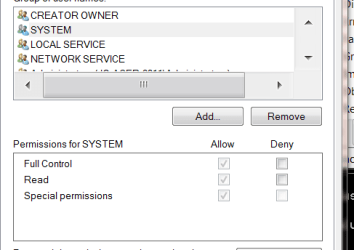
I opened regedit and the permissions for SYSTEM appear to be on.

REG QUERY for Services ran and I attach the file.

REG QUERY for DNS Cache said there was no key.

I attach screen shots of the message, the permissions and the presence of an Unknown user.

Thanks again, Jo

PS I had to zip the .txt file because it was too big - did I run it more than once perhaps?
 

Attachments

  • dhcpdns.zip
    dhcpdns.zip
    420.1 KB · Views: 4
  • extra user dnscache.PNG
    extra user dnscache.PNG
    11.7 KB · Views: 44
  • permissions.PNG
    permissions.PNG
    7.7 KB · Views: 44
  • no_key.PNG
    no_key.PNG
    3.1 KB · Views: 1

My Computer My Computer

At a glance

Microsoft Windows 7 Home Premium 64-bit 7601 ...Intel(R) Core(TM) i5 CPU M 480 @ 2.67GHz46GB 5.68GB available(1) LogMeIn Mirror Driver (2) Intel(R) HD Gra...
Computer type
Laptop
Computer Manufacturer/Model Number
ACER Aspire 5742
OS
Microsoft Windows 7 Home Premium 64-bit 7601 Multiprocessor Free Service Pack 1
CPU
Intel(R) Core(TM) i5 CPU M 480 @ 2.67GHz4
Motherboard
InsydeH2O Version V1.15
Memory
6GB 5.68GB available
Graphics Card(s)
(1) LogMeIn Mirror Driver (2) Intel(R) HD Graphics //////
Sound Card
(1) WDC WD5000BEVT-22A0RT0 (1) Realtek High Definition Au
Hard Drives
WDC WD5000BEVT-22A0RT0
Yeah - my mistake on the commands - but it contains the data we need, anyhow ;)
back later when I get time to digest it!
 

My Computer My Computer

At a glance

Win 7 x64 Home Premium (and x86 VirtualBox VM...i3 370M/i7 6500U8GB - finally :)/8GBit's an i3, dude!/dual Intel&nVidia
Computer type
Laptop
Computer Manufacturer/Model Number
Asus K52F or Lenovo B51-80
OS
Win 7 x64 Home Premium (and x86 VirtualBox VM)/Win10
CPU
i3 370M/i7 6500U
Motherboard
Asus/Lenovo
Memory
8GB - finally :)/8GB
Graphics Card(s)
it's an i3, dude!/dual Intel&nVidia
Sound Card
onboard
Monitor(s) Displays
15.6" built-in
Screen Resolution
1366x768/1920x1080
Hard Drives
750GB Seagate internal
Sundry external drives attached to other computers on the local network
1TB SSD on the Lenovo
PSU
n/a
Internet Speed
as much as I can get - usually on a dongle/phone, so <1MB/s
Antivirus
MSE/Defender
Browser
IE11/12/Edge/Chrome/FF(if I must)
Extra info - maybe irrelevant - dnsapi.dll

The thread seems to have got tangled.

I am too out of my depth to know if this is relevant - but from the outset the dnsapi.dll has been missing and the firewall was quarantining a trojan that arrived with the updates.
 

My Computer My Computer

At a glance

Microsoft Windows 7 Home Premium 64-bit 7601 ...Intel(R) Core(TM) i5 CPU M 480 @ 2.67GHz46GB 5.68GB available(1) LogMeIn Mirror Driver (2) Intel(R) HD Gra...
Computer type
Laptop
Computer Manufacturer/Model Number
ACER Aspire 5742
OS
Microsoft Windows 7 Home Premium 64-bit 7601 Multiprocessor Free Service Pack 1
CPU
Intel(R) Core(TM) i5 CPU M 480 @ 2.67GHz4
Motherboard
InsydeH2O Version V1.15
Memory
6GB 5.68GB available
Graphics Card(s)
(1) LogMeIn Mirror Driver (2) Intel(R) HD Graphics //////
Sound Card
(1) WDC WD5000BEVT-22A0RT0 (1) Realtek High Definition Au
Hard Drives
WDC WD5000BEVT-22A0RT0
The SFC scan doesn't show any problems about a missing dnsapi.dll - I suspect that it may have been part of your Trojan.
Are you getting the error at boot every time? What is the EXACT error message?
 

My Computer My Computer

At a glance

Win 7 x64 Home Premium (and x86 VirtualBox VM...i3 370M/i7 6500U8GB - finally :)/8GBit's an i3, dude!/dual Intel&nVidia
Computer type
Laptop
Computer Manufacturer/Model Number
Asus K52F or Lenovo B51-80
OS
Win 7 x64 Home Premium (and x86 VirtualBox VM)/Win10
CPU
i3 370M/i7 6500U
Motherboard
Asus/Lenovo
Memory
8GB - finally :)/8GB
Graphics Card(s)
it's an i3, dude!/dual Intel&nVidia
Sound Card
onboard
Monitor(s) Displays
15.6" built-in
Screen Resolution
1366x768/1920x1080
Hard Drives
750GB Seagate internal
Sundry external drives attached to other computers on the local network
1TB SSD on the Lenovo
PSU
n/a
Internet Speed
as much as I can get - usually on a dongle/phone, so <1MB/s
Antivirus
MSE/Defender
Browser
IE11/12/Edge/Chrome/FF(if I must)
Error msgs on boot

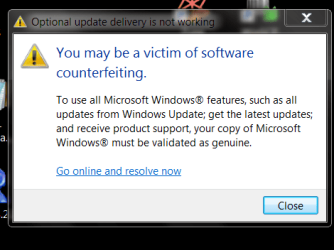
1. The Windows Activation / Windows is not genine / Get genuine now / Ask me later / 0x80070005

2. At bottom left: Windows 7 Build 7601 This copy of Windows is not genuine.

3. The next visible message is from Skype saying it cannot load then dnsapi.dll

4. Firefox crashes

5. Chrome and Opera hang.

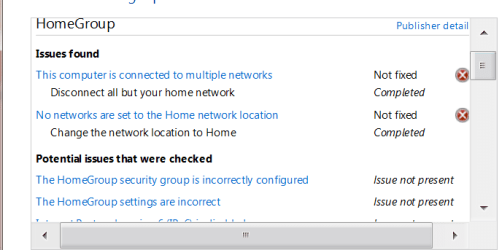
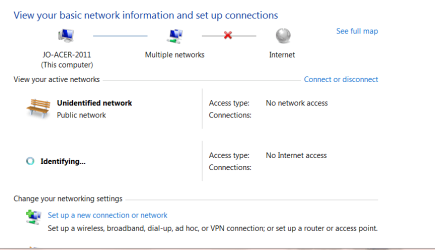
6. Somewhere after a restore the internet connection got scribbled (could no longer ping). I attach a screen shot and the log file. I can see the problem is the connection to an unidentified public network but I can't find how to disconnect it.

Thanks - I hope this is not trying your patience too much. Jo
 

Attachments

  • firefox_crash.PNG
    firefox_crash.PNG
    13.2 KB · Views: 35
  • network_connections.PNG
    network_connections.PNG
    14.5 KB · Views: 0
  • homegroup_diagnostics.PNG
    homegroup_diagnostics.PNG
    10.7 KB · Views: 35
  • Captur.PNG
    Captur.PNG
    14.5 KB · Views: 0
  • victim_of.PNG
    victim_of.PNG
    14.3 KB · Views: 35
  • homenetwork_diagnostics.zip
    homenetwork_diagnostics.zip
    142.4 KB · Views: 3

My Computer My Computer

At a glance

Microsoft Windows 7 Home Premium 64-bit 7601 ...Intel(R) Core(TM) i5 CPU M 480 @ 2.67GHz46GB 5.68GB available(1) LogMeIn Mirror Driver (2) Intel(R) HD Gra...
Computer type
Laptop
Computer Manufacturer/Model Number
ACER Aspire 5742
OS
Microsoft Windows 7 Home Premium 64-bit 7601 Multiprocessor Free Service Pack 1
CPU
Intel(R) Core(TM) i5 CPU M 480 @ 2.67GHz4
Motherboard
InsydeH2O Version V1.15
Memory
6GB 5.68GB available
Graphics Card(s)
(1) LogMeIn Mirror Driver (2) Intel(R) HD Graphics //////
Sound Card
(1) WDC WD5000BEVT-22A0RT0 (1) Realtek High Definition Au
Hard Drives
WDC WD5000BEVT-22A0RT0
That unknown ssid 556 relates to the fact that the machine has been turned into a domain controller, which is further confirmed by the multiple networks screenshot.
This in turn has modified permissions on this comp.

Firewalls DO NOT quarintine they block, and i have never known of any MS update containing a virus.
What AV are you running, and what were the last results from its log files
Roy
 

My Computer My Computer

At a glance

W7 home premium 32bit/W7HP 64bit/w10 tp insid...E5300 dual core3gbNvidia Geforce 7100 Nforce 630i
Computer type
PC/Desktop
Computer Manufacturer/Model Number
medionl/Aspire 6930G/acer x55a
OS
W7 home premium 32bit/W7HP 64bit/w10 tp insider ring
CPU
E5300 dual core
Motherboard
medion MS7366
Memory
3gb
Graphics Card(s)
Nvidia Geforce 7100 Nforce 630i
Monitor(s) Displays
avixc
Internet Speed
n (isp resticted to 72)
Antivirus
mse/pands
Browser
palemoon
Other Info
Belkin Fd7050 n USB using Railink RT2870 drivers, more upto date
Info requested by Roy

Thanks Roy - I am afraid I am out of my depth here. I am hoping Noel still has the patience to guide me through this.

The history was that I was away for two weeks and the original problem emerged when I powered up. I use Microsoft Security Essentials.

Thanks for the pointer. I will read up DC to be a little less ignorant of what is happening.

Jo
 

My Computer My Computer

At a glance

Microsoft Windows 7 Home Premium 64-bit 7601 ...Intel(R) Core(TM) i5 CPU M 480 @ 2.67GHz46GB 5.68GB available(1) LogMeIn Mirror Driver (2) Intel(R) HD Gra...
Computer type
Laptop
Computer Manufacturer/Model Number
ACER Aspire 5742
OS
Microsoft Windows 7 Home Premium 64-bit 7601 Multiprocessor Free Service Pack 1
CPU
Intel(R) Core(TM) i5 CPU M 480 @ 2.67GHz4
Motherboard
InsydeH2O Version V1.15
Memory
6GB 5.68GB available
Graphics Card(s)
(1) LogMeIn Mirror Driver (2) Intel(R) HD Graphics //////
Sound Card
(1) WDC WD5000BEVT-22A0RT0 (1) Realtek High Definition Au
Hard Drives
WDC WD5000BEVT-22A0RT0
I don't believe that it has anything to do with a Domain Controller?

Let's work on the basis that the dnsapi.dll is present - and check the permissions on it.

Open an Elevated Command Prompt, and run the following commands:

ICACLS C:\Windows\System32\dnsapi.dll /T
ICACLS C:\Windows\winsxs\dnsapi.dll /T
ICACLS C:\Windows\SysWOW64\dnsapi.dll /T
DIR C:\Windows\dnsapi.dll /S

(The last one will take a couple of minutes to complete - be patient!)

post the results...

Here are some instructions to make life easier :)
1) To open an Elevated Command Prompt Window (the ECP window), click on Start, All Programs, Accessories – then right-click on Command Prompt, and select Run as Administrator. Accept the UAC prompt.
2) To run the commands easier, highlight the block of commands, and right-click on the highlight – select Copy. In the CP Window, click on the black/white icon at top left – select Paste. The commands will run but may not complete the last command, so hit the Enter Key once.
3) To copy the results... click on the Black/White icon in the top left, and select Edit... 'Select All', and hit the Enter key - then use Ctrl+V or r-click+Paste to paste it into your response.
 

My Computer My Computer

At a glance

Win 7 x64 Home Premium (and x86 VirtualBox VM...i3 370M/i7 6500U8GB - finally :)/8GBit's an i3, dude!/dual Intel&nVidia
Computer type
Laptop
Computer Manufacturer/Model Number
Asus K52F or Lenovo B51-80
OS
Win 7 x64 Home Premium (and x86 VirtualBox VM)/Win10
CPU
i3 370M/i7 6500U
Motherboard
Asus/Lenovo
Memory
8GB - finally :)/8GB
Graphics Card(s)
it's an i3, dude!/dual Intel&nVidia
Sound Card
onboard
Monitor(s) Displays
15.6" built-in
Screen Resolution
1366x768/1920x1080
Hard Drives
750GB Seagate internal
Sundry external drives attached to other computers on the local network
1TB SSD on the Lenovo
PSU
n/a
Internet Speed
as much as I can get - usually on a dongle/phone, so <1MB/s
Antivirus
MSE/Defender
Browser
IE11/12/Edge/Chrome/FF(if I must)
Back
Top