
Windows Startup Repair query

Thanks, that worked :)
So now I can see my F Drive, the 4TB HDD. I'm going to move the user folders like Greg mentioned above.
Then, I will attempt to install Max and hopefully it puts its required document files in the moved documents folder, otherwise I will loose my mind! I'll post an update when I can.
 

My Computer My Computer

Computer type
PC/Desktop
Computer Manufacturer/Model Number
Dell Precision Tower 7910 Workstation
OS
Microsoft Windows 7 Professional 64-bit
CPU
Dual Xeon(R) CPU E5-2687W v3 @ 3.10GHz
Motherboard
Dell Inc. 0215PR
Memory
32.00 GB
Graphics Card(s)
NVIDIA Quadro K4200
Sound Card
(1) NVIDIA High Definition Audio (2) High Definition Audio
Hard Drives
(1) SK hynix SC210 2.5 7MM 256GB ATA Device
(2) ATA WDC WD4003FZEX-0 SCSI Disk Device
Antivirus
Avast Free and Malwarebytes Free
Browser
Chrome
Other Info
BIOS: BIOS Date: 04/14/15 18:58:26 Ver: A07.00
If that fails again, we will try the linking method.
 

My Computer My Computer

Computer type
PC/Desktop
Computer Manufacturer/Model Number
Custom Build
OS
Windows 7 Ultimate x64 SP1
CPU
AMD Phenom 2 1090T
Motherboard
Gigabyte GA-890FXA-UD5
Memory
2x8GB Kingston HyperX Fury Black 1600Mhz Unganged
Graphics Card(s)
MSI GTX 970 Gaming 4G
Sound Card
Realtek On-Board HD 7.1 Audio / Logitech G35
Monitor(s) Displays
3xAcer GD245HQ
Screen Resolution
1920x1080
Hard Drives
Samsung 850 Pro 512GB SSD - OS /
WD Caviar Black SATA 3 - 1 TBx2 - Dynamic RAID 0 /
WD Caviar Green SATA 2 - 640GBx2 - Dynamic RAID 0 /
WD Caviar Green SATA 2 - 640GB - Internal Backup /
Seagate Barracude SATA 3 - 3TB - External Backup/ Sync
PSU
HighPower 1000W
Case
Cooler Master HAF 932
Cooling
Noctua NH-D14
Keyboard
Logitech G19
Mouse
Logitech G500
Internet Speed
100/4 Mbit Cable (100GB quota)
Antivirus
ZoneAlarm Extreme Security / MBAM Pro / MBAE Free / SAS Free
Browser
IE 11 - Firefox - Chrome
Other Info
Logitech F710/ G27/ G940/ Z5500 // TrackIR 5 // Nvidia 3D Surround Vision
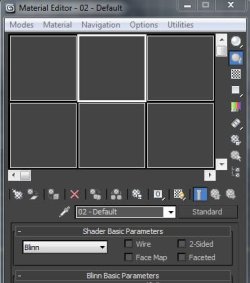
Hi, OK so the moved folders seems to have worked with Max 2012, I just wanted to install that version first as it was rock solid for me in the past. But, when it starts, if I click on anything, it crashes. So I installed the service pack 2 for Max. Now, I can open material editor, but it looks like the image attached. GokAy I think you are familiar with 3ds Max are you? This is very strange and very disappointing. Any ideas? Should I maybe install this from the Dell drivers site - nVIDIA 340.66 Driver supporting Windows 7 (64-bit), Windows 8 (64-bit), and Windows 8.1 (64-bit). Even when I hit render a blank scene upon startup - it crashes. Screebgrab of material editor:
 

Attachments

  • 3ds_Max_Material_Editor.JPG
    3ds_Max_Material_Editor.JPG
    27.1 KB · Views: 36

My Computer My Computer

Computer type
PC/Desktop
Computer Manufacturer/Model Number
Dell Precision Tower 7910 Workstation
OS
Microsoft Windows 7 Professional 64-bit
CPU
Dual Xeon(R) CPU E5-2687W v3 @ 3.10GHz
Motherboard
Dell Inc. 0215PR
Memory
32.00 GB
Graphics Card(s)
NVIDIA Quadro K4200
Sound Card
(1) NVIDIA High Definition Audio (2) High Definition Audio
Hard Drives
(1) SK hynix SC210 2.5 7MM 256GB ATA Device
(2) ATA WDC WD4003FZEX-0 SCSI Disk Device
Antivirus
Avast Free and Malwarebytes Free
Browser
Chrome
Other Info
BIOS: BIOS Date: 04/14/15 18:58:26 Ver: A07.00
Compare the Display and chipset drivers you have now with the latest on Dell's Support Downloads site for your Service tag #.
 
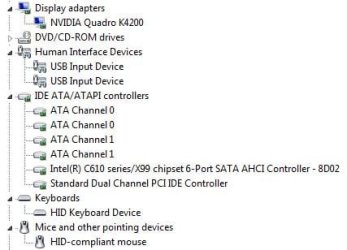
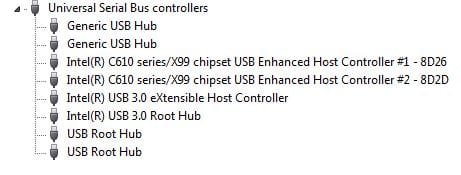
It tell me in my device manager that the display adapter is the most up to date and also for the chipset (Intel C610 series) I have added screenshots of my device manager for other devices and USB Controllers.

Also, I notice a driver on the Dell site that is 111 MB - it's called Intel Management Engine Components Installer Driver (Chipset_Driver_KTGFH_WN_10.0.2.1000_A00.EXE). Maybe I should install this?

Another thing that is insanely annoying is the keyboard turning off after every minute or so. Would installing this driver possibly fix this? Under 'Mouse, Keyboard & Input Devices (2 files)' there is:
1. Dell PCIe Serial Card Driver for Win8.1 64 bit
Input_Driver_X7PM4_WN_1.2.426.2014_A00.EXE

2. Dell USB Smartcard Keyboard Driver
IO_LOGI_W82_W84_A00_Setup-MC8V1_ZPE.exe
 

Attachments

  • Other_Devices.JPG
    Other_Devices.JPG
    26.6 KB · Views: 30
  • USB_Controllers.JPG
    USB_Controllers.JPG
    21.1 KB · Views: 30

My Computer My Computer

Computer type
PC/Desktop
Computer Manufacturer/Model Number
Dell Precision Tower 7910 Workstation
OS
Microsoft Windows 7 Professional 64-bit
CPU
Dual Xeon(R) CPU E5-2687W v3 @ 3.10GHz
Motherboard
Dell Inc. 0215PR
Memory
32.00 GB
Graphics Card(s)
NVIDIA Quadro K4200
Sound Card
(1) NVIDIA High Definition Audio (2) High Definition Audio
Hard Drives
(1) SK hynix SC210 2.5 7MM 256GB ATA Device
(2) ATA WDC WD4003FZEX-0 SCSI Disk Device
Antivirus
Avast Free and Malwarebytes Free
Browser
Chrome
Other Info
BIOS: BIOS Date: 04/14/15 18:58:26 Ver: A07.00
Yes, try installing the Mgmt Engine drivers .

Did you compare the Display driver installed with the latest on the Dell Downloads webpage? All that Latest Driver message means is that there isn't a newer one in Windows Update, which is not the only source.

Is this a USB keyboard? That driver seems to be for a USB keyboard. You can still try installing it. You can also trace the keyboard Hardware Identification to see if Dell lists the specific driver for the device, google for it or ask back here for help.
 
Yes, try installing the Mgmt Engine drivers .

Did you compare the Display driver installed with the latest on the Dell Downloads webpage? All that Latest Driver message means is that there isn't a newer one in Windows Update, which is not the only source.

Is this a USB keyboard? That driver seems to be for a USB keyboard. You can still try installing it. You can also trace the keyboard Hardware Identification to see if Dell lists the specific driver for the device, google for it or ask back here for help.

OK, I will try that. When I go to the properties of my display driver, it says it is version is 9.18.13.4752
On the Dell site, the only NVIDIA labelled one is called "nVIDIA 340.66 Driver supporting Windows 7 (64-bit), Windows 8 (64-bit), and Windows 8.1 (64-bit). Video_Driver_H3KDT_WN_9.18.13.4066_A00.EXE

Should that actually be installed also?

The keyboard is USB yeah and also the mouse. I do have another USB keyboard and was getting the same problem with that. But I haven't tested that other one since the reinstall.
 

My Computer My Computer

Computer type
PC/Desktop
Computer Manufacturer/Model Number
Dell Precision Tower 7910 Workstation
OS
Microsoft Windows 7 Professional 64-bit
CPU
Dual Xeon(R) CPU E5-2687W v3 @ 3.10GHz
Motherboard
Dell Inc. 0215PR
Memory
32.00 GB
Graphics Card(s)
NVIDIA Quadro K4200
Sound Card
(1) NVIDIA High Definition Audio (2) High Definition Audio
Hard Drives
(1) SK hynix SC210 2.5 7MM 256GB ATA Device
(2) ATA WDC WD4003FZEX-0 SCSI Disk Device
Antivirus
Avast Free and Malwarebytes Free
Browser
Chrome
Other Info
BIOS: BIOS Date: 04/14/15 18:58:26 Ver: A07.00
Where did the installed display adapter come from? It's newer than the Dell driver but I'd try them both.

I'd also try the keyboard driver then if necessary other keyboard.

Try to pinpoint when the install worked fine then what made it decline.
 
Hi,

I just want to give an update on my PC. Dell have agreed to send me a replacement SSD. They want me to return this current one. So once I have it to a level I am happy with with all my programs and tools installed, I plan to create the system image with Macrium then use that to load onto the new SSD.

That's the best thing do do right? Just to save me installing programs again and having to do the Windows Updates again. If it's not the best way forward, I have no problem just doing the fresh install again on the new SSD.

Hi Grey, the installed display adapter got installed with the Windows Updates. The install worked fine, even whey I got the PC this thing was happening with the keyboard cutting out after a minute or so. It's not something that has just happened all of a sudden.

I will try the keyboard driver
 

My Computer My Computer

Computer type
PC/Desktop
Computer Manufacturer/Model Number
Dell Precision Tower 7910 Workstation
OS
Microsoft Windows 7 Professional 64-bit
CPU
Dual Xeon(R) CPU E5-2687W v3 @ 3.10GHz
Motherboard
Dell Inc. 0215PR
Memory
32.00 GB
Graphics Card(s)
NVIDIA Quadro K4200
Sound Card
(1) NVIDIA High Definition Audio (2) High Definition Audio
Hard Drives
(1) SK hynix SC210 2.5 7MM 256GB ATA Device
(2) ATA WDC WD4003FZEX-0 SCSI Disk Device
Antivirus
Avast Free and Malwarebytes Free
Browser
Chrome
Other Info
BIOS: BIOS Date: 04/14/15 18:58:26 Ver: A07.00
Did Dell have you run tests to determine the SSD needs replacing? What exactly is the RMA based upon?
 
Only problem with it is under-performance, especially writes. It is supposed to be the OEM version of 840 Pro.

You should try a different keyboard on your PC, and take your keyboard somewhere else. I thought the keyboard problem started after new installation.

I believe you can just clone to new SSD. You can clean install if so much needed later anyway.
 

My Computer My Computer

Computer type
PC/Desktop
Computer Manufacturer/Model Number
Custom Build
OS
Windows 7 Ultimate x64 SP1
CPU
AMD Phenom 2 1090T
Motherboard
Gigabyte GA-890FXA-UD5
Memory
2x8GB Kingston HyperX Fury Black 1600Mhz Unganged
Graphics Card(s)
MSI GTX 970 Gaming 4G
Sound Card
Realtek On-Board HD 7.1 Audio / Logitech G35
Monitor(s) Displays
3xAcer GD245HQ
Screen Resolution
1920x1080
Hard Drives
Samsung 850 Pro 512GB SSD - OS /
WD Caviar Black SATA 3 - 1 TBx2 - Dynamic RAID 0 /
WD Caviar Green SATA 2 - 640GBx2 - Dynamic RAID 0 /
WD Caviar Green SATA 2 - 640GB - Internal Backup /
Seagate Barracude SATA 3 - 3TB - External Backup/ Sync
PSU
HighPower 1000W
Case
Cooler Master HAF 932
Cooling
Noctua NH-D14
Keyboard
Logitech G19
Mouse
Logitech G500
Internet Speed
100/4 Mbit Cable (100GB quota)
Antivirus
ZoneAlarm Extreme Security / MBAM Pro / MBAE Free / SAS Free
Browser
IE 11 - Firefox - Chrome
Other Info
Logitech F710/ G27/ G940/ Z5500 // TrackIR 5 // Nvidia 3D Surround Vision
Did Dell have you run tests to determine the SSD needs replacing? What exactly is the RMA based upon?

They had asked me to run a diagnostic test yes, please see post #226 & 229.

What do you mean by RMA?
 

My Computer My Computer

Computer type
PC/Desktop
Computer Manufacturer/Model Number
Dell Precision Tower 7910 Workstation
OS
Microsoft Windows 7 Professional 64-bit
CPU
Dual Xeon(R) CPU E5-2687W v3 @ 3.10GHz
Motherboard
Dell Inc. 0215PR
Memory
32.00 GB
Graphics Card(s)
NVIDIA Quadro K4200
Sound Card
(1) NVIDIA High Definition Audio (2) High Definition Audio
Hard Drives
(1) SK hynix SC210 2.5 7MM 256GB ATA Device
(2) ATA WDC WD4003FZEX-0 SCSI Disk Device
Antivirus
Avast Free and Malwarebytes Free
Browser
Chrome
Other Info
BIOS: BIOS Date: 04/14/15 18:58:26 Ver: A07.00
Only problem with it is under-performance, especially writes. It is supposed to be the OEM version of 840 Pro.

You should try a different keyboard on your PC, and take your keyboard somewhere else. I thought the keyboard problem started after new installation.

I believe you can just clone to new SSD. You can clean install if so much needed later anyway.

Here's what they said about the replacement when I asked what model it would be:

"It will be the same model as the one that you have now, but if that model is not available, it will be replaced with a different model/brand."

As I mentioned before, the keyboard is different to the one I used before, both are new. The first one I used was an Alienware one when I first got the PC and it kept cutting out, this current one is the one that shipped with it, a Dell keyboard. Both are USB.
 

My Computer My Computer

Computer type
PC/Desktop
Computer Manufacturer/Model Number
Dell Precision Tower 7910 Workstation
OS
Microsoft Windows 7 Professional 64-bit
CPU
Dual Xeon(R) CPU E5-2687W v3 @ 3.10GHz
Motherboard
Dell Inc. 0215PR
Memory
32.00 GB
Graphics Card(s)
NVIDIA Quadro K4200
Sound Card
(1) NVIDIA High Definition Audio (2) High Definition Audio
Hard Drives
(1) SK hynix SC210 2.5 7MM 256GB ATA Device
(2) ATA WDC WD4003FZEX-0 SCSI Disk Device
Antivirus
Avast Free and Malwarebytes Free
Browser
Chrome
Other Info
BIOS: BIOS Date: 04/14/15 18:58:26 Ver: A07.00
When I go to install the Intel Management Engine Components Installer Driver, I get a window that says:

"This computer currently contains driver versions newer than the versions you are about to install. Are you sure you want to overwrite the following drivers with the older versions?"

So I said no to that.

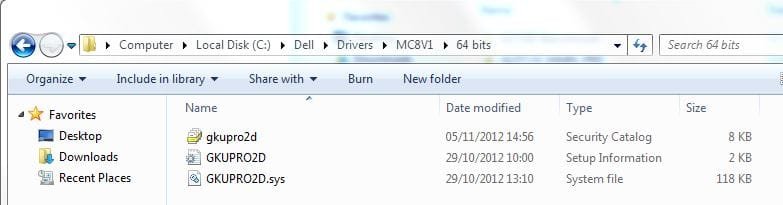
For the Dell USB Smartcard Keyboard Driver, I downloaded it, unzipped it and all. But nothing installed? It created the folder you can see below:
 

Attachments

  • Dell USB Smartcard Keyboard Driver.JPG
    Dell USB Smartcard Keyboard Driver.JPG
    27.6 KB · Views: 1

My Computer My Computer

Computer type
PC/Desktop
Computer Manufacturer/Model Number
Dell Precision Tower 7910 Workstation
OS
Microsoft Windows 7 Professional 64-bit
CPU
Dual Xeon(R) CPU E5-2687W v3 @ 3.10GHz
Motherboard
Dell Inc. 0215PR
Memory
32.00 GB
Graphics Card(s)
NVIDIA Quadro K4200
Sound Card
(1) NVIDIA High Definition Audio (2) High Definition Audio
Hard Drives
(1) SK hynix SC210 2.5 7MM 256GB ATA Device
(2) ATA WDC WD4003FZEX-0 SCSI Disk Device
Antivirus
Avast Free and Malwarebytes Free
Browser
Chrome
Other Info
BIOS: BIOS Date: 04/14/15 18:58:26 Ver: A07.00
In the device manager click on the keyboard device, then from the update tab choose update driver, then browse to that file to see if it will pick up the driver.
 
In the device manager click on the keyboard device, then from the update tab choose update driver, then browse to that file to see if it will pick up the driver.

I just tried that, it says Windows has determined that the driver is up to date
 

My Computer My Computer

Computer type
PC/Desktop
Computer Manufacturer/Model Number
Dell Precision Tower 7910 Workstation
OS
Microsoft Windows 7 Professional 64-bit
CPU
Dual Xeon(R) CPU E5-2687W v3 @ 3.10GHz
Motherboard
Dell Inc. 0215PR
Memory
32.00 GB
Graphics Card(s)
NVIDIA Quadro K4200
Sound Card
(1) NVIDIA High Definition Audio (2) High Definition Audio
Hard Drives
(1) SK hynix SC210 2.5 7MM 256GB ATA Device
(2) ATA WDC WD4003FZEX-0 SCSI Disk Device
Antivirus
Avast Free and Malwarebytes Free
Browser
Chrome
Other Info
BIOS: BIOS Date: 04/14/15 18:58:26 Ver: A07.00
What about if I right click on the keyboard drivers and uninstall them, then do a restart?
 

My Computer My Computer

Computer type
PC/Desktop
Computer Manufacturer/Model Number
Dell Precision Tower 7910 Workstation
OS
Microsoft Windows 7 Professional 64-bit
CPU
Dual Xeon(R) CPU E5-2687W v3 @ 3.10GHz
Motherboard
Dell Inc. 0215PR
Memory
32.00 GB
Graphics Card(s)
NVIDIA Quadro K4200
Sound Card
(1) NVIDIA High Definition Audio (2) High Definition Audio
Hard Drives
(1) SK hynix SC210 2.5 7MM 256GB ATA Device
(2) ATA WDC WD4003FZEX-0 SCSI Disk Device
Antivirus
Avast Free and Malwarebytes Free
Browser
Chrome
Other Info
BIOS: BIOS Date: 04/14/15 18:58:26 Ver: A07.00
Did you follow the instructions that came with the driver Download details?

Are you sure you have a smart card USB keyboard? If it's on the Dell downloads webpage then it would be a device with ships with the PC and not aftermarket. Google the exact name of the device to read about it to know for sure.

Otherwise with a USB keyboard it may be USB controller is the actual device controlling it. Try changing the USB port - is it plugged into a USB3 port which is blue inside?
 
Last edited:
Did you follow the instructions that came with the driver Download details?

Are you sure you have a smart card USB keyboard? If it's on the Dell downloads webpage then it would be a device with ships with the PC and not aftermarket. Google the exact name of the device to read about it to know for sure.

Otherwise with a USB keyboard it may be USB controller sketch are the actual device controlling it. Try changing the USB port. is it plugged into a USB3 port which is blue inside?

The actual model is Dell Keyboard KB212-B Dell 104 Quiet Key USB Keyboard - KB212-B : Computer Accessories | Dell
It seems to be less than every minute while typing that it just cuts out. Then I have to point the cursor to the end of my sentence and continue typing. No instructions came with the driver as far as I could see.

I tried plugging it into another USB port at the back of PC. Still the same nonsense.
 

My Computer My Computer

Computer type
PC/Desktop
Computer Manufacturer/Model Number
Dell Precision Tower 7910 Workstation
OS
Microsoft Windows 7 Professional 64-bit
CPU
Dual Xeon(R) CPU E5-2687W v3 @ 3.10GHz
Motherboard
Dell Inc. 0215PR
Memory
32.00 GB
Graphics Card(s)
NVIDIA Quadro K4200
Sound Card
(1) NVIDIA High Definition Audio (2) High Definition Audio
Hard Drives
(1) SK hynix SC210 2.5 7MM 256GB ATA Device
(2) ATA WDC WD4003FZEX-0 SCSI Disk Device
Antivirus
Avast Free and Malwarebytes Free
Browser
Chrome
Other Info
BIOS: BIOS Date: 04/14/15 18:58:26 Ver: A07.00

My Computer My Computer

Computer type
PC/Desktop
Computer Manufacturer/Model Number
Dell Precision Tower 7910 Workstation
OS
Microsoft Windows 7 Professional 64-bit
CPU
Dual Xeon(R) CPU E5-2687W v3 @ 3.10GHz
Motherboard
Dell Inc. 0215PR
Memory
32.00 GB
Graphics Card(s)
NVIDIA Quadro K4200
Sound Card
(1) NVIDIA High Definition Audio (2) High Definition Audio
Hard Drives
(1) SK hynix SC210 2.5 7MM 256GB ATA Device
(2) ATA WDC WD4003FZEX-0 SCSI Disk Device
Antivirus
Avast Free and Malwarebytes Free
Browser
Chrome
Other Info
BIOS: BIOS Date: 04/14/15 18:58:26 Ver: A07.00
Back
Top