
You are using an out of date browser. It may not display this or other websites correctly.
You should upgrade or use an alternative browser.
You should upgrade or use an alternative browser.
windows startup sound
- Thread starter Rose1
- Start date

Get any sound you want, rename it to Windows Startup.wav and replace the one in Windows\Media
My Computer
- Computer Manufacturer/Model Number
- MSI
- OS
- Windows 7 Professional 64bit
- CPU
- Intel Celeron 2.4 GH
- Memory
- 4 GB
- Graphics Card(s)
- NVidia GeForce 9800GT
- Sound Card
- ATI HDMI Audio
- Monitor(s) Displays
- Acer S231HL Dual Monitors
- Hard Drives
- Hitachi 300GB ATA
Maxtor 300GB USB
- Cooling
- Standard
- Keyboard
- Logitech wireless
- Mouse
- Logitech wireless
- Internet Speed
- Cable

- Local time
- 3:37 AM
- Messages
- 416
Get any sound you want, rename it to Windows Startup.wav and replace the one in Windows\Media
The windows startup wav is NOT in the list.
My Computer
- Computer type
- Laptop
- Computer Manufacturer/Model Number
- compaq
- OS
- windows Ultimate

- Local time
- 5:37 PM
- Messages
- 12,011
Get any sound you want, rename it to Windows Startup.wav and replace the one in Windows\Media
The windows startup wav is NOT in the list.
On my PC, the file is called "Windows Startup.wav" and is located at:
C:\Windows\winsxs\x86_microsoft-windows-shell-sounds_31bf3856ad364e35_6.1.7600.16385_none_16e8d25616dd2c98
My Computer
- Computer type
- PC/Desktop
- Computer Manufacturer/Model Number
- Ignatz Special; 4 speed manual gearbox; factory air conditioning; one of one
- OS
- Windows 7 Home Premium SP1, 64-bit
- CPU
- Intel Skylake i5-6600K, not overclocked
- Motherboard
- AsRock Z170M Extreme 4, micro ATX
- Memory
- 8 GB HyperX DDR4-2666 (2 x 4 GB)
- Graphics Card(s)
- none; graphics are integrated on CPU
- Sound Card
- onboard: Realtek ALC1150; external: USB Behringer UF0-202
- Monitor(s) Displays
- Dell S2340M 23 inch IPS
- Screen Resolution
- 1600 x 900
- Hard Drives
- System: Crucial MX100 series SSD, 128 GB;
Data: Samsung Spinpoint 103SJ, 1 TB;
Backup: WD Caviar Green WD30EZRX-00D8PB0, 3 TB
- PSU
- Rosewill SilentNight 500 watt fanless, semi-modular
- Case
- Antec Solo II
- Cooling
- Noctua NH-U12S; Noctua F12 intake, Noctua S12A exhaust
- Keyboard
- Microsoft 200 6JH-00001 USB
- Mouse
- Dell or Microsoft optical wired; USB
- Antivirus
- Microsoft Security Essentials and Malwarebytes Premium
- Browser
- Pale Moon
- Other Info
- All fans PWM; speeds at idle: CPU circa 500 rpm; intake circa 600 rpm; exhaust circa 600 rpm; CPU temps 27 idle and 47 C load in a warm room (27 C/81 F) when running Intel Extreme Tuning Utility stress test.

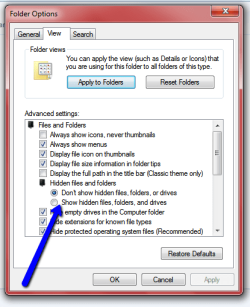
you may have to "show hidden folders" open a window click organise / folder and search options , view tab croll down and check the box show hidden folders, files etcGet any sound you want, rename it to Windows Startup.wav and replace the one in Windows\Media
The windows startup wav is NOT in the list.
My Computer
- Computer Manufacturer/Model Number
- Hewlett packard/p6512uk
- OS
- Microsoft Windows 7 Home Premium 64-bit 7600
- CPU
- IIx4 amd athelon 635 processor
- Motherboard
- FOXCONN 2AA9
- Memory
- 2x2gb
- Graphics Card(s)
- ati radeon HD 5450
- Sound Card
- (1) Realtek High Definition Audio (2) AMD High Definition
- Monitor(s) Displays
- samsung lcd tv 32"
- Screen Resolution
- 1360x 768
- Hard Drives
- (1) WDC WD10 01FAES-60Z2A0 SATA Disk Device (2) Maxtor OneTouch USB Device (3) ST310003 33AS USB Device (4) WD My Book 1111 USB Device
- PSU
- ?
- Cooling
- air!
- Keyboard
- wireless hp
- Mouse
- wireless Hp,optical
- Internet Speed
- 1.10mb/s
- Antivirus
- MSE
- Browser
- Firefox
- Local time
- 3:37 AM
- Messages
- 416
you may have to "show hidden folders" open a window click organise / folder and search options , view tab croll down and check the box show hidden folders, files etcGet any sound you want, rename it to Windows Startup.wav and replace the one in Windows\Media
The windows startup wav is NOT in the list.
View attachment 131966
Ok, done that and still NOT in the sound list.
My Computer
- Computer type
- Laptop
- Computer Manufacturer/Model Number
- compaq
- OS
- windows Ultimate
Ok ,im not sure this will work but its worth a shot. right click the desktop select personalise then click sounds ,in the window that opens scroll to and select windows logon, then next to the test button click browse .
Browse to the sound file you want to use then click open then apply, see how you go.
edit : found this tutorial by brink
http://www.sevenforums.com/tutorials/63398-startup-sound-change-windows-7-a.html
Browse to the sound file you want to use then click open then apply, see how you go.
edit : found this tutorial by brink
http://www.sevenforums.com/tutorials/63398-startup-sound-change-windows-7-a.html
Last edited:
My Computer
- Computer Manufacturer/Model Number
- Hewlett packard/p6512uk
- OS
- Microsoft Windows 7 Home Premium 64-bit 7600
- CPU
- IIx4 amd athelon 635 processor
- Motherboard
- FOXCONN 2AA9
- Memory
- 2x2gb
- Graphics Card(s)
- ati radeon HD 5450
- Sound Card
- (1) Realtek High Definition Audio (2) AMD High Definition
- Monitor(s) Displays
- samsung lcd tv 32"
- Screen Resolution
- 1360x 768
- Hard Drives
- (1) WDC WD10 01FAES-60Z2A0 SATA Disk Device (2) Maxtor OneTouch USB Device (3) ST310003 33AS USB Device (4) WD My Book 1111 USB Device
- PSU
- ?
- Cooling
- air!
- Keyboard
- wireless hp
- Mouse
- wireless Hp,optical
- Internet Speed
- 1.10mb/s
- Antivirus
- MSE
- Browser
- Firefox
- Local time
- 3:37 AM
- Messages
- 416
Also, done that and NOPE.Ok ,im not sure this will work but its worth a shot. right click the desktop select personalise then click sounds ,in the window that opens scroll to and select windows logon, then next to the test button click browse .
Browse to the sound file you want to use then click open then apply, see how you go.
edit : found this tutorial by brink
http://www.sevenforums.com/tutorials/63398-startup-sound-change-windows-7-a.html
My Computer
- Computer type
- Laptop
- Computer Manufacturer/Model Number
- compaq
- OS
- windows Ultimate
OK would you settle for a personal greeting from your pc when you logon?
look here
look here
My Computer
- Computer Manufacturer/Model Number
- Hewlett packard/p6512uk
- OS
- Microsoft Windows 7 Home Premium 64-bit 7600
- CPU
- IIx4 amd athelon 635 processor
- Motherboard
- FOXCONN 2AA9
- Memory
- 2x2gb
- Graphics Card(s)
- ati radeon HD 5450
- Sound Card
- (1) Realtek High Definition Audio (2) AMD High Definition
- Monitor(s) Displays
- samsung lcd tv 32"
- Screen Resolution
- 1360x 768
- Hard Drives
- (1) WDC WD10 01FAES-60Z2A0 SATA Disk Device (2) Maxtor OneTouch USB Device (3) ST310003 33AS USB Device (4) WD My Book 1111 USB Device
- PSU
- ?
- Cooling
- air!
- Keyboard
- wireless hp
- Mouse
- wireless Hp,optical
- Internet Speed
- 1.10mb/s
- Antivirus
- MSE
- Browser
- Firefox
- Local time
- 3:37 AM
- Messages
- 416
I have the dangerous creature sound, but where can I put it on the startup sound?OK would you settle for a personal greeting from your pc when you logon?
look here
My Computer
- Computer type
- Laptop
- Computer Manufacturer/Model Number
- compaq
- OS
- windows Ultimate
im afraid the link i gave you is a txt to speech workaround with anna greeting you or saying something VERY rude if you choose ,did you click the look here in orange ,its a link!
My Computer
- Computer Manufacturer/Model Number
- Hewlett packard/p6512uk
- OS
- Microsoft Windows 7 Home Premium 64-bit 7600
- CPU
- IIx4 amd athelon 635 processor
- Motherboard
- FOXCONN 2AA9
- Memory
- 2x2gb
- Graphics Card(s)
- ati radeon HD 5450
- Sound Card
- (1) Realtek High Definition Audio (2) AMD High Definition
- Monitor(s) Displays
- samsung lcd tv 32"
- Screen Resolution
- 1360x 768
- Hard Drives
- (1) WDC WD10 01FAES-60Z2A0 SATA Disk Device (2) Maxtor OneTouch USB Device (3) ST310003 33AS USB Device (4) WD My Book 1111 USB Device
- PSU
- ?
- Cooling
- air!
- Keyboard
- wireless hp
- Mouse
- wireless Hp,optical
- Internet Speed
- 1.10mb/s
- Antivirus
- MSE
- Browser
- Firefox
Similar threads
- Replies
- 6
- Views
- 3K

- Replies
- 4
- Views
- 3K
