Windows Update 8024402F error

Log show no errors. Humm.....
Could you please attach windowsupdate.log
Location: C:\Windows
 

My Computer

Computer type
PC/Desktop
Computer Manufacturer/Model Number
HP Desktop & Compaq Laptop
OS
Win 10 x64, Linux Lite, Win 7 x64, BlackArch, & Kali
Hard Drives
Samsung 850 Pro 256Gb,
Hitachi HDD 1Tb,
Crucial MX SSD 250Gb
Segate 3Tb USB 3.0 Ext. Backup HDD
Internet Speed
150Mbps dn, 20Mbps up
Antivirus
Avast Free, Malwarebytes Anti-Exploit & Anti-Ransomware
Browser
Firefox, Chrome, Opera, & VPN
The updates that Snick was talking about are:

KB3020369 - Servicing Stack Update - April 2015.
KB3125574 - Convenience Rollup Package - May 2016.
KB3172605 - Functional Update Rollup (THIS ONE IS IMPORTANT) - July 2016.
KB3179573 - Functional Update Rollup - August 2016.

Then either:

KB4054518 - Security Monthly Quality Rollup Update – December 2017.

...Or:

ALL the Security Only Quality Updates from October 2016 to December 2017.

Thank you for posting that helpful list.
 

My Computer

Computer type
PC/Desktop
Computer Manufacturer/Model Number
I do not know. It was put together with separately purchased parts.
OS
Windows 7 Ultimate 64-bit SP1
CPU
Intel Core i5-3570K
Motherboard
ASUS P8Z77-V PRO
Memory
Corsair Vengeance Blue 4x8 GB
Graphics Card(s)
Nvidia GTX 1060
Sound Card
M-Audio Delta 1010LT
Monitor(s) Displays
2 Asus VS247H-P 23.6-Inch LED-Lit LCD monitors
Screen Resolution
1920x1080
Hard Drives
Western Digital WD1002FAEX Caviar Black 1TB SATA III
(no SSD)
My Passport Ultra external hard drive 2TB
PSU
CORSAIR RM650 650W 80 PLUS GOLD Full Modular PSU
Case
Corsair Obsidian Series Black 550D Mid Tower
Cooling
Zalman CNPS9500AT CPU Cooler
Keyboard
Azio Large Print Tri-Color Backlit Wired Keyboard (KB505U)
Mouse
Logitech Gaming Mouse G300
Internet Speed
6-8Mbps down, 2Mbps up
Antivirus
Malwarebytes Premium
Browser
IE, Firefox, Chrome
Other Info
2nd PC: Dell Dimension 4600
OS: Windows 7 Home Premium 32-bit SP1
PSU: EVGA 500W 80+ thingo
CPU: Intel Pentium 4
RAM: 3.00 GB Dual Channel DDR @ 199MHz
MB: Dell 02Y832
GPU: 512MB Nvidia GeForce 6200
HDD: 465GB WDC WD5000AAKS-00A7B2 ATA (SATA)
Opt Drive: HL-DT-ST DVD-ROM GDR8162B ATA Device
Opt Drive: TSSTcorp CD-RW TS-H292C ATA Device
Audio: Creative SB Live
Monitor: Asus-VS247H-P
I attach two logs from last night and also this morning. Last night when I did this procedure I was not connected to the internet.

Looking at the worst case scenario I will have to clean install but this is a very time consuming process and all these errors may happen again on a fresh pc. I do not want to do this now and not on two computers.

In the meantime is there any way of manually finding out which updates are missing and manually installing them? Also is there a facility to get email messages for new updates. This is a far from ideal solution but I am only looking at a temporary measures while this problem may or may not be resolved.
 

My Computer

Computer type
PC/Desktop
OS
Windows 7 HP & Pro 64 bit
Hi Efdy,

Thank you for posting that helpful list.

I hope it helped the OP.
You probably noticed that I only included updates upto the end of 2017.
This was deliberate because of the problems with meltdown etc and updates that kept appearing even after they had been installed.
 

My Computer

Computer type
Laptop
Computer Manufacturer/Model Number
Fujitsu LIFEBOOK
OS
Win 7 HP SP1 64-bit Vista HB SP2 32-bit Linux Mint 18.3
CPU
Intel(R) Pentium(R) CPU P6200 @ 2.13GHz
Motherboard
FUJITSU FJNBB06
Memory
4.00 GB
Graphics Card(s)
Intel(R) Graphics Media Accelerator HD
Sound Card
[1] Realtek High Definition Audio [2] Intel(R) Display Audio
Screen Resolution
1366 x 768 x 32 bits (4294967296 colors) @ 59 Hz
Hard Drives
TOSHIBA MK5076GSX
Antivirus
AVG FREE
meridius21,
Thanks for the windowsupdate.logs!
copy and paste below into your URL/Address Bar

[FONT=&quot]http://download.windowsupdate.com/msdownload/update/common/2011/05/4321798_2393e147c9b3cdbf2425c45fe87bcb8c9cac2da3.cab

[/FONT]The results should be a popup file, if it appears, cancel the download and run the batch file below and try win update again. If it doesn't then your AV/Firewall/ect is blocking WU
Reset_Windows_Update_Full.bat

 
Last edited:

My Computer

Computer type
PC/Desktop
Computer Manufacturer/Model Number
HP Desktop & Compaq Laptop
OS
Win 10 x64, Linux Lite, Win 7 x64, BlackArch, & Kali
Hard Drives
Samsung 850 Pro 256Gb,
Hitachi HDD 1Tb,
Crucial MX SSD 250Gb
Segate 3Tb USB 3.0 Ext. Backup HDD
Internet Speed
150Mbps dn, 20Mbps up
Antivirus
Avast Free, Malwarebytes Anti-Exploit & Anti-Ransomware
Browser
Firefox, Chrome, Opera, & VPN
I have followed all your instructions and same result. I will have to look into AV issues and get back to this post with an update...
 

My Computer

Computer type
PC/Desktop
OS
Windows 7 HP & Pro 64 bit
Couple more things to try:
Run the network troubleshooter
Right-click the Network or icon in the notification area, and then select Troubleshoot problems.
Follow the steps in the wizard to diagnose and resolve your network problems.
Run Windows Update again.
If still not working:
Run Troubleshooter for Windows 7 Try running Windows Update again
Still not working
I'd Repair install follow post #5
 

My Computer

Computer type
PC/Desktop
Computer Manufacturer/Model Number
HP Desktop & Compaq Laptop
OS
Win 10 x64, Linux Lite, Win 7 x64, BlackArch, & Kali
Hard Drives
Samsung 850 Pro 256Gb,
Hitachi HDD 1Tb,
Crucial MX SSD 250Gb
Segate 3Tb USB 3.0 Ext. Backup HDD
Internet Speed
150Mbps dn, 20Mbps up
Antivirus
Avast Free, Malwarebytes Anti-Exploit & Anti-Ransomware
Browser
Firefox, Chrome, Opera, & VPN
There has been a positive development but I am holding my breath...

I uninstalled the AV, tried Windows Update and got error code of 8024402F.

Then I reinstalled the AV and tried Windows Update and it reports "Windows is up to date".

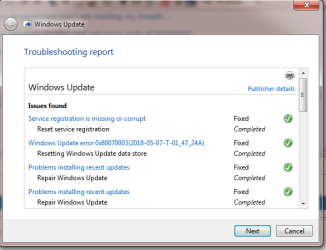
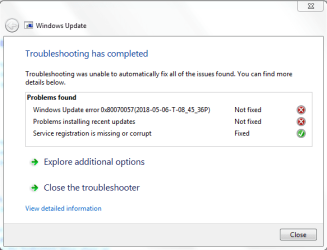
I ran WindowsUpdate.diagcab twice. It says "Windows Update error 0x80070003 not fixed" but the troubleshooting report says it's OK (see attached).

The other problem I am getting after the AV reinstall is in Firefox where each page I try to get into says "Your connection is not secure". I will need to look into this further.
 

Attachments

  • TSR.png
    TSR.png
    18.3 KB · Views: 27

My Computer

Computer type
PC/Desktop
OS
Windows 7 HP & Pro 64 bit
The other problem I am getting after the AV reinstall is in Firefox where each page I try to get into says "Your connection is not secure". I will need to look into this further.

This appears to have righted itself on restart.
 

My Computer

Computer type
PC/Desktop
OS
Windows 7 HP & Pro 64 bit
AWESOME!
Your other computer will most likely have the same fix.
Glad to be able to assist you in resolving your issue. I very much enjoy working with Win Update issues, as it's quite often, not a simple fix, and a learning experience each and every day!

I had the same message on FF a few weeks ago when Quantum was rendering blank tabs, or freezing. I have crash reports, etc. enabled to upload to Mozilla. Obviously Mozilla is still ironing out the bugs in Quantum, which appears to be running sweet now.

I'm a student at WCCCD, Cybrary, CareerAcademy, member of ITintheD CareerAcademy on Facebook, & in the process of beginning expert training at Sysnative, GeekU and BleepingComputers. Win Update, BSOD & Malware Removal. 65 as of March, and kickin' the kid's behinds in classes.

Yep, I spend most of the day studying and on SevenForums trying to apply what I've learned assisting others.

BTW: From experience Windows system restore, etc. is quirky, and usually when you need it, it fails. Use a third party backup. Macrium Reflect free is regularly recommended by others on SevenForums, as do I, and I also recommend AOMEI Backupper free, which I use. AOMEI has a simple GUI and I've found it easier for the not-so-tech savvy computer users. External HDDs, cheaper, larger data capacity and more secure data storage than SSDs.

Have a GREAT DAY & Happy Computing!

Nic

 

My Computer

Computer type
PC/Desktop
Computer Manufacturer/Model Number
HP Desktop & Compaq Laptop
OS
Win 10 x64, Linux Lite, Win 7 x64, BlackArch, & Kali
Hard Drives
Samsung 850 Pro 256Gb,
Hitachi HDD 1Tb,
Crucial MX SSD 250Gb
Segate 3Tb USB 3.0 Ext. Backup HDD
Internet Speed
150Mbps dn, 20Mbps up
Antivirus
Avast Free, Malwarebytes Anti-Exploit & Anti-Ransomware
Browser
Firefox, Chrome, Opera, & VPN
Just for comparisons I ran WindowsUpdateDiag.cab. All scans, tests, SURT, SFC, chkdsk, are good, but WUD.cab shows errors which are incorrect. No problem installing Windows Updates

Capture.PNG
 
Last edited:

My Computer

Computer type
PC/Desktop
Computer Manufacturer/Model Number
HP Desktop & Compaq Laptop
OS
Win 10 x64, Linux Lite, Win 7 x64, BlackArch, & Kali
Hard Drives
Samsung 850 Pro 256Gb,
Hitachi HDD 1Tb,
Crucial MX SSD 250Gb
Segate 3Tb USB 3.0 Ext. Backup HDD
Internet Speed
150Mbps dn, 20Mbps up
Antivirus
Avast Free, Malwarebytes Anti-Exploit & Anti-Ransomware
Browser
Firefox, Chrome, Opera, & VPN
Yes you are either interested in computing or not. For me Security First is the motto especially on an ailing Windows 7 computer.... I attach WindowsUpdate.log. I hope it shows that the process is approaching normal...

I reinstalled the AV on the other computer but don't have the same result. I haven't had a chance to test things further but this will happen hopefully later tonight.

It was a very late night last night and I will only be able to get back to this post later today but thanks for pushing me on this.

I never studied computing but have had my late nights with Windows and have experimented with Linux...
 

Attachments

Last edited:

My Computer

Computer type
PC/Desktop
OS
Windows 7 HP & Pro 64 bit
I'll have a look see at the WU.log
CheckSUR.log too, when you get a chance, please.

Copy & paste the following into url
[FONT=&quot]http://download.windowsupdate.com/c/msdownload/update/others/2015/02/16506821_b6d5a3e0360582e789b5d50a598fd8909fea02c5.cab[/FONT]
If you get a popup to download
Check Time and Date
Run
Malwarebytes
:orb: searchbox Type network troubleshooter click on
Identify and repair network problems
Try Windows Update again
still not working
run
Windows Update Troubleshooter
Try Window Update again
 
Last edited:

My Computer

Computer type
PC/Desktop
Computer Manufacturer/Model Number
HP Desktop & Compaq Laptop
OS
Win 10 x64, Linux Lite, Win 7 x64, BlackArch, & Kali
Hard Drives
Samsung 850 Pro 256Gb,
Hitachi HDD 1Tb,
Crucial MX SSD 250Gb
Segate 3Tb USB 3.0 Ext. Backup HDD
Internet Speed
150Mbps dn, 20Mbps up
Antivirus
Avast Free, Malwarebytes Anti-Exploit & Anti-Ransomware
Browser
Firefox, Chrome, Opera, & VPN
I guess last night's news was too good to be true! I suspected it might be a false positive...

I am back to square one.

CheckSUR.log attached.

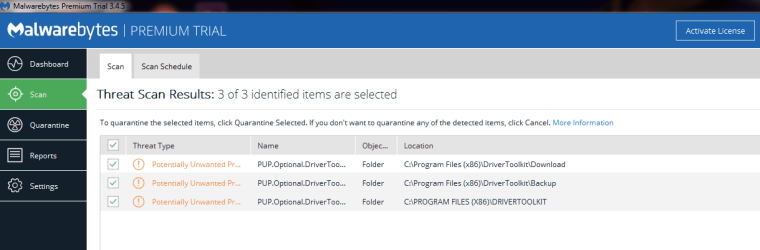
Malwarebytes scan attached. Folders shown are completely empty including hidden files. My normal IS suite is KIS.

Ran Network Troubleshooter, Windows Update and Windows Update Troubleshooter.

From services.msc changed Windows Update startup from Automatic (Delayed Start) to Automatic.

Could not follow/understand your instruction on checking time and date but my time zone is currently GMT +2 (i.e. BST +1).

Windows Update is showing same/previous error code.

Is a clean install on the cards when I get the time?!

I have another computer with Windows 10. Is it worth leaving Windows 7 behind now? It is much easier in terms of the GUI. Also Windows 10 has build issues. After a new build there always seems to be some sort of crisis which we have to work around.

I am not that happy with flaws in the update process as it means gaps in my security which KIS may not be able to cover.

I don't think Ubuntu is a realistic option as we are living in a Windows world and for all its faults the job eventually gets done...

Should I run SURT again?
 

Attachments

  • CheckSUR.log
    CheckSUR.log
    395 bytes · Views: 2
  • Malwarebytes_07.05.2018.png
    Malwarebytes_07.05.2018.png
    19.1 KB · Views: 1

My Computer

Computer type
PC/Desktop
OS
Windows 7 HP & Pro 64 bit
YOu can delete the findings of Malwarebytes, PUPs (Potentially Unwanted Programs) Check date and time to see if they are correct for your timezone correct for your location, and Tab Internet Time set to time.Windows.com If those have somehow changes, it could cause issue with WinUpdate.
SURT is clean, no need to rerun. Give this a try on your 2nd computer that you didn't run it on:
Reset_Windows_Update_Full.bat
And try Win Update one last time.
See Post #5 Repair Install, not clean.
Make sure you have your 25 character CD/product key. Product ID, Control Panel > System is not your CD key. If your computers still have the sticker on them. I'd still check for a match. Windows store the CD/product key as hexadecimal, not alpha-numeric, and has to be deciphered
KeyFinder | Magical Jelly Bean

Nic
 

My Computer

Computer type
PC/Desktop
Computer Manufacturer/Model Number
HP Desktop & Compaq Laptop
OS
Win 10 x64, Linux Lite, Win 7 x64, BlackArch, & Kali
Hard Drives
Samsung 850 Pro 256Gb,
Hitachi HDD 1Tb,
Crucial MX SSD 250Gb
Segate 3Tb USB 3.0 Ext. Backup HDD
Internet Speed
150Mbps dn, 20Mbps up
Antivirus
Avast Free, Malwarebytes Anti-Exploit & Anti-Ransomware
Browser
Firefox, Chrome, Opera, & VPN
Many thanks for all these tips. I have learnt a lot throughout this process even if the result is not what I wanted.

Does a repair install keep applications like Office etc? If not I will probably go for a clean install. I can't afford the downtime over the next 2 weeks or so but will get on to this when the time is right.

I found some other products online called WSUS and Autopatcher but have no experience of them. Do you know if they are reliable as an interim solution?

I think a lot of this problem comes from Microsoft. There have been a few dodgy updates recently that duplicate themselves. This issue is no joke. Some banks are still using Windows 7 so I don't know what they do.
 

My Computer

Computer type
PC/Desktop
OS
Windows 7 HP & Pro 64 bit
Been meticulously scrutinizing your WindowsUpdate.log
Are you using a proxy?
2018-04-30 10:41:56:790 544 1704 Misc WARNING: Send failed with hr = 80072efe.
2018-04-30 10:41:56:790 544 1704 Misc WARNING: SendRequest failed with hr = 80072efe. Proxy List used: <(null)> Bypass List used : <(null)> Auth Schemes used : <>
2018-04-30 10:41:56:790 544 1704 Misc FATAL: SOAP/WinHttp - SendRequest: SendRequestUsingProxy failed. error 0x80072efe
 

My Computer

Computer type
PC/Desktop
Computer Manufacturer/Model Number
HP Desktop & Compaq Laptop
OS
Win 10 x64, Linux Lite, Win 7 x64, BlackArch, & Kali
Hard Drives
Samsung 850 Pro 256Gb,
Hitachi HDD 1Tb,
Crucial MX SSD 250Gb
Segate 3Tb USB 3.0 Ext. Backup HDD
Internet Speed
150Mbps dn, 20Mbps up
Antivirus
Avast Free, Malwarebytes Anti-Exploit & Anti-Ransomware
Browser
Firefox, Chrome, Opera, & VPN
I have not had a serious continuous backup plan for my operating system as a home user, except for the system image that was created after the main clean install quite a while ago. I didn't get into Acronis etc. because the important data is partitioned and I can deal with minimal os downtime even though it is a pain in the neck. The current strategy may have to be reviewed at some point!

I will experiment at a leisurely pace until the end of the month. I am well into my monthly data allowance (I have already used 20GB...) and need to use it sparingly for the next two weeks so can't experiment with downloads until then.

This has now brought up the issue of that should we be using Windows 7 at all and if possible should we not upgrade to Windows 10. Sometimes though these older laptops (2011 and pre 2011) don't adapt well if at all to new operating systems and Windows 10 can also have its problems with updates.

Unfortunately I never really took to programming except for some very basic SQL and VBA. I am sure it could be better taught and made more interesting.

I seem to enjoy the element of problem solving that is linked to the functioning (or not...) of operating systems. I seem to have got through most problems over the last few years with trial and a lot of error but this particular Windows Update problem is one that has stuck more than others. It's a bit like a game. I normally win but this time I may have been caught out. However, it's not game over yet...
 

My Computer

Computer type
PC/Desktop
OS
Windows 7 HP & Pro 64 bit
Been meticulously scrutinizing your WindowsUpdate.log
Are you using a proxy?
2018-04-30 10:41:56:790 544 1704 Misc WARNING: Send failed with hr = 80072efe.
2018-04-30 10:41:56:790 544 1704 Misc WARNING: SendRequest failed with hr = 80072efe. Proxy List used: <(null)> Bypass List used : <(null)> Auth Schemes used : <>
2018-04-30 10:41:56:790 544 1704 Misc FATAL: SOAP/WinHttp - SendRequest: SendRequestUsingProxy failed. error 0x80072efe

I'll have to check this again. I shouldn't be unless it's something to do with KIS but this has been around for some time.

IE is set to Automatically detect settings (LAN). I also have Firefox and Chrome installed but I am not sure if any settings would have an effect on Windows Update.

I had to change a procedure on another computer with Windows 10 build 1709 just to get an internet connection. Let me look at my notes again and try a few things out and get back to this post if I get a positive result.
 
Last edited:

My Computer

Computer type
PC/Desktop
OS
Windows 7 HP & Pro 64 bit
[FONT=&quot]Note the time differential between the two. Is that the period you disabled your internet security suite?
Here's portion of WUlog before errors
[/FONT][FONT=&quot]2018-04-29 13:09:24:109 556 3d0 Agent * Access type: No proxy[/FONT]

And after
2018-04-29 13:37:56:308 556 13fc PT +++++++++++ PT: Synchronizing server updates +++++++++++
2018-04-29 13:37:56:308 556 13fc PT + ServiceId = {7971F918-A847-4430-9279-4A52D1EFE18D}, Server URL = https://fe2.update.microsoft.com/v6/ClientWebService/client.asmx
2018-04-29 13:39:03:821 556 13fc Misc WARNING: Send failed with hr = 80072ee7.
2018-04-29 13:39:03:821 556 13fc Misc WARNING: SendRequest failed with hr = 80072ee7. Proxy List used: <(null)> Bypass List used : <(null)> Auth Schemes used : <>
[FONT=&quot]2018-04-29 13:39:03:822 556 13fc Misc WARNING: WinHttp: SendRequestUsingProxy failed for <http://download.windowsupdate.com/msdownload/update/common/2011/05/4321798_2393e147c9b3cdbf2425c45fe87bcb8c9cac2da3.cab>. error 0x8024402c

Copy and paste bold text below into URL, if you get a popup to download, your security suite firewall is blocking WinUpdate from accessing server. You'll have to add an exception to your firewall rules to permit WU to access its server.
[/FONT]

[FONT=&quot][FONT=&quot]http://download.windowsupdate.com/msdownload/update/common/2011/05/4321798_2393e147c9b3cdbf2425c45fe87bcb8c9cac2da3.cab[/FONT][/FONT]
 

My Computer

Computer type
PC/Desktop
Computer Manufacturer/Model Number
HP Desktop & Compaq Laptop
OS
Win 10 x64, Linux Lite, Win 7 x64, BlackArch, & Kali
Hard Drives
Samsung 850 Pro 256Gb,
Hitachi HDD 1Tb,
Crucial MX SSD 250Gb
Segate 3Tb USB 3.0 Ext. Backup HDD
Internet Speed
150Mbps dn, 20Mbps up
Antivirus
Avast Free, Malwarebytes Anti-Exploit & Anti-Ransomware
Browser
Firefox, Chrome, Opera, & VPN
Back
Top