Windows Update 8024402F error

No problem, glad to be able to try and assist you.
Yes, repair install keeps applications like Office, all your personal files, etc. Read my post #5
Click all the hypertext links and more reading, except for Brian's excellent video as he verbally and visually walks you through the process
. Piece of cake actually.

Always create a full system image to external hard drive before you start, better safe than sorry. I don't believe you'll have any problems with the repair install. Sometimes, with massive corruptions, which you don't have, repair install fails due to component hive damage and that has to be dealt with to permit repair install to complete.

Windows Server Update Services (WSUS), previously known as Software Update Services (SUS), is a computer program developed by Microsoft Corporation that enables administrators to manage the distribution of updates and hotfixes released for Microsoft products to computers in a corporate environment.

AutoPatcher is an offline updater and alternative to Microsoft Update that can be used for installing software patches, service packs and other updates for certain Microsoft Windows systems.

AutoPatcher/WSUS/Other, which do you use and why?

Haven't used them, so I can't say anything about reliability. For the most part M$ Windows Update works fine. Best practice is to backup your systems regularly, as I stated earlier, external HDDs are the best choice for backups. If everyone routinely backed up their systems, they could eliminate the problems by reimaging their drive with a known working prior backup.

Quite often, I attempt to create the same problems as an OP is experiencing on their computers, on one of mine, to be able to hands on troubleshoot. Saves time and frustration on OPs behalf with the whole process.

M$ reissues quite a few patches/updates, and supersedes some, thus the reappear. The process of creating a patch, update, etc. is actually quite rigorous on M$ part. They have to test it, with a number of different configurations of Windows, installed 3rd party software, etc., to check for compatibility, and sometimes, unfortunately, it doesn't go as planned.

I did quite a bit of programming back in the day, and I can attest to the rigors of compatibility. I authored a GED program for Apple IIe and GS, and was a learning experience, to say the least. Had an issue with the super serial card not recognizing tab stops when printing and it frustrated me for more than a month. I'd write the code, meticulously check the code for syntax errors (typos), run the code and the tab stops didn't happen. Didn't have the internet back in the day, and I stumbled across the solution with a typo, of all things. Turned out, the SS card had a programming flaw that required an entry of two code characters back to back and then the card recognized the tab sets and work. Learned a valuable lesson, thus, the 1st line of my footer.

Banks, hospitals, etc, have many legacy (older) programs which they use with critical operations, and work as intended on Windows 7, an upgrade of the OS has the potential to break/render non-working, many of those critical systems and is the primary reason they don't upgrade, at least not yet. ATM machines, in particular, still run Windows XP.

Microsoft doesn't plan to stop fixing security problems (with updates) in Windows 7 until extended support ends. That's January 14, 2020--five years and a day from the end of mainstream support.

Here's som more reading for you on how various AVs perform.
AV-Comparatives Independent Tests of Anti-Virus Software - AV ...

Please let is know how you did/progressed in the repair installs, installing the prerequisites and the convenience rollups, and that your issue is hopefully resolved.

Nic
 

My Computer

Computer type
PC/Desktop
Computer Manufacturer/Model Number
HP Desktop & Compaq Laptop
OS
Win 10 x64, Linux Lite, Win 7 x64, BlackArch, & Kali
Hard Drives
Samsung 850 Pro 256Gb,
Hitachi HDD 1Tb,
Crucial MX SSD 250Gb
Segate 3Tb USB 3.0 Ext. Backup HDD
Internet Speed
150Mbps dn, 20Mbps up
Antivirus
Avast Free, Malwarebytes Anti-Exploit & Anti-Ransomware
Browser
Firefox, Chrome, Opera, & VPN
[FONT=&quot]Note the time differential between the two. Is that the period you disabled your internet security suite? ........ [/FONT]
[FONT=&quot]
[/FONT]
[FONT=&quot]Something to do with KIS.[/FONT]
[FONT=&quot]
[/FONT]
[FONT=&quot]
Copy and paste bold text below into URL, if you get a popup to download, your security suite firewall is blocking WinUpdate from accessing server. You'll have to add an exception to your firewall rules to permit WU to access its server.
[/FONT]
[FONT=&quot][FONT=&quot][FONT=&quot]http://download.windowsupdate.com/msdownload/update/common / 2011/05 /4321798_2393e147c9b3cdbf2425c45fe87bcb8c9cac2da3.cab[/FONT][/FONT][/FONT]
[FONT=&quot][FONT=&quot][FONT=&quot]

[/FONT][/FONT]
[/FONT]
[FONT=&quot][FONT=&quot][FONT=&quot]Yes there was a popup to download.

Although this post is related to Windows 10 the problem is similar:

https://forum.kaspersky.com/index.php?/topic/380393-windows-update-stop-working-with-kav-free-2018/

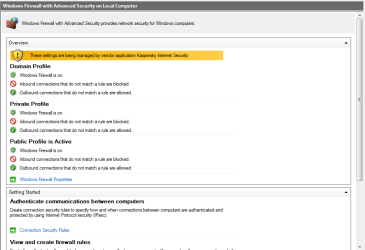
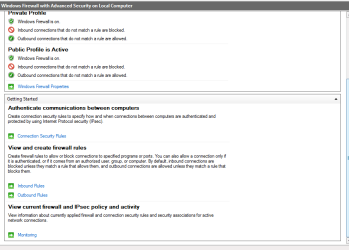
I am running KIS 2018 (latest build). KIS manages Windows Firewall. I am not sure how to add exceptions for Windows Update (links?) in Kaspersky Internet Security (where?). I need to look into this myself. It seems like other users have had problems but mine on both computers came at the end of last month.
[/FONT][/FONT]
[/FONT]
 
Last edited:

My Computer

Computer type
PC/Desktop
OS
Windows 7 HP & Pro 64 bit
You shouldn't need to add an exception to windows firewall, being that when you disabled/uninstalled it windows update worked (I believe that is what you said)

Windows Firewall:

  1. Choose Control Panel from the Windows Start menu. Open the Security Center utility.
  2. Beneath Manage security settings for, select Windows Firewall. The Windows Firewall dialog will be displayed.
  3. Determine the status of the Windows Firewall. If the Windows Firewall is off, it is not blocking connections from your host system. Regardless of the status, we recommend adding the program exception as the Windows Firewall may be turned on at any time.
  4. Open the Exceptions tab and click the Add Program button. In the Add a Program dialog, click Browse and locate the application you wish to allow.
  5. Verify is listed in the Programs and Services list and press the OK button to accept the changes and dismiss the dialog. Press OK on the network connection's "Properties" dialog to apply the changes.
  6. Note: Do not make any changes to the existing exceptions.
How to find the full version number of Kaspersky Internet Security 2018

How to use Kaspersky Update Utility 3.0 for Windows

Here's a link to method @markinsonused to install WinUpdates.

https://forum.kaspersky.com/index.p...kav-free-2018/&do=findComment&comment=2778461
 
Last edited:

My Computer

Computer type
PC/Desktop
Computer Manufacturer/Model Number
HP Desktop & Compaq Laptop
OS
Win 10 x64, Linux Lite, Win 7 x64, BlackArch, & Kali
Hard Drives
Samsung 850 Pro 256Gb,
Hitachi HDD 1Tb,
Crucial MX SSD 250Gb
Segate 3Tb USB 3.0 Ext. Backup HDD
Internet Speed
150Mbps dn, 20Mbps up
Antivirus
Avast Free, Malwarebytes Anti-Exploit & Anti-Ransomware
Browser
Firefox, Chrome, Opera, & VPN
The firewall is technically managed by Kaspersky. I have looked at some of the other posts but perhaps it is time to raise a ticket with them. After all KIS is paid software...

I can't remember how the updates temporarily resolved themselves but it was also after temporarily uninstalling KIS and that means its control of the firewall so you are right.

I will have to go through the Kaspersky post again to see what worked and what didn't. I agree that ideally we should not be creating rules in the Windows firewall as that is the security suite's job.

In any case this brings up the issue of KIS which has taken a battering in the press recently due to supposed scandals. It may be time to test other IS suites although I do not like to be online for any period of time for some without protection.

I won't be able to get to this post again until night time but thanks again for all your pointers.
 

Attachments

  • KIS_Firewall_1.png
    KIS_Firewall_1.png
    20.6 KB · Views: 0
  • KIS_Firewall_2.png
    KIS_Firewall_2.png
    16.7 KB · Views: 0

My Computer

Computer type
PC/Desktop
OS
Windows 7 HP & Pro 64 bit
I want to say that this has been one of the most frustrating problems I have had in my computing life...

Despite reinstalling Windows (i.e. a full clean install) after having repair installed with no result, as well as testing with and without without an IS suite, the problem still remained.

I can only think that Microsoft have problems with their Windows Update servers in certain parts of the world or they want us to upgrade. I would have said Windows Update had become corrupted after hidden updates, changes to the operating system etc. but this happened on a clean install. Potentially an alternative high speed ethernet internet connection may make the difference but I do not have the luxury of testing this. For this problem to have happened on two computers at the same time made no sense.

It seems like, if you want to keep Windows 7 and you have this problem or similar as unresolved, a potential solution where you can have some control over your updates is to manually install and select Windows updates from a page like this: https://support.microsoft.com/en-us...and-windows-server-update-services-changes-in (There is probably a better one) or to upgrade to Windows 10 which has no update issues.
 

My Computer

Computer type
PC/Desktop
OS
Windows 7 HP & Pro 64 bit
Would you please post windowupdate.log for a perusal?
Location C:\Windows
Just found this Kaspersky 2018 blocking Win updates solution was to roll-back to 2017 version. Tech dept said they are aware of the problem and working to facilitate a solution. Down a few posts, moderator stated patch would fix, please update database and reboot. Apparently it's not fixed as you can attest.
At this point, I believe a call to Kaspersky Tech in order. If, when they provide a resolution, please post it to assist others with the same issue.
 
Last edited:

My Computer

Computer type
PC/Desktop
Computer Manufacturer/Model Number
HP Desktop & Compaq Laptop
OS
Win 10 x64, Linux Lite, Win 7 x64, BlackArch, & Kali
Hard Drives
Samsung 850 Pro 256Gb,
Hitachi HDD 1Tb,
Crucial MX SSD 250Gb
Segate 3Tb USB 3.0 Ext. Backup HDD
Internet Speed
150Mbps dn, 20Mbps up
Antivirus
Avast Free, Malwarebytes Anti-Exploit & Anti-Ransomware
Browser
Firefox, Chrome, Opera, & VPN
The only way I can test this properly again is to do a clean install of Windows 7 on a blank pc and report back. I no longer have my original os - good riddance!...

I had contacted Kaspersky and supplied them with the information they required but as I had the same error code on a clean install without Kaspersky there was no point in taking things further...

When I get the time I will clean install a spare pc and start again and get back to you with windowsupdate.log with and without Kaspersky.

At the same time this has made me think about one critical point. Is Windows 7 sufficiently safe? Updates are few and far between and Microsoft is prioritising Windows 10 development.
 

My Computer

Computer type
PC/Desktop
OS
Windows 7 HP & Pro 64 bit
:thumbsup:
 

My Computer

Computer type
PC/Desktop
Computer Manufacturer/Model Number
HP Desktop & Compaq Laptop
OS
Win 10 x64, Linux Lite, Win 7 x64, BlackArch, & Kali
Hard Drives
Samsung 850 Pro 256Gb,
Hitachi HDD 1Tb,
Crucial MX SSD 250Gb
Segate 3Tb USB 3.0 Ext. Backup HDD
Internet Speed
150Mbps dn, 20Mbps up
Antivirus
Avast Free, Malwarebytes Anti-Exploit & Anti-Ransomware
Browser
Firefox, Chrome, Opera, & VPN

My Computer

Computer type
PC/Desktop
Computer Manufacturer/Model Number
HP Desktop & Compaq Laptop
OS
Win 10 x64, Linux Lite, Win 7 x64, BlackArch, & Kali
Hard Drives
Samsung 850 Pro 256Gb,
Hitachi HDD 1Tb,
Crucial MX SSD 250Gb
Segate 3Tb USB 3.0 Ext. Backup HDD
Internet Speed
150Mbps dn, 20Mbps up
Antivirus
Avast Free, Malwarebytes Anti-Exploit & Anti-Ransomware
Browser
Firefox, Chrome, Opera, & VPN
I have asked Microsoft to clarify their guidelines in this document. When or if I get a meaningful response I will let you know.

I know of many people whose updates stopped working in 2016 and 2017 and haven't done anything about it but that's not really acceptable as the IS suite can't take all the strain. This must mean that there are many pc's out there that can be considered insecure.

At the same time some people have been afraid to upgrade to Windows 10 as they think Microsoft has more access to their data and privacy than in Windows 7. Some organisations have been afraid to take the plunge into an upgrade with unknown consequences.

So the state of personal IT security isn't wonderful at the moment.
 

My Computer

Computer type
PC/Desktop
OS
Windows 7 HP & Pro 64 bit
I wonder if this post is going to go down as one of those annoying unresolved problems...

I contacted Microsoft and tested this problem on a clean install Windows 7 Professional with no AV, their firewall completely disabled and Windows Defender completely disabled. I only got as far as Windows Update Agent 7.6.7600.320 being installed through Windows Update. Then I got the error code as above.

Their answer is to download Windows 7 from here: https://www.microsoft.com/en-us/software-download/windows7 I can't test this for now as I have restricted internet allowance for some time but this is just an FYI for anyone else who comes across this post.
 

My Computer

Computer type
PC/Desktop
OS
Windows 7 HP & Pro 64 bit
I got this again on my 2008 r2 computer when I had to install .net 4. Disabling WU "fixed" the issue.
 

My Computers

System One System Two

Did you disable Windows Update from services.msc and then try to run it again from the Windows Update GUI? Can you let us know exactly how?
 

My Computer

Computer type
PC/Desktop
OS
Windows 7 HP & Pro 64 bit

My Computers

System One System Two

Unfortunately this plus your other suggestion (method 3 - above) didn't work for me.

Updates are working for all other Microsoft operating systems but not Windows 7. I know home users who are in a similar situation.

I guess commercial organisations such as banks and hospitals who operate on a network may also install updates manually after they have been tested first but I am not sure what methods they use.
 

My Computer

Computer type
PC/Desktop
OS
Windows 7 HP & Pro 64 bit
They probably use servers to push updates out. Did you try resetting Windows update?
 

My Computers

System One System Two

I have tried this and so many things until I am blue in the face.

I need to think outside the box. Where I am currently residing some websites are blocked as well as VPNs etc. Perhaps Windows Update for Windows 7 has become a casualty of blocked websites etc.

I am doing this more as an exercise in tenacity rather than anything else. I managed Windows Update OK up until the end of April 2018 and since then nothing has worked, neither on a clean install with no firewall or no Windows Defender nor anything else. I know there were some problems with bad updates before then, maybe around January or February. I had to hide one (can't remember which) so it wouldn't keep trying to install again.

This problem is giving some of us a good reason to begin to give up on Windows 7 but I know so many people using it who have not had updates for some time and even since 2016. I had to work through many problems myself in a previous older post (Windows 7 Update Problems) and managed a way through it but this just isn't practical for the majority of people. It is a security nightmare to have an operating system running without months of updates.

One of the things Microsoft recommends is to download Windows 7 from the link I provided earlier. I do not have sufficient data allowance to do this at the moment but maybe a fully updated Windows 7 will work in terms of updates coming through although this would need to be tested first.
 

My Computer

Computer type
PC/Desktop
OS
Windows 7 HP & Pro 64 bit
I have come across this post, which I haven't had the time to test yet, but has been suggested as a solution to those having Windows Update problems:

https://answers.microsoft.com/en-us...-17a7-4942-8145-8d9f68265189?tm=1524412557788

I think Microsoft need to develop a new app to deal with all these problems (but they probably won't...).

Thanks for that. I haven't been updating my computer much since I've been concerned about messing it up. I think that you are right about WU and in fact it wouldn't surprise me if they messed it up on purpose. The same thing happened with Vista. WU developed issues (different issues but still issues) on Vista when 10 came out and M$ NEVER fixed them. I wondered then if W$ had done that on purpose. They don't seem to care about anything other than 10. I'm not going to 10 unless they change their practices which I don't see as likely.
 

My Computers

System One System Two

Back
Top