
Solved Windows update error 0x80073701

sk8ingdroid

New member
Local time
1:53 PM
Messages
30
Hello guys,
I hate posting new threads on forums without searching and trying which I have done but to no avail have I been able to fix this problem tried so many things fixed corrupt files after sfc scan and so much more but now it is still not fixed.
here are the main errors in getting in the cbs.log file (from the original scan uploaded not the new one)
Code:
2015-04-25 12:25:39, Error                 CSI    0000001e@2015/4/25:16:25:39.874 (F) d:\win7sp1_gdr\base\wcp\componentstore\csd_locking.cpp(324): Error STATUS_SXS_ASSEMBLY_MISSING originated in function CCSDirectTransaction::LockComponent expression: (null)
[gle=0x80004005]
2015-04-25 12:25:39, Error                 CSI    0000001f (F) STATUS_SXS_ASSEMBLY_MISSING #10738# from CCSDirectTransaction::OperateEnding at index 0 of 1 operations, disposition 2[gle=0xd015000c]
2015-04-25 12:25:39, Error                 CSI    00000020 (F) HRESULT_FROM_WIN32(ERROR_SXS_ASSEMBLY_MISSING) #10623# from Windows::ServicingAPI::CCSITransaction::ICSITransaction_PinDeployment(Flags = 0, a = Microsoft-Windows-WindowsUpdateClient-Aux.Deployment-LanguagePack, Version = 7.6.7600.256, pA = PROCESSOR_ARCHITECTURE_AMD64 (9), Culture = [l:10{5}]"zh-TW", VersionScope = 1 nonSxS, PublicKeyToken = {l:8 b:31bf3856ad364e35}, Type neutral, TypeName neutral, PublicKey neutral, cb = (null), s = (null), rid = [77]"WUClient-SelfUpdate-Aux-AuxComp~31bf3856ad364e35~amd64~zh-TW~7.6.7600.256.Aux", rah = [2]"32", manpath = (null), catpath = (null), ed = 0, disp = 0)[gle=0x80073701]
2015-04-25 12:25:39, Info                  CBS    Failed to pin deployment while resolving Update: Aux from file: (null) [HRESULT = 0x80073701 - ERROR_SXS_ASSEMBLY_MISSING]
2015-04-25 12:25:39, Info                  CBS    Failed to resolve item[0] in Package: WUClient-SelfUpdate-Aux-AuxComp~31bf3856ad364e35~amd64~zh-TW~7.6.7600.256, Update: Aux [HRESULT = 0x80073701 - ERROR_SXS_ASSEMBLY_MISSING]
2015-04-25 12:25:39, Info                  CBS    Failed to resolve execution update. [HRESULT = 0x80073701 - ERROR_SXS_ASSEMBLY_MISSING]
2015-04-25 12:25:39, Error                 CBS    Failed to resolve execution package: WUClient-SelfUpdate-Aux-AuxComp~31bf3856ad364e35~amd64~zh-TW~7.6.7600.256 [HRESULT = 0x80073701 - ERROR_SXS_ASSEMBLY_MISSING]
2015-04-25 12:25:39, Info                  CSI    00000021@2015/4/25:16:25:39.907 CSI Transaction @0xc5d030 destroyed
2015-04-25 12:25:39, Info                  CBS    Perf: Resolve chain complete.
2015-04-25 12:25:39, Info                  CBS    Failed to resolve execution chain. [HRESULT = 0x80073701 - ERROR_SXS_ASSEMBLY_MISSING]
2015-04-25 12:25:39, Error                 CBS    Failed to process single phase execution. [HRESULT = 0x80073701 - ERROR_SXS_ASSEMBLY_MISSING]
2015-04-25 12:25:39, Info                  CBS    WER: Generating failure report for package: WUClient-SelfUpdate-Aux-TopLevel~31bf3856ad364e35~amd64~~7.6.7600.320, status: 0x80073701, failure source: Resolve, start state: Absent, target state: Staged, client id: WindowsUpdateAgent
2015-04-25 12:25:39, Info                  CBS    Failed to query DisableWerReporting flag.  Assuming not set... [HRESULT = 0x80070002 - ERROR_FILE_NOT_FOUND]
2015-04-25 12:25:39, Info                  CBS    Failed to add %windir%\winsxs\pending.xml to WER report because it is missing.  Continuing without it...
2015-04-25 12:25:39, Info                  CBS    Failed to add %windir%\winsxs\pending.xml.bad to WER report because it is missing.  Continuing without it...
2015-04-25 12:25:41, Info                  CBS    Reboot mark refs: 0
2015-04-25 12:25:41, Info                  CBS    SQM: Reporting package change for package: WUClient-SelfUpdate-Aux-TopLevel~31bf3856ad364e35~amd64~~7.6.7600.320, current: Absent, pending: Default, start: Absent, applicable: Installed, target: Staged, limit: Staged, hotpatch status: StillGoing, status: 0x0, failure source: Resolve, reboot required: False, client id: WindowsUpdateAgent, initiated offline: False, execution sequence: 1715, first merged sequence: 1715
2015-04-25 12:25:41, Info                  CBS    SQM: Upload requested for report: PackageChangeBegin_WUClient-SelfUpdate-Aux-TopLevel~31bf3856ad364e35~amd64~~7.6.7600.320, session id: 142859, sample type: Standard
2015-04-25 12:25:41, Info                  CBS    SQM: Ignoring upload request because the sample type is not enabled: Standard
2015-04-25 12:25:41, Info                  CBS    SQM: Reporting package change completion for package: WUClient-SelfUpdate-Aux-TopLevel~31bf3856ad364e35~amd64~~7.6.7600.320, current: Absent, original: Absent, target: Staged, status: 0x80073701, failure source: Resolve, failure details: "(null)", client id: WindowsUpdateAgent, initiated offline: False, execution sequence: 1715, first merged sequence: 1715
2015-04-25 12:25:41, Info                  CBS    SQM: resolve time performance datapoint is invalid. [HRESULT = 0x80070490 - ERROR_NOT_FOUND]
2015-04-25 12:25:41, Info                  CBS    SQM: stage time performance datapoint is invalid. [HRESULT = 0x80070490 - ERROR_NOT_FOUND]
2015-04-25 12:25:41, Info                  CBS    SQM: execute time performance datapoint is invalid. [HRESULT = 0x80070490 - ERROR_NOT_FOUND]
2015-04-25 12:25:41, Info                  CBS    SQM: Upload requested for report: PackageChangeEnd_WUClient-SelfUpdate-Aux-TopLevel~31bf3856ad364e35~amd64~~7.6.7600.320, session id: 142862, sample type: Standard
2015-04-25 12:25:41, Info                  CBS    SQM: Ignoring upload request because the sample type is not enabled: Standard
2015-04-25 12:25:41, Info                  CBS    Enabling LKG boot option
2015-04-25 12:25:41, Info                  CBS    Exec: End: nested restore point - complete.
2015-04-25 12:25:41, Info                  CBS    Restored system sleep block state: 0x80000000
2015-04-25 12:25:41, Info                  CBS    Exec: Processing complete.  Session: 30441332_1943197427, Package: WUClient-SelfUpdate-Aux-TopLevel~31bf3856ad364e35~amd64~~7.6.7600.320 [HRESULT = 0x80073701 - ERROR_SXS_ASSEMBLY_MISSING]
2015-04-25 12:25:41, Info                  CBS    Archived backup log: C:\Windows\Logs\CBS\CbsPersist_20150425162455.cab.
2015-04-25 12:35:41, Info                  CBS    Reboot mark refs incremented to: 1
2015-04-25 12:35:41, Info                  CBS    Scavenge: Starts
2015-04-25 12:35:41, Info                  CSI    00000022@2015/4/25:16:35:41.386 CSI Transaction @0xc5ce20 initialized for deployment engine {d16d444c-56d8-11d5-882d-0080c847b195} with flags 00000002 and client id [10]"TI6.0_0:0/"
CBS zip not uploading directly as an attachment, added a drive link:https://drive.google.com/file/d/0Bx-W8S1uplfFVDI4NVFTbjRsQ2c/view?usp=sharing
I'm really stuck here I also unintalled all the windows specific updates that were done on the last day they were updated which was a few months ago 9/12/15 and nothing worked.
I am also running SURT again I dont remeber if i had left it to run completly but I think i did but just in case
UPDATE: so after running SURT it installed hotfix kb947821 and I'm running sfc again and will upload the files cbs files once its done.
UPDATE: OK sfc finished an gave me this : WIndows Resource Protection found corrupt files but was unable to fix some of them.
here are the new files on drive since its too big to upload: https://drive.google.com/file/d/0Bx-W8S1uplfFbE9ia1ktRjlZdjQ/view?usp=sharing
if you could help me that would be great.
Thanks!!
 

Attachments
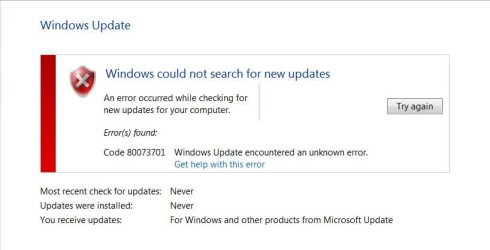
  • windows update erro.JPG
    windows update erro.JPG
    35 KB · Views: 0
Last edited:

My Computer My Computer

Computer type
Laptop
Computer Manufacturer/Model Number
Asus
OS
Windows 7 64bit home premium
If KB3004394 is installed, uninstall it, and reboot twice.
Do a Check for Updates, and install the new version of KB3004394, and any other updates.
reboot again,
Then run SFC /SCANNOW and CheckSUR again, and post the new logs.
 

My Computer My Computer

Computer type
Laptop
Computer Manufacturer/Model Number
Asus K52F or Lenovo B51-80
OS
Win 7 x64 Home Premium (and x86 VirtualBox VM)/Win10
CPU
i3 370M/i7 6500U
Motherboard
Asus/Lenovo
Memory
8GB - finally :)/8GB
Graphics Card(s)
it's an i3, dude!/dual Intel&nVidia
Sound Card
onboard
Monitor(s) Displays
15.6" built-in
Screen Resolution
1366x768/1920x1080
Hard Drives
750GB Seagate internal
Sundry external drives attached to other computers on the local network
1TB SSD on the Lenovo
PSU
n/a
Internet Speed
as much as I can get - usually on a dongle/phone, so <1MB/s
Antivirus
MSE/Defender
Browser
IE11/12/Edge/Chrome/FF(if I must)
If KB3004394 is installed, uninstall it, and reboot twice.
Do a Check for Updates, and install the new version of KB3004394, and any other updates.
reboot again,
Then run SFC /SCANNOW and CheckSUR again, and post the new logs.

Thank you for the reply. I actually dont have that update. nor sure if I uninstalled prior I'll have to check the picture I took of the ones i removed.
 

My Computer My Computer

Computer type
Laptop
Computer Manufacturer/Model Number
Asus
OS
Windows 7 64bit home premium
In that case...
Your SFC results show the following errors...
Code:
 Line 274944: 2015-04-26 13:34:01, Info                  CSI    00000575 [SR] Repairing 4 components
 Line 274945: 2015-04-26 13:34:01, Info                  CSI    00000576 [SR] Beginning Verify and Repair transaction
 Line 274948: 2015-04-26 13:34:01, Info                  CSI    00000578 [SR] Cannot repair member file [l:14{7}]"fde.dll" of Microsoft-Windows-fde, Version = 6.1.7601.17514, pA = PROCESSOR_ARCHITECTURE_INTEL (0), Culture neutral, VersionScope = 1 nonSxS, PublicKeyToken = {l:8 b:31bf3856ad364e35}, Type neutral, TypeName neutral, PublicKey neutral in the store, hash mismatch
 Line 274951: 2015-04-26 13:34:01, Info                  CSI    0000057a [SR] Cannot repair member file [l:22{11}]"fdeploy.dll" of Microsoft-Windows-fdeploy, Version = 6.1.7601.17514, pA = PROCESSOR_ARCHITECTURE_INTEL (0), Culture neutral, VersionScope = 1 nonSxS, PublicKeyToken = {l:8 b:31bf3856ad364e35}, Type neutral, TypeName neutral, PublicKey neutral in the store, hash mismatch
 Line 274954: 2015-04-26 13:34:01, Info                  CSI    0000057c [SR] Cannot repair member file [l:20{10}]"gptext.dll" of Microsoft-Windows-GroupPolicy-Gptext, Version = 6.1.7600.16385, pA = PROCESSOR_ARCHITECTURE_INTEL (0), Culture neutral, VersionScope = 1 nonSxS, PublicKeyToken = {l:8 b:31bf3856ad364e35}, Type neutral, TypeName neutral, PublicKey neutral in the store, hash mismatch
 Line 274957: 2015-04-26 13:34:01, Info                  CSI    0000057e [SR] Cannot repair member file [l:20{10}]"gpedit.dll" of Microsoft-Windows-GroupPolicy-Admin-Gpedit, Version = 6.1.7600.16385, pA = PROCESSOR_ARCHITECTURE_INTEL (0), Culture neutral, VersionScope = 1 nonSxS, PublicKeyToken = {l:8 b:31bf3856ad364e35}, Type neutral, TypeName neutral, PublicKey neutral in the store, hash mismatch

I'll post a fix protocol later - but it does look as if you've deployed a hack to get Group policy to work on your Home Premium install.
Is this the case? - or do you have a malware infestation?
 

My Computer My Computer

Computer type
Laptop
Computer Manufacturer/Model Number
Asus K52F or Lenovo B51-80
OS
Win 7 x64 Home Premium (and x86 VirtualBox VM)/Win10
CPU
i3 370M/i7 6500U
Motherboard
Asus/Lenovo
Memory
8GB - finally :)/8GB
Graphics Card(s)
it's an i3, dude!/dual Intel&nVidia
Sound Card
onboard
Monitor(s) Displays
15.6" built-in
Screen Resolution
1366x768/1920x1080
Hard Drives
750GB Seagate internal
Sundry external drives attached to other computers on the local network
1TB SSD on the Lenovo
PSU
n/a
Internet Speed
as much as I can get - usually on a dongle/phone, so <1MB/s
Antivirus
MSE/Defender
Browser
IE11/12/Edge/Chrome/FF(if I must)
In that case...
Your SFC results show the following errors...
Code:
 Line 274944: 2015-04-26 13:34:01, Info                  CSI    00000575 [SR] Repairing 4 components
 Line 274945: 2015-04-26 13:34:01, Info                  CSI    00000576 [SR] Beginning Verify and Repair transaction
 Line 274948: 2015-04-26 13:34:01, Info                  CSI    00000578 [SR] Cannot repair member file [l:14{7}]"fde.dll" of Microsoft-Windows-fde, Version = 6.1.7601.17514, pA = PROCESSOR_ARCHITECTURE_INTEL (0), Culture neutral, VersionScope = 1 nonSxS, PublicKeyToken = {l:8 b:31bf3856ad364e35}, Type neutral, TypeName neutral, PublicKey neutral in the store, hash mismatch
 Line 274951: 2015-04-26 13:34:01, Info                  CSI    0000057a [SR] Cannot repair member file [l:22{11}]"fdeploy.dll" of Microsoft-Windows-fdeploy, Version = 6.1.7601.17514, pA = PROCESSOR_ARCHITECTURE_INTEL (0), Culture neutral, VersionScope = 1 nonSxS, PublicKeyToken = {l:8 b:31bf3856ad364e35}, Type neutral, TypeName neutral, PublicKey neutral in the store, hash mismatch
 Line 274954: 2015-04-26 13:34:01, Info                  CSI    0000057c [SR] Cannot repair member file [l:20{10}]"gptext.dll" of Microsoft-Windows-GroupPolicy-Gptext, Version = 6.1.7600.16385, pA = PROCESSOR_ARCHITECTURE_INTEL (0), Culture neutral, VersionScope = 1 nonSxS, PublicKeyToken = {l:8 b:31bf3856ad364e35}, Type neutral, TypeName neutral, PublicKey neutral in the store, hash mismatch
 Line 274957: 2015-04-26 13:34:01, Info                  CSI    0000057e [SR] Cannot repair member file [l:20{10}]"gpedit.dll" of Microsoft-Windows-GroupPolicy-Admin-Gpedit, Version = 6.1.7600.16385, pA = PROCESSOR_ARCHITECTURE_INTEL (0), Culture neutral, VersionScope = 1 nonSxS, PublicKeyToken = {l:8 b:31bf3856ad364e35}, Type neutral, TypeName neutral, PublicKey neutral in the store, hash mismatch

I'll post a fix protocol later - but it does look as if you've deployed a hack to get Group policy to work on your Home Premium install.
Is this the case? - or do you have a malware infestation?
Not that I remember. Gpedit was a program on my computer that I was kind of suspicious of saw it in my list of uninstall programs.but I searched on Google and it seemed needed. I don't have my laptop right now or I would check if if it still on my computer. I've check my computer a few times with malware bytes and haven't seen anything recently that was serious. But it could be malware according to what you're saying and what I saw on my computer
Thank you very much
 

My Computer My Computer

Computer type
Laptop
Computer Manufacturer/Model Number
Asus
OS
Windows 7 64bit home premium
gpedit is perfectly normal - it's just not active in a Home Premium installation.
I'll post the fix later.
 

My Computer My Computer

Computer type
Laptop
Computer Manufacturer/Model Number
Asus K52F or Lenovo B51-80
OS
Win 7 x64 Home Premium (and x86 VirtualBox VM)/Win10
CPU
i3 370M/i7 6500U
Motherboard
Asus/Lenovo
Memory
8GB - finally :)/8GB
Graphics Card(s)
it's an i3, dude!/dual Intel&nVidia
Sound Card
onboard
Monitor(s) Displays
15.6" built-in
Screen Resolution
1366x768/1920x1080
Hard Drives
750GB Seagate internal
Sundry external drives attached to other computers on the local network
1TB SSD on the Lenovo
PSU
n/a
Internet Speed
as much as I can get - usually on a dongle/phone, so <1MB/s
Antivirus
MSE/Defender
Browser
IE11/12/Edge/Chrome/FF(if I must)
gpedit is perfectly normal - it's just not active in a Home Premium installation.
I'll post the fix later.

Yeah got it but is it usually showing on the uninstall program list on control panel?
Thanks alot take your time I probably won't be able to get much done until finals are done anyway lol.
 

My Computer My Computer

Computer type
Laptop
Computer Manufacturer/Model Number
Asus
OS
Windows 7 64bit home premium
Hmm - that's usually only because the hack I was talking about has been installed.

Back later with the 'fix' (takes 10-15 mins to do, hopefully)
 

My Computer My Computer

Computer type
Laptop
Computer Manufacturer/Model Number
Asus K52F or Lenovo B51-80
OS
Win 7 x64 Home Premium (and x86 VirtualBox VM)/Win10
CPU
i3 370M/i7 6500U
Motherboard
Asus/Lenovo
Memory
8GB - finally :)/8GB
Graphics Card(s)
it's an i3, dude!/dual Intel&nVidia
Sound Card
onboard
Monitor(s) Displays
15.6" built-in
Screen Resolution
1366x768/1920x1080
Hard Drives
750GB Seagate internal
Sundry external drives attached to other computers on the local network
1TB SSD on the Lenovo
PSU
n/a
Internet Speed
as much as I can get - usually on a dongle/phone, so <1MB/s
Antivirus
MSE/Defender
Browser
IE11/12/Edge/Chrome/FF(if I must)
Here we go...

I've uploaded a file - sk8aa.zip - to my OneDrive at Noel's OneDrive
Please download and save it.

Right-click on the saved file and select Extract all...
Change the target to C:\ and click on Extract
Close all windows (it would be a good idea to print these instructions!)

Now reboot to the Repair Environment - as soon as the machine restarts, start tapping F8 - this should bring up the Advanced Boot Menu, at the top of which should be the option 'Repair my Computer'
Pick that
You'll have to log in with your username and password.

Pick the option to use a Command Prompt
At the prompt type
DIR C:\sk8aa
hit the enter key - if you get a 'Not Found' error try
DIR D:\sk8aa
or
DIR E:\sk8aa


The drive letter in use when you find the folder will need to be substituted (for<drive>) into the following command...


XCOPY <drive>:\sk8aa <drive>:\windows\winsxs /y /i /s /v /h


(e.g. XCOPY P:\wfire P:\windows\winsxs /y /i /s /v /h )


run the command (it should take almost no time) and when the prompt returns, type
EXIT
and hit the Enter key to exit Command Prompt - reboot to Normal Mode Windows.

Now run SFC /SCANNOW in an Elevated Command Prompt
then reboot and upload the new CBS.log file to your reply
 

My Computer My Computer

Computer type
Laptop
Computer Manufacturer/Model Number
Asus K52F or Lenovo B51-80
OS
Win 7 x64 Home Premium (and x86 VirtualBox VM)/Win10
CPU
i3 370M/i7 6500U
Motherboard
Asus/Lenovo
Memory
8GB - finally :)/8GB
Graphics Card(s)
it's an i3, dude!/dual Intel&nVidia
Sound Card
onboard
Monitor(s) Displays
15.6" built-in
Screen Resolution
1366x768/1920x1080
Hard Drives
750GB Seagate internal
Sundry external drives attached to other computers on the local network
1TB SSD on the Lenovo
PSU
n/a
Internet Speed
as much as I can get - usually on a dongle/phone, so <1MB/s
Antivirus
MSE/Defender
Browser
IE11/12/Edge/Chrome/FF(if I must)
Here we go...

I've uploaded a file - sk8aa.zip - to my OneDrive at Noel's OneDrive
Please download and save it.

Right-click on the saved file and select Extract all...
Change the target to C:\ and click on Extract
Close all windows (it would be a good idea to print these instructions!)

Now reboot to the Repair Environment - as soon as the machine restarts, start tapping F8 - this should bring up the Advanced Boot Menu, at the top of which should be the option 'Repair my Computer'
Pick that
You'll have to log in with your username and password.

Pick the option to use a Command Prompt
At the prompt type
DIR C:\sk8aa
hit the enter key - if you get a 'Not Found' error try
DIR D:\sk8aa
or
DIR E:\sk8aa


The drive letter in use when you find the folder will need to be substituted (for<drive>) into the following command...


XCOPY <drive>:\sk8aa <drive>:\windows\winsxs /y /i /s /v /h


(e.g. XCOPY P:\wfire P:\windows\winsxs /y /i /s /v /h )


run the command (it should take almost no time) and when the prompt returns, type
EXIT
and hit the Enter key to exit Command Prompt - reboot to Normal Mode Windows.

Now run SFC /SCANNOW in an Elevated Command Prompt
then reboot and upload the new CBS.log file to your reply
Awesome Thanks a lot! I'll try it when I get a chance and upload the CBS.log file.
 

My Computer My Computer

Computer type
Laptop
Computer Manufacturer/Model Number
Asus
OS
Windows 7 64bit home premium
Here we go...

I've uploaded a file - sk8aa.zip - to my OneDrive at Noel's OneDrive
Please download and save it.

Right-click on the saved file and select Extract all...
Change the target to C:\ and click on Extract
Close all windows (it would be a good idea to print these instructions!)

Now reboot to the Repair Environment - as soon as the machine restarts, start tapping F8 - this should bring up the Advanced Boot Menu, at the top of which should be the option 'Repair my Computer'
Pick that
You'll have to log in with your username and password.

Pick the option to use a Command Prompt
At the prompt type
DIR C:\sk8aa
hit the enter key - if you get a 'Not Found' error try
DIR D:\sk8aa
or
DIR E:\sk8aa


The drive letter in use when you find the folder will need to be substituted (for<drive>) into the following command...


XCOPY <drive>:\sk8aa <drive>:\windows\winsxs /y /i /s /v /h


(e.g. XCOPY P:\wfire P:\windows\winsxs /y /i /s /v /h )


run the command (it should take almost no time) and when the prompt returns, type
EXIT
and hit the Enter key to exit Command Prompt - reboot to Normal Mode Windows.

Now run SFC /SCANNOW in an Elevated Command Prompt
then reboot and upload the new CBS.log file to your reply

Once I boot it to the repair your computer it opens Asus recovery and asks if I want to recover the whole HD or just the partition it HD and partition. Not sure what to do . I just extted it for now .
Thanks
 

My Computer My Computer

Computer type
Laptop
Computer Manufacturer/Model Number
Asus
OS
Windows 7 64bit home premium

My Computer My Computer

Computer type
Laptop
Computer Manufacturer/Model Number
Asus K52F or Lenovo B51-80
OS
Win 7 x64 Home Premium (and x86 VirtualBox VM)/Win10
CPU
i3 370M/i7 6500U
Motherboard
Asus/Lenovo
Memory
8GB - finally :)/8GB
Graphics Card(s)
it's an i3, dude!/dual Intel&nVidia
Sound Card
onboard
Monitor(s) Displays
15.6" built-in
Screen Resolution
1366x768/1920x1080
Hard Drives
750GB Seagate internal
Sundry external drives attached to other computers on the local network
1TB SSD on the Lenovo
PSU
n/a
Internet Speed
as much as I can get - usually on a dongle/phone, so <1MB/s
Antivirus
MSE/Defender
Browser
IE11/12/Edge/Chrome/FF(if I must)

My Computer My Computer

Computer type
Laptop
Computer Manufacturer/Model Number
Asus
OS
Windows 7 64bit home premium
OH dear - that means that ASUS has taken over the system completely :(
In that case you'll need to create a Repair disk.
http://www.sevenforums.com/tutorials/2083-system-repair-disc-create.html
boot to that, and follow the same instructions as above.

I hate to bump this ancient thread so I finally tried to fix it wasn't really using my computer for the past few months and it still brings up Asus preload wizard with the boot disc any other options other than doing it from there and erasing my stuff thanks
 
Last edited:

My Computer My Computer

Computer type
Laptop
Computer Manufacturer/Model Number
Asus
OS
Windows 7 64bit home premium
anything??
 

My Computer My Computer

Computer type
Laptop
Computer Manufacturer/Model Number
Asus
OS
Windows 7 64bit home premium
Trying to find time for anything but work :(

Back when I can!
 

My Computer My Computer

Computer type
Laptop
Computer Manufacturer/Model Number
Asus K52F or Lenovo B51-80
OS
Win 7 x64 Home Premium (and x86 VirtualBox VM)/Win10
CPU
i3 370M/i7 6500U
Motherboard
Asus/Lenovo
Memory
8GB - finally :)/8GB
Graphics Card(s)
it's an i3, dude!/dual Intel&nVidia
Sound Card
onboard
Monitor(s) Displays
15.6" built-in
Screen Resolution
1366x768/1920x1080
Hard Drives
750GB Seagate internal
Sundry external drives attached to other computers on the local network
1TB SSD on the Lenovo
PSU
n/a
Internet Speed
as much as I can get - usually on a dongle/phone, so <1MB/s
Antivirus
MSE/Defender
Browser
IE11/12/Edge/Chrome/FF(if I must)
anything?
 

My Computer My Computer

Computer type
Laptop
Computer Manufacturer/Model Number
Asus
OS
Windows 7 64bit home premium
Sorry - fell off my ToDo list :(
back tonight.!
 

My Computer My Computer

Computer type
Laptop
Computer Manufacturer/Model Number
Asus K52F or Lenovo B51-80
OS
Win 7 x64 Home Premium (and x86 VirtualBox VM)/Win10
CPU
i3 370M/i7 6500U
Motherboard
Asus/Lenovo
Memory
8GB - finally :)/8GB
Graphics Card(s)
it's an i3, dude!/dual Intel&nVidia
Sound Card
onboard
Monitor(s) Displays
15.6" built-in
Screen Resolution
1366x768/1920x1080
Hard Drives
750GB Seagate internal
Sundry external drives attached to other computers on the local network
1TB SSD on the Lenovo
PSU
n/a
Internet Speed
as much as I can get - usually on a dongle/phone, so <1MB/s
Antivirus
MSE/Defender
Browser
IE11/12/Edge/Chrome/FF(if I must)
Sorry - fell off my ToDo list :(
back tonight.!
Editted a few times lol
oh its ok thank you. I just wanted to at least get wndows 10 before they stop giving it out. stupid asus recovery lol if anything ill just end up backing up everything on an external harddrive and reinstalling windows hopefully it doesn't have to get to that. could I somehow download the recovery disc from somewhere as long as its the same kind of windows ie. windows home premium.
also there are some things i remember doing like editting some stuff to change the login background and remove the shortcut arrow and borders from the desktop icons not sure if that has to do with it.
also like i said before gpedt.msc 1.0(note the missing i) (the publisher is Richard) is on my uninstall list maybe uninstalling it would fit the issue?
just throwing some bits of info hopefully it'll help you finding a fix.
EDIT: Also I've been getting blue screens of death recently. this last time it happened after using it for a few hour and using photoshop lightroom it crashed and redirected to bios not sure if its related might just be my harddrive failing after almost 3 years of having it an i could be completely wrong lol
Thanks again
 
Last edited:

My Computer My Computer

Computer type
Laptop
Computer Manufacturer/Model Number
Asus
OS
Windows 7 64bit home premium
You have almost a year to get the free upgrade to Windows 10 ;)
Sorry about the wait - it's been a rather hectic weekend! :(
 

My Computer My Computer

Computer type
Laptop
Computer Manufacturer/Model Number
Asus K52F or Lenovo B51-80
OS
Win 7 x64 Home Premium (and x86 VirtualBox VM)/Win10
CPU
i3 370M/i7 6500U
Motherboard
Asus/Lenovo
Memory
8GB - finally :)/8GB
Graphics Card(s)
it's an i3, dude!/dual Intel&nVidia
Sound Card
onboard
Monitor(s) Displays
15.6" built-in
Screen Resolution
1366x768/1920x1080
Hard Drives
750GB Seagate internal
Sundry external drives attached to other computers on the local network
1TB SSD on the Lenovo
PSU
n/a
Internet Speed
as much as I can get - usually on a dongle/phone, so <1MB/s
Antivirus
MSE/Defender
Browser
IE11/12/Edge/Chrome/FF(if I must)
Back
Top