Solved Windows Update - Impossible To Get

Will have to agree on that one...

Let's go back to Windows Update and see if we can find out which update does not want to install.

Go to Control Panel > System and Security > Windows Update
Click on: Check for updates, and see if it gives you whatever needs to be installed.

If it does, post an image. Would not be surprised if the MSE update was the culprit.
There is also a View update history...or, is the MSE update showing there?
 

My Computer

Computer type
PC/Desktop
Computer Manufacturer/Model Number
An ol' eMachines
OS
Windows 7 Home Premium
Internet Speed
Fine for me...I'm retired!
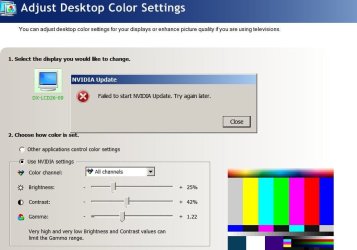
Cottonball, here's the latest attachment on the NVIDIA update failure. As mentioned earlier, l when I try to do the Windows Update now, I - once again - am getting a failure notice, telling me that this NVIDIA did not update. Cottonball, do you know where I can turn the auto updates by Windows OFF for this product? When I asked the other tech, he failed to get back with me. If this is done, it may just resolved this issue entirely. See attachment.
 

Attachments

  • NVIDIA Update - Failed.jpg
    NVIDIA Update - Failed.jpg
    47 KB · Views: 1

My Computer

Computer Manufacturer/Model Number
Dell Optiplex 760
OS
Windows 7 Pro, 64-bit
Has this problem been resolved? Post #4

256361d1361495019t-windows-update-impossible-get-security-essentials.jpg
 

My Computer

Computer type
PC/Desktop
Computer Manufacturer/Model Number
Home made Desktop
OS
Windows 10 Pro. 64/ version 1709 Windows 7 Pro/64
CPU
Intel i7-6800K @ 4.3
Motherboard
ASUS X-99 Deluxe II
Memory
Corsair Platinum 16 gig @2400
Graphics Card(s)
EVGA GTX 1070 OC
Monitor(s) Displays
Asus 27" LED LCD/VE278Q
Screen Resolution
1920-1080 or 1280-720 HDMI
Hard Drives
INTEL SSD 730-240 Gb Sata 3.0/
PSU
EVGA Platium 1200W
Case
Phanteks Luxe Tempered Glass 8 fans/ one radiator
Cooling
XSPC/ Water Cooled CPU
Keyboard
Das 4 Professional
Mouse
Logitech M705/MX Anywhere 2-S
Internet Speed
100 mbits
Antivirus
Microsoft Security Essentials/ Malwarebytes Premium 3.0/ SAS
Browser
I.E. 11 default/Firefox/ ISP Time Warner Cable/Spectrum
Other Info
LG BluRay Burner/
Sound system-KLipsch-THX/
Icy Dock ssd Hot Swap bays.
Actually, the problem HAS NOT been resolved in its entirety, as we're still have an issue with getting all the updates. The issue with MSE seems to be resolved . . . at least to our knowledge, but that remains to be seen . . . Post #4

256361d1361495019t-windows-update-impossible-get-security-essentials.jpg
[/QUOTE]
 
Last edited:

My Computer

Computer Manufacturer/Model Number
Dell Optiplex 760
OS
Windows 7 Pro, 64-bit
I don't find this forum particularly user-friendly, as though I can read your e-mail easily in my Yahoo inbox, I cannot seem to find your same message here in the forum! Sorry about that.

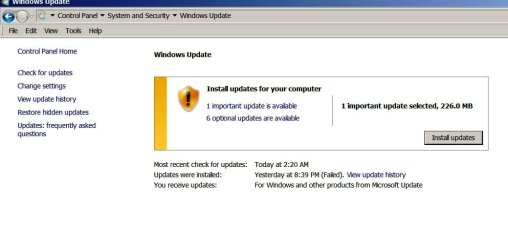
Anyways, I did Cottonball as you suggested. Went to the Control Panel and checked for updates. The first popup seen was the message that there's one update (see one of the two images attached).

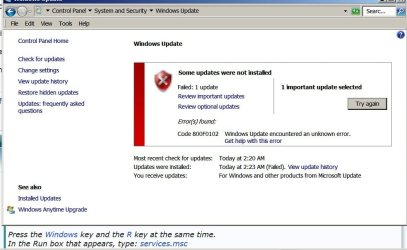
Unfortunately and once again, it directs to the second popup, telling me that the update (NVIDIA) failed. Both popup screenshots are attached. Do you know where I can UNDO the auto Windows Update feature for the NVIDIA software? As mentioned earlier Cottonball, I believe this is the culprit.
 

Attachments

  • First Results Appearing.jpg
    First Results Appearing.jpg
    42.2 KB · Views: 2
  • Leading To This Error.jpg
    Leading To This Error.jpg
    62 KB · Views: 3

My Computer

Computer Manufacturer/Model Number
Dell Optiplex 760
OS
Windows 7 Pro, 64-bit

My Computer

Computer type
PC/Desktop
Computer Manufacturer/Model Number
Home made Desktop
OS
Windows 10 Pro. 64/ version 1709 Windows 7 Pro/64
CPU
Intel i7-6800K @ 4.3
Motherboard
ASUS X-99 Deluxe II
Memory
Corsair Platinum 16 gig @2400
Graphics Card(s)
EVGA GTX 1070 OC
Monitor(s) Displays
Asus 27" LED LCD/VE278Q
Screen Resolution
1920-1080 or 1280-720 HDMI
Hard Drives
INTEL SSD 730-240 Gb Sata 3.0/
PSU
EVGA Platium 1200W
Case
Phanteks Luxe Tempered Glass 8 fans/ one radiator
Cooling
XSPC/ Water Cooled CPU
Keyboard
Das 4 Professional
Mouse
Logitech M705/MX Anywhere 2-S
Internet Speed
100 mbits
Antivirus
Microsoft Security Essentials/ Malwarebytes Premium 3.0/ SAS
Browser
I.E. 11 default/Firefox/ ISP Time Warner Cable/Spectrum
Other Info
LG BluRay Burner/
Sound system-KLipsch-THX/
Icy Dock ssd Hot Swap bays.
Hmmmm.....

What the Command Prompt image posted shows is C:\Users\admin>^U

That (^U) would not be a recognized command.
By any chance, did you have the NumLk key active?
If you press Fn and NumLk at the same time, that will inactivate it.

It's more of an ^V . Reason for it . You can't do a CTRL+V in the command prompt to paste . You would have to right click and choose paste .
 

My Computer

Computer Manufacturer/Model Number
Custom Built
OS
Windows 7 Ultimate 32-Bit & Windows 7 Ultimate 64-Bit
CPU
Intel Core i7 CPU 950 @ 3.07GHz
Motherboard
ASUS P6T DELUXE V2
Memory
OCZ 6GB (3 x 2GB) 240-Pin DDR3 SDRAM DDR3 1600 OCZ3X1600R2
Graphics Card(s)
ATI Radeon HD 5700 Series
Sound Card
OnBoard
Hard Drives
WD6400AACS-00M3B0 (640GB SATA )
PSU
CORSAIR 850w
Case
NZXT LEXA
Cooling
Intel Stock Heatsink Fan
Keyboard
Microsoft Wireless Laser Keyboard 7000
Mouse
Microsoft Wireless Laser Mouse 7000
>>> nVidia <<<

To remove the nVidia update, read these two:
1. https://forums.geforce.com/default/...te-and-updatususer-how-do-i-get-rid-of-it-/4/
2. What is NVIDIA

Or, if you just want to disable this service: nvUpdatusService

Open a command prompt as Administrator, and use the following:

net user /delete updatususer
sc delete nvupdatusservice


~~~~
On the following: Windows Activation Technologies genuine validation failed.

If the error happens again, to properly analyze and solve problems with Activation and Validation, like Bear says, we need to use MGADiag.
 

My Computer

Computer type
PC/Desktop
Computer Manufacturer/Model Number
An ol' eMachines
OS
Windows 7 Home Premium
Internet Speed
Fine for me...I'm retired!
Thanks, VistaKing!!

Couldn't figure that one out.
 

My Computer

Computer type
PC/Desktop
Computer Manufacturer/Model Number
An ol' eMachines
OS
Windows 7 Home Premium
Internet Speed
Fine for me...I'm retired!
Ahhhh, I was doing the Control>V.

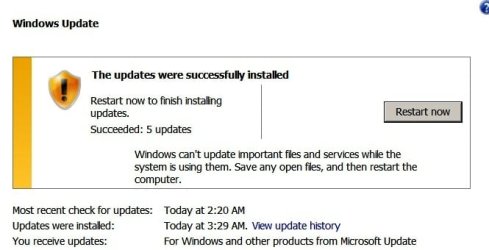
In any event, I just did a successful update - well, 5 out of 6 updates. It still will not do the update on NVIDIA. I wish I could find where to UNCHECK this to be updated by Windows; but I can't seem to find the area . . . . Have looked everywhere. Obviously, I'm not an IT! See attachment - good news. I just rebooted after install and received another GREEN message that the updates were successful.
 

Attachments

  • UPDATES - Successfully Installed.jpg
    UPDATES - Successfully Installed.jpg
    26.1 KB · Views: 4

My Computer

Computer Manufacturer/Model Number
Dell Optiplex 760
OS
Windows 7 Pro, 64-bit
Cottonball, please see my latest message - got 5 out of 6 updates - SUCCESSFULLY!! :) I just need to UNCHECK NVIDIA from Windows Updates but I can't seem to find the area to uncheck this.
 

My Computer

Computer Manufacturer/Model Number
Dell Optiplex 760
OS
Windows 7 Pro, 64-bit

My Computer

Computer type
PC/Desktop
Computer Manufacturer/Model Number
Home made Desktop
OS
Windows 10 Pro. 64/ version 1709 Windows 7 Pro/64
CPU
Intel i7-6800K @ 4.3
Motherboard
ASUS X-99 Deluxe II
Memory
Corsair Platinum 16 gig @2400
Graphics Card(s)
EVGA GTX 1070 OC
Monitor(s) Displays
Asus 27" LED LCD/VE278Q
Screen Resolution
1920-1080 or 1280-720 HDMI
Hard Drives
INTEL SSD 730-240 Gb Sata 3.0/
PSU
EVGA Platium 1200W
Case
Phanteks Luxe Tempered Glass 8 fans/ one radiator
Cooling
XSPC/ Water Cooled CPU
Keyboard
Das 4 Professional
Mouse
Logitech M705/MX Anywhere 2-S
Internet Speed
100 mbits
Antivirus
Microsoft Security Essentials/ Malwarebytes Premium 3.0/ SAS
Browser
I.E. 11 default/Firefox/ ISP Time Warner Cable/Spectrum
Other Info
LG BluRay Burner/
Sound system-KLipsch-THX/
Icy Dock ssd Hot Swap bays.
Yes, but I think I'll do this tomorrow, as I can scarcely keep my eyes open. Thanks so much for your help on this. :sleep:
 

My Computer

Computer Manufacturer/Model Number
Dell Optiplex 760
OS
Windows 7 Pro, 64-bit
See you tomorrow. Have a nice rest.
 

My Computer

Computer type
PC/Desktop
Computer Manufacturer/Model Number
Home made Desktop
OS
Windows 10 Pro. 64/ version 1709 Windows 7 Pro/64
CPU
Intel i7-6800K @ 4.3
Motherboard
ASUS X-99 Deluxe II
Memory
Corsair Platinum 16 gig @2400
Graphics Card(s)
EVGA GTX 1070 OC
Monitor(s) Displays
Asus 27" LED LCD/VE278Q
Screen Resolution
1920-1080 or 1280-720 HDMI
Hard Drives
INTEL SSD 730-240 Gb Sata 3.0/
PSU
EVGA Platium 1200W
Case
Phanteks Luxe Tempered Glass 8 fans/ one radiator
Cooling
XSPC/ Water Cooled CPU
Keyboard
Das 4 Professional
Mouse
Logitech M705/MX Anywhere 2-S
Internet Speed
100 mbits
Antivirus
Microsoft Security Essentials/ Malwarebytes Premium 3.0/ SAS
Browser
I.E. 11 default/Firefox/ ISP Time Warner Cable/Spectrum
Other Info
LG BluRay Burner/
Sound system-KLipsch-THX/
Icy Dock ssd Hot Swap bays.
Code:
Diagnostic Report (1.9.0027.0):
-----------------------------------------
Windows Validation Data-->

Validation Code: 0
Cached Online Validation Code: 0x0
Windows Product Key: *****-*****-V27RH-TKW44-KQK3W
Windows Product Key Hash: RjXAjpzfPe/XRicgJ92Zlm+YJ3g=
Windows Product ID: 00371-OEM-9305434-55210
Windows Product ID Type: 8
Windows License Type: COA SLP
Windows OS version: 6.1.7601.2.00010100.1.0.048
ID: {21389D8C-51A1-414B-A3A6-D64E89C6AA34}(3)
Is Admin: Yes
TestCab: 0x0
LegitcheckControl ActiveX: N/A, hr = 0x80070002
Signed By: N/A, hr = 0x80070002
Product Name: Windows 7 Professional
Architecture: 0x00000009
Build lab: 7601.win7sp1_gdr.130104-1431
TTS Error: 
Validation Diagnostic: 
Resolution Status: N/A

Vista WgaER Data-->
ThreatID(s): N/A, hr = 0x80070002
Version: N/A, hr = 0x80070002

Windows XP Notifications Data-->
Cached Result: N/A, hr = 0x80070002
File Exists: No
Version: N/A, hr = 0x80070002
WgaTray.exe Signed By: N/A, hr = 0x80070002
WgaLogon.dll Signed By: N/A, hr = 0x80070002

OGA Notifications Data-->
Cached Result: N/A, hr = 0x80070002
Version: N/A, hr = 0x80070002
OGAExec.exe Signed By: N/A, hr = 0x80070002
OGAAddin.dll Signed By: N/A, hr = 0x80070002

OGA Data-->
Office Status: 109 N/A
OGA Version: N/A, 0x80070002
Signed By: N/A, hr = 0x80070002
Office Diagnostics: B4D0AA8B-604-645_025D1FF3-364-80041010_025D1FF3-229-80041010_025D1FF3-230-1_025D1FF3-517-80040154_025D1FF3-237-80040154_025D1FF3-238-2_025D1FF3-244-80070002_025D1FF3-258-3

Browser Data-->
Proxy settings: N/A
User Agent: Mozilla/4.0 (compatible; MSIE 8.0; Win32)
Default Browser: C:\Program Files (x86)\Mozilla Firefox\firefox.exe
Download signed ActiveX controls: Prompt
Download unsigned ActiveX controls: Disabled
Run ActiveX controls and plug-ins: Allowed
Initialize and script ActiveX controls not marked as safe: Disabled
Allow scripting of Internet Explorer Webbrowser control: Disabled
Active scripting: Allowed
Script ActiveX controls marked as safe for scripting: Allowed

File Scan Data-->

Other data-->
Office Details: <GenuineResults><MachineData><UGUID>{21389D8C-51A1-414B-A3A6-D64E89C6AA34}</UGUID><Version>1.9.0027.0</Version><OS>6.1.7601.2.00010100.1.0.048</OS><Architecture>x64</Architecture><PKey>*****-*****-*****-*****-KQK3W</PKey><PID>00371-OEM-9305434-55210</PID><PIDType>8</PIDType><SID>S-1-5-21-3822973686-234049461-2214256919</SID><SYSTEM><Manufacturer>Dell Inc.</Manufacturer><Model>OptiPlex 760                 </Model></SYSTEM><BIOS><Manufacturer>Dell Inc.</Manufacturer><Version>A05</Version><SMBIOSVersion major="2" minor="5"/><Date>20090817000000.000000+000</Date></BIOS><HWID>14913307018400F8</HWID><UserLCID>0409</UserLCID><SystemLCID>0409</SystemLCID><TimeZone>Eastern Standard Time(GMT-05:00)</TimeZone><iJoin>0</iJoin><SBID><stat>3</stat><msppid></msppid><name></name><model></model></SBID><OEM><OEMID>DELL  </OEMID><OEMTableID>B10K   </OEMTableID></OEM><GANotification/></MachineData><Software><Office><Result>109</Result><Products/><Applications/></Office></Software></GenuineResults>  

Spsys.log Content: 0x80070002

Licensing Data-->
Software licensing service version: 6.1.7601.17514

Name: Windows(R) 7, Professional edition
Description: Windows Operating System - Windows(R) 7, OEM_COA_SLP channel
Activation ID: da22eadd-46dc-4056-a287-f5041c852470
Application ID: 55c92734-d682-4d71-983e-d6ec3f16059f
Extended PID: 00371-00186-054-355210-02-1033-7600.0000-1612011
Installation ID: 003175410903452210162676221926401410826901933511144043
Processor Certificate URL: http://go.microsoft.com/fwlink/?LinkID=88338
Machine Certificate URL: http://go.microsoft.com/fwlink/?LinkID=88339
Use License URL: http://go.microsoft.com/fwlink/?LinkID=88341
Product Key Certificate URL: http://go.microsoft.com/fwlink/?LinkID=88340
Partial Product Key: KQK3W
License Status: Licensed
Remaining Windows rearm count: 4
Trusted time: 2/23/2013 10:34:36 AM

Windows Activation Technologies-->
HrOffline: 0x00000000
HrOnline: 0x00000000
HealthStatus: 0x0000000000000000
Event Time Stamp: 12:15:2012 04:42
ActiveX: Registered, Version: 7.1.7600.16395
Admin Service: Registered, Version: 7.1.7600.16395
HealthStatus Bitmask Output:


HWID Data-->
HWID Hash Current: MAAAAAEABAABAAEAAAABAAAAAQABAAEA6GFQMPbaAErI6xQDNO3yFW7BWmOqT0bK

OEM Activation 1.0 Data-->
N/A

OEM Activation 2.0 Data-->
BIOS valid for OA 2.0: yes
Windows marker version: 0x20001
OEMID and OEMTableID Consistent: yes
BIOS Information: 
  ACPI Table Name    OEMID Value    OEMTableID Value
  APIC            DELL          B10K   
  FACP            DELL          B10K   
  HPET            DELL          B10K   
  BOOT            DELL          B10K   
  MCFG            DELL          B10K   
  SSDT            DELL        st_ex
  ASF!            DELL          B10K   
  ____            DELL          B10K   
  SLIC            DELL          B10K   
  SSDT            DELL        st_ex
  SSDT            DELL        st_ex
  SSDT            DELL        st_ex

 

My Computer

Computer Manufacturer/Model Number
Dell Optiplex 760
OS
Windows 7 Pro, 64-bit
Hi, Layback Bear:

I just posted the validation info, as you instructed.
 

My Computer

Computer Manufacturer/Model Number
Dell Optiplex 760
OS
Windows 7 Pro, 64-bit
Maranatha4u.

Might want to try this


Try the following:

1) Click Start button.

2) Type: CMD.exe into the 'Search programs and files' field

3) Right-Click on CMD.exe and select Run as Administrator

4) Type: net stop sppsvc (It may ask you if you are sure, select yes)

Note: the Software Protection service may not be running, this is ok.

5) Type: cd %windir%\ServiceProfiles\NetworkService\AppData\Roaming\Microsoft\SoftwareProtectionPlatform

6) Type: rename tokens.dat tokens.bar

7) Type: cd %windir%\system32

8) Type: net start sppsvc

9) Type: slui.exe

10) After a couple of seconds Windows Activation dialog will appear. You may be asked to re-activate and/or re-enter your product key or Activation may occur automatically.

Run MGADiag again, and post the report

From Noel's post try this

Click on Start
in the Search box, type
SERVICES.MSC
and hit the Enter key - accept the UAC prompt if you get one.
Look in the console for the Software Protection service, right-click on it and select Properties.
make sure that the Startup Type is set to Automatic (Delayed Start), and click Apply.

Try starting the service now - do you get an error message? Does it start? does it almost immediately stop again?
Post back with your results, and a new MGADiag report.

If it doesn't start, then please do the following...
Please open an Elevated (Administrator) Command Prompt window and use the following commands....

net start sppsvc
sc qc sppsvc
sc queryex sppsvc
sc qprivs sppsvc
sc qsidtype sppsvc
sc sdshow sppsvc
 

My Computer

Computer Manufacturer/Model Number
Custom Built
OS
Windows 7 Ultimate 32-Bit & Windows 7 Ultimate 64-Bit
CPU
Intel Core i7 CPU 950 @ 3.07GHz
Motherboard
ASUS P6T DELUXE V2
Memory
OCZ 6GB (3 x 2GB) 240-Pin DDR3 SDRAM DDR3 1600 OCZ3X1600R2
Graphics Card(s)
ATI Radeon HD 5700 Series
Sound Card
OnBoard
Hard Drives
WD6400AACS-00M3B0 (640GB SATA )
PSU
CORSAIR 850w
Case
NZXT LEXA
Cooling
Intel Stock Heatsink Fan
Keyboard
Microsoft Wireless Laser Keyboard 7000
Mouse
Microsoft Wireless Laser Mouse 7000

My Computer

Computer type
PC/Desktop
Computer Manufacturer/Model Number
Bruce ... somewhere in his 40's
OS
Windows 7 Ultimate 32bit SP1
CPU
Intel(R) Core(TM)2 Quad CPU @ 2.40GHz, 2400 MHz
Motherboard
INTEL/D975XBX2
Memory
4 GB
Graphics Card(s)
ATI Radeon HD 2600 Pro
Monitor(s) Displays
Samsung SyncMaster 914v
Screen Resolution
1280 x 1024
Hard Drives
2/500GB each ... ST3500630AS ATA Device.
One is not connected
PSU
Rocketfish 700 W
Case
G.Skill Gigabyte Chassis
Keyboard
Standard PS/2 Keyboard
Mouse
Microsoft PS/2 Mouse
Internet Speed
DSL
Antivirus
Avira Internet Security
Browser
IE 11
Other Info
ATI HDMI Audio

My Computer

Computer type
PC/Desktop
Computer Manufacturer/Model Number
Home made Desktop
OS
Windows 10 Pro. 64/ version 1709 Windows 7 Pro/64
CPU
Intel i7-6800K @ 4.3
Motherboard
ASUS X-99 Deluxe II
Memory
Corsair Platinum 16 gig @2400
Graphics Card(s)
EVGA GTX 1070 OC
Monitor(s) Displays
Asus 27" LED LCD/VE278Q
Screen Resolution
1920-1080 or 1280-720 HDMI
Hard Drives
INTEL SSD 730-240 Gb Sata 3.0/
PSU
EVGA Platium 1200W
Case
Phanteks Luxe Tempered Glass 8 fans/ one radiator
Cooling
XSPC/ Water Cooled CPU
Keyboard
Das 4 Professional
Mouse
Logitech M705/MX Anywhere 2-S
Internet Speed
100 mbits
Antivirus
Microsoft Security Essentials/ Malwarebytes Premium 3.0/ SAS
Browser
I.E. 11 default/Firefox/ ISP Time Warner Cable/Spectrum
Other Info
LG BluRay Burner/
Sound system-KLipsch-THX/
Icy Dock ssd Hot Swap bays.
Back
Top