Solved Windows update problem

Deasteroid

New member
Local time
12:06 AM
Messages
18
I'm using Windows 7 Ultimate SP1. For some reason, windows update stopped working. There's a big red X icon and when I press on "check for updates" button, it says: "Windows Update cannot check for updates, because the service is not running. You may need to restart your computer." I know, I'm not the only one having this, but others fixed it by turning off the updates, then turning it on again. That didn't work for me. Any other idea would be appreciated!
 

My Computer

OS
Windows 7 Ultimate x64

My Computer

Computer type
PC/Desktop
Computer Manufacturer/Model Number
Self assembled
OS
Windows 10 Home 64Bit
CPU
Intel Core i5 10400 @ 2.90GHz
Motherboard
Intel Corporation DG41WV (PROCESSOR)
Memory
8.00GB Single-Channel Unknown @ 1329MHz (16-20-20-38)
Sound Card
Realtek High Definition Audio
Monitor(s) Displays
DELL E170S
Screen Resolution
1280x1024 pixels
Hard Drives
931GB TOSHIBA DT01ACA100 (SATA)
238GB TEAM TM8PS7256G (SATA SSD)
Case
Nothing Fancy
Cooling
Fans
Keyboard
A4 Tech Co LTD
Mouse
A4 Tech Co Ltd/Logitech
Internet Speed
25 Mbps
Wow! That was easy, I mean it fixed the problem, thank you very much! Before I mark this as solved, can the same thing happen by any chance?

Glad to know and Thanks for posting back.

And well it depends. If it does, just post on this thread or create a new one.
There are other things we could try to solve the problem.
 

My Computer

Computer type
PC/Desktop
Computer Manufacturer/Model Number
Self assembled
OS
Windows 10 Home 64Bit
CPU
Intel Core i5 10400 @ 2.90GHz
Motherboard
Intel Corporation DG41WV (PROCESSOR)
Memory
8.00GB Single-Channel Unknown @ 1329MHz (16-20-20-38)
Sound Card
Realtek High Definition Audio
Monitor(s) Displays
DELL E170S
Screen Resolution
1280x1024 pixels
Hard Drives
931GB TOSHIBA DT01ACA100 (SATA)
238GB TEAM TM8PS7256G (SATA SSD)
Case
Nothing Fancy
Cooling
Fans
Keyboard
A4 Tech Co LTD
Mouse
A4 Tech Co Ltd/Logitech
Internet Speed
25 Mbps
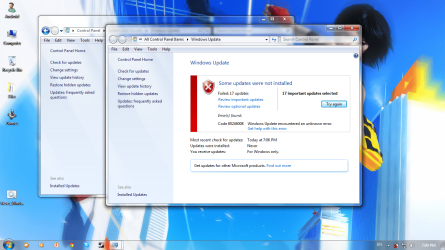
Well, seems like it didn't fix the issue at all... For a moment, it became active and I was able to check for updates, but when I did it, this thing happened (I'll attach the image) I'm still very thankful for your help, hoping to hear some other suggestions. (I'm sorry, my English isn't that good)
 

Attachments

  • Untitled.png
    Untitled.png
    255.4 KB · Views: 25

My Computer

OS
Windows 7 Ultimate x64
Well, seems like it didn't fix the issue at all... For a moment, it became active and I was able to check for updates, but when I did it, this thing happened (I'll attach the image) I'm still very thankful for your help, hoping to hear some other suggestions. (I'm sorry, my English isn't that good)


Try installing one by one I will look up the error code and get back to you.
 

My Computer

Computer type
PC/Desktop
Computer Manufacturer/Model Number
Self assembled
OS
Windows 10 Home 64Bit
CPU
Intel Core i5 10400 @ 2.90GHz
Motherboard
Intel Corporation DG41WV (PROCESSOR)
Memory
8.00GB Single-Channel Unknown @ 1329MHz (16-20-20-38)
Sound Card
Realtek High Definition Audio
Monitor(s) Displays
DELL E170S
Screen Resolution
1280x1024 pixels
Hard Drives
931GB TOSHIBA DT01ACA100 (SATA)
238GB TEAM TM8PS7256G (SATA SSD)
Case
Nothing Fancy
Cooling
Fans
Keyboard
A4 Tech Co LTD
Mouse
A4 Tech Co Ltd/Logitech
Internet Speed
25 Mbps
Click on the link here and fine the error number, it should take you to a possible solution. That is the link when you run Updates.
Capture.JPG
 

My Computer

Computer type
PC/Desktop
Computer Manufacturer/Model Number
Home Built Desktop By DataTech
OS
Windows 7 Ultimate X64 SP1
CPU
Intel i5-2550K, Differing ~4.4-4.8GHz No built in GPU
Motherboard
ASUS P8Z68-V PRO/GEN3
Memory
16GB G.Skill Sniper 1866MHz @ 2133MHz 2x8GB
Graphics Card(s)
ASUS GTX650TIB-DC2OC-2GD5, (650TI Boost)
Sound Card
Onboard Realtek 5-1
Monitor(s) Displays
Samsung P2570HD
Screen Resolution
1920x1080
Hard Drives
Samsung 840 Pro 256GB SSD for OS, 500GB Seagate Constellation (Enterprise drive) for Data
PSU
Corsair HX650W
Case
Inwin Dragon Rider
Cooling
Hyper 212 EVO w/two Noctua fans, push-pull, @1300 RPM
Keyboard
E-Z Eyes, bright yellow keys with large characters
Mouse
steelseries SENSEI Laser Pro Gaming
Internet Speed
48-51Mbs Mbs down, 11 Mbs up Xfinity Cable
Antivirus
Norton Internet Security 2013
Browser
IE 10, Opera, Pale Moon if needed
Other Info
4 case fans, LG BluRay-RE, ASUS DVD-RW, Mr. Fusion power supply, 1.21 gigawatts.

My Computer

Computer type
PC/Desktop
Computer Manufacturer/Model Number
Self assembled
OS
Windows 10 Home 64Bit
CPU
Intel Core i5 10400 @ 2.90GHz
Motherboard
Intel Corporation DG41WV (PROCESSOR)
Memory
8.00GB Single-Channel Unknown @ 1329MHz (16-20-20-38)
Sound Card
Realtek High Definition Audio
Monitor(s) Displays
DELL E170S
Screen Resolution
1280x1024 pixels
Hard Drives
931GB TOSHIBA DT01ACA100 (SATA)
238GB TEAM TM8PS7256G (SATA SSD)
Case
Nothing Fancy
Cooling
Fans
Keyboard
A4 Tech Co LTD
Mouse
A4 Tech Co Ltd/Logitech
Internet Speed
25 Mbps
Click on the link here and fine the error number, it should take you to a possible solution. That is the link when you run Updates.
View attachment 227545
Thank you, I've tried this, didn't help at all.

Click on the link here and fine the error number, it should take you to a possible solution.
View attachment 227545

Thanks Gary.

Also take a look at this link Windows Update error 80246008 once you're done.

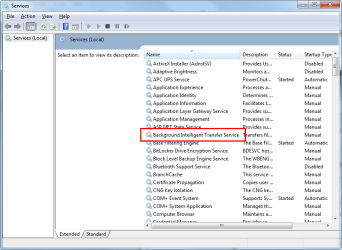
This looks like a solution, but there's one thing I don't get... it says to enter services from Administrative Tools, then "Right-click the Background Intelligent Transfer Service (BITS) service, and then click Properties." But there's no Background Intelligent Transfer Service. I'm kind of confused now, but once again, thank you for the time you've wasted. Trying to find the solution atm, if I do so, I'll post it here as well.
 

My Computer

OS
Windows 7 Ultimate x64
Not in here?
Untitled.png
 

My Computer

Computer type
PC/Desktop
Computer Manufacturer/Model Number
Home Built Desktop By DataTech
OS
Windows 7 Ultimate X64 SP1
CPU
Intel i5-2550K, Differing ~4.4-4.8GHz No built in GPU
Motherboard
ASUS P8Z68-V PRO/GEN3
Memory
16GB G.Skill Sniper 1866MHz @ 2133MHz 2x8GB
Graphics Card(s)
ASUS GTX650TIB-DC2OC-2GD5, (650TI Boost)
Sound Card
Onboard Realtek 5-1
Monitor(s) Displays
Samsung P2570HD
Screen Resolution
1920x1080
Hard Drives
Samsung 840 Pro 256GB SSD for OS, 500GB Seagate Constellation (Enterprise drive) for Data
PSU
Corsair HX650W
Case
Inwin Dragon Rider
Cooling
Hyper 212 EVO w/two Noctua fans, push-pull, @1300 RPM
Keyboard
E-Z Eyes, bright yellow keys with large characters
Mouse
steelseries SENSEI Laser Pro Gaming
Internet Speed
48-51Mbs Mbs down, 11 Mbs up Xfinity Cable
Antivirus
Norton Internet Security 2013
Browser
IE 10, Opera, Pale Moon if needed
Other Info
4 case fans, LG BluRay-RE, ASUS DVD-RW, Mr. Fusion power supply, 1.21 gigawatts.

My Computer

Computer type
PC/Desktop
Computer Manufacturer/Model Number
Self assembled
OS
Windows 10 Home 64Bit
CPU
Intel Core i5 10400 @ 2.90GHz
Motherboard
Intel Corporation DG41WV (PROCESSOR)
Memory
8.00GB Single-Channel Unknown @ 1329MHz (16-20-20-38)
Sound Card
Realtek High Definition Audio
Monitor(s) Displays
DELL E170S
Screen Resolution
1280x1024 pixels
Hard Drives
931GB TOSHIBA DT01ACA100 (SATA)
238GB TEAM TM8PS7256G (SATA SSD)
Case
Nothing Fancy
Cooling
Fans
Keyboard
A4 Tech Co LTD
Mouse
A4 Tech Co Ltd/Logitech
Internet Speed
25 Mbps
If the sfc scan doesn't help you may have to do a http://www.sevenforums.com/tutorials/3413-repair-install.html#post31238
Or a http://www.sevenforums.com/installation-setup/151566-reinstalling-windows-7-a-6.html#post1300819
Also,
To help all of us would you please add your systems specs? Here's how: http://www.sevenforums.com/tutorials/180324-system-info-see-your-system-specs.html#post1530002
Under System Manufacturer/Model Number add desktop or laptop and whether self built.

You can easily copy/paste from within the app, no install required.
 

My Computer

Computer type
PC/Desktop
Computer Manufacturer/Model Number
Home Built Desktop By DataTech
OS
Windows 7 Ultimate X64 SP1
CPU
Intel i5-2550K, Differing ~4.4-4.8GHz No built in GPU
Motherboard
ASUS P8Z68-V PRO/GEN3
Memory
16GB G.Skill Sniper 1866MHz @ 2133MHz 2x8GB
Graphics Card(s)
ASUS GTX650TIB-DC2OC-2GD5, (650TI Boost)
Sound Card
Onboard Realtek 5-1
Monitor(s) Displays
Samsung P2570HD
Screen Resolution
1920x1080
Hard Drives
Samsung 840 Pro 256GB SSD for OS, 500GB Seagate Constellation (Enterprise drive) for Data
PSU
Corsair HX650W
Case
Inwin Dragon Rider
Cooling
Hyper 212 EVO w/two Noctua fans, push-pull, @1300 RPM
Keyboard
E-Z Eyes, bright yellow keys with large characters
Mouse
steelseries SENSEI Laser Pro Gaming
Internet Speed
48-51Mbs Mbs down, 11 Mbs up Xfinity Cable
Antivirus
Norton Internet Security 2013
Browser
IE 10, Opera, Pale Moon if needed
Other Info
4 case fans, LG BluRay-RE, ASUS DVD-RW, Mr. Fusion power supply, 1.21 gigawatts.
If the sfc scan doesn't help you may have to do a http://www.sevenforums.com/tutorials/3413-repair-install.html#post31238
Or a http://www.sevenforums.com/installation-setup/151566-reinstalling-windows-7-a-6.html#post1300819
Also,
To help all of us would you please add your systems specs? Here's how: http://www.sevenforums.com/tutorials/180324-system-info-see-your-system-specs.html#post1530002
Under System Manufacturer/Model Number add desktop or laptop and whether self built.

You can easily copy/paste from within the app, no install required.

CPU - Intel(R) Core(TM) i3-2350M CPU @ 2.30GHz
Motherboard - Intel(R) Core(TM) i3-2350M CPU @ 2.30GHz
BIOS - BIOS Date: 01/17/12 15:16:46 Ver: 04.06.03
Total Memory - 3.00 GB (2,78 GB usable)
HDD - WDC WD3200BPVT-80JJ5T0
Graphics Card - Intel(R) HD Graphics 3000 (integrated) and NVIDIA GeForce 610M 2GB
OS - Windows 7 Ultimate Service Pack 1

There, and I'm about to start sfc scan, can it cause any data loss?
 

My Computer

OS
Windows 7 Ultimate x64

My Computer

Computer type
PC/Desktop
Computer Manufacturer/Model Number
Self assembled
OS
Windows 10 Home 64Bit
CPU
Intel Core i5 10400 @ 2.90GHz
Motherboard
Intel Corporation DG41WV (PROCESSOR)
Memory
8.00GB Single-Channel Unknown @ 1329MHz (16-20-20-38)
Sound Card
Realtek High Definition Audio
Monitor(s) Displays
DELL E170S
Screen Resolution
1280x1024 pixels
Hard Drives
931GB TOSHIBA DT01ACA100 (SATA)
238GB TEAM TM8PS7256G (SATA SSD)
Case
Nothing Fancy
Cooling
Fans
Keyboard
A4 Tech Co LTD
Mouse
A4 Tech Co Ltd/Logitech
Internet Speed
25 Mbps
hey im having a problem with my windows as well i would be glad to help you but im so stressed that i cant think i have the error code 0xC004F074 but good luck i hope you figure your problem out also thanks for saying the program name :MGA diag tool
 

My Computer

OS
windows7 enterprise 64bit
hey im having a problem with my windows as well i would be glad to help you but im so stressed that i cant think i have the error code 0xC004F074 but good luck i hope you figure your problem out also thanks for saying the program name :MGA diag tool

Please wait for a reply on your thread.
 

My Computer

Computer type
PC/Desktop
Computer Manufacturer/Model Number
Self assembled
OS
Windows 10 Home 64Bit
CPU
Intel Core i5 10400 @ 2.90GHz
Motherboard
Intel Corporation DG41WV (PROCESSOR)
Memory
8.00GB Single-Channel Unknown @ 1329MHz (16-20-20-38)
Sound Card
Realtek High Definition Audio
Monitor(s) Displays
DELL E170S
Screen Resolution
1280x1024 pixels
Hard Drives
931GB TOSHIBA DT01ACA100 (SATA)
238GB TEAM TM8PS7256G (SATA SSD)
Case
Nothing Fancy
Cooling
Fans
Keyboard
A4 Tech Co LTD
Mouse
A4 Tech Co Ltd/Logitech
Internet Speed
25 Mbps
If the sfc scan doesn't help you may have to do a http://www.sevenforums.com/tutorials/3413-repair-install.html#post31238
Or a http://www.sevenforums.com/installation-setup/151566-reinstalling-windows-7-a-6.html#post1300819
Also,
To help all of us would you please add your systems specs? Here's how: http://www.sevenforums.com/tutorials/180324-system-info-see-your-system-specs.html#post1530002
Under System Manufacturer/Model Number add desktop or laptop and whether self built.

You can easily copy/paste from within the app, no install required.

CPU - Intel(R) Core(TM) i3-2350M CPU @ 2.30GHz
Motherboard - Intel(R) Core(TM) i3-2350M CPU @ 2.30GHz
BIOS - BIOS Date: 01/17/12 15:16:46 Ver: 04.06.03
Total Memory - 3.00 GB (2,78 GB usable)
HDD - WDC WD3200BPVT-80JJ5T0
Graphics Card - Intel(R) HD Graphics 3000 (integrated) and NVIDIA GeForce 610M 2GB
OS - Windows 7 Ultimate Service Pack 1

There, and I'm about to start sfc scan, can it cause any data loss?
you missed the part on how to put that in your profile mate.
 

My Computer

Computer type
PC/Desktop
Computer Manufacturer/Model Number
Home Built Desktop By DataTech
OS
Windows 7 Ultimate X64 SP1
CPU
Intel i5-2550K, Differing ~4.4-4.8GHz No built in GPU
Motherboard
ASUS P8Z68-V PRO/GEN3
Memory
16GB G.Skill Sniper 1866MHz @ 2133MHz 2x8GB
Graphics Card(s)
ASUS GTX650TIB-DC2OC-2GD5, (650TI Boost)
Sound Card
Onboard Realtek 5-1
Monitor(s) Displays
Samsung P2570HD
Screen Resolution
1920x1080
Hard Drives
Samsung 840 Pro 256GB SSD for OS, 500GB Seagate Constellation (Enterprise drive) for Data
PSU
Corsair HX650W
Case
Inwin Dragon Rider
Cooling
Hyper 212 EVO w/two Noctua fans, push-pull, @1300 RPM
Keyboard
E-Z Eyes, bright yellow keys with large characters
Mouse
steelseries SENSEI Laser Pro Gaming
Internet Speed
48-51Mbs Mbs down, 11 Mbs up Xfinity Cable
Antivirus
Norton Internet Security 2013
Browser
IE 10, Opera, Pale Moon if needed
Other Info
4 case fans, LG BluRay-RE, ASUS DVD-RW, Mr. Fusion power supply, 1.21 gigawatts.
Hey, I did a SFC scan, it detected some system problems, but said they would be repaired after next reboot. I rebooted and nothing happened. Also, I found this http://www.sevenforums.com/tutorials/113399-windows-update-error-80246008-windows-7-fix.html I did everything, added BITSWin7.reg to the registry, but couldn't get WU to work. I think the problem is that there is no "BITS" service in services. Also, I get 80246008 error only after reseting Windows Updates, but after I did everything as it was said in the tutorial (linked above) it says this again: "Windows Update cannot check for updates, because the service is not running. You may need to restart your computer."
 

My Computer

OS
Windows 7 Ultimate x64

My Computer

Computer type
PC/Desktop
Computer Manufacturer/Model Number
Self assembled
OS
Windows 10 Home 64Bit
CPU
Intel Core i5 10400 @ 2.90GHz
Motherboard
Intel Corporation DG41WV (PROCESSOR)
Memory
8.00GB Single-Channel Unknown @ 1329MHz (16-20-20-38)
Sound Card
Realtek High Definition Audio
Monitor(s) Displays
DELL E170S
Screen Resolution
1280x1024 pixels
Hard Drives
931GB TOSHIBA DT01ACA100 (SATA)
238GB TEAM TM8PS7256G (SATA SSD)
Case
Nothing Fancy
Cooling
Fans
Keyboard
A4 Tech Co LTD
Mouse
A4 Tech Co Ltd/Logitech
Internet Speed
25 Mbps
Back
Top