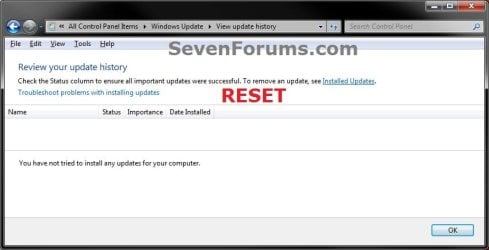
Windows Update - Reset

How to Reset Windows Update in Vista, Windows 7, and Windows 8


   Information
This will show you how to reset Windows Update view update history, and how to reset and re-register Windows Update Components if you are having a problem updating with Windows Update.


OPTION ONE

To Only Reset Windows Update History


   Note
Resetting Windows Update using this option will clear the view update history details list (cache).

This will not actually uninstall any of your currently installed Windows Update. They will just not be listed anymore. Any new Windows Update installed after the reset will show up in the view update history list as normal though.

1. Click/tap on the Download button below to download this file below.
Reset_Windows_Update_History.bat


Download


2. Save the .bat file to your Desktop.

3. Right click or press and hold on the downloaded .bat file, and click/tap on Run as administrator.

4. If prompted by UAC click/tap on Run, then Yes/Continue (if administrator) or type in administrator's password (if standard user).

5. You will now see an elevated command prompt open and run. When it's finished, it will close automatically.

6. If opened, close and reopen Windows Update to verify that it has been reset.
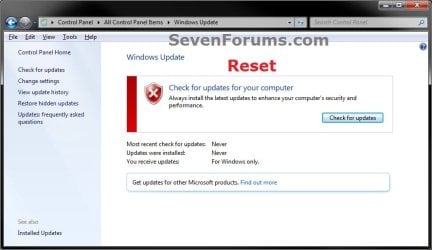
Reset.jpg

Update_History.jpg

7. Resetting the Windows Update history will also restore the default language packs being listed in Windows Upate again in the Windows 7 Ultimate and Enterprise editions after you check for updates next.
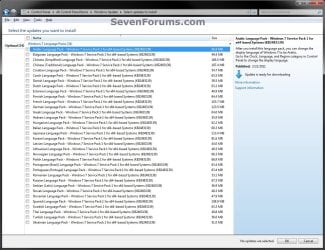
Language_Packs.jpg


OPTION TWO

To Reset and Re-register Windows Update Components


NOTE: This option is the Windows version of: How do I reset Windows Update components?. It will reset Windows Update Components and re-register the BITS files and the Windows Update files to help fix Windows Update errors. This option will not clear the view update history details list as it does in OPTION ONE above.
1. Click/tap on the Download button below to download this file below.
Reset_Reregister_Windows_Update_Components.bat


Download


2. Save the .bat file to your Desktop.

3. Right click or press and hold on the downloaded .bat file, and click/tap on Run as administrator.

4. If prompted by UAC click on Run, then Yes/Continue (if administrator) or type in administrator's password (if standard user).

5. You will now see an elevated command prompt open and run. When it's finished, it will close automatically.

6. Restart the computer afterwards to apply.

7. If this still does not help, then run the Microsoft Fix it tool here:
How do I reset Windows Update components?

See also: Unable to install updates in Windows Vista, Windows 7, Windows Server 2008 and Windows Server 2008 R2


OPTION THREE

To Reset and Re-register Windows Update Components AND Reset Update History in One Easy Click


   Note
This option combines OPTION ONE and OPTION TWO above in one .bat file.

1. Click/tap on the Download button below to download this file below.
Reset_Windows_Update_Full.bat


Download


2. Save the .bat file to your Desktop.

3. Right click or press and hold on the downloaded .bat file, and click/tap on Run as administrator.

4. If prompted by UAC click/tap on Run, then Yes/Continue (if administrator) or type in administrator's password (if standard user).

5. You will now see an elevated command prompt open and run. When it's finished, it will close automatically.

6. Restart the computer afterwards to apply.

7. If this still does not help, then run the Microsoft Fix it tool here:

Download


How do I reset Windows Update components?

See also: Unable to install updates in Windows Vista, Windows 7, Windows Server 2008 and Windows Server 2008 R2
That's it,
Shawn


Attachments

Last edited:
I'm glad it could help rollercoaster, and welcome to Seven Forums. :)
 

My Computer

Computer type
PC/Desktop
Computer Manufacturer/Model Number
Self built custom
OS
64-bit Windows 11 Pro for Workstations
CPU
Intel i7-8700K OC'd to 5 GHz
Motherboard
ASUS ROG Maximus XI Formula Z390
Memory
64 GB (4x16GB) G.SKILL TridentZ RGB DDR4 3600 MHz
Graphics Card(s)
ASUS ROG-STRIX-GTX1080TI-O11G-GAMING
Sound Card
Integrated
Monitor(s) Displays
2 x Samsung Odyssey G7 27"
Screen Resolution
2560x1440
Hard Drives
1TB Samsung 990 PRO M.2,
4TB Samsung 990 PRO PRO M.2,
TerraMaster F8 SSD Plus NAS
PSU
Seasonic Prime Titanium 850W
Case
Thermaltake Core P3
Cooling
Corsair Hydro H115i
Keyboard
Logitech wireless K800
Mouse
Logitech MX Master 4
Internet Speed
2 Gb/s Download and 100 Mb/s Upload
Antivirus
Malwarebyte Anti-Malware Premium
Browser
Google Chrome
Other Info
Logitech Z625 speaker system,
Logitech BRIO 4K Pro webcam,
HP Color LaserJet Pro MFP M477fdn,
APC SMART-UPS RT 1000 XL - SURT1000XLI,
Galaxy S23 Plus phone
Hi Shawn
Is there a cache or something windows uses for this ?
 

My Computer

Computer type
PC/Desktop
Computer Manufacturer/Model Number
Custom assembled by me :}
OS
Win-7-Pro64bit 7-H-Prem-64bit
CPU
i7-5930K 2nd i9-9940x both water blocked VRM's too
Motherboard
ASUS SABERTOOTH X99 2nd ASUS x299 Apex
Memory
Trident-z 3200C14 2nd Trident-z 3600C16
Graphics Card(s)
EVGA 1080ti ftw3 2nd Titan Xp both water blocked
Sound Card
Built-in Realtek
Monitor(s) Displays
1-AOC G2460PG 24"G-Sync 144Hz/ 2nd 1-ASUS VG248QE 24" 144Hz
Screen Resolution
1920 x 1080 144Hz
Hard Drives
2-Samsung M.2 Evo & Evo Plus
2-Samsung 850 EVO 500GB SSD's/ 3-2.5 W.D. Black 1tb-&3-1tb/3-3.5 WD Black 1tb hdd's
PSU
EVGA SuperNOVA 1000-P2 2nd 1200-P2
Case
2-Corsair Obsidian Series 450D Black ATX Mid Tower
Cooling
Custom water loops
Keyboard
Logitech G710+/ 2nd Logitech G910
Mouse
2-RedDragon M901 Perdition 16400 dpi Gaming mouse = wired
Internet Speed
Comcast Ping 19ms 89.31mbps download speed 6.12mbps upload
Antivirus
Malwarebytes Pro/ Superantispyware Pro
Browser
FireFox & Pale moon
Other Info
2nd ASUS X299 Apex/Intel i9-9940x with Custom water loop/7H-Prem-x64/Corsair 450D case/Ram Trident-z 3600C16 4x8gb / Samsung970Evo plus 500gb SSD/Dual ssd EZ swap evo/PSU EVGA SuperNova 1200w-P2 80+Platinum/GPU Titan Xp /8-ML-140 on push-pull on 2-280GTX rads
The Windows Update cache is the "C:\Windows\SoftwareDistribution\Download" folder. The .bat files in the tutorial will clear this. :)
 

My Computer

Computer type
PC/Desktop
Computer Manufacturer/Model Number
Self built custom
OS
64-bit Windows 11 Pro for Workstations
CPU
Intel i7-8700K OC'd to 5 GHz
Motherboard
ASUS ROG Maximus XI Formula Z390
Memory
64 GB (4x16GB) G.SKILL TridentZ RGB DDR4 3600 MHz
Graphics Card(s)
ASUS ROG-STRIX-GTX1080TI-O11G-GAMING
Sound Card
Integrated
Monitor(s) Displays
2 x Samsung Odyssey G7 27"
Screen Resolution
2560x1440
Hard Drives
1TB Samsung 990 PRO M.2,
4TB Samsung 990 PRO PRO M.2,
TerraMaster F8 SSD Plus NAS
PSU
Seasonic Prime Titanium 850W
Case
Thermaltake Core P3
Cooling
Corsair Hydro H115i
Keyboard
Logitech wireless K800
Mouse
Logitech MX Master 4
Internet Speed
2 Gb/s Download and 100 Mb/s Upload
Antivirus
Malwarebyte Anti-Malware Premium
Browser
Google Chrome
Other Info
Logitech Z625 speaker system,
Logitech BRIO 4K Pro webcam,
HP Color LaserJet Pro MFP M477fdn,
APC SMART-UPS RT 1000 XL - SURT1000XLI,
Galaxy S23 Plus phone
Hi,
Okay thanks that folder location is not listed in the tutorial unless I missed it :o
 

My Computer

Computer type
PC/Desktop
Computer Manufacturer/Model Number
Custom assembled by me :}
OS
Win-7-Pro64bit 7-H-Prem-64bit
CPU
i7-5930K 2nd i9-9940x both water blocked VRM's too
Motherboard
ASUS SABERTOOTH X99 2nd ASUS x299 Apex
Memory
Trident-z 3200C14 2nd Trident-z 3600C16
Graphics Card(s)
EVGA 1080ti ftw3 2nd Titan Xp both water blocked
Sound Card
Built-in Realtek
Monitor(s) Displays
1-AOC G2460PG 24"G-Sync 144Hz/ 2nd 1-ASUS VG248QE 24" 144Hz
Screen Resolution
1920 x 1080 144Hz
Hard Drives
2-Samsung M.2 Evo & Evo Plus
2-Samsung 850 EVO 500GB SSD's/ 3-2.5 W.D. Black 1tb-&3-1tb/3-3.5 WD Black 1tb hdd's
PSU
EVGA SuperNOVA 1000-P2 2nd 1200-P2
Case
2-Corsair Obsidian Series 450D Black ATX Mid Tower
Cooling
Custom water loops
Keyboard
Logitech G710+/ 2nd Logitech G910
Mouse
2-RedDragon M901 Perdition 16400 dpi Gaming mouse = wired
Internet Speed
Comcast Ping 19ms 89.31mbps download speed 6.12mbps upload
Antivirus
Malwarebytes Pro/ Superantispyware Pro
Browser
FireFox & Pale moon
Other Info
2nd ASUS X299 Apex/Intel i9-9940x with Custom water loop/7H-Prem-x64/Corsair 450D case/Ram Trident-z 3600C16 4x8gb / Samsung970Evo plus 500gb SSD/Dual ssd EZ swap evo/PSU EVGA SuperNova 1200w-P2 80+Platinum/GPU Titan Xp /8-ML-140 on push-pull on 2-280GTX rads
Nar, but it's included in the .bat files to delete the contents of the "C:\Windows\SoftwareDistribution" folder.
 

My Computer

Computer type
PC/Desktop
Computer Manufacturer/Model Number
Self built custom
OS
64-bit Windows 11 Pro for Workstations
CPU
Intel i7-8700K OC'd to 5 GHz
Motherboard
ASUS ROG Maximus XI Formula Z390
Memory
64 GB (4x16GB) G.SKILL TridentZ RGB DDR4 3600 MHz
Graphics Card(s)
ASUS ROG-STRIX-GTX1080TI-O11G-GAMING
Sound Card
Integrated
Monitor(s) Displays
2 x Samsung Odyssey G7 27"
Screen Resolution
2560x1440
Hard Drives
1TB Samsung 990 PRO M.2,
4TB Samsung 990 PRO PRO M.2,
TerraMaster F8 SSD Plus NAS
PSU
Seasonic Prime Titanium 850W
Case
Thermaltake Core P3
Cooling
Corsair Hydro H115i
Keyboard
Logitech wireless K800
Mouse
Logitech MX Master 4
Internet Speed
2 Gb/s Download and 100 Mb/s Upload
Antivirus
Malwarebyte Anti-Malware Premium
Browser
Google Chrome
Other Info
Logitech Z625 speaker system,
Logitech BRIO 4K Pro webcam,
HP Color LaserJet Pro MFP M477fdn,
APC SMART-UPS RT 1000 XL - SURT1000XLI,
Galaxy S23 Plus phone
windows 7 Update stuck after restore of system image

Before I upgraded from Windows 7 Home to Windows 10 I created a System Image. I was not happy with the Windows 10 so I decided to go back to windows 7. I restored Windows 7 from the earlier created System Image.

Windows 7 was working well except that Windows Update was stuck on "Checking for Updates". After several hours I killed it and ran your Option 3. Still no joy. My only option now was to go back to Windows 10. I had created a System Image of Windows 10 before I went back to Windows 7.

Windows 10 is now running and Windows Update is doing fine.
 

My Computer

Computer type
Laptop
Computer Manufacturer/Model Number
Toshiba
OS
Windows Home Premium 64 bit
Memory
3GB
Antivirus
MSE
Browser
IE 10
Hello RockFox, :)

I'm glad to hear it's running fine in Windows 10.

If you like, please post anything that you're not happy about Windows 10 at our sister site www.tenforums.com, and we'll be happy to see if there's something we may be able to do to help.
 

My Computer

Computer type
PC/Desktop
Computer Manufacturer/Model Number
Self built custom
OS
64-bit Windows 11 Pro for Workstations
CPU
Intel i7-8700K OC'd to 5 GHz
Motherboard
ASUS ROG Maximus XI Formula Z390
Memory
64 GB (4x16GB) G.SKILL TridentZ RGB DDR4 3600 MHz
Graphics Card(s)
ASUS ROG-STRIX-GTX1080TI-O11G-GAMING
Sound Card
Integrated
Monitor(s) Displays
2 x Samsung Odyssey G7 27"
Screen Resolution
2560x1440
Hard Drives
1TB Samsung 990 PRO M.2,
4TB Samsung 990 PRO PRO M.2,
TerraMaster F8 SSD Plus NAS
PSU
Seasonic Prime Titanium 850W
Case
Thermaltake Core P3
Cooling
Corsair Hydro H115i
Keyboard
Logitech wireless K800
Mouse
Logitech MX Master 4
Internet Speed
2 Gb/s Download and 100 Mb/s Upload
Antivirus
Malwarebyte Anti-Malware Premium
Browser
Google Chrome
Other Info
Logitech Z625 speaker system,
Logitech BRIO 4K Pro webcam,
HP Color LaserJet Pro MFP M477fdn,
APC SMART-UPS RT 1000 XL - SURT1000XLI,
Galaxy S23 Plus phone
Hi.

I need a little help before I run "option 2".

Windows update cannot update, searching....... It also has the big red X. But also my MSSE cannot update too, searching...... etc. The last update in history is 6/19/16. The last update of MSSE was 7/31/16. Which is funny as initially it was 7/15/16 and one day it ran & updated to 7/31, but now is just searching.....

I do have a few restore points available, that has not been wiped out. The last being, I think, 6/19/16. I want to add that the 6/19 update was only an update for office and not win7.

I read this old topic http://www.sevenforums.com/system-security/211286-unable-update-mse.html and I appear to be going the right way, but of course, want to be as sure as I can be.

I ran malwarebytes initially and it found a pup hiding in the recycler. However, it's quarantine did not help anything and still unable to update.

So I guess I need to know what order to try things; restore first? option 2 first? option 3?

In the past, I've run 7forums explorer reset tool and it works great. Thanks for that one.

I'm hoping you can help me again.

Also sorry for this being my 1st post. But you know how it is......
 

My Computer

Computer type
PC/Desktop
Computer Manufacturer/Model Number
HP x4600
OS
Windows 7 Pro 64 Bit, SP1
CPU
Intel Core 2 Duo E6850 (Dual-Core3 3.00-GHz, 1333 MHz FSB)
Motherboard
HP
Memory
HP 8GB (2x4GB) DDR2-800 ECC RAM
Graphics Card(s)
NVIDIA Quadro FX 1700 PCI-Express graphics controller
Sound Card
Integrated high definition audio
Hard Drives
(2) 250 gig sata
PSU
475 W; active Power Factor Correction
Keyboard
USB standard keyboard
Mouse
USB 2-button optical scroll mouse
Antivirus
MSSE
Browser
IE
Hello number42, and welcome to Seven Forums. :)

OPTION THREE to completely reset Windows Update would give you the best chance of success.
 

My Computer

Computer type
PC/Desktop
Computer Manufacturer/Model Number
Self built custom
OS
64-bit Windows 11 Pro for Workstations
CPU
Intel i7-8700K OC'd to 5 GHz
Motherboard
ASUS ROG Maximus XI Formula Z390
Memory
64 GB (4x16GB) G.SKILL TridentZ RGB DDR4 3600 MHz
Graphics Card(s)
ASUS ROG-STRIX-GTX1080TI-O11G-GAMING
Sound Card
Integrated
Monitor(s) Displays
2 x Samsung Odyssey G7 27"
Screen Resolution
2560x1440
Hard Drives
1TB Samsung 990 PRO M.2,
4TB Samsung 990 PRO PRO M.2,
TerraMaster F8 SSD Plus NAS
PSU
Seasonic Prime Titanium 850W
Case
Thermaltake Core P3
Cooling
Corsair Hydro H115i
Keyboard
Logitech wireless K800
Mouse
Logitech MX Master 4
Internet Speed
2 Gb/s Download and 100 Mb/s Upload
Antivirus
Malwarebyte Anti-Malware Premium
Browser
Google Chrome
Other Info
Logitech Z625 speaker system,
Logitech BRIO 4K Pro webcam,
HP Color LaserJet Pro MFP M477fdn,
APC SMART-UPS RT 1000 XL - SURT1000XLI,
Galaxy S23 Plus phone
Thank you for the super quick response. I wasn't expecting that, although I admit :blush (ah, you don't have that one) that I was monitoring the thread, just in case.

I'll give it a go in the next few days and report back.

Thanks again. (and a tip of the hat)

edit:
Now at home I start the problem computer and MSSE now decides to work again. Out of the blue it downloads the latest defs & the panel looks normal. Go figure. (looks to see if it's a full moon)

I don't have time tonight to run option 3 right now, but will later. :fingers-crossed.
 
Last edited:

My Computer

Computer type
PC/Desktop
Computer Manufacturer/Model Number
HP x4600
OS
Windows 7 Pro 64 Bit, SP1
CPU
Intel Core 2 Duo E6850 (Dual-Core3 3.00-GHz, 1333 MHz FSB)
Motherboard
HP
Memory
HP 8GB (2x4GB) DDR2-800 ECC RAM
Graphics Card(s)
NVIDIA Quadro FX 1700 PCI-Express graphics controller
Sound Card
Integrated high definition audio
Hard Drives
(2) 250 gig sata
PSU
475 W; active Power Factor Correction
Keyboard
USB standard keyboard
Mouse
USB 2-button optical scroll mouse
Antivirus
MSSE
Browser
IE
Hello - my first post so please pardon any breaches of protocol! So successful was your Option 3 on my super swish PC that when an elderly friend asked me to look at her not-so-swish laptop which seemed to be suffering the same problems I agreed.

In fact I decided to do a clean install on the machine (Dell Inspiron running Windows 7 Home Premium) as it had been maintenance-less for many years and was somewhat clogged with un-needed clutter. The ReInstall from OEM disc went fine. Updates started well until after the SP.1 update and the subsequent download of the Windows Update Agent which follows. Then the ubiquitous "Checking for Updates" endless loop and 100% CPU hog. I have encountered endless cases of this precise sequence of events on pretty well every forum and help-site.

Undaunted I ran the Option 3. (In fact I have run it a number of times!) The bat file runs but "stalls" usually after sucessfully deleting the qmgr0.dat and qmgr1.dat files but sometimes after the next line where it returns the "Software Distribution Store.bak DATSTR~1 - The directory is not empty". There is a long pause and finally an Access Denied message followed by a "Could not acces the file as it is in use by another process" The .bat file then proceeds smoothly to completion. I would send you a snip-cap but not sure how to cap the dos screen before it closes?

I am guessing that the Option 3 that worked so well for me previously is not doing everything that it should here. Advice would be much appreciated. This is particularly troublesome after a reinstall - not just the CPU hog but the inability to install some 200 or so updates.
 

My Computer

Computer type
PC/Desktop
Computer Manufacturer/Model Number
Custom
OS
Windows 7 Pro 64bit
CPU
I7 quadcore
Motherboard
Z97-HD3
Memory
16GB
Graphics Card(s)
AMD
Hard Drives
256 GB - SSD (OS + software)
2TB STA internal HD
Various USB external hard drives
Antivirus
Avast
Browser
Firefox, Chrome
Hello mr2legs, and welcome to Seven Forums. :)

It's not unusual to get a few "in use" error messages. When this happens, you can usually restart the computer after it finishes to clear anything that may be in use, and try option 3 again if still needed.
 

My Computer

Computer type
PC/Desktop
Computer Manufacturer/Model Number
Self built custom
OS
64-bit Windows 11 Pro for Workstations
CPU
Intel i7-8700K OC'd to 5 GHz
Motherboard
ASUS ROG Maximus XI Formula Z390
Memory
64 GB (4x16GB) G.SKILL TridentZ RGB DDR4 3600 MHz
Graphics Card(s)
ASUS ROG-STRIX-GTX1080TI-O11G-GAMING
Sound Card
Integrated
Monitor(s) Displays
2 x Samsung Odyssey G7 27"
Screen Resolution
2560x1440
Hard Drives
1TB Samsung 990 PRO M.2,
4TB Samsung 990 PRO PRO M.2,
TerraMaster F8 SSD Plus NAS
PSU
Seasonic Prime Titanium 850W
Case
Thermaltake Core P3
Cooling
Corsair Hydro H115i
Keyboard
Logitech wireless K800
Mouse
Logitech MX Master 4
Internet Speed
2 Gb/s Download and 100 Mb/s Upload
Antivirus
Malwarebyte Anti-Malware Premium
Browser
Google Chrome
Other Info
Logitech Z625 speaker system,
Logitech BRIO 4K Pro webcam,
HP Color LaserJet Pro MFP M477fdn,
APC SMART-UPS RT 1000 XL - SURT1000XLI,
Galaxy S23 Plus phone
Well, I have returned. But the news is not good.

Option 3 Did not work. It did clean out my history, and worked without hangup, but I still get the red X.

I noticed that windows will still download updates if I leave my computer on all night. It just won't install them unless I tell it to. Also update will only download important or recommended updates not optional ones. So since my MSSE is again not working, I can't get update to the defs either. On the related subject of MSSE cannot update. Should I delete and reinstall? or delete and move on? I will open this discussion on the MSSE topic.

So next step? Fix it tool or sfc /scannow?

I just clicked the link for the fix it tool and it's really a long list of things to be done manually??? No real "tool". https://support.microsoft.com/en-us/kb/971058

Searching differently, I found this page...

"End of support notification for Fix it
If you are redirected to this article when you click the Download button of a “Fix it” solution in a Microsoft Knowledge Base article, this means that the solution has been retired and is no longer supported. We recommend that you use one of the following diagnostics to resolve your software issues." https://support.microsoft.com/en-us/kb/2970908

:sigh:
 
Last edited:

My Computer

Computer type
PC/Desktop
Computer Manufacturer/Model Number
HP x4600
OS
Windows 7 Pro 64 Bit, SP1
CPU
Intel Core 2 Duo E6850 (Dual-Core3 3.00-GHz, 1333 MHz FSB)
Motherboard
HP
Memory
HP 8GB (2x4GB) DDR2-800 ECC RAM
Graphics Card(s)
NVIDIA Quadro FX 1700 PCI-Express graphics controller
Sound Card
Integrated high definition audio
Hard Drives
(2) 250 gig sata
PSU
475 W; active Power Factor Correction
Keyboard
USB standard keyboard
Mouse
USB 2-button optical scroll mouse
Antivirus
MSSE
Browser
IE
number42,

OPTION THREE is basically just the KB971058 article that does it for you with a .bat file.

It wouldn't hurt to try the "Resolve problems that prevent you from updating Windows" fix it.

It sounds like you are getting your updates then other than the MSSE definitions due to some issue you're having with MSSE. What do you have your Windows Update settings set to?
 

My Computer

Computer type
PC/Desktop
Computer Manufacturer/Model Number
Self built custom
OS
64-bit Windows 11 Pro for Workstations
CPU
Intel i7-8700K OC'd to 5 GHz
Motherboard
ASUS ROG Maximus XI Formula Z390
Memory
64 GB (4x16GB) G.SKILL TridentZ RGB DDR4 3600 MHz
Graphics Card(s)
ASUS ROG-STRIX-GTX1080TI-O11G-GAMING
Sound Card
Integrated
Monitor(s) Displays
2 x Samsung Odyssey G7 27"
Screen Resolution
2560x1440
Hard Drives
1TB Samsung 990 PRO M.2,
4TB Samsung 990 PRO PRO M.2,
TerraMaster F8 SSD Plus NAS
PSU
Seasonic Prime Titanium 850W
Case
Thermaltake Core P3
Cooling
Corsair Hydro H115i
Keyboard
Logitech wireless K800
Mouse
Logitech MX Master 4
Internet Speed
2 Gb/s Download and 100 Mb/s Upload
Antivirus
Malwarebyte Anti-Malware Premium
Browser
Google Chrome
Other Info
Logitech Z625 speaker system,
Logitech BRIO 4K Pro webcam,
HP Color LaserJet Pro MFP M477fdn,
APC SMART-UPS RT 1000 XL - SURT1000XLI,
Galaxy S23 Plus phone
Do you ever sleep? lol

I have updates set for "install updates automatically". Checked "give me recommended updates the same way as important updates". It's just that I can't ask updates to do a check and therefore can't get optional updates.

Do you have a link to this? "It wouldn't hurt to try the "Resolve problems that prevent you from updating Windows" fix it."

So generally I seem to be sool in getting this fixed?
 

My Computer

Computer type
PC/Desktop
Computer Manufacturer/Model Number
HP x4600
OS
Windows 7 Pro 64 Bit, SP1
CPU
Intel Core 2 Duo E6850 (Dual-Core3 3.00-GHz, 1333 MHz FSB)
Motherboard
HP
Memory
HP 8GB (2x4GB) DDR2-800 ECC RAM
Graphics Card(s)
NVIDIA Quadro FX 1700 PCI-Express graphics controller
Sound Card
Integrated high definition audio
Hard Drives
(2) 250 gig sata
PSU
475 W; active Power Factor Correction
Keyboard
USB standard keyboard
Mouse
USB 2-button optical scroll mouse
Antivirus
MSSE
Browser
IE

My Computer

Computer type
PC/Desktop
Computer Manufacturer/Model Number
Self built custom
OS
64-bit Windows 11 Pro for Workstations
CPU
Intel i7-8700K OC'd to 5 GHz
Motherboard
ASUS ROG Maximus XI Formula Z390
Memory
64 GB (4x16GB) G.SKILL TridentZ RGB DDR4 3600 MHz
Graphics Card(s)
ASUS ROG-STRIX-GTX1080TI-O11G-GAMING
Sound Card
Integrated
Monitor(s) Displays
2 x Samsung Odyssey G7 27"
Screen Resolution
2560x1440
Hard Drives
1TB Samsung 990 PRO M.2,
4TB Samsung 990 PRO PRO M.2,
TerraMaster F8 SSD Plus NAS
PSU
Seasonic Prime Titanium 850W
Case
Thermaltake Core P3
Cooling
Corsair Hydro H115i
Keyboard
Logitech wireless K800
Mouse
Logitech MX Master 4
Internet Speed
2 Gb/s Download and 100 Mb/s Upload
Antivirus
Malwarebyte Anti-Malware Premium
Browser
Google Chrome
Other Info
Logitech Z625 speaker system,
Logitech BRIO 4K Pro webcam,
HP Color LaserJet Pro MFP M477fdn,
APC SMART-UPS RT 1000 XL - SURT1000XLI,
Galaxy S23 Plus phone
In fact I decided to do a clean install on the machine (Dell Inspiron running Windows 7 Home Premium) as it had been maintenance-less for many years and was somewhat clogged with un-needed clutter. The ReInstall from OEM disc went fine. Updates started well until after the SP.1 update and the subsequent download of the Windows Update Agent which follows.

SP1 includes a version of Windows Update Client (Agent) that doesn't work.

Refer to this: Search for Windows Updates takes forever? - A possible solution

RE: The batch file you ran. When I ran it I had the same problem and needed to go through each step manually running line by line using Elevated Command Prompt including stopping locked processes and manually deleting files that were in use or not actually deleted.
 
Last edited:

My Computer

Computer type
Laptop
Computer Manufacturer/Model Number
ASUS
OS
Microsoft Windows 7 Home Premium 64-bit 7601 Multiprocessor Free Service Pack 1
CPU
AMD C-60 APU with Radeon(tm) HD Graphics
Motherboard
ASUSTeK COMPUTER INC. X501U
Memory
4.00 GB
Graphics Card(s)
AMD Radeon HD 6290 Graphics
Sound Card
(1) AMD High Definition Audio Device (2) Realtek High Defi
Screen Resolution
1366 x 768 x 32 bits (4294967296 colors) @ 60 Hz
Hard Drives
Hitachi HTS545050A7E380 SATA Disk Device
Antivirus
Comodo CIS & FW, SecureAplus App Whitelisting, Threatfire
Browser
Cyberfox 64bit, Opera 64bit, Airfox
Other Info
Spy-The-Spy, HitmanPro.Alert, Norton Connect Safe, MJRegWatcher, BitDefender TrafficLight, Voodoo Shield, Zemana AntiMalware
Many thanks Callender and Brink, for your suggestions. I had in fact picked up the other thread on the site regarding a clean install of Windows 7 involving the Manual install of Service Pack 1 and an immediate Manual install of the latest Update Client. If you are on Home Premium it seems you can't update to SP1 manually with IE8 and you can't update IE8 to IE11 without SP1 so, unless I'm being very foolish, you will need to install another browser before you start. Once you have done all this,Windows Update will find about 230 updates and seems happy to download and install the lot without need for restart until the end - so you can leave it overnight - took about 8 hours on an oldish Inspiron. Not wishing to lose this much progress I set a Resore Point here. There were none of the issues associated with this thread.

Then I hit problems. Update now finds a further 10 updates, downloads them but fails to install them. Wuauserv goes back into 100% CPU hogging mode. Running Option 3 encountered an Acess denied glitch half way through as described above but after a reboot the downloaded files which failed to install had disappeared. I set Check for Updates and 24 hours later we were no further on so I concluded we were back to the problems being encountered on this thread rather than the re-install thread. I gather Microsoft have now even abandoned the tool which didn't fix it! Disgraceful. Before embarking upon Callender's excellent (but daunting for those of us with a congenital dread of the command prompt) suggestion of running Option 3 line by line, I ran a Belarc scan which indicated I was actually only lacking one critical and seven important updates. I installed all but three of these manually, one at a time with a restart between each - two of them have known installation issues but a switch of browser resolved that problem (God knows why). I also set a restore point after each install. I then ran Option 3 again. Set Check for updates ovenight and it found and downloaded seven updates which installed without problem. From that point WU has worked as it should, has downloaded and installed a further twenty or so updates in stages and in timely fashion and is now displaying the 'Windows is up to date' legend.

Not much science involved in the above but if anyone is having the same problems then after ten days of arsing around with this, as I have, then you will probably be glad to try anything that worked for anyone.

Thanks again to the site contributors - lost without you on this.
 

My Computer

Computer type
PC/Desktop
Computer Manufacturer/Model Number
Custom
OS
Windows 7 Pro 64bit
CPU
I7 quadcore
Motherboard
Z97-HD3
Memory
16GB
Graphics Card(s)
AMD
Hard Drives
256 GB - SSD (OS + software)
2TB STA internal HD
Various USB external hard drives
Antivirus
Avast
Browser
Firefox, Chrome
Hi,
You'd be better off using media that already had sp1 on it :)
Just post the language and exact version and we can help you out getting one to use for a real clean install :)
 

My Computer

Computer type
PC/Desktop
Computer Manufacturer/Model Number
Custom assembled by me :}
OS
Win-7-Pro64bit 7-H-Prem-64bit
CPU
i7-5930K 2nd i9-9940x both water blocked VRM's too
Motherboard
ASUS SABERTOOTH X99 2nd ASUS x299 Apex
Memory
Trident-z 3200C14 2nd Trident-z 3600C16
Graphics Card(s)
EVGA 1080ti ftw3 2nd Titan Xp both water blocked
Sound Card
Built-in Realtek
Monitor(s) Displays
1-AOC G2460PG 24"G-Sync 144Hz/ 2nd 1-ASUS VG248QE 24" 144Hz
Screen Resolution
1920 x 1080 144Hz
Hard Drives
2-Samsung M.2 Evo & Evo Plus
2-Samsung 850 EVO 500GB SSD's/ 3-2.5 W.D. Black 1tb-&3-1tb/3-3.5 WD Black 1tb hdd's
PSU
EVGA SuperNOVA 1000-P2 2nd 1200-P2
Case
2-Corsair Obsidian Series 450D Black ATX Mid Tower
Cooling
Custom water loops
Keyboard
Logitech G710+/ 2nd Logitech G910
Mouse
2-RedDragon M901 Perdition 16400 dpi Gaming mouse = wired
Internet Speed
Comcast Ping 19ms 89.31mbps download speed 6.12mbps upload
Antivirus
Malwarebytes Pro/ Superantispyware Pro
Browser
FireFox & Pale moon
Other Info
2nd ASUS X299 Apex/Intel i9-9940x with Custom water loop/7H-Prem-x64/Corsair 450D case/Ram Trident-z 3600C16 4x8gb / Samsung970Evo plus 500gb SSD/Dual ssd EZ swap evo/PSU EVGA SuperNova 1200w-P2 80+Platinum/GPU Titan Xp /8-ML-140 on push-pull on 2-280GTX rads
Hello ThrashZone, thanks for your input. I did try to obtain a SP1 iso version from microsoft using the Dell factory installation Key and the Re-install disc Key but my requests were rejected, presumably because this was originally an OEM installation. I was unaware that there was any other way of obtaining a legitimate copy. If there is then I would welcome your advice on obtaining one - in case this happens again! Windows 7 Home Premium 64 bit, English (UK).

Thanks.
 

My Computer

Computer type
PC/Desktop
Computer Manufacturer/Model Number
Custom
OS
Windows 7 Pro 64bit
CPU
I7 quadcore
Motherboard
Z97-HD3
Memory
16GB
Graphics Card(s)
AMD
Hard Drives
256 GB - SSD (OS + software)
2TB STA internal HD
Various USB external hard drives
Antivirus
Avast
Browser
Firefox, Chrome
Back
Top