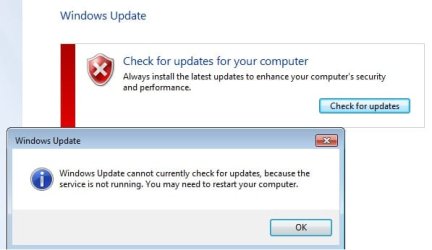
Windows Update service not running (Windows 7 Home Premium x64)

littlelotus

New member
Local time
9:13 PM
Messages
4
I just reformatted my PC and unable to run Windows Update.
I have attached the CBS file and a screenshot of the error message.
Have tried restarting a zillion times, update drivers, and a fix registry tool but still unsuccessful.
Can someone please help? Thanks in advance.
 

Attachments

  • win7update.jpg
    win7update.jpg
    21.5 KB · Views: 15

My Computer My Computer

At a glance

Windows 7 Home Premium 64 bit
Computer type
PC/Desktop
Computer Manufacturer/Model Number
custom build
OS
Windows 7 Home Premium 64 bit
Antivirus
AVG
Browser
Google Chrome
Your install has a very high number of POQ's in the SFC report - which usually indicates that a lot of Language Packs have been installed.

There are no serious errors in the scan.

Please download the Farbar Service Scanner from

http://www.bleepingcomputer.com/download/farbar-service-scanner/

Right-click on the saved file and select 'Run as Administrator', and tick all the options, then click on the Scan button - copy and paste the report to your response.


My Computer My Computer

At a glance

Win 7 x64 Home Premium (and x86 VirtualBox VM...i3 370M/i7 6500U8GB - finally :)/8GBit's an i3, dude!/dual Intel&nVidia
Computer type
Laptop
Computer Manufacturer/Model Number
Asus K52F or Lenovo B51-80
OS
Win 7 x64 Home Premium (and x86 VirtualBox VM)/Win10
CPU
i3 370M/i7 6500U
Motherboard
Asus/Lenovo
Memory
8GB - finally :)/8GB
Graphics Card(s)
it's an i3, dude!/dual Intel&nVidia
Sound Card
onboard
Monitor(s) Displays
15.6" built-in
Screen Resolution
1366x768/1920x1080
Hard Drives
750GB Seagate internal
Sundry external drives attached to other computers on the local network
1TB SSD on the Lenovo
PSU
n/a
Internet Speed
as much as I can get - usually on a dongle/phone, so <1MB/s
Antivirus
MSE/Defender
Browser
IE11/12/Edge/Chrome/FF(if I must)
Thanks for replying NoelDP.
Can we get rid of the excessive language packs because we don't use them anyway?
But I think that requires a new thread?

Here's the response from the scan:

Farbar Service Scanner Version: 17-01-2015
Ran by iman (administrator) on 16-05-2015 at 12:41:32
Running from "C:\Users\iman\Downloads"
Microsoft Windows 7 Home Premium (X64)
Boot Mode: Normal
****************************************************************

Internet Services:
============

Connection Status:
==============
Localhost is accessible.
LAN connected.
Google IP is accessible.
Google.com is accessible.
Yahoo.com is accessible.


Windows Firewall:
=============

Firewall Disabled Policy:
==================


System Restore:
============

System Restore Policy:
========================


Action Center:
============


Windows Update:
============

Windows Autoupdate Disabled Policy:
============================


Windows Defender:
==============
WinDefend Service is not running. Checking service configuration:
The start type of WinDefend service is set to Demand. The default start type is Auto.
The ImagePath of WinDefend service is OK.
The ServiceDll of WinDefend service is OK.


Other Services:
==============


File Check:
========
C:\Windows\System32\nsisvc.dll => File is digitally signed
C:\Windows\System32\drivers\nsiproxy.sys => File is digitally signed
C:\Windows\System32\dhcpcore.dll => File is digitally signed
C:\Windows\System32\drivers\afd.sys => File is digitally signed
C:\Windows\System32\drivers\tdx.sys => File is digitally signed
C:\Windows\System32\Drivers\tcpip.sys => File is digitally signed
C:\Windows\System32\dnsrslvr.dll => File is digitally signed
C:\Windows\System32\mpssvc.dll => File is digitally signed
C:\Windows\System32\bfe.dll => File is digitally signed
C:\Windows\System32\drivers\mpsdrv.sys => File is digitally signed
C:\Windows\System32\SDRSVC.dll => File is digitally signed
C:\Windows\System32\vssvc.exe => File is digitally signed
C:\Windows\System32\wscsvc.dll => File is digitally signed
C:\Windows\System32\wbem\WMIsvc.dll => File is digitally signed
C:\Windows\System32\wuaueng.dll => File is digitally signed
C:\Windows\System32\qmgr.dll => File is digitally signed
C:\Windows\System32\es.dll => File is digitally signed
C:\Windows\System32\cryptsvc.dll => File is digitally signed
C:\Program Files\Windows Defender\MpSvc.dll => File is digitally signed
C:\Windows\System32\svchost.exe => File is digitally signed
C:\Windows\System32\rpcss.dll => File is digitally signed


**** End of log ****
 

My Computer My Computer

At a glance

Windows 7 Home Premium 64 bit
Computer type
PC/Desktop
Computer Manufacturer/Model Number
custom build
OS
Windows 7 Home Premium 64 bit
Antivirus
AVG
Browser
Google Chrome
The thing is that in Home Premium, there should be no language packs installed at all - because they are restricted to Utlimate and Enterprise editions.
This means that if indeed there are MUI Language packs installed, then there must be a hack present to allow that to happen.

There's nothing untoward in the Farbar results.

Let's take a look at something else...

I need to see a full copy of the report produced by the MGADiag tool
(download and save to desktop - http://go.microsoft.com/fwlink/?linkid=52012 )
Once saved, run the tool.
Click on the Continue button, which will produce the report.
To copy the report to your response, click on the Copy button in the tool (ignore any error messages at this point), and then paste (using either r-click/Paste, or Ctrl+V ) into your response.x
- in your own thread, please

Please also state the Version and Edition of Windows quoted on your COA sticker (if you have one) on the case of your machine (or inside the battery compartment), but do NOT quote the Key on the sticker!
http://www.microsoft.com/en-us/howtotell/Hardware.aspx
 

My Computer My Computer

At a glance

Win 7 x64 Home Premium (and x86 VirtualBox VM...i3 370M/i7 6500U8GB - finally :)/8GBit's an i3, dude!/dual Intel&nVidia
Computer type
Laptop
Computer Manufacturer/Model Number
Asus K52F or Lenovo B51-80
OS
Win 7 x64 Home Premium (and x86 VirtualBox VM)/Win10
CPU
i3 370M/i7 6500U
Motherboard
Asus/Lenovo
Memory
8GB - finally :)/8GB
Graphics Card(s)
it's an i3, dude!/dual Intel&nVidia
Sound Card
onboard
Monitor(s) Displays
15.6" built-in
Screen Resolution
1366x768/1920x1080
Hard Drives
750GB Seagate internal
Sundry external drives attached to other computers on the local network
1TB SSD on the Lenovo
PSU
n/a
Internet Speed
as much as I can get - usually on a dongle/phone, so <1MB/s
Antivirus
MSE/Defender
Browser
IE11/12/Edge/Chrome/FF(if I must)
Diagnostic Report (1.9.0027.0):
-----------------------------------------
Windows Validation Data-->

Validation Code: 0
Cached Online Validation Code: N/A, hr = 0xc004f012
Windows Product Key: *****-*****-HTTMD-WFFT4-MXDQM
Windows Product Key Hash: kdi7SGHZMltFXGxC8bSBOi3WXaw=
Windows Product ID: 00359-OEM-8703253-87068
Windows Product ID Type: 3
Windows License Type: OEM System Builder
Windows OS version: 6.1.7600.2.00010300.0.0.003
ID: {98085F35-753F-44BA-A0AC-BFB905FB64B7}(1)
Is Admin: Yes
TestCab: 0x0
LegitcheckControl ActiveX: N/A, hr = 0x80070002
Signed By: N/A, hr = 0x80070002
Product Name: Windows 7 Home Premium
Architecture: 0x00000009
Build lab: 7600.win7_gdr.100618-1621
TTS Error:
Validation Diagnostic:
Resolution Status: N/A

Vista WgaER Data-->
ThreatID(s): N/A, hr = 0x80070002
Version: N/A, hr = 0x80070002

Windows XP Notifications Data-->
Cached Result: N/A, hr = 0x80070002
File Exists: No
Version: N/A, hr = 0x80070002
WgaTray.exe Signed By: N/A, hr = 0x80070002
WgaLogon.dll Signed By: N/A, hr = 0x80070002

OGA Notifications Data-->
Cached Result: N/A, hr = 0x80070002
Version: N/A, hr = 0x80070002
OGAExec.exe Signed By: N/A, hr = 0x80070002
OGAAddin.dll Signed By: N/A, hr = 0x80070002

OGA Data-->
Office Status: 109 N/A
OGA Version: N/A, 0x80070002
Signed By: N/A, hr = 0x80070002
Office Diagnostics: 025D1FF3-364-80041010_025D1FF3-229-80041010_025D1FF3-230-1_025D1FF3-517-80040154_025D1FF3-237-80040154_025D1FF3-238-2_025D1FF3-244-80070002_025D1FF3-258-3

Browser Data-->
Proxy settings: N/A
User Agent: Mozilla/4.0 (compatible; MSIE 8.0; Win32)
Default Browser: C:\Program Files (x86)\Mozilla Firefox\firefox.exe
Download signed ActiveX controls: Prompt
Download unsigned ActiveX controls: Disabled
Run ActiveX controls and plug-ins: Allowed
Initialize and script ActiveX controls not marked as safe: Disabled
Allow scripting of Internet Explorer Webbrowser control: Disabled
Active scripting: Allowed
Script ActiveX controls marked as safe for scripting: Allowed

File Scan Data-->
File Mismatch: C:\Windows\system32\wat\watadminsvc.exe[Hr = 0x80070003]
File Mismatch: C:\Windows\system32\wat\npwatweb.dll[Hr = 0x80070003]
File Mismatch: C:\Windows\system32\wat\watux.exe[Hr = 0x80070003]
File Mismatch: C:\Windows\system32\wat\watweb.dll[Hr = 0x80070003]

Other data-->
Office Details: <GenuineResults><MachineData><UGUID>{98085F35-753F-44BA-A0AC-BFB905FB64B7}</UGUID><Version>1.9.0027.0</Version><OS>6.1.7600.2.00010300.0.0.003</OS><Architecture>x64</Architecture><PKey>*****-*****-*****-*****-MXDQM</PKey><PID>00359-OEM-8703253-87068</PID><PIDType>3</PIDType><SID>S-1-5-21-3376557710-1181284078-520857964</SID><SYSTEM><Manufacturer>To Be Filled By O.E.M.</Manufacturer><Model>To Be Filled By O.E.M.</Model></SYSTEM><BIOS><Manufacturer>American Megatrends Inc.</Manufacturer><Version>P1.20</Version><SMBIOSVersion major="2" minor="6"/><Date>20100722000000.000000+000</Date></BIOS><HWID>68B93607018400FE</HWID><UserLCID>0C09</UserLCID><SystemLCID>0409</SystemLCID><TimeZone>W. Australia Standard Time(GMT+08:00)</TimeZone><iJoin>0</iJoin><SBID><stat>3</stat><msppid></msppid><name></name><model></model></SBID><OEM/><GANotification/></MachineData><Software><Office><Result>109</Result><Products/><Applications/></Office></Software></GenuineResults>

Spsys.log Content: 0x80070002

Licensing Data-->
Software licensing service version: 6.1.7600.16385

Name: Windows(R) 7, HomePremium edition
Description: Windows Operating System - Windows(R) 7, OEM_COA_NSLP channel
Activation ID: 586bc076-c93d-429a-afe5-a69fbc644e88
Application ID: 55c92734-d682-4d71-983e-d6ec3f16059f
Extended PID: 00359-00174-032-587068-02-3081-7600.0000-1322015
Installation ID: 001975680680725921349780491440590163160583663755183984
Processor Certificate URL: SpcService Web Service
Machine Certificate URL: RacService Web Service
Use License URL: UseLicenseService Web Service
Product Key Certificate URL: PkcService Web Service
Partial Product Key: MXDQM
License Status: Licensed
Remaining Windows rearm count: 3
Trusted time: 16/05/2015 4:25:03 PM

Windows Activation Technologies-->
HrOffline: 0x00000000
HrOnline: N/A
HealthStatus: 0x0000000000000000
Event Time Stamp: N/A
ActiveX: Not Registered - 0x80040154
Admin Service: Not Registered - 0x80040154
HealthStatus Bitmask Output:


HWID Data-->
HWID Hash Current: PgAAAAEABgABAAEAAwADAAAAAQABAAEA6GEmUZa9YsPKfELGKD6AlohDzvPiatbA6OMwB2I9IDZZKk40dlY=

OEM Activation 1.0 Data-->
N/A

OEM Activation 2.0 Data-->
BIOS valid for OA 2.0: yes, but no SLIC table
Windows marker version: N/A
OEMID and OEMTableID Consistent: N/A
BIOS Information:
ACPI Table Name OEMID Value OEMTableID Value
APIC 072210 APIC1600
FACP A_M_I OEMFACP
MCFG 072210 OEMMCFG
OEMB 072210 OEMB1600
AAFT 072210 OEMAAFT
GSCI 072210 GMCHSCI
SSDT DpgPmm CpuPm

Regarding version and edition of Windows on the COA sticker, it says Windows 7 Home Prem 64-bit English
Is this the info you're looking for?

 

My Computer My Computer

At a glance

Windows 7 Home Premium 64 bit
Computer type
PC/Desktop
Computer Manufacturer/Model Number
custom build
OS
Windows 7 Home Premium 64 bit
Antivirus
AVG
Browser
Google Chrome
I did the reformat because my PC was heavily infested with adwares.
Tried a few things but didn't work, so I resorted to reinstalling the Windows.
If I try reformatting, reinstalling again do you think it would help my case?
 

My Computer My Computer

At a glance

Windows 7 Home Premium 64 bit
Computer type
PC/Desktop
Computer Manufacturer/Model Number
custom build
OS
Windows 7 Home Premium 64 bit
Antivirus
AVG
Browser
Google Chrome
Back
Top