
You are using an out of date browser. It may not display this or other websites correctly.
You should upgrade or use an alternative browser.
You should upgrade or use an alternative browser.
Windows won't fully start
- Thread starter cedar
- Start date

Don't post your COA image.

My Computers
System One System Two
-
- Computer type
- PC/Desktop
- Computer Manufacturer/Model Number
- custom build
- OS
- Windows 7 HP 64
- CPU
- i5 6600K - 800MHz to 4200MHz
- Motherboard
- GA-Z170-HD3P
- Memory
- 4+4G GSkill DDR4 3000
- Graphics Card(s)
- IG - Intel 530
- Monitor(s) Displays
- Samsung 226BW
- Screen Resolution
- 1680x1050
- Hard Drives
- (1) -1 SM951 – 128GB M.2 AHCI PCIe SSD drive for Windows 7 and Lubuntu
(2) -1 WD SATA 3 - 1T for Data
(3) -1 WD SATA 3 - 1T for backup
- PSU
- Thermaltake 450W TR2 gold
- Keyboard
- Old and good Chicony mechanical keyboard
- Mouse
- Logitech mX performance - 9 buttons (had to disable some)
- Internet Speed
- 500Mb/s
- Browser
- Firefox 64
- Other Info
- TinyWall firewall
-
- Computer type
- Laptop
- System Manufacturer/Model Number
- Asus Q550LF
- OS
- Windows 7 Pro
- CPU
- i7-4500U 800MHz to 3.0GHz
- Motherboard
- Asus Q550LF
- Memory
- (4+4)G DDR3 1600
- Graphics Card(s)
- IG intel 4400 + NVIDIA GeForce GT 745M
- Sound Card
- Realtek
- Monitor(s) Displays
- LG Display LP156WF4-SPH1
- Screen Resolution
- 1920 x 1080
- Hard Drives
- BX500 120G SSD for Windows and programs +
1T HDD for data
- Internet Speed
- 500 Mb/s
- Browser
- Firefox
- Other Info
- TinyWall firewall
Tried to do a partial image.
At least I know now that was it.
It was a private album and it's gone now anyway.
Thanks.
I will now do the steps you outlined earlier.
thnx.
At least I know now that was it.
It was a private album and it's gone now anyway.
Thanks.
I will now do the steps you outlined earlier.
thnx.
My Computer
- Computer type
- PC/Desktop
- Computer Manufacturer/Model Number
- HP 6005 Pro
- OS
- Windows 7 Pro x64
- CPU
- Athlon II X2 B24 (3.00GHz)
- Memory
- 8GB DDR3
- Hard Drives
- 1TB HDD
Well the process was up to 52% of the gathering files stage (about 30 minutes in) and I left for a few minutes and I think it crashed.
Back to desktop with nothing else.
Started upgrade/repair process up again and it crashed right after starting up (about 2 minutes).
Won't let me run upgrade in safe mode.
Sighhhhhhhh!
Back to desktop with nothing else.
Started upgrade/repair process up again and it crashed right after starting up (about 2 minutes).
Won't let me run upgrade in safe mode.
Sighhhhhhhh!
Last edited:
My Computer
- Computer type
- PC/Desktop
- Computer Manufacturer/Model Number
- HP 6005 Pro
- OS
- Windows 7 Pro x64
- CPU
- Athlon II X2 B24 (3.00GHz)
- Memory
- 8GB DDR3
- Hard Drives
- 1TB HDD
In my opinion you have a hardware problem.
Are you sure your disk is healthy?
Are you sure your disk is healthy?
My Computers
System One System Two
-
- Computer type
- PC/Desktop
- Computer Manufacturer/Model Number
- custom build
- OS
- Windows 7 HP 64
- CPU
- i5 6600K - 800MHz to 4200MHz
- Motherboard
- GA-Z170-HD3P
- Memory
- 4+4G GSkill DDR4 3000
- Graphics Card(s)
- IG - Intel 530
- Monitor(s) Displays
- Samsung 226BW
- Screen Resolution
- 1680x1050
- Hard Drives
- (1) -1 SM951 – 128GB M.2 AHCI PCIe SSD drive for Windows 7 and Lubuntu
(2) -1 WD SATA 3 - 1T for Data
(3) -1 WD SATA 3 - 1T for backup
- PSU
- Thermaltake 450W TR2 gold
- Keyboard
- Old and good Chicony mechanical keyboard
- Mouse
- Logitech mX performance - 9 buttons (had to disable some)
- Internet Speed
- 500Mb/s
- Browser
- Firefox 64
- Other Info
- TinyWall firewall
-
- Computer type
- Laptop
- System Manufacturer/Model Number
- Asus Q550LF
- OS
- Windows 7 Pro
- CPU
- i7-4500U 800MHz to 3.0GHz
- Motherboard
- Asus Q550LF
- Memory
- (4+4)G DDR3 1600
- Graphics Card(s)
- IG intel 4400 + NVIDIA GeForce GT 745M
- Sound Card
- Realtek
- Monitor(s) Displays
- LG Display LP156WF4-SPH1
- Screen Resolution
- 1920 x 1080
- Hard Drives
- BX500 120G SSD for Windows and programs +
1T HDD for data
- Internet Speed
- 500 Mb/s
- Browser
- Firefox
- Other Info
- TinyWall firewall
- Local time
- 4:11 AM
- Messages
- 565
Hi All,
Greets,
Sir(s),
First and foremost I appreciate your efforts and patience. Both of you are the real heroes of the thread. I would like to mention somethings. May be i am too late for i don't know where you stand right now!
1. we can easily make out whether a recovery partition is there in the Disk Management view.
( Disk Management - Post a Screen Capture Image - Windows 7 Help Forums )
2. I was looking some activation woes but now i find that you have a good retail key in 25 alphanumeric characters. ( If you have any doubt against it, you can enter your windows 7 product key & click 'verify' here :
Download Windows 7 Disc Images (ISO Files) )
3. Activation backups mostly work only on clean installs & not on repair installs. NO CONFUSION : you have a retail key, you can go ahead with repair install.
4. Don't you have any System Image ? Did you ever used Backup functionality from within windows 7 ?
5. Recovery Disks normally provided by OEM like hp,dell, Asus, etc. & not by a refurber.
6. It was a reputable "Microsoft Authorized Refurbisher" I purchased it from
So, it seems to be a good refurb.
7. Yes I can boot into all safe modes and it has never crashed in any of them
If you are sure, tested it ? I would boot into safe mode different options & wait for the system to crash! The other thing would be to Clean Boot & wait for the system to crash! If it doesn't It gives some hope !
8. Is there some kind of program/app that will show why the computer keeps crashing?
Or is it on to the os repair/recovery?
(a).As i go by your posts, it tells me that your pc crashes/shuts down improperly and then restarts automatically leaving no time for you to make out what exactly happened. This feature has to be put off to get some error codes and come to know exactly what is happening! Here is a short tutorial :
How To Disable the Automatic Restart on System Failure in Windows 7
(b) In addition to the above tutorial, again give a look to the below image:
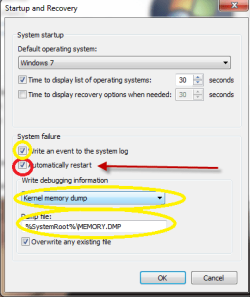
Here note down that the Red box has to be cleared as said above. And Yellow entries has to be the way as in the image.
(c) One more thing is too look in Event Viewer & Event Logs! In fact it should be taken care the first as said by pros. ( I don't say so, i am not a pro ). Even there is a specific section for 'Shut Down' and 'Startup' logs in the Event Viewer functionality.
(d) What i would do is set my clock exactly same to the system clock. Then i will wait for the crash and take note of the exact time. When i boot again in the system, i would look out for the events happened around the crash time!
9. You were following sir Megahertz07 and he was intending a Repair Install.
Thanks & Regards. ...
Greets,
Sir(s),
First and foremost I appreciate your efforts and patience. Both of you are the real heroes of the thread. I would like to mention somethings. May be i am too late for i don't know where you stand right now!
1. we can easily make out whether a recovery partition is there in the Disk Management view.
( Disk Management - Post a Screen Capture Image - Windows 7 Help Forums )
2. I was looking some activation woes but now i find that you have a good retail key in 25 alphanumeric characters. ( If you have any doubt against it, you can enter your windows 7 product key & click 'verify' here :
Download Windows 7 Disc Images (ISO Files) )
3. Activation backups mostly work only on clean installs & not on repair installs. NO CONFUSION : you have a retail key, you can go ahead with repair install.
4. Don't you have any System Image ? Did you ever used Backup functionality from within windows 7 ?
5. Recovery Disks normally provided by OEM like hp,dell, Asus, etc. & not by a refurber.
6. It was a reputable "Microsoft Authorized Refurbisher" I purchased it from
So, it seems to be a good refurb.
7. Yes I can boot into all safe modes and it has never crashed in any of them
If you are sure, tested it ? I would boot into safe mode different options & wait for the system to crash! The other thing would be to Clean Boot & wait for the system to crash! If it doesn't It gives some hope !
8. Is there some kind of program/app that will show why the computer keeps crashing?
Or is it on to the os repair/recovery?
(a).As i go by your posts, it tells me that your pc crashes/shuts down improperly and then restarts automatically leaving no time for you to make out what exactly happened. This feature has to be put off to get some error codes and come to know exactly what is happening! Here is a short tutorial :
How To Disable the Automatic Restart on System Failure in Windows 7
(b) In addition to the above tutorial, again give a look to the below image:
Here note down that the Red box has to be cleared as said above. And Yellow entries has to be the way as in the image.
(c) One more thing is too look in Event Viewer & Event Logs! In fact it should be taken care the first as said by pros. ( I don't say so, i am not a pro ). Even there is a specific section for 'Shut Down' and 'Startup' logs in the Event Viewer functionality.
(d) What i would do is set my clock exactly same to the system clock. Then i will wait for the crash and take note of the exact time. When i boot again in the system, i would look out for the events happened around the crash time!
9. You were following sir Megahertz07 and he was intending a Repair Install.
Thanks & Regards. ...
My Computer
- Computer type
- Laptop
- Computer Manufacturer/Model Number
- hp compaq presario c795VU notebook pc
- OS
- Windows 7 Ultimate x32 With Sp1 + Vista Ultimate x32 with Sp1 & Sp2 !!
- CPU
- Intel Mobile Core 2 Duo T5750 @ 2.00GHz Merom 65nm Technolog
- Motherboard
- Hewlett-Packard 30D9 (CPU)
- Memory
- 2.00GB Dual-Channel DDR2 @ 332MHz (5-5-5-15)
- Graphics Card(s)
- Mobile Intel(R) 965 Express Chipset Family
- Sound Card
- High Definition Audio Device
- Monitor(s) Displays
- LP154WX4-TLCB on Mobile Intel 965 Express Chipset Family
- Screen Resolution
- 1280x800 @ 60Hz
- Hard Drives
- 149GB Western Digital WDC WD1600BEVS-60VAT0 ATA Device (SATA)
- Keyboard
- Standard 101/102-Key or Microsoft Natural PS/2 Key + HP QLB
- Mouse
- ALPS pointing device
- Antivirus
- Kaspersky AV 2017(Win 7) & AVG AntiVirus Free 2016 (VISTA)
- Browser
- google chrome
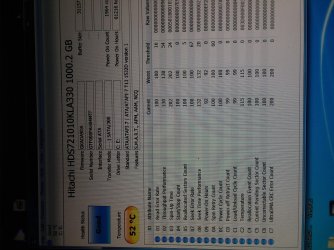
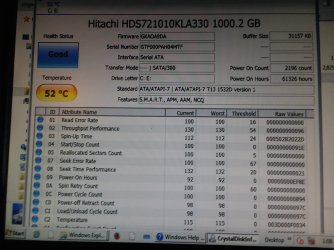
In my opinion you have a hardware problem.
Are you sure your disk is healthy?
This is what Crystaldiskinfo said:
That's all I know.
Attachments
My Computer
- Computer type
- PC/Desktop
- Computer Manufacturer/Model Number
- HP 6005 Pro
- OS
- Windows 7 Pro x64
- CPU
- Athlon II X2 B24 (3.00GHz)
- Memory
- 8GB DDR3
- Hard Drives
- 1TB HDD
Thanks for replying Vineet!
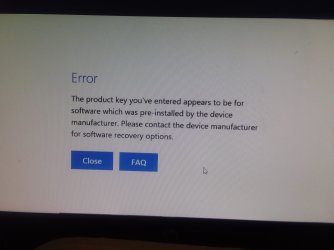
2. I was looking some activation woes but now i find that you have a good retail key in 25 alphanumeric characters. ( If you have any doubt against it, you can enter your windows 7 product key & click 'verify' here :
Download Windows 7 Disc Images (ISO Files) )
3. Activation backups mostly work only on clean installs & not on repair installs. NO CONFUSION : you have a retail key, you can go ahead with repair install.
Went to the link with my 25 digit product key.
This is what I got:
Attachments
My Computer
- Computer type
- PC/Desktop
- Computer Manufacturer/Model Number
- HP 6005 Pro
- OS
- Windows 7 Pro x64
- CPU
- Athlon II X2 B24 (3.00GHz)
- Memory
- 8GB DDR3
- Hard Drives
- 1TB HDD
I was able to (between safe mode and normal) get the event viewer logs of the computer transferred to another which I then converted to an exel file.
So I have it in .csv and .xlsx format and can post it wherever.
Also atm have computer in safe mode with networking running for a couple of hours with no problems.
Will post tomorrow when it still hasn't crashed yet.
So I have it in .csv and .xlsx format and can post it wherever.
Also atm have computer in safe mode with networking running for a couple of hours with no problems.
Will post tomorrow when it still hasn't crashed yet.
My Computer
- Computer type
- PC/Desktop
- Computer Manufacturer/Model Number
- HP 6005 Pro
- OS
- Windows 7 Pro x64
- CPU
- Athlon II X2 B24 (3.00GHz)
- Memory
- 8GB DDR3
- Hard Drives
- 1TB HDD
Have had safe mode running all night with no problems.
Will post back later.
I might have had a crash with safe mode with networking running though.
I will check that next to make sure.
Will post back later.
I might have had a crash with safe mode with networking running though.
I will check that next to make sure.
My Computer
- Computer type
- PC/Desktop
- Computer Manufacturer/Model Number
- HP 6005 Pro
- OS
- Windows 7 Pro x64
- CPU
- Athlon II X2 B24 (3.00GHz)
- Memory
- 8GB DDR3
- Hard Drives
- 1TB HDD
- Local time
- 4:11 AM
- Messages
- 565
Hi, cedar: Sir,
1. You should consider doing this first and then check safe mode, etc. : How To Disable the Automatic Restart on System Failure in Windows 7
It will be helpful. It will give you error codes, crash reports, etc. which can come handy to diagnose the problem. After doing this, computer will not restart automatically after a crash making the things easier for you.
2. It would be good if you check ram as well. Go through the article and try to make it :
RAM - Test with Memtest86+ - Windows 7 Help Forums
3. Your partitions are heavily loaded with 80% occupancy.
4. Heat is also a concern for your pc.
5. Going for a Repair Install or Clean Install can be easy way out. But its your choice & situation !
6. It would be always good to back up activation & keep it safe.
3 Tools to Backup and Restore Windows 7 and Vista OEM Activation License • Raymond.CC
( Advanced Tokens Manager and Activation Backup & Restore {BOTH})
7. It seems you are having OEM license. The backup tools above will tell you that also.
8. Its more of my own interest but less for you also. Run Produkey and just check whether the key it shows matches the one on COA sticker. Its a zip file & you have to extract it first to run it.
Here is the utility link,etc.:
ProduKey - Recover lost product key (CD-Key) of Windows/MS-Office/SQL Server
[No direct links allowed, removed]
Thanks & Regards. ...
1. You should consider doing this first and then check safe mode, etc. : How To Disable the Automatic Restart on System Failure in Windows 7
It will be helpful. It will give you error codes, crash reports, etc. which can come handy to diagnose the problem. After doing this, computer will not restart automatically after a crash making the things easier for you.
2. It would be good if you check ram as well. Go through the article and try to make it :
RAM - Test with Memtest86+ - Windows 7 Help Forums
3. Your partitions are heavily loaded with 80% occupancy.
4. Heat is also a concern for your pc.
5. Going for a Repair Install or Clean Install can be easy way out. But its your choice & situation !
6. It would be always good to back up activation & keep it safe.
3 Tools to Backup and Restore Windows 7 and Vista OEM Activation License • Raymond.CC
( Advanced Tokens Manager and Activation Backup & Restore {BOTH})
7. It seems you are having OEM license. The backup tools above will tell you that also.
8. Its more of my own interest but less for you also. Run Produkey and just check whether the key it shows matches the one on COA sticker. Its a zip file & you have to extract it first to run it.
Here is the utility link,etc.:
ProduKey - Recover lost product key (CD-Key) of Windows/MS-Office/SQL Server
[No direct links allowed, removed]
Thanks & Regards. ...
Last edited by a moderator:
My Computer
- Computer type
- Laptop
- Computer Manufacturer/Model Number
- hp compaq presario c795VU notebook pc
- OS
- Windows 7 Ultimate x32 With Sp1 + Vista Ultimate x32 with Sp1 & Sp2 !!
- CPU
- Intel Mobile Core 2 Duo T5750 @ 2.00GHz Merom 65nm Technolog
- Motherboard
- Hewlett-Packard 30D9 (CPU)
- Memory
- 2.00GB Dual-Channel DDR2 @ 332MHz (5-5-5-15)
- Graphics Card(s)
- Mobile Intel(R) 965 Express Chipset Family
- Sound Card
- High Definition Audio Device
- Monitor(s) Displays
- LP154WX4-TLCB on Mobile Intel 965 Express Chipset Family
- Screen Resolution
- 1280x800 @ 60Hz
- Hard Drives
- 149GB Western Digital WDC WD1600BEVS-60VAT0 ATA Device (SATA)
- Keyboard
- Standard 101/102-Key or Microsoft Natural PS/2 Key + HP QLB
- Mouse
- ALPS pointing device
- Antivirus
- Kaspersky AV 2017(Win 7) & AVG AntiVirus Free 2016 (VISTA)
- Browser
- google chrome
- Local time
- 4:11 AM
- Messages
- 565
Hi All,
Greets,
Sir(s),
cedar: Sir,
1. I suppose you are able to do previous post steps.
2. Please get me two 'Disk Management' windows snapshots/views:
(a) Zoomed standard view's snap.
(b) From top menu in zoomed 'Disk Management' windows, select " View > Top > Disk List " & take a snap.
( Disk Management - Post a Screen Capture Image - Windows 7 Help Forums )
3. Make system partition C: occupied less than 50%. Copy the needed files to external drive(s). Don't delete system files. Try to lighten other partitions too.
4. I have seen you tried doing 'Repair Install' from safe mode
Repair Install - Windows 7 Help Forums But the warning section says 'You can only do a repair install from within Windows 7.You cannot do a repair install at boot or in Safe Mode'
5. It's important to briefly mention that a Repair Install or Clean Install actually deals with software/OS problems and not a pure hardware problem. Initially, it's better to check whether one has any software problem. If the software is in a very bad shape, its better to go for a Repair Install or Clean Install. Repair Install saves your Data, Programs,etc. But sometimes you may need to sacrifice everything & make a Clean Install!
6. Before Repair Install, I would like to do some load shedding from your system to make sure that everything goes well. And that will include some other troubleshooting steps.
7. When you run Memtest, be watchful for the results! Besides, If the pc crashes there, its close to diagnose that you are having Ram problem or if not then some other hardware problem(s). Why ? Because we are anticipating a software problem & when you boot in memtest, you are actually booting into another operating system which off course is a very very limited OS but is a new & trouble free software/OS if you have burnt it correctly! I will help you with burning & running Memtest but be a little patient. Till then go thoroughly through the link, try to understand the things & give it a try on your own.
RAM - Test with Memtest86+ - Windows 7 Help Forums
8. And i am remembered of one of my seniors who himself gave me this link. It's a great contribution by him :
gerrys template
( The whole template is very useful. Let us see how far you can go! )
Let us know.
Thanks & Regards. ...
Greets,
Sir(s),
cedar: Sir,
1. I suppose you are able to do previous post steps.
2. Please get me two 'Disk Management' windows snapshots/views:
(a) Zoomed standard view's snap.
(b) From top menu in zoomed 'Disk Management' windows, select " View > Top > Disk List " & take a snap.
( Disk Management - Post a Screen Capture Image - Windows 7 Help Forums )
3. Make system partition C: occupied less than 50%. Copy the needed files to external drive(s). Don't delete system files. Try to lighten other partitions too.
4. I have seen you tried doing 'Repair Install' from safe mode
Repair Install - Windows 7 Help Forums But the warning section says 'You can only do a repair install from within Windows 7.You cannot do a repair install at boot or in Safe Mode'
5. It's important to briefly mention that a Repair Install or Clean Install actually deals with software/OS problems and not a pure hardware problem. Initially, it's better to check whether one has any software problem. If the software is in a very bad shape, its better to go for a Repair Install or Clean Install. Repair Install saves your Data, Programs,etc. But sometimes you may need to sacrifice everything & make a Clean Install!
6. Before Repair Install, I would like to do some load shedding from your system to make sure that everything goes well. And that will include some other troubleshooting steps.
7. When you run Memtest, be watchful for the results! Besides, If the pc crashes there, its close to diagnose that you are having Ram problem or if not then some other hardware problem(s). Why ? Because we are anticipating a software problem & when you boot in memtest, you are actually booting into another operating system which off course is a very very limited OS but is a new & trouble free software/OS if you have burnt it correctly! I will help you with burning & running Memtest but be a little patient. Till then go thoroughly through the link, try to understand the things & give it a try on your own.
RAM - Test with Memtest86+ - Windows 7 Help Forums
8. And i am remembered of one of my seniors who himself gave me this link. It's a great contribution by him :
gerrys template
( The whole template is very useful. Let us see how far you can go! )
Let us know.
Thanks & Regards. ...
Last edited:
My Computer
- Computer type
- Laptop
- Computer Manufacturer/Model Number
- hp compaq presario c795VU notebook pc
- OS
- Windows 7 Ultimate x32 With Sp1 + Vista Ultimate x32 with Sp1 & Sp2 !!
- CPU
- Intel Mobile Core 2 Duo T5750 @ 2.00GHz Merom 65nm Technolog
- Motherboard
- Hewlett-Packard 30D9 (CPU)
- Memory
- 2.00GB Dual-Channel DDR2 @ 332MHz (5-5-5-15)
- Graphics Card(s)
- Mobile Intel(R) 965 Express Chipset Family
- Sound Card
- High Definition Audio Device
- Monitor(s) Displays
- LP154WX4-TLCB on Mobile Intel 965 Express Chipset Family
- Screen Resolution
- 1280x800 @ 60Hz
- Hard Drives
- 149GB Western Digital WDC WD1600BEVS-60VAT0 ATA Device (SATA)
- Keyboard
- Standard 101/102-Key or Microsoft Natural PS/2 Key + HP QLB
- Mouse
- ALPS pointing device
- Antivirus
- Kaspersky AV 2017(Win 7) & AVG AntiVirus Free 2016 (VISTA)
- Browser
- google chrome
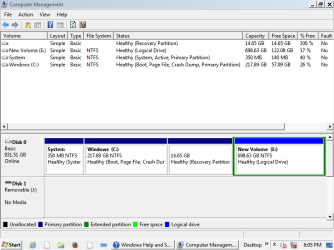
Here's a screen of disk management.2. Please get me two 'Disk Management' windows snapshots/views:
(a) Zoomed standard view's snap.
(b) From top menu in zoomed 'Disk Management' windows, select " View > Top > Disk List " & take a snap.
( Disk Management - Post a Screen Capture Image - Windows 7 Help Forums )
7. When you run Memtest, be watchful for the results! Besides, If the pc crashes there, its close to diagnose that you are having Ram problem or if not then some other hardware problem(s). Why ? Because we are anticipating a software problem & when you boot in memtest, you are actually booting into another operating system which off course is a very very limited OS but is a new & trouble free software/OS if you have burnt it correctly! I will help you with burning & running Memtest but be a little patient. Till then go thoroughly through the link, try to understand the things & give it a try on your own.
RAM - Test with Memtest86+ - Windows 7 Help Forums
I'm not sure what other view you want though.
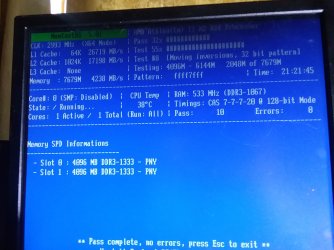
Memtest is running now.
27 minutes in and it's still on 1st pass so this may take awhile.
thanks again for your help!
Attachments
My Computer
- Computer type
- PC/Desktop
- Computer Manufacturer/Model Number
- HP 6005 Pro
- OS
- Windows 7 Pro x64
- CPU
- Athlon II X2 B24 (3.00GHz)
- Memory
- 8GB DDR3
- Hard Drives
- 1TB HDD
3 passes of memtest took 5:14.
Each pass seems to take longer than the last one.
No errors so far.
Each pass seems to take longer than the last one.
No errors so far.
My Computer
- Computer type
- PC/Desktop
- Computer Manufacturer/Model Number
- HP 6005 Pro
- OS
- Windows 7 Pro x64
- CPU
- Athlon II X2 B24 (3.00GHz)
- Memory
- 8GB DDR3
- Hard Drives
- 1TB HDD
- Local time
- 4:11 AM
- Messages
- 565
Ha ha ha Recovery Partition is there. If the partition is good enough & it is a good refurb, it would work! You will lose just everything to the purchased status. It will format all the drive. If its a software/OS problem, it would be solved.
Right Memtest takes time. Complete Memtest & report.
Thanks & Regards. ...
Right Memtest takes time. Complete Memtest & report.
Thanks & Regards. ...
My Computer
- Computer type
- Laptop
- Computer Manufacturer/Model Number
- hp compaq presario c795VU notebook pc
- OS
- Windows 7 Ultimate x32 With Sp1 + Vista Ultimate x32 with Sp1 & Sp2 !!
- CPU
- Intel Mobile Core 2 Duo T5750 @ 2.00GHz Merom 65nm Technolog
- Motherboard
- Hewlett-Packard 30D9 (CPU)
- Memory
- 2.00GB Dual-Channel DDR2 @ 332MHz (5-5-5-15)
- Graphics Card(s)
- Mobile Intel(R) 965 Express Chipset Family
- Sound Card
- High Definition Audio Device
- Monitor(s) Displays
- LP154WX4-TLCB on Mobile Intel 965 Express Chipset Family
- Screen Resolution
- 1280x800 @ 60Hz
- Hard Drives
- 149GB Western Digital WDC WD1600BEVS-60VAT0 ATA Device (SATA)
- Keyboard
- Standard 101/102-Key or Microsoft Natural PS/2 Key + HP QLB
- Mouse
- ALPS pointing device
- Antivirus
- Kaspersky AV 2017(Win 7) & AVG AntiVirus Free 2016 (VISTA)
- Browser
- google chrome
My Computer
- Computer type
- PC/Desktop
- Computer Manufacturer/Model Number
- HP 6005 Pro
- OS
- Windows 7 Pro x64
- CPU
- Athlon II X2 B24 (3.00GHz)
- Memory
- 8GB DDR3
- Hard Drives
- 1TB HDD
- Local time
- 4:11 AM
- Messages
- 565
Hi cedar,
Sir,
Its more than sufficient. Just stop it there, Make a shut down & leave pc to complete rest for at least 24 hours. Did the pc heat up ?
Thanks & Regards. ...
Sir,
Its more than sufficient. Just stop it there, Make a shut down & leave pc to complete rest for at least 24 hours. Did the pc heat up ?
Thanks & Regards. ...
My Computer
- Computer type
- Laptop
- Computer Manufacturer/Model Number
- hp compaq presario c795VU notebook pc
- OS
- Windows 7 Ultimate x32 With Sp1 + Vista Ultimate x32 with Sp1 & Sp2 !!
- CPU
- Intel Mobile Core 2 Duo T5750 @ 2.00GHz Merom 65nm Technolog
- Motherboard
- Hewlett-Packard 30D9 (CPU)
- Memory
- 2.00GB Dual-Channel DDR2 @ 332MHz (5-5-5-15)
- Graphics Card(s)
- Mobile Intel(R) 965 Express Chipset Family
- Sound Card
- High Definition Audio Device
- Monitor(s) Displays
- LP154WX4-TLCB on Mobile Intel 965 Express Chipset Family
- Screen Resolution
- 1280x800 @ 60Hz
- Hard Drives
- 149GB Western Digital WDC WD1600BEVS-60VAT0 ATA Device (SATA)
- Keyboard
- Standard 101/102-Key or Microsoft Natural PS/2 Key + HP QLB
- Mouse
- ALPS pointing device
- Antivirus
- Kaspersky AV 2017(Win 7) & AVG AntiVirus Free 2016 (VISTA)
- Browser
- google chrome
Hi cedar,
Sir,
Its more than sufficient. Just stop it there, Make a shut down & leave pc to complete rest for at least 24 hours. Did the pc heat up ?
Are you saying to leave the computer off for at least 24 hours and then check the temperature after startup?
What/how should I check the temperature with?
thnx!
BTW 14 passes no errors.
My Computer
- Computer type
- PC/Desktop
- Computer Manufacturer/Model Number
- HP 6005 Pro
- OS
- Windows 7 Pro x64
- CPU
- Athlon II X2 B24 (3.00GHz)
- Memory
- 8GB DDR3
- Hard Drives
- 1TB HDD
My Computer
- Computer type
- PC/Desktop
- Computer Manufacturer/Model Number
- HP 6005 Pro
- OS
- Windows 7 Pro x64
- CPU
- Athlon II X2 B24 (3.00GHz)
- Memory
- 8GB DDR3
- Hard Drives
- 1TB HDD
Similar threads
- Replies
- 7
- Views
- 1K

- Replies
- 9
- Views
- 4K

- Replies
- 13
- Views
- 4K