Windows won't fully start

Hi cedar,
Sir,
1.I suppose you have stopped/exited Memtest. Its more than enough.
2.I explained you that if your pc crashes here, either your Ram or other hardware is problematic. But we can't say that your hardware is perfect even now because it was a very limited OS and it used minimum hardware. Try to understand that!
3.I just meant shut down the PC & give it 24 hour rest . I was casually asking if it got too hot ? Fans, etc noises ?
4.As for hard disk temperature, 50 C is OK not good ! Yours is 52 C. The process was long and so its ok But try to keep it low during normal usage. My practice is that i stop using pc when hard disk temp approaches 42 C if its not critical. ( There are other temperatures as well )
5.Utility : 'CrystalDiskInfo' gives only data but 'Speecy-Portable' also tells whether it's good or bad. This Download is a zip file and need to be extracted to a folder. Then go into the folder & double click/launch 'Speccy64.exe'. Let it load & then click 'Storage'.
Speccy - Portable
6.You never told me whether you are able to extract zip files. If you need an archiver/extractor, install it. It works out of the box.
https://www.rarlab.com/rar/winrar-x64-560.exe
My choice is 7-zip but it needs a few steps.
https://www.7-zip.org/a/7z1805-x64.exe

Let us know.

Thanks & Regards. ...
 
Last edited:

My Computer

Computer type
Laptop
Computer Manufacturer/Model Number
hp compaq presario c795VU notebook pc
OS
Windows 7 Ultimate x32 With Sp1 + Vista Ultimate x32 with Sp1 & Sp2 !!
CPU
Intel Mobile Core 2 Duo T5750 @ 2.00GHz Merom 65nm Technolog
Motherboard
Hewlett-Packard 30D9 (CPU)
Memory
2.00GB Dual-Channel DDR2 @ 332MHz (5-5-5-15)
Graphics Card(s)
Mobile Intel(R) 965 Express Chipset Family
Sound Card
High Definition Audio Device
Monitor(s) Displays
LP154WX4-TLCB on Mobile Intel 965 Express Chipset Family
Screen Resolution
1280x800 @ 60Hz
Hard Drives
149GB Western Digital WDC WD1600BEVS-60VAT0 ATA Device (SATA)
Keyboard
Standard 101/102-Key or Microsoft Natural PS/2 Key + HP QLB
Mouse
ALPS pointing device
Antivirus
Kaspersky AV 2017(Win 7) & AVG AntiVirus Free 2016 (VISTA)
Browser
google chrome
Yes I can extract files but since computer crashes I download on other computer and transfer thru usb stick and run in safe mode.
That's what crystaldiskinfo is running in.
Left it on all last night and now it says 47 degrees F.


Will run specy after I get back from church.
thnx!
 

My Computer

Computer type
PC/Desktop
Computer Manufacturer/Model Number
HP 6005 Pro
OS
Windows 7 Pro x64
CPU
Athlon II X2 B24 (3.00GHz)
Memory
8GB DDR3
Hard Drives
1TB HDD
Yes I can extract files but since computer crashes I download on other computer and transfer thru usb stick and run in safe mode.
That's what crystaldiskinfo is running in.
Left it on all last night and now it says 47 degrees F.
Will run speccy after I get back from church.
thnx!

1. I understand you are running in trouble. I hope we would be able to make it all right soon.
2. Its not 47 degrees F. Its 47 degrees C = 116.6 degrees F
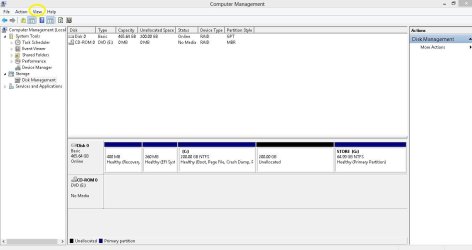
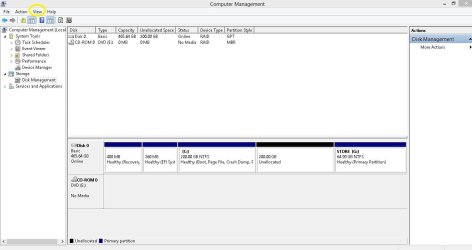
3. The other view in Disk Management :

Disk Management Capture.JPG

You have to click 'View' menu tab, select 'Top' & then 'List Disk'. Then take the snap.

4. Once your pc is rested enough, we are going to take the next step.

Anything else ?

Thanks & Regards. ...
 
Last edited:

My Computer

Computer type
Laptop
Computer Manufacturer/Model Number
hp compaq presario c795VU notebook pc
OS
Windows 7 Ultimate x32 With Sp1 + Vista Ultimate x32 with Sp1 & Sp2 !!
CPU
Intel Mobile Core 2 Duo T5750 @ 2.00GHz Merom 65nm Technolog
Motherboard
Hewlett-Packard 30D9 (CPU)
Memory
2.00GB Dual-Channel DDR2 @ 332MHz (5-5-5-15)
Graphics Card(s)
Mobile Intel(R) 965 Express Chipset Family
Sound Card
High Definition Audio Device
Monitor(s) Displays
LP154WX4-TLCB on Mobile Intel 965 Express Chipset Family
Screen Resolution
1280x800 @ 60Hz
Hard Drives
149GB Western Digital WDC WD1600BEVS-60VAT0 ATA Device (SATA)
Keyboard
Standard 101/102-Key or Microsoft Natural PS/2 Key + HP QLB
Mouse
ALPS pointing device
Antivirus
Kaspersky AV 2017(Win 7) & AVG AntiVirus Free 2016 (VISTA)
Browser
google chrome
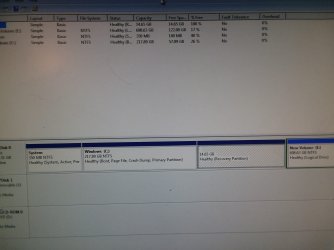
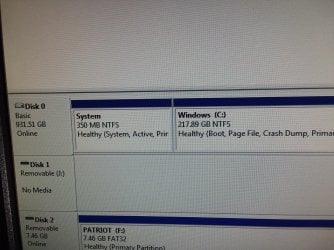
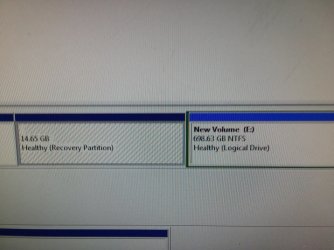
All right I think this is the other view you want in disk management.


I also ran specy.
saved as text and xml and took pictures on phone.
What are you looking for?


thnx!
 

Attachments

  • 20180805_220128.jpg
    20180805_220128.jpg
    233.6 KB · Views: 3

My Computer

Computer type
PC/Desktop
Computer Manufacturer/Model Number
HP 6005 Pro
OS
Windows 7 Pro x64
CPU
Athlon II X2 B24 (3.00GHz)
Memory
8GB DDR3
Hard Drives
1TB HDD
Hi cedar,
Sir,
1. Please shut down your pc & wait for the instructions.
2. What is your plan for security solutions, Antivirus, etc ?
3. Do you like to make Windows & hp Updates ?

Thanks & Regards. ...
 
Last edited:

My Computer

Computer type
Laptop
Computer Manufacturer/Model Number
hp compaq presario c795VU notebook pc
OS
Windows 7 Ultimate x32 With Sp1 + Vista Ultimate x32 with Sp1 & Sp2 !!
CPU
Intel Mobile Core 2 Duo T5750 @ 2.00GHz Merom 65nm Technolog
Motherboard
Hewlett-Packard 30D9 (CPU)
Memory
2.00GB Dual-Channel DDR2 @ 332MHz (5-5-5-15)
Graphics Card(s)
Mobile Intel(R) 965 Express Chipset Family
Sound Card
High Definition Audio Device
Monitor(s) Displays
LP154WX4-TLCB on Mobile Intel 965 Express Chipset Family
Screen Resolution
1280x800 @ 60Hz
Hard Drives
149GB Western Digital WDC WD1600BEVS-60VAT0 ATA Device (SATA)
Keyboard
Standard 101/102-Key or Microsoft Natural PS/2 Key + HP QLB
Mouse
ALPS pointing device
Antivirus
Kaspersky AV 2017(Win 7) & AVG AntiVirus Free 2016 (VISTA)
Browser
google chrome
Okay but did you need the specy file?
Yiou told me to run it.
 

My Computer

Computer type
PC/Desktop
Computer Manufacturer/Model Number
HP 6005 Pro
OS
Windows 7 Pro x64
CPU
Athlon II X2 B24 (3.00GHz)
Memory
8GB DDR3
Hard Drives
1TB HDD
Okay but did you need the specy file?
Yiou told me to run it.

1. That was a tip. I hope you caught it. Speecy may come handy in the near future!
2. What is your plan for security solutions, Antivirus, etc ?
3. Do you like to make Windows & hp Updates ?

Let us know,

Thanks & Regards. ...
 

My Computer

Computer type
Laptop
Computer Manufacturer/Model Number
hp compaq presario c795VU notebook pc
OS
Windows 7 Ultimate x32 With Sp1 + Vista Ultimate x32 with Sp1 & Sp2 !!
CPU
Intel Mobile Core 2 Duo T5750 @ 2.00GHz Merom 65nm Technolog
Motherboard
Hewlett-Packard 30D9 (CPU)
Memory
2.00GB Dual-Channel DDR2 @ 332MHz (5-5-5-15)
Graphics Card(s)
Mobile Intel(R) 965 Express Chipset Family
Sound Card
High Definition Audio Device
Monitor(s) Displays
LP154WX4-TLCB on Mobile Intel 965 Express Chipset Family
Screen Resolution
1280x800 @ 60Hz
Hard Drives
149GB Western Digital WDC WD1600BEVS-60VAT0 ATA Device (SATA)
Keyboard
Standard 101/102-Key or Microsoft Natural PS/2 Key + HP QLB
Mouse
ALPS pointing device
Antivirus
Kaspersky AV 2017(Win 7) & AVG AntiVirus Free 2016 (VISTA)
Browser
google chrome
I am sorry.
I went back and reread your original post and you specifically said to go to "storage".


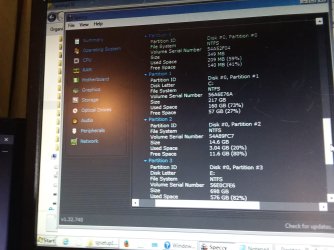
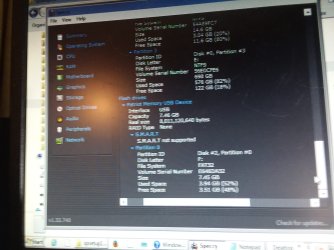
Here are some screens of that section.


sorry.
 

Attachments

  • 20180805_232944.jpg
    20180805_232944.jpg
    375 KB · Views: 0
  • 20180805_233010.jpg
    20180805_233010.jpg
    486.8 KB · Views: 0
  • 20180805_233021.jpg
    20180805_233021.jpg
    486.1 KB · Views: 0
  • 20180805_233049.jpg
    20180805_233049.jpg
    361.8 KB · Views: 0
  • 20180805_233059.jpg
    20180805_233059.jpg
    347.5 KB · Views: 0

My Computer

Computer type
PC/Desktop
Computer Manufacturer/Model Number
HP 6005 Pro
OS
Windows 7 Pro x64
CPU
Athlon II X2 B24 (3.00GHz)
Memory
8GB DDR3
Hard Drives
1TB HDD
1. That was a tip. I hope you caught it. Speecy may come handy in the near future!
2. What is your plan for security solutions, Antivirus, etc ?
3. Do you like to make Windows & hp Updates ?

Let us know,

Thanks & Regards. ...


No didn't catch it.
Kinda dense on computers.
Never really ran a 24/7 av before.
About updates.
This is my second system.
Hadn't ran it in awhile.
My other system with windows 10 a 3.5mm headphone plug broke off in the rear jack and I couldn't get any sound to come out so I started this one to try and fix the other and it started crashing on me.
I always update the critical fixes.
 

My Computer

Computer type
PC/Desktop
Computer Manufacturer/Model Number
HP 6005 Pro
OS
Windows 7 Pro x64
CPU
Athlon II X2 B24 (3.00GHz)
Memory
8GB DDR3
Hard Drives
1TB HDD
Hi,

1. No didn't catch it.
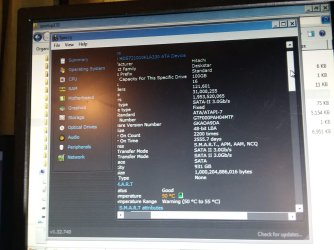
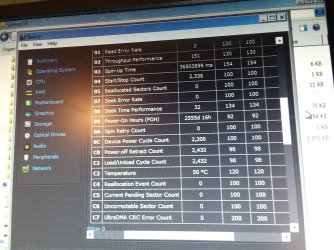
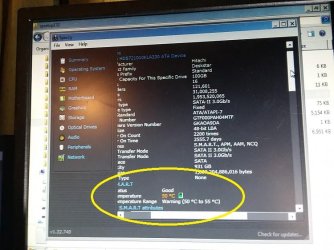
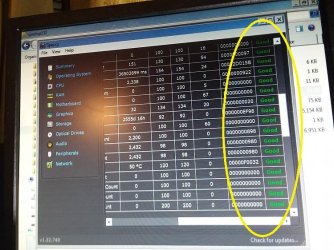
See the 'Yellow' marked entries in the below images from Speecy :

Speccy 1.jpg

Your hard disk status is good. but temperature with 50 degrees C is in warning zone of 50-55 degrees C. Heat is a problem for you & your pc. Lets see whether it corrects with recovery!

Speecy 2.jpg

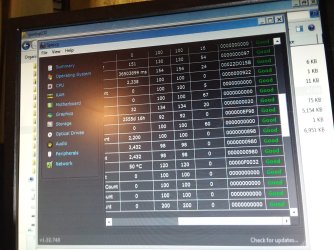
Speccy shows whether a particular reading is Good or not. Check for all the readings. CrystalDiskInfo only tells readings!

2. Never really ran a 24/7 av before.
That's very bad! You should consider 'Bit Defender Internet Security' or 'Bit Defender Antivirus Plus'. You can try one for free for one month without buying. At least go for 'Bit Defender Antivirus Free'
What you decide ?

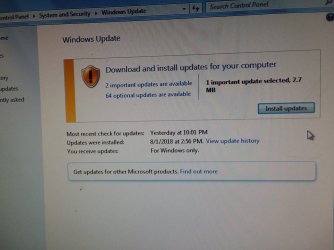
3. About updates. This is my second system. Hadn't ran it in awhile. I always update the critical fixes.
I suppose you have some idea about Windows Updates & hp Updates. One should never make 'Automatic Updates' settings in the windows & hp updates. In fact i don't plan any updates for your pc as of now. When we will be recovering, you will be presented with the options for updates settings. There you have to make it 'Never Check For Updates' for both windows & hp updates. I will mention it a little later.
What you mean by 'critical fixes'? You make them through Windows Updates ?
Any questions ?

4. Be ready with this download as well :
https://portableapps.duckduckgo.com/IObitUninstallerPortable_7.5.0.7.paf.exe

5.The other view in Disk Management : You did not make it right!

Disk Management Capture.JPG

Look for the Yellow marked 'View', click it , choose 'Top' ,then choose 'Disk List' and take the snap.

Let us know

Thanks & Regards. ...
 
Last edited:

My Computer

Computer type
Laptop
Computer Manufacturer/Model Number
hp compaq presario c795VU notebook pc
OS
Windows 7 Ultimate x32 With Sp1 + Vista Ultimate x32 with Sp1 & Sp2 !!
CPU
Intel Mobile Core 2 Duo T5750 @ 2.00GHz Merom 65nm Technolog
Motherboard
Hewlett-Packard 30D9 (CPU)
Memory
2.00GB Dual-Channel DDR2 @ 332MHz (5-5-5-15)
Graphics Card(s)
Mobile Intel(R) 965 Express Chipset Family
Sound Card
High Definition Audio Device
Monitor(s) Displays
LP154WX4-TLCB on Mobile Intel 965 Express Chipset Family
Screen Resolution
1280x800 @ 60Hz
Hard Drives
149GB Western Digital WDC WD1600BEVS-60VAT0 ATA Device (SATA)
Keyboard
Standard 101/102-Key or Microsoft Natural PS/2 Key + HP QLB
Mouse
ALPS pointing device
Antivirus
Kaspersky AV 2017(Win 7) & AVG AntiVirus Free 2016 (VISTA)
Browser
google chrome
Hi,


2. Never really ran a 24/7 av before.
That's very bad! You should consider 'Bit Defender Internet Security' or 'Bit Defender Antivirus Plus'. You can try one for free for one month without buying. At least go for 'Bit Defender Antivirus Free'
What you decide ?

3. About updates. This is my second system. Hadn't ran it in awhile. I always update the critical fixes.
I suppose you have some idea about Windows Updates & hp Updates. One should never make 'Automatic Updates' settings in the windows & hp updates. In fact i don't plan any updates for your pc as of now. When we will be recovering, you will be presented with the options for updates settings. There you have to make it 'Never Check For Updates' for both windows & hp updates. I will mention it a little later.
What you mean by 'critical fixes'? You make them through Windows Updates ?
Any questions ?

4. Be ready with this download as well :
https://portableapps.duckduckgo.com/IObitUninstallerPortable_7.5.0.7.paf.exe

5.The other view in Disk Management : You did not make it right!


Look for the Yellow marked 'View', click it , choose 'Top' ,then choose 'Disk List' and take the snap.
.

I sometimes run ClamWin Portable.
I might consider Bit Defender free though.
I meant "important" fixes not critical.
Don't install "optional" ones.

Have the uninstaller downloaded.
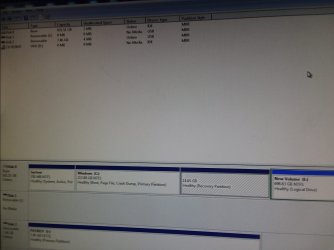
Enclosing a screenshot of the disk management view you asked for.


thnx!
 

Attachments

  • 20180806_062427.jpg
    20180806_062427.jpg
    449.4 KB · Views: 1
  • 20180806_062442.jpg
    20180806_062442.jpg
    234.1 KB · Views: 1
  • 20180806_062450.jpg
    20180806_062450.jpg
    852.1 KB · Views: 0
  • 20180806_062454.jpg
    20180806_062454.jpg
    622.8 KB · Views: 0

My Computer

Computer type
PC/Desktop
Computer Manufacturer/Model Number
HP 6005 Pro
OS
Windows 7 Pro x64
CPU
Athlon II X2 B24 (3.00GHz)
Memory
8GB DDR3
Hard Drives
1TB HDD
Sir,

1.I sometimes run ClamWin Portable
Forget it . Otherwise once you install an antivirus & you want to run it, you have to take some steps and then only you should run it. Though there are better free solutions available if required. As you make important windows updates, you would hardly fall infected with Bitdefender Free if you don't try to suicide!

2. Antivirus
I would like to mention that win 10 has an in-built complete security solution ( Though it is not so good ) but win 7 is weaker on this. It doesn't have Antivirus functionality. Though you can install MSE on win7 which is a complete microsoft solution ( Again it's not so good ) So, i advise to install at least Bitdefender free on both win 7 & win 10.
I plan as soon as you get to the recovered system, you should first check what are the security solutions already installed by hp, then remove them properly and install Bitdefender. It would depend on what is preinstalled by hp & other things. I would mention later.
Bitdefender Free : .
Wayback Machine

3. I meant "important" fixes not critical. Don't install "optional" ones.''
Perfect! But i would say that during setup you should select 'Never Check For Updates'. once Bitdefender is installed & updated, go for the settings you like.
No for hp updates, if its not required.

4. Disk Management View is good enough now.

Thanks & Regards. ...
 

My Computer

Computer type
Laptop
Computer Manufacturer/Model Number
hp compaq presario c795VU notebook pc
OS
Windows 7 Ultimate x32 With Sp1 + Vista Ultimate x32 with Sp1 & Sp2 !!
CPU
Intel Mobile Core 2 Duo T5750 @ 2.00GHz Merom 65nm Technolog
Motherboard
Hewlett-Packard 30D9 (CPU)
Memory
2.00GB Dual-Channel DDR2 @ 332MHz (5-5-5-15)
Graphics Card(s)
Mobile Intel(R) 965 Express Chipset Family
Sound Card
High Definition Audio Device
Monitor(s) Displays
LP154WX4-TLCB on Mobile Intel 965 Express Chipset Family
Screen Resolution
1280x800 @ 60Hz
Hard Drives
149GB Western Digital WDC WD1600BEVS-60VAT0 ATA Device (SATA)
Keyboard
Standard 101/102-Key or Microsoft Natural PS/2 Key + HP QLB
Mouse
ALPS pointing device
Antivirus
Kaspersky AV 2017(Win 7) & AVG AntiVirus Free 2016 (VISTA)
Browser
google chrome
Sir,
Now follow the instructions. Do only as i mention, take snaps with smart mobile and come back to normal start. I want to see where F11 actually takes you to!
1. Turn off the computer.
2. Disconnect all peripheral devices, except for the monitor, keyboard, mouse, and power cord. Remove media from internal drives, and remove any recently added internal hardware.
3. Turn on the computer and repeatedly press the F11 key, about once every second, until Recovery Manager opens.


Let us know,

Thanks & Regards. ...
 

My Computer

Computer type
Laptop
Computer Manufacturer/Model Number
hp compaq presario c795VU notebook pc
OS
Windows 7 Ultimate x32 With Sp1 + Vista Ultimate x32 with Sp1 & Sp2 !!
CPU
Intel Mobile Core 2 Duo T5750 @ 2.00GHz Merom 65nm Technolog
Motherboard
Hewlett-Packard 30D9 (CPU)
Memory
2.00GB Dual-Channel DDR2 @ 332MHz (5-5-5-15)
Graphics Card(s)
Mobile Intel(R) 965 Express Chipset Family
Sound Card
High Definition Audio Device
Monitor(s) Displays
LP154WX4-TLCB on Mobile Intel 965 Express Chipset Family
Screen Resolution
1280x800 @ 60Hz
Hard Drives
149GB Western Digital WDC WD1600BEVS-60VAT0 ATA Device (SATA)
Keyboard
Standard 101/102-Key or Microsoft Natural PS/2 Key + HP QLB
Mouse
ALPS pointing device
Antivirus
Kaspersky AV 2017(Win 7) & AVG AntiVirus Free 2016 (VISTA)
Browser
google chrome

My Computer

Computer type
PC/Desktop
Computer Manufacturer/Model Number
HP 6005 Pro
OS
Windows 7 Pro x64
CPU
Athlon II X2 B24 (3.00GHz)
Memory
8GB DDR3
Hard Drives
1TB HDD
Hi,
Sir,

1.Take snaps with smart mobile
Sorry to confuse, you have to take the snaps of the screen, that's all .

2. Remove media from internal drives
Mean to say media in internal drives or internal disks. For eg. Floppy, CD/DVD, extra Internal hard drive ( some people may have two or more internal hard disks ), memory cards, etc. Actually, the process is supposed to format the particular internal hard disk and recover. To make sure that the correct drive is formatted & recovered, no external & internal media should be plugged in except the one internal hard disk/drive. Obviously, Disk Management will list all the internal & external media, if any confusion.
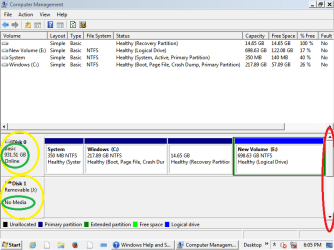
Just have a look on your pc's Disk Management Standard & Disks List Views :

cedar's pc disk management Standard View .PNG

On the left side, you see the disks connected & their capacity. On the right, i have marked the scroll bar as red!

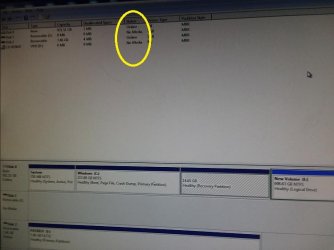
cedar's pc disk management Disk List View.jpg

In the Disk List View (above),
1. It shows two disks , 1 & 3, with capacities of 931 GB & 7.46 GB. Probably the pen drive & single internal hard disk
2. and no media for 2 & 4

( Its supposed that the disk management of the OS, you are booted in, showing/recognizing all the disks/drives attached. Don't get confuse, take out the pen drive & proceed )

3. How big was the antivirus download ?

Let us know.

Thanks & Regards. ...
 
Last edited:

My Computer

Computer type
Laptop
Computer Manufacturer/Model Number
hp compaq presario c795VU notebook pc
OS
Windows 7 Ultimate x32 With Sp1 + Vista Ultimate x32 with Sp1 & Sp2 !!
CPU
Intel Mobile Core 2 Duo T5750 @ 2.00GHz Merom 65nm Technolog
Motherboard
Hewlett-Packard 30D9 (CPU)
Memory
2.00GB Dual-Channel DDR2 @ 332MHz (5-5-5-15)
Graphics Card(s)
Mobile Intel(R) 965 Express Chipset Family
Sound Card
High Definition Audio Device
Monitor(s) Displays
LP154WX4-TLCB on Mobile Intel 965 Express Chipset Family
Screen Resolution
1280x800 @ 60Hz
Hard Drives
149GB Western Digital WDC WD1600BEVS-60VAT0 ATA Device (SATA)
Keyboard
Standard 101/102-Key or Microsoft Natural PS/2 Key + HP QLB
Mouse
ALPS pointing device
Antivirus
Kaspersky AV 2017(Win 7) & AVG AntiVirus Free 2016 (VISTA)
Browser
google chrome
The 7gb drive shown was the pen drive I use to transfer the filoes to malfunctioning computer.

I just have a single internal drive.
I usually buy WD passports (external usb drives) and run them.
Though now that I think about it when I had 3 plugged in at once it was a bit much as the passports take power from the computer rather than an outlet.
And mine is a SFF (small form factor) with small psu.

Have downloaded orbit uninstaller but not bitdefender free.
The link you gave said wayback machine.
Went to bit defender site and they seemed to have a current version there.
Which one should I download?
And keep it on pen drive or hard drive of computer?

thnx.
 

My Computer

Computer type
PC/Desktop
Computer Manufacturer/Model Number
HP 6005 Pro
OS
Windows 7 Pro x64
CPU
Athlon II X2 B24 (3.00GHz)
Memory
8GB DDR3
Hard Drives
1TB HDD
Downloaded bit defender to pen drive.


F11 is not getting me into recovery manager.
Goes to desktop.


I can get to advanced boot options.
 

My Computer

Computer type
PC/Desktop
Computer Manufacturer/Model Number
HP 6005 Pro
OS
Windows 7 Pro x64
CPU
Athlon II X2 B24 (3.00GHz)
Memory
8GB DDR3
Hard Drives
1TB HDD
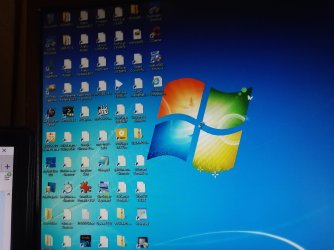
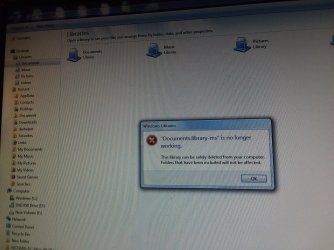
Desktop has not been rendering all icons for a bit.


And when trying to open some folders like documents I get this error message.
 

Attachments

  • 20180807_191311.jpg
    20180807_191311.jpg
    326.6 KB · Views: 0
  • 20180807_191343.jpg
    20180807_191343.jpg
    707.5 KB · Views: 1

My Computer

Computer type
PC/Desktop
Computer Manufacturer/Model Number
HP 6005 Pro
OS
Windows 7 Pro x64
CPU
Athlon II X2 B24 (3.00GHz)
Memory
8GB DDR3
Hard Drives
1TB HDD
Just to be clear when I press F11 repeatedly I get one black screen with some text on it but then windows just continues loading normally to the desktop (severely handicaooed desktop) pictured in above post.
 

My Computer

Computer type
PC/Desktop
Computer Manufacturer/Model Number
HP 6005 Pro
OS
Windows 7 Pro x64
CPU
Athlon II X2 B24 (3.00GHz)
Memory
8GB DDR3
Hard Drives
1TB HDD

My Computer

Computer type
PC/Desktop
Computer Manufacturer/Model Number
HP 6005 Pro
OS
Windows 7 Pro x64
CPU
Athlon II X2 B24 (3.00GHz)
Memory
8GB DDR3
Hard Drives
1TB HDD
Back
Top