
Winhlp32.exe

You can use this, just extract the .zip, right click and run as admin - browse to the .hlp file you want to open :

View attachment 11598

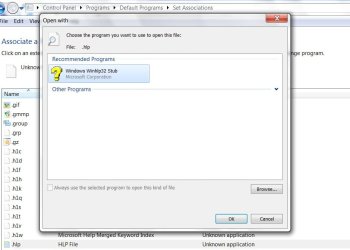
I'm using build 7127 x64. I created a directory in Program Files (x86) and called it WinHelp. I then downloaded the file that SIW2 provided (winhlp32.exe and put it in that directory. I renamed the file to mywinhlp32.exe and did the associate thing under default programs and pointed to that file, C:\Program Files (x86)\WinHelp\mywinhlp32.exe and now if I dbl-click a .hlp file it will open. It still does not open from within a program that uses an old .hlp file. I renamed the winhlp32.exe to mywinhlp32.exe because the OS seems to get confused and defaults to the winhlp32.exe STUB found under the C:\Windows folder.

Hope this helps. (No Pun Intended)
 
Last edited:

My Computer

Computer Manufacturer/Model Number
Me
OS
Win 7 Professional x64
CPU
Intel i7-920 @ 2.66Ghz
Motherboard
Asus P6T basic
Memory
Corsair XMS3 6GB ( 3 x 2 GB ) DDR3 1333 MHz
Graphics Card(s)
ATI Radeon x1650
Sound Card
Onboard 8-channel HD audio
Monitor(s) Displays
SyncMaster 912N and Princeton VL1916
Screen Resolution
1280x1024
Hard Drives
Intel ICH10R RAID
2 x WD1600 in RAID0 (System)
2 x WD1600 in RAID0 (Data)
PSU
OCZ Tech Stealth X Stream 600w
Case
Antec 300
Cooling
CPU Fan - 3 Case Fans - 2 HDD Fans
Keyboard
Sony
Mouse
Microsoft USB
Internet Speed
6M DSL
Other Info
Windows Home Server with around 1.4GB of storage
Your right rbmoblile. Never thought about that.
This works for me in Win7 32bit. Should work in 64 too since that winhlp stub is 32bit.

Take ownership of winhlp32.exe in windows folder.
Delete it.
Put the winhelp32.exe that SIW2 posted in windows folder.
Accociate .hlp files with winhlp32 in windows folder using the 'Open With"
Now I can access a programs help from the help menu.

Edit:Note that asscoiating using the open with is just so you can open a .hlp by clicking on it.
 

My Computer

Computer type
PC/Desktop
Computer Manufacturer/Model Number
Made by Dixon Butz
OS
Win7 Win 10, Win 8.1
CPU
AMD FX-8350, Corsair H100i
Motherboard
ASUS Crosshair V Formula-Z
Memory
16GB G.SKILL Ripjaws DDR3
Graphics Card(s)
EVGA GTX 980, EVGA GTX 860
Sound Card
Denon x4200 Dolby AMOS!
Monitor(s) Displays
65" Samsung 4K, +3 27inch
Screen Resolution
4K, 1080x3
Hard Drives
2TB Samsung hd204ui

1X Samsung 850 SSD
PSU
1000w EVGA, 2000VA UPS, 1000VA UPS and many others
Case
Lian Li
Cooling
Corsair H100i
Keyboard
Logitech K800
Mouse
Logitech Couch Mouse
Internet Speed
Gigabit!
Antivirus
Defender
Browser
Slimjet Chrome
When attempting to delete the winhlp32.exe in the Windows folder, I require permission by Trusted Installer. How do I get around that?
 

My Computer

Computer Manufacturer/Model Number
Dell XPS 400
OS
Windows 7 RC
Memory
3 GB
Dixon and Paulv44 -
I too am unable to delete or rename winhlp32.exe within Windows folder and "Take Ownership" is not an option on this file. Any of the other files in that folder I can take ownership of. Any ideas?
 

My Computer

Computer Manufacturer/Model Number
Me
OS
Win 7 Professional x64
CPU
Intel i7-920 @ 2.66Ghz
Motherboard
Asus P6T basic
Memory
Corsair XMS3 6GB ( 3 x 2 GB ) DDR3 1333 MHz
Graphics Card(s)
ATI Radeon x1650
Sound Card
Onboard 8-channel HD audio
Monitor(s) Displays
SyncMaster 912N and Princeton VL1916
Screen Resolution
1280x1024
Hard Drives
Intel ICH10R RAID
2 x WD1600 in RAID0 (System)
2 x WD1600 in RAID0 (Data)
PSU
OCZ Tech Stealth X Stream 600w
Case
Antec 300
Cooling
CPU Fan - 3 Case Fans - 2 HDD Fans
Keyboard
Sony
Mouse
Microsoft USB
Internet Speed
6M DSL
Other Info
Windows Home Server with around 1.4GB of storage
There's no need - you can leave it there.

rb spotted the answer. Just rename the real one you got from the .zip to myhlp.exe, copy it into the Windows folder.

Rt click a .hlp file, select Open With , browse to myhlp.exe - it works.:D

You can also go to Default Programs and associate it there, browse to myhlp.exe in the Windows folder ( or wherever you decided to put it) - it changes successfully .

Clicking on a .hlp file opens it with myhlp.exe straightaway.
 

My Computers

System One System Two

  • Computer type
    PC/Desktop
    OS
    7 X64
    CPU
    i5 8400
    Motherboard
    gigabyte b365m ds3h
    Memory
    2x8gb 3200mhz
    Hard Drives
    various
    PSU
    pure power 11 400w cm
    Case
    Coolermaster
    Cooling
    cryorig m9i
  • Computer type
    PC/Desktop
    OS
    7x64
    CPU
    g5400
    Motherboard
    ga b365m ds3h
    Memory
    8gb ddr4 2400
    PSU
    xfx pro 450w
Thanks SIW2. I guess I got a little carried away with creating a new folder. As you point out...not necessary. I wonder if MS is going to provide a means to open old .hlp files from within Win7 or are they going to require that developers change old files to .chm files.
 

My Computer

Computer Manufacturer/Model Number
Me
OS
Win 7 Professional x64
CPU
Intel i7-920 @ 2.66Ghz
Motherboard
Asus P6T basic
Memory
Corsair XMS3 6GB ( 3 x 2 GB ) DDR3 1333 MHz
Graphics Card(s)
ATI Radeon x1650
Sound Card
Onboard 8-channel HD audio
Monitor(s) Displays
SyncMaster 912N and Princeton VL1916
Screen Resolution
1280x1024
Hard Drives
Intel ICH10R RAID
2 x WD1600 in RAID0 (System)
2 x WD1600 in RAID0 (Data)
PSU
OCZ Tech Stealth X Stream 600w
Case
Antec 300
Cooling
CPU Fan - 3 Case Fans - 2 HDD Fans
Keyboard
Sony
Mouse
Microsoft USB
Internet Speed
6M DSL
Other Info
Windows Home Server with around 1.4GB of storage
You can take ownership and delete while in Windows.

By using my method you can use a programs help menu from within the program.
 

My Computer

Computer type
PC/Desktop
Computer Manufacturer/Model Number
Made by Dixon Butz
OS
Win7 Win 10, Win 8.1
CPU
AMD FX-8350, Corsair H100i
Motherboard
ASUS Crosshair V Formula-Z
Memory
16GB G.SKILL Ripjaws DDR3
Graphics Card(s)
EVGA GTX 980, EVGA GTX 860
Sound Card
Denon x4200 Dolby AMOS!
Monitor(s) Displays
65" Samsung 4K, +3 27inch
Screen Resolution
4K, 1080x3
Hard Drives
2TB Samsung hd204ui

1X Samsung 850 SSD
PSU
1000w EVGA, 2000VA UPS, 1000VA UPS and many others
Case
Lian Li
Cooling
Corsair H100i
Keyboard
Logitech K800
Mouse
Logitech Couch Mouse
Internet Speed
Gigabit!
Antivirus
Defender
Browser
Slimjet Chrome
Dixon,
I can't take ownership of the file!
 

My Computer

Computer Manufacturer/Model Number
Me
OS
Win 7 Professional x64
CPU
Intel i7-920 @ 2.66Ghz
Motherboard
Asus P6T basic
Memory
Corsair XMS3 6GB ( 3 x 2 GB ) DDR3 1333 MHz
Graphics Card(s)
ATI Radeon x1650
Sound Card
Onboard 8-channel HD audio
Monitor(s) Displays
SyncMaster 912N and Princeton VL1916
Screen Resolution
1280x1024
Hard Drives
Intel ICH10R RAID
2 x WD1600 in RAID0 (System)
2 x WD1600 in RAID0 (Data)
PSU
OCZ Tech Stealth X Stream 600w
Case
Antec 300
Cooling
CPU Fan - 3 Case Fans - 2 HDD Fans
Keyboard
Sony
Mouse
Microsoft USB
Internet Speed
6M DSL
Other Info
Windows Home Server with around 1.4GB of storage
My Computer

Computer type
PC/Desktop
Computer Manufacturer/Model Number
Made by Dixon Butz
OS
Win7 Win 10, Win 8.1
CPU
AMD FX-8350, Corsair H100i
Motherboard
ASUS Crosshair V Formula-Z
Memory
16GB G.SKILL Ripjaws DDR3
Graphics Card(s)
EVGA GTX 980, EVGA GTX 860
Sound Card
Denon x4200 Dolby AMOS!
Monitor(s) Displays
65" Samsung 4K, +3 27inch
Screen Resolution
4K, 1080x3
Hard Drives
2TB Samsung hd204ui

1X Samsung 850 SSD
PSU
1000w EVGA, 2000VA UPS, 1000VA UPS and many others
Case
Lian Li
Cooling
Corsair H100i
Keyboard
Logitech K800
Mouse
Logitech Couch Mouse
Internet Speed
Gigabit!
Antivirus
Defender
Browser
Slimjet Chrome
Workin' Now

DB...You da man! Between you and SIW2 I'm good ta go. And thanks to Brink for the tutorial. All of you get adds to your reps.

Thanks guys.
rb:D
 

My Computer

Computer Manufacturer/Model Number
Me
OS
Win 7 Professional x64
CPU
Intel i7-920 @ 2.66Ghz
Motherboard
Asus P6T basic
Memory
Corsair XMS3 6GB ( 3 x 2 GB ) DDR3 1333 MHz
Graphics Card(s)
ATI Radeon x1650
Sound Card
Onboard 8-channel HD audio
Monitor(s) Displays
SyncMaster 912N and Princeton VL1916
Screen Resolution
1280x1024
Hard Drives
Intel ICH10R RAID
2 x WD1600 in RAID0 (System)
2 x WD1600 in RAID0 (Data)
PSU
OCZ Tech Stealth X Stream 600w
Case
Antec 300
Cooling
CPU Fan - 3 Case Fans - 2 HDD Fans
Keyboard
Sony
Mouse
Microsoft USB
Internet Speed
6M DSL
Other Info
Windows Home Server with around 1.4GB of storage
You're wecome. Glad to have helped!

db
 

My Computer

Computer type
PC/Desktop
Computer Manufacturer/Model Number
Made by Dixon Butz
OS
Win7 Win 10, Win 8.1
CPU
AMD FX-8350, Corsair H100i
Motherboard
ASUS Crosshair V Formula-Z
Memory
16GB G.SKILL Ripjaws DDR3
Graphics Card(s)
EVGA GTX 980, EVGA GTX 860
Sound Card
Denon x4200 Dolby AMOS!
Monitor(s) Displays
65" Samsung 4K, +3 27inch
Screen Resolution
4K, 1080x3
Hard Drives
2TB Samsung hd204ui

1X Samsung 850 SSD
PSU
1000w EVGA, 2000VA UPS, 1000VA UPS and many others
Case
Lian Li
Cooling
Corsair H100i
Keyboard
Logitech K800
Mouse
Logitech Couch Mouse
Internet Speed
Gigabit!
Antivirus
Defender
Browser
Slimjet Chrome
Hi,

You can delete the stub from the Windows folder by giving Full control to All Users.

Looking in Default programs , it still shows in the browse box - not sure how to delete or change that bit ( not that it matters), and says Unknown application - with no icon.

Winhlp-3-2009-05-24_005534.jpg

However, I do get the icon on the .hlp files

Winhlp-4.jpg

I don't really use it, and would never have thought about it if Paul hadn't brought it up.

Interesting , though, well done to everyone who contributed here.

It works perfectly.:D
 

My Computers

System One System Two

  • Computer type
    PC/Desktop
    OS
    7 X64
    CPU
    i5 8400
    Motherboard
    gigabyte b365m ds3h
    Memory
    2x8gb 3200mhz
    Hard Drives
    various
    PSU
    pure power 11 400w cm
    Case
    Coolermaster
    Cooling
    cryorig m9i
  • Computer type
    PC/Desktop
    OS
    7x64
    CPU
    g5400
    Motherboard
    ga b365m ds3h
    Memory
    8gb ddr4 2400
    PSU
    xfx pro 450w
Thanks to everyone who helped. I'm attached to a few old programs written with the *.hlp files.

Works perfectly now...........and I learned a lot about file control and permissions, etc.

Paul :)
 

My Computer

Computer Manufacturer/Model Number
Dell XPS 400
OS
Windows 7 RC
Memory
3 GB
I just get an error (info window) showing "(9009)".

Any suggestions?
 

My Computer

OS
Windows7 SP1
Yes.. fill out your system specs if you would like assistance
 

My Computer

Computer type
PC/Desktop
Computer Manufacturer/Model Number
LENOVO K450 @3.0GHZ
OS
64-bit Windows 8.1 Pro
CPU
Core(TM) i5 CPU 4330 Haswell @ 3.20GHz
Motherboard
LENOVO
Memory
12.00 GB
Graphics Card(s)
Intel(R) HD Graphics
Sound Card
Intel HD integtrated
Monitor(s) Displays
HP 25' ISP Monitor
Screen Resolution
1900/1020
Hard Drives
(1) ST1000DM003-1CH162 (2) Generic STORAGE DEVICE USB Device (3) Generic STORAGE DEVICE USB Device
Internet Speed
100mb down/10mb up
please change the winhlp32.exe to winhelp32_2.exe, so you can select it it with 'open with' and build the connection to the file of 'hlp' type.
hope it will help you .
 

My Computer

OS
win7
Back
Top