DISKPART : At PC Startup

Open Windows DISKPART at System Startup
This is an outline of the methods to boot (start) the PC to open DISKPART so you can manipulate the Solid State Drive (SSD) or Hard Disk Drive (HDD) partitions before you start an installation or for any other reason.

Let's get started!


Method One

Windows 7 Full Installer


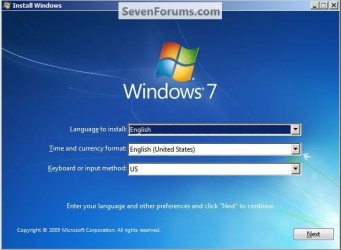
1) In the BIOS set the boot order to boot first from the CD/DVD Drive, insert the Windows 7 instalation DVD and restart the PC, at the first black/screen hit the space bar for the "Press any key ... " prompt, then at the "Language" screen hold the "Shift" key and hit the F10 hot-key to open a command window.


click any image to enlarge

Any Key2.jpg
Select3.jpg
2) In the command window that opens type diskpart <enter> to get started.

To close the command window when finished type exit <enter> to leave diskpart, then exit <enter> again to close the command window and get back to the installer.
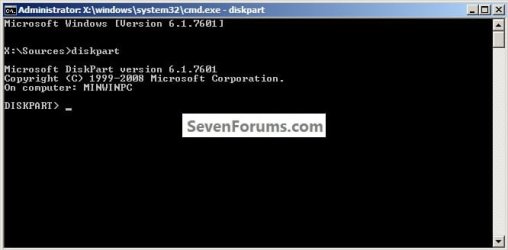
DISKPART.jpg


Method Two

Windows Repair CD


In the BIOS set the boot order to boot first from the CD/DVD Drive, insert the created repair CD and restart the PC.

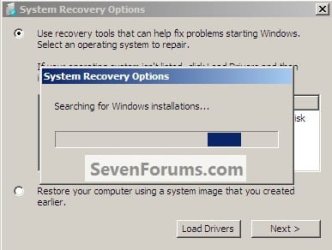
1) At the first black/screen hit the space bar for the "Press any key ... " prompt, after the "Loading Files" screen, select your language, then it'll do a search.
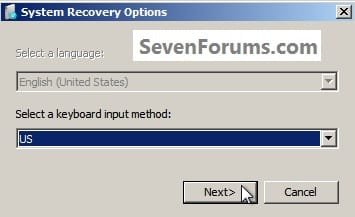
Recovery.jpg
Search.jpg
2) Select the desired OS and click next.
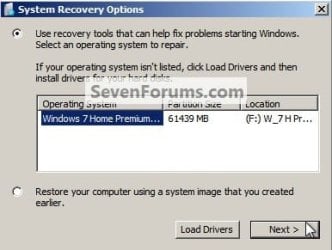
Next.jpg
3) In the Choose a Recovery Tool dialog box click Command Prompt, in the command window that opens type diskpart <enter> to get started.
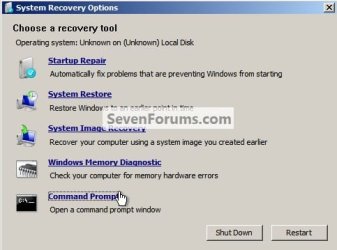
Command.jpg
When finished with diskpart type exit <enter> to leave diskpart, then exit <enter> again to close the command window.

Then click Restart in the Choose a Recovery Tool dialog box that's still open to finish up.


Method Three

Vista Full Installer


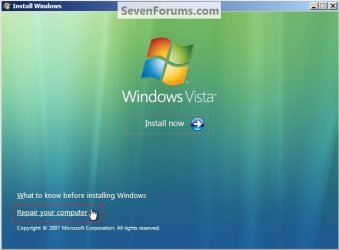
In the BIOS set the boot order to boot first from the CD/DVD Drive, insert the Windows Vista full installer DVD and restart the PC, at the first black/screen hit the space bar for the "Press any key ... " prompt, then at the "Language" screen click next, at the "Install ... " screen click Repair Your Computer.

From there the steps are exactly the same as in Method Two above, starting at step #1 to get to the command window, also to close the command window and finish up.
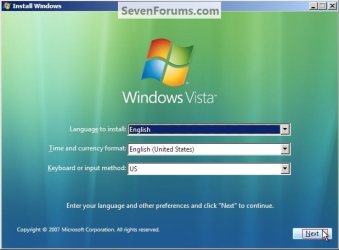
VistaLanguage.jpg
VistaRepair.jpg
Enjoy! :)


Last edited:

My Computer

Computer Manufacturer/Model Number
* BFK Customs *
OS
W 7 64-bit Ultimate
CPU
Intel Q9550 Yorkfield
Motherboard
ASUS P5Q Pro
Memory
8GB Dominator 8500C5D
Graphics Card(s)
ATI : XFX 5870
Sound Card
Realtek HD Audio 7-1
Monitor(s) Displays
1x 47" LCD HDMI & 3x 26" LCD HDMI
Screen Resolution
1920x1080P & 1920x1200
Hard Drives
1x 80GB Intel X25-M G2 SSD : 1x 500GB & 1x 640GB WD Caviar Black(s)
PSU
Corsair 620HX
Case
Cooler Master RC-690
Cooling
Tuniq Tower 120, 2x 140mm and 3x 120mm case fans
Keyboard
Microsoft 500
Mouse
Razer Diamondback 3G
Internet Speed
14 Mb/s
Other Info
1x Koutech 3Gb/s SATA HDD Hot Swap Rack
Great Tutorial Ted :thumbsup:
 

My Computer

Computer type
PC/Desktop
Computer Manufacturer/Model Number
Custom Built
OS
Windows 7 Professional x64 SP1 ; Windows Server 2012 R2 Standard
CPU
Intel Core i5 2400 @ 3.10GHz
Motherboard
Foxconn H67MP-S/-V/H67MP
Memory
8.0GB DDR3 @ 665MHz (2GBx4)
Graphics Card(s)
AMD Radeon HD 6870
Sound Card
Realtek High Definition Audio
Monitor(s) Displays
AOC 2243W & SMB1930NW
Screen Resolution
1440x900 & 1920x1080
Hard Drives
977GB Seagate ST31000524AS ATA Drive (SATA)
250GB WD iSCSI attached Drive
PSU
750W Gaming PSU
Case
Novatech Night
Cooling
Fan
Keyboard
Dell Standard PS/2 Keyboard
Mouse
R.A.T 07 Gaming Mouse
Internet Speed
Download: 10 Mbps Ping: 30ms Upload: 0.81 Mbps
Browser
Google Chrome
Other Info
Optiarc DVD RW AD-5260S ATA Device
Thank you Josh.
 

My Computer

Computer Manufacturer/Model Number
* BFK Customs *
OS
W 7 64-bit Ultimate
CPU
Intel Q9550 Yorkfield
Motherboard
ASUS P5Q Pro
Memory
8GB Dominator 8500C5D
Graphics Card(s)
ATI : XFX 5870
Sound Card
Realtek HD Audio 7-1
Monitor(s) Displays
1x 47" LCD HDMI & 3x 26" LCD HDMI
Screen Resolution
1920x1080P & 1920x1200
Hard Drives
1x 80GB Intel X25-M G2 SSD : 1x 500GB & 1x 640GB WD Caviar Black(s)
PSU
Corsair 620HX
Case
Cooler Master RC-690
Cooling
Tuniq Tower 120, 2x 140mm and 3x 120mm case fans
Keyboard
Microsoft 500
Mouse
Razer Diamondback 3G
Internet Speed
14 Mb/s
Other Info
1x Koutech 3Gb/s SATA HDD Hot Swap Rack
very nice.. a convenient link I can use instead of explaining it over and over again.


Thank you, it would have saved the confusion I caused in this thread yesterday with my #2 post.

Newby problem - Windows 7 and RAID 5
I ought to record the process I use to make custom images for the more difficult installs in order to make a tutorial, but whenever I'm in the middle of something like that, I've usually got 7 other things going on at the same time. I know if more people knew how to do that, there wouldn't be so many driver related BSODs after the install is complete, especially with chipsets and graphics card drivers.
 
Very nice! :D
 

My Computer

Computer type
PC/Desktop
Computer Manufacturer/Model Number
Custom
OS
Windows 7 Ultimate x64
CPU
AMD A10-7850 Quad Core 3.7 GHz
Motherboard
MSI MS-7900
Memory
16 GB
Graphics Card(s)
MSI Radeon R7 250 OC Crossfired with A10 AMD Radeon R7
Monitor(s) Displays
Samsung SyncMaster XL2370HD, ViewSonic VA1912wb
Screen Resolution
1920*1080, 1440*900
Hard Drives
128 GB SSD
512 GB SSD
500 GB HDD
PSU
Corsair CX500
Case
Rosewill THOR V2 BLACK
Keyboard
Logitech G15
Mouse
CMSTORM MS2K
Internet Speed
ATT U-Verse
Antivirus
Microsoft Security Essentials, MalwareBytes
Browser
Firefox (lastest stable) with NoScript
Other Info
Just a humdrum little system.
Thank you Danny, I still have some work to do to Method Two to get it correct.
 

My Computer

Computer Manufacturer/Model Number
* BFK Customs *
OS
W 7 64-bit Ultimate
CPU
Intel Q9550 Yorkfield
Motherboard
ASUS P5Q Pro
Memory
8GB Dominator 8500C5D
Graphics Card(s)
ATI : XFX 5870
Sound Card
Realtek HD Audio 7-1
Monitor(s) Displays
1x 47" LCD HDMI & 3x 26" LCD HDMI
Screen Resolution
1920x1080P & 1920x1200
Hard Drives
1x 80GB Intel X25-M G2 SSD : 1x 500GB & 1x 640GB WD Caviar Black(s)
PSU
Corsair 620HX
Case
Cooler Master RC-690
Cooling
Tuniq Tower 120, 2x 140mm and 3x 120mm case fans
Keyboard
Microsoft 500
Mouse
Razer Diamondback 3G
Internet Speed
14 Mb/s
Other Info
1x Koutech 3Gb/s SATA HDD Hot Swap Rack
Hello, I am living in india.Friends i have bought a Dell about a month ago a laptop with windows 7 home basic 64 bit OS,320 GB hard disc and i3 processor. My problem is :
I have recieved it with os installed and no partition of 320 GB HDD. Now i want atleast 2 more partition on it. How can i do it without harming the present system as it is? (I mean keeping the OS installed.). Can the Dell service tech. help me do it ? Or its not possible anyway? Need a solution. Can you help ?
 
Last edited:

My Computer

Computer Manufacturer/Model Number
Dell inspiron 15R T540903IN8
OS
Windows 7 home basic 64 bit
Motherboard
Intel(R) 5 series /3400 series chipset family
Memory
intel core i3 M370 @2.40Ghz,2394 Mhz,2 cores
Graphics Card(s)
ATI Mobility Radeon HD 550v 1 GB
Sound Card
ATI High Definition Audio Device
Monitor(s) Displays
Dell 15.6 " WLED generic PnP monitor
Screen Resolution
1366 * 768 *59 hertz ,32 bits/pixel
Hard Drives
320 GB ST9320325AS, manufacturer not known.
Keyboard
standard PS/2 Keyboard 102 key
Mouse
usb optical mouse
Other Info
Some of the hardware details like manufacturer of hard disk etc. are not exact because Dell has not given them for some reason.
Hello, I am living in india.Friends i have bought a Dell about a month ago a laptop with windows 7 home basic 64 bit OS,320 GB hard disc and i3 processor. My problem is :
I have recieved it with os installed and no partition of 320 GB HDD. Now i want atleast 2 more partition on it. How can i do it without harming the present system as it is? (I mean keeping the OS installed.). Can the Dell service tech. help me do it ? Or its not possible anyway? Need a solution. Can you help ?


I already answered you here at Post #15 have a look at that.
 

My Computer

Computer Manufacturer/Model Number
* BFK Customs *
OS
W 7 64-bit Ultimate
CPU
Intel Q9550 Yorkfield
Motherboard
ASUS P5Q Pro
Memory
8GB Dominator 8500C5D
Graphics Card(s)
ATI : XFX 5870
Sound Card
Realtek HD Audio 7-1
Monitor(s) Displays
1x 47" LCD HDMI & 3x 26" LCD HDMI
Screen Resolution
1920x1080P & 1920x1200
Hard Drives
1x 80GB Intel X25-M G2 SSD : 1x 500GB & 1x 640GB WD Caviar Black(s)
PSU
Corsair 620HX
Case
Cooler Master RC-690
Cooling
Tuniq Tower 120, 2x 140mm and 3x 120mm case fans
Keyboard
Microsoft 500
Mouse
Razer Diamondback 3G
Internet Speed
14 Mb/s
Other Info
1x Koutech 3Gb/s SATA HDD Hot Swap Rack
Thanx, Bare Foot Kid.Before viewing this reply , I've already done shrinking and partitioning of my disk but it showed less free space available(130 GB OUT OF 288 GB) than i expected as it is almost new system (i mean,it has very few programs and stuff installed ) but i did it anyway. Also did one more partitioning of unallocated space too. After that i have got is 2 (new) logical drives. Can i use 3rd party software to gain more free space as you suggested to somebody in other post somewhere ? How can i make new partition as primary instead of logical drives ? Sorry i can not give more details of my disk management or screenshots as i am away from my lappy right now. But i'll do it later if its important.
 

My Computer

Computer Manufacturer/Model Number
Dell inspiron 15R T540903IN8
OS
Windows 7 home basic 64 bit
Motherboard
Intel(R) 5 series /3400 series chipset family
Memory
intel core i3 M370 @2.40Ghz,2394 Mhz,2 cores
Graphics Card(s)
ATI Mobility Radeon HD 550v 1 GB
Sound Card
ATI High Definition Audio Device
Monitor(s) Displays
Dell 15.6 " WLED generic PnP monitor
Screen Resolution
1366 * 768 *59 hertz ,32 bits/pixel
Hard Drives
320 GB ST9320325AS, manufacturer not known.
Keyboard
standard PS/2 Keyboard 102 key
Mouse
usb optical mouse
Other Info
Some of the hardware details like manufacturer of hard disk etc. are not exact because Dell has not given them for some reason.
Thanx, Bare Foot Kid.Before viewing this reply , I've already done shrinking and partitioning of my disk but it showed less free space available(130 GB OUT OF 288 GB) than i expected as it is almost new system (i mean,it has very few programs and stuff installed ) but i did it anyway. Also did one more partitioning of unallocated space too. After that i have got is 2 (new) logical drives. Can i use 3rd party software to gain more free space as you suggested to somebody in other post somewhere ? How can i make new partition as primary instead of logical drives ? Sorry i can not give more details of my disk management or screenshots as i am away from my lappy right now. But i'll do it later if its important.


I can't give specific information without seeing a snip of disk management with a full description.
 

My Computer

Computer Manufacturer/Model Number
* BFK Customs *
OS
W 7 64-bit Ultimate
CPU
Intel Q9550 Yorkfield
Motherboard
ASUS P5Q Pro
Memory
8GB Dominator 8500C5D
Graphics Card(s)
ATI : XFX 5870
Sound Card
Realtek HD Audio 7-1
Monitor(s) Displays
1x 47" LCD HDMI & 3x 26" LCD HDMI
Screen Resolution
1920x1080P & 1920x1200
Hard Drives
1x 80GB Intel X25-M G2 SSD : 1x 500GB & 1x 640GB WD Caviar Black(s)
PSU
Corsair 620HX
Case
Cooler Master RC-690
Cooling
Tuniq Tower 120, 2x 140mm and 3x 120mm case fans
Keyboard
Microsoft 500
Mouse
Razer Diamondback 3G
Internet Speed
14 Mb/s
Other Info
1x Koutech 3Gb/s SATA HDD Hot Swap Rack
Q: Where is the link within this tutorial , info about using Diskpart once opened?
(Related tutorial section shows no link to usage info.)


.
 

My Computer

OS
XP Pro 32, Win7 Pro 64, Windows 7 Ultimate 32/64
All the tutorials that discuss diskpart show the relevant info for that instance; there is no need for a "diskpart how-to" as it would be way too large and hard to follow for the casual user.

I created this so I could just post a link to a convenient little guide in each tutorial rather than show a step-by-step in each tutorial how to get to diskpart, this saves a lot of time and space.
 

My Computer

Computer Manufacturer/Model Number
* BFK Customs *
OS
W 7 64-bit Ultimate
CPU
Intel Q9550 Yorkfield
Motherboard
ASUS P5Q Pro
Memory
8GB Dominator 8500C5D
Graphics Card(s)
ATI : XFX 5870
Sound Card
Realtek HD Audio 7-1
Monitor(s) Displays
1x 47" LCD HDMI & 3x 26" LCD HDMI
Screen Resolution
1920x1080P & 1920x1200
Hard Drives
1x 80GB Intel X25-M G2 SSD : 1x 500GB & 1x 640GB WD Caviar Black(s)
PSU
Corsair 620HX
Case
Cooler Master RC-690
Cooling
Tuniq Tower 120, 2x 140mm and 3x 120mm case fans
Keyboard
Microsoft 500
Mouse
Razer Diamondback 3G
Internet Speed
14 Mb/s
Other Info
1x Koutech 3Gb/s SATA HDD Hot Swap Rack
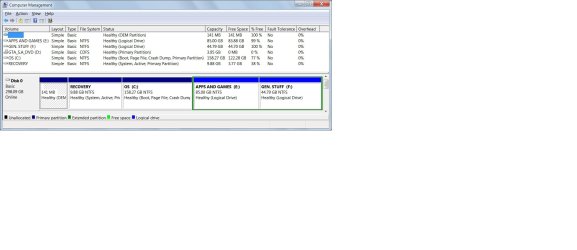
Hello BFK, Here is screenshot of my disk mgmt.anything to be done more to make my system okay ?
 

Attachments

  • Untitled.jpg
    Untitled.jpg
    229.8 KB · Views: 343

My Computer

Computer Manufacturer/Model Number
Dell inspiron 15R T540903IN8
OS
Windows 7 home basic 64 bit
Motherboard
Intel(R) 5 series /3400 series chipset family
Memory
intel core i3 M370 @2.40Ghz,2394 Mhz,2 cores
Graphics Card(s)
ATI Mobility Radeon HD 550v 1 GB
Sound Card
ATI High Definition Audio Device
Monitor(s) Displays
Dell 15.6 " WLED generic PnP monitor
Screen Resolution
1366 * 768 *59 hertz ,32 bits/pixel
Hard Drives
320 GB ST9320325AS, manufacturer not known.
Keyboard
standard PS/2 Keyboard 102 key
Mouse
usb optical mouse
Other Info
Some of the hardware details like manufacturer of hard disk etc. are not exact because Dell has not given them for some reason.
It looks good to me, are you having problems?

You can't really remove the "Recovery" partition as that may be needed if the PC ever has really bad issues that the PC needs to be recovered from.

Maybe you could be very specific in what you are asking.
 

My Computer

Computer Manufacturer/Model Number
* BFK Customs *
OS
W 7 64-bit Ultimate
CPU
Intel Q9550 Yorkfield
Motherboard
ASUS P5Q Pro
Memory
8GB Dominator 8500C5D
Graphics Card(s)
ATI : XFX 5870
Sound Card
Realtek HD Audio 7-1
Monitor(s) Displays
1x 47" LCD HDMI & 3x 26" LCD HDMI
Screen Resolution
1920x1080P & 1920x1200
Hard Drives
1x 80GB Intel X25-M G2 SSD : 1x 500GB & 1x 640GB WD Caviar Black(s)
PSU
Corsair 620HX
Case
Cooler Master RC-690
Cooling
Tuniq Tower 120, 2x 140mm and 3x 120mm case fans
Keyboard
Microsoft 500
Mouse
Razer Diamondback 3G
Internet Speed
14 Mb/s
Other Info
1x Koutech 3Gb/s SATA HDD Hot Swap Rack
i have got is 2 (new) logical drives. Can i use 3rd party software to gain more free space for these two drives as you suggested to somebody in other post somewhere ? How can i make new partitions as primary instead of logical drives ?why my recovery partition is marked active and not os drive? can i install xp on a logical drive? will the procedure be same (i am already having W7 preinstalled).
Sorrrrrrrrrrrrry! so much questions 'cause i really am a noob at such things.
 
Last edited:

My Computer

Computer Manufacturer/Model Number
Dell inspiron 15R T540903IN8
OS
Windows 7 home basic 64 bit
Motherboard
Intel(R) 5 series /3400 series chipset family
Memory
intel core i3 M370 @2.40Ghz,2394 Mhz,2 cores
Graphics Card(s)
ATI Mobility Radeon HD 550v 1 GB
Sound Card
ATI High Definition Audio Device
Monitor(s) Displays
Dell 15.6 " WLED generic PnP monitor
Screen Resolution
1366 * 768 *59 hertz ,32 bits/pixel
Hard Drives
320 GB ST9320325AS, manufacturer not known.
Keyboard
standard PS/2 Keyboard 102 key
Mouse
usb optical mouse
Other Info
Some of the hardware details like manufacturer of hard disk etc. are not exact because Dell has not given them for some reason.
Have you made the set of recovery disks yet?
 

My Computer

Computer Manufacturer/Model Number
* BFK Customs *
OS
W 7 64-bit Ultimate
CPU
Intel Q9550 Yorkfield
Motherboard
ASUS P5Q Pro
Memory
8GB Dominator 8500C5D
Graphics Card(s)
ATI : XFX 5870
Sound Card
Realtek HD Audio 7-1
Monitor(s) Displays
1x 47" LCD HDMI & 3x 26" LCD HDMI
Screen Resolution
1920x1080P & 1920x1200
Hard Drives
1x 80GB Intel X25-M G2 SSD : 1x 500GB & 1x 640GB WD Caviar Black(s)
PSU
Corsair 620HX
Case
Cooler Master RC-690
Cooling
Tuniq Tower 120, 2x 140mm and 3x 120mm case fans
Keyboard
Microsoft 500
Mouse
Razer Diamondback 3G
Internet Speed
14 Mb/s
Other Info
1x Koutech 3Gb/s SATA HDD Hot Swap Rack
Nope ! That i didn't yet. Because every file and software is already there on my old desktop. And I have all the DVDs that came with lappy. But ready to make if very necessary.
By the way pardon me for my slow response as i have to stay away from our forum for days sometime.
 

My Computer

Computer Manufacturer/Model Number
Dell inspiron 15R T540903IN8
OS
Windows 7 home basic 64 bit
Motherboard
Intel(R) 5 series /3400 series chipset family
Memory
intel core i3 M370 @2.40Ghz,2394 Mhz,2 cores
Graphics Card(s)
ATI Mobility Radeon HD 550v 1 GB
Sound Card
ATI High Definition Audio Device
Monitor(s) Displays
Dell 15.6 " WLED generic PnP monitor
Screen Resolution
1366 * 768 *59 hertz ,32 bits/pixel
Hard Drives
320 GB ST9320325AS, manufacturer not known.
Keyboard
standard PS/2 Keyboard 102 key
Mouse
usb optical mouse
Other Info
Some of the hardware details like manufacturer of hard disk etc. are not exact because Dell has not given them for some reason.
It's my pleasure to help you so take all the time you need, just keep me informed when you're able.


What company manufactured the PC?

I can't with a good conscience suggest you remove the 2 partitions to the left of the Windows partition as you may need the "Recovery" partition to repair the PC if you ever have terrible issues that make the PC unusable.

If you did choose to do so after you have made the set of recovery disks from the "Recovery" partition, have a look at this tutorial at the link below; the first thing that would have to be done is to mark the Windows C: partition as "Active" using the out-line in Step One of the tutorial.


Partition : Recover Space Used by an Older OS
 

My Computer

Computer Manufacturer/Model Number
* BFK Customs *
OS
W 7 64-bit Ultimate
CPU
Intel Q9550 Yorkfield
Motherboard
ASUS P5Q Pro
Memory
8GB Dominator 8500C5D
Graphics Card(s)
ATI : XFX 5870
Sound Card
Realtek HD Audio 7-1
Monitor(s) Displays
1x 47" LCD HDMI & 3x 26" LCD HDMI
Screen Resolution
1920x1080P & 1920x1200
Hard Drives
1x 80GB Intel X25-M G2 SSD : 1x 500GB & 1x 640GB WD Caviar Black(s)
PSU
Corsair 620HX
Case
Cooler Master RC-690
Cooling
Tuniq Tower 120, 2x 140mm and 3x 120mm case fans
Keyboard
Microsoft 500
Mouse
Razer Diamondback 3G
Internet Speed
14 Mb/s
Other Info
1x Koutech 3Gb/s SATA HDD Hot Swap Rack
Back
Top