
How much diskspace for windows partition???

blackdot

New member
Member
Local time
1:25 AM
Messages
51
I felt confident about giving my windows partition 30Gb of diskspace. Now, and suddenly i have only about 200mb's left. Why the hell does windows use so much space? And why is its need for space growing and not constant?

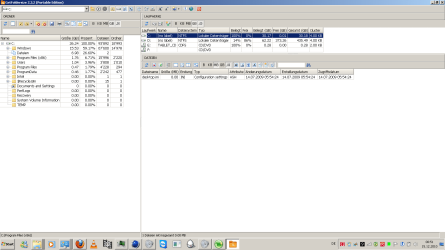
Are there any backup/update/something-files i can dump? Here a screenshot of my diskspace-usage
 

Attachments
  • Untitled.png
    Untitled.png
    35.8 KB · Views: 85

My Computer My Computer

OS
desktop: win7 professional x86, laptop: win7 prof. x64
CPU
desktop: intel e6400 dual @ 2.13ghz, laptop: intel i7 quad
Internet Speed
20Mbit/s dwn, 2Mbit/s up
I felt confident about giving my windows partition 30Gb of diskspace. Now, and suddenly i have only about 200mb's left. Why the hell does windows use so much space? And why is its need for space growing and not constant?

Are there any backup/update/something-files i can dump? Here a screenshot of my diskspace-usage

As you add programs and updates the size does grow. 30 Gigs is on the small end for a win 7 OS partition.

Doubtful that there is any backups in that partition because it is too small.


Ken J
 

My Computer My Computer

Computer Manufacturer/Model Number
HP Pavillion dv-7 1005 Tx
OS
Win 8 Release candidate 8400
CPU
[email protected]
Memory
4 gigs
Graphics Card(s)
Nvidia 9600M
Sound Card
HD built-in
Monitor(s) Displays
17" Wxga
Screen Resolution
1440x900
Cooling
none
Internet Speed
45Mb down 5Mb up
Hello blackdot, welcome to Seven Forums!


Have a look at this tutorial at the link below to see if it will get you some space back; 30GB is not nearly enough space for the OS and installed programs/apps.

How to Free Up and Recover Hard Drive Space
 

My Computer My Computer

Computer Manufacturer/Model Number
* BFK Customs *
OS
W 7 64-bit Ultimate
CPU
Intel Q9550 Yorkfield
Motherboard
ASUS P5Q Pro
Memory
8GB Dominator 8500C5D
Graphics Card(s)
ATI : XFX 5870
Sound Card
Realtek HD Audio 7-1
Monitor(s) Displays
1x 47" LCD HDMI & 3x 26" LCD HDMI
Screen Resolution
1920x1080P & 1920x1200
Hard Drives
1x 80GB Intel X25-M G2 SSD : 1x 500GB & 1x 640GB WD Caviar Black(s)
PSU
Corsair 620HX
Case
Cooler Master RC-690
Cooling
Tuniq Tower 120, 2x 140mm and 3x 120mm case fans
Keyboard
Microsoft 500
Mouse
Razer Diamondback 3G
Internet Speed
14 Mb/s
Other Info
1x Koutech 3Gb/s SATA HDD Hot Swap Rack
I use 50Gb for OS, but that's because I have a large drive.
You could get away with 25Gb, 35Gb or 40Gb.
It all depend upon what you're installing.
If you have more than one partition, you may want to use partitioning software to increase the size of the OS partition.
 

My Computer My Computer

Computer type
PC/Desktop
Computer Manufacturer/Model Number
Custom Build
OS
Windows 7 Home Premium 64 bit
CPU
Intel Core i7-4790
Motherboard
GA-Z87X-D3H
Memory
G.SKILL 8GB (2 x 4GB) DDR3 F3-10666CL9D-8GBNT
Graphics Card(s)
AMD Radeon R7 250
Sound Card
Realtek ALC892
Monitor(s) Displays
Samsung UN32EH5000, Dell 1703FPT
Screen Resolution
1920 x 1080, 1280 x 1024
Hard Drives
WD5003AZEX
WD10EZEX
Samsung HD103SJ
Samsung 128 GB 840 PRO
PSU
SeaSonic M12II SS-500GM
Case
Fractal Design Define R4
Cooling
Zalman CNPS9900ALED
Keyboard
Logitech K800
Mouse
Logitech M705
Internet Speed
16 Mbps
Antivirus
Avast
Browser
Firefox
Other Info
Bose Companion 2 Multimedia Speakers
Hello blackdot, welcome to Seven Forums!


Have a look at this tutorial at the link below to see if it will get you some space back; 30GB is not nearly enough space for the OS and installed programs/apps.

How to Free Up and Recover Hard Drive Space

thanks, there were some tricks i didnt know. i guess with the sync-files i can save some Gb's. Or is it possible to tell him, that he shall not put synced files on C: ?

As you add programs and updates the size does grow.

Well i recognised that. Isnt there a way, that every file a program brings is installed where i order it to insteady of messing up my windows partition?

I use 50Gb for OS, but that's because I have a large drive.
You could get away with 25Gb, 35Gb or 40Gb.
It all depend upon what you're installing.
If you have more than one partition, you may want to use partitioning software to increase the size of the OS partition.
If i use such a software i dont need to reinstall windows? that would be great, because it sucks to install all programs and drivers all over again.
 

My Computer My Computer

OS
desktop: win7 professional x86, laptop: win7 prof. x64
CPU
desktop: intel e6400 dual @ 2.13ghz, laptop: intel i7 quad
Internet Speed
20Mbit/s dwn, 2Mbit/s up
Have a look at this tutorial at the link below for some ideas and be sure to post back with any further questions you may have and to keep us informed.


Partition Wizard : Use the Bootable CD
 

My Computer My Computer

Computer Manufacturer/Model Number
* BFK Customs *
OS
W 7 64-bit Ultimate
CPU
Intel Q9550 Yorkfield
Motherboard
ASUS P5Q Pro
Memory
8GB Dominator 8500C5D
Graphics Card(s)
ATI : XFX 5870
Sound Card
Realtek HD Audio 7-1
Monitor(s) Displays
1x 47" LCD HDMI & 3x 26" LCD HDMI
Screen Resolution
1920x1080P & 1920x1200
Hard Drives
1x 80GB Intel X25-M G2 SSD : 1x 500GB & 1x 640GB WD Caviar Black(s)
PSU
Corsair 620HX
Case
Cooler Master RC-690
Cooling
Tuniq Tower 120, 2x 140mm and 3x 120mm case fans
Keyboard
Microsoft 500
Mouse
Razer Diamondback 3G
Internet Speed
14 Mb/s
Other Info
1x Koutech 3Gb/s SATA HDD Hot Swap Rack
thank you, i will look into that.

Btw, thank you all for those ultra-fast replies ;).
 

My Computer My Computer

OS
desktop: win7 professional x86, laptop: win7 prof. x64
CPU
desktop: intel e6400 dual @ 2.13ghz, laptop: intel i7 quad
Internet Speed
20Mbit/s dwn, 2Mbit/s up
You're welcome.
 

My Computer My Computer

Computer Manufacturer/Model Number
* BFK Customs *
OS
W 7 64-bit Ultimate
CPU
Intel Q9550 Yorkfield
Motherboard
ASUS P5Q Pro
Memory
8GB Dominator 8500C5D
Graphics Card(s)
ATI : XFX 5870
Sound Card
Realtek HD Audio 7-1
Monitor(s) Displays
1x 47" LCD HDMI & 3x 26" LCD HDMI
Screen Resolution
1920x1080P & 1920x1200
Hard Drives
1x 80GB Intel X25-M G2 SSD : 1x 500GB & 1x 640GB WD Caviar Black(s)
PSU
Corsair 620HX
Case
Cooler Master RC-690
Cooling
Tuniq Tower 120, 2x 140mm and 3x 120mm case fans
Keyboard
Microsoft 500
Mouse
Razer Diamondback 3G
Internet Speed
14 Mb/s
Other Info
1x Koutech 3Gb/s SATA HDD Hot Swap Rack
When you install software, it defaults to the C: drive (where the OS is).

In my case, I have a 60GB SSD and am limited on space, so I install to my E: drive, which is a much larger HDD. You can change this (filepath) when you install anything.

~Lordbob
 

My Computer My Computer

Computer Manufacturer/Model Number
Hera
OS
Windows 7 Ultimate x64, Mint 9
CPU
Intel i5-2500k
Motherboard
ASUS P8P67 Pro
Memory
2x 4Gb Corsair VENGEANCE DDR3-1600
Graphics Card(s)
NVidia GeForce N260GTX Twin Frozr
Sound Card
Realtek HD OnBoard Audio
Monitor(s) Displays
ASUS 24" Monitor
Screen Resolution
1920x1080
Hard Drives
G.SKILL Phoenix Series 60GB SATA II MLC Internal Solid State Drive (SSD)
SAMSUNG Spinpoint F3R 1TB 7200 RPM 32MB Cache SATA II
PSU
Cooler Master Real Power Pro 750W
Case
Cooler Master Haf 932
Cooling
Fans
Keyboard
Razer Tarantula
Mouse
Razer Lachesis
Internet Speed
not fast enough
When you install software, it defaults to the C: drive (where the OS is).

In my case, I have a 60GB SSD and am limited on space, so I install to my E: drive, which is a much larger HDD. You can change this (filepath) when you install anything.

~Lordbob

I do this. I even changed the default-install-path in the registry, as sometimes programs dont ask where they are wanted to be installed.
 

My Computer My Computer

OS
desktop: win7 professional x86, laptop: win7 prof. x64
CPU
desktop: intel e6400 dual @ 2.13ghz, laptop: intel i7 quad
Internet Speed
20Mbit/s dwn, 2Mbit/s up
When you install software, it defaults to the C: drive (where the OS is).

In my case, I have a 60GB SSD and am limited on space, so I install to my E: drive, which is a much larger HDD. You can change this (filepath) when you install anything.

~Lordbob

I do this. I even changed the default-install-path in the registry, as sometimes programs dont ask where they are wanted to be installed.
They will always ask, you just have to choose custom/advanced.
I have yet to come across one that doesn't.

~Lordbob
 

My Computer My Computer

Computer Manufacturer/Model Number
Hera
OS
Windows 7 Ultimate x64, Mint 9
CPU
Intel i5-2500k
Motherboard
ASUS P8P67 Pro
Memory
2x 4Gb Corsair VENGEANCE DDR3-1600
Graphics Card(s)
NVidia GeForce N260GTX Twin Frozr
Sound Card
Realtek HD OnBoard Audio
Monitor(s) Displays
ASUS 24" Monitor
Screen Resolution
1920x1080
Hard Drives
G.SKILL Phoenix Series 60GB SATA II MLC Internal Solid State Drive (SSD)
SAMSUNG Spinpoint F3R 1TB 7200 RPM 32MB Cache SATA II
PSU
Cooler Master Real Power Pro 750W
Case
Cooler Master Haf 932
Cooling
Fans
Keyboard
Razer Tarantula
Mouse
Razer Lachesis
Internet Speed
not fast enough
They will always ask, you just have to choose custom/advanced.
I have yet to come across one that doesn't.

~Lordbob

I know that i have to choose custom/advanced and I experienced VERY few programs who didnt ask.
 

My Computer My Computer

OS
desktop: win7 professional x86, laptop: win7 prof. x64
CPU
desktop: intel e6400 dual @ 2.13ghz, laptop: intel i7 quad
Internet Speed
20Mbit/s dwn, 2Mbit/s up
Check my specs thats the way I do it, no problems with space.

2X1 Ter =4x 500 gig

Separate systems on 3, other one for applications used by all 3 systems
 

My Computer My Computer

Computer Manufacturer/Model Number
Home build.
OS
Vista Ultimate 32 bit, Win 7 Pro 32 bit, Win 7 Pro 64 bit
CPU
Intel i5 CPU 750 @ 2.67 GHZ, OC 3.7 GHZ
Motherboard
Asus P7P55D
Memory
4 Gig
Graphics Card(s)
Nvidia GeForce GTS450
Monitor(s) Displays
Acer 24"
Screen Resolution
1440 x 900
Hard Drives
1000 GIG
1000 GIG
PSU
650
Case
Antec Nine Hundred Two
Internet Speed
14 MB (APPROX)
My HDD is 500GB and 80GB of that is my Windows Partition and Program Files. Other partition is for games and movies etc

If you have a big enough drive you can use Windows disk manager and transfer some of the free space from your other partition, I recommend and extra 30gigs if you can.
 

My Computer My Computer

Computer type
PC/Desktop
Computer Manufacturer/Model Number
Me
OS
Windows 7 Home Premium x64
CPU
AMD Bulldozer FX-8 8120 Black Edition @ 4GHz
Motherboard
Asus Crosshair V Formula 990FX
Memory
Corsair Vengeance 16GB DDR3 PC3-12800C9 1600MHz
Graphics Card(s)
MSI nVidia Geforce GTX 670 OC 2048MB GDDR5
Sound Card
Sound Blaster X-Fi 2 MB 2
Monitor(s) Displays
Samsung SyncMaster SA350 22" LED HDMI
Screen Resolution
1920x1080
Hard Drives
Seagate Barracuda SATA II 500GB 16MB Cache 7200.12
PSU
Corsair Professional Series Gold AX1200 (1200Watts)
Case
Antec 1200 Ultimate Gaming Case
Cooling
Antec Kuhler H20 620
Keyboard
Logitech G510
Mouse
Microsoft Wireless 3000
Internet Speed
Upto 40Mb/s Fibre Optic Broadband
Back
Top