how to make a homegroup?

noelian13

New member
hello! :)

i'd like to know i followed all steps in here http://www.sevenforums.com/tutorials/43961-homegroup-create.html
but when i click create homegroup choose the music documents and printer when i click create it says "A homegroup can only be created on a home network"

also i started to have homegroup diagnostics or the troubleshooter it says "Local Area connection" doesnt have a valid ip configuration


but my connection is already in Home network

im using NetGear FS605 5 port fast ethernet switcher

i mean in network sharing center it says im on a home network :(
 

My Computer

OS
windows 7 ultimate
CPU
2.2ghz Intel dual core
Memory
3GB DDR3
Graphics Card(s)
512MB Gforce GT9400
Monitor(s) Displays
BenQ
First up you can only set up a Homegroup with machines running Windows 7. You cannot introduce an XP machine.
Assuming you have only Win 7 machines, first make sure that they are all on the same network. They must all have the same network name!
Then you will be able to follow your link above to create your Homegroup.
 

My Computer

Computer type
PC/Desktop
OS
Microsoft Windows 7 Home Premium 64-bit 7601 Multiprocessor Free Service Pack 1
CPU
Intel(R) Core(TM) i7-3770 CPU @ 3.40GHz
Motherboard
ASUSTeK COMPUTER INC. P8H77-M
Memory
8.00 GB
Graphics Card(s)
Intel(R) HD Graphics 4000
Sound Card
On Board
Monitor(s) Displays
Dell 24"
Screen Resolution
1920 x 1080
Hard Drives
(1) INTEL SSDSC2CT180A3 ATA Device (2) ST500DM002-1BD142 ATA Device (3) WDC WD3200AAKS-75L9A0 ATA Device (4) Generic- Compact Flash USB Device (5) Generic- MS/MS-Pro USB Device (6) Generic- SD/MMC USB Device (7) Generic- SM/xD-Picture USB
PSU
500w Corsair
Case
Cooler Master
Cooling
3 Fans
Keyboard
Logitech MK300
Mouse
Logitech WOM
Internet Speed
75Mb
Antivirus
Norton 360
Browser
Firefox, Opera, IE
First up you can only set up a Homegroup with machines running Windows 7. You cannot introduce an XP machine.
Assuming you have only Win 7 machines, first make sure that they are all on the same network. They must all have the same network name!
Then you will be able to follow your link above to create your Homegroup.


im in wondows 7 ultimate my notebook is in windows 7 starter(Aspire one)
both uses the same network and network name

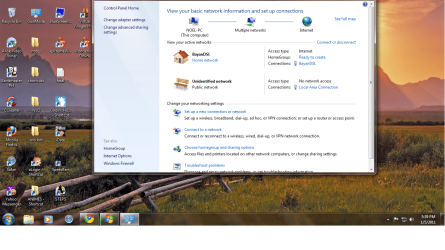
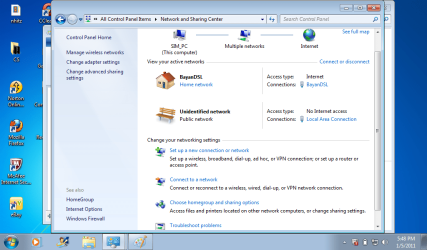
in network sharing center

Windows 7 ultimate
BayanDSL(Where i connect or my ISP)
Home Network

under it Unidentified network
Public network

(Right side matching with BayanDSL Home network)
Access type Internet
homegroup ready to create
connections BayanDSL

(right side matching with unidentified network)
access type no internet access
connections Local area connection

also this info is same on my notebook
is it correct already with the thing your saying? :)
 

My Computer

OS
windows 7 ultimate
CPU
2.2ghz Intel dual core
Memory
3GB DDR3
Graphics Card(s)
512MB Gforce GT9400
Monitor(s) Displays
BenQ
Could you post screenshots of both the Network and Sharing centre windows please?
 

My Computer

Computer type
PC/Desktop
OS
Microsoft Windows 7 Home Premium 64-bit 7601 Multiprocessor Free Service Pack 1
CPU
Intel(R) Core(TM) i7-3770 CPU @ 3.40GHz
Motherboard
ASUSTeK COMPUTER INC. P8H77-M
Memory
8.00 GB
Graphics Card(s)
Intel(R) HD Graphics 4000
Sound Card
On Board
Monitor(s) Displays
Dell 24"
Screen Resolution
1920 x 1080
Hard Drives
(1) INTEL SSDSC2CT180A3 ATA Device (2) ST500DM002-1BD142 ATA Device (3) WDC WD3200AAKS-75L9A0 ATA Device (4) Generic- Compact Flash USB Device (5) Generic- MS/MS-Pro USB Device (6) Generic- SD/MMC USB Device (7) Generic- SM/xD-Picture USB
PSU
500w Corsair
Case
Cooler Master
Cooling
3 Fans
Keyboard
Logitech MK300
Mouse
Logitech WOM
Internet Speed
75Mb
Antivirus
Norton 360
Browser
Firefox, Opera, IE
here it is in order

Network and sharing center of mine(windows 7 ultimate with the error im getting )

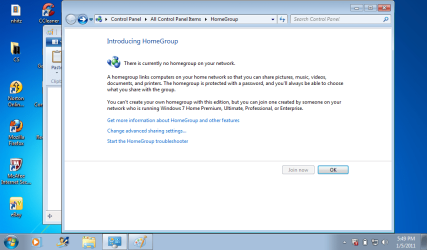
Network and sharing center of my notebook (win 7 starter) error(theres no netwokr yet) as i cant create one in my pc
then the picture of its homegroup
 

Attachments

  • win7 ultimate.png
    win7 ultimate.png
    1.1 MB · Views: 49
  • win7 iltimate error.png
    win7 iltimate error.png
    325.2 KB · Views: 46
  • homegroup win7.png
    homegroup win7.png
    177.6 KB · Views: 33
  • win7 starter homegroup.png
    win7 starter homegroup.png
    211.4 KB · Views: 35

My Computer

OS
windows 7 ultimate
CPU
2.2ghz Intel dual core
Memory
3GB DDR3
Graphics Card(s)
512MB Gforce GT9400
Monitor(s) Displays
BenQ
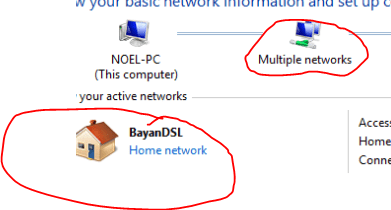
I can now see the problem. In your first screen shot we have this:
Capture81.PNG
The two red ringed items must be the same. You need to create a network connect called Bayan DSL
 

My Computer

Computer type
PC/Desktop
OS
Microsoft Windows 7 Home Premium 64-bit 7601 Multiprocessor Free Service Pack 1
CPU
Intel(R) Core(TM) i7-3770 CPU @ 3.40GHz
Motherboard
ASUSTeK COMPUTER INC. P8H77-M
Memory
8.00 GB
Graphics Card(s)
Intel(R) HD Graphics 4000
Sound Card
On Board
Monitor(s) Displays
Dell 24"
Screen Resolution
1920 x 1080
Hard Drives
(1) INTEL SSDSC2CT180A3 ATA Device (2) ST500DM002-1BD142 ATA Device (3) WDC WD3200AAKS-75L9A0 ATA Device (4) Generic- Compact Flash USB Device (5) Generic- MS/MS-Pro USB Device (6) Generic- SD/MMC USB Device (7) Generic- SM/xD-Picture USB
PSU
500w Corsair
Case
Cooler Master
Cooling
3 Fans
Keyboard
Logitech MK300
Mouse
Logitech WOM
Internet Speed
75Mb
Antivirus
Norton 360
Browser
Firefox, Opera, IE
oh okay but how do i create it? :)
when i clicked the multiple networks icon i got this
 

Attachments

  • wi7.png
    wi7.png
    110.4 KB · Views: 23

My Computer

OS
windows 7 ultimate
CPU
2.2ghz Intel dual core
Memory
3GB DDR3
Graphics Card(s)
512MB Gforce GT9400
Monitor(s) Displays
BenQ
and when i click on it nothing goes but when in my network sharing center i click create homegroup same error :(
 

My Computer

OS
windows 7 ultimate
CPU
2.2ghz Intel dual core
Memory
3GB DDR3
Graphics Card(s)
512MB Gforce GT9400
Monitor(s) Displays
BenQ
Well this does look a bit of a mess. I now see that you have a Work Network not a Home Network. You cannot have Homegroup on a Work network!
So as far as I can see you need to start off from scratch.
I'll have to do some test to work out whether it will be easier to edit the settings you have or to delete them all and start again. I can't see how I can do that at the moment without trying it on my own set up and I am a bit loath to cancel my settings and start again. Will think some more unless any other member has a better idea!
 

My Computer

Computer type
PC/Desktop
OS
Microsoft Windows 7 Home Premium 64-bit 7601 Multiprocessor Free Service Pack 1
CPU
Intel(R) Core(TM) i7-3770 CPU @ 3.40GHz
Motherboard
ASUSTeK COMPUTER INC. P8H77-M
Memory
8.00 GB
Graphics Card(s)
Intel(R) HD Graphics 4000
Sound Card
On Board
Monitor(s) Displays
Dell 24"
Screen Resolution
1920 x 1080
Hard Drives
(1) INTEL SSDSC2CT180A3 ATA Device (2) ST500DM002-1BD142 ATA Device (3) WDC WD3200AAKS-75L9A0 ATA Device (4) Generic- Compact Flash USB Device (5) Generic- MS/MS-Pro USB Device (6) Generic- SD/MMC USB Device (7) Generic- SM/xD-Picture USB
PSU
500w Corsair
Case
Cooler Master
Cooling
3 Fans
Keyboard
Logitech MK300
Mouse
Logitech WOM
Internet Speed
75Mb
Antivirus
Norton 360
Browser
Firefox, Opera, IE
okay ill just be waiting ^^
 

My Computer

OS
windows 7 ultimate
CPU
2.2ghz Intel dual core
Memory
3GB DDR3
Graphics Card(s)
512MB Gforce GT9400
Monitor(s) Displays
BenQ
Well I am calling for help now from other members. I cannot see how to delete the Multiple networks Work Workgroup so that we can create a new Home Workgroup. I keep coming to a dead end. If it were my PC I would take a few chances but I am not happy about giving advice unless I'm fairly sure it will work and as I can't recreate the set up on my PC's I can't test things!
Anyone like to join in and help please?

I seem to recall that Multiple networks was a bit of a problem on Vista but I can't quite remember!
 

My Computer

Computer type
PC/Desktop
OS
Microsoft Windows 7 Home Premium 64-bit 7601 Multiprocessor Free Service Pack 1
CPU
Intel(R) Core(TM) i7-3770 CPU @ 3.40GHz
Motherboard
ASUSTeK COMPUTER INC. P8H77-M
Memory
8.00 GB
Graphics Card(s)
Intel(R) HD Graphics 4000
Sound Card
On Board
Monitor(s) Displays
Dell 24"
Screen Resolution
1920 x 1080
Hard Drives
(1) INTEL SSDSC2CT180A3 ATA Device (2) ST500DM002-1BD142 ATA Device (3) WDC WD3200AAKS-75L9A0 ATA Device (4) Generic- Compact Flash USB Device (5) Generic- MS/MS-Pro USB Device (6) Generic- SD/MMC USB Device (7) Generic- SM/xD-Picture USB
PSU
500w Corsair
Case
Cooler Master
Cooling
3 Fans
Keyboard
Logitech MK300
Mouse
Logitech WOM
Internet Speed
75Mb
Antivirus
Norton 360
Browser
Firefox, Opera, IE
take your time mitchelle ^^ i hope i can create a home network soon ^^
 

My Computer

OS
windows 7 ultimate
CPU
2.2ghz Intel dual core
Memory
3GB DDR3
Graphics Card(s)
512MB Gforce GT9400
Monitor(s) Displays
BenQ
You just need to disable which ever adaptor is associated with the Unidentified Public network. You can do this in Device Manager or go to the Network and Sharing center then to "Change adaptor settings" and disable the extra adaptor there.

There might also be a default gateway problem but I'd have to see your ipconfig /all to get that straightend out.
 

My Computer

Computer type
PC/Desktop
Computer Manufacturer/Model Number
Home built
OS
Windows 7 Ult, Windows 8.1 Pro,
CPU
Q9650-4.275GHz, E8600 4.5GHz, E6750-3.8GHz
Motherboard
Evga 780i FTW
Memory
G.Skill PC2 9600 1200Mhz 5 5 5 15 2T
Graphics Card(s)
GTX480
Sound Card
Asus Xonar D2
Monitor(s) Displays
HannsG
Screen Resolution
1680X1050
Hard Drives
GSkill Phoenix Pro 120GB SSD
PSU
ThermalTake Toughpower 1000Watt modular
Case
ThermalTake XaserV
Cooling
Xigmatek S1283
Keyboard
Logitech G15
Mouse
Logitech G9
Internet Speed
T1
Hi noelian13
Do as Rob suggests and see how you get on. I can't try it first I'm afraid but I'm sure you will com to no hard. Rob is much more knowledgeable than I am!
 

My Computer

Computer type
PC/Desktop
OS
Microsoft Windows 7 Home Premium 64-bit 7601 Multiprocessor Free Service Pack 1
CPU
Intel(R) Core(TM) i7-3770 CPU @ 3.40GHz
Motherboard
ASUSTeK COMPUTER INC. P8H77-M
Memory
8.00 GB
Graphics Card(s)
Intel(R) HD Graphics 4000
Sound Card
On Board
Monitor(s) Displays
Dell 24"
Screen Resolution
1920 x 1080
Hard Drives
(1) INTEL SSDSC2CT180A3 ATA Device (2) ST500DM002-1BD142 ATA Device (3) WDC WD3200AAKS-75L9A0 ATA Device (4) Generic- Compact Flash USB Device (5) Generic- MS/MS-Pro USB Device (6) Generic- SD/MMC USB Device (7) Generic- SM/xD-Picture USB
PSU
500w Corsair
Case
Cooler Master
Cooling
3 Fans
Keyboard
Logitech MK300
Mouse
Logitech WOM
Internet Speed
75Mb
Antivirus
Norton 360
Browser
Firefox, Opera, IE
You just need to disable which ever adaptor is associated with the Unidentified Public network. You can do this in Device Manager or go to the Network and Sharing center then to "Change adaptor settings" and disable the extra adaptor there.

There might also be a default gateway problem but I'd have to see your ipconfig /all to get that straightend out.


how do i get the ipconfig i tried in run but command prompt pops out then immedietly closes down
 

My Computer

OS
windows 7 ultimate
CPU
2.2ghz Intel dual core
Memory
3GB DDR3
Graphics Card(s)
512MB Gforce GT9400
Monitor(s) Displays
BenQ
also when i go to network sharin center as you said
there was only 2

the dialer i created which i uses to connect to my DSL
and the Local area connection i tried to disable it but when disabled my net disconnected

when i click diagnose problems on local area connection win 7 diagnosis it that problem was

doesnt have a valid ip configuration
 

My Computer

OS
windows 7 ultimate
CPU
2.2ghz Intel dual core
Memory
3GB DDR3
Graphics Card(s)
512MB Gforce GT9400
Monitor(s) Displays
BenQ
You just need to disable which ever adaptor is associated with the Unidentified Public network. You can do this in Device Manager or go to the Network and Sharing center then to "Change adaptor settings" and disable the extra adaptor there.

There might also be a default gateway problem but I'd have to see your ipconfig /all to get that straightend out.


how do i get the ipconfig i tried in run but command prompt pops out then immedietly closes down

Need to go into safe mode to do this!
 

My Computer

Computer type
PC/Desktop
OS
Microsoft Windows 7 Home Premium 64-bit 7601 Multiprocessor Free Service Pack 1
CPU
Intel(R) Core(TM) i7-3770 CPU @ 3.40GHz
Motherboard
ASUSTeK COMPUTER INC. P8H77-M
Memory
8.00 GB
Graphics Card(s)
Intel(R) HD Graphics 4000
Sound Card
On Board
Monitor(s) Displays
Dell 24"
Screen Resolution
1920 x 1080
Hard Drives
(1) INTEL SSDSC2CT180A3 ATA Device (2) ST500DM002-1BD142 ATA Device (3) WDC WD3200AAKS-75L9A0 ATA Device (4) Generic- Compact Flash USB Device (5) Generic- MS/MS-Pro USB Device (6) Generic- SD/MMC USB Device (7) Generic- SM/xD-Picture USB
PSU
500w Corsair
Case
Cooler Master
Cooling
3 Fans
Keyboard
Logitech MK300
Mouse
Logitech WOM
Internet Speed
75Mb
Antivirus
Norton 360
Browser
Firefox, Opera, IE
ohh you need to go safe mode to do ipconfig? :)
 

My Computer

OS
windows 7 ultimate
CPU
2.2ghz Intel dual core
Memory
3GB DDR3
Graphics Card(s)
512MB Gforce GT9400
Monitor(s) Displays
BenQ
heres ipconfig
run->cmd->ipconfig heres the results

Microsoft Windows [Version 6.1.7600]
Copyright (c) 2009 Microsoft Corporation. All rights reserved.

C:\Users\Noel>ipconfig

Windows IP Configuration


PPP adapter BayanDSL:

Connection-specific DNS Suffix . :
IPv4 Address. . . . . . . . . . . : 121.96.189.180
Subnet Mask . . . . . . . . . . . : 255.255.255.255
Default Gateway . . . . . . . . . : 0.0.0.0

Ethernet adapter Local Area Connection:

Connection-specific DNS Suffix . :
Link-local IPv6 Address . . . . . : fe80::94c:ad4b:8f0b:649a%11
Autoconfiguration IPv4 Address. . : 169.254.100.154
Subnet Mask . . . . . . . . . . . : 255.255.0.0
Default Gateway . . . . . . . . . :

Tunnel adapter isatap.{12C3DEB2-DBDE-4550-A4C7-F9825AA52F8B}:

Media State . . . . . . . . . . . : Media disconnected
Connection-specific DNS Suffix . :

Tunnel adapter Reusable ISATAP Interface {61E2A852-7B2F-424B-BA3F-031BB948AC1B}:


Media State . . . . . . . . . . . : Media disconnected
Connection-specific DNS Suffix . :

Tunnel adapter Local Area Connection* 15:

Media State . . . . . . . . . . . : Media disconnected
Connection-specific DNS Suffix . :

Tunnel adapter Local Area Connection* 9:

Media State . . . . . . . . . . . : Media disconnected
Connection-specific DNS Suffix . :

Tunnel adapter Local Area Connection* 18:

Connection-specific DNS Suffix . :
IPv6 Address. . . . . . . . . . . : 2002:7960:bdb4::7960:bdb4
Default Gateway . . . . . . . . . : 2002:c058:6301::c058:6301

Tunnel adapter isatap.{30318A2F-7E0F-4A2D-9663-0905F9998FAA}:

Media State . . . . . . . . . . . : Media disconnected
Connection-specific DNS Suffix . :

C:\Users\Noel>
 

My Computer

OS
windows 7 ultimate
CPU
2.2ghz Intel dual core
Memory
3GB DDR3
Graphics Card(s)
512MB Gforce GT9400
Monitor(s) Displays
BenQ
Ok first off you should not need to go into safe mode to get your ipconfig /all report, I can't imagine why that was required but it's not normal. Lets take a look at your ipconfig results.

According to Wiki you are in Manila in the Philippines. From what I'm seeing here you aren't using a router?

You are also showing two different subnets which is why Windows was showing the unidentified network. You also aren't showing a default gateway, you can not create a network with out a default gateway.

I'm not sure what you are trying to do here but your source "ISP" or otherwise is not working correctly and certainly doesn't look normal from my point of view.

C:\Users\Noel>ipconfig

Windows IP Configuration


PPP adapter BayanDSL:

Connection-specific DNS Suffix . :
IPv4 Address. . . . . . . . . . . : 121.96.189.180
Subnet Mask . . . . . . . . . . . : 255.255.255.255
Default Gateway . . . . . . . . . : 0.0.0.0

Ethernet adapter Local Area Connection:

Connection-specific DNS Suffix . :
Link-local IPv6 Address . . . . . : fe80::94c:ad4b:8f0b:649a%11
Autoconfiguration IPv4 Address. . : 169.254.100.154
Subnet Mask . . . . . . . . . . . : 255.255.0.0
Default Gateway . . . . . . . . . :
 

My Computer

Computer type
PC/Desktop
Computer Manufacturer/Model Number
Home built
OS
Windows 7 Ult, Windows 8.1 Pro,
CPU
Q9650-4.275GHz, E8600 4.5GHz, E6750-3.8GHz
Motherboard
Evga 780i FTW
Memory
G.Skill PC2 9600 1200Mhz 5 5 5 15 2T
Graphics Card(s)
GTX480
Sound Card
Asus Xonar D2
Monitor(s) Displays
HannsG
Screen Resolution
1680X1050
Hard Drives
GSkill Phoenix Pro 120GB SSD
PSU
ThermalTake Toughpower 1000Watt modular
Case
ThermalTake XaserV
Cooling
Xigmatek S1283
Keyboard
Logitech G15
Mouse
Logitech G9
Internet Speed
T1
Back
Top