Want Folders Not Libraries

My Computer My Computer

Computer Manufacturer/Model Number
Dell XPS 15 L502x
OS
Windows 7 Ultimate x64 SP1
CPU
Core i7-2670QM
Memory
8GB DDR3 PC3-10600
Graphics Card(s)
Intel HD Graphics 3000 + GeForce GT 540M
Screen Resolution
1920x1080
Hard Drives
1TB 5400RPM Seagate
First let me clarify that I don't use W7 much - I'm still on XP. I do support several people that use W7, so I have a virtual machine with W7 in it.

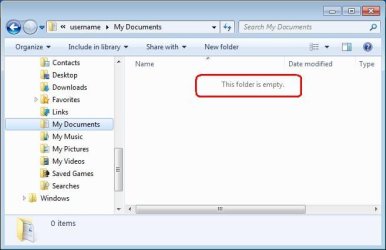
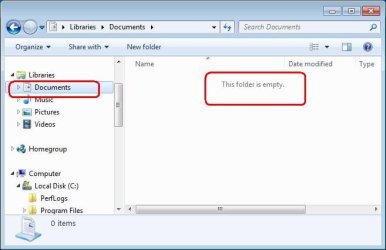
Here is a screenshot of what I first see in Explore. ~~~ This just shows that I don't have a "documents" folder available.......
There is definitely something different about your explorer window. If you follow kegobeer's link, you can probably get the documents shortcut back under Libraries - once you have done that, the file > save as dialog issue will be cured as well.

......It was only when I created the recipe document in Open Office then tried to save and create a new folder in process......
Thanks for the additional info - I was not sure how to help you since I was not sure what editor you used... I should have just asked.

.....How about someone recreate what I did and see if you have the same hang ups. I very well may simply be missing something. I don't purport to be a geek......

Now here's the thing:
I installed Open Office into my W7 VM
opened Writer
typed "test" in as some text
did a file > save as
The "save as" dialog box looks just like the one that I posted earlier. The "Libraries\documents" folder was already selected in the save as window - so I made a new folder via right click > new > folder (then I deleted that new folder) and made another new folder via the new folder button and I put the test document in that new folder - then exited OO Writer.

I opened up explorer to see if the test folder and test file was were it was supposed to be... but I noticed a new temp folder being created in the root of C. [The type of temp file that OS patches sometimes create with lots of letters and numbers in the folder name. I figured that it was OO updating itself because OS updates are turned off. The temp file soon went away.] I mention this OO update thing because the test folder/file that I saved was nowhere to be found via explorer.

So.... I opened OO's Writer app again and did a File > save as --- only to be told that folder that I was attempting to access was no longer available. This tells me that OO took note of the most recent folder used for the save as dialog and it tried to open that for me during the second save as operation, So I was not the only entity that thought the recently created folder and test file should still be on the hard drive. :-)

oo0.JPG


A glance at Writer's recent documents confirms the location of the file that OO & I did not find:
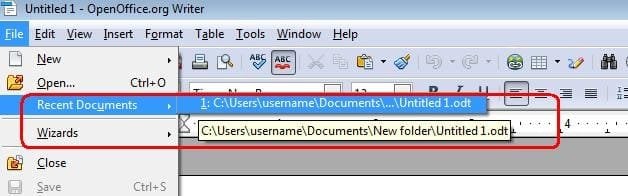
oo1.JPG


...and via explorer

oo2.JPG

oo3.JPG

RANT
Dear MS,
I have enough trouble explaining to people where files really are on their hard drive without you calling the real "Documents" folder by an alias of "My Documents". Not all applications call your APIs - some apps use their own file access dialog boxes... thus people need to know the real path to their files.
/RANT
There; I feel better now. :-)


.....Do I need to start another thread to ask about the additional questions I have posed or do people simply not know the answers?.....
No, we just were not clear that the explorer issue and the save as issue are related. Once you fix explorer, the save as will be fixed - we hope.


.....Also look at my screen shot and see how it opened up with all the space to the right and everything jumbled to the left. This is how it looks every time I open any folder the first time before I drag it open to view more stuff at once....
Turn off the preview pane. You can use the menus shown on the left or toggle that pane via the icon highlighted on the upper right.
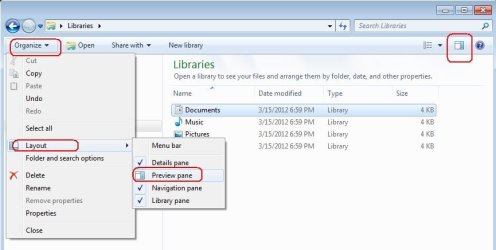
explorer-preview.JPG

I'm going to go ahead and hit "Submit Reply" for this post before the attached images disappear again. There appears to be a time out on that when a post stays in the edit mode too long. If I get the time, I'll start over on the OO install and see if the test file goes away again.

 

My Computer My Computer

Computer type
Laptop
Computer Manufacturer/Model Number
Employer provided Dell Latitude
OS
W7 Pro SP1 64bit
CPU
i7
Memory
8GB
Graphics Card(s)
Intel HD Graphics
Hard Drives
crappy SSD
Antivirus
Employer mandated Symantec Endpoint Protection
Browser
Pale Moon 64bit, IE11 64bit & Chrome 64bit
You might also like to remove "Libraries" from the shell context menu like so. Save to a removelib.reg file or whatever then run it.

Code:
Windows Registry Editor Version 5.00

[-HKEY_LOCAL_MACHINE\SOFTWARE\Microsoft\Windows\CurrentVersion\Explorer\Desktop\NameSpace\{031E4825-7B94-4dc3-B131-E946B44C8DD5}]
[-HKEY_CLASSES_ROOT\CLSID\{031E4825-7B94-4dc3-B131-E946B44C8DD5}]
[-HKEY_LOCAL_MACHINE\SOFTWARE\Classes\CLSID\{031E4825-7B94-4dc3-B131-E946B44C8DD5}]
[-HKEY_LOCAL_MACHINE\SOFTWARE\Microsoft\Windows\CurrentVersion\Explorer\FolderDescriptions\{2112AB0A-C86A-4ffe-A368-0DE96E47012E}]
[-HKEY_LOCAL_MACHINE\SOFTWARE\Microsoft\Windows\CurrentVersion\Explorer\FolderDescriptions\{491E922F-5643-4af4-A7EB-4E7A138D8174}]
[-HKEY_LOCAL_MACHINE\SOFTWARE\Microsoft\Windows\CurrentVersion\Explorer\FolderDescriptions\{7b0db17d-9cd2-4a93-9733-46cc89022e7c}]
[-HKEY_LOCAL_MACHINE\SOFTWARE\Microsoft\Windows\CurrentVersion\Explorer\FolderDescriptions\{A302545D-DEFF-464b-ABE8-61C8648D939B}]
[-HKEY_LOCAL_MACHINE\SOFTWARE\Microsoft\Windows\CurrentVersion\Explorer\FolderDescriptions\{A990AE9F-A03B-4e80-94BC-9912D7504104}]
[HKEY_LOCAL_MACHINE\SOFTWARE\Microsoft\Windows\CurrentVersion\Explorer\HideDesktopIcons\NewStartPanel]
“{031E4825-7B94-4dc3-B131-E946B44C8DD5}”=-
 

My Computer My Computer

Computer type
PC/Desktop
OS
Windows 10 x64
CPU
Intel i5-3570K
Motherboard
Asus Maximus V Gene
Memory
Crucial 16GB
Graphics Card(s)
nVidia Geforce 660 GTX
Sound Card
onboard
Monitor(s) Displays
NEC 2490WUXi2
Screen Resolution
1920x1200
Hard Drives
Crucial M4 256GB
PSU
Corsair 650TX
Case
Fractal Design - Define Mini
Keyboard
Filco Majestouch Tenkeyless Black MX
Mouse
Logitech MBJ58
.....Do I need to start another thread to ask about the additional questions I have posed or do people simply not know the answers?.....
No, we just were not clear that the explorer issue and the save as issue are related. Once you fix explorer, the save as will be fixed - we hope.


.....Also look at my screen shot and see how it opened up with all the space to the right and everything jumbled to the left. This is how it looks every time I open any folder the first time before I drag it open to view more stuff at once....
Turn off the preview pane. You can use the menus shown on the left or toggle that pane via the icon highlighted on the upper right.

View attachment 205354
.

Thanks for the thoughtful post. I haven't digested all you said about saving a doc but the issue I was having with Explore opening up with a minimal view was easily fixed by simply clicking on the Preview Pane icon on the upper right. I opened and closed Explore several times and it seems to have stuck. So that was easy.

For the moment I'm going to work around having Libraries. I'll see if I want to spend the time to understand how to eliminate them later. One thing I'm concerned about it if I eliminate them will I loose what is in them since I have folders within libraries? Or do they not really work that way?

Now the one other issue that no one has touched on yet is my erratic mouse behavior when scrolling pics. Like I said before if I'm trying to scroll up or down through a bunch of pics and click on the space between the bar and the arrow more than a few times or I hold down on the arrow for too many seconds it goes into rapid scroll mode that is too fast to see. It makes it almost impossible to find a pic if there are a lot in a folder. The only way around it I have found it to hold left button and drag the bar, but this is even hard to do if there are a lot of pics because you can't move it a small enough distance.

I haven't enabled any preference that I have aware of that is supposed to speed things up or accelerate. The only automation I have enabled on my laptop is pinch to zoom, but this happens on my desk top too. Another symptom is when it goes into this rapid mode if I take the cursor away from the scroll bar it stops then starts up again if I move it back to it without hitting any mouse buttons. If I left click away from the scroll bar it stops then the process repeats if I try and scroll again. I hope that isn't too confusing.
 

My Computer My Computer

OS
Windows 7 Home Premium 64 bit
When I reinstalled OO for a second time, I could not get it to update - it seems that the servers were down. So I did not repeat my experiment to see if the folder/file would be deleted during an update.

Glad to hear that you got your folders looking like you want them, for now.

I'll have to let others talk to the usefulness of the Libraries. As far as losing the stuff that is in them if you remove them from view: my one small test was to put pictures into the "users\username\my pictures" folder and then merged the reg file that pcunite posted. The pics are there - Libraries are not :-)

As far as your mouse and the wild scrolling - I don't use a mouse with my laptop, so I've not seen such behavior. Maybe a fresh thread in this Sevens Forum might help you.
 

My Computer My Computer

Computer type
Laptop
Computer Manufacturer/Model Number
Employer provided Dell Latitude
OS
W7 Pro SP1 64bit
CPU
i7
Memory
8GB
Graphics Card(s)
Intel HD Graphics
Hard Drives
crappy SSD
Antivirus
Employer mandated Symantec Endpoint Protection
Browser
Pale Moon 64bit, IE11 64bit & Chrome 64bit
I have a folder on my desk top called "my Desk". Inside that folder I have many, many more folders, but each folder is named with an icon... very easy to get to like a complete filing system.
 

Attachments

  • mydesk.jpg
    mydesk.jpg
    2.6 KB · Views: 109
  • recipes.jpg
    recipes.jpg
    1.6 KB · Views: 110

My Computer My Computer

Computer type
PC/Desktop
Computer Manufacturer/Model Number
Bruce ... somewhere in his 40's
OS
Windows 7 Ultimate 32bit SP1
CPU
Intel(R) Core(TM)2 Quad CPU @ 2.40GHz, 2400 MHz
Motherboard
INTEL/D975XBX2
Memory
4 GB
Graphics Card(s)
ATI Radeon HD 2600 Pro
Monitor(s) Displays
Samsung SyncMaster 914v
Screen Resolution
1280 x 1024
Hard Drives
2/500GB each ... ST3500630AS ATA Device.
One is not connected
PSU
Rocketfish 700 W
Case
G.Skill Gigabyte Chassis
Keyboard
Standard PS/2 Keyboard
Mouse
Microsoft PS/2 Mouse
Internet Speed
DSL
Antivirus
Avira Internet Security
Browser
IE 11
Other Info
ATI HDMI Audio
I'll have to let others talk to the usefulness of the Libraries. As far as losing the stuff that is in them if you remove them from view: my one small test was to put pictures into the "users\username\my pictures" folder and then merged the reg file that pcunite posted. The pics are there - Libraries are not :-)

Yeah that may work. I did have a Library called Bicycles and a folder in it that was called Components. The Components folder had only pics I had saved to that folder but the Library had every picture I had saved to either the folder or the Library. I created another folder called Bicycles and moved all the bicycle pics into it but they didn't really move they just copied. But then I deleted one of the pics in the Library to see if it would go away or stay in the folder. It went away. I still don't get the purpose of Libraries. They seem redundant. I hope they don't double the space used on the hard drive. But I think I read somewhere that they do not. I find that you can do almost everything in 7 that you could in XP and perhaps some additional stuff. It just seems harder to figure out how to do it. I wonder if 8 will be an improvement.
 

My Computer My Computer

OS
Windows 7 Home Premium 64 bit
Jump List?

Have you tried adding "My Documents" to the "Jump List" in "Windows Explorer"?

Add "My Documents" to the "Jump List"
  • Pin "Windows Explorer" to your Taskbar (if it isn't already present).
  • Open Windows Explorer
  • Navigate to "My Documents" (or another desired folder).
  • Drag the "My Documents" folder to the pinned "Windows Explorer" icon.
  • Release the mouse button when the "Pin to Windows Explorer" screen tip appears.

Access "My Documents" from the "Jump List"
  • Right click on the pinned "Windows Explorer" icon to activate the "Jump List".
  • Click on the desired icon.

Click on the picture for an animation.
Jump List.gif
 

My Computer My Computer

Computer type
PC/Desktop
Computer Manufacturer/Model Number
n/a
OS
W7 Ultimate SP1, LM19.2 MATE, W10 Home 1703, W10 Pro 1703 VM, #All 64 bit
CPU
AMD Phenom II x6 1100T, 3.3 GHz
Motherboard
ASUS M4A88T-M/USB3 (AM3)
Memory
12GB DDR3 1333 G-Skill (4GB x 2), G-Skill (2GB x 2)
Graphics Card(s)
NVIDIA GeForce GTX 660
Sound Card
Realtek?
Monitor(s) Displays
Samsung S23B350
Screen Resolution
1920x1080
Hard Drives
WD Green 2TB (SATA), WD Green 3TB (SATA), WD Blue 4TB (SATA), WD Blue 6TB (SATA)
PSU
Cooler Master
Case
Antec GX300 Tower
Cooling
3x Antec TRICOOL 120mm Fans
Mouse
Wired Optical
Internet Speed
DSL
Antivirus
Avast
Browser
Pale Moon (64 bit)
Other Info
2018-12-27 Upgraded HDDs
2015-12-10 Upgraded case, graphics card, storage
2015-08-15 Upgraded motherboard & RAM
2015-07-15 Upgraded LM17.1 to LM17.2
you could open your users folder and drag the documents folder to the favourite tree on the left in a window, and any other folders/file you want quick access to.
also if you set a window how you like it ie, size then adjust the view you want for the files ,large icons, list ,details etc then click organise /folders and search options/view tab then click apply to folders to save the setting.
to select the size of your files click the change your view tab ,top right of a window then using the dropdown arrow will give you more options with a slider to fine tune the size you want.
 

My Computer My Computer

Computer Manufacturer/Model Number
Hewlett packard/p6512uk
OS
Microsoft Windows 7 Home Premium 64-bit 7600
CPU
IIx4 amd athelon 635 processor
Motherboard
FOXCONN 2AA9
Memory
2x2gb
Graphics Card(s)
ati radeon HD 5450
Sound Card
(1) Realtek High Definition Audio (2) AMD High Definition
Monitor(s) Displays
samsung lcd tv 32"
Screen Resolution
1360x 768
Hard Drives
(1) WDC WD10 01FAES-60Z2A0 SATA Disk Device (2) Maxtor OneTouch USB Device (3) ST310003 33AS USB Device (4) WD My Book 1111 USB Device
PSU
?
Cooling
air!
Keyboard
wireless hp
Mouse
wireless Hp,optical
Internet Speed
1.10mb/s
Antivirus
MSE
Browser
Firefox
Here's a way to disable Libraries if that's what you still want: How to Disable “Libraries” Feature in Windows 7? - Tweaking with Vishal

I strongly recommend you to at least make a restore point first or preferably take a System Image.

I tried Libraries for about 2 weeks after getting my laptop and never found any need for them, so used this link and I've never
missed them. There is a restore in the Zip file if you change your mind.
 

My Computer My Computer

Computer Manufacturer/Model Number
Acer 7738G
OS
Windows 7 Home Premium X64 SP1
CPU
Intel Core2 duo T6600
Memory
4gb
Graphics Card(s)
Nvidia GeForce GT 1gb
Hard Drives
2 X 500 gb
Leave "Libraries" as they are ... it's not a problem to work around them and make your own folders, all included into one folder on the desktop.

Name the desktop folder what you want to, then name all individual folders as you want.

Save to 'desktop' , then move recipes, .txt notes, forums, or whatever into their respective folders. ( the most simple way to do this)
 

My Computer My Computer

Computer type
PC/Desktop
Computer Manufacturer/Model Number
Bruce ... somewhere in his 40's
OS
Windows 7 Ultimate 32bit SP1
CPU
Intel(R) Core(TM)2 Quad CPU @ 2.40GHz, 2400 MHz
Motherboard
INTEL/D975XBX2
Memory
4 GB
Graphics Card(s)
ATI Radeon HD 2600 Pro
Monitor(s) Displays
Samsung SyncMaster 914v
Screen Resolution
1280 x 1024
Hard Drives
2/500GB each ... ST3500630AS ATA Device.
One is not connected
PSU
Rocketfish 700 W
Case
G.Skill Gigabyte Chassis
Keyboard
Standard PS/2 Keyboard
Mouse
Microsoft PS/2 Mouse
Internet Speed
DSL
Antivirus
Avira Internet Security
Browser
IE 11
Other Info
ATI HDMI Audio
I agree with jaycee,
as a newcomer to windows 7 things will be different to XP but why change or remove them. once you get used to the system then you will appreciate them, i didnt use the libraries much at all in the early days but now i have several drives with music folders.
Using the library to collate the shortcuts to all the different music folders is a godsend, no more opening several windows and folders to get a specific track ,they show in one place.
bare in mind these files and folders in the library are ONLY shortcuts to the original folders that YOU create then add to the library.
 

My Computer My Computer

Computer Manufacturer/Model Number
Hewlett packard/p6512uk
OS
Microsoft Windows 7 Home Premium 64-bit 7600
CPU
IIx4 amd athelon 635 processor
Motherboard
FOXCONN 2AA9
Memory
2x2gb
Graphics Card(s)
ati radeon HD 5450
Sound Card
(1) Realtek High Definition Audio (2) AMD High Definition
Monitor(s) Displays
samsung lcd tv 32"
Screen Resolution
1360x 768
Hard Drives
(1) WDC WD10 01FAES-60Z2A0 SATA Disk Device (2) Maxtor OneTouch USB Device (3) ST310003 33AS USB Device (4) WD My Book 1111 USB Device
PSU
?
Cooling
air!
Keyboard
wireless hp
Mouse
wireless Hp,optical
Internet Speed
1.10mb/s
Antivirus
MSE
Browser
Firefox
I've been using Windows 7 for over two years, now, and I have yet to find any use at all for the "Libraries" feature. Over the course of Windows 3.11 and Windows 95 I developed and refined an organizational system for my files that I kept using through Windows 98, Windows 2000 Pro, XP, and now Windows 7. My files are organized by collections of file types in partitions, then major folders, and then subfolders. In other words, they are all collected in known locations to start with; I don't need a "Library" to offer me a lot of shortcuts to files when I know already exactly where to find them.

For someone who is young, or new to computers, perhaps Libraries may serve them in some useful way, but I've been dealing with this stuff for over 30 years and have developed an organizational system that is second-nature for me. Libraries offer me nothing of any benefit whatsoever, and I have removed them.

My Documents folder is just that, "Documents", not "My Documents". I have a shortcut on my desktop to that Documents folder, and it opens to the actual file location, not to a bunch of shortcuts. My Pictures are on a partition named "Pictures", categoriezed into folders which contain the actual image files.

What I'm getting at is that if one is familiar with the use of computers as a tool, and over the years has developed something that works well for them, why on earth try to force a change in habits in order to comply with a so-called "better idea" conjured up by a bunch of young software engineers who haven't even been alive as long as you have been working?

If you see some benefit to you in using Libraries, by all means go for it, but do it for yourself, not for Microsoft. Believe me, Windows 7 is indeed flexible enough to completely ignore "Libraries" if that's what you want to do.
 

My Computer My Computer

Computer Manufacturer/Model Number
Dell Inspiron 580
OS
7 Ultimate x64/7 Home Premium x64
CPU
Intel i3 550 3.2 GHz
Motherboard
Dell/Intel H57
Memory
Corsair 16 GB DDR3 (4 X 4GB)
Graphics Card(s)
Intel HD Graphics
Sound Card
Intel P55 HD Audio
Monitor(s) Displays
LG E2360 LED
Screen Resolution
1920 X 1080
Hard Drives
Seagate 1TB X 2 Internal,
Seagate 1TB eSATA (Backup)
PSU
Dell 300W
Case
Dell Inspiron
Cooling
Dell/Intel
Keyboard
Microsoft Wireless Comfort Keyboard 5000
Mouse
Microsoft Wireless Mouse 5000
Internet Speed
4,000 Mbit DSL
Other Info
Custom Installation -
OS separate on C:
Pagefile Separate on P:
Program Files Separate on U:
Users and ProgramData separate on V:
I've been using Windows 7 for over two years, now, and I have yet to find any use at all for the "Libraries" feature. Over the course of Windows 3.11 and Windows 95 I developed and refined an organizational system for my files that I kept using through Windows 98, Windows 2000 Pro, XP, and now Windows 7. My files are organized by collections of file types in partitions, then major folders, and then subfolders. In other words, they are all collected in known locations to start with; I don't need a "Library" to offer me a lot of shortcuts to files when I know already exactly where to find them.

For someone who is young, or new to computers, perhaps Libraries may serve them in some useful way, but I've been dealing with this stuff for over 30 years and have developed an organizational system that is second-nature for me. Libraries offer me nothing of any benefit whatsoever, and I have removed them.

My Documents folder is just that, "Documents", not "My Documents". I have a shortcut on my desktop to that Documents folder, and it opens to the actual file location, not to a bunch of shortcuts. My Pictures are on a partition named "Pictures", categoriezed into folders which contain the actual image files.

What I'm getting at is that if one is familiar with the use of computers as a tool, and over the years has developed something that works well for them, why on earth try to force a change in habits in order to comply with a so-called "better idea" conjured up by a bunch of young software engineers who haven't even been alive as long as you have been working?

If you see some benefit to you in using Libraries, by all means go for it, but do it for yourself, not for Microsoft. Believe me, Windows 7 is indeed flexible enough to completely ignore "Libraries" if that's what you want to do.
sounds similar to my set up, but having music folders on three externals and an internal hard drive then using the library to gather all the folders together in one click, well two clicks is handy. and yes i have set up my folders in the first place and so i know where they are but again i can see them all at a glance via a library.
 

My Computer My Computer

Computer Manufacturer/Model Number
Hewlett packard/p6512uk
OS
Microsoft Windows 7 Home Premium 64-bit 7600
CPU
IIx4 amd athelon 635 processor
Motherboard
FOXCONN 2AA9
Memory
2x2gb
Graphics Card(s)
ati radeon HD 5450
Sound Card
(1) Realtek High Definition Audio (2) AMD High Definition
Monitor(s) Displays
samsung lcd tv 32"
Screen Resolution
1360x 768
Hard Drives
(1) WDC WD10 01FAES-60Z2A0 SATA Disk Device (2) Maxtor OneTouch USB Device (3) ST310003 33AS USB Device (4) WD My Book 1111 USB Device
PSU
?
Cooling
air!
Keyboard
wireless hp
Mouse
wireless Hp,optical
Internet Speed
1.10mb/s
Antivirus
MSE
Browser
Firefox
Back
Top