
You are using an out of date browser. It may not display this or other websites correctly.
You should upgrade or use an alternative browser.
You should upgrade or use an alternative browser.
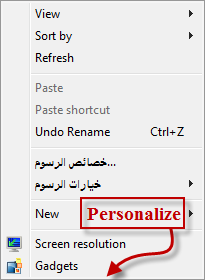
Solved "Personalize" is not found it
- Thread starter ZeroHQ
- Start date

Hello ZeroHQ,
What edition of Windows 7 is this on?
The Windows 7 Starter and Home Basic editions do not have the personalization feature included in them. If this is the case, then you could use the shortcut below for this instead if you like.
http://www.sevenforums.com/tutorials/24013-personalization-shortcut-create.html
Hope this helps,
Shawn
What edition of Windows 7 is this on?
The Windows 7 Starter and Home Basic editions do not have the personalization feature included in them. If this is the case, then you could use the shortcut below for this instead if you like.
http://www.sevenforums.com/tutorials/24013-personalization-shortcut-create.html
Hope this helps,
Shawn
My Computer
- Computer type
- PC/Desktop
- Computer Manufacturer/Model Number
- Self built custom
- OS
- 64-bit Windows 11 Pro for Workstations
- CPU
- Intel i7-8700K OC'd to 5 GHz
- Motherboard
- ASUS ROG Maximus XI Formula Z390
- Memory
- 64 GB (4x16GB) G.SKILL TridentZ RGB DDR4 3600 MHz
- Graphics Card(s)
- ASUS ROG-STRIX-GTX1080TI-O11G-GAMING
- Sound Card
- Integrated
- Monitor(s) Displays
- 2 x Samsung Odyssey G7 27"
- Screen Resolution
- 2560x1440
- Hard Drives
- 1TB Samsung 990 PRO M.2,
4TB Samsung 990 PRO PRO M.2,
TerraMaster F8 SSD Plus NAS
- PSU
- Seasonic Prime Titanium 850W
- Case
- Thermaltake Core P3
- Cooling
- Corsair Hydro H115i
- Keyboard
- Logitech wireless K800
- Mouse
- Logitech MX Master 4
- Internet Speed
- 2 Gb/s Download and 100 Mb/s Upload
- Antivirus
- Malwarebyte Anti-Malware Premium
- Browser
- Google Chrome
- Other Info
- Logitech Z625 speaker system,
Logitech BRIO 4K Pro webcam,
HP Color LaserJet Pro MFP M477fdn,
APC SMART-UPS RT 1000 XL - SURT1000XLI,
Galaxy S23 Plus phone
his specs say windows 7 ultimate
My Computer
- Computer Manufacturer/Model Number
- asus k53e bbr23 laptop
- OS
- windows 7 x64 pro sp1
- CPU
- intel i5 2540m
- Motherboard
- asus
- Memory
- 8 gig ddr3 12800
- Graphics Card(s)
- intel hd 3000
- Sound Card
- realtek hd audio
- Screen Resolution
- 1366*768 hd
- Hard Drives
- (1) ST3250312AS ATA Device (2) TOSHIBA External USB 3.0 USB Device
- Mouse
- lenovo usb mouse
- Internet Speed
- 20Mbps/1Mbps
Yeah, but I find that is not always accurate, or may not be the system that they are referring to in this case. I just like to verify first before getting into the issue that wouldn't make any difference if it was a Windows 7 Starter and Home Basic edition. That's all. 
My Computer
- Computer type
- PC/Desktop
- Computer Manufacturer/Model Number
- Self built custom
- OS
- 64-bit Windows 11 Pro for Workstations
- CPU
- Intel i7-8700K OC'd to 5 GHz
- Motherboard
- ASUS ROG Maximus XI Formula Z390
- Memory
- 64 GB (4x16GB) G.SKILL TridentZ RGB DDR4 3600 MHz
- Graphics Card(s)
- ASUS ROG-STRIX-GTX1080TI-O11G-GAMING
- Sound Card
- Integrated
- Monitor(s) Displays
- 2 x Samsung Odyssey G7 27"
- Screen Resolution
- 2560x1440
- Hard Drives
- 1TB Samsung 990 PRO M.2,
4TB Samsung 990 PRO PRO M.2,
TerraMaster F8 SSD Plus NAS
- PSU
- Seasonic Prime Titanium 850W
- Case
- Thermaltake Core P3
- Cooling
- Corsair Hydro H115i
- Keyboard
- Logitech wireless K800
- Mouse
- Logitech MX Master 4
- Internet Speed
- 2 Gb/s Download and 100 Mb/s Upload
- Antivirus
- Malwarebyte Anti-Malware Premium
- Browser
- Google Chrome
- Other Info
- Logitech Z625 speaker system,
Logitech BRIO 4K Pro webcam,
HP Color LaserJet Pro MFP M477fdn,
APC SMART-UPS RT 1000 XL - SURT1000XLI,
Galaxy S23 Plus phone
 Hello, Dear Brink
- Local time
- 4:03 PM
- Messages
- 14,164
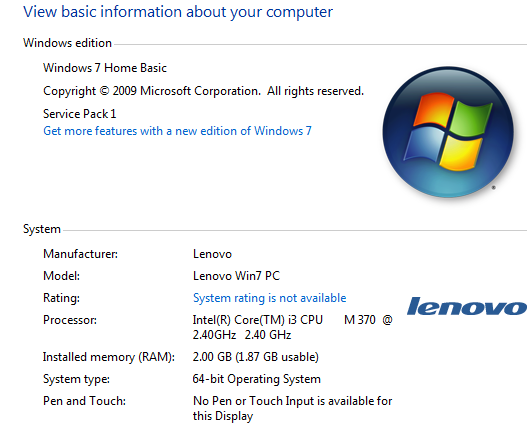
What version of windows are you using? starter? home basic? Go to My computer and select system properties. You will be able to see the version of windows you are using.
Also do a http://www.sevenforums.com/tutorials/1538-sfc-scannow-command-system-file-checker.html and restart upon finding violations.
Also do a http://www.sevenforums.com/tutorials/1538-sfc-scannow-command-system-file-checker.html and restart upon finding violations.
My Computer
- Computer type
- PC/Desktop
- Computer Manufacturer/Model Number
- Self assembled
- OS
- Windows 10 Home 64Bit
- CPU
- Intel Core i5 10400 @ 2.90GHz
- Motherboard
- Intel Corporation DG41WV (PROCESSOR)
- Memory
- 8.00GB Single-Channel Unknown @ 1329MHz (16-20-20-38)
- Sound Card
- Realtek High Definition Audio
- Monitor(s) Displays
- DELL E170S
- Screen Resolution
- 1280x1024 pixels
- Hard Drives
- 931GB TOSHIBA DT01ACA100 (SATA)
238GB TEAM TM8PS7256G (SATA SSD)
- Case
- Nothing Fancy
- Cooling
- Fans
- Keyboard
- A4 Tech Co LTD
- Mouse
- A4 Tech Co Ltd/Logitech
- Internet Speed
- 25 Mbps
- Local time
- 4:03 PM
- Messages
- 14,164
Its a home basic version. Please follow the steps here http://www.sevenforums.com/tutorials/24013-personalization-shortcut-create.html again as suggested by Brink on his first post.
My Computer
- Computer type
- PC/Desktop
- Computer Manufacturer/Model Number
- Self assembled
- OS
- Windows 10 Home 64Bit
- CPU
- Intel Core i5 10400 @ 2.90GHz
- Motherboard
- Intel Corporation DG41WV (PROCESSOR)
- Memory
- 8.00GB Single-Channel Unknown @ 1329MHz (16-20-20-38)
- Sound Card
- Realtek High Definition Audio
- Monitor(s) Displays
- DELL E170S
- Screen Resolution
- 1280x1024 pixels
- Hard Drives
- 931GB TOSHIBA DT01ACA100 (SATA)
238GB TEAM TM8PS7256G (SATA SSD)
- Case
- Nothing Fancy
- Cooling
- Fans
- Keyboard
- A4 Tech Co LTD
- Mouse
- A4 Tech Co Ltd/Logitech
- Internet Speed
- 25 Mbps
ZeroHQ,
Yep, that's why then. The Personalize/Personalization features are not available in your Windows 7 Home Basic.
The Personalization shortcut I posted above should open the window below for you in that edition. Did it not open this for you?

If that is not what you were wanting, then you might give OPTION TWO in the tutorial below a try to see if that may work.
http://www.sevenforums.com/tutorials/47294-desktop-background-change-windows-7-starter.html
Hope this helps,
Shawn
Yep, that's why then. The Personalize/Personalization features are not available in your Windows 7 Home Basic.
The Personalization shortcut I posted above should open the window below for you in that edition. Did it not open this for you?
http://www.sevenforums.com/tutorials/47294-desktop-background-change-windows-7-starter.html
Hope this helps,
Shawn
My Computer
- Computer type
- PC/Desktop
- Computer Manufacturer/Model Number
- Self built custom
- OS
- 64-bit Windows 11 Pro for Workstations
- CPU
- Intel i7-8700K OC'd to 5 GHz
- Motherboard
- ASUS ROG Maximus XI Formula Z390
- Memory
- 64 GB (4x16GB) G.SKILL TridentZ RGB DDR4 3600 MHz
- Graphics Card(s)
- ASUS ROG-STRIX-GTX1080TI-O11G-GAMING
- Sound Card
- Integrated
- Monitor(s) Displays
- 2 x Samsung Odyssey G7 27"
- Screen Resolution
- 2560x1440
- Hard Drives
- 1TB Samsung 990 PRO M.2,
4TB Samsung 990 PRO PRO M.2,
TerraMaster F8 SSD Plus NAS
- PSU
- Seasonic Prime Titanium 850W
- Case
- Thermaltake Core P3
- Cooling
- Corsair Hydro H115i
- Keyboard
- Logitech wireless K800
- Mouse
- Logitech MX Master 4
- Internet Speed
- 2 Gb/s Download and 100 Mb/s Upload
- Antivirus
- Malwarebyte Anti-Malware Premium
- Browser
- Google Chrome
- Other Info
- Logitech Z625 speaker system,
Logitech BRIO 4K Pro webcam,
HP Color LaserJet Pro MFP M477fdn,
APC SMART-UPS RT 1000 XL - SURT1000XLI,
Galaxy S23 Plus phone
The problem still exists ... I will install the system .. Thank you anyway my dear brother
No problem, but could you give more details on what you mean by the problem still exists?
What happens when you tried the above?
My Computer
- Computer type
- PC/Desktop
- Computer Manufacturer/Model Number
- Self built custom
- OS
- 64-bit Windows 11 Pro for Workstations
- CPU
- Intel i7-8700K OC'd to 5 GHz
- Motherboard
- ASUS ROG Maximus XI Formula Z390
- Memory
- 64 GB (4x16GB) G.SKILL TridentZ RGB DDR4 3600 MHz
- Graphics Card(s)
- ASUS ROG-STRIX-GTX1080TI-O11G-GAMING
- Sound Card
- Integrated
- Monitor(s) Displays
- 2 x Samsung Odyssey G7 27"
- Screen Resolution
- 2560x1440
- Hard Drives
- 1TB Samsung 990 PRO M.2,
4TB Samsung 990 PRO PRO M.2,
TerraMaster F8 SSD Plus NAS
- PSU
- Seasonic Prime Titanium 850W
- Case
- Thermaltake Core P3
- Cooling
- Corsair Hydro H115i
- Keyboard
- Logitech wireless K800
- Mouse
- Logitech MX Master 4
- Internet Speed
- 2 Gb/s Download and 100 Mb/s Upload
- Antivirus
- Malwarebyte Anti-Malware Premium
- Browser
- Google Chrome
- Other Info
- Logitech Z625 speaker system,
Logitech BRIO 4K Pro webcam,
HP Color LaserJet Pro MFP M477fdn,
APC SMART-UPS RT 1000 XL - SURT1000XLI,
Galaxy S23 Plus phone

 :huh:
:huh:My Computer
- Computer type
- PC/Desktop
- Computer Manufacturer/Model Number
- Self built custom
- OS
- 64-bit Windows 11 Pro for Workstations
- CPU
- Intel i7-8700K OC'd to 5 GHz
- Motherboard
- ASUS ROG Maximus XI Formula Z390
- Memory
- 64 GB (4x16GB) G.SKILL TridentZ RGB DDR4 3600 MHz
- Graphics Card(s)
- ASUS ROG-STRIX-GTX1080TI-O11G-GAMING
- Sound Card
- Integrated
- Monitor(s) Displays
- 2 x Samsung Odyssey G7 27"
- Screen Resolution
- 2560x1440
- Hard Drives
- 1TB Samsung 990 PRO M.2,
4TB Samsung 990 PRO PRO M.2,
TerraMaster F8 SSD Plus NAS
- PSU
- Seasonic Prime Titanium 850W
- Case
- Thermaltake Core P3
- Cooling
- Corsair Hydro H115i
- Keyboard
- Logitech wireless K800
- Mouse
- Logitech MX Master 4
- Internet Speed
- 2 Gb/s Download and 100 Mb/s Upload
- Antivirus
- Malwarebyte Anti-Malware Premium
- Browser
- Google Chrome
- Other Info
- Logitech Z625 speaker system,
Logitech BRIO 4K Pro webcam,
HP Color LaserJet Pro MFP M477fdn,
APC SMART-UPS RT 1000 XL - SURT1000XLI,
Galaxy S23 Plus phone
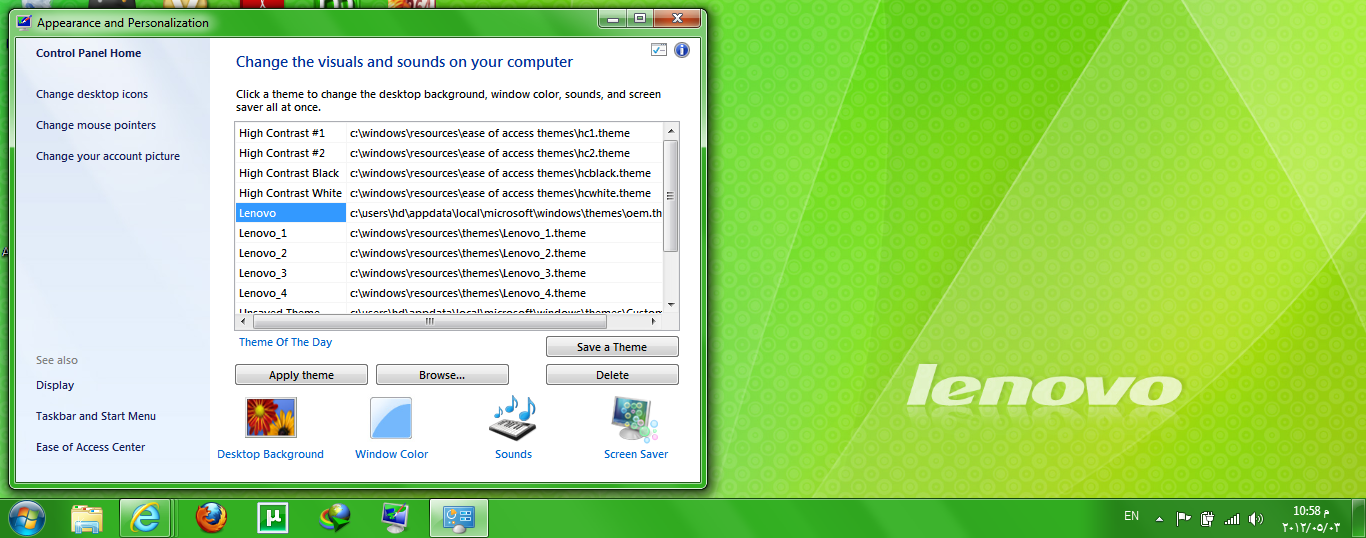
Thank you so much dear ... Thank you Many thanks ... I've succeeded The second idea I did not take advantage of them...
In any case thank you ..
In any case thank you ..
My Computer
- OS
- Windows 7 Ultimate x64
- CPU
- 3.06
- Motherboard
- 1GB
- Memory
- 2GB
- Graphics Card(s)
- 1GB
- Monitor(s) Displays
- 19 HD
- Hard Drives
- 360
You're most welcome. I'm happy that will work for you.
My Computer
- Computer type
- PC/Desktop
- Computer Manufacturer/Model Number
- Self built custom
- OS
- 64-bit Windows 11 Pro for Workstations
- CPU
- Intel i7-8700K OC'd to 5 GHz
- Motherboard
- ASUS ROG Maximus XI Formula Z390
- Memory
- 64 GB (4x16GB) G.SKILL TridentZ RGB DDR4 3600 MHz
- Graphics Card(s)
- ASUS ROG-STRIX-GTX1080TI-O11G-GAMING
- Sound Card
- Integrated
- Monitor(s) Displays
- 2 x Samsung Odyssey G7 27"
- Screen Resolution
- 2560x1440
- Hard Drives
- 1TB Samsung 990 PRO M.2,
4TB Samsung 990 PRO PRO M.2,
TerraMaster F8 SSD Plus NAS
- PSU
- Seasonic Prime Titanium 850W
- Case
- Thermaltake Core P3
- Cooling
- Corsair Hydro H115i
- Keyboard
- Logitech wireless K800
- Mouse
- Logitech MX Master 4
- Internet Speed
- 2 Gb/s Download and 100 Mb/s Upload
- Antivirus
- Malwarebyte Anti-Malware Premium
- Browser
- Google Chrome
- Other Info
- Logitech Z625 speaker system,
Logitech BRIO 4K Pro webcam,
HP Color LaserJet Pro MFP M477fdn,
APC SMART-UPS RT 1000 XL - SURT1000XLI,
Galaxy S23 Plus phone

- Local time
- 3:33 PM
- Messages
- 1,036
Just FYI, you can use this tool to have ultimate-like personalization panel with other features like aero, aero shake, aero peek and flip 3D window switcher.
Download Simple Patch to Enable Aero Glass and All Other Personalization Features in Windows 7 Home Basic and Starter Edition - Tweaking with Vishal
Download Simple Patch to Enable Aero Glass and All Other Personalization Features in Windows 7 Home Basic and Starter Edition - Tweaking with Vishal
My Computer
- Computer Manufacturer/Model Number
- HCL
- OS
- Winbdows 7 ultimate x64 | Ubuntu 12.04 x64 LTS
- CPU
- Core 2 Duo e7400 @ 2.90GHz
- Motherboard
- Gigabyte G31M-ES2L
- Memory
- 3GB DDR2
- Graphics Card(s)
- Asus Nvidia GTX 560Ti 1GB
- Sound Card
- On-board
- Monitor(s) Displays
- HCL eZeeBee 18.5" LCD
- Screen Resolution
- 1366x768 @ 60Hz
- Hard Drives
- Western Digital 320GB
- PSU
- Corsair CX500 V2 500W
- Cooling
- Stock
- Keyboard
- Stock
- Mouse
- Stock
- Internet Speed
- 15-25kBps D/L | 10kBps U/L | Hey Don't laugh
RizwanMoghees
New member
- Local time
- 5:03 AM
- Messages
- 1
It's simple... (You do not need to install or do anything)
Go to Control panel ---> Appearance ---> Display ---> Change color scheme
Note all the personalization commands are there.
Go to Control panel ---> Appearance ---> Display ---> Change color scheme
Note all the personalization commands are there.
My Computer
- Computer type
- PC/Desktop
- OS
- Windows 7
Similar threads
- Replies
- 19
- Views
- 4K
- Replies
- 3
- Views
- 7K

- Replies
- 57
- Views
- 18K


- Replies
- 0
- Views
- 1K
- Replies
- 2
- Views
- 2K