Windows 7 Ultimate with NO SP-1?

Going to have dinner will be back later.
Jerry
 

My Computer My Computer

At a glance

Win 7 Pro x64 / Win 10 ProIntel(R) Core(TM) i7-3630QM CPU @ 2.40GHz12 GB(1) Intel(R) HD Graphics 4000 (2) NVIDIA GeFo...
Computer type
Laptop
Computer Manufacturer/Model Number
Sager NP9170
OS
Win 7 Pro x64 / Win 10 Pro
CPU
Intel(R) Core(TM) i7-3630QM CPU @ 2.40GHz
Motherboard
CLEVO P170EM
Memory
12 GB
Graphics Card(s)
(1) Intel(R) HD Graphics 4000 (2) NVIDIA GeForce GTX 675M
Sound Card
(1) Realtek High Definition Audio (2) Intel(R) Display Aud
Monitor(s) Displays
17.3
Screen Resolution
1920x1080
Hard Drives
(1) Samsung 860 EVO 500GB(OS) (1) Samsung 860 EVO 500GB(Data)
Keyboard
Backlite
Antivirus
MSE, Malwarebytes Pro
Browser
Firefox
Other Info
DESKTOP: Custom-built.
OS: Win 10 Pro x64.
CASE: Rosewill R5.
CPU: Intel I5 4670K CPU @ 3.40GHz.
CPU COOLER: Cool Master Hyper 212 EVO.
MOTHERBOARD: Asus Z87-A.
MEMORY: Kingston HyperX 2x4 GB.
GPU: Nvidia Geforce 650 TI.
PSU: Corsair TX750.
DRIVES: (1) Samsung 840 120 GB SSD (2) Western Digital blue 500 GB 7200 RPM.
OK Chuck
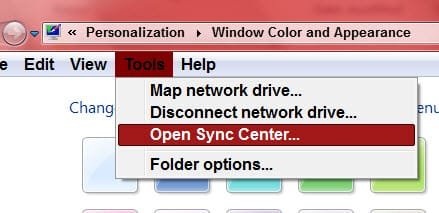
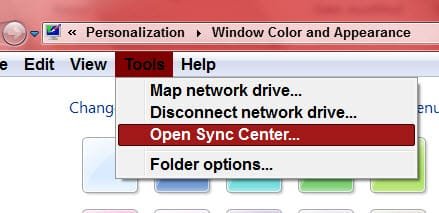
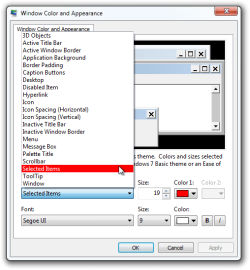
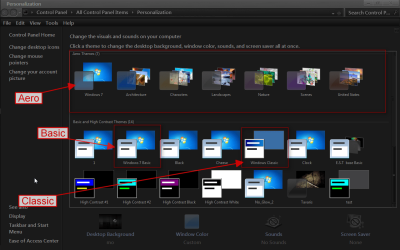
I did some testing, using your settings in Window Color and Appearance when using Aero or Basic themes it can not be done but using Classic theme it works. See screenshots
Window Color and Appearance.png

Aero, Basic, Classic
Personalization.png

Aero
aero.png

Basic
basic.png

Classic
classic.png

I have been using the same color set since back in the Windows 2000 days
You need to remember Windows 7 changed with Aero and Basic themes added.

You would need a custom theme to get it to work on Aero or Basic themes.
I can change that for you, using Windows Style Builder and post it here in a zip folder.
&
This will be a custom theme and you will need to do 1 of these 2 ways of Enabling custom themes for it to work.
http://www.sevenforums.com/tutorials/34579-enabling-custom-themes-windows-7-a.html
Or
http://www.sevenforums.com/tutorials/28377-theme-how-apply-custom-themes.html?filter

Let me know.
Jerry
 

My Computer My Computer

At a glance

Win 7 Pro x64 / Win 10 ProIntel(R) Core(TM) i7-3630QM CPU @ 2.40GHz12 GB(1) Intel(R) HD Graphics 4000 (2) NVIDIA GeFo...
Computer type
Laptop
Computer Manufacturer/Model Number
Sager NP9170
OS
Win 7 Pro x64 / Win 10 Pro
CPU
Intel(R) Core(TM) i7-3630QM CPU @ 2.40GHz
Motherboard
CLEVO P170EM
Memory
12 GB
Graphics Card(s)
(1) Intel(R) HD Graphics 4000 (2) NVIDIA GeForce GTX 675M
Sound Card
(1) Realtek High Definition Audio (2) Intel(R) Display Aud
Monitor(s) Displays
17.3
Screen Resolution
1920x1080
Hard Drives
(1) Samsung 860 EVO 500GB(OS) (1) Samsung 860 EVO 500GB(Data)
Keyboard
Backlite
Antivirus
MSE, Malwarebytes Pro
Browser
Firefox
Other Info
DESKTOP: Custom-built.
OS: Win 10 Pro x64.
CASE: Rosewill R5.
CPU: Intel I5 4670K CPU @ 3.40GHz.
CPU COOLER: Cool Master Hyper 212 EVO.
MOTHERBOARD: Asus Z87-A.
MEMORY: Kingston HyperX 2x4 GB.
GPU: Nvidia Geforce 650 TI.
PSU: Corsair TX750.
DRIVES: (1) Samsung 840 120 GB SSD (2) Western Digital blue 500 GB 7200 RPM.
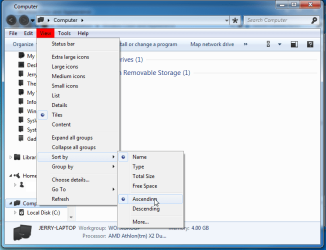
Here is what can be done with Windows Style Builder.
Those color can be changed to your colors.
Jerry
Screenshot - 7_21_2012 , 9_12_42 PM.png
 

My Computer My Computer

At a glance

Win 7 Pro x64 / Win 10 ProIntel(R) Core(TM) i7-3630QM CPU @ 2.40GHz12 GB(1) Intel(R) HD Graphics 4000 (2) NVIDIA GeFo...
Computer type
Laptop
Computer Manufacturer/Model Number
Sager NP9170
OS
Win 7 Pro x64 / Win 10 Pro
CPU
Intel(R) Core(TM) i7-3630QM CPU @ 2.40GHz
Motherboard
CLEVO P170EM
Memory
12 GB
Graphics Card(s)
(1) Intel(R) HD Graphics 4000 (2) NVIDIA GeForce GTX 675M
Sound Card
(1) Realtek High Definition Audio (2) Intel(R) Display Aud
Monitor(s) Displays
17.3
Screen Resolution
1920x1080
Hard Drives
(1) Samsung 860 EVO 500GB(OS) (1) Samsung 860 EVO 500GB(Data)
Keyboard
Backlite
Antivirus
MSE, Malwarebytes Pro
Browser
Firefox
Other Info
DESKTOP: Custom-built.
OS: Win 10 Pro x64.
CASE: Rosewill R5.
CPU: Intel I5 4670K CPU @ 3.40GHz.
CPU COOLER: Cool Master Hyper 212 EVO.
MOTHERBOARD: Asus Z87-A.
MEMORY: Kingston HyperX 2x4 GB.
GPU: Nvidia Geforce 650 TI.
PSU: Corsair TX750.
DRIVES: (1) Samsung 840 120 GB SSD (2) Western Digital blue 500 GB 7200 RPM.
Jerry;

I appreciate your time and effort. Thanks. I won't even BEGIN to try to understand why Windows 7 -- or WHEN for that matter -- made those changes -- without warning! 'Cause I'm telling you, I was using that type of colo0r for years -- bad eyes mad the red more easily locatable.

At least I know I'm not totally daft!

As for patching:

The second choice seems the more "friendly" of the two. I could do it...my question would be would it hold up under Windows Update processes? Or would it be something one would always have to "re-do"? I don't see myself "upgrading" to Windows 8 anytime soon, so that isn't an [initial] issue, so if it would remain in effect once complete, I could do that.

Although I certainly appreciate the effort Jerry, I feel bad that you would have to spend "hours" on this for me.

Lemme know what you think / feel about this...

Regards,
Chuck

OK Chuck
I did some testing, using your settings in Window Color and Appearance when using Aero or Basic themes it can not be done but using Classic theme it works. See screenshots
View attachment 222700

Aero, Basic, Classic
View attachment 222701

Aero
View attachment 222702

Basic
View attachment 222703

Classic
View attachment 222704

I have been using the same color set since back in the Windows 2000 days
You need to remember Windows 7 changed with Aero and Basic themes added.

You would need a custom theme to get it to work on Aero or Basic themes.
I can change that for you, using Windows Style Builder and post it here in a zip folder.
&
This will be a custom theme and you will need to do 1 of these 2 ways of Enabling custom themes for it to work.
http://www.sevenforums.com/tutorials/34579-enabling-custom-themes-windows-7-a.html
Or
http://www.sevenforums.com/tutorials/28377-theme-how-apply-custom-themes.html?filter

Let me know.
Jerry
 

My Computer My Computer

At a glance

Windows 7 b7000
OS
Windows 7 b7000

My Computer My Computer

At a glance

Win 7 Pro x64 / Win 10 ProIntel(R) Core(TM) i7-3630QM CPU @ 2.40GHz12 GB(1) Intel(R) HD Graphics 4000 (2) NVIDIA GeFo...
Computer type
Laptop
Computer Manufacturer/Model Number
Sager NP9170
OS
Win 7 Pro x64 / Win 10 Pro
CPU
Intel(R) Core(TM) i7-3630QM CPU @ 2.40GHz
Motherboard
CLEVO P170EM
Memory
12 GB
Graphics Card(s)
(1) Intel(R) HD Graphics 4000 (2) NVIDIA GeForce GTX 675M
Sound Card
(1) Realtek High Definition Audio (2) Intel(R) Display Aud
Monitor(s) Displays
17.3
Screen Resolution
1920x1080
Hard Drives
(1) Samsung 860 EVO 500GB(OS) (1) Samsung 860 EVO 500GB(Data)
Keyboard
Backlite
Antivirus
MSE, Malwarebytes Pro
Browser
Firefox
Other Info
DESKTOP: Custom-built.
OS: Win 10 Pro x64.
CASE: Rosewill R5.
CPU: Intel I5 4670K CPU @ 3.40GHz.
CPU COOLER: Cool Master Hyper 212 EVO.
MOTHERBOARD: Asus Z87-A.
MEMORY: Kingston HyperX 2x4 GB.
GPU: Nvidia Geforce 650 TI.
PSU: Corsair TX750.
DRIVES: (1) Samsung 840 120 GB SSD (2) Western Digital blue 500 GB 7200 RPM.
my question would be would it hold up under Windows Update processes?
Yes it does.

If you use this http://www.sevenforums.com/tutorials/28377-theme-how-apply-custom-themes.html?filter sometimes you need to repatch if you use sfc /scannow.

This 1 is a service and no need to repatch, it's the1 I use http://www.sevenforums.com/tutorials/34579-enabling-custom-themes-windows-7-a.html

Let me know.
Jerry

No. 2 looks pretty straightforward -- so I don't need to replace any files -- just run the unzipped prog? That would be cool -- and quickly re-done if need be...

So Jerry, will the patched files just "allow" the changes -- not force the changes?

If so, I'm all for it...

Anytime...

Chuck
 

My Computer My Computer

At a glance

Windows 7 b7000
OS
Windows 7 b7000
Jerry, OK, I installed UxStyle_Core_jul13_bits. Now, if you set up a custom theme, will I be able to then "adapt" that theme? Or should I set up a theme, and then send it to you for modification?

Regards,
Chuck Billow

OK Chuck
I did some testing, using your settings in Window Color and Appearance when using Aero or Basic themes it can not be done but using Classic theme it works. See screenshots
View attachment 222700

Aero, Basic, Classic
View attachment 222701

Aero
View attachment 222702

Basic
View attachment 222703

Classic
View attachment 222704

I have been using the same color set since back in the Windows 2000 days
You need to remember Windows 7 changed with Aero and Basic themes added.

You would need a custom theme to get it to work on Aero or Basic themes.
I can change that for you, using Windows Style Builder and post it here in a zip folder.
&
This will be a custom theme and you will need to do 1 of these 2 ways of Enabling custom themes for it to work.
http://www.sevenforums.com/tutorials/34579-enabling-custom-themes-windows-7-a.html
Or
http://www.sevenforums.com/tutorials/28377-theme-how-apply-custom-themes.html?filter

Let me know.
Jerry
 

My Computer My Computer

At a glance

Windows 7 b7000
OS
Windows 7 b7000
Jerry, here's a copy of a current theme. It's the "Selected Items" that's all screwed up...

Chuck
 

Attachments

My Computer My Computer

At a glance

Windows 7 b7000
OS
Windows 7 b7000
Hi Chuck
Sorry for the late reply was a little sick.

Here you go try this download and extract the zip folder to your desktop, put both 1 CWB theme folder and 1 CWB.theme file in C:\Windows\Resources\Themes
CWB.pngThemes.png

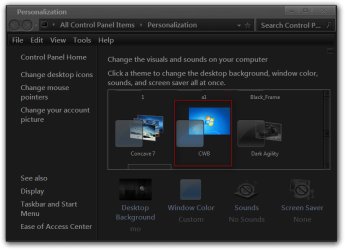
It will show up in Personalization as CWB
Personalization.png

Let me know if it's OK or not.
Jerry
 
Last edited:

My Computer My Computer

At a glance

Win 7 Pro x64 / Win 10 ProIntel(R) Core(TM) i7-3630QM CPU @ 2.40GHz12 GB(1) Intel(R) HD Graphics 4000 (2) NVIDIA GeFo...
Computer type
Laptop
Computer Manufacturer/Model Number
Sager NP9170
OS
Win 7 Pro x64 / Win 10 Pro
CPU
Intel(R) Core(TM) i7-3630QM CPU @ 2.40GHz
Motherboard
CLEVO P170EM
Memory
12 GB
Graphics Card(s)
(1) Intel(R) HD Graphics 4000 (2) NVIDIA GeForce GTX 675M
Sound Card
(1) Realtek High Definition Audio (2) Intel(R) Display Aud
Monitor(s) Displays
17.3
Screen Resolution
1920x1080
Hard Drives
(1) Samsung 860 EVO 500GB(OS) (1) Samsung 860 EVO 500GB(Data)
Keyboard
Backlite
Antivirus
MSE, Malwarebytes Pro
Browser
Firefox
Other Info
DESKTOP: Custom-built.
OS: Win 10 Pro x64.
CASE: Rosewill R5.
CPU: Intel I5 4670K CPU @ 3.40GHz.
CPU COOLER: Cool Master Hyper 212 EVO.
MOTHERBOARD: Asus Z87-A.
MEMORY: Kingston HyperX 2x4 GB.
GPU: Nvidia Geforce 650 TI.
PSU: Corsair TX750.
DRIVES: (1) Samsung 840 120 GB SSD (2) Western Digital blue 500 GB 7200 RPM.
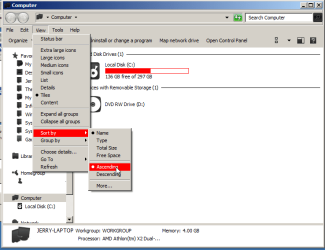
Hi Chuck
Sorry for the late reply was a little sick.

Here you go try this download and extract the zip folder to your desktop, put both 1 CWB theme folder and 1 CWB.theme file in C:\Windows\Resources\Themes
View attachment 222918View attachment 222919

It will show up in Personalization as CWB
View attachment 222920

Let me know if it's OK or not.
Jerry

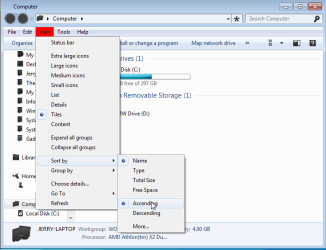
We are getting closer! But look what I just saw in an explorer window:

Is this fixable?

CB
-----
That is TOO cool! You the MAN!

I had almost resigned myself to those colors being gone.

Now all I have to do is backtrack and make sure that I can re-do this in case I have a system meltdown!

I hope you're feeling better Jerry. Being sick can be a total pain.

A funny aside: My daughter was a counselor at camp a couple summers ago, and had picked up the nickname 'Bongo' from the kids. She says you stole her name!

So, in the future, until I can shell out the $30 or so for the software, I just need to replace those three files in the system32 directory, and run that one patch, and then the altered theme will be good to go? Too cool...


Thanks,
Chuck
 

Attachments

  • OhNo.jpg
    OhNo.jpg
    17.7 KB · Views: 8
Last edited by a moderator:

My Computer My Computer

At a glance

Windows 7 b7000
OS
Windows 7 b7000
You're Welcome Chuck

So, in the future, until I can shell out the $30 or so for the software, I just need to replace those three files in the system32 directory, and run that one patch, and then the altered theme will be good to go? Too cool...

Do you have a direct e-mail you could/would share, Jerry, or do you prefer the board?

That's about right.
And make posts about things, no sharing emails
Jerry
 

My Computer My Computer

At a glance

Win 7 Pro x64 / Win 10 ProIntel(R) Core(TM) i7-3630QM CPU @ 2.40GHz12 GB(1) Intel(R) HD Graphics 4000 (2) NVIDIA GeFo...
Computer type
Laptop
Computer Manufacturer/Model Number
Sager NP9170
OS
Win 7 Pro x64 / Win 10 Pro
CPU
Intel(R) Core(TM) i7-3630QM CPU @ 2.40GHz
Motherboard
CLEVO P170EM
Memory
12 GB
Graphics Card(s)
(1) Intel(R) HD Graphics 4000 (2) NVIDIA GeForce GTX 675M
Sound Card
(1) Realtek High Definition Audio (2) Intel(R) Display Aud
Monitor(s) Displays
17.3
Screen Resolution
1920x1080
Hard Drives
(1) Samsung 860 EVO 500GB(OS) (1) Samsung 860 EVO 500GB(Data)
Keyboard
Backlite
Antivirus
MSE, Malwarebytes Pro
Browser
Firefox
Other Info
DESKTOP: Custom-built.
OS: Win 10 Pro x64.
CASE: Rosewill R5.
CPU: Intel I5 4670K CPU @ 3.40GHz.
CPU COOLER: Cool Master Hyper 212 EVO.
MOTHERBOARD: Asus Z87-A.
MEMORY: Kingston HyperX 2x4 GB.
GPU: Nvidia Geforce 650 TI.
PSU: Corsair TX750.
DRIVES: (1) Samsung 840 120 GB SSD (2) Western Digital blue 500 GB 7200 RPM.
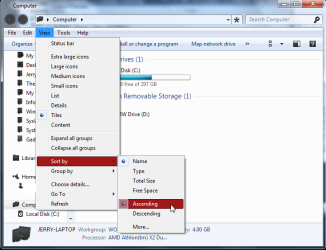
Gotcha. Thanks.
 

My Computer My Computer

At a glance

Windows 7 b7000
OS
Windows 7 b7000
Jerry, if I have a prior copy of Windows 7 as a virtual machine appliance, and I copy themes from there [as they will have coloring prior to the Windows 7 "changes"] will they be usable on current windows 7 installs -- post locking those three files?

Regards,
Chuck Billow
 

My Computer My Computer

At a glance

Windows 7 b7000
OS
Windows 7 b7000
Jerry, another piece: I tried setting up a theme Ina virtual machine, and then copying it over to my desktop. It worked, but the same issue was/is present: the white on re [for instance] appears everywhere seemingly, except for the menus in explorer windows, where it still is black on red.

sigh....

Chuck
 

My Computer My Computer

At a glance

Windows 7 b7000
OS
Windows 7 b7000
Hi Chuck
I am a little confused at what you are trying to ask, Could you try to explain it a little better?
Jerry
 

My Computer My Computer

At a glance

Win 7 Pro x64 / Win 10 ProIntel(R) Core(TM) i7-3630QM CPU @ 2.40GHz12 GB(1) Intel(R) HD Graphics 4000 (2) NVIDIA GeFo...
Computer type
Laptop
Computer Manufacturer/Model Number
Sager NP9170
OS
Win 7 Pro x64 / Win 10 Pro
CPU
Intel(R) Core(TM) i7-3630QM CPU @ 2.40GHz
Motherboard
CLEVO P170EM
Memory
12 GB
Graphics Card(s)
(1) Intel(R) HD Graphics 4000 (2) NVIDIA GeForce GTX 675M
Sound Card
(1) Realtek High Definition Audio (2) Intel(R) Display Aud
Monitor(s) Displays
17.3
Screen Resolution
1920x1080
Hard Drives
(1) Samsung 860 EVO 500GB(OS) (1) Samsung 860 EVO 500GB(Data)
Keyboard
Backlite
Antivirus
MSE, Malwarebytes Pro
Browser
Firefox
Other Info
DESKTOP: Custom-built.
OS: Win 10 Pro x64.
CASE: Rosewill R5.
CPU: Intel I5 4670K CPU @ 3.40GHz.
CPU COOLER: Cool Master Hyper 212 EVO.
MOTHERBOARD: Asus Z87-A.
MEMORY: Kingston HyperX 2x4 GB.
GPU: Nvidia Geforce 650 TI.
PSU: Corsair TX750.
DRIVES: (1) Samsung 840 120 GB SSD (2) Western Digital blue 500 GB 7200 RPM.
Hi Chuck
I am a little confused at what you are trying to ask, Could you try to explain it a little better?
Jerry

Jerry, I went through the steps and was able to "install" the modified theme. but then I noticed that the "black on red" issue was still there in explorer.

Then I tried using a virtual machine with the "old" Windows 7up the theme, and then copying that to the "new" Windows 7 [my 'everyday' install] and got the very same results.

So then I went back and double-checked that I had properly set up the three patched files and it appears that I did.

So, I dunno what the hey...

Chuck
 

Attachments

  • OhNo.jpg
    OhNo.jpg
    17.7 KB · Views: 2

My Computer My Computer

At a glance

Windows 7 b7000
OS
Windows 7 b7000
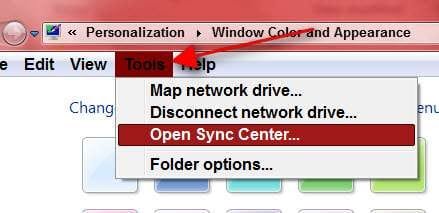
You want the black text that I have a arrow pointing to change to white?
How did you get the red under the black text where the arrow is pointing?
Jerry
OhNo.jpg
 

My Computer My Computer

At a glance

Win 7 Pro x64 / Win 10 ProIntel(R) Core(TM) i7-3630QM CPU @ 2.40GHz12 GB(1) Intel(R) HD Graphics 4000 (2) NVIDIA GeFo...
Computer type
Laptop
Computer Manufacturer/Model Number
Sager NP9170
OS
Win 7 Pro x64 / Win 10 Pro
CPU
Intel(R) Core(TM) i7-3630QM CPU @ 2.40GHz
Motherboard
CLEVO P170EM
Memory
12 GB
Graphics Card(s)
(1) Intel(R) HD Graphics 4000 (2) NVIDIA GeForce GTX 675M
Sound Card
(1) Realtek High Definition Audio (2) Intel(R) Display Aud
Monitor(s) Displays
17.3
Screen Resolution
1920x1080
Hard Drives
(1) Samsung 860 EVO 500GB(OS) (1) Samsung 860 EVO 500GB(Data)
Keyboard
Backlite
Antivirus
MSE, Malwarebytes Pro
Browser
Firefox
Other Info
DESKTOP: Custom-built.
OS: Win 10 Pro x64.
CASE: Rosewill R5.
CPU: Intel I5 4670K CPU @ 3.40GHz.
CPU COOLER: Cool Master Hyper 212 EVO.
MOTHERBOARD: Asus Z87-A.
MEMORY: Kingston HyperX 2x4 GB.
GPU: Nvidia Geforce 650 TI.
PSU: Corsair TX750.
DRIVES: (1) Samsung 840 120 GB SSD (2) Western Digital blue 500 GB 7200 RPM.
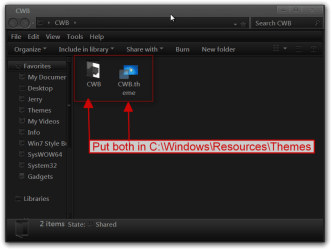
You want the black text that I have a arrow pointing to change to white?
How did you get the red under the black text where the arrow is pointing?
Jerry
View attachment 223238

In the "old days" the "Selected Items" would govern both the item being pointed to in the menu bar [the one that is black] AND the item as one scrolled down the list [the one that made the change to white].

Even in my VM, this didn't seem to be the case. dunno0 why MS felt the need to change that, but I wish they would check with one of us "common user folks" before they made such drastic adjustments! Maybe some "compromise could be worked out! :-)

This one is sort of along the same lines as MS "turning off" access to Startup Sounds.

Now, I understand that MS, in their infinite wisdom, had good reason for such things, but it would surely be nice to have a little heads up!

Chuck
 

My Computer My Computer

At a glance

Windows 7 b7000
OS
Windows 7 b7000
Do you want the black text that I have a arrow pointing to change to white?
Jerry
OhNo.jpg
 

My Computer My Computer

At a glance

Win 7 Pro x64 / Win 10 ProIntel(R) Core(TM) i7-3630QM CPU @ 2.40GHz12 GB(1) Intel(R) HD Graphics 4000 (2) NVIDIA GeFo...
Computer type
Laptop
Computer Manufacturer/Model Number
Sager NP9170
OS
Win 7 Pro x64 / Win 10 Pro
CPU
Intel(R) Core(TM) i7-3630QM CPU @ 2.40GHz
Motherboard
CLEVO P170EM
Memory
12 GB
Graphics Card(s)
(1) Intel(R) HD Graphics 4000 (2) NVIDIA GeForce GTX 675M
Sound Card
(1) Realtek High Definition Audio (2) Intel(R) Display Aud
Monitor(s) Displays
17.3
Screen Resolution
1920x1080
Hard Drives
(1) Samsung 860 EVO 500GB(OS) (1) Samsung 860 EVO 500GB(Data)
Keyboard
Backlite
Antivirus
MSE, Malwarebytes Pro
Browser
Firefox
Other Info
DESKTOP: Custom-built.
OS: Win 10 Pro x64.
CASE: Rosewill R5.
CPU: Intel I5 4670K CPU @ 3.40GHz.
CPU COOLER: Cool Master Hyper 212 EVO.
MOTHERBOARD: Asus Z87-A.
MEMORY: Kingston HyperX 2x4 GB.
GPU: Nvidia Geforce 650 TI.
PSU: Corsair TX750.
DRIVES: (1) Samsung 840 120 GB SSD (2) Western Digital blue 500 GB 7200 RPM.
Yea...in effect it's any text that gets highlighted I think, Jerry. That explorer thing is strange, because in other software it works/looks fine. That issue seems to be contained in explorer windows and related programs and windows.

Chuck
 

My Computer My Computer

At a glance

Windows 7 b7000
OS
Windows 7 b7000
Back
Top