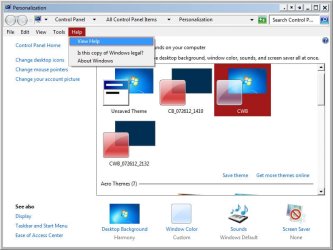
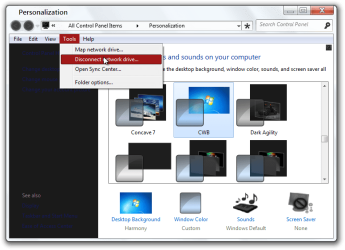
Windows 7 Ultimate with NO SP-1?

OK Chuck
1st switch to the default Aero theme and then log off and log on, download and extract the zip folder at the bottom of this post, inside will be a CBW.msstyles
Now go to C:\Windows\Resources\Themes\CWB folder and delete or move the CBW.msstyles in that folder and replace it with the one from the new zip folder.
Let me know how it turns out.
Jerry
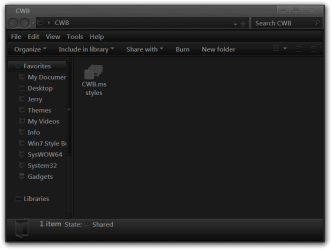
CWB.png
 
Last edited:

My Computer My Computer

At a glance

Win 7 Pro x64 / Win 10 ProIntel(R) Core(TM) i7-3630QM CPU @ 2.40GHz12 GB(1) Intel(R) HD Graphics 4000 (2) NVIDIA GeFo...
Computer type
Laptop
Computer Manufacturer/Model Number
Sager NP9170
OS
Win 7 Pro x64 / Win 10 Pro
CPU
Intel(R) Core(TM) i7-3630QM CPU @ 2.40GHz
Motherboard
CLEVO P170EM
Memory
12 GB
Graphics Card(s)
(1) Intel(R) HD Graphics 4000 (2) NVIDIA GeForce GTX 675M
Sound Card
(1) Realtek High Definition Audio (2) Intel(R) Display Aud
Monitor(s) Displays
17.3
Screen Resolution
1920x1080
Hard Drives
(1) Samsung 860 EVO 500GB(OS) (1) Samsung 860 EVO 500GB(Data)
Keyboard
Backlite
Antivirus
MSE, Malwarebytes Pro
Browser
Firefox
Other Info
DESKTOP: Custom-built.
OS: Win 10 Pro x64.
CASE: Rosewill R5.
CPU: Intel I5 4670K CPU @ 3.40GHz.
CPU COOLER: Cool Master Hyper 212 EVO.
MOTHERBOARD: Asus Z87-A.
MEMORY: Kingston HyperX 2x4 GB.
GPU: Nvidia Geforce 650 TI.
PSU: Corsair TX750.
DRIVES: (1) Samsung 840 120 GB SSD (2) Western Digital blue 500 GB 7200 RPM.
OK Chuck
1st switch to the default Aero theme and then log off and log on, download and extract the zip folder at the bottom of this post, inside will be a CBW.msstyles
Now go to C:\Windows\Resources\Themes\CWB folder and delete or move the CBW.msstyles in that folder and replace it with the one from the new zip folder.
Let me know how it turns out.
Jerry
View attachment 223253


Slowly but surely!
 

Attachments

  • SecondStage.jpg
    SecondStage.jpg
    61.6 KB · Views: 4

My Computer My Computer

At a glance

Windows 7 b7000
OS
Windows 7 b7000
Did you switch to Windows classic theme? That's what it looks like.
Jerry
 

My Computer My Computer

At a glance

Win 7 Pro x64 / Win 10 ProIntel(R) Core(TM) i7-3630QM CPU @ 2.40GHz12 GB(1) Intel(R) HD Graphics 4000 (2) NVIDIA GeFo...
Computer type
Laptop
Computer Manufacturer/Model Number
Sager NP9170
OS
Win 7 Pro x64 / Win 10 Pro
CPU
Intel(R) Core(TM) i7-3630QM CPU @ 2.40GHz
Motherboard
CLEVO P170EM
Memory
12 GB
Graphics Card(s)
(1) Intel(R) HD Graphics 4000 (2) NVIDIA GeForce GTX 675M
Sound Card
(1) Realtek High Definition Audio (2) Intel(R) Display Aud
Monitor(s) Displays
17.3
Screen Resolution
1920x1080
Hard Drives
(1) Samsung 860 EVO 500GB(OS) (1) Samsung 860 EVO 500GB(Data)
Keyboard
Backlite
Antivirus
MSE, Malwarebytes Pro
Browser
Firefox
Other Info
DESKTOP: Custom-built.
OS: Win 10 Pro x64.
CASE: Rosewill R5.
CPU: Intel I5 4670K CPU @ 3.40GHz.
CPU COOLER: Cool Master Hyper 212 EVO.
MOTHERBOARD: Asus Z87-A.
MEMORY: Kingston HyperX 2x4 GB.
GPU: Nvidia Geforce 650 TI.
PSU: Corsair TX750.
DRIVES: (1) Samsung 840 120 GB SSD (2) Western Digital blue 500 GB 7200 RPM.
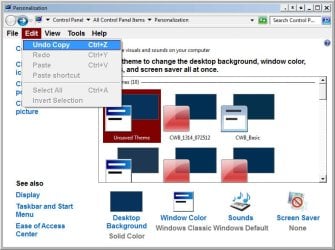
Did you switch to Windows classic theme? That's what it looks like.
Jerry

I just double-checked. The "CWB" theme does look like standard / basic, and gives the red / blue selected items.
 

My Computer My Computer

At a glance

Windows 7 b7000
OS
Windows 7 b7000

My Computer My Computer

At a glance

Win 7 Pro x64 / Win 10 ProIntel(R) Core(TM) i7-3630QM CPU @ 2.40GHz12 GB(1) Intel(R) HD Graphics 4000 (2) NVIDIA GeFo...
Computer type
Laptop
Computer Manufacturer/Model Number
Sager NP9170
OS
Win 7 Pro x64 / Win 10 Pro
CPU
Intel(R) Core(TM) i7-3630QM CPU @ 2.40GHz
Motherboard
CLEVO P170EM
Memory
12 GB
Graphics Card(s)
(1) Intel(R) HD Graphics 4000 (2) NVIDIA GeForce GTX 675M
Sound Card
(1) Realtek High Definition Audio (2) Intel(R) Display Aud
Monitor(s) Displays
17.3
Screen Resolution
1920x1080
Hard Drives
(1) Samsung 860 EVO 500GB(OS) (1) Samsung 860 EVO 500GB(Data)
Keyboard
Backlite
Antivirus
MSE, Malwarebytes Pro
Browser
Firefox
Other Info
DESKTOP: Custom-built.
OS: Win 10 Pro x64.
CASE: Rosewill R5.
CPU: Intel I5 4670K CPU @ 3.40GHz.
CPU COOLER: Cool Master Hyper 212 EVO.
MOTHERBOARD: Asus Z87-A.
MEMORY: Kingston HyperX 2x4 GB.
GPU: Nvidia Geforce 650 TI.
PSU: Corsair TX750.
DRIVES: (1) Samsung 840 120 GB SSD (2) Western Digital blue 500 GB 7200 RPM.
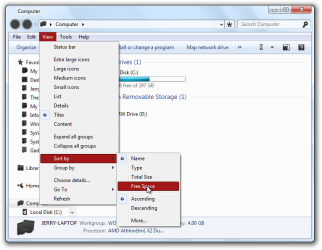
#1 I do believe
 

My Computer My Computer

At a glance

Windows 7 b7000
OS
Windows 7 b7000
Jerry;

OK, I restored a bare activated Windows 7 install. I then ran the Universal theme patcher.

I rebooted.

I picked the theme you had sent me.

The "elected..." bar is white on red -- except for -- ta-da -- the explorer windows. And then, it's only, just like the picture I sent before, the item on the menu bar itself. The menu as I scroll down goes white on red...but that top item is black on red.

In Internet Explorer it's even good...just in the "plain" explorer does there seem to be issues.

All else seems OK...so far at least!

Chuck
 

My Computer My Computer

At a glance

Windows 7 b7000
OS
Windows 7 b7000
OK Chuck
You need to slow down and wait for my responses, you may not have needed to the reinstalling and using the Universal Theme Patcher but that's okay for now.
Here is a new .msstyles in a zip folder at the bottom of this post, looked back up at Post #41 a for instructions on how to change it out.
Here is a screenshot of what I am getting.
Computer.png
Let me know if it works.
Jerry
 

Attachments

My Computer My Computer

At a glance

Win 7 Pro x64 / Win 10 ProIntel(R) Core(TM) i7-3630QM CPU @ 2.40GHz12 GB(1) Intel(R) HD Graphics 4000 (2) NVIDIA GeFo...
Computer type
Laptop
Computer Manufacturer/Model Number
Sager NP9170
OS
Win 7 Pro x64 / Win 10 Pro
CPU
Intel(R) Core(TM) i7-3630QM CPU @ 2.40GHz
Motherboard
CLEVO P170EM
Memory
12 GB
Graphics Card(s)
(1) Intel(R) HD Graphics 4000 (2) NVIDIA GeForce GTX 675M
Sound Card
(1) Realtek High Definition Audio (2) Intel(R) Display Aud
Monitor(s) Displays
17.3
Screen Resolution
1920x1080
Hard Drives
(1) Samsung 860 EVO 500GB(OS) (1) Samsung 860 EVO 500GB(Data)
Keyboard
Backlite
Antivirus
MSE, Malwarebytes Pro
Browser
Firefox
Other Info
DESKTOP: Custom-built.
OS: Win 10 Pro x64.
CASE: Rosewill R5.
CPU: Intel I5 4670K CPU @ 3.40GHz.
CPU COOLER: Cool Master Hyper 212 EVO.
MOTHERBOARD: Asus Z87-A.
MEMORY: Kingston HyperX 2x4 GB.
GPU: Nvidia Geforce 650 TI.
PSU: Corsair TX750.
DRIVES: (1) Samsung 840 120 GB SSD (2) Western Digital blue 500 GB 7200 RPM.
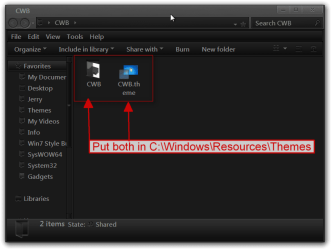
OK Chuck
You need to slow down and wait for my responses, you may not have needed to the reinstalling and using the Universal Theme Patcher but that's okay for now.
Here is a new .msstyles in a zip folder at the bottom of this post, looked back up at Post #41 a for instructions on how to change it out.
Here is a screenshot of what I am getting.
View attachment 223350
Let me know if it works.
Jerry

Jerry;

I apologize...I did get a little "ahead of myself"...Okay, so here's where " am at:

After I didn't see any noticeable advantage -- and in fact was looking at a good deal of added work -- setting up everything again, I restored my backup -- kinda to where it was yesterday, but:

I have the one file you just sent me, so do I need also the folder from the one you sent before? And, I may need to re-path the three files again. When I run the Universal theme patched, it is showing as having nothing patched. Should I? I have run the UX_Style_Core program already.

Also, I have a
"C:\Windows\Resources\Themes" folder, but not a "C:\Windows\Resources\Themes\CWB" folder.

Does that change things?

Chuck
 

My Computer My Computer

At a glance

Windows 7 b7000
OS
Windows 7 b7000
Let start over.
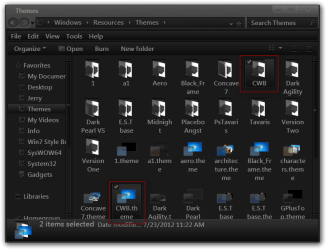
Here you go try this download and extract the zip folder to your desktop, put both 1 CWB theme folder and 1 CWB.theme file in C:\Windows\Resources\Themes
CWB.pngThemes.png

If you have UxStyle Core running Do Not Patch with Universal theme patcher Do not use both at the same time.

When using the theme and it looks like it changed to Classic theme then UxStyle Core has stop running you need to go to services and restart it here is how.
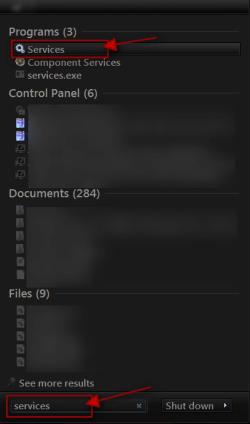
Click on the Start Button:orb: type in Services In the search box and then click on Services
1.png

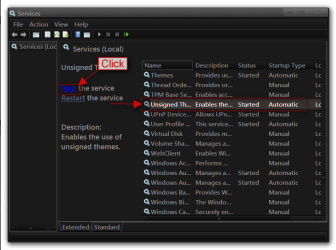
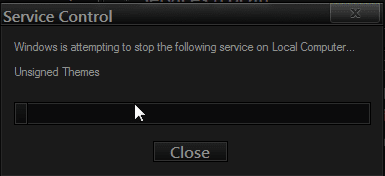
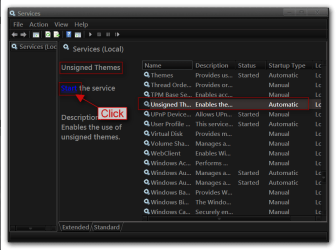
Scroll down until you see unsigned themes select it in click on the Stop text and let it stop after that click on Start text and see if that works. Your screen may blink when you do this.
4.pngstop.PNG
5.pngstart.png

Jerry
 
Last edited:

My Computer My Computer

At a glance

Win 7 Pro x64 / Win 10 ProIntel(R) Core(TM) i7-3630QM CPU @ 2.40GHz12 GB(1) Intel(R) HD Graphics 4000 (2) NVIDIA GeFo...
Computer type
Laptop
Computer Manufacturer/Model Number
Sager NP9170
OS
Win 7 Pro x64 / Win 10 Pro
CPU
Intel(R) Core(TM) i7-3630QM CPU @ 2.40GHz
Motherboard
CLEVO P170EM
Memory
12 GB
Graphics Card(s)
(1) Intel(R) HD Graphics 4000 (2) NVIDIA GeForce GTX 675M
Sound Card
(1) Realtek High Definition Audio (2) Intel(R) Display Aud
Monitor(s) Displays
17.3
Screen Resolution
1920x1080
Hard Drives
(1) Samsung 860 EVO 500GB(OS) (1) Samsung 860 EVO 500GB(Data)
Keyboard
Backlite
Antivirus
MSE, Malwarebytes Pro
Browser
Firefox
Other Info
DESKTOP: Custom-built.
OS: Win 10 Pro x64.
CASE: Rosewill R5.
CPU: Intel I5 4670K CPU @ 3.40GHz.
CPU COOLER: Cool Master Hyper 212 EVO.
MOTHERBOARD: Asus Z87-A.
MEMORY: Kingston HyperX 2x4 GB.
GPU: Nvidia Geforce 650 TI.
PSU: Corsair TX750.
DRIVES: (1) Samsung 840 120 GB SSD (2) Western Digital blue 500 GB 7200 RPM.
Jerry, the universal theme patcher shows me as unpatched...but I'm not certain as to whether I am or did run the UxStyle_Core.

Do those two matter to what I am to be doing as of now? Or should I just go ahead and load the theme and folder in the Resources\Themes folder?

Chuck
 

My Computer My Computer

At a glance

Windows 7 b7000
OS
Windows 7 b7000
Jerry, the universal theme patcher shows me as unpatched...but I'm not certain as to whether I am or did run the UxStyle_Core.

Do those two matter to what I am to be doing as of now? Or should I just go ahead and load the theme and folder in the Resources\Themes folder?

Chuck

You do need one or the other, not both, to use a custom theme.

I prefer the UxStyle Core since it just a service being installed, but they both work.

If the theme patcher is showing unpatched then you need to use one of them.
 

My Computer My Computer

At a glance

Win 10 Pro x64Intel I5-2500K @3.3GHz16GB G.Skill Ripjaws X (4x4GB)EVGA GeForce 750 Ti SC 2GB
Computer type
PC/Desktop
Computer Manufacturer/Model Number
Self Built
OS
Win 10 Pro x64
CPU
Intel I5-2500K @3.3GHz
Motherboard
Asrock P67 Extreme4
Memory
16GB G.Skill Ripjaws X (4x4GB)
Graphics Card(s)
EVGA GeForce 750 Ti SC 2GB
Sound Card
ASUS Xonar DG 5.1 Channels 24-bit 96KHz PCI Interface Sound
Monitor(s) Displays
auria eq2367
Screen Resolution
1920 x 1080
Hard Drives
250GB Samsung 850 EVO SSD
1TB WD Blue
1TB Hitachi
PSU
SeaSonic X 650W 80 Plus Gold
Case
Corsair Obsidian 750D
Cooling
Corsair H60, Three 140mm case fans
Keyboard
Logitech Wireless Keyboard K520
Mouse
Logitech Wireless Mouse M310
Internet Speed
Wave Broadband ~ 100 dn 5 up
Antivirus
Windows Defender, Malwarebytes Premium
Browser
Edge, IE11, Chrome
Other Info
Laptop specs: HP g7-1365dx /
CPU: AMD A6-3420M APU with Radeon(tm) HD Graphics /
RAM: Crucial 8Gb (2x4Gb) /
SSD: Crucial M4-CT128M4SSD2 ATA Device/ FW 000F /
GFX: AMD Radeon HD 6520G /
OS: Windows 10 Pro x64
Got it.


Jerry, the universal theme patcher shows me as unpatched...but I'm not certain as to whether I am or did run the UxStyle_Core.

Do those two matter to what I am to be doing as of now? Or should I just go ahead and load the theme and folder in the Resources\Themes folder?

Chuck

You do need one or the other, not both, to use a custom theme.

I prefer the UxStyle Core since it just a service being installed, but they both work.

If the theme patcher is showing unpatched then you need to use one of them.
 

My Computer My Computer

At a glance

Windows 7 b7000
OS
Windows 7 b7000
Jerry, I don't get it. I put CWB.theme into C:\Windows\Resources\Themes\ and the CWB folder there as well.

What I get is show below.
 

Attachments

  • Try_3.jpg
    Try_3.jpg
    53.3 KB · Views: 3

My Computer My Computer

At a glance

Windows 7 b7000
OS
Windows 7 b7000
I'm not sure how that happened, but you are on a "classic" style theme.

Try clicking on the CWB theme on the right side there.
 

My Computer My Computer

At a glance

Win 10 Pro x64Intel I5-2500K @3.3GHz16GB G.Skill Ripjaws X (4x4GB)EVGA GeForce 750 Ti SC 2GB
Computer type
PC/Desktop
Computer Manufacturer/Model Number
Self Built
OS
Win 10 Pro x64
CPU
Intel I5-2500K @3.3GHz
Motherboard
Asrock P67 Extreme4
Memory
16GB G.Skill Ripjaws X (4x4GB)
Graphics Card(s)
EVGA GeForce 750 Ti SC 2GB
Sound Card
ASUS Xonar DG 5.1 Channels 24-bit 96KHz PCI Interface Sound
Monitor(s) Displays
auria eq2367
Screen Resolution
1920 x 1080
Hard Drives
250GB Samsung 850 EVO SSD
1TB WD Blue
1TB Hitachi
PSU
SeaSonic X 650W 80 Plus Gold
Case
Corsair Obsidian 750D
Cooling
Corsair H60, Three 140mm case fans
Keyboard
Logitech Wireless Keyboard K520
Mouse
Logitech Wireless Mouse M310
Internet Speed
Wave Broadband ~ 100 dn 5 up
Antivirus
Windows Defender, Malwarebytes Premium
Browser
Edge, IE11, Chrome
Other Info
Laptop specs: HP g7-1365dx /
CPU: AMD A6-3420M APU with Radeon(tm) HD Graphics /
RAM: Crucial 8Gb (2x4Gb) /
SSD: Crucial M4-CT128M4SSD2 ATA Device/ FW 000F /
GFX: AMD Radeon HD 6520G /
OS: Windows 10 Pro x64
Dunno how that happened, but it must have just been something in the pic.

See here:
 

Attachments

  • Try_4.jpg
    Try_4.jpg
    52.9 KB · Views: 5

My Computer My Computer

At a glance

Windows 7 b7000
OS
Windows 7 b7000
Well you're off the classic theme now, what color is that text supposed to be?
 

My Computer My Computer

At a glance

Win 10 Pro x64Intel I5-2500K @3.3GHz16GB G.Skill Ripjaws X (4x4GB)EVGA GeForce 750 Ti SC 2GB
Computer type
PC/Desktop
Computer Manufacturer/Model Number
Self Built
OS
Win 10 Pro x64
CPU
Intel I5-2500K @3.3GHz
Motherboard
Asrock P67 Extreme4
Memory
16GB G.Skill Ripjaws X (4x4GB)
Graphics Card(s)
EVGA GeForce 750 Ti SC 2GB
Sound Card
ASUS Xonar DG 5.1 Channels 24-bit 96KHz PCI Interface Sound
Monitor(s) Displays
auria eq2367
Screen Resolution
1920 x 1080
Hard Drives
250GB Samsung 850 EVO SSD
1TB WD Blue
1TB Hitachi
PSU
SeaSonic X 650W 80 Plus Gold
Case
Corsair Obsidian 750D
Cooling
Corsair H60, Three 140mm case fans
Keyboard
Logitech Wireless Keyboard K520
Mouse
Logitech Wireless Mouse M310
Internet Speed
Wave Broadband ~ 100 dn 5 up
Antivirus
Windows Defender, Malwarebytes Premium
Browser
Edge, IE11, Chrome
Other Info
Laptop specs: HP g7-1365dx /
CPU: AMD A6-3420M APU with Radeon(tm) HD Graphics /
RAM: Crucial 8Gb (2x4Gb) /
SSD: Crucial M4-CT128M4SSD2 ATA Device/ FW 000F /
GFX: AMD Radeon HD 6520G /
OS: Windows 10 Pro x64
Well you're off the classic theme now, what color is that text supposed to be?

It's supposed to be like the menu bar: red with white letters on selected items.
 

My Computer My Computer

At a glance

Windows 7 b7000
OS
Windows 7 b7000
Chuck it's not the theme here is what I get.
Personalization.png

What are you using in explorer to get the extra buttons by the Close/Min/Max buttons?

It still looks like aero is not working or the patch did not work.
Jerry
 

My Computer My Computer

At a glance

Win 7 Pro x64 / Win 10 ProIntel(R) Core(TM) i7-3630QM CPU @ 2.40GHz12 GB(1) Intel(R) HD Graphics 4000 (2) NVIDIA GeFo...
Computer type
Laptop
Computer Manufacturer/Model Number
Sager NP9170
OS
Win 7 Pro x64 / Win 10 Pro
CPU
Intel(R) Core(TM) i7-3630QM CPU @ 2.40GHz
Motherboard
CLEVO P170EM
Memory
12 GB
Graphics Card(s)
(1) Intel(R) HD Graphics 4000 (2) NVIDIA GeForce GTX 675M
Sound Card
(1) Realtek High Definition Audio (2) Intel(R) Display Aud
Monitor(s) Displays
17.3
Screen Resolution
1920x1080
Hard Drives
(1) Samsung 860 EVO 500GB(OS) (1) Samsung 860 EVO 500GB(Data)
Keyboard
Backlite
Antivirus
MSE, Malwarebytes Pro
Browser
Firefox
Other Info
DESKTOP: Custom-built.
OS: Win 10 Pro x64.
CASE: Rosewill R5.
CPU: Intel I5 4670K CPU @ 3.40GHz.
CPU COOLER: Cool Master Hyper 212 EVO.
MOTHERBOARD: Asus Z87-A.
MEMORY: Kingston HyperX 2x4 GB.
GPU: Nvidia Geforce 650 TI.
PSU: Corsair TX750.
DRIVES: (1) Samsung 840 120 GB SSD (2) Western Digital blue 500 GB 7200 RPM.
Jerry, the buttons up by the min/max in explorer are from 4t Tray Minimizer [ 4t Niagara Software - Productivity software for business, home and personal use ]. Strictly control Min/Max functions.

I *thought* that I went back to a bare install and tried it there -- my thought being that if it worked I could back that up and be set...but it didn't. So I just restored what I had had and went from there.

The interesting thing here -- or one of them -- is that the black type is gone with the CWB theme. It's not all red background [menu bar red, menus blue] ...but the type, the thing that started this all for me, is white, not black. It's strange that the menu bar color would be different than the menu itself.

Chuck
 

My Computer My Computer

At a glance

Windows 7 b7000
OS
Windows 7 b7000
Back
Top