Solved Repair Windows 7 boot menu on UEFI

Volumes and Partitions are not the same thing.
Can you list partitions and post output ?

diskpart
>sel disk 0
>list par

And unhiding is just changing the id of partition
>sel par # - # is partition number
>set id=07 - NTFS
>set id=17 - NTFS hidden


And for transferring .iso to USB I would use "Windows 7 USB DVD Download Tool".

Here it is:

Code:
Partition ###    Type                  Size            Offset
Partition 1        System               200MB         1024KB
Partition 2        Reserved             128MB         201MB
Partition 3        System               140GB          329MB
Partition 4        Primary               138GB          141GB
Partition 5        Primary               393GB          279GB
Partition 6        Primary               25GB            673GB

From what I heard, Windows 7 USB DVD Download Tool format the USB under NTFS :-?

The more I think about it, the possibility of the Logical partition causing a problem is a good conclusion.

Your flashdrive showing as NTFS, when you show it being FAT32, plus the Hidden Partition, and other things.

I would use Partition Wizard, the Home version, bootable which free, and remove any partitions placed on the drive. Then use it to change your logical partitions to primary, or just remove them also if you can.

I am currently installing the test bed.... :geek:
As you can see in the partition list, there is no logical partition :(. I think maybe there is a problem with the BIOS that it can not identify the correct properties of the partitions ?

Unfortunately, I run out of blank CD. I cannot create a bootable CD of Partition Wizard. I will try diskpart or Gparted instead.
 

My Computer My Computer

At a glance

Windows 7 Home Premium x64
OS
Windows 7 Home Premium x64
Sorry, I had to edit a response. I suggest removing just the partitions placed on the drive by Ubuntu. And converting the logical ones to primary.

Logical partitions have shown some problems when dealing with UEFI
What do you mean by saying "removing just the partitions placed on the drive by Ubuntu" ? Since I install Ubuntu alongside Windows 7, there is no dedicated partition for Ubuntu. The ubuntu folder is in Partition 4. Do I need to reformat it ? :huh:
 

My Computer My Computer

At a glance

Windows 7 Home Premium x64
OS
Windows 7 Home Premium x64
Volumes and Partitions are not the same thing.
Can you list partitions and post output ?

diskpart
>sel disk 0
>list par

And unhiding is just changing the id of partition
>sel par # - # is partition number
>set id=07 - NTFS
>set id=17 - NTFS hidden


And for transferring .iso to USB I would use "Windows 7 USB DVD Download Tool".

I just tried to set id=07 for the OS partition. There is an error, the error mesage is The specified type is not in the correct format.

Using HELP SET, I found out that id=07 is only use for MBR disk. I will try GParted instead.
 

My Computer My Computer

At a glance

Windows 7 Home Premium x64
OS
Windows 7 Home Premium x64
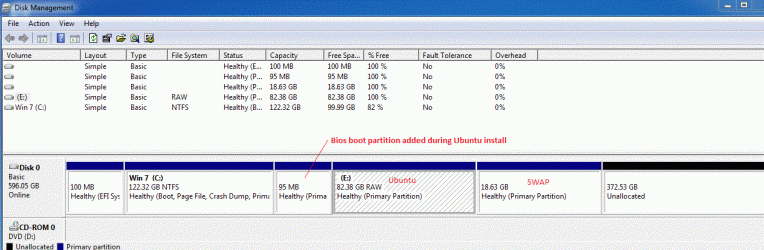
Just finished the Trial Ubuntu Legacy (MBR) install on a Windows 7 UEFI install drive. Both OSes boot normally when the correct boot device is selected.

During the install, I added a 100 mb boot partition for Ubuntu to use. I will assume if you did not do that, Ubuntu probably would not boot.

But I have attached some pictures to show the setup. I have NO logical partitions. I will try that next to see what happens and post back.
 

Attachments

  • UbuntuDisk.GIF
    UbuntuDisk.GIF
    91.7 KB · Views: 46
  • Ubuntu_MBR.gif
    Ubuntu_MBR.gif
    112.7 KB · Views: 74

My Computer My Computer

At a glance

Windows 7 x64i7-2600K8 GGTX 480
Computer Manufacturer/Model Number
Homebuilt
OS
Windows 7 x64
CPU
i7-2600K
Motherboard
Asus P8Z77-v Pro
Memory
8 G
Graphics Card(s)
GTX 480
Sound Card
Onboard
Monitor(s) Displays
LG W2753V
Screen Resolution
1920x1080
Hard Drives
Crucial M4 128 G SSD
Just finished the Trial Ubuntu Legacy (MBR) install on a Windows 7 UEFI install drive. Both OSes boot normally when the correct boot device is selected.

During the install, I added a 100 mb boot partition for Ubuntu to use. I will assume if you did not do that, Ubuntu probably would not boot.

But I have attached some pictures to show the setup. I have NO logical partitions. I will try that next to see what happens and post back.
So this may be the problem that I was unable to boot to Ubuntu since I have no MBR for Ubuntu only a Ubuntu option that is not bootable.

Thank you very much. I will add a boot partition for Ubuntu next time :D

I'm using GParted to hide the OS partition and then unhide to see whether it can be accessed.
 

My Computer My Computer

At a glance

Windows 7 Home Premium x64
OS
Windows 7 Home Premium x64
I just used GParted to hide the Windows partition. It was hidden as show in diskpart. Then I used Gparted to unhide it (Gparted now showed that the partition was hidden). However, diskpart still identified the Windows partition as hidden.

More bad news, the Windows Boot Manager is now showing error. The error status is 0xc000000f. File \EFI\Microsoft\Boot\BCD. Info: An error occurred while attempting to read the boot configuration data.

I don't know what to do next. It seems if the Windows partition is not unhidden, nothing can be done :(
 

My Computer My Computer

At a glance

Windows 7 Home Premium x64
OS
Windows 7 Home Premium x64
As far as I know, you cannot install another OS in the same partition as a previous OS.

So, I would suggest you restore you system back to a factory default and start over. This time, if you want to install Ubuntu, use the UEFI version and make partitions for it during the install.
 

My Computer My Computer

At a glance

Windows 7 x64i7-2600K8 GGTX 480
Computer Manufacturer/Model Number
Homebuilt
OS
Windows 7 x64
CPU
i7-2600K
Motherboard
Asus P8Z77-v Pro
Memory
8 G
Graphics Card(s)
GTX 480
Sound Card
Onboard
Monitor(s) Displays
LG W2753V
Screen Resolution
1920x1080
Hard Drives
Crucial M4 128 G SSD
As far as I know, you cannot install another OS in the same partition as a previous OS.

So, I would suggest you restore you system back to a factory default and start over. This time, if you want to install Ubuntu, use the UEFI version and make partitions for it during the install.
The problem is I cannot restore the system back to the factory default since the recovery wizard from the OEM requires access to the Windows partition (it assumes that the Windows partition is C, which is incorrect).

Maybe I must do a clean install to start over and ignore the recovery partition. :-s
 

My Computer My Computer

At a glance

Windows 7 Home Premium x64
OS
Windows 7 Home Premium x64
Yes I was wrong "Windows 7 USB DVD Download tool" cannot be used for EFI USB install as it formats the USB with NTFS.

All you need to make USB bootable is format to FAT32,
copy the contents of DVD to USB using explorer and
copy \bootmgr.efi to \efi\boot\bootx64.efi.

GPT partitions have GUIDs to be identified as SYSTEM, BASIC, MS_RESERVED in the partition table but the first sector of a GPT partition has the filesystem (FAT32, NTFS) type stored so it can be interpreted by the OS.

It is strange that diskpart cannot change filesystem type (at least 07 to 17)
(NTFS to hidden NTFS). EFI GUID type and filesystem type are two different notions.
 

My Computer My Computer

At a glance

Win 8 RP, Win 7, XPIntel
Computer Manufacturer/Model Number
Acer Notebook
OS
Win 8 RP, Win 7, XP
CPU
Intel
Yes I was wrong "Windows 7 USB DVD Download tool" cannot be used for EFI USB install as it formats the USB with NTFS.

All you need to make USB bootable is format to FAT32,
copy the contents of DVD to USB using explorer and
copy \bootmgr.efi to \efi\boot\bootx64.efi.

GPT partitions have GUIDs to be identified as SYSTEM, BASIC, MS_RESERVED in the partition table but the first sector of a GPT partition has the filesystem (FAT32, NTFS) type stored so it can be interpreted by the OS.

It is strange that diskpart cannot change filesystem type (at least 07 to 17)
(NTFS to hidden NTFS). EFI GUID type and filesystem type are two different notions.
Do you have any suggestion that I can make the Windows partition unhidden ?
 

My Computer My Computer

At a glance

Windows 7 Home Premium x64
OS
Windows 7 Home Premium x64
Last part for GPT !


DISKPART> help attributes volume

Displays, sets, or clears volume attributes for the selected volume.
Syntax: ATTRIBUTES VOLUME [SET | CLEAR]
[HIDDEN | READONLY | NODEFAULTDRIVELETTER | SHADOWCOPY] [NOERR]
SET Sets the specified attribute (HIDDEN, READONLY, and
NODEFAULTDRIVELETTER or SHADOWCOPY) for the selected volume.
CLEAR Clears the specified attribute (HIDDEN, READONLY,
NODEFAULTDRIVELETTER or SHADOWCOPY) from the selected volume.
HIDDEN Specifies that the volume is hidden.
READONLY Specifies that the volume is read-only.
NODEFAULTDRIVELETTER
Specifies that the volume does not receive a drive letter by
default.
SHADOWCOPY Specifies that the volume is a shadow copy volume.
NOERR For scripting only. When an error is encountered, DiskPart
continues to process commands as if the error did not occur.
Without the NOERR parameter, an error causes DiskPart to exit
with an error code.
On basic master boot record (MBR) disks, the HIDDEN, READONLY, and
NODEFAULTDRIVELETTER attributes apply to all volumes on the disk.

On basic GUID partition table (GPT) disks, and on dynamic MBR and GPT
disks, the HIDDEN, READONLY, and NODEFAULTDRIVELETTER attributes apply
only to the selected volume.
 

My Computer My Computer

At a glance

Win 8 RP, Win 7, XPIntel
Computer Manufacturer/Model Number
Acer Notebook
OS
Win 8 RP, Win 7, XP
CPU
Intel
Using attributes volume causes an error: Virtual Disk Service error: The object is not found.

I think my last resort for this problem is setID http://technet.microsoft.com/en-us/library/cc753840(v=ws.10) of the Windows partition from EFI system partition to Basic data partition. As mentioned in CREATE_PARTITION_PARAMETERS structure (Windows), only basic data partition can be recognized by Windows.

Moreover, Saltgrass, could you confirm that the Windows partition in your PC is not a EFI System partition ?
Any comment before I doing this ?
 

My Computer My Computer

At a glance

Windows 7 Home Premium x64
OS
Windows 7 Home Premium x64
EFI with GPT disks are going to create much headache, I think, until we get enough knowledge.:)

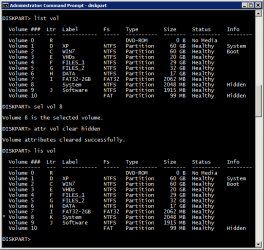
>select vol #
>attr vol clear hidden
 

My Computer My Computer

At a glance

Win 8 RP, Win 7, XPIntel
Computer Manufacturer/Model Number
Acer Notebook
OS
Win 8 RP, Win 7, XP
CPU
Intel
EFI with GPT disks are going to create much headache, I think, until we get enough knowledge.:)

>select vol #
>attr vol clear hidden

attr vol is only a shortcut for attributes volume. Therefore, the same error
Using attributes volume causes an error: Virtual Disk Service error: The object is not found.
occurs
 

My Computer My Computer

At a glance

Windows 7 Home Premium x64
OS
Windows 7 Home Premium x64
Is Virtual Disk Service running ?
 

My Computer My Computer

At a glance

Win 8 RP, Win 7, XPIntel
Computer Manufacturer/Model Number
Acer Notebook
OS
Win 8 RP, Win 7, XP
CPU
Intel
How can I tell ? And how can I start it if it is not running ? :)
 

My Computer My Computer

At a glance

Windows 7 Home Premium x64
OS
Windows 7 Home Premium x64
View if running:
Task Manager (all processes) shows vds.exe

See properties of service:
Using Control Panel -> Administrative Tools -> Services

Virtual Disk (my is set to manual by default)
Service is started when needed by the system I think.
 

Attachments

  • diskpart_artt_clear_hidden.png
    diskpart_artt_clear_hidden.png
    15.7 KB · Views: 61

My Computer My Computer

At a glance

Win 8 RP, Win 7, XPIntel
Computer Manufacturer/Model Number
Acer Notebook
OS
Win 8 RP, Win 7, XP
CPU
Intel
Ok. I was able to fix this problem by set id=ebd0a0a2-b9e5-4433-87c0-68b6b72699c7 which is for a basic data partition.
Thank you SaltGrass and boyans for your help. I really appreciate your support. Without both of you, I wouldn't be able to fix this problem. Thank you very much.
 

My Computer My Computer

At a glance

Windows 7 Home Premium x64
OS
Windows 7 Home Premium x64
EFI with GPT disks are going to create much headache, I think, until we get enough knowledge.:)
Not really sure the current situation would suggest this. But I do wish manufacturers would make an effort to inform their customers when a UEFI system is being used, and perhaps some direction about certain procedures, such as how to boot to a UEFI DVD...
 

My Computer My Computer

At a glance

Windows 7 x64i7-2600K8 GGTX 480
Computer Manufacturer/Model Number
Homebuilt
OS
Windows 7 x64
CPU
i7-2600K
Motherboard
Asus P8Z77-v Pro
Memory
8 G
Graphics Card(s)
GTX 480
Sound Card
Onboard
Monitor(s) Displays
LG W2753V
Screen Resolution
1920x1080
Hard Drives
Crucial M4 128 G SSD
I have a question:

If this disk was installed using EFI then how was there a Logical partition, since my understanding is that EFI can only be installed to a GPT disk which allows no Primary or Logical partitions?
 
Back
Top