Solved After replacing mother board, Windows cannot find WindowsImageBackup

cab

New member
Local time
7:48 AM
Messages
25
Win7x64 Home Premium ASUS U56E.
Before I sent my system in for warranty repair, I made a disk image onto external drive. I checked the vhd file out--for example Attach VHD allowed me to read all the files. Then I did a full factory restore and sent it into ASUS. It took two RMA's but finally they fixed the problem by replacing the mother board. I presume it was the same part (but difficult to get info from ASUS).
.
Now I am trying to restore the disk image. After choosing [recover system settings or your computer] -> [Advanced recovery methods] -> [Use a system image created earlier to recover your computer] -. [Skip] -> [Restart] ... "loading files" ... [US language]... I get "Windows cannot find a system image on this computer" an no amount of retry, refresh or anything I can find will help. The disk is mounted and I can navigate to the same .vhd file I saw when I backed up (above).

I read somewhere that if the mother board is changed, windows will act like this.

  • If someone knows a way I can restore, I will appreciate it.
I may be willing to settle for attaching the .vhd (as above) and being able to access the backed-up files. But when I try this, it appears that I do not have permission to read them (because of a new mother board?). Windows tells me to use "security" to get access (I am not the Admin but my username has Admin rights). I try this and add my username and wanting only "read and excute" control, in the security tab.. Windows won't do this because the disk is "protected" (I suppose because I attached the vhd with [x]read-only access).

  • I am presuming that I can reattach the vhd without [x]read-only access and I might be successful. But here is the second part of my post: If I successfully change the permissions, would this modification to the vhd-file in itself render the file unusable for Windows [system image recovery], in case I was able to find a way to get windows to recognize the vhd file..
Any help would be appreciated.

Cab
 

My Computer My Computer

Computer Manufacturer/Model Number
ASUS U56E
OS
Microsoft Windows 7 Home Premium 64-bit (SP1)
CPU
Intel(R) Core(TM) i3-2310M CPU @ 2.10GHz
Motherboard
Base Board U56E, ver 1.0
Memory
4 GB
Graphics Card(s)
Intel(R) HD Graphics Family, 1680 x 1050 x 32 bits (42949672
Sound Card
(1) Realtek High Definition Audio (2) Intel(R) Display Aud
Monitor(s) Displays
Logitec USB port for Monitor & mouse
Screen Resolution
1680 x 1050 (recommended)
Hard Drives
WDC WD6400BPVT-80HXZT1, 600 GB

USB portable BUFFALO 1 TB
Keyboard
Laptop. but using Logitec via USb
Mouse
""
Internet Speed
g-wireless
Because you state you are not the administrator I suggest you contact the person who is the administrator for help.
 

My Computer My Computer

Computer type
PC/Desktop
Computer Manufacturer/Model Number
Home made Desktop
OS
Windows 10 Pro. 64/ version 1709 Windows 7 Pro/64
CPU
Intel i7-6800K @ 4.3
Motherboard
ASUS X-99 Deluxe II
Memory
Corsair Platinum 16 gig @2400
Graphics Card(s)
EVGA GTX 1070 OC
Monitor(s) Displays
Asus 27" LED LCD/VE278Q
Screen Resolution
1920-1080 or 1280-720 HDMI
Hard Drives
INTEL SSD 730-240 Gb Sata 3.0/
PSU
EVGA Platium 1200W
Case
Phanteks Luxe Tempered Glass 8 fans/ one radiator
Cooling
XSPC/ Water Cooled CPU
Keyboard
Das 4 Professional
Mouse
Logitech M705/MX Anywhere 2-S
Internet Speed
100 mbits
Antivirus
Microsoft Security Essentials/ Malwarebytes Premium 3.0/ SAS
Browser
I.E. 11 default/Firefox/ ISP Time Warner Cable/Spectrum
Other Info
LG BluRay Burner/
Sound system-KLipsch-THX/
Icy Dock ssd Hot Swap bays.
Boot into win7 recovery environtment->command prompt
Code:
diskpart
list disk
[COLOR=red]do you see the external disk? Note it's number[/COLOR]
[COLOR=black]sel disk 1[/COLOR]
[COLOR=#000000]list part[/COLOR]
[COLOR=red]do you see partition on external disk?[/COLOR]
[COLOR=black]list vol[/COLOR]
[COLOR=red]what is drive letter of volume with windowsimagebackup folder?[/COLOR]
[COLOR=black]exit[/COLOR]
 

My Computer My Computer

Computer type
Laptop
Computer Manufacturer/Model Number
ACER ASPIRE 5742G
OS
Microsoft Windows 7 Home Premium 64-bits 7601 Multiprocessor Free Service Pack 1
CPU
Intel(R) Core(TM) i3 CPU M 370 @ 2.40GHz
Motherboard
Acer Aspire 5742G
Memory
4,00 GB
Graphics Card(s)
ATI Mobility Radeon HD 5400 Series
Sound Card
(1) AMD High Definition Audio Device (2) Realtek High Defi
Screen Resolution
1366 x 768 x 32 bits (4294967296 colors) @ 60 Hz
Hard Drives
WDC WD5000BEVT-22ZAT0
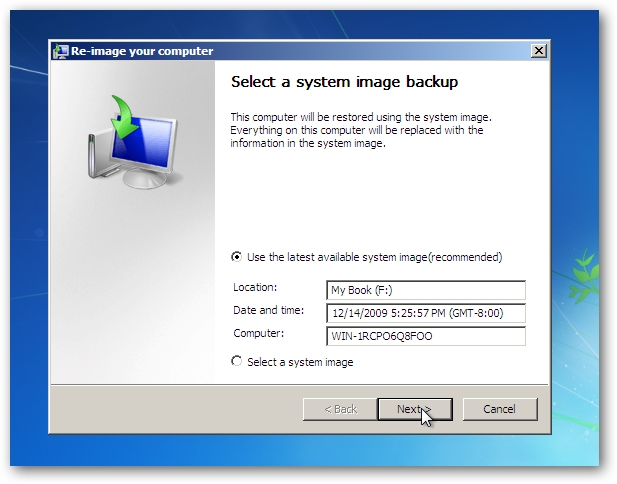
How To Restore Windows 7 from a System Image - How-To Geek

You see the backup on this screen?
7restore.png

Otherwise select "select a system image" and browse to it. What happens exactly?
 

My Computer My Computer

Computer type
Laptop
Computer Manufacturer/Model Number
ACER ASPIRE 5742G
OS
Microsoft Windows 7 Home Premium 64-bits 7601 Multiprocessor Free Service Pack 1
CPU
Intel(R) Core(TM) i3 CPU M 370 @ 2.40GHz
Motherboard
Acer Aspire 5742G
Memory
4,00 GB
Graphics Card(s)
ATI Mobility Radeon HD 5400 Series
Sound Card
(1) AMD High Definition Audio Device (2) Realtek High Defi
Screen Resolution
1366 x 768 x 32 bits (4294967296 colors) @ 60 Hz
Hard Drives
WDC WD5000BEVT-22ZAT0
Because you state you are not the administrator I suggest you contact the person who is the administrator for help.
Thanks, Layback Bear. This is a home laptop and I am the only user. Sorry for the confusion. When I said I was not the Administrator I meant that I was not logged in as Administrator, but I have admin rights (so MS makes me hit [continue] once in a while to gain them).
 

My Computer My Computer

Computer Manufacturer/Model Number
ASUS U56E
OS
Microsoft Windows 7 Home Premium 64-bit (SP1)
CPU
Intel(R) Core(TM) i3-2310M CPU @ 2.10GHz
Motherboard
Base Board U56E, ver 1.0
Memory
4 GB
Graphics Card(s)
Intel(R) HD Graphics Family, 1680 x 1050 x 32 bits (42949672
Sound Card
(1) Realtek High Definition Audio (2) Intel(R) Display Aud
Monitor(s) Displays
Logitec USB port for Monitor & mouse
Screen Resolution
1680 x 1050 (recommended)
Hard Drives
WDC WD6400BPVT-80HXZT1, 600 GB

USB portable BUFFALO 1 TB
Keyboard
Laptop. but using Logitec via USb
Mouse
""
Internet Speed
g-wireless
How To Restore Windows 7 from a System Image - How-To Geek

You see the backup on this screen?
7restore.png

Otherwise select "select a system image" and browse to it. What happens exactly?
Thanks, Kaktussoft. Regarding your first post--I can find the SystemImage and attach it (the drive letter is F)--but, as I mentioned, there is a problem with permissions.
.
Regarding your second post--what happens exactly is that the "latest available system image" is blank, and when I try (.) Select a system image.. Windows displays the [Re-image your computer] window and instructs me to connect the drive. But the drive is connected and the list of system images is blank, the [Next] button is greyed out, the [Refresh] button does nothing, and the [Advanced] button gives me the option of 1) searching a network drive or 2) install a driver. But the image is not on a network drive and the external disk driver has already been installed because I can find the system image using [Computer].

-------
I was wondering if this is because the mother-board was changed and windows thinks I am restoring to a different computer.

As I mentioned, I can probably read the files by attaching the vhd, but it looks like I'll need to change permissions, but I am reluctant to modify the vhd file until I find out there is no hope of restoring the system image.

I suppose I could try restoring the backup (not the system image) but I wanted the system image since all programs come installed.

I appreciate everyone's time for my little problem.
 

My Computer My Computer

Computer Manufacturer/Model Number
ASUS U56E
OS
Microsoft Windows 7 Home Premium 64-bit (SP1)
CPU
Intel(R) Core(TM) i3-2310M CPU @ 2.10GHz
Motherboard
Base Board U56E, ver 1.0
Memory
4 GB
Graphics Card(s)
Intel(R) HD Graphics Family, 1680 x 1050 x 32 bits (42949672
Sound Card
(1) Realtek High Definition Audio (2) Intel(R) Display Aud
Monitor(s) Displays
Logitec USB port for Monitor & mouse
Screen Resolution
1680 x 1050 (recommended)
Hard Drives
WDC WD6400BPVT-80HXZT1, 600 GB

USB portable BUFFALO 1 TB
Keyboard
Laptop. but using Logitec via USb
Mouse
""
Internet Speed
g-wireless
change of motherboard has nothing to do with problem! At least if it's able to find external disk without extra special drivers. Is external drive connected to usb3.0, usb2.0 or eSATA? Don't mess around with vhd yet!

Please post output of #3
 

My Computer My Computer

Computer type
Laptop
Computer Manufacturer/Model Number
ACER ASPIRE 5742G
OS
Microsoft Windows 7 Home Premium 64-bits 7601 Multiprocessor Free Service Pack 1
CPU
Intel(R) Core(TM) i3 CPU M 370 @ 2.40GHz
Motherboard
Acer Aspire 5742G
Memory
4,00 GB
Graphics Card(s)
ATI Mobility Radeon HD 5400 Series
Sound Card
(1) AMD High Definition Audio Device (2) Realtek High Defi
Screen Resolution
1366 x 768 x 32 bits (4294967296 colors) @ 60 Hz
Hard Drives
WDC WD5000BEVT-22ZAT0
The vhd file(s) are located in M:\WindowsImageBackup\<your PC name>\Backup 2009-09-14 043945
Of course replac M with actual drive letter. And of course Backup 2009-09-14 043945 is different. But it starts with Backup.

How many VHD files do you see there? Maybe you can check with another PC.
http://www.sevenforums.com/tutorials/24771-system-image-extract-files-using-disk-management.html
Maybe you can attach them as well and tell me their sizes. Also tell me the purpose of each partition you backed up.
 
Last edited:

My Computer My Computer

Computer type
Laptop
Computer Manufacturer/Model Number
ACER ASPIRE 5742G
OS
Microsoft Windows 7 Home Premium 64-bits 7601 Multiprocessor Free Service Pack 1
CPU
Intel(R) Core(TM) i3 CPU M 370 @ 2.40GHz
Motherboard
Acer Aspire 5742G
Memory
4,00 GB
Graphics Card(s)
ATI Mobility Radeon HD 5400 Series
Sound Card
(1) AMD High Definition Audio Device (2) Realtek High Defi
Screen Resolution
1366 x 768 x 32 bits (4294967296 colors) @ 60 Hz
Hard Drives
WDC WD5000BEVT-22ZAT0
change of motherboard has nothing to do with problem! At least if it's able to find external disk without extra special drivers. Is external drive connected to usb3.0, usb2.0 or eSATA? Don't mess around with vhd yet!

Please post output of #3
DISKPART> list disk
Disk 0 Online 596 GB 1024KB

Only shows my HDD, not the portable disk, which is attached via USB 3.0
I see that from [Computer]. Is this a clue?

The vhd file is not -attached- at this point--If I go back and do that, will it survive the restart? I'll try.
 

My Computer My Computer

Computer Manufacturer/Model Number
ASUS U56E
OS
Microsoft Windows 7 Home Premium 64-bit (SP1)
CPU
Intel(R) Core(TM) i3-2310M CPU @ 2.10GHz
Motherboard
Base Board U56E, ver 1.0
Memory
4 GB
Graphics Card(s)
Intel(R) HD Graphics Family, 1680 x 1050 x 32 bits (42949672
Sound Card
(1) Realtek High Definition Audio (2) Intel(R) Display Aud
Monitor(s) Displays
Logitec USB port for Monitor & mouse
Screen Resolution
1680 x 1050 (recommended)
Hard Drives
WDC WD6400BPVT-80HXZT1, 600 GB

USB portable BUFFALO 1 TB
Keyboard
Laptop. but using Logitec via USb
Mouse
""
Internet Speed
g-wireless
Booting back to windows and using Disk Management to attach, I get drive letter D: size=238GB, disk# 2. I only have one DiskImage. I can go back and see if when I use the recovery disk, if the file is still attached.
When I return, please.
 

My Computer My Computer

Computer Manufacturer/Model Number
ASUS U56E
OS
Microsoft Windows 7 Home Premium 64-bit (SP1)
CPU
Intel(R) Core(TM) i3-2310M CPU @ 2.10GHz
Motherboard
Base Board U56E, ver 1.0
Memory
4 GB
Graphics Card(s)
Intel(R) HD Graphics Family, 1680 x 1050 x 32 bits (42949672
Sound Card
(1) Realtek High Definition Audio (2) Intel(R) Display Aud
Monitor(s) Displays
Logitec USB port for Monitor & mouse
Screen Resolution
1680 x 1050 (recommended)
Hard Drives
WDC WD6400BPVT-80HXZT1, 600 GB

USB portable BUFFALO 1 TB
Keyboard
Laptop. but using Logitec via USb
Mouse
""
Internet Speed
g-wireless
Booting back to windows and using Disk Management to attach, I get drive letter D: size=238GB, disk# 2. I only have one DiskImage. I can go back and see if when I use the recovery disk, if the file is still attached.
When I return, please.
Doesn't survive a reboot
 

My Computer My Computer

Computer type
Laptop
Computer Manufacturer/Model Number
ACER ASPIRE 5742G
OS
Microsoft Windows 7 Home Premium 64-bits 7601 Multiprocessor Free Service Pack 1
CPU
Intel(R) Core(TM) i3 CPU M 370 @ 2.40GHz
Motherboard
Acer Aspire 5742G
Memory
4,00 GB
Graphics Card(s)
ATI Mobility Radeon HD 5400 Series
Sound Card
(1) AMD High Definition Audio Device (2) Realtek High Defi
Screen Resolution
1366 x 768 x 32 bits (4294967296 colors) @ 60 Hz
Hard Drives
WDC WD5000BEVT-22ZAT0
change of motherboard has nothing to do with problem! At least if it's able to find external disk without extra special drivers. Is external drive connected to usb3.0, usb2.0 or eSATA? Don't mess around with vhd yet!

Please post output of #3
DISKPART> list disk
Disk 0 Online 596 GB 1024KB

Only shows my HDD, not the portable disk, which is attached via USB 3.0
I see that from [Computer]. Is this a clue?

The vhd file is not -attached- at this point--If I go back and do that, will it survive the restart? I'll try.
Attach to usb2.0 port!! Then windows recovery environment sees it. And then you can restore without issues
 

My Computer My Computer

Computer type
Laptop
Computer Manufacturer/Model Number
ACER ASPIRE 5742G
OS
Microsoft Windows 7 Home Premium 64-bits 7601 Multiprocessor Free Service Pack 1
CPU
Intel(R) Core(TM) i3 CPU M 370 @ 2.40GHz
Motherboard
Acer Aspire 5742G
Memory
4,00 GB
Graphics Card(s)
ATI Mobility Radeon HD 5400 Series
Sound Card
(1) AMD High Definition Audio Device (2) Realtek High Defi
Screen Resolution
1366 x 768 x 32 bits (4294967296 colors) @ 60 Hz
Hard Drives
WDC WD5000BEVT-22ZAT0
Booting back to windows and using Disk Management to attach, I get drive letter D: size=238GB, disk# 2. I only have one DiskImage. I can go back and see if when I use the recovery disk, if the file is still attached.
When I return, please.
Windows image backup always includes boot partition and system partition. Since you have only one vhd.... boot and system partition were the same.

Windows image restore will see it's another disk that has a different disk signature and/or partition layout. It will destroy everything on disk and restore boot/system partition only. So recovery partition is gone afterwards!
 

My Computer My Computer

Computer type
Laptop
Computer Manufacturer/Model Number
ACER ASPIRE 5742G
OS
Microsoft Windows 7 Home Premium 64-bits 7601 Multiprocessor Free Service Pack 1
CPU
Intel(R) Core(TM) i3 CPU M 370 @ 2.40GHz
Motherboard
Acer Aspire 5742G
Memory
4,00 GB
Graphics Card(s)
ATI Mobility Radeon HD 5400 Series
Sound Card
(1) AMD High Definition Audio Device (2) Realtek High Defi
Screen Resolution
1366 x 768 x 32 bits (4294967296 colors) @ 60 Hz
Hard Drives
WDC WD5000BEVT-22ZAT0
Well, what a champ you are Kaktussoft! I moved my external HDD from USB 3.0 to 2.0 and there it is. Windows Restore sees the SystemImage. Thank you.

But this seems rather odd--why would Windows not look at the 3.0? Any thought I had of making the restore faster by using 3.0 (which my external drive supports) has vanished. It is true that I used 2.0 when I made the image, but Windows has to find it first before it could say "I don't see that because it's on the wrong USB.)."

But now you are worrying me. I have two partitions on disk-0

[25 GB Primary Partition]
[OS C: 571GB NTFS System, Boot, Page File, Active, Crash, Primary]

The first has no drive letter--I suppose that is my recovery partition. I used to have a D: partition but I merged that with C: because I never used it and when I got my laptop back from ASUS they had made the C: partition too small to hold the system image.

Are you saying that a system image restore will wipe out the 25GB partition? I think I need that in case I have to restore windows again. That would be rude. It was there when I created the system image.
- I thought maybe I only got an image of C:
- Maybe I should restore D: so I don't confuse poor Microsoft, but I don't know what the exact size was when I made the image.
 

My Computer My Computer

Computer Manufacturer/Model Number
ASUS U56E
OS
Microsoft Windows 7 Home Premium 64-bit (SP1)
CPU
Intel(R) Core(TM) i3-2310M CPU @ 2.10GHz
Motherboard
Base Board U56E, ver 1.0
Memory
4 GB
Graphics Card(s)
Intel(R) HD Graphics Family, 1680 x 1050 x 32 bits (42949672
Sound Card
(1) Realtek High Definition Audio (2) Intel(R) Display Aud
Monitor(s) Displays
Logitec USB port for Monitor & mouse
Screen Resolution
1680 x 1050 (recommended)
Hard Drives
WDC WD6400BPVT-80HXZT1, 600 GB

USB portable BUFFALO 1 TB
Keyboard
Laptop. but using Logitec via USb
Mouse
""
Internet Speed
g-wireless
Well, what a champ you are Kaktussoft! I moved my external HDD from USB 3.0 to 2.0 and there it is. Windows Restore sees the SystemImage. Thank you.

But this seems rather odd--why would Windows not look at the 3.0? Any thought I had of making the restore faster by using 3.0 (which my external drive supports) has vanished. It is true that I used 2.0 when I made the image, but Windows has to find it first before it could say "I don't see that because it's on the wrong USB.)."

If you restore a windows image backup, you're doing that from WINPE (a mini windows). That winpe doesn't have the usb3.0 drivers! But you can load them on the fly from CD or USB stick for example. start windows image restore, browse for image, advanced (something like that). There's is an option to load the drivers. Sure you wanna restore using usb3.0?

usb2.0 works without issues and is much easier.

Step 1: Goto c:\windows\inf
Post OEM*.INF
 

My Computer My Computer

Computer type
Laptop
Computer Manufacturer/Model Number
ACER ASPIRE 5742G
OS
Microsoft Windows 7 Home Premium 64-bits 7601 Multiprocessor Free Service Pack 1
CPU
Intel(R) Core(TM) i3 CPU M 370 @ 2.40GHz
Motherboard
Acer Aspire 5742G
Memory
4,00 GB
Graphics Card(s)
ATI Mobility Radeon HD 5400 Series
Sound Card
(1) AMD High Definition Audio Device (2) Realtek High Defi
Screen Resolution
1366 x 768 x 32 bits (4294967296 colors) @ 60 Hz
Hard Drives
WDC WD5000BEVT-22ZAT0
But now you are worrying me. I have two partitions on disk-0

[25 GB Primary Partition]
[OS C: 571GB NTFS System, Boot, Page File, Active, Crash, Primary]

The first has no drive letter--I suppose that is my recovery partition. I used to have a D: partition but I merged that with C: because I never used it and when I got my laptop back from ASUS they had made the C: partition too small to hold the system image.

Are you saying that a system image restore will wipe out the 25GB partition? I think I need that in case I have to restore windows again. That would be rude. It was there when I created the system image.
- I thought maybe I only got an image of C:
- Maybe I should restore D: so I don't confuse poor Microsoft, but I don't know what the exact size was when I made the image.
When restore the image backup the partition layout will be exactly the same as it was at the moment you made the backup! But only partitions you did backup are restored. So you end up with 25GB unallocated space afterwards.

So you want to keep it.
http://www.sevenforums.com/backup-restore/43219-image-your-system-free-macrium.html
http://www.sevenforums.com/tutorials/73828-imaging-free-macrium.html?ltr=I
Use the winpe rescue listed there so https://skydrive.live.com/?cid=475a0a48ca6d4035&id=475A0A48CA6D4035!1812

It supports lots of usb3.0 chipsets! so backup that 25GB partition and restore it later using macrium.
------------------------
If all has been succesful and you are happy....
In the future use macrium reflect instead of windows image backup. It supports usb3.0 , can backup any partition(s) you want. And it can restore 1 or more partitions from the backup image. Even to another spot on disk (darg and drop). Even to a smaller partition. It's very user friendly.

You can browse the files inside the image as well. How to browse an Image or 'File and Folder' Backup in Windows Explorer
 

My Computer My Computer

Computer type
Laptop
Computer Manufacturer/Model Number
ACER ASPIRE 5742G
OS
Microsoft Windows 7 Home Premium 64-bits 7601 Multiprocessor Free Service Pack 1
CPU
Intel(R) Core(TM) i3 CPU M 370 @ 2.40GHz
Motherboard
Acer Aspire 5742G
Memory
4,00 GB
Graphics Card(s)
ATI Mobility Radeon HD 5400 Series
Sound Card
(1) AMD High Definition Audio Device (2) Realtek High Defi
Screen Resolution
1366 x 768 x 32 bits (4294967296 colors) @ 60 Hz
Hard Drives
WDC WD5000BEVT-22ZAT0
Hot Potatoes!
I used Macrium to back up my Recovery partition, like you suggested, and I restored the SystemImage using 2.0 port, like you suggested. Now my repaired laptop is back in business. I could not have done it without you. Thank you, thank you.
.
Now about Microsoft :-) There's no way that a backup followed by an immediate restore should lose data--except I suppose by MS. When I made the image backup I was -not- given an opportunity or told to backup other partitions on the same disk (tho I see it reported like that). Nor did it give me any warning that actually -using- the image I was making would be risky. There are plenty of warnings when I started to restore ("you should back up any other partitions you don't want erased"). But there is no way I could do that using MS tools only because the Recovery-Part has no drive letter. What's more the restore says it will format all drives except the one I am restoring from--unless I use the [exclude] button. (An opt-out situation). But that could be overlooked by the user. Maybe MS will only format drives which are in the SystemImage, but it does not say that. In this case a unsuspecting user could make a simple backup of C: and when restored find out that his second HDD and two external drives were formatted. This is just plain EVIL EVIL EVIL. Of course MS can't format the drive I am restoring from, but why doesn't it just go ahead and reformat that drive too when it has finished, because I didn't tell it not to!!!.
(End of Rant)

Thanks again Kaktussoft.
 

My Computer My Computer

Computer Manufacturer/Model Number
ASUS U56E
OS
Microsoft Windows 7 Home Premium 64-bit (SP1)
CPU
Intel(R) Core(TM) i3-2310M CPU @ 2.10GHz
Motherboard
Base Board U56E, ver 1.0
Memory
4 GB
Graphics Card(s)
Intel(R) HD Graphics Family, 1680 x 1050 x 32 bits (42949672
Sound Card
(1) Realtek High Definition Audio (2) Intel(R) Display Aud
Monitor(s) Displays
Logitec USB port for Monitor & mouse
Screen Resolution
1680 x 1050 (recommended)
Hard Drives
WDC WD6400BPVT-80HXZT1, 600 GB

USB portable BUFFALO 1 TB
Keyboard
Laptop. but using Logitec via USb
Mouse
""
Internet Speed
g-wireless
Windows image backup backups:
  • OS and BOOT partition (partition that's active).
  • It asks you to include more partitions!! But only if they are NTFS and have a drive letter assigned!
Windows backup .. if you restore:
  • Checks if same disk is still attached to system (determined by disk signature)
  • Checks if it still has EXACTLY same partition layout.
  • Only then you can restore and all other partitions are not touched (not deleted)
If it doesn't fit the requirements above:
  • It cleans the destination physical drive
  • Restores the partitions to exactly same spot and same size.
  • As a result you can only restore if destination disk is same size or larger. The size that should be available= original drive size minus "unallocated space at the end".
  • After restore you have an EXACT clone
Not quite flexibel...you're right. Use macrium instead
 

My Computer My Computer

Computer type
Laptop
Computer Manufacturer/Model Number
ACER ASPIRE 5742G
OS
Microsoft Windows 7 Home Premium 64-bits 7601 Multiprocessor Free Service Pack 1
CPU
Intel(R) Core(TM) i3 CPU M 370 @ 2.40GHz
Motherboard
Acer Aspire 5742G
Memory
4,00 GB
Graphics Card(s)
ATI Mobility Radeon HD 5400 Series
Sound Card
(1) AMD High Definition Audio Device (2) Realtek High Defi
Screen Resolution
1366 x 768 x 32 bits (4294967296 colors) @ 60 Hz
Hard Drives
WDC WD5000BEVT-22ZAT0
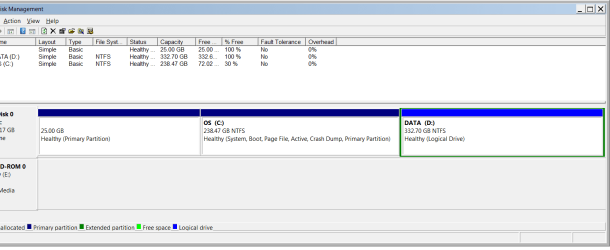
Post final screenshot of disk management please
 

My Computer My Computer

Computer type
Laptop
Computer Manufacturer/Model Number
ACER ASPIRE 5742G
OS
Microsoft Windows 7 Home Premium 64-bits 7601 Multiprocessor Free Service Pack 1
CPU
Intel(R) Core(TM) i3 CPU M 370 @ 2.40GHz
Motherboard
Acer Aspire 5742G
Memory
4,00 GB
Graphics Card(s)
ATI Mobility Radeon HD 5400 Series
Sound Card
(1) AMD High Definition Audio Device (2) Realtek High Defi
Screen Resolution
1366 x 768 x 32 bits (4294967296 colors) @ 60 Hz
Hard Drives
WDC WD5000BEVT-22ZAT0
Post final screenshot of disk management please

Here is the screenshot. As I can see, it did wipe out my recovery partition (But I have a copy). Thanks again.
 

Attachments

  • diskman.png
    diskman.png
    17.3 KB · Views: 9

My Computer My Computer

Computer Manufacturer/Model Number
ASUS U56E
OS
Microsoft Windows 7 Home Premium 64-bit (SP1)
CPU
Intel(R) Core(TM) i3-2310M CPU @ 2.10GHz
Motherboard
Base Board U56E, ver 1.0
Memory
4 GB
Graphics Card(s)
Intel(R) HD Graphics Family, 1680 x 1050 x 32 bits (42949672
Sound Card
(1) Realtek High Definition Audio (2) Intel(R) Display Aud
Monitor(s) Displays
Logitec USB port for Monitor & mouse
Screen Resolution
1680 x 1050 (recommended)
Hard Drives
WDC WD6400BPVT-80HXZT1, 600 GB

USB portable BUFFALO 1 TB
Keyboard
Laptop. but using Logitec via USb
Mouse
""
Internet Speed
g-wireless
Back
Top