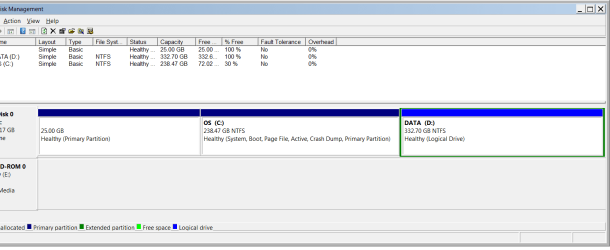
Win7x64 Home Premium ASUS U56E.
Before I sent my system in for warranty repair, I made a disk image onto external drive. I checked the vhd file out--for example Attach VHD allowed me to read all the files. Then I did a full factory restore and sent it into ASUS. It took two RMA's but finally they fixed the problem by replacing the mother board. I presume it was the same part (but difficult to get info from ASUS).
.
Now I am trying to restore the disk image. After choosing [recover system settings or your computer] -> [Advanced recovery methods] -> [Use a system image created earlier to recover your computer] -. [Skip] -> [Restart] ... "loading files" ... [US language]... I get "Windows cannot find a system image on this computer" an no amount of retry, refresh or anything I can find will help. The disk is mounted and I can navigate to the same .vhd file I saw when I backed up (above).
I read somewhere that if the mother board is changed, windows will act like this.
Cab
Before I sent my system in for warranty repair, I made a disk image onto external drive. I checked the vhd file out--for example Attach VHD allowed me to read all the files. Then I did a full factory restore and sent it into ASUS. It took two RMA's but finally they fixed the problem by replacing the mother board. I presume it was the same part (but difficult to get info from ASUS).
.
Now I am trying to restore the disk image. After choosing [recover system settings or your computer] -> [Advanced recovery methods] -> [Use a system image created earlier to recover your computer] -. [Skip] -> [Restart] ... "loading files" ... [US language]... I get "Windows cannot find a system image on this computer" an no amount of retry, refresh or anything I can find will help. The disk is mounted and I can navigate to the same .vhd file I saw when I backed up (above).
I read somewhere that if the mother board is changed, windows will act like this.
- If someone knows a way I can restore, I will appreciate it.
- I am presuming that I can reattach the vhd without [x]read-only access and I might be successful. But here is the second part of my post: If I successfully change the permissions, would this modification to the vhd-file in itself render the file unusable for Windows [system image recovery], in case I was able to find a way to get windows to recognize the vhd file..
Cab
My Computer
- Computer Manufacturer/Model Number
- ASUS U56E
- OS
- Microsoft Windows 7 Home Premium 64-bit (SP1)
- CPU
- Intel(R) Core(TM) i3-2310M CPU @ 2.10GHz
- Motherboard
- Base Board U56E, ver 1.0
- Memory
- 4 GB
- Graphics Card(s)
- Intel(R) HD Graphics Family, 1680 x 1050 x 32 bits (42949672
- Sound Card
- (1) Realtek High Definition Audio (2) Intel(R) Display Aud
- Monitor(s) Displays
- Logitec USB port for Monitor & mouse
- Screen Resolution
- 1680 x 1050 (recommended)
- Hard Drives
- WDC WD6400BPVT-80HXZT1, 600 GB
USB portable BUFFALO 1 TB
- Keyboard
- Laptop. but using Logitec via USb
- Mouse
- ""
- Internet Speed
- g-wireless

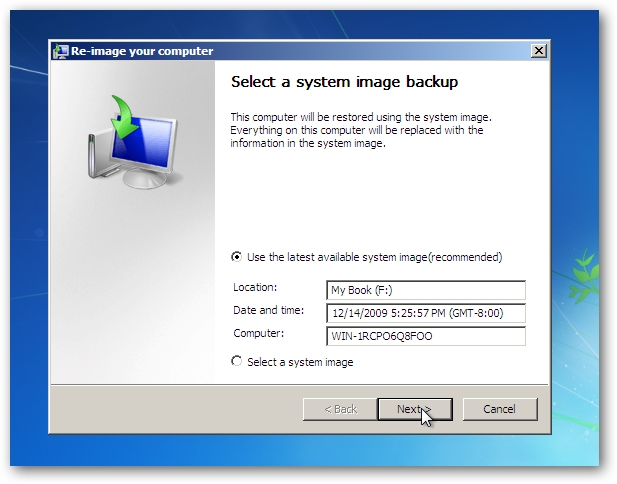
 There's no way that a backup followed by an immediate restore should lose data--except I suppose by MS. When I made the image backup I was -not- given an opportunity or told to backup other partitions on the same disk (tho I see it reported like that). Nor did it give me any warning that actually -using- the image I was making would be risky. There are plenty of warnings when I started to restore ("you should back up any other partitions you don't want erased"). But there is no way I could do that using MS tools only because the Recovery-Part has no drive letter. What's more the restore says it will format all drives except the one I am restoring from--unless I use the [exclude] button. (An opt-out situation). But that could be overlooked by the user. Maybe MS will only format drives which are in the SystemImage, but it does not say that. In this case a unsuspecting user could make a simple backup of C: and when restored find out that his second HDD and two external drives were formatted. This is just plain EVIL EVIL EVIL. Of course MS can't format the drive I am restoring from, but why doesn't it just go ahead and reformat that drive too when it has finished, because I didn't tell it not to!!!.