Solved Drive C partition unallocated

Instead of Recuva - which can run only with Windows and that is closed for you :) - you may go with a live Linux CD/pendrive........

Hi Zirch,

I already told you that Recuva can run only with Windows.

The other thing is that Recuva, if it can, can recover all sorts files. Sameway, even PhotoRec can recover a wide gamut of Archive, Multimedia, Office, and other files. File Formats Recovered By PhotoRec - CGSecurity

Next, there is no paid version of Recuva.

Now don't be in a haste to remove the drive and pluck it into another system.

You can still run Recuva in-situ. Recovering files using Recuva from the Ultimate Boot CD for Windows (UBCD4Win) - myfixlog.com

( I generally don't look into programs that may deviate from what I feel is right.)
 

My Computer My Computer

At a glance

Windows 7 Home Premium 32 bit
OS
Windows 7 Home Premium 32 bit
I ran TestDisk another time, did a deep search, and this time it showed all my partitions, including the lost one!

I booted into Linux Mint from a USB drive and I am able to access the files on the C drive. I have already copied the files which I want for backup.

However, Windows 7 would not boot still. I'm thinking that the boot sector is damaged? How can I fix this?
 

My Computer My Computer

At a glance

Windows 7 Ultimate 32bit
OS
Windows 7 Ultimate 32bit
I ran TestDisk another time, did a deep search, and this time it showed all my partitions, including the lost one!

I booted into Linux Mint from a USB drive and I am able to access the files on the C drive. I have already copied the files which I want for backup.

However, Windows 7 would not boot still. I'm thinking that the boot sector is damaged? How can I fix this?
Sure all is back?

Boot from partition wizard CD and make recovered partition primary and then active.
How to set partition as Primary with partition manager?
of course apply the changes. Boot normally. What error do you get now?
 

My Computer My Computer

At a glance

Microsoft Windows 7 Home Premium 64-bits 7601...Intel(R) Core(TM) i3 CPU M 370 @ 2.40GHz4,00 GBATI Mobility Radeon HD 5400 Series
Computer type
Laptop
Computer Manufacturer/Model Number
ACER ASPIRE 5742G
OS
Microsoft Windows 7 Home Premium 64-bits 7601 Multiprocessor Free Service Pack 1
CPU
Intel(R) Core(TM) i3 CPU M 370 @ 2.40GHz
Motherboard
Acer Aspire 5742G
Memory
4,00 GB
Graphics Card(s)
ATI Mobility Radeon HD 5400 Series
Sound Card
(1) AMD High Definition Audio Device (2) Realtek High Defi
Screen Resolution
1366 x 768 x 32 bits (4294967296 colors) @ 60 Hz
Hard Drives
WDC WD5000BEVT-22ZAT0
I ran TestDisk another time, did a deep search, and this time it showed all my partitions, including the lost one!

I booted into Linux Mint from a USB drive and I am able to access the files on the C drive. I have already copied the files which I want for backup.

However, Windows 7 would not boot still. I'm thinking that the boot sector is damaged? How can I fix this?
Sure all is back?

Boot from partition wizard CD and make recovered partition primary and then active.
How to set partition as Primary with partition manager?
of course apply the changes. Boot normally. What error do you get now?

Yes, all is back.

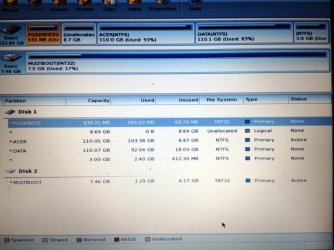
The partition ACER is both primary and active. When I tried to boot, it shows only a blank screen with a blinking cursor.

There are 4 primary partitions and 1 logical partition. There should not be more than 3 partitions when there is a logical partition?

image 5.jpg
 

My Computer My Computer

At a glance

Windows 7 Ultimate 32bit
OS
Windows 7 Ultimate 32bit
If not booting... then boot from win7 install dvd or system repair cd and enter command prompt
http://www.sevenforums.com/tutorials/682-command-prompt-startup.html

Code:
dir c:\
dir d:\
dir e:\

What drive letter has your win7 partition? I use K in this example

Code:
bootsect/nt60  K: /force
Now the volume boot sector has been rewritten

Code:
chkdsk/f  K:
any errors? all repaired? If errors... run it again to prove no more errors
 

My Computer My Computer

At a glance

Microsoft Windows 7 Home Premium 64-bits 7601...Intel(R) Core(TM) i3 CPU M 370 @ 2.40GHz4,00 GBATI Mobility Radeon HD 5400 Series
Computer type
Laptop
Computer Manufacturer/Model Number
ACER ASPIRE 5742G
OS
Microsoft Windows 7 Home Premium 64-bits 7601 Multiprocessor Free Service Pack 1
CPU
Intel(R) Core(TM) i3 CPU M 370 @ 2.40GHz
Motherboard
Acer Aspire 5742G
Memory
4,00 GB
Graphics Card(s)
ATI Mobility Radeon HD 5400 Series
Sound Card
(1) AMD High Definition Audio Device (2) Realtek High Defi
Screen Resolution
1366 x 768 x 32 bits (4294967296 colors) @ 60 Hz
Hard Drives
WDC WD5000BEVT-22ZAT0
I ran TestDisk another time, did a deep search, and this time it showed all my partitions, including the lost one!

I booted into Linux Mint from a USB drive and I am able to access the files on the C drive. I have already copied the files which I want for backup.

However, Windows 7 would not boot still. I'm thinking that the boot sector is damaged? How can I fix this?
Sure all is back?

Boot from partition wizard CD and make recovered partition primary and then active.
How to set partition as Primary with partition manager?
of course apply the changes. Boot normally. What error do you get now?

Yes, all is back.

The partition ACER is both primary and active. When I tried to boot, it shows only a blank screen with a blinking cursor.

There are 4 primary partitions and 1 logical partition. There should not be more than 3 partitions when there is a logical partition?

View attachment 255061
8.69GB is just unallocates space. Not a partition at all!
Why is PQSERVICE only 600MB!! Now it's useless for sure. It was 9GB in earlier screenshots. Not a real issue because it's only used to restore to factory settings
 

My Computer My Computer

At a glance

Microsoft Windows 7 Home Premium 64-bits 7601...Intel(R) Core(TM) i3 CPU M 370 @ 2.40GHz4,00 GBATI Mobility Radeon HD 5400 Series
Computer type
Laptop
Computer Manufacturer/Model Number
ACER ASPIRE 5742G
OS
Microsoft Windows 7 Home Premium 64-bits 7601 Multiprocessor Free Service Pack 1
CPU
Intel(R) Core(TM) i3 CPU M 370 @ 2.40GHz
Motherboard
Acer Aspire 5742G
Memory
4,00 GB
Graphics Card(s)
ATI Mobility Radeon HD 5400 Series
Sound Card
(1) AMD High Definition Audio Device (2) Realtek High Defi
Screen Resolution
1366 x 768 x 32 bits (4294967296 colors) @ 60 Hz
Hard Drives
WDC WD5000BEVT-22ZAT0
to resolve the black screen with blinking cursor...
Boot to recovery environment->command prompt

Code:
bootsect/nt60  c:  /force  /mbr

Command succeeds succesfully? Boot normally
 

My Computer My Computer

At a glance

Microsoft Windows 7 Home Premium 64-bits 7601...Intel(R) Core(TM) i3 CPU M 370 @ 2.40GHz4,00 GBATI Mobility Radeon HD 5400 Series
Computer type
Laptop
Computer Manufacturer/Model Number
ACER ASPIRE 5742G
OS
Microsoft Windows 7 Home Premium 64-bits 7601 Multiprocessor Free Service Pack 1
CPU
Intel(R) Core(TM) i3 CPU M 370 @ 2.40GHz
Motherboard
Acer Aspire 5742G
Memory
4,00 GB
Graphics Card(s)
ATI Mobility Radeon HD 5400 Series
Sound Card
(1) AMD High Definition Audio Device (2) Realtek High Defi
Screen Resolution
1366 x 768 x 32 bits (4294967296 colors) @ 60 Hz
Hard Drives
WDC WD5000BEVT-22ZAT0
to resolve the black screen with blinking cursor...
Boot to recovery environment->command prompt

Code:
bootsect/nt60  c:  /force  /mbr
Command succeeds succesfully? Boot normally

Hooray! It boots normally. All the files are still there. Everything works as usual. Though now in My Computer, I see 2 extra partitions that were previously not there. One is a RAW partition 1GB, another is NTFS 3GB. There is also a 8.69GB unallocated space. Is this anything significant?

Anyway, thank you very much for your help. Really appreciate the time you spend to help me. You're my saviour.
 

My Computer My Computer

At a glance

Windows 7 Ultimate 32bit
OS
Windows 7 Ultimate 32bit
to resolve the black screen with blinking cursor...
Boot to recovery environment->command prompt

Code:
bootsect/nt60  c:  /force  /mbr
Command succeeds succesfully? Boot normally

Hooray! It boots normally. All the files are still there. Everything works as usual. Though now in My Computer, I see 2 extra partitions that were previously not there. One is a RAW partition 1GB, another is NTFS 3GB. There is also a 8.69GB unallocated space. Is this anything significant?

Anyway, thank you very much for your help. Really appreciate the time you spend to help me. You're my saviour.
Waht command fixed the blinking cursor problem?

The 3GB partition was there all the time in screenshots. 8.69 belongs in other screenshots to PQSERVICE partition. PQSERVICE isn't needed it's for restore to factory settings. You can reinstall win7 by using DVD and product key anyway. What's on 3GB partition?

Post output of disk management please
 

My Computer My Computer

At a glance

Microsoft Windows 7 Home Premium 64-bits 7601...Intel(R) Core(TM) i3 CPU M 370 @ 2.40GHz4,00 GBATI Mobility Radeon HD 5400 Series
Computer type
Laptop
Computer Manufacturer/Model Number
ACER ASPIRE 5742G
OS
Microsoft Windows 7 Home Premium 64-bits 7601 Multiprocessor Free Service Pack 1
CPU
Intel(R) Core(TM) i3 CPU M 370 @ 2.40GHz
Motherboard
Acer Aspire 5742G
Memory
4,00 GB
Graphics Card(s)
ATI Mobility Radeon HD 5400 Series
Sound Card
(1) AMD High Definition Audio Device (2) Realtek High Defi
Screen Resolution
1366 x 768 x 32 bits (4294967296 colors) @ 60 Hz
Hard Drives
WDC WD5000BEVT-22ZAT0
  1. delete the PQSERVICE partition. Do it using disk management. Just right click->delete volume
  2. Look what's in 3GB partition. Corrupt or not needed stuff? Copy all you need from it to DATA for example. After that delete that 3GB partition.
Now you have 2 partitions. One is called C (WIN7)and the other one most likely D (DATA). Chek the file system!
http://www.sevenforums.com/tutorials/783-elevated-command-prompt.html
Code:
chkdsk/f  c:
chkdsk/f  d:

You can't check disk C because it's locked, so win7 asks you to do it on reboot. Answer YES
Both disks are fine?
 
Last edited:

My Computer My Computer

At a glance

Microsoft Windows 7 Home Premium 64-bits 7601...Intel(R) Core(TM) i3 CPU M 370 @ 2.40GHz4,00 GBATI Mobility Radeon HD 5400 Series
Computer type
Laptop
Computer Manufacturer/Model Number
ACER ASPIRE 5742G
OS
Microsoft Windows 7 Home Premium 64-bits 7601 Multiprocessor Free Service Pack 1
CPU
Intel(R) Core(TM) i3 CPU M 370 @ 2.40GHz
Motherboard
Acer Aspire 5742G
Memory
4,00 GB
Graphics Card(s)
ATI Mobility Radeon HD 5400 Series
Sound Card
(1) AMD High Definition Audio Device (2) Realtek High Defi
Screen Resolution
1366 x 768 x 32 bits (4294967296 colors) @ 60 Hz
Hard Drives
WDC WD5000BEVT-22ZAT0
Waht command fixed the blinking cursor problem?

The 3GB partition was there all the time in screenshots. 8.69 belongs in other screenshots to PQSERVICE partition. PQSERVICE isn't needed it's for restore to factory settings. You can reinstall win7 by using DVD and product key anyway. What's on 3GB partition?

Post output of disk management please

The bootsect/nt60 command fixed the blinking cursor problem, I think.

On the 3GB partition is the Acer Recovery files, I suppose. The list of files:
15/05/2007 03:20 PM 8,511,488 AcerKit.exe
17/04/2007 03:15 PM 11 Arcade.dat
12/02/2010 05:33 PM 201 boot.ini
07/03/2007 03:40 PM 5,120 Chs.dll
07/03/2007 03:41 PM 5,120 Cht.dll
23/11/2007 05:44 PM 98,304 CLLauncher.exe
12/02/2010 05:28 PM <DIR> CLSetup
11/05/2007 05:32 PM 7,680 Csy.dll
11/05/2007 05:32 PM 7,680 Dan.dll
07/03/2007 03:41 PM 9,216 Deu.dll
12/02/2010 05:28 PM <DIR> Documents and Settings
11/05/2007 05:32 PM 8,192 Ell.dll
07/03/2007 03:41 PM 7,680 Enu.dll
07/03/2007 03:41 PM 8,192 Esp.dll
11/05/2007 05:32 PM 7,680 Fin.dll
07/03/2007 03:42 PM 8,704 Fra.dll
11/05/2007 05:32 PM 8,192 Hun.dll
12/02/2010 05:28 PM <DIR> Intel
07/03/2007 03:42 PM 8,192 Ita.dll
07/03/2007 03:42 PM 6,144 Jpn.dll
12/02/2010 05:33 PM 20 MBR.ini
07/03/2007 03:42 PM 8,192 Nld.dll
15/05/2007 05:17 PM 7,680 Nor.dll
03/08/2004 10:38 PM 47,564 NTDETECT.COM
19/08/2005 04:13 AM 250,048 ntldr
11/05/2007 05:32 PM 8,192 Plk.dll
12/02/2010 05:30 PM <DIR> Program Files
07/03/2007 03:43 PM 8,192 Ptg.dll
19/04/2007 11:46 PM 5,292,054 Root_bg.bmp
11/05/2007 05:32 PM 8,192 Rus.dll
11/05/2007 05:32 PM 8,192 Sve.dll
11/05/2007 05:32 PM 8,192 Trk.dll
24/04/2007 02:45 PM 282 WERUNTIME.INI
12/02/2010 05:33 PM <DIR> WINDOWS

By output of disk management, do you mean a screenshot?
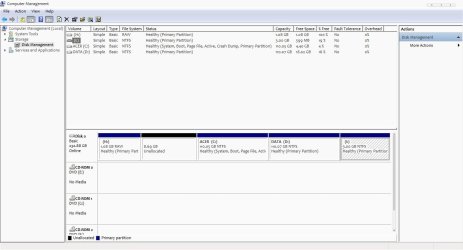
image 6.jpg
 

My Computer My Computer

At a glance

Windows 7 Ultimate 32bit
OS
Windows 7 Ultimate 32bit
H is RAW. Before it was called PQSERVICE and about 600MB. Strange things happen. Delete H and I using disk management. Did you already do

chkdsk/f c
chkdsk/f d

??
 

My Computer My Computer

At a glance

Microsoft Windows 7 Home Premium 64-bits 7601...Intel(R) Core(TM) i3 CPU M 370 @ 2.40GHz4,00 GBATI Mobility Radeon HD 5400 Series
Computer type
Laptop
Computer Manufacturer/Model Number
ACER ASPIRE 5742G
OS
Microsoft Windows 7 Home Premium 64-bits 7601 Multiprocessor Free Service Pack 1
CPU
Intel(R) Core(TM) i3 CPU M 370 @ 2.40GHz
Motherboard
Acer Aspire 5742G
Memory
4,00 GB
Graphics Card(s)
ATI Mobility Radeon HD 5400 Series
Sound Card
(1) AMD High Definition Audio Device (2) Realtek High Defi
Screen Resolution
1366 x 768 x 32 bits (4294967296 colors) @ 60 Hz
Hard Drives
WDC WD5000BEVT-22ZAT0
Hey, I'm going to get some sleep. Will work back on the chkdsk when I wake up. Thanks again for the help.
 

My Computer My Computer

At a glance

Windows 7 Ultimate 32bit
OS
Windows 7 Ultimate 32bit

My Computer My Computer

At a glance

Microsoft Windows 7 Home Premium 64-bits 7601...Intel(R) Core(TM) i3 CPU M 370 @ 2.40GHz4,00 GBATI Mobility Radeon HD 5400 Series
Computer type
Laptop
Computer Manufacturer/Model Number
ACER ASPIRE 5742G
OS
Microsoft Windows 7 Home Premium 64-bits 7601 Multiprocessor Free Service Pack 1
CPU
Intel(R) Core(TM) i3 CPU M 370 @ 2.40GHz
Motherboard
Acer Aspire 5742G
Memory
4,00 GB
Graphics Card(s)
ATI Mobility Radeon HD 5400 Series
Sound Card
(1) AMD High Definition Audio Device (2) Realtek High Defi
Screen Resolution
1366 x 768 x 32 bits (4294967296 colors) @ 60 Hz
Hard Drives
WDC WD5000BEVT-22ZAT0
I know that awful feeling when your drive dies.
Time to setup a cloud drive with automatic backups.
Google Drive
Ubuntu One
etc...

Losing a drive should become only a small inconvenience.
If it synced automatically to several places, then your in good shape.

You can also use Macrium to back up a partition and save it in case you go down, then just copy to a new drive and your ready to boot again with no reinstall.
 

My Computer My Computer

At a glance

Windows 7 Ultimate x64
OS
Windows 7 Ultimate x64
H is RAW. Before it was called PQSERVICE and about 600MB. Strange things happen. Delete H and I using disk management. Did you already do

chkdsk/f c
chkdsk/f d

??

Deleted H and I. Ran chkdsk on both C and D. Initially there was an error on C but repaired. Done a second run and no errors found.
 

My Computer My Computer

At a glance

Windows 7 Ultimate 32bit
OS
Windows 7 Ultimate 32bit
Install Macrium Reflect FREE Edition - Information and download and make a backup of C and D (actually everything if you did delete H and I) to external disk. After succesfull backup you can move/resize C and D to reclaim the unused space.
How to Move/Resize Partition with partition manager? Partition Wizard Move/Resize Partition Video Help.

Best to be done with bootable CD. Otherwise windows 7 is running and can crash

Ok. Thanks. I'll have to get another external disk first though. My current external doesn't have enough space to backup both C and D. But I'll definitely perform a backup.
 

My Computer My Computer

At a glance

Windows 7 Ultimate 32bit
OS
Windows 7 Ultimate 32bit
You can extend D now using disk management ... so add the 3GB space to it.
Afterwards you can add the 9GB in front of C to C using PW.

used space of C+D is about 200GB. But pagefile and hibernation file and some other temp files won't be backupped. And it will be compressed. Resulting image file will be about 160GB (depends on if files are compressable)
 

My Computer My Computer

At a glance

Microsoft Windows 7 Home Premium 64-bits 7601...Intel(R) Core(TM) i3 CPU M 370 @ 2.40GHz4,00 GBATI Mobility Radeon HD 5400 Series
Computer type
Laptop
Computer Manufacturer/Model Number
ACER ASPIRE 5742G
OS
Microsoft Windows 7 Home Premium 64-bits 7601 Multiprocessor Free Service Pack 1
CPU
Intel(R) Core(TM) i3 CPU M 370 @ 2.40GHz
Motherboard
Acer Aspire 5742G
Memory
4,00 GB
Graphics Card(s)
ATI Mobility Radeon HD 5400 Series
Sound Card
(1) AMD High Definition Audio Device (2) Realtek High Defi
Screen Resolution
1366 x 768 x 32 bits (4294967296 colors) @ 60 Hz
Hard Drives
WDC WD5000BEVT-22ZAT0
You can extend D now using disk management ... so add the 3GB space to it.
Afterwards you can add the 9GB in front of C to C using PW.

used space of C+D is about 200GB. But pagefile and hibernation file and some other temp files won't be backupped. And it will be compressed. Resulting image file will be about 160GB (depends on if files are compressable)

I see. That will be good. After that, I suppose the system will be working as usual?
 

My Computer My Computer

At a glance

Windows 7 Ultimate 32bit
OS
Windows 7 Ultimate 32bit
Back
Top