
Solved New drive (Z:) after installing Epson on PC

bawldiggle

GrayGhost2 ret.
Pro User
VIP
Local time
11:45 PM
Messages
895
Location
Australia
Today I installed Epson printer XP400 onto my Win7 32bit laptop.

The laptop prints to the XP400 via WiFi.
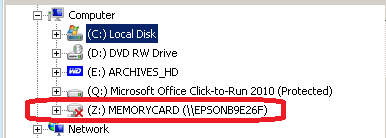
When the printer is OFF WinExp has a "Z:MEMORYCARD (\\EPSONB9E26F)" drive.

WinExp setting Hide empty drives in the Computer folder is enabled

Q1: Can this drive be hidden when the printer is OFF ?

-----------------
EDIT 13-Mar-2015
-----------------

As it transpired the Z drive was created when installing the new printer onto my PC
- after that the Z drive assignment/mapping was irrelevant .
At first I "hid" the drive (my post #12) but consequently "deleting" was a more sensible option.
** See my post #19 for the final "delete" process
 
Last edited:

My Computer My Computer

At a glance

XP Pro (x86) | 7 HP (x86) & (x64) | 7 Pro (x64)
Computer type
PC/Desktop
Computer Manufacturer/Model Number
Toshiba, Lenovo (laptops) + 4 rigs
OS
XP Pro (x86) | 7 HP (x86) & (x64) | 7 Pro (x64)
Post screenshot of disk management please where Z is visible. If printer is off you can't see it!! If somethoing has no power is doesn't do anything. Sure it's powered off and not just standby?
 

My Computer My Computer

At a glance

Microsoft Windows 7 Home Premium 64-bits 7601...Intel(R) Core(TM) i3 CPU M 370 @ 2.40GHz4,00 GBATI Mobility Radeon HD 5400 Series
Computer type
Laptop
Computer Manufacturer/Model Number
ACER ASPIRE 5742G
OS
Microsoft Windows 7 Home Premium 64-bits 7601 Multiprocessor Free Service Pack 1
CPU
Intel(R) Core(TM) i3 CPU M 370 @ 2.40GHz
Motherboard
Acer Aspire 5742G
Memory
4,00 GB
Graphics Card(s)
ATI Mobility Radeon HD 5400 Series
Sound Card
(1) AMD High Definition Audio Device (2) Realtek High Defi
Screen Resolution
1366 x 768 x 32 bits (4294967296 colors) @ 60 Hz
Hard Drives
WDC WD5000BEVT-22ZAT0
If the Z: drive doesn't serve any purpose and you just want to hide it, you may do so like this (I have a Z drive and have hidden it the same way):

Press Win+R - Type "regedit" and click OK.

Now navigate to HKEY_CURRENT_USER\SOFTWARE\Microsoft\Windows\CurrentVersion\Policies\Explorer

Right click on the right pane - New - 32 bit Dword and enter the name as "NoDrives".

Now double click it and select "decimal" and then enter the value as 33554432.

Log off and log back on. Z: will now be hidden (but you can still access it by typing "Z:" in the address bar.
 
Last edited:

My Computer My Computer

At a glance

Windows 7 Home Premium x64
Computer type
PC/Desktop
OS
Windows 7 Home Premium x64
Today I installed Epson printer XP400 onto my Win7 32bit laptop.

The laptop prints to the XP400 via WiFi.
When the printer is OFF WinExp has a "Z:MEMORYCARD (\\EPSONB9E26F)" drive.

WinExp setting Hide empty drives in the Computer folder is enabled

Q1: Can this drive be hidden when the printer is OFF ?
(\\EPSONB9E26F) is it a share?
 

My Computer My Computer

At a glance

Microsoft Windows 7 Home Premium 64-bits 7601...Intel(R) Core(TM) i3 CPU M 370 @ 2.40GHz4,00 GBATI Mobility Radeon HD 5400 Series
Computer type
Laptop
Computer Manufacturer/Model Number
ACER ASPIRE 5742G
OS
Microsoft Windows 7 Home Premium 64-bits 7601 Multiprocessor Free Service Pack 1
CPU
Intel(R) Core(TM) i3 CPU M 370 @ 2.40GHz
Motherboard
Acer Aspire 5742G
Memory
4,00 GB
Graphics Card(s)
ATI Mobility Radeon HD 5400 Series
Sound Card
(1) AMD High Definition Audio Device (2) Realtek High Defi
Screen Resolution
1366 x 768 x 32 bits (4294967296 colors) @ 60 Hz
Hard Drives
WDC WD5000BEVT-22ZAT0
@ Kaktussoft
Printer is OFF, (there is only on or off)
Image of Z:drive too...
Z-drive 16Apr2013.png

Z-drive is obviously related to the Epson printer.
The printer is accessed from my PC_1 via WiFi.
The printer is also connected to PC_2 via USB cable

When PC_1 is booted a popup appears from system-tray, and self dismisses after about 3 seconds.
One drive fails 16Apr2013.png
@ roboticarm
Your registry fix:
PC_1 registry has
Code:
HKCU\Software\Microsoft\Windows\CurrentVersion\Policies
but no "Explorer" subkey (does have "Comdlg32" subkey)

Q1: If I hide the "Z-drive" will it affect the printer's (PC_1) WiFi connectiivity/operation?

-----
PC_1
Computer Type:= Laptop
Manufacturer:= Toshiba Satellite C665
OS:= Windows 7 Home Premium, sp1 (Build 7601)
CPU:= Intel(R) Core(TM) i5-2410M CPU @ 2.30GHz
Motherboard:= TOSHIBA Portable PC
Memory:= 2,806 MB
Graphics:= NVIDIA GeForce 315M *
Sound Card:= Speakers (Conexant SmartAudio H |
Monitors:= x1, Generic PnP
Screen Resolution:= 1366 X 768 - 32 bit
Hard Drives:= C: 585.4GB
PSU:=
Case:= Toshiba Satellite
Cooling:= default fan
Keyboard:= default + Logitech K260
Mouse:= default pad + Logitech M210
Internet Speed:= ADSL2
Antivirus:= Bitdefender Internet Security 2013
Browser:= IE-9.10, PaleMoon, Firefox 20.0
Others:= USB Safely Remove, Metapad, ClipX,
7Zip, Classic Shell Start, Explorer++, FileSearchEX, KeyboardLEDS, CapsLock,
MalwareBytes, MyDefrag, PostBox, Epson
 
Last edited:

My Computer My Computer

At a glance

XP Pro (x86) | 7 HP (x86) & (x64) | 7 Pro (x64)
Computer type
PC/Desktop
Computer Manufacturer/Model Number
Toshiba, Lenovo (laptops) + 4 rigs
OS
XP Pro (x86) | 7 HP (x86) & (x64) | 7 Pro (x64)
@ Kaktussoft
Printer is OFF, (there is only on or off)
Image of Z:drive too...
View attachment 264339

Z-drive is obviously related to the Epson printer.
The printer is accessed from my PC_1 via WiFi.
The printer is also connected to PC_2 via USB cable

When PC_1 is booted a popup appears from system-tray, and self dismisses after about 3 seconds.
View attachment 264340
@ roboticarm
Your registry fix:
PC_1 registry has
Code:
HKCU\Software\Microsoft\Windows\CurrentVersion\Policies
but no "Explorer" subkey (does have "Comdlg32" subkey)

Q1: If I hide the "Z-drive" will it affect the printer's (PC_1) WiFi connectiivity/operation?

-----
PC_1
Computer Type:= Laptop
Manufacturer:= Toshiba Satellite C665
OS:= Windows 7 Home Premium, sp1 (Build 7601)
CPU:= Intel(R) Core(TM) i5-2410M CPU @ 2.30GHz
Motherboard:= TOSHIBA Portable PC
Memory:= 2,806 MB
Graphics:= NVIDIA GeForce 315M *
Sound Card:= Speakers (Conexant SmartAudio H |
Monitors:= x1, Generic PnP
Screen Resolution:= 1366 X 768 - 32 bit
Hard Drives:= C: 585.4GB
PSU:=
Case:= Toshiba Satellite
Cooling:= default fan
Keyboard:= default + Logitech K260
Mouse:= default pad + Logitech M210
Internet Speed:= ADSL2
Antivirus:= Bitdefender Internet Security 2013
Browser:= IE-9.10, PaleMoon, Firefox 20.0
Others:= USB Safely Remove, Metapad, ClipX,
7Zip, Classic Shell Start, Explorer++, FileSearchEX, KeyboardLEDS, CapsLock,
MalwareBytes, MyDefrag, PostBox, Epson

It's a connection to a network share!
in command prompt:
Code:
net  use  z:  /delete
Is it gone now? It has nothing to do with printing/scanning/wireless
 

My Computer My Computer

At a glance

Microsoft Windows 7 Home Premium 64-bits 7601...Intel(R) Core(TM) i3 CPU M 370 @ 2.40GHz4,00 GBATI Mobility Radeon HD 5400 Series
Computer type
Laptop
Computer Manufacturer/Model Number
ACER ASPIRE 5742G
OS
Microsoft Windows 7 Home Premium 64-bits 7601 Multiprocessor Free Service Pack 1
CPU
Intel(R) Core(TM) i3 CPU M 370 @ 2.40GHz
Motherboard
Acer Aspire 5742G
Memory
4,00 GB
Graphics Card(s)
ATI Mobility Radeon HD 5400 Series
Sound Card
(1) AMD High Definition Audio Device (2) Realtek High Defi
Screen Resolution
1366 x 768 x 32 bits (4294967296 colors) @ 60 Hz
Hard Drives
WDC WD5000BEVT-22ZAT0
Check registry key HKCU\Network. Is Z listed there? Delete Z there and logoff and logon again. Most likely the "net use z: /delete" command did delete it already. It's gone? Even after reboot?

Drive letter
 

My Computer My Computer

At a glance

Microsoft Windows 7 Home Premium 64-bits 7601...Intel(R) Core(TM) i3 CPU M 370 @ 2.40GHz4,00 GBATI Mobility Radeon HD 5400 Series
Computer type
Laptop
Computer Manufacturer/Model Number
ACER ASPIRE 5742G
OS
Microsoft Windows 7 Home Premium 64-bits 7601 Multiprocessor Free Service Pack 1
CPU
Intel(R) Core(TM) i3 CPU M 370 @ 2.40GHz
Motherboard
Acer Aspire 5742G
Memory
4,00 GB
Graphics Card(s)
ATI Mobility Radeon HD 5400 Series
Sound Card
(1) AMD High Definition Audio Device (2) Realtek High Defi
Screen Resolution
1366 x 768 x 32 bits (4294967296 colors) @ 60 Hz
Hard Drives
WDC WD5000BEVT-22ZAT0

My Computer My Computer

At a glance

Windows 7 Ultimate Retail Box (64-bit install...AMD FX-8350 CPU v1.15 (or 1.0F) BIOS was requ...8G CAS-7 G-Skill DDR3 @1333 (2 fours) [mobo n...Radeon HD 7950 [3 gigs of GDDR5] MSI Twin Fro...
Computer type
PC/Desktop
Computer Manufacturer/Model Number
Self Built Custom
OS
Windows 7 Ultimate Retail Box (64-bit installed) + Service Pack 1
CPU
AMD FX-8350 CPU v1.15 (or 1.0F) BIOS was required!
Motherboard
MSI 890FXA-GD70
Memory
8G CAS-7 G-Skill DDR3 @1333 (2 fours) [mobo nonOC max rec'd]
Graphics Card(s)
Radeon HD 7950 [3 gigs of GDDR5] MSI Twin Frozr model
Sound Card
Realtek High Definition Audio (onboard mobo, ALC-889 chip)
Monitor(s) Displays
2 WS LED Monitors: One LG One Viewsonic
Screen Resolution
1920 by 1080
Hard Drives
SSD for OS: Samsung 840 Pro
SSD for VM and utilities: Adata SX900
7200 RPM SATA HDs for the rest: Hitachi and Seagate
PSU
Corsair TX850 - 850W max, in service since August 2010.
Case
Thermaltake Armor A90
Cooling
Thermaltake Spin Q CPU Cooler, in service since August 2010
Keyboard
Logitech G11
Mouse
Logitech M310 Wireless
Internet Speed
100 Megabit broadband supposedly upgraded from 50 (Cable)
Antivirus
Bitdefender Internet Security 2014 suite
Browser
Pale Moon 64-bit main, also IceDragon, Opera, and Maxthon.
Other Info
CompTIA A+ certified (220-800 series) in July 2013.
Hide "Z" drive after installing Epson printer

SUCCESS (see my next post, how I did it)
Thanks to all who helped

@roboticarm
Exactly what I wanted. How to "hide" the drive.
Your "Decimal" value 33554432 added to my understanding Binary > Decimal conversion
especially when I used the "Calc" programmers Calculator incorrectly.

@Faladu
Your link to Hide Drives from Your Computer in Windows 7 or Vista
-- excellent tutorial explained how it all works

@Kaktussoft
Thank you for your interest.
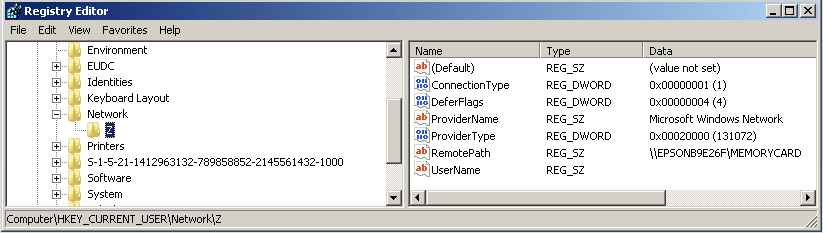
I did not delete the HKCU/Network/Z key, because I think I might have lost my WiFi connection to the printer ?

HKCU-Networks.png
 

My Computer My Computer

At a glance

XP Pro (x86) | 7 HP (x86) & (x64) | 7 Pro (x64)
Computer type
PC/Desktop
Computer Manufacturer/Model Number
Toshiba, Lenovo (laptops) + 4 rigs
OS
XP Pro (x86) | 7 HP (x86) & (x64) | 7 Pro (x64)
You did it the right way by removing the letter. I don`t know why it was suggested to go into the registry and delete keys and what not.

As Faladu suggested, you could have just left it alone.
 

My Computer My Computer

At a glance

Windows 10 Pro x64Intel Core i7 6700KGSkill TridentZ RGB 16GB 3600 16-16-16-36EVGA GTX 980 Ti SC x2
Computer type
PC/Desktop
Computer Manufacturer/Model Number
Skylake Special #666
OS
Windows 10 Pro x64
CPU
Intel Core i7 6700K
Motherboard
Asus Sabertooth Z170 Mark 1
Memory
GSkill TridentZ RGB 16GB 3600 16-16-16-36
Graphics Card(s)
EVGA GTX 980 Ti SC x2
Sound Card
Realtek High Definition
Monitor(s) Displays
AOC G2460PG
Screen Resolution
1920 x 1080 144Hz
Hard Drives
Samsung 860 Pro 256GB, Seagate Barracuda 4TB x2
PSU
EVGA 1000 P2, EVGA White Custom Braided Cables
Case
Corsair Vengeance C70 Gunmetal Black
Cooling
Corsair H100i v2, Corsair ML120 x2, Thermal Grizzly Kryonaut
Keyboard
Logitech G910 Orion Spectrum
Mouse
Logitech G700s
Internet Speed
Verizon Fios Quantum Gateway 75/75
Antivirus
Windows Defender, Malwarebytes Free 3.8.3
Browser
Chrome
Other Info
Corsair SP120 x4, LG Blu-ray Drive, Durabrand HT-395 100 Watt Dolby Digital Amp, Corsair H2100 Wireless 7.1 Headset
SUCCESS (see my next post, how I did it)
Thanks to all who helped

@roboticarm
Exactly what I wanted. How to "hide" the drive.
Your "Decimal" value 33554432 added to my understanding Binary > Decimal conversion
especially when I used the "Calc" programmers Calculator incorrectly.

@Faladu
Your link to Hide Drives from Your Computer in Windows 7 or Vista
-- excellent tutorial explained how it all works

@Kaktussoft
Thank you for your interest.
I did not delete the HKCU/Network/Z key, because I think I might have lost my WiFi connection to the printer ?

View attachment 264603

HKCU/Network/Z is just the PERMANENT drive letter for a shared folder.
NET USE Z/DELETE : This deletes it as well.
This is not about wireless whatsoever
 

My Computer My Computer

At a glance

Microsoft Windows 7 Home Premium 64-bits 7601...Intel(R) Core(TM) i3 CPU M 370 @ 2.40GHz4,00 GBATI Mobility Radeon HD 5400 Series
Computer type
Laptop
Computer Manufacturer/Model Number
ACER ASPIRE 5742G
OS
Microsoft Windows 7 Home Premium 64-bits 7601 Multiprocessor Free Service Pack 1
CPU
Intel(R) Core(TM) i3 CPU M 370 @ 2.40GHz
Motherboard
Acer Aspire 5742G
Memory
4,00 GB
Graphics Card(s)
ATI Mobility Radeon HD 5400 Series
Sound Card
(1) AMD High Definition Audio Device (2) Realtek High Defi
Screen Resolution
1366 x 768 x 32 bits (4294967296 colors) @ 60 Hz
Hard Drives
WDC WD5000BEVT-22ZAT0
How i hid the "z" drive

MY SOLUTION
- how to hide Z-drive

Created a restore point -- must, in case things go wrong
Opened: Hide Drives from Your Computer in Windows 7 or Vista
- getting my head around the Binary structure was the most difficult for my first-time experience
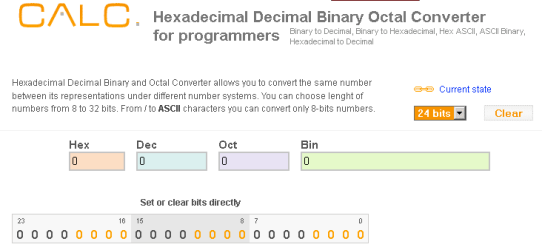
Opened: "Calc" programmers Calculator
Calc-empty.png
Calc (tool)
[Clear] button to clear all previous settings (my previous experiments/calculations)
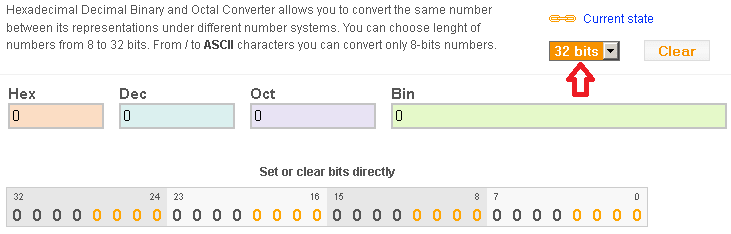
Set current state drop-down to "32 bits"
- all fields should be zeros
Calc as 32bits.png
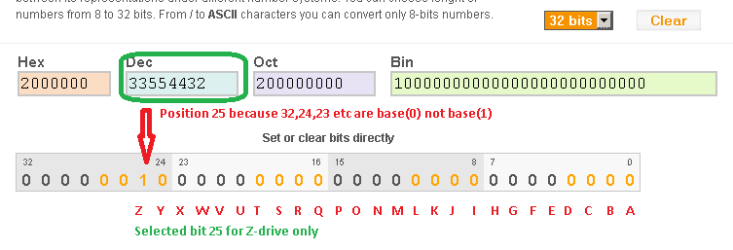
Long Binary-bar "Set or clear bits directly"
- set BITS value to 10000000000000000000000000 by clicking on position 25
- in my case I only wanted to hide the Z-drive, ie, position 25 on the binary-bar
- yes 25 not 26, because the counter guides are base(0) not base(1)
Drives sequence is Z to A (not A to Z)
Calc as Z-drive.png
-----
Open Registry:-
Start > Run:= regedit > OK
Browse down to HKEY_CURRENT_USER\Software\Microsoft\Windows\CurrentVersion\Policies
RClick on "Policies" ... New > Key
New Key Name*:= Explorer
* only if missing
Select "Explorer" Key
HKEY_CURRENT_USER\Software\Microsoft\Windows\CurrentVersion\Policies\Explorer
In right-hand panel ...
RClick > New > DWORD (32bit) value
Name:= NoDrives
Value:= ("Dec" value copied from "Calc" Programmers Calculator)
- for my needs that was "33554432", to hide Z-drive
Registry entry.png
Close all open windows and programs
Reboot windows
... you are done
 

My Computer My Computer

At a glance

XP Pro (x86) | 7 HP (x86) & (x64) | 7 Pro (x64)
Computer type
PC/Desktop
Computer Manufacturer/Model Number
Toshiba, Lenovo (laptops) + 4 rigs
OS
XP Pro (x86) | 7 HP (x86) & (x64) | 7 Pro (x64)
My Computer My Computer

At a glance

Microsoft Windows 7 Home Premium 64-bits 7601...Intel(R) Core(TM) i3 CPU M 370 @ 2.40GHz4,00 GBATI Mobility Radeon HD 5400 Series
Computer type
Laptop
Computer Manufacturer/Model Number
ACER ASPIRE 5742G
OS
Microsoft Windows 7 Home Premium 64-bits 7601 Multiprocessor Free Service Pack 1
CPU
Intel(R) Core(TM) i3 CPU M 370 @ 2.40GHz
Motherboard
Acer Aspire 5742G
Memory
4,00 GB
Graphics Card(s)
ATI Mobility Radeon HD 5400 Series
Sound Card
(1) AMD High Definition Audio Device (2) Realtek High Defi
Screen Resolution
1366 x 768 x 32 bits (4294967296 colors) @ 60 Hz
Hard Drives
WDC WD5000BEVT-22ZAT0
Apologies to "Kaktussoft"

My sincere apologies to you "Kaktussoft" -- was not aware of your status on "sevenforums.com"
I did not look up your profile, I made my evaluations based on your post fronts.

How could I doubt you -- I did! :o
-----
Created a restore-point
Registry and manually deleted the "HKEY_CURRENT_USER\Network\Z" key

You were right, my WiFi was not affected
Rhetorical question: Why dont Epson clean up after their installation? Very annoying.

This whole exercise has taught me a lot, thank you :geek:
---------
19-April-2013
Just discovered opening threads from email advice -- the thread does not display ANY posters credentials.
Something new every day !
 
Last edited:

My Computer My Computer

At a glance

XP Pro (x86) | 7 HP (x86) & (x64) | 7 Pro (x64)
Computer type
PC/Desktop
Computer Manufacturer/Model Number
Toshiba, Lenovo (laptops) + 4 rigs
OS
XP Pro (x86) | 7 HP (x86) & (x64) | 7 Pro (x64)
My sincere apologies to you "Kaktussoft" -- was not aware of your status on "sevenforums.com"
I did not look up your profile, I made my evaluations based on your post fronts.

How could I doubt you -- I did! :o
-----
Created a restore-point
Registry and manually deleted the "HKEY_CURRENT_USER\Network\Z" key

You were right, my WiFi was not affected
Rhetorical question: Why dont Epson clean up after their installation? Very annoying.

This whole exercise has taught me a lot, thank you :geek:
A wifi printer is connected to your pc using wireless. To be more precise... wifi printer connects to home router. All wireless and wired computers can access it. See it as a virtual direct connection. Windows makes a virtual port. To that port the printer is connected. So it it's actual a LOCAL printer.

But the printer has also a slot to insert SD-card!! How would you access that card from your pc? Answer: the printer has sort of mini windows installed. It shares the sd card of the NETWORK just like you can share folders on your pc. On printer install the installation maps a drive letter to that share, so you can put files on it or get files from it. (at least that's what I think if you didn't do it yourself)

The sd-card is mainly meant for exchanging photo's from camera. Put sd-card from camera in printerslot and you can directly print without computer (at least that's what's in HP manual). Epson is something like that.

But you can put any file on sd card you want..it's just a small disk! You can always remap it again if you want.

Did you revert changes to HKEY_CURRENT_USER\Software\Microsoft\Windows\CurrentVersion\Policies\Explorer already?
 

My Computer My Computer

At a glance

Microsoft Windows 7 Home Premium 64-bits 7601...Intel(R) Core(TM) i3 CPU M 370 @ 2.40GHz4,00 GBATI Mobility Radeon HD 5400 Series
Computer type
Laptop
Computer Manufacturer/Model Number
ACER ASPIRE 5742G
OS
Microsoft Windows 7 Home Premium 64-bits 7601 Multiprocessor Free Service Pack 1
CPU
Intel(R) Core(TM) i3 CPU M 370 @ 2.40GHz
Motherboard
Acer Aspire 5742G
Memory
4,00 GB
Graphics Card(s)
ATI Mobility Radeon HD 5400 Series
Sound Card
(1) AMD High Definition Audio Device (2) Realtek High Defi
Screen Resolution
1366 x 768 x 32 bits (4294967296 colors) @ 60 Hz
Hard Drives
WDC WD5000BEVT-22ZAT0
Z-Drive on Windows Explorer

Thank you "Kaktussoft" for your expanded reply

Kaktussoft wrote
A wifi printer is connected to your pc using wireless. To be more precise... wifi printer connects to home router. All wireless and wired computers can access it. See it as a virtual direct connection. Windows makes a virtual port. To that port the printer is connected. So it it's actual a LOCAL printer.... etc
Yes I did delete the HKCU\Software\Microsoft\Windows\CurrentVersion\Policies\Explorer\Z key

Just discovered contributers credentials are not listed on ANY post in this thread today.
(I clicked on the email advice to open your last reply)

I will always exercise caution. Even in this thread I have had a variety of :confused: "ideas"

Thanks to all :)
 

My Computer My Computer

At a glance

XP Pro (x86) | 7 HP (x86) & (x64) | 7 Pro (x64)
Computer type
PC/Desktop
Computer Manufacturer/Model Number
Toshiba, Lenovo (laptops) + 4 rigs
OS
XP Pro (x86) | 7 HP (x86) & (x64) | 7 Pro (x64)
I didn't see it addressed, but you don't need the computer connected by Wi-Fi and USB. You should only use one or the other.
 

My Computer My Computer

At a glance

Windows 7 Ultimate x64 SP1Intel Core i7-260012 GB Patriot Extreme DDR3-1333Nvidia GTX 470
OS
Windows 7 Ultimate x64 SP1
CPU
Intel Core i7-2600
Motherboard
Gigabyte GA-P67A-UD3P-B3
Memory
12 GB Patriot Extreme DDR3-1333
Graphics Card(s)
Nvidia GTX 470
Monitor(s) Displays
Dell UltraSharp 2209WA
Hard Drives
OCZ Agility3 240 GB, WD5001AALS, WD7501AALS
PSU
OCZ ModStream 700W
Case
CoolerMaster HAF 912 Advanced
Cooling
CoolerMaster Hyper 212 Plus
Z drive after installing Epson printer software

@ DeaconFrost

Post #5
The printer is accessed from my PC_1 via WiFi.
The printer is also connected to PC_2 via USB cable
So far it is all working
Thank you for your interest :)
 
Last edited:

My Computer My Computer

At a glance

XP Pro (x86) | 7 HP (x86) & (x64) | 7 Pro (x64)
Computer type
PC/Desktop
Computer Manufacturer/Model Number
Toshiba, Lenovo (laptops) + 4 rigs
OS
XP Pro (x86) | 7 HP (x86) & (x64) | 7 Pro (x64)
----------------
FINAL SOLUTION
----------------

The simplest and technically logical solution to the "Z:\" drive was provided by Kaktussoft
... to delete the drive letter from ...
HKEY_CURRENT_USER\Network\Z

Others suggestions to "hide" the drive, did just that, but the drive was still assigned to the Epson printer.
- and Z was no longer available for other devices etc
As it turned out the Z drive was a persistent left-over from Epson install -- Epson did not clean up after the install.
Since removing the Z drive from HKEY_CURRENT_USER\Network ... the PC to printer has worked perfectly for 2 years via WiFi without a hitch

Kaktussoft comments in post #11 also offered an alternative way to remove Z from HKEY_CURRENT_USER\Network\Z
HKCU/Network/Z is just the PERMANENT drive letter for a shared folder.
NET USE Z: /DELETE : This deletes it as well.
ie, in cmd.exe
Code:
net use z: /delete
Kaktussoft's link to How to Delete Mapped Network Drives in Windows 7 is a good tutorial. It was for me !

"Hiding" Z drive as per my post #12 was a very long winded way of hiding the Z drive.
** I did undo the "hidden" "NoDrive" in Registry
HKEY_CURRENT_USER\Software\Microsoft\Windows\CurrentVersion\Policies\Explorer
Name:= "NoDrives"
Data:= 33554432
Caution: 33554432 applies to Z drive only, if the data-value is anything else, there are other drives being hidden​
But the experience with "Calc" programmers Calculator has added to my understanding of Registry data values.
 
Last edited:

My Computer My Computer

At a glance

XP Pro (x86) | 7 HP (x86) & (x64) | 7 Pro (x64)
Computer type
PC/Desktop
Computer Manufacturer/Model Number
Toshiba, Lenovo (laptops) + 4 rigs
OS
XP Pro (x86) | 7 HP (x86) & (x64) | 7 Pro (x64)
Back
Top