Solved Drive G: intermittently disappears

The BIOS may or may not enumerate disks in a specific order. There is no direct relationship between the BIOS order, and the order in which Windows numbers the disks. During startup, Windows switches from using the BIOS INT13 support to native Windows drivers to access disks. Windows waits for several seconds for the system disk to enumerate through Plug and Play. When there is a match within the time-out period, normal startup will proceed. Otherwise, the system will trigger a bug check with Stop error code of 0x7B. Windows uses other mechanisms to differentiate disks, as Windows has no control over the disk-numbering process before startup. Windows has no information about any changes to hardware when the computer is turned off. Therefore, Windows initiates its own query for device enumeration.
Yeah, I was wrong there. Still the reasoning to use ports 0 and 1 is still valid to get the benefit of the native chipset controller. Until the new Intel Z87 chipset there was native support for just 2 SATAIII ports, the rest coming from 3rd party once, Z87 can run up to 6. I'm unsure how AMD works.
I have done my own tests and using anything other than the native controller results in very noticeable performance drops, in the time it takes apps to open, rendering an image, transcoding video, to reboot times.

Still all this doesn't explain why the OP's drive drops out.

(jumanji, that thread is so old it's grown a long beard. That was when I had been here just a few months.)
 

My Computer My Computer

At a glance

Windows 7 Ultimate X64 SP1Intel i5-2550K, Differing ~4.4-4.8GHz No buil...16GB G.Skill Sniper 1866MHz @ 2133MHz 2x8GBASUS GTX650TIB-DC2OC-2GD5, (650TI Boost)
Computer type
PC/Desktop
Computer Manufacturer/Model Number
Home Built Desktop By DataTech
OS
Windows 7 Ultimate X64 SP1
CPU
Intel i5-2550K, Differing ~4.4-4.8GHz No built in GPU
Motherboard
ASUS P8Z68-V PRO/GEN3
Memory
16GB G.Skill Sniper 1866MHz @ 2133MHz 2x8GB
Graphics Card(s)
ASUS GTX650TIB-DC2OC-2GD5, (650TI Boost)
Sound Card
Onboard Realtek 5-1
Monitor(s) Displays
Samsung P2570HD
Screen Resolution
1920x1080
Hard Drives
Samsung 840 Pro 256GB SSD for OS, 500GB Seagate Constellation (Enterprise drive) for Data
PSU
Corsair HX650W
Case
Inwin Dragon Rider
Cooling
Hyper 212 EVO w/two Noctua fans, push-pull, @1300 RPM
Keyboard
E-Z Eyes, bright yellow keys with large characters
Mouse
steelseries SENSEI Laser Pro Gaming
Internet Speed
48-51Mbs Mbs down, 11 Mbs up Xfinity Cable
Antivirus
Norton Internet Security 2013
Browser
IE 10, Opera, Pale Moon if needed
Other Info
4 case fans, LG BluRay-RE, ASUS DVD-RW, Mr. Fusion power supply, 1.21 gigawatts.
Yep. Once again we hang around here talking about shoes and fishing while we wait for the OP to tell us if anything we have babbled about solved his problem! I assume he is giving it a few days to see if it is actually over.

And don't get me wrong, I have to have all my hard drives numbered in perfect order! I will completely start a build over and reinstall Windows if I have to. I know I don't need to, but it doesn't help at all when you are OCD!

I'm just saying that the drive order most likely has nothing to do with the OP's problem.
 

My Computer My Computer

At a glance

Windows 7 64 Bit Home Premium SP1i7-3820GSkill F3-14900CL9Q - 16GBEVGA GeForce GTX660 - Driver 352.86
Computer type
PC/Desktop
Computer Manufacturer/Model Number
Home Built - Jan 2013
OS
Windows 7 64 Bit Home Premium SP1
CPU
i7-3820
Motherboard
Asus P9X79-PRO - Bios 4608
Memory
GSkill F3-14900CL9Q - 16GB
Graphics Card(s)
EVGA GeForce GTX660 - Driver 352.86
Sound Card
On board Realtek ALC898
Monitor(s) Displays
Acer S271HL
Screen Resolution
1920 x 1080
Hard Drives
#1- Samsung 840 Pro Series
#2- Western Digital WD1002FAEX Sata3 Black
#3- Western Digital WD1002FAEX Sata3 Black
PSU
Corsair CMPSU-850TX-V2 - 850 watt (by Seasonic)
Case
Corsair Obsidian 550D
Cooling
Standard 3 120mm case fans, Cooler Master Hyper 212 EVO
Keyboard
MS KC-0405
Mouse
Intellimouse 5-button
Internet Speed
56 Mbits/Sec (on a good day)
Antivirus
Avast & Malwarebytes
Browser
Firefox
Other Info
Asus DVD - DRW-24B1ST 24X
Yeah you're right Bob, I think I derailed the thread. :o I usually point up the need for the OC drive to be disk 0 if it's not, hence me starting that old thread.
 

My Computer My Computer

At a glance

Windows 7 Ultimate X64 SP1Intel i5-2550K, Differing ~4.4-4.8GHz No buil...16GB G.Skill Sniper 1866MHz @ 2133MHz 2x8GBASUS GTX650TIB-DC2OC-2GD5, (650TI Boost)
Computer type
PC/Desktop
Computer Manufacturer/Model Number
Home Built Desktop By DataTech
OS
Windows 7 Ultimate X64 SP1
CPU
Intel i5-2550K, Differing ~4.4-4.8GHz No built in GPU
Motherboard
ASUS P8Z68-V PRO/GEN3
Memory
16GB G.Skill Sniper 1866MHz @ 2133MHz 2x8GB
Graphics Card(s)
ASUS GTX650TIB-DC2OC-2GD5, (650TI Boost)
Sound Card
Onboard Realtek 5-1
Monitor(s) Displays
Samsung P2570HD
Screen Resolution
1920x1080
Hard Drives
Samsung 840 Pro 256GB SSD for OS, 500GB Seagate Constellation (Enterprise drive) for Data
PSU
Corsair HX650W
Case
Inwin Dragon Rider
Cooling
Hyper 212 EVO w/two Noctua fans, push-pull, @1300 RPM
Keyboard
E-Z Eyes, bright yellow keys with large characters
Mouse
steelseries SENSEI Laser Pro Gaming
Internet Speed
48-51Mbs Mbs down, 11 Mbs up Xfinity Cable
Antivirus
Norton Internet Security 2013
Browser
IE 10, Opera, Pale Moon if needed
Other Info
4 case fans, LG BluRay-RE, ASUS DVD-RW, Mr. Fusion power supply, 1.21 gigawatts.
I just wanted to give an update to let you know I'm still here. So far I have not had any problem with the drive disappearing. The only think I've changed on the system is changing the position of the boot drive on the Marvell controller from SATA_6 to SATA_7. I did that when I only had on drive it was in position Disk 0. After adding the 2nd drive it went to Disk 1. Not understanding the way it works (thanks for the explainations) I switch the ports but it didn't change the position of the drive in Drive manager. In addition I cleaned the drive letter from the system with drivecleanup utility previously recommend. After installing all the drives the boot SSD is now I think Drive 5. Finally I remove the active flag on what is now Drive I:.

I'm thinking that getting rid of the active flag on drive I: is what fixed the problem. That seems odd to me as you could have a drive with 3 paritions each with an active OS on it booting into each from a boot manager.

If it would help with the discussion about speed and drive position I can change the SSD to SATA_0 and see if it boots faster and run SSD diagnostics before and after to see if the speed decreases from 3 gig/s controller from 6.

Thanks again for the information it's been a great learning experience.
 

My Computer My Computer

At a glance

Windows 7 Pro 64Biti7 5820KCORSAIR Vengeance LPX 16GB 288-Pin DDR4 SDRAMMSI GeForce GTX 970 100ME 4GB
Computer type
PC/Desktop
Computer Manufacturer/Model Number
Custom Build
OS
Windows 7 Pro 64Bit
CPU
i7 5820K
Motherboard
MSI X99A SLI KRAIT EDITION LGA 2011-v3
Memory
CORSAIR Vengeance LPX 16GB 288-Pin DDR4 SDRAM
Graphics Card(s)
MSI GeForce GTX 970 100ME 4GB
PSU
Corsair RM850X 850W
Antivirus
Microsoft Security Essentials
Good to hear Sxcd1! I've got a good feeling it will stay that way.

Now that you have all your fixed disks in place and recognized you can start adding any external drives back one at a time between reboots. Rebooting may not be entirely necessary but might help keep things in order.
Just remember that hard drives recognized as Removable Drives will have the partition letters change as needed by Windows. For most this is not an issue. I would be wary of any attempt to assign permanent drive letters to Removable Drives as this may make things messy again. For my Removable Drives I give the partitions names but not letters. Works for me, other folks may have a better system.

And we love having folks who will run experiments and post results. That is how we learn what works and what doesn't. So if you want to run performance diagnostics on the different controllers and post results that would be great!
 

My Computer My Computer

At a glance

Windows 7 64 Bit Home Premium SP1i7-3820GSkill F3-14900CL9Q - 16GBEVGA GeForce GTX660 - Driver 352.86
Computer type
PC/Desktop
Computer Manufacturer/Model Number
Home Built - Jan 2013
OS
Windows 7 64 Bit Home Premium SP1
CPU
i7-3820
Motherboard
Asus P9X79-PRO - Bios 4608
Memory
GSkill F3-14900CL9Q - 16GB
Graphics Card(s)
EVGA GeForce GTX660 - Driver 352.86
Sound Card
On board Realtek ALC898
Monitor(s) Displays
Acer S271HL
Screen Resolution
1920 x 1080
Hard Drives
#1- Samsung 840 Pro Series
#2- Western Digital WD1002FAEX Sata3 Black
#3- Western Digital WD1002FAEX Sata3 Black
PSU
Corsair CMPSU-850TX-V2 - 850 watt (by Seasonic)
Case
Corsair Obsidian 550D
Cooling
Standard 3 120mm case fans, Cooler Master Hyper 212 EVO
Keyboard
MS KC-0405
Mouse
Intellimouse 5-button
Internet Speed
56 Mbits/Sec (on a good day)
Antivirus
Avast & Malwarebytes
Browser
Firefox
Other Info
Asus DVD - DRW-24B1ST 24X
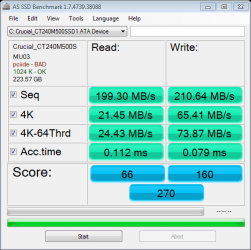
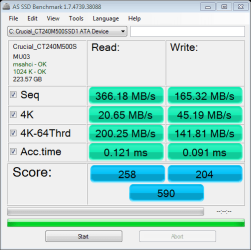
I put the SSD on the SATA_0 controller 3 Gig/s and got this benchmark the original benchmark on the Sata 6 Gigs/s is much faster at reading but not in all write speed categories is posted below it. It seems that I'm much better off using the Marvell 6 gig/s SATA controller vs the native Intel.
 

Attachments

  • as-ssd-bench Crucial_CT240M50 4.8.2014 3 gig.png
    as-ssd-bench Crucial_CT240M50 4.8.2014 3 gig.png
    13.3 KB · Views: 18
  • as-ssd-bench Crucial_CT240M50 4.8.2014 6 gig port.png
    as-ssd-bench Crucial_CT240M50 4.8.2014 6 gig port.png
    13.2 KB · Views: 18

My Computer My Computer

At a glance

Windows 7 Pro 64Biti7 5820KCORSAIR Vengeance LPX 16GB 288-Pin DDR4 SDRAMMSI GeForce GTX 970 100ME 4GB
Computer type
PC/Desktop
Computer Manufacturer/Model Number
Custom Build
OS
Windows 7 Pro 64Bit
CPU
i7 5820K
Motherboard
MSI X99A SLI KRAIT EDITION LGA 2011-v3
Memory
CORSAIR Vengeance LPX 16GB 288-Pin DDR4 SDRAM
Graphics Card(s)
MSI GeForce GTX 970 100ME 4GB
PSU
Corsair RM850X 850W
Antivirus
Microsoft Security Essentials
Thanks for the info. Very helpful.

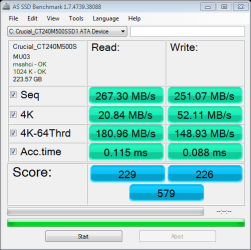
I noticed that the top screenshot (on the SATA0 port) has "pciide - bad" listed.
This would indicate that the SATA controller is set to IDE mode in the BIOS.
The bottom screenshot (on the Marvel port) has "msahci - ok" which indicates that the Marvel controller is set to AHCI mode.

It is recommended that SSDs be run in AHCI mode only. I don't know if this would affect the benchmark scores, but unless you are running any PATA hard drives you should have all of your SATA ports set to AHCI mode for best performance. (Best performance in this case means having the all capabilities of the system available, not that it will improve speed at all).

When the SSD was on the SATA0 port, did Windows start up?
 

My Computer My Computer

At a glance

Windows 7 64 Bit Home Premium SP1i7-3820GSkill F3-14900CL9Q - 16GBEVGA GeForce GTX660 - Driver 352.86
Computer type
PC/Desktop
Computer Manufacturer/Model Number
Home Built - Jan 2013
OS
Windows 7 64 Bit Home Premium SP1
CPU
i7-3820
Motherboard
Asus P9X79-PRO - Bios 4608
Memory
GSkill F3-14900CL9Q - 16GB
Graphics Card(s)
EVGA GeForce GTX660 - Driver 352.86
Sound Card
On board Realtek ALC898
Monitor(s) Displays
Acer S271HL
Screen Resolution
1920 x 1080
Hard Drives
#1- Samsung 840 Pro Series
#2- Western Digital WD1002FAEX Sata3 Black
#3- Western Digital WD1002FAEX Sata3 Black
PSU
Corsair CMPSU-850TX-V2 - 850 watt (by Seasonic)
Case
Corsair Obsidian 550D
Cooling
Standard 3 120mm case fans, Cooler Master Hyper 212 EVO
Keyboard
MS KC-0405
Mouse
Intellimouse 5-button
Internet Speed
56 Mbits/Sec (on a good day)
Antivirus
Avast & Malwarebytes
Browser
Firefox
Other Info
Asus DVD - DRW-24B1ST 24X
Thanks for the info. Very helpful.

I noticed that the top screenshot (on the SATA0 port) has "pciide - bad" listed.
This would indicate that the SATA controller is set to IDE mode in the BIOS.
The bottom screenshot (on the Marvel port) has "msahci - ok" which indicates that the Marvel controller is set to AHCI mode. Turned on AHCI for

It is recommended that SSDs be run in AHCI mode only. I don't know if this would affect the benchmark scores, but unless you are running any PATA hard drives you should have all of your SATA ports set to AHCI mode for best performance. (Best performance in this case means having the all capabilities of the system available, not that it will improve speed at all).

When the SSD was on the SATA0 port, did Windows start up?

When the SSD was on the SATA0 port Windows did start up no problem.

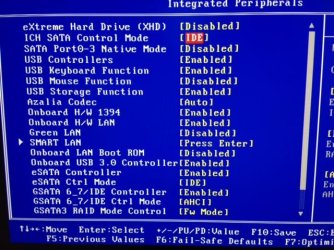
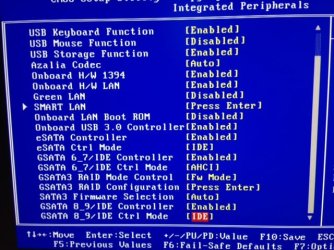
I've adjusted my bios for AHCI mode for all the SATA ports. See attachments
ICH SATA Control Mode [AHCI]
SATA Port 0-3 Native Mode [Enable]
GSATA 8-9 CTRL Mode [AHCI]

SSD Speed improved in some parameters but worse in others. Which SATA port for the SSD would be best SATA_0 or the Marvell 6 gig/s?
 

Attachments

  • Bios1.JPG
    Bios1.JPG
    67 KB · Views: 15
  • Bios2.JPG
    Bios2.JPG
    68.1 KB · Views: 15
  • as-ssd-bench Crucial_CT240M50 4.9.2014 SSD SATA_0 ACHI.png
    as-ssd-bench Crucial_CT240M50 4.9.2014 SSD SATA_0 ACHI.png
    13.3 KB · Views: 15

My Computer My Computer

At a glance

Windows 7 Pro 64Biti7 5820KCORSAIR Vengeance LPX 16GB 288-Pin DDR4 SDRAMMSI GeForce GTX 970 100ME 4GB
Computer type
PC/Desktop
Computer Manufacturer/Model Number
Custom Build
OS
Windows 7 Pro 64Bit
CPU
i7 5820K
Motherboard
MSI X99A SLI KRAIT EDITION LGA 2011-v3
Memory
CORSAIR Vengeance LPX 16GB 288-Pin DDR4 SDRAM
Graphics Card(s)
MSI GeForce GTX 970 100ME 4GB
PSU
Corsair RM850X 850W
Antivirus
Microsoft Security Essentials
That last AS SSD Benchmark - is that on the SATA0 port?

If the benchmark is better on the SATA 6Gb port then that is the winner.
If the SATA0 port is giving equal performance I think I might want to use that one.
 

My Computer My Computer

At a glance

Windows 7 64 Bit Home Premium SP1i7-3820GSkill F3-14900CL9Q - 16GBEVGA GeForce GTX660 - Driver 352.86
Computer type
PC/Desktop
Computer Manufacturer/Model Number
Home Built - Jan 2013
OS
Windows 7 64 Bit Home Premium SP1
CPU
i7-3820
Motherboard
Asus P9X79-PRO - Bios 4608
Memory
GSkill F3-14900CL9Q - 16GB
Graphics Card(s)
EVGA GeForce GTX660 - Driver 352.86
Sound Card
On board Realtek ALC898
Monitor(s) Displays
Acer S271HL
Screen Resolution
1920 x 1080
Hard Drives
#1- Samsung 840 Pro Series
#2- Western Digital WD1002FAEX Sata3 Black
#3- Western Digital WD1002FAEX Sata3 Black
PSU
Corsair CMPSU-850TX-V2 - 850 watt (by Seasonic)
Case
Corsair Obsidian 550D
Cooling
Standard 3 120mm case fans, Cooler Master Hyper 212 EVO
Keyboard
MS KC-0405
Mouse
Intellimouse 5-button
Internet Speed
56 Mbits/Sec (on a good day)
Antivirus
Avast & Malwarebytes
Browser
Firefox
Other Info
Asus DVD - DRW-24B1ST 24X
The last AS SSD Benchmark was from SATA0 Port after AHCI was turned on. Maybe it doesn't matter but seq read speeds are 366(6gig/s)-267(3 gigs SATA0), write 165(6 gig/s) - 251(3gig/s SATA0). Other numbers are similar. I'm not sure which benchmark parameter is more important.
 

My Computer My Computer

At a glance

Windows 7 Pro 64Biti7 5820KCORSAIR Vengeance LPX 16GB 288-Pin DDR4 SDRAMMSI GeForce GTX 970 100ME 4GB
Computer type
PC/Desktop
Computer Manufacturer/Model Number
Custom Build
OS
Windows 7 Pro 64Bit
CPU
i7 5820K
Motherboard
MSI X99A SLI KRAIT EDITION LGA 2011-v3
Memory
CORSAIR Vengeance LPX 16GB 288-Pin DDR4 SDRAM
Graphics Card(s)
MSI GeForce GTX 970 100ME 4GB
PSU
Corsair RM850X 850W
Antivirus
Microsoft Security Essentials
It's the 4K read/write which are important to Windows running as it reads in that size blocks. Sequential read/write is more important to file transfers.
 

My Computer My Computer

At a glance

Windows 7 Ultimate X64 SP1Intel i5-2550K, Differing ~4.4-4.8GHz No buil...16GB G.Skill Sniper 1866MHz @ 2133MHz 2x8GBASUS GTX650TIB-DC2OC-2GD5, (650TI Boost)
Computer type
PC/Desktop
Computer Manufacturer/Model Number
Home Built Desktop By DataTech
OS
Windows 7 Ultimate X64 SP1
CPU
Intel i5-2550K, Differing ~4.4-4.8GHz No built in GPU
Motherboard
ASUS P8Z68-V PRO/GEN3
Memory
16GB G.Skill Sniper 1866MHz @ 2133MHz 2x8GB
Graphics Card(s)
ASUS GTX650TIB-DC2OC-2GD5, (650TI Boost)
Sound Card
Onboard Realtek 5-1
Monitor(s) Displays
Samsung P2570HD
Screen Resolution
1920x1080
Hard Drives
Samsung 840 Pro 256GB SSD for OS, 500GB Seagate Constellation (Enterprise drive) for Data
PSU
Corsair HX650W
Case
Inwin Dragon Rider
Cooling
Hyper 212 EVO w/two Noctua fans, push-pull, @1300 RPM
Keyboard
E-Z Eyes, bright yellow keys with large characters
Mouse
steelseries SENSEI Laser Pro Gaming
Internet Speed
48-51Mbs Mbs down, 11 Mbs up Xfinity Cable
Antivirus
Norton Internet Security 2013
Browser
IE 10, Opera, Pale Moon if needed
Other Info
4 case fans, LG BluRay-RE, ASUS DVD-RW, Mr. Fusion power supply, 1.21 gigawatts.
Thanks to everyone who assisted/educated me in this thread. I've not had a problem with my drive disappearing so I'm marking this thread as solved.
 

My Computer My Computer

At a glance

Windows 7 Pro 64Biti7 5820KCORSAIR Vengeance LPX 16GB 288-Pin DDR4 SDRAMMSI GeForce GTX 970 100ME 4GB
Computer type
PC/Desktop
Computer Manufacturer/Model Number
Custom Build
OS
Windows 7 Pro 64Bit
CPU
i7 5820K
Motherboard
MSI X99A SLI KRAIT EDITION LGA 2011-v3
Memory
CORSAIR Vengeance LPX 16GB 288-Pin DDR4 SDRAM
Graphics Card(s)
MSI GeForce GTX 970 100ME 4GB
PSU
Corsair RM850X 850W
Antivirus
Microsoft Security Essentials
That's very good to hear! Enjoy your PC now. :D
 

My Computer My Computer

At a glance

Windows 7 Ultimate X64 SP1Intel i5-2550K, Differing ~4.4-4.8GHz No buil...16GB G.Skill Sniper 1866MHz @ 2133MHz 2x8GBASUS GTX650TIB-DC2OC-2GD5, (650TI Boost)
Computer type
PC/Desktop
Computer Manufacturer/Model Number
Home Built Desktop By DataTech
OS
Windows 7 Ultimate X64 SP1
CPU
Intel i5-2550K, Differing ~4.4-4.8GHz No built in GPU
Motherboard
ASUS P8Z68-V PRO/GEN3
Memory
16GB G.Skill Sniper 1866MHz @ 2133MHz 2x8GB
Graphics Card(s)
ASUS GTX650TIB-DC2OC-2GD5, (650TI Boost)
Sound Card
Onboard Realtek 5-1
Monitor(s) Displays
Samsung P2570HD
Screen Resolution
1920x1080
Hard Drives
Samsung 840 Pro 256GB SSD for OS, 500GB Seagate Constellation (Enterprise drive) for Data
PSU
Corsair HX650W
Case
Inwin Dragon Rider
Cooling
Hyper 212 EVO w/two Noctua fans, push-pull, @1300 RPM
Keyboard
E-Z Eyes, bright yellow keys with large characters
Mouse
steelseries SENSEI Laser Pro Gaming
Internet Speed
48-51Mbs Mbs down, 11 Mbs up Xfinity Cable
Antivirus
Norton Internet Security 2013
Browser
IE 10, Opera, Pale Moon if needed
Other Info
4 case fans, LG BluRay-RE, ASUS DVD-RW, Mr. Fusion power supply, 1.21 gigawatts.
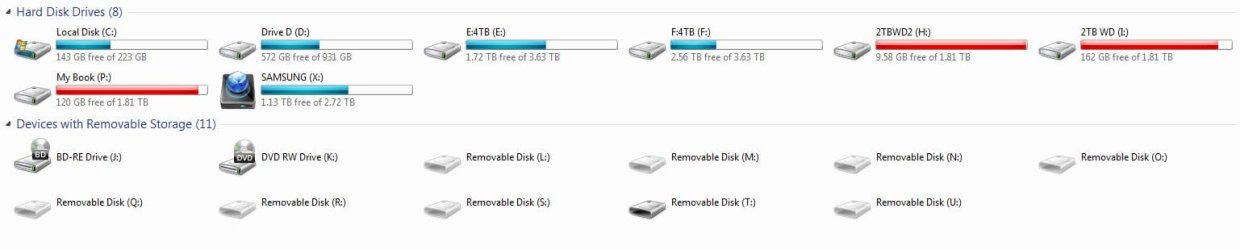
Sorry to report that Drive G disappeared again. I just got back from taking a large number of photos so I decided to plugin the USB 3.0 Card reader on my PCI card to speed the download of the memory card. All went well initially. Using lightroom I generated preview after importing my photos. LR kept saying loading so I decided to optimize the catalog. After that was successfully performed I noticed ? in the location of my photos (an indication of missing location) and sure enough the G: drive was gone. I'm thinking of changing the SATA port that Drive G: uses but will wait till you guys give me some input.
 

Attachments

  • 2 DM no G.JPG
    2 DM no G.JPG
    181.5 KB · Views: 2
  • 2 Exp No G.JPG
    2 Exp No G.JPG
    43.9 KB · Views: 2

My Computer My Computer

At a glance

Windows 7 Pro 64Biti7 5820KCORSAIR Vengeance LPX 16GB 288-Pin DDR4 SDRAMMSI GeForce GTX 970 100ME 4GB
Computer type
PC/Desktop
Computer Manufacturer/Model Number
Custom Build
OS
Windows 7 Pro 64Bit
CPU
i7 5820K
Motherboard
MSI X99A SLI KRAIT EDITION LGA 2011-v3
Memory
CORSAIR Vengeance LPX 16GB 288-Pin DDR4 SDRAM
Graphics Card(s)
MSI GeForce GTX 970 100ME 4GB
PSU
Corsair RM850X 850W
Antivirus
Microsoft Security Essentials
I can't pretend to know what is going on there, having never run so many removable drives at once myself.
But since the tests you've run show that the system is capable of working normally then we need to start looking at what makes your system different.

I suspect it has something to do with the add on card you are using to gain additional USB ports or it's driver. I'm thinking that some protocol is not being followed and that is messing up the system.
You could experiment with using powered USB hubs in series, or hard drive enclosures instead, but that requires investment in more hardware.

There is also the possibility that it is the sheer number of removable drives that is the cause. Do you need every one running constantly? It would be interesting to know if there is a "tipping point".

And yes you could try another SATA port for the fixed internal G drive, although I doubt that is the cause. But it can't hurt, might help.
 

My Computer My Computer

At a glance

Windows 7 64 Bit Home Premium SP1i7-3820GSkill F3-14900CL9Q - 16GBEVGA GeForce GTX660 - Driver 352.86
Computer type
PC/Desktop
Computer Manufacturer/Model Number
Home Built - Jan 2013
OS
Windows 7 64 Bit Home Premium SP1
CPU
i7-3820
Motherboard
Asus P9X79-PRO - Bios 4608
Memory
GSkill F3-14900CL9Q - 16GB
Graphics Card(s)
EVGA GeForce GTX660 - Driver 352.86
Sound Card
On board Realtek ALC898
Monitor(s) Displays
Acer S271HL
Screen Resolution
1920 x 1080
Hard Drives
#1- Samsung 840 Pro Series
#2- Western Digital WD1002FAEX Sata3 Black
#3- Western Digital WD1002FAEX Sata3 Black
PSU
Corsair CMPSU-850TX-V2 - 850 watt (by Seasonic)
Case
Corsair Obsidian 550D
Cooling
Standard 3 120mm case fans, Cooler Master Hyper 212 EVO
Keyboard
MS KC-0405
Mouse
Intellimouse 5-button
Internet Speed
56 Mbits/Sec (on a good day)
Antivirus
Avast & Malwarebytes
Browser
Firefox
Other Info
Asus DVD - DRW-24B1ST 24X
The drive disappeared again this morning. All the Drive are internal except P: and X:. I've disconnected their power supplies and will run the computer with only to internal dirves for a while to see if it happens again. If it doesn't it would point to the PCI USB 3.0 card.
 

My Computer My Computer

At a glance

Windows 7 Pro 64Biti7 5820KCORSAIR Vengeance LPX 16GB 288-Pin DDR4 SDRAMMSI GeForce GTX 970 100ME 4GB
Computer type
PC/Desktop
Computer Manufacturer/Model Number
Custom Build
OS
Windows 7 Pro 64Bit
CPU
i7 5820K
Motherboard
MSI X99A SLI KRAIT EDITION LGA 2011-v3
Memory
CORSAIR Vengeance LPX 16GB 288-Pin DDR4 SDRAM
Graphics Card(s)
MSI GeForce GTX 970 100ME 4GB
PSU
Corsair RM850X 850W
Antivirus
Microsoft Security Essentials
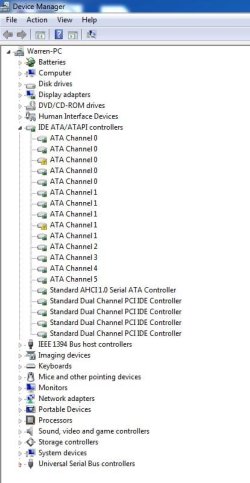
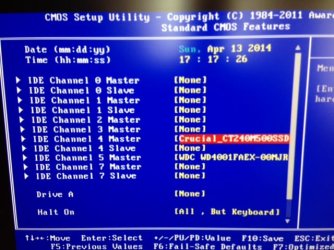
Update. I'm not sure why 2 drives the SSD and 4 TB show up on the computer as IDE during the boot cycle as I have the have it set to AHCI not IDE. I also noticed 2 errors ! in the device manager. I get the feeling these are related.
 

Attachments

  • 2 ATA Error.JPG
    2 ATA Error.JPG
    53.6 KB · Views: 0
  • 2 IDE Drives.JPG
    2 IDE Drives.JPG
    57.3 KB · Views: 16

My Computer My Computer

At a glance

Windows 7 Pro 64Biti7 5820KCORSAIR Vengeance LPX 16GB 288-Pin DDR4 SDRAMMSI GeForce GTX 970 100ME 4GB
Computer type
PC/Desktop
Computer Manufacturer/Model Number
Custom Build
OS
Windows 7 Pro 64Bit
CPU
i7 5820K
Motherboard
MSI X99A SLI KRAIT EDITION LGA 2011-v3
Memory
CORSAIR Vengeance LPX 16GB 288-Pin DDR4 SDRAM
Graphics Card(s)
MSI GeForce GTX 970 100ME 4GB
PSU
Corsair RM850X 850W
Antivirus
Microsoft Security Essentials
I would try removing (uninstalling) the PCI USB card and seeing if everything goes back to normal. You have a lot of unusual stuff going on there. That card continues to be the only foreign factor.
 

My Computer My Computer

At a glance

Windows 7 64 Bit Home Premium SP1i7-3820GSkill F3-14900CL9Q - 16GBEVGA GeForce GTX660 - Driver 352.86
Computer type
PC/Desktop
Computer Manufacturer/Model Number
Home Built - Jan 2013
OS
Windows 7 64 Bit Home Premium SP1
CPU
i7-3820
Motherboard
Asus P9X79-PRO - Bios 4608
Memory
GSkill F3-14900CL9Q - 16GB
Graphics Card(s)
EVGA GeForce GTX660 - Driver 352.86
Sound Card
On board Realtek ALC898
Monitor(s) Displays
Acer S271HL
Screen Resolution
1920 x 1080
Hard Drives
#1- Samsung 840 Pro Series
#2- Western Digital WD1002FAEX Sata3 Black
#3- Western Digital WD1002FAEX Sata3 Black
PSU
Corsair CMPSU-850TX-V2 - 850 watt (by Seasonic)
Case
Corsair Obsidian 550D
Cooling
Standard 3 120mm case fans, Cooler Master Hyper 212 EVO
Keyboard
MS KC-0405
Mouse
Intellimouse 5-button
Internet Speed
56 Mbits/Sec (on a good day)
Antivirus
Avast & Malwarebytes
Browser
Firefox
Other Info
Asus DVD - DRW-24B1ST 24X
I would try removing (uninstalling) the PCI USB card and seeing if everything goes back to normal. You have a lot of unusual stuff going on there. That card continues to be the only foreign factor.
That may be the root issue. SATA, IDE, and PCIe are on the same bus and may well be overloaded here.
With all the drives connected you are juggling enough data to be a server. Maybe you should look into Network Attached Storage (NAS).

Network-attached storage - Wikipedia, the free encyclopedia
 

My Computer My Computer

At a glance

Windows 7 Ultimate X64 SP1Intel i5-2550K, Differing ~4.4-4.8GHz No buil...16GB G.Skill Sniper 1866MHz @ 2133MHz 2x8GBASUS GTX650TIB-DC2OC-2GD5, (650TI Boost)
Computer type
PC/Desktop
Computer Manufacturer/Model Number
Home Built Desktop By DataTech
OS
Windows 7 Ultimate X64 SP1
CPU
Intel i5-2550K, Differing ~4.4-4.8GHz No built in GPU
Motherboard
ASUS P8Z68-V PRO/GEN3
Memory
16GB G.Skill Sniper 1866MHz @ 2133MHz 2x8GB
Graphics Card(s)
ASUS GTX650TIB-DC2OC-2GD5, (650TI Boost)
Sound Card
Onboard Realtek 5-1
Monitor(s) Displays
Samsung P2570HD
Screen Resolution
1920x1080
Hard Drives
Samsung 840 Pro 256GB SSD for OS, 500GB Seagate Constellation (Enterprise drive) for Data
PSU
Corsair HX650W
Case
Inwin Dragon Rider
Cooling
Hyper 212 EVO w/two Noctua fans, push-pull, @1300 RPM
Keyboard
E-Z Eyes, bright yellow keys with large characters
Mouse
steelseries SENSEI Laser Pro Gaming
Internet Speed
48-51Mbs Mbs down, 11 Mbs up Xfinity Cable
Antivirus
Norton Internet Security 2013
Browser
IE 10, Opera, Pale Moon if needed
Other Info
4 case fans, LG BluRay-RE, ASUS DVD-RW, Mr. Fusion power supply, 1.21 gigawatts.
I would try removing (uninstalling) the PCI USB card and seeing if everything goes back to normal. You have a lot of unusual stuff going on there. That card continues to be the only foreign factor.
That may be the root issue. SATA, IDE, and PCIe are on the same bus and may well be overloaded here.
With all the drives connected you are juggling enough data to be a server. Maybe you should look into Network Attached Storage (NAS).

Network-attached storage - Wikipedia, the free encyclopedia

After removing the USB 3 PCI-E card, swapping the cable and SATA port, It appears the the final solution to this problem was turning on AHCI for all the SATA ports except SATA_8 and SATA_9 which are controlled by the Gigabyte chip. This has an IDE port as well as 2 SATAs. The IDE has a DVDROM writer on it. The system has been stable ever since.
A NAS would probably be a good idea. Any recommendations for a brand or model? Thanks again for all the help.
 

My Computer My Computer

At a glance

Windows 7 Pro 64Biti7 5820KCORSAIR Vengeance LPX 16GB 288-Pin DDR4 SDRAMMSI GeForce GTX 970 100ME 4GB
Computer type
PC/Desktop
Computer Manufacturer/Model Number
Custom Build
OS
Windows 7 Pro 64Bit
CPU
i7 5820K
Motherboard
MSI X99A SLI KRAIT EDITION LGA 2011-v3
Memory
CORSAIR Vengeance LPX 16GB 288-Pin DDR4 SDRAM
Graphics Card(s)
MSI GeForce GTX 970 100ME 4GB
PSU
Corsair RM850X 850W
Antivirus
Microsoft Security Essentials
Back
Top