Shortcuts to EXE files "Open File location" fails

bawldiggle

GrayGhost2 ret.
Pro User
VIP
Local time
8:09 AM
Messages
895
Location
Australia
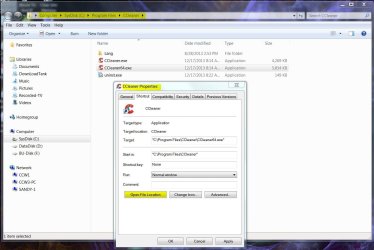
When opening Properties of a shortcut ...
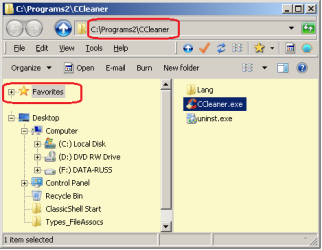
Properties (dlg) > Shortcut (tab) > "Open File location"
... in the Navigation pane "Favorites" is ALWAYS hi-lited with the non-favorite EXE file in the results pane :confused:

dud result.png

No amount of refreshing or coaxing will show the actual "containing folder"
• Selecting the address + Enter/refresh ... no success
• Copy/pasting the folder address + Enter ... no success

There are two solutions:- ... that I know of

  1. add a backslash "\" to the address string > then "Enter" key
    With an additional sore point ... the Navigation pane scrolls down, so the holding folder is not visible.
  2. copy the address from the address bar > open a new instance of Win-Exp > past the path > Enter > manually locate the exe file > ... to finally display the intentions of "Open File location" > then close the first incorrect WinExp window.

Admittedly solution #1 is relatively simpler (just discovered it :o after 2 years with Win-7)

Are there any fixes for these problems ?

Thank you :)

---------------
SPECS:
Toshiba Satellite C665
OS pre-installed:= Windows 7 Home Premium (32-bit), sp1 (Build 7601) OEM
UI:=Classic Shell Start + Classic Explorer
Windows Indexing = disabled
 
Last edited:

My Computer My Computer

At a glance

XP Pro (x86) | 7 HP (x86) & (x64) | 7 Pro (x64)
Computer type
PC/Desktop
Computer Manufacturer/Model Number
Toshiba, Lenovo (laptops) + 4 rigs
OS
XP Pro (x86) | 7 HP (x86) & (x64) | 7 Pro (x64)
I am not real sure what you want to accomplish.
Do you want to access the CCleaner website or activate the program?
Do you have the Quick Launch available on your Notification Taskbar?
 

My Computer My Computer

At a glance

Microsoft Windows 7 Ultimate 64-bit 7601 Mult...Intel(R) Core(TM) i7 CPU 950 @ 3.07GHz16.0GB Dual-Channel DDR3 @ 534MHz (8-8-8-20)1023MB NVIDIA GeForce GTX 650 (EVGA)
Computer type
PC/Desktop
Computer Manufacturer/Model Number
Custome Built
OS
Microsoft Windows 7 Ultimate 64-bit 7601 Multiprocessor Free Service Pack 1
CPU
Intel(R) Core(TM) i7 CPU 950 @ 3.07GHz
Motherboard
ASUSTeK Computer INC. SABERTOOTH X58 (LGA1366)
Memory
16.0GB Dual-Channel DDR3 @ 534MHz (8-8-8-20)
Graphics Card(s)
1023MB NVIDIA GeForce GTX 650 (EVGA)
Sound Card
(1) NVIDIA High Definition Audio (2) High Definition Audio
Monitor(s) Displays
HP W2072a LED Backlit
Screen Resolution
1920x1080@60Hz
Hard Drives
(1) SAMSUNG MMCRE28G5MXP-0VB SCSI Disk Device
(2) ST1000DM 003-1CH162 SCSI Disk Device
(3) WDC WD10EURX-73FH1Y0 SCSI Disk Device
PSU
XION XON-1000P14F
Cooling
Fans
Antivirus
Windows Security Essentials
Browser
Mozilla Firefox
Other Info
BIOS Version/Date
American Megatrends Inc. 1402, 8/9/2012
SMBIOS Version 2.5
Works for me :) Mine is setup this way:

ExpandShow.jpg
 

My Computer My Computer

At a glance

Windows 10 Pro X64Intel Quad Core i7-4770 @ 3.4Ghz16.0GB PC3-12800 DDR3 SDRAM 1600 MHzIntel Integrated HD Graphics
Computer type
PC/Desktop
Computer Manufacturer/Model Number
Lenovo IdeaCenter 450
OS
Windows 10 Pro X64
CPU
Intel Quad Core i7-4770 @ 3.4Ghz
Memory
16.0GB PC3-12800 DDR3 SDRAM 1600 MHz
Graphics Card(s)
Intel Integrated HD Graphics
Sound Card
Realtek HD Audio
Monitor(s) Displays
HP 22" LCD
Screen Resolution
1680 x 1050
Hard Drives
250GB Samsung EVO SATA-3 SSD
2TB Seagate ST2000DM001 SATA-2
1.5TB Seagate ST3150041AS SATA
Keyboard
Dell USB
Mouse
Lenovo USB
Internet Speed
Cable via Road Runner 3MB Upload, 30MB Download
Antivirus
Windows Defender, MBAM Pro, MBAE
Browser
Seamonkey
Other Info
UEFI/GPT
PLDS DVD-RW DH16AERSH
Thanks Ztrucker, :)

With Toshiba + ClassicShell in the Win-7 32bit mix, I am doing some investigations with Toshiba and ClassicShell forums.

When I get some (hopefully) inspiring answers I will report back here
 

My Computer My Computer

At a glance

XP Pro (x86) | 7 HP (x86) & (x64) | 7 Pro (x64)
Computer type
PC/Desktop
Computer Manufacturer/Model Number
Toshiba, Lenovo (laptops) + 4 rigs
OS
XP Pro (x86) | 7 HP (x86) & (x64) | 7 Pro (x64)
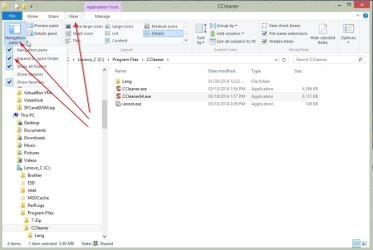
This is what I get when I right click the short cut, select properties and click on Open File Location--A nice clean display. :)
 

Attachments

  • CCleaner Properties.JPG
    CCleaner Properties.JPG
    112.9 KB · Views: 1

My Computer My Computer

At a glance

Windows 7 Pro-x64i7-2600 3.4GHz - 3.8GHz Turbo8Gb - 2x4GB, Muskin 991770 PC3-1333Integrated Intel HD 2000
Computer type
PC/Desktop
Computer Manufacturer/Model Number
Built 2/11/2011
OS
Windows 7 Pro-x64
CPU
i7-2600 3.4GHz - 3.8GHz Turbo
Motherboard
Intel DH67BL-B3
Memory
8Gb - 2x4GB, Muskin 991770 PC3-1333
Graphics Card(s)
Integrated Intel HD 2000
Sound Card
Integrated Intel 10.1 HD, RealTek ALC892
Monitor(s) Displays
Asus LCD VH222H, Haier HL24XSL2a
Screen Resolution
1920x1080, 1920x1080
Hard Drives
Crucial SSD C300-128Gb,
Western Digital WD5002AALX - 500Gb,
Western Digital WD7501AALS - 750Gb
PSU
Seasonic 650W 80+ Gold Modular
Case
Rosewill Defender
Cooling
Stock CPU, Four 120mm case fans, PCH fan added
Keyboard
Logitech EX100 Y-RBH94 Wireless
Mouse
Logitech EX100 M-RCE95 Wireless
Internet Speed
3.0/1.5 Mbs
Antivirus
Microsoft Security Essentials
Browser
Microsoft Internet Explorer 11
Other Info
Antec Veris Premier-Multimedia IR Station,
Cyber Accoustics-3602 Speakers,
AFT XM-5U Card Reader,
Hauppauge TV-HVR-2250,
Sony LX300 USB Turntable

My Computer My Computer

At a glance

W7 Ultimate SP1, LM19.2 MATE, W10 Home 1703, ...AMD Phenom II x6 1100T, 3.3 GHz12GB DDR3 1333 G-Skill (4GB x 2), G-Skill (2G...NVIDIA GeForce GTX 660
Computer type
PC/Desktop
Computer Manufacturer/Model Number
n/a
OS
W7 Ultimate SP1, LM19.2 MATE, W10 Home 1703, W10 Pro 1703 VM, #All 64 bit
CPU
AMD Phenom II x6 1100T, 3.3 GHz
Motherboard
ASUS M4A88T-M/USB3 (AM3)
Memory
12GB DDR3 1333 G-Skill (4GB x 2), G-Skill (2GB x 2)
Graphics Card(s)
NVIDIA GeForce GTX 660
Sound Card
Realtek?
Monitor(s) Displays
Samsung S23B350
Screen Resolution
1920x1080
Hard Drives
WD Green 2TB (SATA), WD Green 3TB (SATA), WD Blue 4TB (SATA), WD Blue 6TB (SATA)
PSU
Cooler Master
Case
Antec GX300 Tower
Cooling
3x Antec TRICOOL 120mm Fans
Mouse
Wired Optical
Internet Speed
DSL
Antivirus
Avast
Browser
Pale Moon (64 bit)
Other Info
2018-12-27 Upgraded HDDs
2015-12-10 Upgraded case, graphics card, storage
2015-08-15 Upgraded motherboard & RAM
2015-07-15 Upgraded LM17.1 to LM17.2
Try changing your windows theme to aero and then back to classic or windows 7 basic.
 

My Computer My Computer

At a glance

Windows 10 ProAMD Ryzen 5 2400G Processor with Radeon RX Ve...G.SKILL Ripjaws V Series 16GB (2 x 8GB) 288-P...2047MB NVIDIA GeForce GTX 1060 6GB (EVGA)
Computer type
PC/Desktop
Computer Manufacturer/Model Number
Custom Built
OS
Windows 10 Pro
CPU
AMD Ryzen 5 2400G Processor with Radeon RX Vega 11 Graphics
Motherboard
ASRock X470 Master SLI/AC AM4 AMD Promontory X470 SATA 6Gb/s
Memory
G.SKILL Ripjaws V Series 16GB (2 x 8GB) 288-Pin DDR4 SDRAM D
Graphics Card(s)
2047MB NVIDIA GeForce GTX 1060 6GB (EVGA)
Sound Card
Motherboard Built in
Monitor(s) Displays
Acer R240HY bidx 23.8-Inch IPS HDMI DVI VGA (1920 x 1080) Wi
Screen Resolution
1920 x 1080
Hard Drives
1TB Sandisk SSD PLUS (Main drive)
500 GB Seagate 7200 RPM (Games)
500 GB Western Digital 7200 RPM (Virtual Machines)
PSU
CORSAIR TX Series TX650M 650W 80+ Gold Modular Power Supply
Case
CORSAIR CARBIDE SPEC-02 Mid-Tower Gaming Case, Red LED Fan
Cooling
220mm, two 120mm, and four 60mm fans
Keyboard
Wired Dell keyboard
Mouse
Wireless Logitech mouse
Internet Speed
250mb down, 30mb up
Antivirus
Panda Cloud Antivirus
Browser
Chrome-ish x64
Other Info
Your awesome for reading this.
Why use Classic Shell with Windows 7? I can see it with Windows 8 but 7?
 

My Computer My Computer

At a glance

Windows 10 Pro X64Intel Quad Core i7-4770 @ 3.4Ghz16.0GB PC3-12800 DDR3 SDRAM 1600 MHzIntel Integrated HD Graphics
Computer type
PC/Desktop
Computer Manufacturer/Model Number
Lenovo IdeaCenter 450
OS
Windows 10 Pro X64
CPU
Intel Quad Core i7-4770 @ 3.4Ghz
Memory
16.0GB PC3-12800 DDR3 SDRAM 1600 MHz
Graphics Card(s)
Intel Integrated HD Graphics
Sound Card
Realtek HD Audio
Monitor(s) Displays
HP 22" LCD
Screen Resolution
1680 x 1050
Hard Drives
250GB Samsung EVO SATA-3 SSD
2TB Seagate ST2000DM001 SATA-2
1.5TB Seagate ST3150041AS SATA
Keyboard
Dell USB
Mouse
Lenovo USB
Internet Speed
Cable via Road Runner 3MB Upload, 30MB Download
Antivirus
Windows Defender, MBAM Pro, MBAE
Browser
Seamonkey
Other Info
UEFI/GPT
PLDS DVD-RW DH16AERSH
Why use Classic Shell with Windows 7? I can see it with Windows 8 but 7?

Why not, it's his computer. They are called Personal Computers.

If we all thought the same way, most of us would be useless.
 

My Computer My Computer

At a glance

Win 10 Pro x64Intel I5-2500K @3.3GHz16GB G.Skill Ripjaws X (4x4GB)EVGA GeForce 750 Ti SC 2GB
Computer type
PC/Desktop
Computer Manufacturer/Model Number
Self Built
OS
Win 10 Pro x64
CPU
Intel I5-2500K @3.3GHz
Motherboard
Asrock P67 Extreme4
Memory
16GB G.Skill Ripjaws X (4x4GB)
Graphics Card(s)
EVGA GeForce 750 Ti SC 2GB
Sound Card
ASUS Xonar DG 5.1 Channels 24-bit 96KHz PCI Interface Sound
Monitor(s) Displays
auria eq2367
Screen Resolution
1920 x 1080
Hard Drives
250GB Samsung 850 EVO SSD
1TB WD Blue
1TB Hitachi
PSU
SeaSonic X 650W 80 Plus Gold
Case
Corsair Obsidian 750D
Cooling
Corsair H60, Three 140mm case fans
Keyboard
Logitech Wireless Keyboard K520
Mouse
Logitech Wireless Mouse M310
Internet Speed
Wave Broadband ~ 100 dn 5 up
Antivirus
Windows Defender, Malwarebytes Premium
Browser
Edge, IE11, Chrome
Other Info
Laptop specs: HP g7-1365dx /
CPU: AMD A6-3420M APU with Radeon(tm) HD Graphics /
RAM: Crucial 8Gb (2x4Gb) /
SSD: Crucial M4-CT128M4SSD2 ATA Device/ FW 000F /
GFX: AMD Radeon HD 6520G /
OS: Windows 10 Pro x64
Hi andrew129260 thank you for your efforts :)

I changed theme back to aero, and tested in aero then again in classic theme
Exactly the same results. (I was hopeful though, the aero idea had crossed my mind) :cry:

Now I am down to (I think) two three possibilities ...

  1. A Classic Shell problem
  2. Corrupted WinExp (free Malwarebytes, 2 hour scan) returned clean
    Not sure if free MAB scans the root kit (?) .. a Q for MAB I know :o
  3. maybe this problem is exacerbated by the small laptop screen


The misbehaving "open File Location" is not life or death.
The worst case scenario is a clean install of Win-7, which is an over re-action.

----
• My custom rig with Win-7 Home Premium 64bit with ClassicShell -- delivers results correctly
• It is only my Toshiba laptop Win-7 Home Premium 32bit with ClassicShell that is misbehaving
 

My Computer My Computer

At a glance

XP Pro (x86) | 7 HP (x86) & (x64) | 7 Pro (x64)
Computer type
PC/Desktop
Computer Manufacturer/Model Number
Toshiba, Lenovo (laptops) + 4 rigs
OS
XP Pro (x86) | 7 HP (x86) & (x64) | 7 Pro (x64)
Why use Classic Shell with Windows 7? I can see it with Windows 8 but 7?

Why not, it's his computer. They are called Personal Computers.

If we all thought the same way, most of us would be useless.

I asked an honest question looking for an honest answer, not a put down response that was totally uncalled for.

Am I not allowed to ask questions about things I don't know the answer to?
 

My Computer My Computer

At a glance

Windows 10 Pro X64Intel Quad Core i7-4770 @ 3.4Ghz16.0GB PC3-12800 DDR3 SDRAM 1600 MHzIntel Integrated HD Graphics
Computer type
PC/Desktop
Computer Manufacturer/Model Number
Lenovo IdeaCenter 450
OS
Windows 10 Pro X64
CPU
Intel Quad Core i7-4770 @ 3.4Ghz
Memory
16.0GB PC3-12800 DDR3 SDRAM 1600 MHz
Graphics Card(s)
Intel Integrated HD Graphics
Sound Card
Realtek HD Audio
Monitor(s) Displays
HP 22" LCD
Screen Resolution
1680 x 1050
Hard Drives
250GB Samsung EVO SATA-3 SSD
2TB Seagate ST2000DM001 SATA-2
1.5TB Seagate ST3150041AS SATA
Keyboard
Dell USB
Mouse
Lenovo USB
Internet Speed
Cable via Road Runner 3MB Upload, 30MB Download
Antivirus
Windows Defender, MBAM Pro, MBAE
Browser
Seamonkey
Other Info
UEFI/GPT
PLDS DVD-RW DH16AERSH
Why use Classic Shell with Windows 7? I can see it with Windows 8 but 7?

Why not, it's his computer. They are called Personal Computers.

If we all thought the same way, most of us would be useless.

I asked an honest question looking for an honest answer, not a put down response that was totally uncalled for.

Am I not allowed to ask questions about things I don't know the answer to?

That wasn't a put down response. That was an honest answer to an honest question.

You are free to ask questions all you want. You asked why, I asked why not.

People have their preferences, that was my only point, not to put you down.

I don't use smilies very often, but here's one to try to help lighten the mood. :D
 

My Computer My Computer

At a glance

Win 10 Pro x64Intel I5-2500K @3.3GHz16GB G.Skill Ripjaws X (4x4GB)EVGA GeForce 750 Ti SC 2GB
Computer type
PC/Desktop
Computer Manufacturer/Model Number
Self Built
OS
Win 10 Pro x64
CPU
Intel I5-2500K @3.3GHz
Motherboard
Asrock P67 Extreme4
Memory
16GB G.Skill Ripjaws X (4x4GB)
Graphics Card(s)
EVGA GeForce 750 Ti SC 2GB
Sound Card
ASUS Xonar DG 5.1 Channels 24-bit 96KHz PCI Interface Sound
Monitor(s) Displays
auria eq2367
Screen Resolution
1920 x 1080
Hard Drives
250GB Samsung 850 EVO SSD
1TB WD Blue
1TB Hitachi
PSU
SeaSonic X 650W 80 Plus Gold
Case
Corsair Obsidian 750D
Cooling
Corsair H60, Three 140mm case fans
Keyboard
Logitech Wireless Keyboard K520
Mouse
Logitech Wireless Mouse M310
Internet Speed
Wave Broadband ~ 100 dn 5 up
Antivirus
Windows Defender, Malwarebytes Premium
Browser
Edge, IE11, Chrome
Other Info
Laptop specs: HP g7-1365dx /
CPU: AMD A6-3420M APU with Radeon(tm) HD Graphics /
RAM: Crucial 8Gb (2x4Gb) /
SSD: Crucial M4-CT128M4SSD2 ATA Device/ FW 000F /
GFX: AMD Radeon HD 6520G /
OS: Windows 10 Pro x64
Got it :)

I'd still like to know why people use Classic Shell on Windows 7 though (:
 

My Computer My Computer

At a glance

Windows 10 Pro X64Intel Quad Core i7-4770 @ 3.4Ghz16.0GB PC3-12800 DDR3 SDRAM 1600 MHzIntel Integrated HD Graphics
Computer type
PC/Desktop
Computer Manufacturer/Model Number
Lenovo IdeaCenter 450
OS
Windows 10 Pro X64
CPU
Intel Quad Core i7-4770 @ 3.4Ghz
Memory
16.0GB PC3-12800 DDR3 SDRAM 1600 MHz
Graphics Card(s)
Intel Integrated HD Graphics
Sound Card
Realtek HD Audio
Monitor(s) Displays
HP 22" LCD
Screen Resolution
1680 x 1050
Hard Drives
250GB Samsung EVO SATA-3 SSD
2TB Seagate ST2000DM001 SATA-2
1.5TB Seagate ST3150041AS SATA
Keyboard
Dell USB
Mouse
Lenovo USB
Internet Speed
Cable via Road Runner 3MB Upload, 30MB Download
Antivirus
Windows Defender, MBAM Pro, MBAE
Browser
Seamonkey
Other Info
UEFI/GPT
PLDS DVD-RW DH16AERSH
Got it :)

I'd still like to know why people use Classic Shell on Windows 7 though (:
Doesn't it also include XP and W98 style menu options?
 

My Computer My Computer

At a glance

W7 Ultimate SP1, LM19.2 MATE, W10 Home 1703, ...AMD Phenom II x6 1100T, 3.3 GHz12GB DDR3 1333 G-Skill (4GB x 2), G-Skill (2G...NVIDIA GeForce GTX 660
Computer type
PC/Desktop
Computer Manufacturer/Model Number
n/a
OS
W7 Ultimate SP1, LM19.2 MATE, W10 Home 1703, W10 Pro 1703 VM, #All 64 bit
CPU
AMD Phenom II x6 1100T, 3.3 GHz
Motherboard
ASUS M4A88T-M/USB3 (AM3)
Memory
12GB DDR3 1333 G-Skill (4GB x 2), G-Skill (2GB x 2)
Graphics Card(s)
NVIDIA GeForce GTX 660
Sound Card
Realtek?
Monitor(s) Displays
Samsung S23B350
Screen Resolution
1920x1080
Hard Drives
WD Green 2TB (SATA), WD Green 3TB (SATA), WD Blue 4TB (SATA), WD Blue 6TB (SATA)
PSU
Cooler Master
Case
Antec GX300 Tower
Cooling
3x Antec TRICOOL 120mm Fans
Mouse
Wired Optical
Internet Speed
DSL
Antivirus
Avast
Browser
Pale Moon (64 bit)
Other Info
2018-12-27 Upgraded HDDs
2015-12-10 Upgraded case, graphics card, storage
2015-08-15 Upgraded motherboard & RAM
2015-07-15 Upgraded LM17.1 to LM17.2
@ Ztrucker
I use Classic Shell because

MS fixed something from XP that was not broken
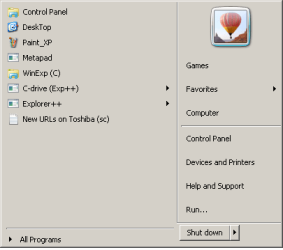
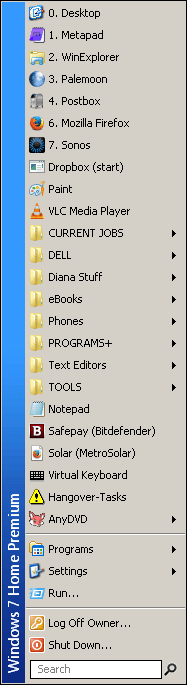
- these images are from my browser/email laptop (exactly as it is setup)

ClassicShell Start menu
  • settings window/dialog is simple and logical, easily accessible
  • compact -- less real estate
  • win-key > hotkey to open target (no mouse RSI)
  • I can use win-key + hotkeys with my eyes shut (cannot do that with a mouse)
  • "Search" is visible
  • Start > Programs is optional (if I need it) about once a fortnight
  • Desktop is Win-key+0 ... no mouse chase to right hand corner of screen (a long way on 27" monitors)
    Desktop is a shortcut to a .scf file in Programs folder, independent of default desktop-shortcut on desktop
  • shut-down is a menu -- no risk of accidental shut-down
  • settings can be saved and transferred to other PCs
  • I am using AutoCad all day (on other PCs) ... enough mousing for me

classic start.png

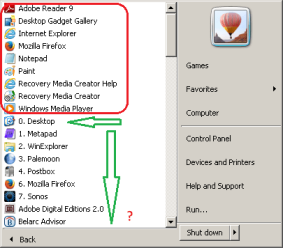
Default Start menu
  • a lot of wasted, empty grey space
  • MS decides order of "Programs" combobox list not me
  • cannot be dragged to resize smaller
  • to access my busy targets is a two step process
  • to access my busy targets requires ... Programs(click) > Scroll > ... but list is in no logical order
  • to access a target on a menu requires ... Programs(click) > Scroll > Menu(click) > target click
  • "Search" is somewhere else
  • "Run" is somewhere else (I know about Win-Key+R)
  • MS stuff program folders onto "default" Programs menu that are not listed on classic-start
    eg, Adobe, Belarc adviser... and then all the crud red-outlined
default start.png default start_2.png

Parodoxes
- my wife refuses to use the start menu, she prefers desktop shortcuts on her rig (I don't get it :confused:)

Classic Explorer
- I use it because it is there
- I can add custom commands to the classic toolbar
BUT...
- WinExplorer is limited (but essential for some obscure settings)
- I use commercial Xplorer2 for dual result panes and incredible versatility (pinned to taskbar)
 

My Computer My Computer

At a glance

XP Pro (x86) | 7 HP (x86) & (x64) | 7 Pro (x64)
Computer type
PC/Desktop
Computer Manufacturer/Model Number
Toshiba, Lenovo (laptops) + 4 rigs
OS
XP Pro (x86) | 7 HP (x86) & (x64) | 7 Pro (x64)
:focus:

I notice previous posts in this thread with-no-problems are on 64bit

My problem is on this 32bit laptop.
Toshiba Satellite C665 (15½ inch screen)
OS:= Windows 7 Home Premium (32-bit), sp1 (Build 7601) OEM
UI:=Classic Shell Start + Classic Explorer
Windows Indexing = disabled
My 64bit rig works correctly as everyone else is reporting.
-----
In Windows has recovered from an unexpected shutdown I had to delete the old graphics driver and replace it with an upgrade.

But during the uninstall process I could not use "Driver Sweeper" (recommended at the time) because of adware in Driver Sweeper and potential risks.
I wonder if residual driver "stuff" might have a bearing on my current Windows Explorer problem ?
(For some history see Windows has recovered from an unexpected shutdown ... post #14 and later ... and ultimate resolution)

I am at a loss :confused:
 

My Computer My Computer

At a glance

XP Pro (x86) | 7 HP (x86) & (x64) | 7 Pro (x64)
Computer type
PC/Desktop
Computer Manufacturer/Model Number
Toshiba, Lenovo (laptops) + 4 rigs
OS
XP Pro (x86) | 7 HP (x86) & (x64) | 7 Pro (x64)
Back
Top