why do my Restore Points keep disappearing?

My Computer My Computer

Computer Manufacturer/Model Number
Acer Aspire Timeline X Laptop - Model 5820TG - V1.23
OS
Windows 7 Home Premium x64 - SP1
CPU
Intel Core i5 @ 2.67GHz Arrandale 32nm Technology
Motherboard
Acer JM51_CP (CPU) Base Board Version
Memory
8 GB RAM [2 x 4 GB DDR3]
Graphics Card(s)
AMD Radeon HD 6650M, Intel (R) HD Graphics
Sound Card
Realtek HD Audio, ATI HD Audio Device
Monitor(s) Displays
Acer Aspire Notebook - 15.7"; Acer LCD Monitor X223Wsd - 22"
Screen Resolution
1366 x 768 x 60Hertz
Hard Drives
Notebook - 733GB Western Digital WDC WD7500BPVT- 22HXZT1 Sata.
External HDs [4];Maxtor One Touch4 - 500GB External HD [Drive M:\].Western Digital WDXMS1200TA - 120GB External HD. WD My Book 'Elite' 1TB External HD [Windows 7 dedicated - Partitioned
Mouse
Logitech Wireless V320 for Notebooks
Other Info
Brother MFC-465CN; PC to Fax/Scan/Copy/Photo Multi Function Centre. Epson Perfection V300 Photo Scanner.
Siemens Speedstream 6520 Router.
Wacom 'Bamboo Fun' CTE-650 PC Tablet, Stylus and Mouse. Logitech X-230 Notebook Stereo Speakers and Sub-woofer.
UAC - On. Internet - FireFox v13.0.1 & IE8.
Hon.RSM to the 4th [Assault Pioneer] Troop Pune Sepoys , and 3rd Troop Jodhpur Bengali Lancers
Thank you. I will see if someone can assist you with this, as I am not a pro at reading cbs logs.

Could you possibly upload it somewhere else so we can see it? Like onedrive or google drive? Dropbox?

Or perhaps zip it compressed and upload it?
 
Last edited:

My Computer My Computer

Computer type
PC/Desktop
Computer Manufacturer/Model Number
Custom Built
OS
Windows 10 Pro
CPU
AMD Ryzen 5 2400G Processor with Radeon RX Vega 11 Graphics
Motherboard
ASRock X470 Master SLI/AC AM4 AMD Promontory X470 SATA 6Gb/s
Memory
G.SKILL Ripjaws V Series 16GB (2 x 8GB) 288-Pin DDR4 SDRAM D
Graphics Card(s)
2047MB NVIDIA GeForce GTX 1060 6GB (EVGA)
Sound Card
Motherboard Built in
Monitor(s) Displays
Acer R240HY bidx 23.8-Inch IPS HDMI DVI VGA (1920 x 1080) Wi
Screen Resolution
1920 x 1080
Hard Drives
1TB Sandisk SSD PLUS (Main drive)
500 GB Seagate 7200 RPM (Games)
500 GB Western Digital 7200 RPM (Virtual Machines)
PSU
CORSAIR TX Series TX650M 650W 80+ Gold Modular Power Supply
Case
CORSAIR CARBIDE SPEC-02 Mid-Tower Gaming Case, Red LED Fan
Cooling
220mm, two 120mm, and four 60mm fans
Keyboard
Wired Dell keyboard
Mouse
Wireless Logitech mouse
Internet Speed
250mb down, 30mb up
Antivirus
Panda Cloud Antivirus
Browser
Chrome-ish x64
Other Info
Your awesome for reading this.

My Computer My Computer

Computer type
PC/Desktop
Computer Manufacturer/Model Number
Own build (new) Desk1 / Asus ROG Win 7 / Desk2 1st build
OS
Desk1 7 Home Prem / Desk2 10 Pro / Main lap Asus ROG 10 Pro 2 laptop Toshiba 7 Pro Asus P2520 7 & 10
CPU
Desk1 i5 3750K / Laptop i7 GTX 860M / Desk2 i5 2500
Motherboard
Desk1 Asus P877-V / Desk2 Gigabyte H67 UD3H / Laptop ?
Memory
Desk1 8GB (1866) / Desk2 16GB (1333) / Laptop 8Gb DDR3
Graphics Card(s)
Desk 1& 2NVidia GTX 650 & Laptops on board Intel
Sound Card
Desk 1 & 2 -XONAR DG Realtek High Def audio Laptop
Monitor(s) Displays
Desk 1 Benq HD 2450 / Desk2 Philips 24" / Laptop 17.5"
Screen Resolution
1920x1080 D1 & D2 & Laptop 1
Hard Drives
Desk1 Samsung 120GB 830 SSD
Asus ROG 256GB 850 Pro SSD
Desk2 Samsung 840 256 SSD
Toshiba 120GB EVO
PSU
Desk 1 Corsair HX 1050/ Laptop ? / Desk 2 Corsair HX 650
Case
Desk 1 Cooler HAF XM ? Toshiba laptop / Desk2 Coolermaster
Cooling
Fans on all Desk1 -2 Desk2 - all Coolermasters 5 Laptop ?
Keyboard
Desk 1 MS Sidewinder X6 Desk 2 MS Sidewinder X 4
Mouse
Desk 1&2 - Gigabyte MS 900 gamer - laptop - Logitec wireless
Internet Speed
ADSL2+
Other Info
One other Desktop (tester) and spare Toshba laptop both with SSD's
Running Kaspersky 2016 ISS on all machines config'd identically
Logitec audio stereo systems on each machine (x3)
Canon MG5250MFC
Router/modem TP-Link running WPA2SK
Tony it would be best if you're just upload the CBS.log file instead of pictures of it.
 

My Computer My Computer

Computer type
PC/Desktop
Computer Manufacturer/Model Number
Home Built Desktop By DataTech
OS
Windows 7 Ultimate X64 SP1
CPU
Intel i5-2550K, Differing ~4.4-4.8GHz No built in GPU
Motherboard
ASUS P8Z68-V PRO/GEN3
Memory
16GB G.Skill Sniper 1866MHz @ 2133MHz 2x8GB
Graphics Card(s)
ASUS GTX650TIB-DC2OC-2GD5, (650TI Boost)
Sound Card
Onboard Realtek 5-1
Monitor(s) Displays
Samsung P2570HD
Screen Resolution
1920x1080
Hard Drives
Samsung 840 Pro 256GB SSD for OS, 500GB Seagate Constellation (Enterprise drive) for Data
PSU
Corsair HX650W
Case
Inwin Dragon Rider
Cooling
Hyper 212 EVO w/two Noctua fans, push-pull, @1300 RPM
Keyboard
E-Z Eyes, bright yellow keys with large characters
Mouse
steelseries SENSEI Laser Pro Gaming
Internet Speed
48-51Mbs Mbs down, 11 Mbs up Xfinity Cable
Antivirus
Norton Internet Security 2013
Browser
IE 10, Opera, Pale Moon if needed
Other Info
4 case fans, LG BluRay-RE, ASUS DVD-RW, Mr. Fusion power supply, 1.21 gigawatts.
Cranial meltdown

Tony it would be best if you're just upload the CBS.log file instead of pictures of it.
...:rolleyes: The bleeding obvious 1 -

What defragger do you use?

Auslogics, and never experienced any problems.

Thank you. I will see if someone can assist you with this, as I am not a pro at reading cbs logs.

Could you possibly upload it somewhere else so we can see it? Like onedrive or google drive? Dropbox?

Or perhaps zip it compressed and upload it?

...:rolleyes: The bleeping obvious 2 is attached;

View attachment 318512

Making hard work of this all around, and feel a right twerp. Maybe I should re-enlist the services of the Sepoys, but fear a mutiny on their part :shock:
 

My Computer My Computer

Computer Manufacturer/Model Number
Acer Aspire Timeline X Laptop - Model 5820TG - V1.23
OS
Windows 7 Home Premium x64 - SP1
CPU
Intel Core i5 @ 2.67GHz Arrandale 32nm Technology
Motherboard
Acer JM51_CP (CPU) Base Board Version
Memory
8 GB RAM [2 x 4 GB DDR3]
Graphics Card(s)
AMD Radeon HD 6650M, Intel (R) HD Graphics
Sound Card
Realtek HD Audio, ATI HD Audio Device
Monitor(s) Displays
Acer Aspire Notebook - 15.7"; Acer LCD Monitor X223Wsd - 22"
Screen Resolution
1366 x 768 x 60Hertz
Hard Drives
Notebook - 733GB Western Digital WDC WD7500BPVT- 22HXZT1 Sata.
External HDs [4];Maxtor One Touch4 - 500GB External HD [Drive M:\].Western Digital WDXMS1200TA - 120GB External HD. WD My Book 'Elite' 1TB External HD [Windows 7 dedicated - Partitioned
Mouse
Logitech Wireless V320 for Notebooks
Other Info
Brother MFC-465CN; PC to Fax/Scan/Copy/Photo Multi Function Centre. Epson Perfection V300 Photo Scanner.
Siemens Speedstream 6520 Router.
Wacom 'Bamboo Fun' CTE-650 PC Tablet, Stylus and Mouse. Logitech X-230 Notebook Stereo Speakers and Sub-woofer.
UAC - On. Internet - FireFox v13.0.1 & IE8.
Hon.RSM to the 4th [Assault Pioneer] Troop Pune Sepoys , and 3rd Troop Jodhpur Bengali Lancers
Please read.
Their are many reports when Googled about restore points problems when using Auslogic and other 3rd party defrag programs.

Windows 7 deletes all system restore points on reboot - Microsoft Community

I recommend using Windows 7 built in defrag. I works great, except you don't get to watch the little colored boxes jumping around.
Using Windows Tool doesn't mess up Windows.
 

My Computer My Computer

Computer type
PC/Desktop
Computer Manufacturer/Model Number
Home made Desktop
OS
Windows 10 Pro. 64/ version 1709 Windows 7 Pro/64
CPU
Intel i7-6800K @ 4.3
Motherboard
ASUS X-99 Deluxe II
Memory
Corsair Platinum 16 gig @2400
Graphics Card(s)
EVGA GTX 1070 OC
Monitor(s) Displays
Asus 27" LED LCD/VE278Q
Screen Resolution
1920-1080 or 1280-720 HDMI
Hard Drives
INTEL SSD 730-240 Gb Sata 3.0/
PSU
EVGA Platium 1200W
Case
Phanteks Luxe Tempered Glass 8 fans/ one radiator
Cooling
XSPC/ Water Cooled CPU
Keyboard
Das 4 Professional
Mouse
Logitech M705/MX Anywhere 2-S
Internet Speed
100 mbits
Antivirus
Microsoft Security Essentials/ Malwarebytes Premium 3.0/ SAS
Browser
I.E. 11 default/Firefox/ ISP Time Warner Cable/Spectrum
Other Info
LG BluRay Burner/
Sound system-KLipsch-THX/
Icy Dock ssd Hot Swap bays.
Second case this week mentioning Auslogics defragmenter. The other one was the Registry defrag.

I would uninstall it and see if new Restore points stick. Make sure it's turned on in System Security.
 
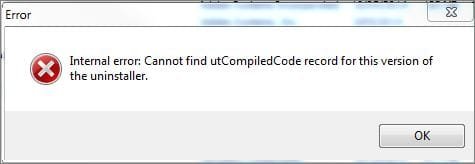
Auslogics uninstall error

Second case this week mentioning Auslogics defragmenter. The other one was the Registry defrag.

I would uninstall it and see if new Restore points stick. Make sure it's turned on in System Security.

I have just tried to do an uninstall of Auslogics, and cannot access the Uninstaller - Error

Auslogics problems.JPG

OK ...so where to now?

Incidentally, I get the same error message if I try to uninstall [as Admin] via CCleaner>Tools>Uninstall> select Auslogics

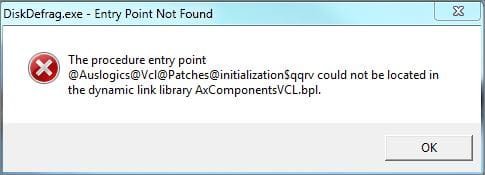
...and just got another error which suggests that the .exe is no longer there?

Auslogics problems 2.JPG

Under Control panel>Programs and Features, Auslogics is still shown listed
 
Last edited:

My Computer My Computer

Computer Manufacturer/Model Number
Acer Aspire Timeline X Laptop - Model 5820TG - V1.23
OS
Windows 7 Home Premium x64 - SP1
CPU
Intel Core i5 @ 2.67GHz Arrandale 32nm Technology
Motherboard
Acer JM51_CP (CPU) Base Board Version
Memory
8 GB RAM [2 x 4 GB DDR3]
Graphics Card(s)
AMD Radeon HD 6650M, Intel (R) HD Graphics
Sound Card
Realtek HD Audio, ATI HD Audio Device
Monitor(s) Displays
Acer Aspire Notebook - 15.7"; Acer LCD Monitor X223Wsd - 22"
Screen Resolution
1366 x 768 x 60Hertz
Hard Drives
Notebook - 733GB Western Digital WDC WD7500BPVT- 22HXZT1 Sata.
External HDs [4];Maxtor One Touch4 - 500GB External HD [Drive M:\].Western Digital WDXMS1200TA - 120GB External HD. WD My Book 'Elite' 1TB External HD [Windows 7 dedicated - Partitioned
Mouse
Logitech Wireless V320 for Notebooks
Other Info
Brother MFC-465CN; PC to Fax/Scan/Copy/Photo Multi Function Centre. Epson Perfection V300 Photo Scanner.
Siemens Speedstream 6520 Router.
Wacom 'Bamboo Fun' CTE-650 PC Tablet, Stylus and Mouse. Logitech X-230 Notebook Stereo Speakers and Sub-woofer.
UAC - On. Internet - FireFox v13.0.1 & IE8.
Hon.RSM to the 4th [Assault Pioneer] Troop Pune Sepoys , and 3rd Troop Jodhpur Bengali Lancers
Here's the errors from your SFC scan..
Code:
Line 35802: 2014-05-19 09:13:48, Info                  CSI    00000327 [SR] Repairing 2 components
 Line 35803: 2014-05-19 09:13:48, Info                  CSI    00000328 [SR] Beginning Verify and Repair transaction
 Line 35806: 2014-05-19 09:13:49, Info                  CSI    0000032a [SR] Cannot repair member file [l:30{15}]"NlsData0045.dll" of Microsoft-Windows-NaturalLanguage6, Version = 6.1.7601.17514, pA = PROCESSOR_ARCHITECTURE_AMD64 (9), Culture neutral, VersionScope = 1 nonSxS, PublicKeyToken = {l:8 b:31bf3856ad364e35}, Type neutral, TypeName neutral, PublicKey neutral in the store, hash mismatch
 Line 35809: 2014-05-19 09:13:51, Info                  CSI    0000032c [SR] Cannot repair member file [l:20{10}]"diagER.dll" of Microsoft-Windows-Setup-Component, Version = 6.1.7601.17514, pA = PROCESSOR_ARCHITECTURE_AMD64 (9), Culture neutral, VersionScope = 1 nonSxS, PublicKeyToken = {l:8 b:31bf3856ad364e35}, Type neutral, TypeName neutral, PublicKey neutral in the store, hash mismatch

There don't appear to be any other problems in the CBS log background.

I'll post a fix protocol for the above later.
 

My Computer My Computer

Computer type
Laptop
Computer Manufacturer/Model Number
Asus K52F or Lenovo B51-80
OS
Win 7 x64 Home Premium (and x86 VirtualBox VM)/Win10
CPU
i3 370M/i7 6500U
Motherboard
Asus/Lenovo
Memory
8GB - finally :)/8GB
Graphics Card(s)
it's an i3, dude!/dual Intel&nVidia
Sound Card
onboard
Monitor(s) Displays
15.6" built-in
Screen Resolution
1366x768/1920x1080
Hard Drives
750GB Seagate internal
Sundry external drives attached to other computers on the local network
1TB SSD on the Lenovo
PSU
n/a
Internet Speed
as much as I can get - usually on a dongle/phone, so <1MB/s
Antivirus
MSE/Defender
Browser
IE11/12/Edge/Chrome/FF(if I must)
Layback Bear the simple one is back.
I use the Windows 7 built in defrag.

Windows 7 knows Windows 7.
When you defrag with Windows 7 it put things where Windows 7 want them. That allows Windows 7 to find them.
Third party defrag programs puts things where the creator of the 3rd party program wants them.

Third-party disk defragmenter tools for Windows


Quote:
All versions of Microsoft Windows include a tool for disk defragmentation. The Windows Disk Defragmenter tool is a limited version of the Diskeeper program from Diskeeper Corporation. Disk Defragmenter does not include all the features available in the full version of Diskeeper
Seems like Diskeeper just took out all the bells and wissels and made Microsoft a defrag program to suite Windows 7.

To me that means that if one must use a 3rd party defrag program Diskeeper would be the one to choose.

http://www.majorgeeks.com/files/deta...l_edition.html

Home Online Store: Full Versions | Condusiv Products

Intel corp. also likes Diskeeper.

http://www.intel.com/design/motherbd.../diskeeper.htm
 

My Computer My Computer

Computer type
PC/Desktop
Computer Manufacturer/Model Number
Home made Desktop
OS
Windows 10 Pro. 64/ version 1709 Windows 7 Pro/64
CPU
Intel i7-6800K @ 4.3
Motherboard
ASUS X-99 Deluxe II
Memory
Corsair Platinum 16 gig @2400
Graphics Card(s)
EVGA GTX 1070 OC
Monitor(s) Displays
Asus 27" LED LCD/VE278Q
Screen Resolution
1920-1080 or 1280-720 HDMI
Hard Drives
INTEL SSD 730-240 Gb Sata 3.0/
PSU
EVGA Platium 1200W
Case
Phanteks Luxe Tempered Glass 8 fans/ one radiator
Cooling
XSPC/ Water Cooled CPU
Keyboard
Das 4 Professional
Mouse
Logitech M705/MX Anywhere 2-S
Internet Speed
100 mbits
Antivirus
Microsoft Security Essentials/ Malwarebytes Premium 3.0/ SAS
Browser
I.E. 11 default/Firefox/ ISP Time Warner Cable/Spectrum
Other Info
LG BluRay Burner/
Sound system-KLipsch-THX/
Icy Dock ssd Hot Swap bays.
I've uploaded a file - sfoaa.zip - to my OneDrive at Noel's OneDrive
Please download and save it.

Right-click on the saved file and select Extract all...
Change the target to C:\ and click on Extract
Close all windows (it would be a good idea to print these instructions!)

Now reboot to the Repair Environment - as soon as the machine restarts, start tapping F8 - this should bring up the Advanced Boot Menu, at the top of which should be the option 'Repair my Computer'
Pick that
You'll have to log in with your username and password.

Pick the option to use a Command Prompt
At the prompt type
DIR C:\sfoaa
hit the enter key - if you get a 'Not Found' error try
DIR D:\sfoaa
or
DIR E:\sfoaa


The drive letter in use when you find the folder will need to be substituted (for<drive>) into the following command...

XCOPY <drive>:\sfoaa <drive>:\windows\winsxs /y /i /s /v /h

(e.g. XCOPY P:\wfire P:\windows\winsxs /y /i /s /v /h )

run the command (it should take almost no time) and when the prompt returns, type
EXIT
and hit the Enter key to exit Command Prompt - reboot to Normal Mode Windows.

Now run SFC /SCANNOW in an Elevated Command Prompt
then reboot and upload the new CBS.log file to your reply
 

My Computer My Computer

Computer type
Laptop
Computer Manufacturer/Model Number
Asus K52F or Lenovo B51-80
OS
Win 7 x64 Home Premium (and x86 VirtualBox VM)/Win10
CPU
i3 370M/i7 6500U
Motherboard
Asus/Lenovo
Memory
8GB - finally :)/8GB
Graphics Card(s)
it's an i3, dude!/dual Intel&nVidia
Sound Card
onboard
Monitor(s) Displays
15.6" built-in
Screen Resolution
1366x768/1920x1080
Hard Drives
750GB Seagate internal
Sundry external drives attached to other computers on the local network
1TB SSD on the Lenovo
PSU
n/a
Internet Speed
as much as I can get - usually on a dongle/phone, so <1MB/s
Antivirus
MSE/Defender
Browser
IE11/12/Edge/Chrome/FF(if I must)
This is a marathon event - thanks to all so far

I've uploaded a file - sfoaa.zip - to my OneDrive at Noel's OneDrive
Please download and save it.
Zipped sfoaa folder saved to the desktop

Right-click on the saved file and select Extract all...
Right click and extract placed another sfoaa folder [accessible] on the desktop. A right click and Open on that gave me the following; Sfoaa [sub-folder] which when right clicked and Open again gave two files - 1. NlsData0045.dll, and 2. diaER.dll Ques? Have I made an error in opening?

Change the target to C:\ and click on Extract

Please expand on this - how do I 'change target'

Close all windows (it would be a good idea to print these instructions!)
I have a print copy to follow.

Now reboot to the Repair Environment [Restart and start tapping F8 key?] - as soon as the machine restarts, start tapping F8 - this should bring up
the Advanced Boot Menu, at the top of which should be the option 'Repair my Computer'

Pick that
You'll have to log in with your username and password.
- no Username or password
Pick the option to use a Command Prompt

At the prompt type

DIR C:\sfoaa
hit the enter key - if you get a 'Not Found' error try
DIR D:\sfoaa
or
DIR E:\sfoaa


The drive letter in use when you find the folder will need to be substituted (for<drive>) into the following command...

XCOPY <drive>:\sfoaa <drive>:\windows\winsxs /y /i /s /v /h

So if I find the folder in Drive C:, then I enter

XCOPY C:\sfoaa C:\windows\winsxs/y/i/s/v/h - is this the correct command? and then hit Enter to run?

(e.g. XCOPY P:\wfire P:\windows\winsxs /y /i /s /v /h )

run the command (it should take almost no time) and when the prompt returns, type
EXIT
and hit the Enter key to exit Command Prompt - reboot to Normal Mode Windows.

Now run SFC /SCANNOW in an Elevated Command Prompt
then reboot and upload the new CBS.log file to your reply

Thanks for sticking with this NoelDP ... I'm now venturing into realms never entered into before, and therefore am uncertain of some of your instructions. I have entered my comments for clarification into the body of your post so that I gain the confidence I need to understand the advice you are giving, and the steps I need to take to make sure that I don't mess this up.
 

My Computer My Computer

Computer Manufacturer/Model Number
Acer Aspire Timeline X Laptop - Model 5820TG - V1.23
OS
Windows 7 Home Premium x64 - SP1
CPU
Intel Core i5 @ 2.67GHz Arrandale 32nm Technology
Motherboard
Acer JM51_CP (CPU) Base Board Version
Memory
8 GB RAM [2 x 4 GB DDR3]
Graphics Card(s)
AMD Radeon HD 6650M, Intel (R) HD Graphics
Sound Card
Realtek HD Audio, ATI HD Audio Device
Monitor(s) Displays
Acer Aspire Notebook - 15.7"; Acer LCD Monitor X223Wsd - 22"
Screen Resolution
1366 x 768 x 60Hertz
Hard Drives
Notebook - 733GB Western Digital WDC WD7500BPVT- 22HXZT1 Sata.
External HDs [4];Maxtor One Touch4 - 500GB External HD [Drive M:\].Western Digital WDXMS1200TA - 120GB External HD. WD My Book 'Elite' 1TB External HD [Windows 7 dedicated - Partitioned
Mouse
Logitech Wireless V320 for Notebooks
Other Info
Brother MFC-465CN; PC to Fax/Scan/Copy/Photo Multi Function Centre. Epson Perfection V300 Photo Scanner.
Siemens Speedstream 6520 Router.
Wacom 'Bamboo Fun' CTE-650 PC Tablet, Stylus and Mouse. Logitech X-230 Notebook Stereo Speakers and Sub-woofer.
UAC - On. Internet - FireFox v13.0.1 & IE8.
Hon.RSM to the 4th [Assault Pioneer] Troop Pune Sepoys , and 3rd Troop Jodhpur Bengali Lancers

My Computer My Computer

Computer Manufacturer/Model Number
Acer Aspire Timeline X Laptop - Model 5820TG - V1.23
OS
Windows 7 Home Premium x64 - SP1
CPU
Intel Core i5 @ 2.67GHz Arrandale 32nm Technology
Motherboard
Acer JM51_CP (CPU) Base Board Version
Memory
8 GB RAM [2 x 4 GB DDR3]
Graphics Card(s)
AMD Radeon HD 6650M, Intel (R) HD Graphics
Sound Card
Realtek HD Audio, ATI HD Audio Device
Monitor(s) Displays
Acer Aspire Notebook - 15.7"; Acer LCD Monitor X223Wsd - 22"
Screen Resolution
1366 x 768 x 60Hertz
Hard Drives
Notebook - 733GB Western Digital WDC WD7500BPVT- 22HXZT1 Sata.
External HDs [4];Maxtor One Touch4 - 500GB External HD [Drive M:\].Western Digital WDXMS1200TA - 120GB External HD. WD My Book 'Elite' 1TB External HD [Windows 7 dedicated - Partitioned
Mouse
Logitech Wireless V320 for Notebooks
Other Info
Brother MFC-465CN; PC to Fax/Scan/Copy/Photo Multi Function Centre. Epson Perfection V300 Photo Scanner.
Siemens Speedstream 6520 Router.
Wacom 'Bamboo Fun' CTE-650 PC Tablet, Stylus and Mouse. Logitech X-230 Notebook Stereo Speakers and Sub-woofer.
UAC - On. Internet - FireFox v13.0.1 & IE8.
Hon.RSM to the 4th [Assault Pioneer] Troop Pune Sepoys , and 3rd Troop Jodhpur Bengali Lancers
Will it open and function?

Reinstall it from a trustworthy source guarding against sneakware at every step, for the purpose of uninstalling it. Download Auslogics Disk Defrag Free


Installed new version from Auslogics, then Uninstalled it in Programs and Features - finally got rid of all of it. But I'll still look later for fragments in CCleaner Registry cleanup, once I get through this marathon effort.. Thanks for heads-up
 

My Computer My Computer

Computer Manufacturer/Model Number
Acer Aspire Timeline X Laptop - Model 5820TG - V1.23
OS
Windows 7 Home Premium x64 - SP1
CPU
Intel Core i5 @ 2.67GHz Arrandale 32nm Technology
Motherboard
Acer JM51_CP (CPU) Base Board Version
Memory
8 GB RAM [2 x 4 GB DDR3]
Graphics Card(s)
AMD Radeon HD 6650M, Intel (R) HD Graphics
Sound Card
Realtek HD Audio, ATI HD Audio Device
Monitor(s) Displays
Acer Aspire Notebook - 15.7"; Acer LCD Monitor X223Wsd - 22"
Screen Resolution
1366 x 768 x 60Hertz
Hard Drives
Notebook - 733GB Western Digital WDC WD7500BPVT- 22HXZT1 Sata.
External HDs [4];Maxtor One Touch4 - 500GB External HD [Drive M:\].Western Digital WDXMS1200TA - 120GB External HD. WD My Book 'Elite' 1TB External HD [Windows 7 dedicated - Partitioned
Mouse
Logitech Wireless V320 for Notebooks
Other Info
Brother MFC-465CN; PC to Fax/Scan/Copy/Photo Multi Function Centre. Epson Perfection V300 Photo Scanner.
Siemens Speedstream 6520 Router.
Wacom 'Bamboo Fun' CTE-650 PC Tablet, Stylus and Mouse. Logitech X-230 Notebook Stereo Speakers and Sub-woofer.
UAC - On. Internet - FireFox v13.0.1 & IE8.
Hon.RSM to the 4th [Assault Pioneer] Troop Pune Sepoys , and 3rd Troop Jodhpur Bengali Lancers
Right-click on the saved file and select Extract all...
Right click and extract placed another sfoaa folder [accessible] on the desktop. A right click and Open on that gave me the following; Sfoaa [sub-folder] which when right clicked and Open again gave two files - 1. NlsData0045.dll, and 2. diaER.dll Ques? Have I made an error in opening?

Yep :) - not to worry.
just delete the folder (not the zip file) you created

right-click on the sfoaa zip file and select Extract all...
You should get a popup with a path option that looks something like

C:\Users\Fred\desktop

Simply change it to C:\


Now reboot to the Repair Environment [Restart and start tapping F8 key?] - as soon as the machine restarts, start tapping F8 - this should bring up
the Advanced Boot Menu, at the top of which should be the option 'Repair my Computer'
Pick that
You'll have to log in with your username and password.
- no Username or password

You must have a username - or Windows wouldn't let you log in :)
Passwords are advisable but optional


Pick the option to use a Command Prompt

At the prompt type
DIR C:\sfoaa
hit the enter key - if you get a 'Not Found' error try
DIR D:\sfoaa
or
DIR E:\sfoaa


The drive letter in use when you find the folder will need to be substituted (for<drive>) into the following command...

XCOPY <drive>:\sfoaa <drive>:\windows\winsxs /y /i /s /v /h

So if I find the folder in Drive C:, then I enter

XCOPY C:\sfoaa C:\windows\winsxs/y/i/s/v/h - is this the correct command? and then hit Enter to run?

Yep

Thanks for sticking with this NoelDP ... I'm now venturing into realms never entered into before, and therefore am uncertain of some of your instructions. I have entered my comments for clarification into the body of your post so that I gain the confidence I need to understand the advice you are giving, and the steps I need to take to make sure that I don't mess this up.

No problem - doing this sort of thing for the first time can be rather daunting! (but I've got some real duffers through it before, and you seem to be well above that level :) )
 

My Computer My Computer

Computer type
Laptop
Computer Manufacturer/Model Number
Asus K52F or Lenovo B51-80
OS
Win 7 x64 Home Premium (and x86 VirtualBox VM)/Win10
CPU
i3 370M/i7 6500U
Motherboard
Asus/Lenovo
Memory
8GB - finally :)/8GB
Graphics Card(s)
it's an i3, dude!/dual Intel&nVidia
Sound Card
onboard
Monitor(s) Displays
15.6" built-in
Screen Resolution
1366x768/1920x1080
Hard Drives
750GB Seagate internal
Sundry external drives attached to other computers on the local network
1TB SSD on the Lenovo
PSU
n/a
Internet Speed
as much as I can get - usually on a dongle/phone, so <1MB/s
Antivirus
MSE/Defender
Browser
IE11/12/Edge/Chrome/FF(if I must)
No problem - doing this sort of thing for the first time can be rather daunting! (but I've got some real duffers through it before, and you seem to be well above that level :) )

Well Mate! All done per your clear instructions and advice above. :thumbsup:

...and I've learned - I think = Duffer Class III.

View attachment 318582

And the message on the Command page this time was - "Windows Resource Protection found no
integrity violations"


Does this mean we have a winner?? ;)
 

My Computer My Computer

Computer Manufacturer/Model Number
Acer Aspire Timeline X Laptop - Model 5820TG - V1.23
OS
Windows 7 Home Premium x64 - SP1
CPU
Intel Core i5 @ 2.67GHz Arrandale 32nm Technology
Motherboard
Acer JM51_CP (CPU) Base Board Version
Memory
8 GB RAM [2 x 4 GB DDR3]
Graphics Card(s)
AMD Radeon HD 6650M, Intel (R) HD Graphics
Sound Card
Realtek HD Audio, ATI HD Audio Device
Monitor(s) Displays
Acer Aspire Notebook - 15.7"; Acer LCD Monitor X223Wsd - 22"
Screen Resolution
1366 x 768 x 60Hertz
Hard Drives
Notebook - 733GB Western Digital WDC WD7500BPVT- 22HXZT1 Sata.
External HDs [4];Maxtor One Touch4 - 500GB External HD [Drive M:\].Western Digital WDXMS1200TA - 120GB External HD. WD My Book 'Elite' 1TB External HD [Windows 7 dedicated - Partitioned
Mouse
Logitech Wireless V320 for Notebooks
Other Info
Brother MFC-465CN; PC to Fax/Scan/Copy/Photo Multi Function Centre. Epson Perfection V300 Photo Scanner.
Siemens Speedstream 6520 Router.
Wacom 'Bamboo Fun' CTE-650 PC Tablet, Stylus and Mouse. Logitech X-230 Notebook Stereo Speakers and Sub-woofer.
UAC - On. Internet - FireFox v13.0.1 & IE8.
Hon.RSM to the 4th [Assault Pioneer] Troop Pune Sepoys , and 3rd Troop Jodhpur Bengali Lancers
:thumbsup: Well done!
here's the end-of-scan for you...
Code:
POQ 133 ends.
2014-05-21 00:49:38, Info                  CSI    00000316 [SR] Verify complete
2014-05-21 00:49:38, Info                  CSI    00000317 [SR] Repairing 0 components
2014-05-21 00:49:38, Info                  CSI    00000318 [SR] Beginning Verify and Repair transaction
2014-05-21 00:49:38, Info                  CSI    00000319 Repair results created:
POQ 134 starts:
 
POQ 134 ends.
2014-05-21 00:49:38, Info                  CSI    0000031a [SR] Repair complete

I'll let the others back at you now to do the other stuff as necessary :)

Good luck!
 

My Computer My Computer

Computer type
Laptop
Computer Manufacturer/Model Number
Asus K52F or Lenovo B51-80
OS
Win 7 x64 Home Premium (and x86 VirtualBox VM)/Win10
CPU
i3 370M/i7 6500U
Motherboard
Asus/Lenovo
Memory
8GB - finally :)/8GB
Graphics Card(s)
it's an i3, dude!/dual Intel&nVidia
Sound Card
onboard
Monitor(s) Displays
15.6" built-in
Screen Resolution
1366x768/1920x1080
Hard Drives
750GB Seagate internal
Sundry external drives attached to other computers on the local network
1TB SSD on the Lenovo
PSU
n/a
Internet Speed
as much as I can get - usually on a dongle/phone, so <1MB/s
Antivirus
MSE/Defender
Browser
IE11/12/Edge/Chrome/FF(if I must)
Noel, Thank you. Your assistance is very much appreciated.

1.)Download security check below.

This will show me what security software you use and what the status is of services such as windows firewall:

Downloading SecurityCheck

Open and run: SecurityCheck.exe
Follow the instructions inside the window that appears.

When done, a Notepad report opens automatically, called: checkup.txt

Please post the checkup.txt in your reply using the paperclip:

picture.php


My Computer My Computer

Computer type
PC/Desktop
Computer Manufacturer/Model Number
Custom Built
OS
Windows 10 Pro
CPU
AMD Ryzen 5 2400G Processor with Radeon RX Vega 11 Graphics
Motherboard
ASRock X470 Master SLI/AC AM4 AMD Promontory X470 SATA 6Gb/s
Memory
G.SKILL Ripjaws V Series 16GB (2 x 8GB) 288-Pin DDR4 SDRAM D
Graphics Card(s)
2047MB NVIDIA GeForce GTX 1060 6GB (EVGA)
Sound Card
Motherboard Built in
Monitor(s) Displays
Acer R240HY bidx 23.8-Inch IPS HDMI DVI VGA (1920 x 1080) Wi
Screen Resolution
1920 x 1080
Hard Drives
1TB Sandisk SSD PLUS (Main drive)
500 GB Seagate 7200 RPM (Games)
500 GB Western Digital 7200 RPM (Virtual Machines)
PSU
CORSAIR TX Series TX650M 650W 80+ Gold Modular Power Supply
Case
CORSAIR CARBIDE SPEC-02 Mid-Tower Gaming Case, Red LED Fan
Cooling
220mm, two 120mm, and four 60mm fans
Keyboard
Wired Dell keyboard
Mouse
Wireless Logitech mouse
Internet Speed
250mb down, 30mb up
Antivirus
Panda Cloud Antivirus
Browser
Chrome-ish x64
Other Info
Your awesome for reading this.
Back
Top