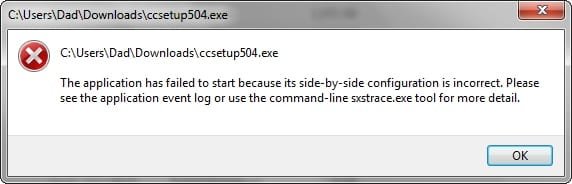
CCleaner ccsetup504.exe: "...side-by-side configuration is incorrect"

You could also run this SF-Diagnostic-Tool and upload the zip file here. Be sure to run as administrator and click on the Grab All button. Allow at least five minutes for the tool to assemble all the files. There's no personal info in the files except the pc/user-name (if that's personal).
 

My Computer My Computer

At a glance

Windows 7 Pro-x64i7-2600 3.4GHz - 3.8GHz Turbo8Gb - 2x4GB, Muskin 991770 PC3-1333Integrated Intel HD 2000
Computer type
PC/Desktop
Computer Manufacturer/Model Number
Built 2/11/2011
OS
Windows 7 Pro-x64
CPU
i7-2600 3.4GHz - 3.8GHz Turbo
Motherboard
Intel DH67BL-B3
Memory
8Gb - 2x4GB, Muskin 991770 PC3-1333
Graphics Card(s)
Integrated Intel HD 2000
Sound Card
Integrated Intel 10.1 HD, RealTek ALC892
Monitor(s) Displays
Asus LCD VH222H, Haier HL24XSL2a
Screen Resolution
1920x1080, 1920x1080
Hard Drives
Crucial SSD C300-128Gb,
Western Digital WD5002AALX - 500Gb,
Western Digital WD7501AALS - 750Gb
PSU
Seasonic 650W 80+ Gold Modular
Case
Rosewill Defender
Cooling
Stock CPU, Four 120mm case fans, PCH fan added
Keyboard
Logitech EX100 Y-RBH94 Wireless
Mouse
Logitech EX100 M-RCE95 Wireless
Internet Speed
3.0/1.5 Mbs
Antivirus
Microsoft Security Essentials
Browser
Microsoft Internet Explorer 11
Other Info
Antec Veris Premier-Multimedia IR Station,
Cyber Accoustics-3602 Speakers,
AFT XM-5U Card Reader,
Hauppauge TV-HVR-2250,
Sony LX300 USB Turntable
Under "Error", there are 3 "SideBySide" categories:
2015-04-09_014109.jpg

Event ID: 33

Activation context generation failed for "c:\Windows\Installer\{67E03279-F703-408F-B4BF-46B5FC8D70CD}\WksWP.exe". Dependent Assembly msadctls,processorArchitecture="x86",type="win32",version="1.0.1801.0" could not be found. Please use sxstrace.exe for detailed diagnosis.

"C:\Windows\Installer\{67E03279-F703-408F-B4BF-46B5FC8D70CD}\wksss.exe"

"c:\Windows\Installer\{67E03279-F703-408F-B4BF-46B5FC8D70CD}\wksdb.exe".

"c:\Windows\Installer\{67E03279-F703-408F-B4BF-46B5FC8D70CD}\WksCal.exe".

These 4 ".exe" files are repeated throughout.
.........................

Event ID: 35

Activation context generation failed for "C:\Program Files (x86)\Windows Live\Photo Gallery\MovieMaker.Exe".Error in manifest or policy file "C:\Program Files (x86)\Windows Live\Photo Gallery\WLMFDS.DLL" on line 8. Component identity found in manifest does not match the identity of the component requested. Reference is WLMFDS,processorArchitecture="AMD64",type="win32",version="1.0.0.1". Definition is WLMFDS,processorArchitecture="x86",type="win32",version="1.0.0.1". Please use sxstrace.exe for detailed diagnosis.

I haven't ever used MovieMaker.
....................

Event ID: 59

Just 4 entries.

2015-04-09_020054.jpg

Activation context generation failed for "C:\PROGRAMS\CCleaner 5.03.5128\ccsetup503.exe".Error in manifest or policy file "C:\PROGRAMS\CCleaner 5.03.5128\ccsetup503.exe" on line 0. Invalid Xml syntax.

This is the version I had installed prior to attempting to upgrade.
.................

I can't use the SF-Diagnostic-Tool, as I get the same error:
2015-04-09_020952.jpg
 

My Computer My Computer

At a glance

Windows 7 Home Premium 64bitCore i38GB DDR3Intel HD
Computer type
Laptop
Computer Manufacturer/Model Number
Acer Aspire 5741
OS
Windows 7 Home Premium 64bit
CPU
Core i3
Memory
8GB DDR3
Graphics Card(s)
Intel HD
The first group (Event ID 33) is a Microsoft Works problems. These look like they're missing MSADCTL.DLL or your version is too old. I think you need version 8 or above for Windows 7. Check your version!

The second group (Event ID 35) is caused by a bad WLMFDS.DLL. This looks like a wrong version too.

The problem with CCleaner setup appears to be a corrupt file. It could be that anything you download may be getting infected.

After looking at these, there's a strong possibility that you have malware. Download Emsisoft Emergency Kit, free version, and run the EEK scan. You'll need to let it update the signatures first so this will take a while. It is a standalone portable program so there is no install. It can be run from a thumb drive too. It might be a good idea to use a different PC to download it and TDSSKiller below.

Also download and run TDSSKiller. This is a root-kit virus checker. I think this one installs so run the EEK scan first.
 

My Computer My Computer

At a glance

Windows 7 Pro-x64i7-2600 3.4GHz - 3.8GHz Turbo8Gb - 2x4GB, Muskin 991770 PC3-1333Integrated Intel HD 2000
Computer type
PC/Desktop
Computer Manufacturer/Model Number
Built 2/11/2011
OS
Windows 7 Pro-x64
CPU
i7-2600 3.4GHz - 3.8GHz Turbo
Motherboard
Intel DH67BL-B3
Memory
8Gb - 2x4GB, Muskin 991770 PC3-1333
Graphics Card(s)
Integrated Intel HD 2000
Sound Card
Integrated Intel 10.1 HD, RealTek ALC892
Monitor(s) Displays
Asus LCD VH222H, Haier HL24XSL2a
Screen Resolution
1920x1080, 1920x1080
Hard Drives
Crucial SSD C300-128Gb,
Western Digital WD5002AALX - 500Gb,
Western Digital WD7501AALS - 750Gb
PSU
Seasonic 650W 80+ Gold Modular
Case
Rosewill Defender
Cooling
Stock CPU, Four 120mm case fans, PCH fan added
Keyboard
Logitech EX100 Y-RBH94 Wireless
Mouse
Logitech EX100 M-RCE95 Wireless
Internet Speed
3.0/1.5 Mbs
Antivirus
Microsoft Security Essentials
Browser
Microsoft Internet Explorer 11
Other Info
Antec Veris Premier-Multimedia IR Station,
Cyber Accoustics-3602 Speakers,
AFT XM-5U Card Reader,
Hauppauge TV-HVR-2250,
Sony LX300 USB Turntable
Microsoft Works is v.9. I can't find any mention of a later version. I haven't ever used the program.

Windows Live Movie Maker is v.14.0.8091.0731 - but Microsoft states the latest is v.12!
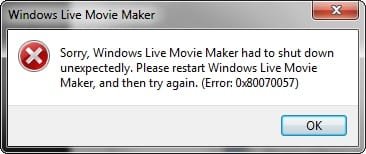
Incidentally, when I opened the prog, it crashed after a few mins:
2015-04-09_180937.jpg

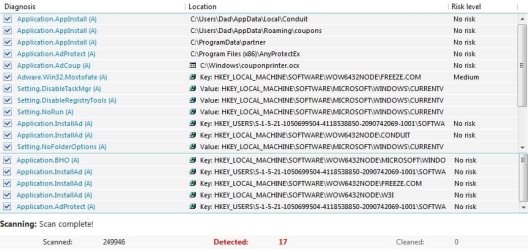
Emsisoft Emergency Kit:
2015-04-09_173357_join.jpg

View attachment EEK a2scan_150409-161408.txt

I haven't deleted or quarantined anything.

TDSSKiller didn't find anything:
View attachment TDSSKiller Scan Log 2015-04-09.txt

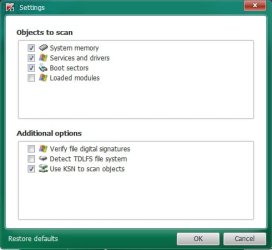
Do I need to adjust anything?
2015-04-09_173717.jpg
 

My Computer My Computer

At a glance

Windows 7 Home Premium 64bitCore i38GB DDR3Intel HD
Computer type
Laptop
Computer Manufacturer/Model Number
Acer Aspire 5741
OS
Windows 7 Home Premium 64bit
CPU
Core i3
Memory
8GB DDR3
Graphics Card(s)
Intel HD
Yes, check all those boxes. Some valid unsigned drivers may show up but it's better to verify the digital signatures and check kick-outs individually than to let all of them just pass. "Most" (used loosely) malware isn't signed. You can chose what to do with them.

I would at least quarantine the objects found by EEK. These too can be restored or deleted later. Some of those are potentially dangerous. Perhaps not in themselves but what they can allow. Especially Conduit (browser hijacker) and Freeze (download server). There's also a number of ad-servers on the list. Check to see if any show up on your installed programs list. If they do, I suggest they be uninstalled. NEVER download applications or drivers from any service but the OEM or the OEM's alternate server. And ALWAYS choose a "custom install" so you can see what's being added to the install. Many will include additional PUPs.

There's one more I'd like you to run. No single scanner will catch all malware. Download and install the free version of Malwarebytes Antimalware (MBAM). You can get the download HERE then follow this TUTORIAL. Pay particular attention to the last install option screen and uncheck the trial option. Be sure to run MBAM as administrator after installed.
 

My Computer My Computer

At a glance

Windows 7 Pro-x64i7-2600 3.4GHz - 3.8GHz Turbo8Gb - 2x4GB, Muskin 991770 PC3-1333Integrated Intel HD 2000
Computer type
PC/Desktop
Computer Manufacturer/Model Number
Built 2/11/2011
OS
Windows 7 Pro-x64
CPU
i7-2600 3.4GHz - 3.8GHz Turbo
Motherboard
Intel DH67BL-B3
Memory
8Gb - 2x4GB, Muskin 991770 PC3-1333
Graphics Card(s)
Integrated Intel HD 2000
Sound Card
Integrated Intel 10.1 HD, RealTek ALC892
Monitor(s) Displays
Asus LCD VH222H, Haier HL24XSL2a
Screen Resolution
1920x1080, 1920x1080
Hard Drives
Crucial SSD C300-128Gb,
Western Digital WD5002AALX - 500Gb,
Western Digital WD7501AALS - 750Gb
PSU
Seasonic 650W 80+ Gold Modular
Case
Rosewill Defender
Cooling
Stock CPU, Four 120mm case fans, PCH fan added
Keyboard
Logitech EX100 Y-RBH94 Wireless
Mouse
Logitech EX100 M-RCE95 Wireless
Internet Speed
3.0/1.5 Mbs
Antivirus
Microsoft Security Essentials
Browser
Microsoft Internet Explorer 11
Other Info
Antec Veris Premier-Multimedia IR Station,
Cyber Accoustics-3602 Speakers,
AFT XM-5U Card Reader,
Hauppauge TV-HVR-2250,
Sony LX300 USB Turntable
I've re-run EEK and quarantined everything - the prog says only 16 of the 17 have been quarantined, though. I haven't identified the missing one.

If I can identify any as installed progs, what should I use to uninstall them, if they don't appear under Windows' Add and Remove or in Revo Uninstaller?

MBAM log:
Malwarebytes Anti-Malware
Malwarebytes | Free Anti-Malware & Internet Security Software

Scan Date: 09/04/2015
Scan Time: 23:22:55
Logfile:
Administrator: Yes

Version: 2.01.4.1018
Malware Database: v2015.04.09.07
Rootkit Database: v2015.03.31.01
License: Free
Malware Protection: Disabled
Malicious Website Protection: Disabled
Self-protection: Disabled

OS: Windows 7 Service Pack 1
CPU: x64
File System: NTFS
User: Dad

Scan Type: Threat Scan
Result: Completed
Objects Scanned: 399082
Time Elapsed: 36 min, 54 sec

Memory: Enabled
Startup: Enabled
Filesystem: Enabled
Archives: Enabled
Rootkits: Enabled
Heuristics: Enabled
PUP: Enabled
PUM: Enabled

Processes: 0
(No malicious items detected)

Modules: 0
(No malicious items detected)

Registry Keys: 0
(No malicious items detected)

Registry Values: 3
PUP.Optional.Conduit.A, HKLM\SOFTWARE\WOW6432NODE\MICROSOFT\INTERNET EXPLORER\SEARCHSCOPES\{afdbddaa-5d3f-42ee-b79c-185a7020515b}|URL, http://search.conduit.com/ResultsExt.aspx?q={searchTerms}&SearchSource=4&ctid=CT1060933&SSPV=IESB01, Quarantined, [17743139d9b1f73f343637856c97db25]
PUP.Optional.Conduit.A, HKU\S-1-5-21-1050699504-4118538850-2090742069-1001\SOFTWARE\MICROSOFT\INTERNET EXPLORER\SEARCHSCOPES\{afdbddaa-5d3f-42ee-b79c-185a7020515b}|URL, http://search.conduit.com/Results.aspx?gd=&ctid=CT3315513&octid=EB_ORIGINAL_CTID&ISID=M08AB69D0-373D-4C18-956B-1138BD153C79&SearchSource=58&CUI=&UM=5&UP=SPF72EF9AF-729C-4225-8D57-299642F05D15&q={searchTerms}&SSPV=, Quarantined, [c6c525452a600d2994d73c8044bf6997]
PUP.Optional.Conduit.A, HKU\S-1-5-21-1050699504-4118538850-2090742069-1001\SOFTWARE\MICROSOFT\INTERNET EXPLORER\SEARCHSCOPES\{afdbddaa-5d3f-42ee-b79c-185a7020515b}|SuggestionsURL_JSON, http://suggest.search.conduit.com/CSuggestJson.ashx?prefix={searchTerms}, Quarantined, [acdff1797317d165da9177459a693fc1]

Registry Data: 0
(No malicious items detected)

Folders: 0
(No malicious items detected)

Files: 0
(No malicious items detected)

Physical Sectors: 0
(No malicious items detected)


(end)
 

My Computer My Computer

At a glance

Windows 7 Home Premium 64bitCore i38GB DDR3Intel HD
Computer type
Laptop
Computer Manufacturer/Model Number
Acer Aspire 5741
OS
Windows 7 Home Premium 64bit
CPU
Core i3
Memory
8GB DDR3
Graphics Card(s)
Intel HD
Be sure to reboot after the scans.

If they don't show up in Programs, they could be inserted as a browser add-on. Depending on which browser(s) you use, you can look in Tools for something like Manage Add-ons. Do this for all browsers installed on the system (Chrome, IE, Firefox, etc.) Use Disable or Delete depending on which Type of add-on is selected (Tool Bars, Accelerators, Search Providers, etc.).
 

My Computer My Computer

At a glance

Windows 7 Pro-x64i7-2600 3.4GHz - 3.8GHz Turbo8Gb - 2x4GB, Muskin 991770 PC3-1333Integrated Intel HD 2000
Computer type
PC/Desktop
Computer Manufacturer/Model Number
Built 2/11/2011
OS
Windows 7 Pro-x64
CPU
i7-2600 3.4GHz - 3.8GHz Turbo
Motherboard
Intel DH67BL-B3
Memory
8Gb - 2x4GB, Muskin 991770 PC3-1333
Graphics Card(s)
Integrated Intel HD 2000
Sound Card
Integrated Intel 10.1 HD, RealTek ALC892
Monitor(s) Displays
Asus LCD VH222H, Haier HL24XSL2a
Screen Resolution
1920x1080, 1920x1080
Hard Drives
Crucial SSD C300-128Gb,
Western Digital WD5002AALX - 500Gb,
Western Digital WD7501AALS - 750Gb
PSU
Seasonic 650W 80+ Gold Modular
Case
Rosewill Defender
Cooling
Stock CPU, Four 120mm case fans, PCH fan added
Keyboard
Logitech EX100 Y-RBH94 Wireless
Mouse
Logitech EX100 M-RCE95 Wireless
Internet Speed
3.0/1.5 Mbs
Antivirus
Microsoft Security Essentials
Browser
Microsoft Internet Explorer 11
Other Info
Antec Veris Premier-Multimedia IR Station,
Cyber Accoustics-3602 Speakers,
AFT XM-5U Card Reader,
Hauppauge TV-HVR-2250,
Sony LX300 USB Turntable
Also: What antivirus system are you using? Make sure it's up to date and run a full scan.

Follow this Clean Start tutorial to see if any questionable entries are shown. Don't change anything yet--Skip item 3 and click on the Services tab. You can hide the Microsoft Services. We just want to see what's there for the time being. Post an image if you don't recognize entries.

After checking the browsers, and removing any questionable entries, close the browser and reboot. Re-run MBAM and see if the Registry entries for Conduit return. If it does, start saving your data files. I'm afraid a clean install of Windows may be in your future. :(
 

My Computer My Computer

At a glance

Windows 7 Pro-x64i7-2600 3.4GHz - 3.8GHz Turbo8Gb - 2x4GB, Muskin 991770 PC3-1333Integrated Intel HD 2000
Computer type
PC/Desktop
Computer Manufacturer/Model Number
Built 2/11/2011
OS
Windows 7 Pro-x64
CPU
i7-2600 3.4GHz - 3.8GHz Turbo
Motherboard
Intel DH67BL-B3
Memory
8Gb - 2x4GB, Muskin 991770 PC3-1333
Graphics Card(s)
Integrated Intel HD 2000
Sound Card
Integrated Intel 10.1 HD, RealTek ALC892
Monitor(s) Displays
Asus LCD VH222H, Haier HL24XSL2a
Screen Resolution
1920x1080, 1920x1080
Hard Drives
Crucial SSD C300-128Gb,
Western Digital WD5002AALX - 500Gb,
Western Digital WD7501AALS - 750Gb
PSU
Seasonic 650W 80+ Gold Modular
Case
Rosewill Defender
Cooling
Stock CPU, Four 120mm case fans, PCH fan added
Keyboard
Logitech EX100 Y-RBH94 Wireless
Mouse
Logitech EX100 M-RCE95 Wireless
Internet Speed
3.0/1.5 Mbs
Antivirus
Microsoft Security Essentials
Browser
Microsoft Internet Explorer 11
Other Info
Antec Veris Premier-Multimedia IR Station,
Cyber Accoustics-3602 Speakers,
AFT XM-5U Card Reader,
Hauppauge TV-HVR-2250,
Sony LX300 USB Turntable
Thanks for your patience.

With the same things showing up in the scans, I thought I'd post all the results in one post, mainly so I can keep on top of everything.

........................
Emsisoft Emergency Kit v. 9.0.0.4700
(C) 2003-2014 Emsisoft - Emsisoft Anti-Malware: Your ultimate weapon against all Internet threats

ID Object
0 C:\Windows\couponprinter.ocx detected: Application.AdCoup (A)

1 Key: HKEY_LOCAL_MACHINE\SOFTWARE\WOW6432NODE\W3I detected: Application.InstallAd (A)

2 Value: HKEY_LOCAL_MACHINE\SOFTWARE\MICROSOFT\WINDOWS\CURRENTVERSION\POLICIES\EXPLORER -> NOFOLDEROPTIONS detected: Setting.NoFolderOptions (A)

3 Key: HKEY_USERS\S-1-5-21-1050699504-4118538850-2090742069-1001\SOFTWARE\ANYPROTECT detected: Application.AdProtect (A)

4 C:\Program Files (x86)\AnyProtectEx detected: Application.AdProtect (A)

5 Key: HKEY_USERS\S-1-5-21-1050699504-4118538850-2090742069-1001\SOFTWARE\CONDUIT detected: Application.InstallAd (A)

6 C:\Users\Dad\AppData\Local\Conduit detected: Application.AppInstall (A)

7 Value: HKEY_LOCAL_MACHINE\SOFTWARE\MICROSOFT\WINDOWS\CURRENTVERSION\POLICIES\SYSTEM -> DISABLETASKMGR detected: Setting.DisableTaskMgr (A)

8 Value: HKEY_LOCAL_MACHINE\SOFTWARE\MICROSOFT\WINDOWS\CURRENTVERSION\POLICIES\EXPLORER -> NORUN detected: Setting.NoRun (A)

9 Value: HKEY_LOCAL_MACHINE\SOFTWARE\MICROSOFT\WINDOWS\CURRENTVERSION\POLICIES\SYSTEM -> DISABLEREGISTRYTOOLS detected: Setting.DisableRegistryTools (A)

10 Key: HKEY_USERS\S-1-5-21-1050699504-4118538850-2090742069-1001\SOFTWARE\SOFTONIC detected: Application.InstallAd (A)

11 C:\Users\Dad\AppData\Roaming\coupons detected: Application.AppInstall (A)

12 Key: HKEY_LOCAL_MACHINE\SOFTWARE\WOW6432NODE\MICROSOFT\WINDOWS\CURRENTVERSION\EXPLORER\BROWSER HELPER OBJECTS\{1392B8D2-5C05-419F-A8F6-B9F15A596612} detected: Application.BHO (A)

13 C:\ProgramData\partner detected: Application.AppInstall (A)

14 Key: HKEY_LOCAL_MACHINE\SOFTWARE\WOW6432NODE\FREEZE.COM detected: Application.InstallAd (A)

15 Key: HKEY_LOCAL_MACHINE\SOFTWARE\WOW6432NODE\CONDUIT detected: Application.InstallAd (A)

Deleted all of these.
..............................

MBAM

Registry Values: 3
PUP.Optional.Conduit.A, HKLM\SOFTWARE\WOW6432NODE\MICROSOFT\INTERNET EXPLORER\SEARCHSCOPES\{afdbddaa-5d3f-42ee-b79c-185a7020515b}|URL, http://search.conduit.com/ResultsExt.aspx?q={searchTerms}&SearchSource=4&ctid=CT1060933&SSPV=IESB01, Quarantined, [17743139d9b1f73f343637856c97db25]
PUP.Optional.Conduit.A, HKU\S-1-5-21-1050699504-4118538850-2090742069-1001\SOFTWARE\MICROSOFT\INTERNET EXPLORER\SEARCHSCOPES\{afdbddaa-5d3f-42ee-b79c-185a7020515b}|URL, http://search.conduit.com/Results.aspx?gd=&ctid=CT3315513&octid=EB_ORIGINAL_CTID&ISID=M08AB69D0-373D-4C18-956B-1138BD153C79&SearchSource=58&CUI=&UM=5&UP=SPF72EF9AF-729C-4225-8D57-299642F05D15&q={searchTerms}&SSPV=, Quarantined, [c6c525452a600d2994d73c8044bf6997]
PUP.Optional.Conduit.A, HKU\S-1-5-21-1050699504-4118538850-2090742069-1001\SOFTWARE\MICROSOFT\INTERNET EXPLORER\SEARCHSCOPES\{afdbddaa-5d3f-42ee-b79c-185a7020515b}|SuggestionsURL_JSON, http://suggest.search.conduit.com/CSuggestJson.ashx?prefix={searchTerms}, Quarantined, [acdff1797317d165da9177459a693fc1]

Deleted all of these.

.............................

No suspicious extensions or add-ons in Chrome or IE11.

.............................

I have Avast Free Anti-virus 2015, so I ran the Smart Scan and then a Boot Scan (as I was prompted to do). The boot scan took hours.

I quarantined everything to the "Virus Chest" and then deleted it all, after the laptop had re-booted to the full Windows environment. I thought I'd already removed some of this stuff with EEK, especially AnyProtect.
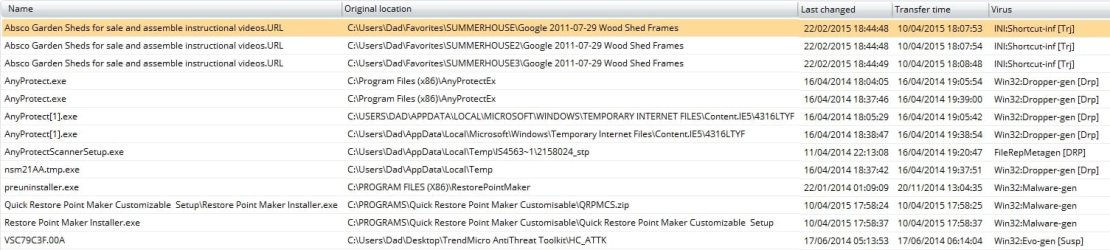
2015-04-10_212811_join.jpg

Should I do another boot scan, to confirm they've gone?
.............................

Clean Start-up
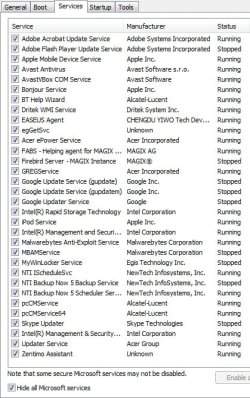
2015-04-10_213735_join.jpg

I don't immediately recognise everything, but nothing nasty springs out at me.

I only went as far as listing the non-Microsoft processes - I didn't disable them and re-boot, as the tutorial instructs.

.............................

Re-ran MBAM and it's clean.

I haven't yet tried to re-install CCleaner ccsetup504.exe, in case you want me to do the full clean boot or if the CCleaner exe still needs to be checked.

I think I know where all of the above have come from, though. About a year ago I upgraded the previously safe PicPick screen-capture tool to v.3.3.2, which turned-out to be bundled with aggresive PUPs. Some installed no matter what I ticked and unticked, and all-but disabled Revo Uninstaller, together with a few other things. As everything eventually returned to normal, bar Revo, I ignored it. Daft, really.

 

My Computer My Computer

At a glance

Windows 7 Home Premium 64bitCore i38GB DDR3Intel HD
Computer type
Laptop
Computer Manufacturer/Model Number
Acer Aspire 5741
OS
Windows 7 Home Premium 64bit
CPU
Core i3
Memory
8GB DDR3
Graphics Card(s)
Intel HD
I had to look up a few of the Services I didn't recognize. Some "I" wouldn't use but that's owner choice. Go back to that Clean Start-up and click on the Start UP tab for a quick look.

I would feel better if you did another boot scan and it came out clean.

I would download a new copy of CCleaner before attempting to install it. Get it from HERE only.
 

My Computer My Computer

At a glance

Windows 7 Pro-x64i7-2600 3.4GHz - 3.8GHz Turbo8Gb - 2x4GB, Muskin 991770 PC3-1333Integrated Intel HD 2000
Computer type
PC/Desktop
Computer Manufacturer/Model Number
Built 2/11/2011
OS
Windows 7 Pro-x64
CPU
i7-2600 3.4GHz - 3.8GHz Turbo
Motherboard
Intel DH67BL-B3
Memory
8Gb - 2x4GB, Muskin 991770 PC3-1333
Graphics Card(s)
Integrated Intel HD 2000
Sound Card
Integrated Intel 10.1 HD, RealTek ALC892
Monitor(s) Displays
Asus LCD VH222H, Haier HL24XSL2a
Screen Resolution
1920x1080, 1920x1080
Hard Drives
Crucial SSD C300-128Gb,
Western Digital WD5002AALX - 500Gb,
Western Digital WD7501AALS - 750Gb
PSU
Seasonic 650W 80+ Gold Modular
Case
Rosewill Defender
Cooling
Stock CPU, Four 120mm case fans, PCH fan added
Keyboard
Logitech EX100 Y-RBH94 Wireless
Mouse
Logitech EX100 M-RCE95 Wireless
Internet Speed
3.0/1.5 Mbs
Antivirus
Microsoft Security Essentials
Browser
Microsoft Internet Explorer 11
Other Info
Antec Veris Premier-Multimedia IR Station,
Cyber Accoustics-3602 Speakers,
AFT XM-5U Card Reader,
Hauppauge TV-HVR-2250,
Sony LX300 USB Turntable
carwiz, so that I can appreciate the depth of this topic, what is a side-by-side configuration? Did you kinda sorta explain that earlier? If you did, I can't find that post.
 

My Computer My Computer

At a glance

Windows 7 Professional 64-bitDesktop i5; Acers i5 & i7desktop 16GB; 1 Acer 8GB & 1 Acer 16GB
Computer type
PC/Desktop
Computer Manufacturer/Model Number
Antec desktop; Acer Aspire laptops
OS
Windows 7 Professional 64-bit
CPU
Desktop i5; Acers i5 & i7
Memory
desktop 16GB; 1 Acer 8GB & 1 Acer 16GB
Hard Drives
1TB split into 2 equal partitions [OS and data] usable by RJS
Internet Speed
AT&T DSL
Browser
FF, GChrome, msIE
Other Info
Windows 7 Firewall, Emsisoft AM/AV, MSE [scan-only], SpywareBlaster, Ruiware/BillP combine

My Computer My Computer

At a glance

Windows 7 Pro-x64i7-2600 3.4GHz - 3.8GHz Turbo8Gb - 2x4GB, Muskin 991770 PC3-1333Integrated Intel HD 2000
Computer type
PC/Desktop
Computer Manufacturer/Model Number
Built 2/11/2011
OS
Windows 7 Pro-x64
CPU
i7-2600 3.4GHz - 3.8GHz Turbo
Motherboard
Intel DH67BL-B3
Memory
8Gb - 2x4GB, Muskin 991770 PC3-1333
Graphics Card(s)
Integrated Intel HD 2000
Sound Card
Integrated Intel 10.1 HD, RealTek ALC892
Monitor(s) Displays
Asus LCD VH222H, Haier HL24XSL2a
Screen Resolution
1920x1080, 1920x1080
Hard Drives
Crucial SSD C300-128Gb,
Western Digital WD5002AALX - 500Gb,
Western Digital WD7501AALS - 750Gb
PSU
Seasonic 650W 80+ Gold Modular
Case
Rosewill Defender
Cooling
Stock CPU, Four 120mm case fans, PCH fan added
Keyboard
Logitech EX100 Y-RBH94 Wireless
Mouse
Logitech EX100 M-RCE95 Wireless
Internet Speed
3.0/1.5 Mbs
Antivirus
Microsoft Security Essentials
Browser
Microsoft Internet Explorer 11
Other Info
Antec Veris Premier-Multimedia IR Station,
Cyber Accoustics-3602 Speakers,
AFT XM-5U Card Reader,
Hauppauge TV-HVR-2250,
Sony LX300 USB Turntable
Avast boot scan was clean.

Another MBAM scan was clean.

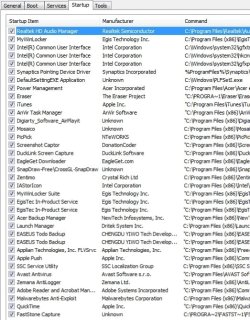
Start-up:
2015-04-11_210543_join_msconfig-startup.jpg

These are associated with Acer, my laptop manuf:
MyWinLocker (Egis Technology Inc)
DefaultSettingEXE Application ("PLFSetl.exe" in Task Manager) - Acer Crystal Eye Webcam
Launch Manager (Dritek System Inc)

I downloaded CCleaner ccsetup504.exe again, via your link to Piriform, but the error remains:
2015-04-05_201539 side-by-side error_event log_sxstrace.exe.jpg
 

My Computer My Computer

At a glance

Windows 7 Home Premium 64bitCore i38GB DDR3Intel HD
Computer type
Laptop
Computer Manufacturer/Model Number
Acer Aspire 5741
OS
Windows 7 Home Premium 64bit
CPU
Core i3
Memory
8GB DDR3
Graphics Card(s)
Intel HD
Wow! That is sure a pile of startups.

What's the error log say for the error? Same as before?
 

My Computer My Computer

At a glance

Windows 7 Pro-x64i7-2600 3.4GHz - 3.8GHz Turbo8Gb - 2x4GB, Muskin 991770 PC3-1333Integrated Intel HD 2000
Computer type
PC/Desktop
Computer Manufacturer/Model Number
Built 2/11/2011
OS
Windows 7 Pro-x64
CPU
i7-2600 3.4GHz - 3.8GHz Turbo
Motherboard
Intel DH67BL-B3
Memory
8Gb - 2x4GB, Muskin 991770 PC3-1333
Graphics Card(s)
Integrated Intel HD 2000
Sound Card
Integrated Intel 10.1 HD, RealTek ALC892
Monitor(s) Displays
Asus LCD VH222H, Haier HL24XSL2a
Screen Resolution
1920x1080, 1920x1080
Hard Drives
Crucial SSD C300-128Gb,
Western Digital WD5002AALX - 500Gb,
Western Digital WD7501AALS - 750Gb
PSU
Seasonic 650W 80+ Gold Modular
Case
Rosewill Defender
Cooling
Stock CPU, Four 120mm case fans, PCH fan added
Keyboard
Logitech EX100 Y-RBH94 Wireless
Mouse
Logitech EX100 M-RCE95 Wireless
Internet Speed
3.0/1.5 Mbs
Antivirus
Microsoft Security Essentials
Browser
Microsoft Internet Explorer 11
Other Info
Antec Veris Premier-Multimedia IR Station,
Cyber Accoustics-3602 Speakers,
AFT XM-5U Card Reader,
Hauppauge TV-HVR-2250,
Sony LX300 USB Turntable
Yes, too many start-ups. A fun evening awaits sorting them out.

The CCleaner error is the same:
2015-04-12_020055.jpg

Activation context generation failed for "C:\Users\Dad\Downloads\ccsetup504.exe".Error in manifest or policy file "C:\Users\Dad\Downloads\ccsetup504.exe" on line 0. Invalid Xml syntax.

2015-04-12_020625_eventid59_xml.jpg
 

My Computer My Computer

At a glance

Windows 7 Home Premium 64bitCore i38GB DDR3Intel HD
Computer type
Laptop
Computer Manufacturer/Model Number
Acer Aspire 5741
OS
Windows 7 Home Premium 64bit
CPU
Core i3
Memory
8GB DDR3
Graphics Card(s)
Intel HD
What discs did you get with your laptop and what discs did you make after you bought it. Did you create a Restore/Recovery disc like the manual says? Any backups or images? It appears that too many files are corrupt or missing.

As a last try, you can run chkdsk on the C: drive and see if any sectors are corrupt and repairable. Use Option One of this tutorial. The check won't start until the reboot. Make sure the laptop is on external power and do not stop or type anything while it's running.
 

My Computer My Computer

At a glance

Windows 7 Pro-x64i7-2600 3.4GHz - 3.8GHz Turbo8Gb - 2x4GB, Muskin 991770 PC3-1333Integrated Intel HD 2000
Computer type
PC/Desktop
Computer Manufacturer/Model Number
Built 2/11/2011
OS
Windows 7 Pro-x64
CPU
i7-2600 3.4GHz - 3.8GHz Turbo
Motherboard
Intel DH67BL-B3
Memory
8Gb - 2x4GB, Muskin 991770 PC3-1333
Graphics Card(s)
Integrated Intel HD 2000
Sound Card
Integrated Intel 10.1 HD, RealTek ALC892
Monitor(s) Displays
Asus LCD VH222H, Haier HL24XSL2a
Screen Resolution
1920x1080, 1920x1080
Hard Drives
Crucial SSD C300-128Gb,
Western Digital WD5002AALX - 500Gb,
Western Digital WD7501AALS - 750Gb
PSU
Seasonic 650W 80+ Gold Modular
Case
Rosewill Defender
Cooling
Stock CPU, Four 120mm case fans, PCH fan added
Keyboard
Logitech EX100 Y-RBH94 Wireless
Mouse
Logitech EX100 M-RCE95 Wireless
Internet Speed
3.0/1.5 Mbs
Antivirus
Microsoft Security Essentials
Browser
Microsoft Internet Explorer 11
Other Info
Antec Veris Premier-Multimedia IR Station,
Cyber Accoustics-3602 Speakers,
AFT XM-5U Card Reader,
Hauppauge TV-HVR-2250,
Sony LX300 USB Turntable
The laptop was bought new, but wasn't supplied with any discs, and I haven't made a recovery disc, stupidly. It gets worse: I don't have any back-ups, either.

Should I select both options:
-Automatically fix file system errors; and
-Scan for and attempt recovery of bad sectors?
 

My Computer My Computer

At a glance

Windows 7 Home Premium 64bitCore i38GB DDR3Intel HD
Computer type
Laptop
Computer Manufacturer/Model Number
Acer Aspire 5741
OS
Windows 7 Home Premium 64bit
CPU
Core i3
Memory
8GB DDR3
Graphics Card(s)
Intel HD
Added:
You were typing while I was looking for the Tutorial.
Yes, but it will run for quite some time as the entire disk is checked.

This may be the last choice unless someone else steps in with more ideas:
http://www.sevenforums.com/tutorials/219487-clean-reinstall-factory-oem-windows-7-a.html

I've reviewed many complaints of the same type of error but they don't involve so many of the system files as yours does. And many were never resolved. I think it's best to save what data you can and do a Clean Reinstall.
 
Last edited:

My Computer My Computer

At a glance

Windows 7 Pro-x64i7-2600 3.4GHz - 3.8GHz Turbo8Gb - 2x4GB, Muskin 991770 PC3-1333Integrated Intel HD 2000
Computer type
PC/Desktop
Computer Manufacturer/Model Number
Built 2/11/2011
OS
Windows 7 Pro-x64
CPU
i7-2600 3.4GHz - 3.8GHz Turbo
Motherboard
Intel DH67BL-B3
Memory
8Gb - 2x4GB, Muskin 991770 PC3-1333
Graphics Card(s)
Integrated Intel HD 2000
Sound Card
Integrated Intel 10.1 HD, RealTek ALC892
Monitor(s) Displays
Asus LCD VH222H, Haier HL24XSL2a
Screen Resolution
1920x1080, 1920x1080
Hard Drives
Crucial SSD C300-128Gb,
Western Digital WD5002AALX - 500Gb,
Western Digital WD7501AALS - 750Gb
PSU
Seasonic 650W 80+ Gold Modular
Case
Rosewill Defender
Cooling
Stock CPU, Four 120mm case fans, PCH fan added
Keyboard
Logitech EX100 Y-RBH94 Wireless
Mouse
Logitech EX100 M-RCE95 Wireless
Internet Speed
3.0/1.5 Mbs
Antivirus
Microsoft Security Essentials
Browser
Microsoft Internet Explorer 11
Other Info
Antec Veris Premier-Multimedia IR Station,
Cyber Accoustics-3602 Speakers,
AFT XM-5U Card Reader,
Hauppauge TV-HVR-2250,
Sony LX300 USB Turntable
Itudnic, ?you did already make an image backup or a folder/file backup of all your txt & doc files, pics & graphics, audio & video, etc. of everything you downloaded or created [via any one of your programs] before going any further?
 
Last edited:

My Computer My Computer

At a glance

Windows 7 Professional 64-bitDesktop i5; Acers i5 & i7desktop 16GB; 1 Acer 8GB & 1 Acer 16GB
Computer type
PC/Desktop
Computer Manufacturer/Model Number
Antec desktop; Acer Aspire laptops
OS
Windows 7 Professional 64-bit
CPU
Desktop i5; Acers i5 & i7
Memory
desktop 16GB; 1 Acer 8GB & 1 Acer 16GB
Hard Drives
1TB split into 2 equal partitions [OS and data] usable by RJS
Internet Speed
AT&T DSL
Browser
FF, GChrome, msIE
Other Info
Windows 7 Firewall, Emsisoft AM/AV, MSE [scan-only], SpywareBlaster, Ruiware/BillP combine
Is everything really as bad as you say?

A clean re-installation of Win 7 is a pretty daunting task, even with the superb tutorial. RolandJS, I moved all my files to a portable drive some time ago, so I haven't lost anything personal, and every program still appears to work, as do all the Windows features I use. Apart from a general slowing of the laptop and this new inability to install CCleaner (no change after ChkDsk), everything seems fine.

I don't know if ChkDsk gives the all-clear, but it hasn't saved anything to a "Found" folder on C:\.

...................................................................
Checking file system on C:
The type of the file system is NTFS.
Volume label is Acer.

A disk check has been scheduled.
Windows will now check the disk.

CHKDSK is verifying files (stage 1 of 5)...
980480 file records processed. File verification completed.
1274 large file records processed. 0 bad file records processed. 0 EA records processed. 64 reparse records processed. CHKDSK is verifying indexes (stage 2 of 5)...
1058698 index entries processed. Index verification completed.
0 unindexed files scanned. 0 unindexed files recovered. CHKDSK is verifying security descriptors (stage 3 of 5)...
980480 file SDs/SIDs processed. Cleaning up 1486 unused index entries from index $SII of file 0x9.
Cleaning up 1486 unused index entries from index $SDH of file 0x9.
Cleaning up 1486 unused security descriptors.
Security descriptor verification completed.
39110 data files processed. CHKDSK is verifying Usn Journal...
33677592 USN bytes processed. Usn Journal verification completed.
CHKDSK is verifying file data (stage 4 of 5)...
980464 files processed. File data verification completed.
CHKDSK is verifying free space (stage 5 of 5)...
38552504 free clusters processed. Free space verification is complete.
Windows has checked the file system and found no problems.

297782367 KB total disk space.
142362552 KB in 191776 files.
118276 KB in 39111 indexes.
0 KB in bad sectors.
1091519 KB in use by the system.
65536 KB occupied by the log file.
154210020 KB available on disk.

4096 bytes in each allocation unit.
74445591 total allocation units on disk.
38552505 allocation units available on disk.

Internal Info:
00 f6 0e 00 f2 85 03 00 63 73 06 00 00 00 00 00 ........cs......
92 06 00 00 40 00 00 00 00 00 00 00 00 00 00 00 ....@...........
00 00 00 00 00 00 00 00 00 00 00 00 00 00 00 00 ................

Windows has finished checking your disk.
Please wait while your computer restarts.
 

My Computer My Computer

At a glance

Windows 7 Home Premium 64bitCore i38GB DDR3Intel HD
Computer type
Laptop
Computer Manufacturer/Model Number
Acer Aspire 5741
OS
Windows 7 Home Premium 64bit
CPU
Core i3
Memory
8GB DDR3
Graphics Card(s)
Intel HD
Back
Top