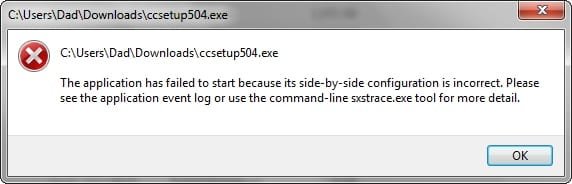
Thanks for your patience.
With the same things showing up in the scans, I thought I'd post all the results in one post, mainly so I can keep on top of everything.
........................
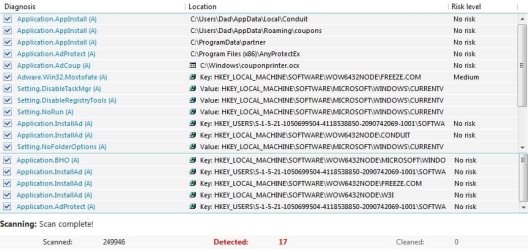
Emsisoft Emergency Kit v. 9.0.0.4700
(C) 2003-2014 Emsisoft -
Emsisoft Anti-Malware: Your ultimate weapon against all Internet threats
ID Object
0 C:\Windows\couponprinter.ocx detected: Application.AdCoup (A)
1 Key: HKEY_LOCAL_MACHINE\SOFTWARE\WOW6432NODE\W3I detected: Application.InstallAd (A)
2 Value: HKEY_LOCAL_MACHINE\SOFTWARE\MICROSOFT\WINDOWS\CURRENTVERSION\POLICIES\EXPLORER -> NOFOLDEROPTIONS detected: Setting.NoFolderOptions (A)
3 Key: HKEY_USERS\S-1-5-21-1050699504-4118538850-2090742069-1001\SOFTWARE\
ANYPROTECT detected: Application.AdProtect (A)
4
C:\Program Files (x86)\AnyProtectEx detected: Application.AdProtect (A)
5 Key: HKEY_USERS\S-1-5-21-1050699504-4118538850-2090742069-1001\SOFTWARE\
CONDUIT detected: Application.InstallAd (A)
6 C:\Users\Dad\AppData\Local\
Conduit detected: Application.AppInstall (A)
7 Value: HKEY_LOCAL_MACHINE\SOFTWARE\MICROSOFT\WINDOWS\CURRENTVERSION\POLICIES\SYSTEM -> DISABLETASKMGR detected: Setting.DisableTaskMgr (A)
8 Value: HKEY_LOCAL_MACHINE\SOFTWARE\MICROSOFT\WINDOWS\CURRENTVERSION\POLICIES\EXPLORER -> NORUN detected: Setting.NoRun (A)
9 Value: HKEY_LOCAL_MACHINE\SOFTWARE\MICROSOFT\WINDOWS\CURRENTVERSION\POLICIES\SYSTEM -> DISABLEREGISTRYTOOLS detected: Setting.DisableRegistryTools (A)
10 Key: HKEY_USERS\S-1-5-21-1050699504-4118538850-2090742069-1001\SOFTWARE\SOFTONIC detected: Application.InstallAd (A)
11 C:\Users\Dad\AppData\Roaming\coupons detected: Application.AppInstall (A)
12 Key: HKEY_LOCAL_MACHINE\SOFTWARE\WOW6432NODE\MICROSOFT\WINDOWS\CURRENTVERSION\EXPLORER\BROWSER HELPER OBJECTS\{1392B8D2-5C05-419F-A8F6-B9F15A596612} detected: Application.BHO (A)
13 C:\ProgramData\partner detected: Application.AppInstall (A)
14 Key: HKEY_LOCAL_MACHINE\SOFTWARE\WOW6432NODE\
FREEZE.COM detected: Application.InstallAd (A)
15 Key: HKEY_LOCAL_MACHINE\SOFTWARE\WOW6432NODE\
CONDUIT detected: Application.InstallAd (A)
Deleted all of these.
..............................
MBAM
Registry Values: 3
PUP.Optional.Conduit.A, HKLM\SOFTWARE\WOW6432NODE\MICROSOFT\INTERNET EXPLORER\SEARCHSCOPES\{afdbddaa-5d3f-42ee-b79c-185a7020515b}|URL, http://search.conduit.com/ResultsExt.aspx?q={searchTerms}&SearchSource=4&ctid=CT1060933&SSPV=IESB01, Quarantined, [17743139d9b1f73f343637856c97db25]
PUP.Optional.Conduit.A, HKU\S-1-5-21-1050699504-4118538850-2090742069-1001\SOFTWARE\MICROSOFT\INTERNET EXPLORER\SEARCHSCOPES\{afdbddaa-5d3f-42ee-b79c-185a7020515b}|URL, http://search.conduit.com/Results.aspx?gd=&ctid=CT3315513&octid=EB_ORIGINAL_CTID&ISID=M08AB69D0-373D-4C18-956B-1138BD153C79&SearchSource=58&CUI=&UM=5&UP=SPF72EF9AF-729C-4225-8D57-299642F05D15&q={searchTerms}&SSPV=, Quarantined, [c6c525452a600d2994d73c8044bf6997]
PUP.Optional.Conduit.A, HKU\S-1-5-21-1050699504-4118538850-2090742069-1001\SOFTWARE\MICROSOFT\INTERNET EXPLORER\SEARCHSCOPES\{afdbddaa-5d3f-42ee-b79c-185a7020515b}|SuggestionsURL_JSON, http://suggest.search.conduit.com/CSuggestJson.ashx?prefix={searchTerms}, Quarantined, [acdff1797317d165da9177459a693fc1]
Deleted all of these.
.............................
No suspicious extensions or add-ons in Chrome or IE11.
.............................
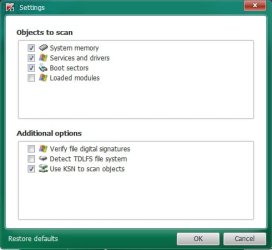
I have Avast Free Anti-virus 2015, so I ran the Smart Scan and then a Boot Scan (as I was prompted to do). The boot scan took hours.
I quarantined everything to the "Virus Chest" and then deleted it all, after the laptop had re-booted to the full Windows environment. I thought I'd already removed some of this stuff with EEK, especially
AnyProtect.
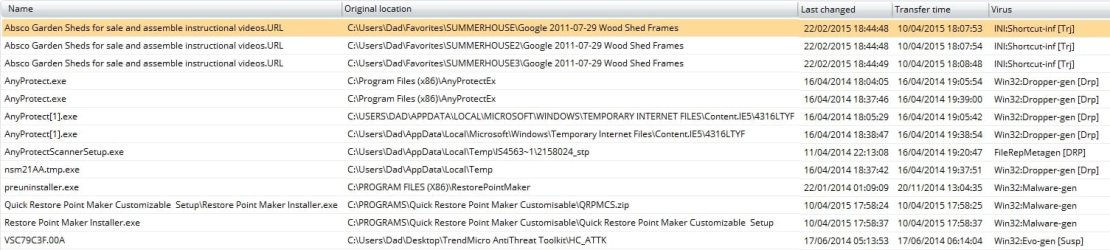
Should I do another boot scan, to confirm they've gone?
.............................
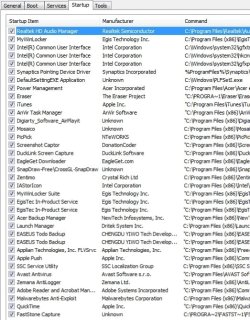
Clean Start-up
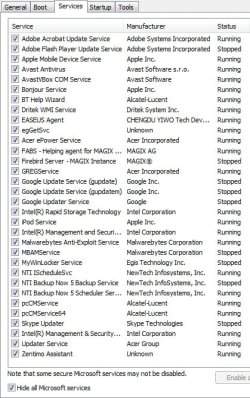
I don't immediately recognise everything, but nothing nasty springs out at me.
I only went as far as listing the non-Microsoft processes - I didn't disable them and re-boot, as the tutorial instructs.
.............................
Re-ran MBAM and it's clean.
I haven't yet tried to re-install CCleaner ccsetup504.exe, in case you want me to do the full clean boot or if the CCleaner exe still needs to be checked.
I think I know where all of the above have come from, though. About a year ago I upgraded the previously safe PicPick screen-capture tool to v.3.3.2, which turned-out to be bundled with aggresive PUPs. Some installed no matter what I ticked and unticked, and all-but disabled Revo Uninstaller, together with a few other things. As everything eventually returned to normal, bar Revo, I ignored it. Daft, really.