
Windows 7 Installation - Prepare PC to be Sold

   Information
Giving away or selling your old PC with OS can be tricky. Should I leave my software, do I lose my licence, can the buyer see my files even if I delete them, is it OK to install some extras for that cousin of mine I'm giving this rig as a Christmas present?

This tutorial shows you how to prepare a PC to be given away or sold. My main purpose is to show what to do when selling / giving away a used Windows 7 computer, but you can also use this method if you (like me ;)) got some nice laptops or PC's almost free to be given as presents but they came without OS.


Giving away or selling a PC with everything intact is -sorry to say it- dumb. Not only can it bring a lot of problems and annoyances due to wrongly named user profiles and folders but it's also a security risk. Whatever you think, however careful you think you have been, there's always enough personal information available on a used PC to really make you suffer, if the new owner so decides. If you are giving away a used PC please wipe the hard disk first to ensure your privacy. Then install Windows 7 without any personal user related information.


This is what you need:
  • A Windows 7 Install Media of your chosen edition
  • A disk wipe utility. If you do not know any, I recommend using Windows 7 built-in DISKPART command line utility
  • A PC, of course ;)
  • Windows 7 Product Key, which you can normally find on a sticker at the bottom or back of the PC. This, of course, is up to you: you can also sell or give away a PC with preinstalled Windows 7 without product key, in which case the buyer / receiver has to produce one
Skills / tutorials needed to manage this procedure:
Phase 1: Wiping the disk
  1. Backup your personal files and folders to an external destination
  2. Use DISKPART Clean All command as told in this tutorial to securely erase (wipe) your hard disk(s)
Phase 2: Installing Seven
  1. Begin installation of Windows 7 as told in this tutorial. If preparing a used computer which came with a pre-installed Windows 7, remember to use the original edition to ensure OEM product key can be used to activate it
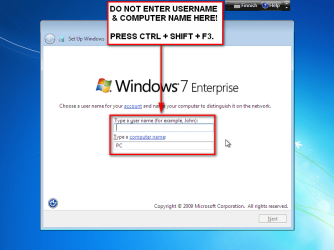
  2. When you reach step 11 in above mentioned installation tutorial, DO NOT ENTER USERNAME AND COMPUTER NAME! Instead press CTRL + SHIFT + F3:
    .
    Audit_1.png
    .
  3. This boots Windows 7 in so called Audit Mode using built-in administrator profile. There's no need to set up user accounts for now
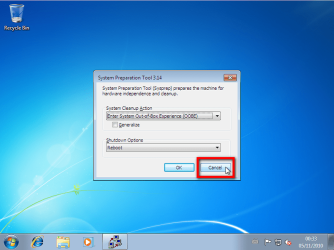
  4. Finally Windows 7 starts again in Audit Mode. Click Cancel to close System Preparation Tool for now:
    .
    Audit_3.png
    .
  5. Install all the drivers and software you want to. When installing software remember to use only valid, legal installation media
  6. If selling or giving away the PC equipped with Windows 7 Ultimate, install language packs needed if PC is going to be used in another language than that of your install media
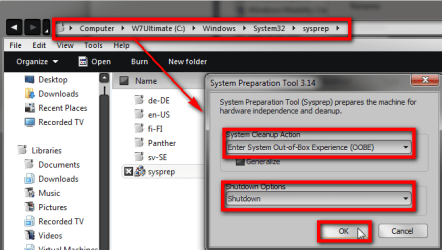
  7. When done, browse to and right click C:\Windows\System32\Sysprep\Sysprep.exe and choose Run as administrator to open System Preparation Tool (sysprep):
    .
    Audit_2.PNG
    .
  8. Select Out-of-Box Experience in System Cleanup Action
  9. Select Shutdown in Shutdown Options
  10. Click OK
Computer shuts down, and next time it is booted it is so called first boot (Out-of-Box Experience), stopping to ask initial user profile name and computer name. If language packs are installed (Ultimate or Enterprise), initial first boot also asks user in what language he / she wants Windows to be set up.

This way you can prepare the PC without creating any user accounts or naming the PC, letting the end user to do that.


Easy and quite fast (not counting DISKPART ;)).

Kari
 
Last edited:
Hi I know this is an older thread but quick question, can I use this method to install 7 then upgrade to 10 so that when I sell it the pc has win10 on?

You don't need to install Windows 7 first.

If you want to give or sell your old PC with Windows 10 and some preinstalled software, then use this method as told in the tutorial. Clean install Windows 10 as @z3r010 told above, then follow the steps told in this tutorial to prepare your PC to be given away or sold.

If you want to give or sell your PC as "new", just Windows 10 installed without any preinstalled software and user accounts, this method will be unnecessary. You can simply reset the PC after the 10 is installed. Reseting Windows 10 removes all user accounts and personal data, leaving Windows 10 as if it was a brand new installation without any user accounts. The next time the PC will be started it starts as if it was the first time ever it was booted.

Reset Windows 10: Reset Windows 10 - Windows 10 Forums

Kari

Cheers for the info, great tutorial. Thing is I'm keeping my copy of windows and was given a copy of 7 by the new owner he has asked if I can install and update for him as this gives him the option to setup as a new PC I thought it would be best.
 

My Computer My Computer

At a glance

windows 7 64 bit and dual boot PinguyosPC, intel i7 920 2.7ghz, laptop i7 720PC 6GB, laptop 2GB, me 2 seconds after 6 pintsPC Asus eah5870,laptop, ati hd 4580
Computer Manufacturer/Model Number
home built PC. Laptop studio1557
OS
windows 7 64 bit and dual boot Pinguyos
CPU
PC, intel i7 920 2.7ghz, laptop i7 720
Motherboard
PC, Asus P6t .laptop probably rubbish from dell
Memory
PC 6GB, laptop 2GB, me 2 seconds after 6 pints
Graphics Card(s)
PC Asus eah5870,laptop, ati hd 4580
Monitor(s) Displays
Sharp 42" HD TV using HDMI + HDMI to onkyo surround amp
Screen Resolution
1920x1080
Hard Drives
1x ssd OCZ 60GB, 2x250GB raid0, 2x1TB (storage),2TB
PSU
OCZ 700w
Case
antec 902
Cooling
antec khuler h20 920
Keyboard
logitek wave
Mouse
x8 sidewinder
Internet Speed
dog slow
Cheers for the info, great tutorial. Thing is I'm keeping my copy of windows and was given a copy of 7 by the new owner he has asked if I can install and update for him as this gives him the option to setup as a new PC I thought it would be best.

There's no point in installing Windows 7 first if the goal is to get Windows 10. If the new owner gave you a Windows 7 product key to use when installing, you can use it to clean install Windows 10, tutorial link in @z3r010's post above, post #38.

If the new owner did not give you a Windows 7 product key and you would install it without a key, the whole process would be useless anyway as the upgraded Windows 10 would not be activated.
 

My Computer My Computer

At a glance

Windows 10 Pro x64 EN-GB1.6 GHz Intel Core i7-720QM Processor6 GBATI Mobility Radeon HD 5850 Graphics
Computer type
Laptop
Computer Manufacturer/Model Number
HP ENVY 17-1150eg
OS
Windows 10 Pro x64 EN-GB
CPU
1.6 GHz Intel Core i7-720QM Processor
Memory
6 GB
Graphics Card(s)
ATI Mobility Radeon HD 5850 Graphics
Sound Card
Beats sound system with integrated subwoofer
Monitor(s) Displays
17" laptop display, 22" LED and 32" Full HD TV through HDMI
Screen Resolution
1600*900 (1), 1920*1080 (2&3)
Hard Drives
Internal: 2 x 500 GB SATA Hard Disk Drive 7200 rpm
External: 2TB for backups, 3TB USB3 network drive for media
Cooling
As Envy runs a bit warm, I have it on a Cooler Master pad
Keyboard
Logitech diNovo Media Desktop Laser (bluetooth)
Mouse
Logitech Performance Mouse MX
Internet Speed
50/10 Mbps VDSL
Antivirus
Windows Defender 4.3.9431.0
Browser
Maxthon 3.5.2., IE11
Ok thanks, I was still under the impression that you needed to install 7 before you could install 10. I've got the product key so all good. Cheers.
 

My Computer My Computer

At a glance

windows 7 64 bit and dual boot PinguyosPC, intel i7 920 2.7ghz, laptop i7 720PC 6GB, laptop 2GB, me 2 seconds after 6 pintsPC Asus eah5870,laptop, ati hd 4580
Computer Manufacturer/Model Number
home built PC. Laptop studio1557
OS
windows 7 64 bit and dual boot Pinguyos
CPU
PC, intel i7 920 2.7ghz, laptop i7 720
Motherboard
PC, Asus P6t .laptop probably rubbish from dell
Memory
PC 6GB, laptop 2GB, me 2 seconds after 6 pints
Graphics Card(s)
PC Asus eah5870,laptop, ati hd 4580
Monitor(s) Displays
Sharp 42" HD TV using HDMI + HDMI to onkyo surround amp
Screen Resolution
1920x1080
Hard Drives
1x ssd OCZ 60GB, 2x250GB raid0, 2x1TB (storage),2TB
PSU
OCZ 700w
Case
antec 902
Cooling
antec khuler h20 920
Keyboard
logitek wave
Mouse
x8 sidewinder
Internet Speed
dog slow
"Too much of anything is bad, but too much of good scotch is barely enough."
(Mark Twain)

Or, as my mother used to say, "Alcohol in moderation is good in any amount."
 

My Computer My Computer

At a glance

Windows 7 Ultimate 64 biti7 Intel8 GBnVidia GeForce
Computer type
PC/Desktop
Computer Manufacturer/Model Number
Dell
OS
Windows 7 Ultimate 64 bit
CPU
i7 Intel
Memory
8 GB
Graphics Card(s)
nVidia GeForce
Hard Drives
Seagate; WesternDigital
Antivirus
Panda
Browser
Firefox
Ok thanks, I was still under the impression that you needed to install 7 before you could install 10. I've got the product key so all good. Cheers.
Hi,
It is if you want the ability to use win-10's system restore back to the previous os
That process announces to M$ you are passing on the free upgrade properly and within the 30 grace period to do so and give them feedback as to why you're returning to the previous os.

Not doing it that way you might have to call M$ to retrieve your win-7 activation key if you don't like win-10 and reinstall win-7 or restore a system image of it if you bothered to make one.
 

My Computer My Computer

At a glance

Win-7-Pro64bit 7-H-Prem-64biti7-5930K 2nd i9-9940x both water blocked VRM'...Trident-z 3200C14 2nd Trident-z 3600C16EVGA 1080ti ftw3 2nd Titan Xp both water blocked
Computer type
PC/Desktop
Computer Manufacturer/Model Number
Custom assembled by me :}
OS
Win-7-Pro64bit 7-H-Prem-64bit
CPU
i7-5930K 2nd i9-9940x both water blocked VRM's too
Motherboard
ASUS SABERTOOTH X99 2nd ASUS x299 Apex
Memory
Trident-z 3200C14 2nd Trident-z 3600C16
Graphics Card(s)
EVGA 1080ti ftw3 2nd Titan Xp both water blocked
Sound Card
Built-in Realtek
Monitor(s) Displays
1-AOC G2460PG 24"G-Sync 144Hz/ 2nd 1-ASUS VG248QE 24" 144Hz
Screen Resolution
1920 x 1080 144Hz
Hard Drives
2-Samsung M.2 Evo & Evo Plus
2-Samsung 850 EVO 500GB SSD's/ 3-2.5 W.D. Black 1tb-&3-1tb/3-3.5 WD Black 1tb hdd's
PSU
EVGA SuperNOVA 1000-P2 2nd 1200-P2
Case
2-Corsair Obsidian Series 450D Black ATX Mid Tower
Cooling
Custom water loops
Keyboard
Logitech G710+/ 2nd Logitech G910
Mouse
2-RedDragon M901 Perdition 16400 dpi Gaming mouse = wired
Internet Speed
Comcast Ping 19ms 89.31mbps download speed 6.12mbps upload
Antivirus
Malwarebytes Pro/ Superantispyware Pro
Browser
FireFox & Pale moon
Other Info
2nd ASUS X299 Apex/Intel i9-9940x with Custom water loop/7H-Prem-x64/Corsair 450D case/Ram Trident-z 3600C16 4x8gb / Samsung970Evo plus 500gb SSD/Dual ssd EZ swap evo/PSU EVGA SuperNova 1200w-P2 80+Platinum/GPU Titan Xp /8-ML-140 on push-pull on 2-280GTX rads
Back
Top