
SSD remaining space does not add up (Win7 x64)

GunPilot

New member
Local time
12:27 AM
Messages
3
Location
South Africa
Good morning all,

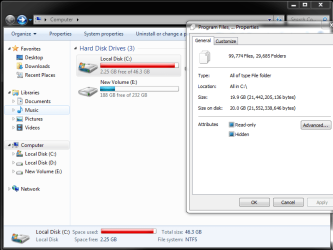
I just got myself a 50GB SSD drive. I wiped it and installed windows 7 on it. My idea was to run my OS on the SSD and install everything else to my other drives. So I litterally only have my OS and drivers installed. But now I already have a warning that I am running low on disk space on the SSD. I selected all folders and the size of all the folders doesn't add up to what the SSD is reflecting(see screenshot). I ran CCleaner and it doesn't help free up space.

Does anyone have some insight into why this is happening and then secondly - is it worth leaving my pc to run like this? will it slow down?

Thanks in advance
 

Attachments
  • Capture.PNG
    Capture.PNG
    30.2 KB · Views: 1

My Computer My Computer

At a glance

Windows 7 Ultimate x64i5 2500K @ 3.2Ghz16GB DDR3MSI GTX660ti 2GB DDR5
Computer type
PC/Desktop
Computer Manufacturer/Model Number
Custom Build
OS
Windows 7 Ultimate x64
CPU
i5 2500K @ 3.2Ghz
Motherboard
MSI H77MA-G43
Memory
16GB DDR3
Graphics Card(s)
MSI GTX660ti 2GB DDR5
Hard Drives
1 x 1 Terabyte Seagate HDD
1 x 50 GB SSD HDD
1 x 250 GB Seagate HDD
PSU
730W
Cooling
CoolerMaster V8 Cooler
Mouse
SteelSeries
Internet Speed
2Mbps uncapped
Antivirus
Windows defender
Browser
Google Chrome
I don't know if this will help, but my C partition has only Windows 7 Ultimate on it and it's currently using about 43.3 GB.

You might want to consider getting a larger drive for your OS partition.
 

My Computer My Computer

At a glance

Windows 7 Ultimate x64
Computer type
PC/Desktop
OS
Windows 7 Ultimate x64
Hi GunPilot,

Welcome to the 7forums :)

It is not smart to have less than 15% free space of the size of the drive, because Windows needs 10-15% free space to do its stuff (on each partition). 15% is to be on the safe side, 10% is the minimum and an exception for large hard drives.

Please run a disk cleanup on the SSD, make sure that you also delete unnecessary system files.
These unnecessary system files are duplicate from previous updates, they are already replaced by newer updates and can be safely removed if any is found :)
http://www.sevenforums.com/tutorials/818-disk-cleanup-open-use.html
 

My Computer My Computer

At a glance

Windows 10 Proi5-650016GB DDR4 2133 Crucial Ballistix Sport LTMSI GeForce GTX 1060 GAMING X 6G
Computer type
PC/Desktop
Computer Manufacturer/Model Number
Custom build
OS
Windows 10 Pro
CPU
i5-6500
Motherboard
Gigabyte B150-HD3P-CF
Memory
16GB DDR4 2133 Crucial Ballistix Sport LT
Graphics Card(s)
MSI GeForce GTX 1060 GAMING X 6G
Sound Card
Intel Display Audio
Monitor(s) Displays
Liyama ProLite XB2483HSU-B2
Screen Resolution
1920 x 1080
Hard Drives
Crucial MX200 500GB & Toshiba DT01ACA300 3TB
PSU
Corsair RM550x
Case
Fractal Design Define S
Cooling
Cooler Master TX3 i
Keyboard
Func KB-460 (MX Red)
Mouse
Corsair Gaming M65 RGB
Antivirus
Bitdefender Total Security 2016 + MBAM Pro + MBAE Pro
Browser
Google Chrome
Other Info
Creative Sound Blaster Tactic3D Rage V2 headset
Thanks for the reply. That looks very similar to mine
 

My Computer My Computer

At a glance

Windows 7 Ultimate x64i5 2500K @ 3.2Ghz16GB DDR3MSI GTX660ti 2GB DDR5
Computer type
PC/Desktop
Computer Manufacturer/Model Number
Custom Build
OS
Windows 7 Ultimate x64
CPU
i5 2500K @ 3.2Ghz
Motherboard
MSI H77MA-G43
Memory
16GB DDR3
Graphics Card(s)
MSI GTX660ti 2GB DDR5
Hard Drives
1 x 1 Terabyte Seagate HDD
1 x 50 GB SSD HDD
1 x 250 GB Seagate HDD
PSU
730W
Cooling
CoolerMaster V8 Cooler
Mouse
SteelSeries
Internet Speed
2Mbps uncapped
Antivirus
Windows defender
Browser
Google Chrome
Hi GunPilot,

Welcome to the 7forums :)

It is not smart to have less than 15% free space of the size of the drive, because Windows needs 10-15% free space to do its stuff (on each partition). 15% is to be on the safe side, 10% is the minimum and an exception for large hard drives.

Please run a disk cleanup on the SSD, make sure that you also delete unnecessary system files.
These unnecessary system files are duplicate from previous updates, they are already replaced by newer updates and can be safely removed if any is found :)
http://www.sevenforums.com/tutorials/818-disk-cleanup-open-use.html

Thank you :)

Done! but still so little space. :(
 

My Computer My Computer

At a glance

Windows 7 Ultimate x64i5 2500K @ 3.2Ghz16GB DDR3MSI GTX660ti 2GB DDR5
Computer type
PC/Desktop
Computer Manufacturer/Model Number
Custom Build
OS
Windows 7 Ultimate x64
CPU
i5 2500K @ 3.2Ghz
Motherboard
MSI H77MA-G43
Memory
16GB DDR3
Graphics Card(s)
MSI GTX660ti 2GB DDR5
Hard Drives
1 x 1 Terabyte Seagate HDD
1 x 50 GB SSD HDD
1 x 250 GB Seagate HDD
PSU
730W
Cooling
CoolerMaster V8 Cooler
Mouse
SteelSeries
Internet Speed
2Mbps uncapped
Antivirus
Windows defender
Browser
Google Chrome
I selected all folders and the size of all the folders doesn't add up to what the SSD is reflecting(see screenshot). I ran CCleaner and it doesn't help free up space.

You can't expect the sum of the size of the folders to match "what the SSD is reflecting". It doesn't work that way.

There's a few things you can do to reduce the size of the installation:

Eliminate hibernation if you don't use it.

Limit the amount of space devoted to System Restore.

Limit the size of the page file.

Windows itself uses maybe 20 to 25 GB. I'm currently using 36, but that includes over 50 applications and a lot of Windows Updates
 

My Computer My Computer

At a glance

Windows 7 Home Premium SP1, 64-bitIntel Skylake i5-6600K, not overclocked8 GB HyperX DDR4-2666 (2 x 4 GB)none; graphics are integrated on CPU
Computer type
PC/Desktop
Computer Manufacturer/Model Number
Ignatz Special; 4 speed manual gearbox; factory air conditioning; one of one
OS
Windows 7 Home Premium SP1, 64-bit
CPU
Intel Skylake i5-6600K, not overclocked
Motherboard
AsRock Z170M Extreme 4, micro ATX
Memory
8 GB HyperX DDR4-2666 (2 x 4 GB)
Graphics Card(s)
none; graphics are integrated on CPU
Sound Card
onboard: Realtek ALC1150; external: USB Behringer UF0-202
Monitor(s) Displays
Dell S2340M 23 inch IPS
Screen Resolution
1600 x 900
Hard Drives
System: Crucial MX100 series SSD, 128 GB;
Data: Samsung Spinpoint 103SJ, 1 TB;
Backup: WD Caviar Green WD30EZRX-00D8PB0, 3 TB
PSU
Rosewill SilentNight 500 watt fanless, semi-modular
Case
Antec Solo II
Cooling
Noctua NH-U12S; Noctua F12 intake, Noctua S12A exhaust
Keyboard
Microsoft 200 6JH-00001 USB
Mouse
Dell or Microsoft optical wired; USB
Antivirus
Microsoft Security Essentials and Malwarebytes Premium
Browser
Pale Moon
Other Info
All fans PWM; speeds at idle: CPU circa 500 rpm; intake circa 600 rpm; exhaust circa 600 rpm; CPU temps 27 idle and 47 C load in a warm room (27 C/81 F) when running Intel Extreme Tuning Utility stress test.

My Computer My Computer

At a glance

Windows 10 Pro. 64/ version 1709 Windows 7 Pr...Intel i7-6800K @ 4.3Corsair Platinum 16 gig @2400EVGA GTX 1070 OC
Computer type
PC/Desktop
Computer Manufacturer/Model Number
Home made Desktop
OS
Windows 10 Pro. 64/ version 1709 Windows 7 Pro/64
CPU
Intel i7-6800K @ 4.3
Motherboard
ASUS X-99 Deluxe II
Memory
Corsair Platinum 16 gig @2400
Graphics Card(s)
EVGA GTX 1070 OC
Monitor(s) Displays
Asus 27" LED LCD/VE278Q
Screen Resolution
1920-1080 or 1280-720 HDMI
Hard Drives
INTEL SSD 730-240 Gb Sata 3.0/
PSU
EVGA Platium 1200W
Case
Phanteks Luxe Tempered Glass 8 fans/ one radiator
Cooling
XSPC/ Water Cooled CPU
Keyboard
Das 4 Professional
Mouse
Logitech M705/MX Anywhere 2-S
Internet Speed
100 mbits
Antivirus
Microsoft Security Essentials/ Malwarebytes Premium 3.0/ SAS
Browser
I.E. 11 default/Firefox/ ISP Time Warner Cable/Spectrum
Other Info
LG BluRay Burner/
Sound system-KLipsch-THX/
Icy Dock ssd Hot Swap bays.
Back
Top