yotoprules
New member
- Local time
- 10:28 PM
- Messages
- 16
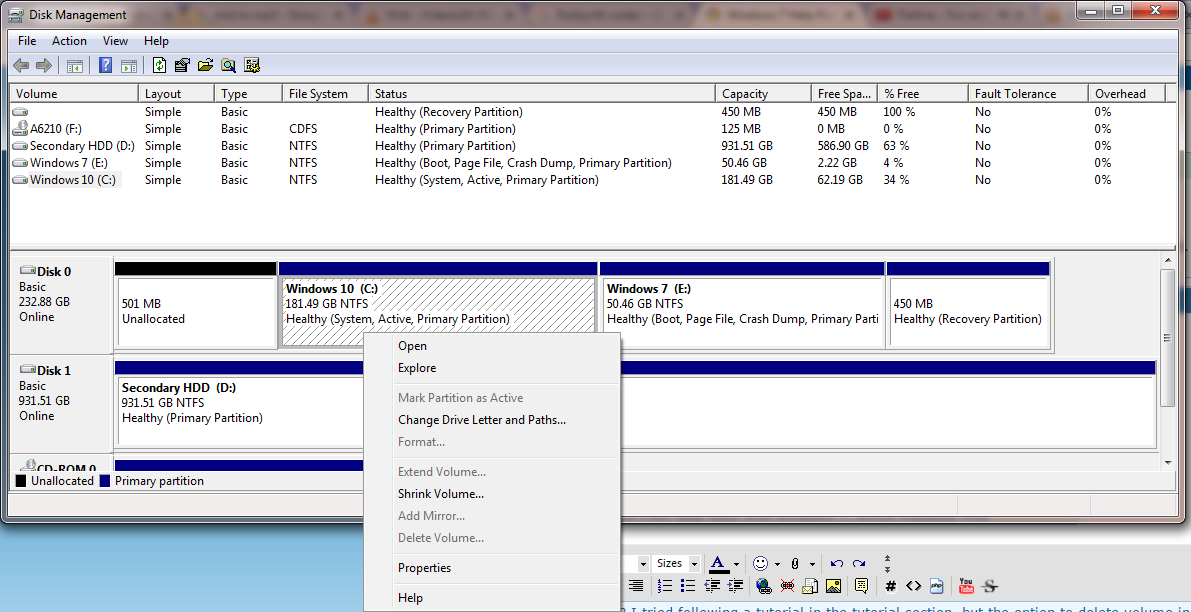
How do I do this? I tried following a tutorial in the tutorial section, but the option to delete volume in grayed out.
My Computer
At a glance
Windows 10 X64AMD FX-835016GBAsus Nvidia GTX 960
- Computer type
- PC/Desktop
- Computer Manufacturer/Model Number
- My Build
- OS
- Windows 10 X64
- CPU
- AMD FX-8350
- Motherboard
- Asus M5A78L-M/USB3
- Memory
- 16GB
- Graphics Card(s)
- Asus Nvidia GTX 960
- Monitor(s) Displays
- Dell E178FP
- Screen Resolution
- 1280x1024
- Hard Drives
- WDC WD10EZEX-00WN4A0 ATA Device
Samsung SSD 850 EVO 250GB ATA Device
- PSU
- Corsair VS550
- Case
- Corsair 100r
- Keyboard
- Powercool Mech1
- Mouse
- Sumvision Nemesis Kata
- Antivirus
- Bitdefender Free
- Browser
- Google Chrome
- Other Info
- Front USB ports aren't compatible with case, but otherwise works fine