
DISM ++ can't install updates after Repair Install

Steampunk7

New member
Member
VIP
Local time
11:41 AM
Messages
119
I have problems with win updates and inability to perform System restore to a previous date. So I decided to perform Repair Install again (today for the third time).

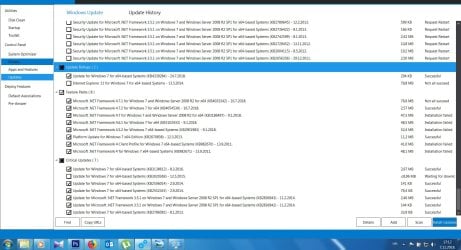
After that I run DISM++. I let DISM install the updates which were selected by the program.

Fatal error during installation.
Then I unchecked Security updates and left only these 16 updates. No luck again. Can't figure what is the problem, since I have just performed Repair Install minutes ago...
 

Attachments
  • 4.jpg
    4.jpg
    244.4 KB · Views: 4

My Computer My Computer

Computer type
PC/Desktop
OS
Windows 7 Ultimate x64
CPU
Intel(R) Xeon(R) CPU E3-1231 v3 @ 3.40GHz
Motherboard
ASUSTeK COMPUTER INC. Z97-A Rev 1.xx
Memory
16 GB
Graphics Card(s)
AMD Radeon (TM) R9 390 Series
Sound Card
(1) AMD High Definition Audio Device (2) Realtek High Defi
You could check the "C:\Windows\Logs\CBS\CBS.log"

Quite difficult because it is probabaly enormous.

I haven't come across that error you describe.
 

My Computers My Computers

System One System Two

  • Computer type
    PC/Desktop
    OS
    7 X64
    CPU
    i5 8400
    Motherboard
    gigabyte b365m ds3h
    Memory
    2x8gb 3200mhz
    Hard Drives
    various
    PSU
    pure power 11 400w cm
    Case
    Coolermaster
    Cooling
    cryorig m9i
  • Computer type
    PC/Desktop
    OS
    7x64
    CPU
    g5400
    Motherboard
    ga b365m ds3h
    Memory
    8gb ddr4 2400
    PSU
    xfx pro 450w
Here is the CBS log
 

My Computer My Computer

Computer type
PC/Desktop
OS
Windows 7 Ultimate x64
CPU
Intel(R) Xeon(R) CPU E3-1231 v3 @ 3.40GHz
Motherboard
ASUSTeK COMPUTER INC. Z97-A Rev 1.xx
Memory
16 GB
Graphics Card(s)
AMD Radeon (TM) R9 390 Series
Sound Card
(1) AMD High Definition Audio Device (2) Realtek High Defi
Hi Steampunk7,

Does you installation disk include SP1?
Does SP1 show up in the DISM++ updates?

I hope this helps!
 

My Computer My Computer

Computer type
Laptop
Computer Manufacturer/Model Number
Fujitsu LIFEBOOK
OS
Win 7 HP SP1 64-bit Vista HB SP2 32-bit Linux Mint 18.3
CPU
Intel(R) Pentium(R) CPU P6200 @ 2.13GHz
Motherboard
FUJITSU FJNBB06
Memory
4.00 GB
Graphics Card(s)
Intel(R) Graphics Media Accelerator HD
Sound Card
[1] Realtek High Definition Audio [2] Intel(R) Display Audio
Screen Resolution
1366 x 768 x 32 bits (4294967296 colors) @ 59 Hz
Hard Drives
TOSHIBA MK5076GSX
Antivirus
AVG FREE
Hi Paul,
I downloaded Repair Install disc form the link on Seven Forums. It does include SP1.

No, SP1 does not show up in the DISM++ updates.
 

Attachments

  • 6.jpg
    6.jpg
    16.1 KB · Views: 35

My Computer My Computer

Computer type
PC/Desktop
OS
Windows 7 Ultimate x64
CPU
Intel(R) Xeon(R) CPU E3-1231 v3 @ 3.40GHz
Motherboard
ASUSTeK COMPUTER INC. Z97-A Rev 1.xx
Memory
16 GB
Graphics Card(s)
AMD Radeon (TM) R9 390 Series
Sound Card
(1) AMD High Definition Audio Device (2) Realtek High Defi

Hi Steampunk7,

Then I unchecked Security updates and left only these 16 updates. No luck again.

Did you try running it with the Security Updates checked?

I hope this helps!
 

My Computer My Computer

Computer type
Laptop
Computer Manufacturer/Model Number
Fujitsu LIFEBOOK
OS
Win 7 HP SP1 64-bit Vista HB SP2 32-bit Linux Mint 18.3
CPU
Intel(R) Pentium(R) CPU P6200 @ 2.13GHz
Motherboard
FUJITSU FJNBB06
Memory
4.00 GB
Graphics Card(s)
Intel(R) Graphics Media Accelerator HD
Sound Card
[1] Realtek High Definition Audio [2] Intel(R) Display Audio
Screen Resolution
1366 x 768 x 32 bits (4294967296 colors) @ 59 Hz
Hard Drives
TOSHIBA MK5076GSX
Antivirus
AVG FREE
Hi Steampunk7,
Did you try running it with the Security Updates checked?


Yes. Half of those were checked (by the DISM, not by me) after the DISM performed scan for updates. After unsuccessful installation of those and other updates, I unchecked everything except the 16 updates form the first attachment.
 

My Computer My Computer

Computer type
PC/Desktop
OS
Windows 7 Ultimate x64
CPU
Intel(R) Xeon(R) CPU E3-1231 v3 @ 3.40GHz
Motherboard
ASUSTeK COMPUTER INC. Z97-A Rev 1.xx
Memory
16 GB
Graphics Card(s)
AMD Radeon (TM) R9 390 Series
Sound Card
(1) AMD High Definition Audio Device (2) Realtek High Defi
Hi Steampunk7,

That is very strange.

I have never got that error and I haven't seen it posted here before when running the DISM++ updates.
Normally it works just fine by disconnecting all other drives, performing the repair install, and the running the DISM++ updates a few times.

I have looked at the CBS.log and Googled a couple of the FAIL entries but it hasn't been very enlightening.

Maybe someone else will come up with an idea from the CBS.log.

In the meantime, you could try running SURT [System Update Readiness Tool].

SURT

SURT [System Update Readiness Tool] is a self-installing utility that executes when you install it. It is used because of an inconsistency found in the Windows servicing store that may prevent the successful installation of updates, service packs, and software. It checks for these inconsistencies [integrity] and tries to fix any issues found. It supports all versions of Windows 7 SP1. When SURT is run, it will create two log files, CheckSUR.log and CheckSUR.persist.log, both in the temporary folder C:\Windows\Logs\CBS.

SURT downloaded => System Update Readiness Tool for Windows 7 (KB947821) [October 2014].

[1] Install SURT [it will automatically run on installation and may take about 15 minutes or so to complete].
[2] Post the log: C:\Windows\Logs\CBS\ CBS.log .
[3] Post the log: C:\Windows\Logs\CBS\ CheckSUR.log .
[4] Post the log: C:\Windows\ WindowsUpdate.log .

SUGGESTION: It is advisable to turn off the power options for sleep etc while this is running because it could take a while.

I am sure that someone will be able to look at the logs and give you an answer.

I hope this helps!
 

My Computer My Computer

Computer type
Laptop
Computer Manufacturer/Model Number
Fujitsu LIFEBOOK
OS
Win 7 HP SP1 64-bit Vista HB SP2 32-bit Linux Mint 18.3
CPU
Intel(R) Pentium(R) CPU P6200 @ 2.13GHz
Motherboard
FUJITSU FJNBB06
Memory
4.00 GB
Graphics Card(s)
Intel(R) Graphics Media Accelerator HD
Sound Card
[1] Realtek High Definition Audio [2] Intel(R) Display Audio
Screen Resolution
1366 x 768 x 32 bits (4294967296 colors) @ 59 Hz
Hard Drives
TOSHIBA MK5076GSX
Antivirus
AVG FREE
Hi Steampunk7,

I downloaded Repair Install disc form the link on Seven Forums. It does include SP1.

Can you post the link to the thread that you used please!

Thanks.
 

My Computer My Computer

Computer type
Laptop
Computer Manufacturer/Model Number
Fujitsu LIFEBOOK
OS
Win 7 HP SP1 64-bit Vista HB SP2 32-bit Linux Mint 18.3
CPU
Intel(R) Pentium(R) CPU P6200 @ 2.13GHz
Motherboard
FUJITSU FJNBB06
Memory
4.00 GB
Graphics Card(s)
Intel(R) Graphics Media Accelerator HD
Sound Card
[1] Realtek High Definition Audio [2] Intel(R) Display Audio
Screen Resolution
1366 x 768 x 32 bits (4294967296 colors) @ 59 Hz
Hard Drives
TOSHIBA MK5076GSX
Antivirus
AVG FREE
Hi Steampunk7,

I have problems with win updates and inability to perform System restore to a previous date. So I decided to perform Repair Install again (today for the third time).

What have you been using for the repair install, a DVD or USB?
Is it a genuine installation disk or is it a burnt DVD/USB from an ISO?
If it was from an ISO, it could be that the ISO was corrupted!
You state that this is the third time to have had to repair install, is this using the same media on all three occasions?
 

My Computer My Computer

Computer type
Laptop
Computer Manufacturer/Model Number
Fujitsu LIFEBOOK
OS
Win 7 HP SP1 64-bit Vista HB SP2 32-bit Linux Mint 18.3
CPU
Intel(R) Pentium(R) CPU P6200 @ 2.13GHz
Motherboard
FUJITSU FJNBB06
Memory
4.00 GB
Graphics Card(s)
Intel(R) Graphics Media Accelerator HD
Sound Card
[1] Realtek High Definition Audio [2] Intel(R) Display Audio
Screen Resolution
1366 x 768 x 32 bits (4294967296 colors) @ 59 Hz
Hard Drives
TOSHIBA MK5076GSX
Antivirus
AVG FREE

My Computer My Computer

Computer type
PC/Desktop
OS
Windows 7 Ultimate x64
CPU
Intel(R) Xeon(R) CPU E3-1231 v3 @ 3.40GHz
Motherboard
ASUSTeK COMPUTER INC. Z97-A Rev 1.xx
Memory
16 GB
Graphics Card(s)
AMD Radeon (TM) R9 390 Series
Sound Card
(1) AMD High Definition Audio Device (2) Realtek High Defi
Hi Steampunk7,
You state that this is the third time to have had to repair install, is this using the same media on all three occasions?


Yes,


the link is in my previous post. It has been recommended to me here.
 

My Computer My Computer

Computer type
PC/Desktop
OS
Windows 7 Ultimate x64
CPU
Intel(R) Xeon(R) CPU E3-1231 v3 @ 3.40GHz
Motherboard
ASUSTeK COMPUTER INC. Z97-A Rev 1.xx
Memory
16 GB
Graphics Card(s)
AMD Radeon (TM) R9 390 Series
Sound Card
(1) AMD High Definition Audio Device (2) Realtek High Defi
Hi Steampunk7,


That site is what we recommended to use. There has on the odd occasion [very very rarely] been some corruption during the download.
I can only surmise that maybe your particular download got corrupted in some way!
Obviously the only way to prove this is to download the ISO again and to create new bootable installation media.
Did you create a DVD or USB for the installation? There could have been a problem with the burn process!
There isn't normally a problem either updating using DISM++. Obviously, if the install is corrupted then it makes sense that there could possibly be problems with installing updates etc.

I hope this helps!
 

My Computer My Computer

Computer type
Laptop
Computer Manufacturer/Model Number
Fujitsu LIFEBOOK
OS
Win 7 HP SP1 64-bit Vista HB SP2 32-bit Linux Mint 18.3
CPU
Intel(R) Pentium(R) CPU P6200 @ 2.13GHz
Motherboard
FUJITSU FJNBB06
Memory
4.00 GB
Graphics Card(s)
Intel(R) Graphics Media Accelerator HD
Sound Card
[1] Realtek High Definition Audio [2] Intel(R) Display Audio
Screen Resolution
1366 x 768 x 32 bits (4294967296 colors) @ 59 Hz
Hard Drives
TOSHIBA MK5076GSX
Antivirus
AVG FREE
Hi Steampunk7,
Did you create a DVD or USB for the installation? There could have been a problem with the burn process!


I actually extracted it on non-system partition, and then clicked on setup.exe
 

My Computer My Computer

Computer type
PC/Desktop
OS
Windows 7 Ultimate x64
CPU
Intel(R) Xeon(R) CPU E3-1231 v3 @ 3.40GHz
Motherboard
ASUSTeK COMPUTER INC. Z97-A Rev 1.xx
Memory
16 GB
Graphics Card(s)
AMD Radeon (TM) R9 390 Series
Sound Card
(1) AMD High Definition Audio Device (2) Realtek High Defi
Hi Steampunk7,

I actually extracted it on non-system partition, and then clicked on setup.exe

I would suggest that you might have more success using a DVD or USB as the installation media, unless there is a reason why you can't?

I hope this helps!
 
Last edited:

My Computer My Computer

Computer type
Laptop
Computer Manufacturer/Model Number
Fujitsu LIFEBOOK
OS
Win 7 HP SP1 64-bit Vista HB SP2 32-bit Linux Mint 18.3
CPU
Intel(R) Pentium(R) CPU P6200 @ 2.13GHz
Motherboard
FUJITSU FJNBB06
Memory
4.00 GB
Graphics Card(s)
Intel(R) Graphics Media Accelerator HD
Sound Card
[1] Realtek High Definition Audio [2] Intel(R) Display Audio
Screen Resolution
1366 x 768 x 32 bits (4294967296 colors) @ 59 Hz
Hard Drives
TOSHIBA MK5076GSX
Antivirus
AVG FREE
I actually extracted it on non-system partition, and then clicked on setup.exe


I have done that many times without issue. Maybe it is problem with something you have installed - antivirus, or something else.
 

My Computers My Computers

System One System Two

  • Computer type
    PC/Desktop
    OS
    7 X64
    CPU
    i5 8400
    Motherboard
    gigabyte b365m ds3h
    Memory
    2x8gb 3200mhz
    Hard Drives
    various
    PSU
    pure power 11 400w cm
    Case
    Coolermaster
    Cooling
    cryorig m9i
  • Computer type
    PC/Desktop
    OS
    7x64
    CPU
    g5400
    Motherboard
    ga b365m ds3h
    Memory
    8gb ddr4 2400
    PSU
    xfx pro 450w
You could try using dism++ to mount the appropriate image from the install.wim

See if it is able to install updates into the mounted image.
 

My Computers My Computers

System One System Two

  • Computer type
    PC/Desktop
    OS
    7 X64
    CPU
    i5 8400
    Motherboard
    gigabyte b365m ds3h
    Memory
    2x8gb 3200mhz
    Hard Drives
    various
    PSU
    pure power 11 400w cm
    Case
    Coolermaster
    Cooling
    cryorig m9i
  • Computer type
    PC/Desktop
    OS
    7x64
    CPU
    g5400
    Motherboard
    ga b365m ds3h
    Memory
    8gb ddr4 2400
    PSU
    xfx pro 450w
SIW2, thanks but...I watched the tutorial by Brian at Britec Computer UK on how to do Repair Install.
I did everything just like he did. I doubt the mounted image will do the RI any better.


I am quite tired of performing Repair Install repeatedly, downloading updates, rebooting (at least 100 times so far), uploading various Hotfixes, setting all my preferences again and again (can't even remember them all) deleting all the Microsoft junk (gadgets, games, weather, Windows media center...) which slow down my PC and...you know how it goes.


I really need my PC working as before, because my job depends on it but now I am not sure what to do. In order to do one thing properly I have to do 10 other things first, in precise order, and when one of those steps fail for some reason...I am not sure what to do now. I feel a little dizzy at the moment. Last couple of days I haven't done anything but looking at the screen for hours and hours, searching for solutions on various problems...


One of those problems (but only one) is for instance that after I successfully installed standalone IE 11 file (I couldn't install it via update installer), and rebooted PC, when I run IE, it is still version 8. Don't know how it could be, but it is so. A couple of standalone updates which I also successfully installed manually (for the same reason) are apparently NOT installed, because they are still on the DISM list of updates.
 

My Computer My Computer

Computer type
PC/Desktop
OS
Windows 7 Ultimate x64
CPU
Intel(R) Xeon(R) CPU E3-1231 v3 @ 3.40GHz
Motherboard
ASUSTeK COMPUTER INC. Z97-A Rev 1.xx
Memory
16 GB
Graphics Card(s)
AMD Radeon (TM) R9 390 Series
Sound Card
(1) AMD High Definition Audio Device (2) Realtek High Defi
Btw, I managed to install critical updates, in small packages of 5-6 updates at the time. There's 59 other updates which can't be installed. What puzzles me is the fact that DISM successfully downloaded and installed some of those 59 updates, but after rebooting I got this annoying message seen zillion times by now: Failure configuring Windows updates. Reverting changes. Do not turn off your computer. It always stuck at 15%.
 

My Computer My Computer

Computer type
PC/Desktop
OS
Windows 7 Ultimate x64
CPU
Intel(R) Xeon(R) CPU E3-1231 v3 @ 3.40GHz
Motherboard
ASUSTeK COMPUTER INC. Z97-A Rev 1.xx
Memory
16 GB
Graphics Card(s)
AMD Radeon (TM) R9 390 Series
Sound Card
(1) AMD High Definition Audio Device (2) Realtek High Defi
Hi Steampunk7,

SIW2, I doubt the mounted image will do the RI any better.

...deleting all the Microsoft junk (gadgets, games, weather, Windows media center...) which slow down my PC.

SIW2 asked you to mount the image for a particular reason, to see if you were able to install the updates into the mounted image [trouble-shooting]!

What M$ stuff exactly in particular [or just those you have stated], and how did you delete it?

Could you have inadvertently deleted any system files for example?
 

My Computer My Computer

Computer type
Laptop
Computer Manufacturer/Model Number
Fujitsu LIFEBOOK
OS
Win 7 HP SP1 64-bit Vista HB SP2 32-bit Linux Mint 18.3
CPU
Intel(R) Pentium(R) CPU P6200 @ 2.13GHz
Motherboard
FUJITSU FJNBB06
Memory
4.00 GB
Graphics Card(s)
Intel(R) Graphics Media Accelerator HD
Sound Card
[1] Realtek High Definition Audio [2] Intel(R) Display Audio
Screen Resolution
1366 x 768 x 32 bits (4294967296 colors) @ 59 Hz
Hard Drives
TOSHIBA MK5076GSX
Antivirus
AVG FREE
Back
Top