Recover a GPT Partition that became RAW in 3T Internal HDD

...


1. Post a fresh screenshot of Windows Disk Management. ( Just to confirm that we are still in the same condition with which we started.)

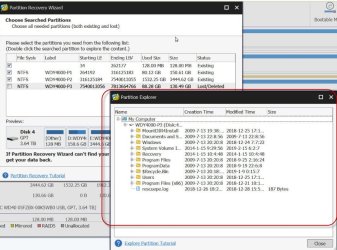
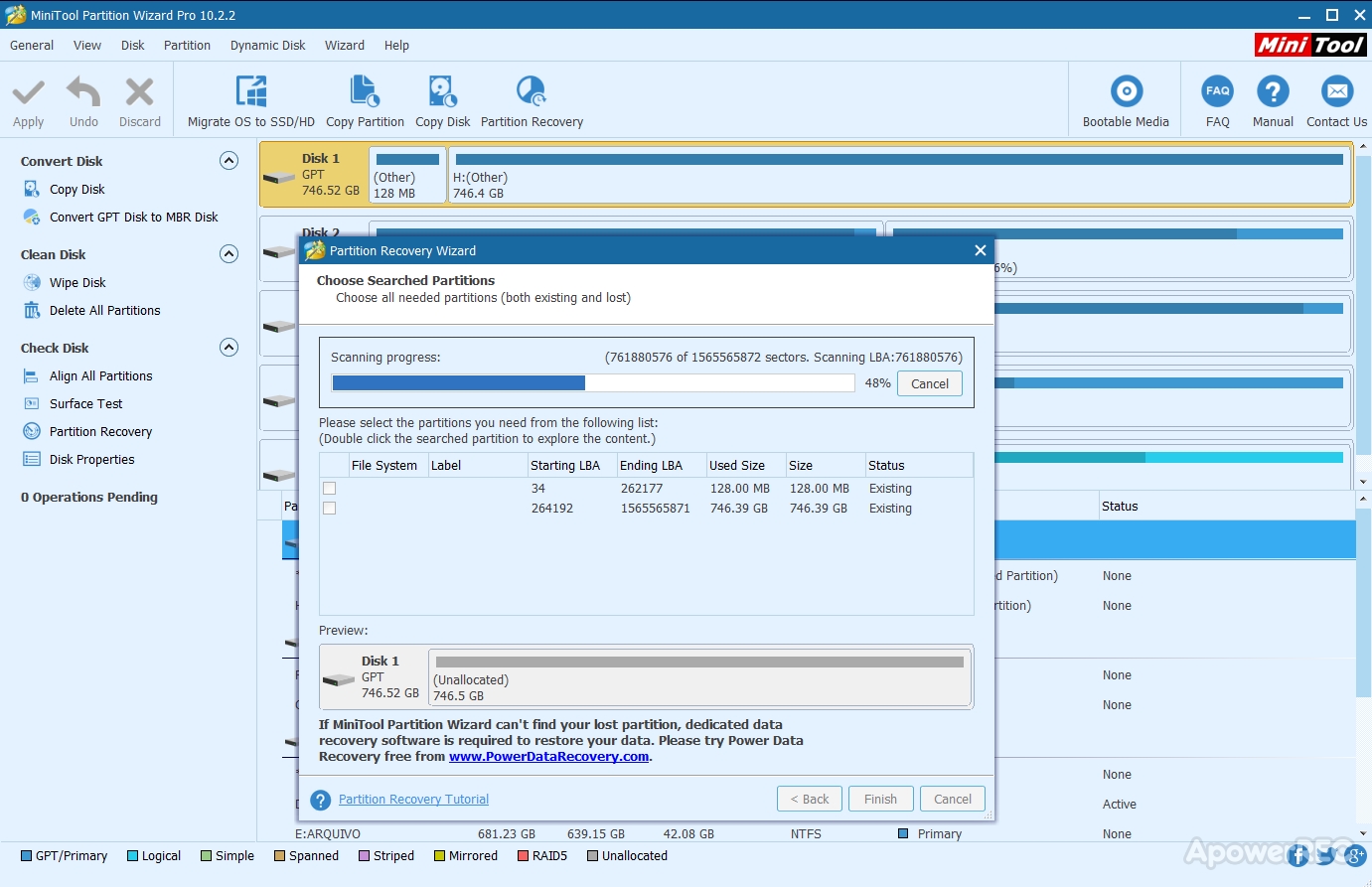
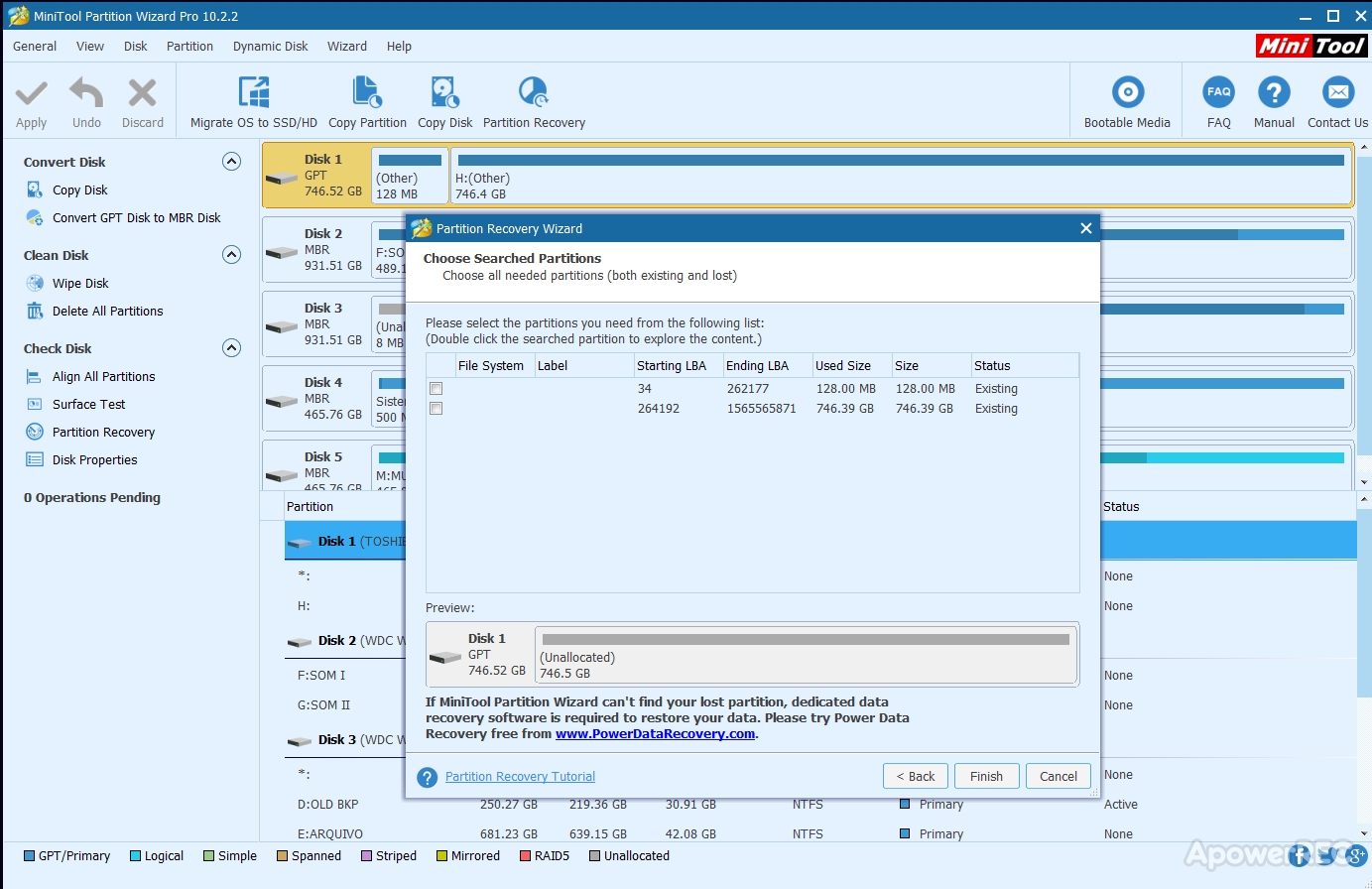
2. I am now going back to Partition Wizard - your Post #21 with the screenshot of found partitions after a quick scan.Quick scan did find a valid VBR at sector 264192. ( This VBR could be a new VBR overwriting the original VBR)

Run a quickscan again. When it finds the partitions, please select the second partition by clicking on the square, double click on the second partition (starting LBA 264192 ending LBA 1565565871) that should open the explorer Window showing the files it could see. ( Please refer to image 5 and image 6 in dsperber's
post # 17)

If it shows the folders/files well and good. Post a screenshot. Close the explorer Window. Cancel and close Partiion Wizard.

Do it slowly at your leisure.Absolutely no need to do anything in a hurry. Absolutely no need to keep awake at night.


Murphy's Law at its best...


1 - Here


Maze7NP.jpg


I'll perform step 2 as asked. However i'm not very confident at this stage... The 1st time the scan haven't detected any lost/deleted partitions and this time same is happening...


nVk19cG.jpg


Will return with more screenshots when all is done!


Cheers


PS - Until now, after all the tests and recovery software analisys, the only program able to detect the partition as windows and also to show me some RAW data recovery is EaseUS Data Recovery Wizard. The odd thing is that another software from that company, EaseUS Partition Master, cannot recognize the partition too which is really weird...


Take a look at the image i made with Easeus Data Recover in the next screenshot.


gbSmtpb.jpg


You can see plenty of RAW data to be recovered. But is all a mess and probably might not find everything i want, and lots of junk in the middle of those files... Look at the size of the recovery data, much bigger than the partition size...
 
Last edited:

My Computer My Computer

At a glance

Windows 7 Ultimate x64Intel I7 920
Computer type
PC/Desktop
OS
Windows 7 Ultimate x64
CPU
Intel I7 920
Motherboard
Asus P6X58D-E
Hard Drives
1xSamsung 860 EVO 500G
2xWD Blue 1T
1xToshiba P300 3T
PW Quick scan ended and nothing happened when i checked the box and double clicked the partition. No detection of lost partitions too. I'll maybe try a Full Scan...


XBteYxt.jpg


PS - OK i've performed a Full Scan with same results. Atm i'm running MiniTool Power Data Recovery to compare the finds with my previous easeus data recover results...
 
Last edited:

My Computer My Computer

At a glance

Windows 7 Ultimate x64Intel I7 920
Computer type
PC/Desktop
OS
Windows 7 Ultimate x64
CPU
Intel I7 920
Motherboard
Asus P6X58D-E
Hard Drives
1xSamsung 860 EVO 500G
2xWD Blue 1T
1xToshiba P300 3T
I wanted you to to select the second partiition , double click on it and show what it shows in the Partition Explorer Window

"When it finds the partitions, please select the second partition by clicking on the square, double click on the second partition (starting LBA 264192 ending LBA 1565565871) that should open the explorer Window showing the files it could see. ( Please refer to image 5 and image 6 in dsperber's
post # 17)"


01-04-2019 07-31-41.jpg

You hadn't done it.
 

My Computer My Computer

At a glance

Windows 7 Home Premium 32 bit
OS
Windows 7 Home Premium 32 bit
"PS - Until now, after all the tests and recovery software analisys, the only program able to detect the partition as windows and also to show me some RAW data recovery is EaseUS Data Recovery Wizard. The odd thing is that another software from that company, EaseUS Partition Master, cannot recognize the partition too which is really weird..."

Good work. ( I missed it since you edited that post and added it later) I haven't used it anytime and so I cannot comment on it.

I may think since 200GB of your 1TB partitlon is missing, you may not see the files in that missing 200GB.

After seeing that however, I would suggest that you try Active@fileRecovery and Getdataback Simple and see whether these can show your files. The plus point with these two programs is: If they show your files, you can open those and check the integrity of the files. If you are satisfied then you can buy a license to copy the files.

Getdataback Simple Data Recovery Software Products - Runtime Software Products

Active @ File Recovery Erased file recovery tool - Active@ File Recovery - for deleted files and damaged disks
 
Last edited:

My Computer My Computer

At a glance

Windows 7 Home Premium 32 bit
OS
Windows 7 Home Premium 32 bit
I wanted you to to select the second partiition , double click on it and show what it shows in the Partition Explorer Window

"When it finds the partitions, please select the second partition by clicking on the square, double click on the second partition (starting LBA 264192 ending LBA 1565565871) that should open the explorer Window showing the files it could see. ( Please refer to image 5 and image 6 in dsperber's
post # 17)"


View attachment 407610

You hadn't done it.


Hello jumanji


I did. As i said, after running the Scans and checked the box, everytime i tryed to double click tha partition, nothing happened. No new popo up window with extra info showed up. That's why i havent posted screeshots of that.


Now even before i opened this thread here at 7forums i already tryed getdabacak but with not much success with it. As i sais, easus was the only showing the most complete recovering results.

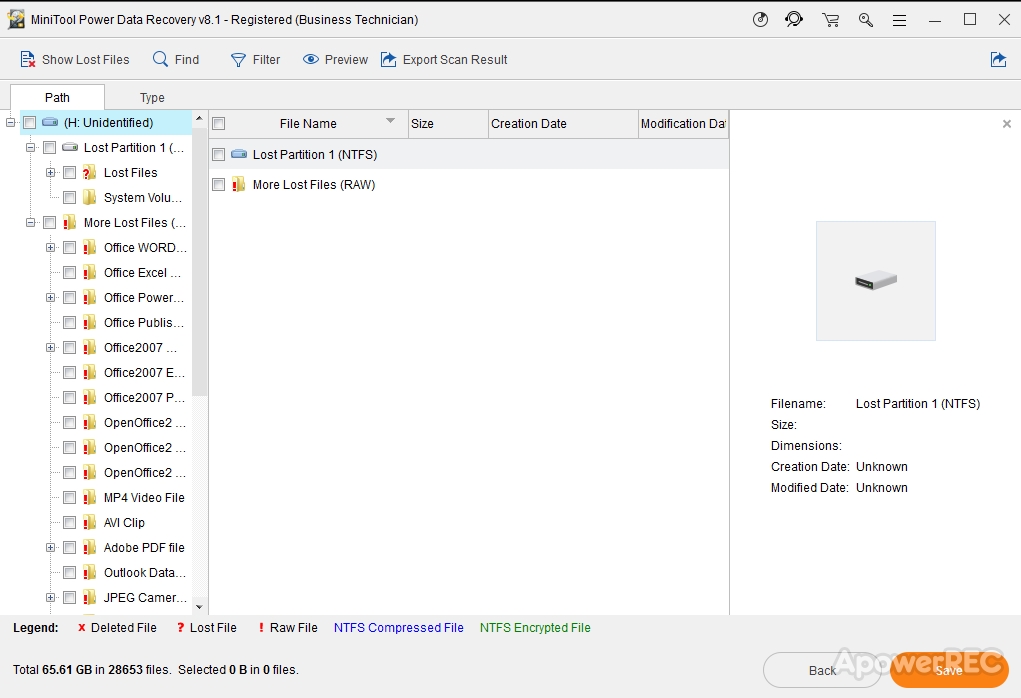
I've also tryed last night Minitool Power Data Recovery with a more refined search and i've also got some results as shown in next screenshot


mFl1tBh.jpg


I will give another go to get data back and check the integrity of founded files.
 

My Computer My Computer

At a glance

Windows 7 Ultimate x64Intel I7 920
Computer type
PC/Desktop
OS
Windows 7 Ultimate x64
CPU
Intel I7 920
Motherboard
Asus P6X58D-E
Hard Drives
1xSamsung 860 EVO 500G
2xWD Blue 1T
1xToshiba P300 3T
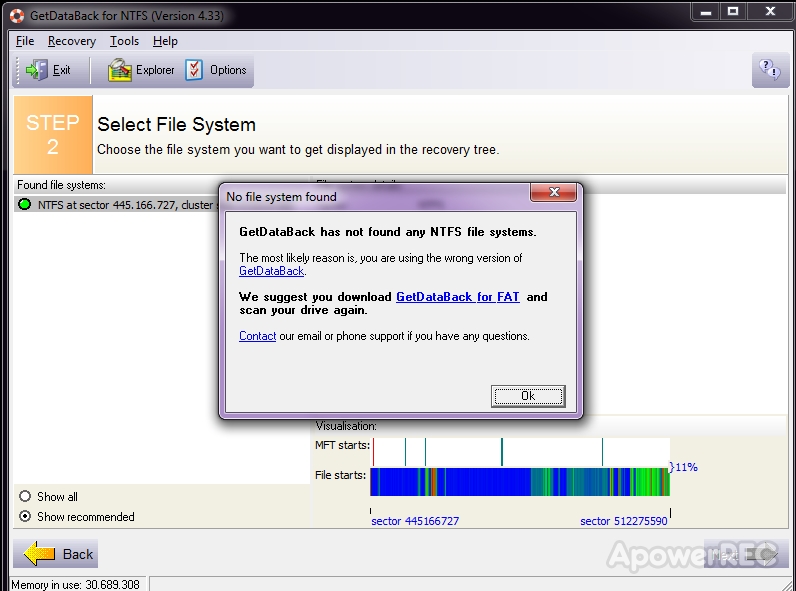
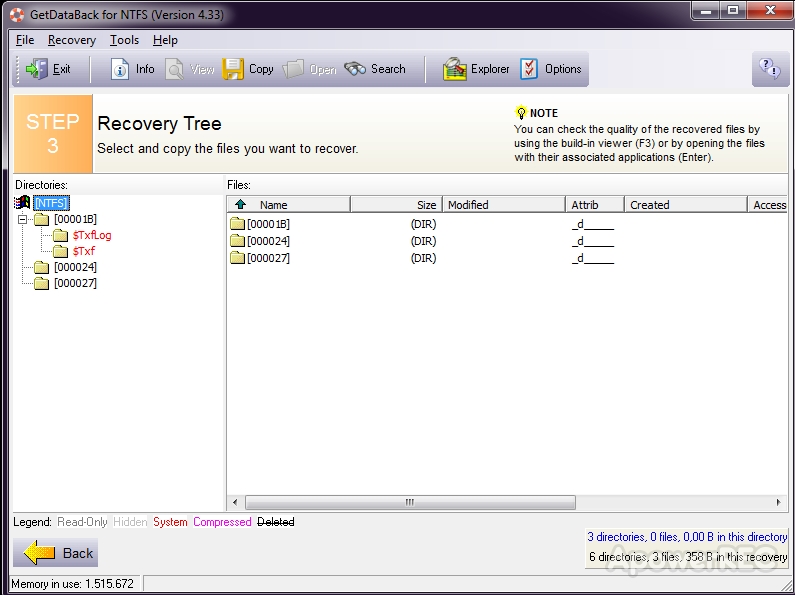
Back again with the new Scan results for getdataback software... nothing new here...


6gYOSAI.jpg


rSq91oP.jpg


Atm the only recovery softwares capable to ID any files are Easus DR and Minitools PDR. I'll might go that way even knowing that i'll have to spend hours to ID and rename all the files of my interest. Can't see a better chance to recover a few data at this time.
 

My Computer My Computer

At a glance

Windows 7 Ultimate x64Intel I7 920
Computer type
PC/Desktop
OS
Windows 7 Ultimate x64
CPU
Intel I7 920
Motherboard
Asus P6X58D-E
Hard Drives
1xSamsung 860 EVO 500G
2xWD Blue 1T
1xToshiba P300 3T
"Atm the only recovery softwares capable to ID any files are Easus DR and Minitools PDR. I'll might go that way even knowing that i'll have to spend hours to ID and rename all the files of my interest. Can't see a better chance to recover a few data at this time."

I agree. Even PhotoRec will get you only a bunch of files without their original file names and folder structure but then it will rebuild the files from their file signatures. Easus DR and Minitools PDR - if they could really recover the files - those will be as they are and not the rebuilt ones.
 

My Computer My Computer

At a glance

Windows 7 Home Premium 32 bit
OS
Windows 7 Home Premium 32 bit
"Atm the only recovery softwares capable to ID any files are Easus DR and Minitools PDR. I'll might go that way even knowing that i'll have to spend hours to ID and rename all the files of my interest. Can't see a better chance to recover a few data at this time."

I agree. Even PhotoRec will get you only a bunch of files without their original file names and folder structure but then it will rebuild the files from their file signatures. Easus DR and Minitools PDR - if they could really recover the files - those will be as they are and not the rebuilt ones.


Hello jumanji


A quick pass just to give a feedback about the recovering process...
I've used 4 different recover softwares and the results are not very promissing. My guess is that the VBS/PBR was so damaged that the search of these apps cannot find all the files i am looking for.

It can find and recover older files from previous data that was stored at the partition before the one that i am trying to recover. My guess is that i won't get any lucky with this... I'll perform a few more tests and trys under my own.

Having said that, I can only thank you for all your help and wisdom. At least I learned more about hard disks, partitions, and especially how to recover data in case of failure. Once again thank you very much for everything. Respect!

Best Wishes
R
 

My Computer My Computer

At a glance

Windows 7 Ultimate x64Intel I7 920
Computer type
PC/Desktop
OS
Windows 7 Ultimate x64
CPU
Intel I7 920
Motherboard
Asus P6X58D-E
Hard Drives
1xSamsung 860 EVO 500G
2xWD Blue 1T
1xToshiba P300 3T
I wish I could have helped you better but then I have gotten busy with other things in the last few days and will continue to be busy with it for the next few days..

At this stage you have no option but continue to try whatever you can. (I had some plans to do some experiments on my 3TB to check whether some ideas I have formulated can work but unfortunately as stated I will be busy with other things and therefore cannot concentrate on it. I need undivided and undisturbed attention to do it)

You may do the following: ( This is exactly what I wanted to experiment)

Save sector 1 ( GPT Header), Sector 2 (GPT Partition Table) Sector 264192 (VBR at the start of the first partition - First partition always starts at Sector 264192), sector 1565565839 ( backup of the current Partition Table), sector 1565565871 ( Backup of the current GPT header) with bootice ( This is only a safety measure. Should you want to go back to the previous state anytime, you can restore with bootice)

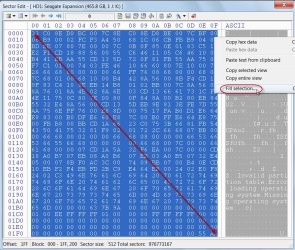
After saving those, zero these sectors. To write zeros to these sectors, go to that Sector, move the mouse pointer diagonally across, (thus selecting all the 512 fields), right click > Fill Selection > 0x00 > OK and click on Save changes icon in the menu bar. In effect you are destroying these unwanted sectors and GPT structure. Keep sector 0 as it is and do not zero it (With this unwanted GPT Partition Data killed, I presume the correct partition data at the fag end of 3TB will kick in and we may be able to see the full 3TB.)

05-04-2019 00-44-20.jpg

Close bootice and rerun to check the disk shows all these sectors are correctly zeroed.

Then Run Partition Wizard, Quick scan. Let me see what partitions it finds. ( Of course it will not find the first partition VBR (absent, since we had zeroed it.) But if it finds the second and third partition and shows your full 3TB disk then we shall think of some more manipulations to write a new VBR for the first partition. If we succeed, then Getdataback and Active at file recovery and all such software may be able to see the original Master File Table that may be, as I guess, between 746GB and 1TB which at present the recovery software do not see.

As I said this is purely experimental that may or may not succeed. I am just working on assumptions and presumptions.
 
Last edited:

My Computer My Computer

At a glance

Windows 7 Home Premium 32 bit
OS
Windows 7 Home Premium 32 bit
I wish I could have helped you better but then I have gotten busy with other things in the last few days and will continue to be busy with it for the next few days..


No worries jumanji. I've found part of my data backed up in another old 2.5" external HDD and as i am again short of time too, i already formatted the partition again (after made backups of all the recovered RAW info) and the system is back to its previous stable state and without problems.


However, as a precaution, now i feel the need of making backups of the VBS/MBR of all my discs. I already have a system image created but i would like to perform the mentioned backups with bootice or any other program that is able to backups MBR/VBS.

Can you please help and guide me through those steps please?


Once yer busy too atm, take your time, no need to rush.


Thanks again for the concern and all the help!


Have a nice day!
R
 

My Computer My Computer

At a glance

Windows 7 Ultimate x64Intel I7 920
Computer type
PC/Desktop
OS
Windows 7 Ultimate x64
CPU
Intel I7 920
Motherboard
Asus P6X58D-E
Hard Drives
1xSamsung 860 EVO 500G
2xWD Blue 1T
1xToshiba P300 3T
God bless!

I am happy to note that you already had a backup.
 

My Computer My Computer

At a glance

Windows 7 Home Premium 32 bit
OS
Windows 7 Home Premium 32 bit
However, as a precaution, now i feel the need of making backups of the VBS/MBR of all my discs. I already have a system image created but i would like to perform the mentioned backups with bootice or any other program that is able to backups MBR/VBS.

Can you please help and guide me through those steps please?
My recommendation for "best practice" is to get yourself an external USB 3.0 drive of 2TB or larger (depending on your overall backup requirements), and start taking regular periodic "system image" backups using Macrium Relfect Free.

Or, you can buy the non-free Home version (very reasonably priced) and get the additional functionality to perform "data" backups (for folders/files, including selective recovery of folders/files rather than having to restore a complete partition from a "system image" backup).

Or, you could consider using a second backup product named NovaBACKUP PC (as I do) which I specifically use for "data" backups because I prefer its GUI to that of Macrium Reflect for this functionality. NovaBACKUP also provides its own "system image" backup functionality, but I prefer using Macrium Reflect for that purpose.

Hence why I have TWO backup programs, for the two types of "system image" and "data" backups with their own unique needs. The important thing is that if you have important data that you would cry if you lost, you need to protect yourself with regular backups... in whatever form is appropriate.

I used to take a Macrium Reflect "system image" backup of my Windows C-partition once a week, then twice a week, and now I do it nightly.

I take my NovaBACKUP "FULL" folder/file backups of all "data" on all partitions (including folders other than C:\Windows on C) once a month, on the first of every month. Then I also take nightly "incremental" backups (of whatever's been created or updated in the past 24 hours). NovaBACKUP has the ability to restore either selectively by folder/file name from a particular backup file, or using a clever "time-based" restore can selectively recover based on date (so that you can simply say "restore the latest copy of XXX", or "restore the most recent version as of January 8, after which I know the file was corrupted", etc.) and the program then examines all of your set of backup files and picks the one or more backup datasets that provide the recovery of whatever you're looking for. That's why I like NovaBACKUP for "data" backup/restore.

Most important, you're taking regular backups of either whole partitions (including the partition tables) and/or folders/files to an external backup media drive. And you will then be able to recover from ANY disaster, from just a lost or accidentally deleted or corrupted folder/file, to all of your music and pictures and videos collection, up to an entire partition. And it all happens nightly weekly, and monthly, automatically while you're sleeping.

And you can retain as many generations of backup dataset files (from both Macrium Reflect and NovaBACKUP) as you'd like to feel comfortable with, and that your external backup media can hold. I myself hold 3-4 months of NovaBACKUP "data" folder/file backups, and thus can recover any file I had on some drive on any specific day over the past 4 months. I retain 7 generations of Macrium Reflect "system image" backups (which is for Windows C-partition only, i.e. providing backups of operational Windows that had 100% integrity). So if a true Windows system disaster strikes that perhaps makes it impossible to boot, or that the system has somehow lost its operational integrity and is behaving totally strangely and I can't resolve it and am forced to revert to a "properly working backup", can typically just restore last night's "system image" in 10 minutes and be back in business. Worst case, I can go back 2 or more days but that really has almost never happened since you know instantly when Windows won't boot or is behaving badly.

Note that Macrium Reflect can produce "system image" backup dataset that include one or more partitions in a single backup file. Then you can restore any one or more of those partitions from that single file. So when taking a backup of your C-partition you also include a backup of (a) "system reserved" usually located on that same physical drive, as well as (b) GPT partition table partition for that drive, if its GPT partitioned, as well as (c) C-Windows partitions plus any additional partitions on that physical drive. Backups run at USB 3.0 output speed, and run especially fast when the source drive is SSD, so it's always "better safe than sorry". You're better off backing up more than you might need, rather than backing up too little and then not having a good backup for some unexpected emergency need.

 

My Computer My Computer

At a glance

Windows 7 Pro x64 (1), Win7 Pro X64 (2)i5-3350p 3.1Ghz/6MB-cache (1); E8400 3.0Ghz/6...8GB PC3-12800 DDR3 (1); 4GB PC3-10600 DDR3 (2)ATI HD7750 (1), (see TV cards); ATI R7 250 (2)
Computer type
PC/Desktop
Computer Manufacturer/Model Number
Home-built, two systems (1) and (2)
OS
Windows 7 Pro x64 (1), Win7 Pro X64 (2)
CPU
i5-3350p 3.1Ghz/6MB-cache (1); E8400 3.0Ghz/6MB-cache (2)
Motherboard
ASUS P8Z77-V Pro (1); ASUS P5Q3 (2)
Memory
8GB PC3-12800 DDR3 (1); 4GB PC3-10600 DDR3 (2)
Graphics Card(s)
ATI HD7750 (1), (see TV cards); ATI R7 250 (2)
Sound Card
Realtek ALC892 HD Audio (1); Realtek ALC1200 HD Audio (2)
Monitor(s) Displays
Eizo HD2441W LCD, Eizo S2433W (1); Eizo 24" S2433W (2)
Screen Resolution
1920x1200, 1920x1200 (1); 1920x1200 (2)
Hard Drives
(1) 1TB SATA-II (7200RPM), 2x2TB SATA-III (7200RPM), 250GB SATA-III (10000RPM) for OS; 2x2TB external USB 3.0

(2) 320GB SATA-II (7200RPM), 750GB SATA-II (7200RPM), 150GB SATA-II (10000RPM) for OS; 2TB external USB 3.0
PSU
Nesteq ECS-6001 600W (1); Nesteq ECS-5001 500W (2)
Case
Acousti-Case 360 (1) and (2)
Cooling
Noctua NH-U12P SE2 for CPU, 2x120mm case fans (1) and (2)
Keyboard
IBM PS/2 (1) and (2)
Mouse
Logitech MX Revolution wireless (1); Microsoft wired (2)
Internet Speed
100mbps down / 10mbps up
Antivirus
Microsoft Security Essentials; Malwarebyte Anti-Malware Pro
Browser
Firefox
Other Info
Ceton InfiniTV 4-tuner cablecard-enabled TV card as well as Hauppauge HVR-2250 OTA/ATSC 2-tuner TV card in (1), running under Win7 WMC
  • Like
Reactions: RFG
My recommendation for "best practice" is to get yourself an external USB 3.0 drive of 2TB or larger (depending on your overall backup requirements), and start taking regular periodic "system image" backups using Macrium Relfect Free.

Or, you can buy the non-free Home version (very reasonably priced) and get the additional functionality to perform "data" backups (for folders/files, including selective recovery of folders/files rather than having to restore a complete partition from a "system image" backup).

Or, you could consider using a second backup product named NovaBACKUP PC (as I do) which I specifically use for "data" backups because I prefer its GUI to that of Macrium Reflect for this functionality. NovaBACKUP also provides its own "system image" backup functionality, but I prefer using Macrium Reflect for that purpose.

Hence why I have TWO backup programs, for the two types of "system image" and "data" backups with their own unique needs. The important thing is that if you have important data that you would cry if you lost, you need to protect yourself with regular backups... in whatever form is appropriate.

I used to take a Macrium Reflect "system image" backup of my Windows C-partition once a week, then twice a week, and now I do it nightly.

I take my NovaBACKUP "FULL" folder/file backups of all "data" on all partitions (including folders other than C:\Windows on C) once a month, on the first of every month. Then I also take nightly "incremental" backups (of whatever's been created or updated in the past 24 hours). NovaBACKUP has the ability to restore either selectively by folder/file name from a particular backup file, or using a clever "time-based" restore can selectively recover based on date (so that you can simply say "restore the latest copy of XXX", or "restore the most recent version as of January 8, after which I know the file was corrupted", etc.) and the program then examines all of your set of backup files and picks the one or more backup datasets that provide the recovery of whatever you're looking for. That's why I like NovaBACKUP for "data" backup/restore.

Most important, you're taking regular backups of either whole partitions (including the partition tables) and/or folders/files to an external backup media drive. And you will then be able to recover from ANY disaster, from just a lost or accidentally deleted or corrupted folder/file, to all of your music and pictures and videos collection, up to an entire partition. And it all happens nightly weekly, and monthly, automatically while you're sleeping.

And you can retain as many generations of backup dataset files (from both Macrium Reflect and NovaBACKUP) as you'd like to feel comfortable with, and that your external backup media can hold. I myself hold 3-4 months of NovaBACKUP "data" folder/file backups, and thus can recover any file I had on some drive on any specific day over the past 4 months. I retain 7 generations of Macrium Reflect "system image" backups (which is for Windows C-partition only, i.e. providing backups of operational Windows that had 100% integrity). So if a true Windows system disaster strikes that perhaps makes it impossible to boot, or that the system has somehow lost its operational integrity and is behaving totally strangely and I can't resolve it and am forced to revert to a "properly working backup", can typically just restore last night's "system image" in 10 minutes and be back in business. Worst case, I can go back 2 or more days but that really has almost never happened since you know instantly when Windows won't boot or is behaving badly.

Note that Macrium Reflect can produce "system image" backup dataset that include one or more partitions in a single backup file. Then you can restore any one or more of those partitions from that single file. So when taking a backup of your C-partition you also include a backup of (a) "system reserved" usually located on that same physical drive, as well as (b) GPT partition table partition for that drive, if its GPT partitioned, as well as (c) C-Windows partitions plus any additional partitions on that physical drive. Backups run at USB 3.0 output speed, and run especially fast when the source drive is SSD, so it's always "better safe than sorry". You're better off backing up more than you might need, rather than backing up too little and then not having a good backup for some unexpected emergency need.



Thank you for the presented options. I didn't knew about those apps.

Atm i have system image created with windows backup. I have also another image created with Easeus Todo Backup. Both on external HDD. I've managed to create MBR & PBS backups with bootice too. I will take a look at those couple of softwares yer mentioning.
I dont need daily backups tbh, but a weekly or monthly incremental one's will be fine for me. I also need a new external HDD to backup everything i want without lack of space issues.


Cheers again guys
 

My Computer My Computer

At a glance

Windows 7 Ultimate x64Intel I7 920
Computer type
PC/Desktop
OS
Windows 7 Ultimate x64
CPU
Intel I7 920
Motherboard
Asus P6X58D-E
Hard Drives
1xSamsung 860 EVO 500G
2xWD Blue 1T
1xToshiba P300 3T
Back
Top