HDD kills Display

Where did you get the USB drivers to add to the Win 7 installation disk?

The direct link to the utility on that page is here.

^ from this post, I added it perfectly fine to the iso aka windows install usb
 

My Computer My Computer

Computer type
PC/Desktop
Computer Manufacturer/Model Number
AuthenticAMD
OS
Microsoft Windows 7 Professional 64-bit
CPU
AMD Ryzen 5 1600 Six-Core Processor
Motherboard
PRIME B350-PLUS
Memory
16.00 GB
Graphics Card(s)
Radeon (TM) RX 480 Graphics
Follow this steps to install on a SSD connected to a SATA port (If M.2 stick you musta also add MVMe drivers to the installation disk)

- Download SIW2 tool 7updaterv21b and extract it to a folder.
- Copy all content of the Win 7 SP1 installation disk to a folder or use the EXTRACT-ISO.cmd to extract from a iso file.
- extract the Ryzen USB drivers (attached) to \Drivers\Boot64 and to \Drivers\Installx64.
-Run 7UPDATERv21B.cmd
- When asked to mount Boot.wim = Y
- When asked if you want to DOWNLOAD the updates = N
- It will ask with version you want to update (drivers) select 3 (Pro) or * for all versions. All versions take longer but the Install.wim will be almost same size.

Once it finish, format a 4G (or bigger) flash disk as Fat32 and COPY all files and folders from the folder you extracted the iso (now with Ryzen USB drivers) to the 4G flash disk. It will only be boot able as UEFI-GPT.

Detach the HDD leaving on only the SSD.

Set bios
Launch CSM - Enabled
Boot device control - uefi & legacy oprom
Boot from network devices - legacy only > - Ignore
Boot from storage devices - legacy only > UEFI driver fist
Boot from PCI-E/PCI expansion devices - legacy only > UEFI driver fist

During post, launch Boot Menu (F8) and select the UEFI flash disk.
Once you boot from the Win 7 installation flash disk, go to install - advanced and delete ALL partitions then create new.
Choose to install on the big NTFS partition
 

Attachments

My Computers My Computers

System One System Two

  • Computer type
    PC/Desktop
    Computer Manufacturer/Model Number
    custom build
    OS
    Windows 7 HP 64
    CPU
    i5 6600K - 800MHz to 4200MHz
    Motherboard
    GA-Z170-HD3P
    Memory
    4+4G GSkill DDR4 3000
    Graphics Card(s)
    IG - Intel 530
    Monitor(s) Displays
    Samsung 226BW
    Screen Resolution
    1680x1050
    Hard Drives
    (1) -1 SM951 – 128GB M.2 AHCI PCIe SSD drive for Windows 7 and Lubuntu
    (2) -1 WD SATA 3 - 1T for Data
    (3) -1 WD SATA 3 - 1T for backup
    PSU
    Thermaltake 450W TR2 gold
    Keyboard
    Old and good Chicony mechanical keyboard
    Mouse
    Logitech mX performance - 9 buttons (had to disable some)
    Internet Speed
    500Mb/s
    Browser
    Firefox 64
    Other Info
    TinyWall firewall
  • Computer type
    Laptop
    System Manufacturer/Model Number
    Asus Q550LF
    OS
    Windows 7 Pro
    CPU
    i7-4500U 800MHz to 3.0GHz
    Motherboard
    Asus Q550LF
    Memory
    (4+4)G DDR3 1600
    Graphics Card(s)
    IG intel 4400 + NVIDIA GeForce GT 745M
    Sound Card
    Realtek
    Monitor(s) Displays
    LG Display LP156WF4-SPH1
    Screen Resolution
    1920 x 1080
    Hard Drives
    BX500 120G SSD for Windows and programs +
    1T HDD for data
    Internet Speed
    500 Mb/s
    Browser
    Firefox
    Other Info
    TinyWall firewall
I did all the above, I added USB support with that windows image tool to my USB with the ISO. Still keyboard and mouse are dying upon install page
You quoted @Megaherz07 but I'm assuming you were referring to my own post regarding use of the Gigabyte utility, since when asked in a later post by @Megaherz07 where you got the USB 3.0 drivers from that you were adding to your Win7 install media you answered:

The direct link to the utility on that page is here.

^ from this post, I added it perfectly fine to the iso aka windows install usb
So just to be clear, it's certainly possible that the USB 3.0 drivers provided by the Gigabyte utility are Intel USB 3.0 drivers, intended to support USB 3.0 in the Series 100 and older chipset hardware present on the Gigabyte Skylake and older motherboards.

This was of course all valid as of several years ago when Skylake first came out and Gigabyte first published this utility to support its own customers who wanted to install Win7 on Gigabyte's Skyulake motherboards. It's certainly possible that these particular USB 3.0 drivers do not support the latest chipset and USB 3.0 hardware in your Ryzen machine of today. I have not made personal use of it myself to try to install Win7 on a Ryzen machine which might require different USB 3.0 drivers for its unique hardware situation.


However first, I provide the information from the README for the Intel USB 3.0 drivers contained in that Gigabyte utility to recreate updated Win7 installer bootable USB flash media for Skylake:

* Production Version Release
*
* Microsoft Windows* 7
*
* Intel(R) USB 3.0 eXtensible Host Controller: 4.0.3.49
*
* December 2015
*
* NOTE: This document refers to systems containing the
* following Intel processors/chipsets:
*
* Intel(R) 8 Series/C220 series Chipset Family
* 4th generation Intel(R) Core(TM) Processors
* Intel(R) C230 series Chipset Family
* Intel(R) C610 series Chipset Family
* Intel(R) 9 Series Chipset Family
* Intel(R) Pentium(R) Processor or Intel(R)
* Celeron(R) Processor N- & J- Series
* 5th generation Intel(R) Core(TM) Processors
* Intel(R) Core(TM) M Processor
* Intel(R) 6th generation Intel(R) Core(TM) processors.
* Intel(R) 100 Series/C230 series Chipset Family.


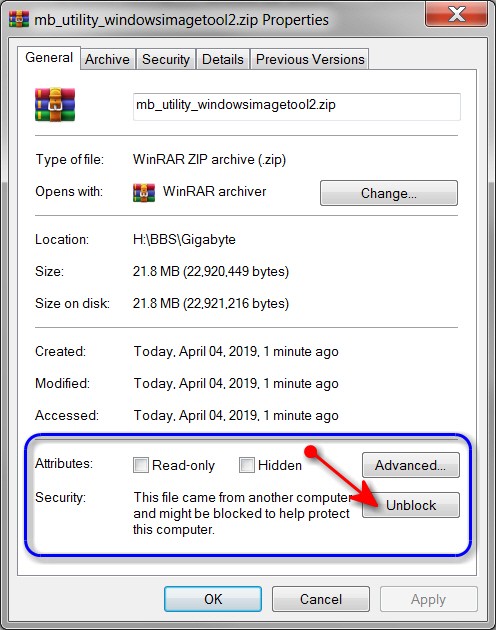
Second, I restate what I had noted in my original post that referenced the fact that it was MANDATORY that you first "UNBLOCK'ed" the download ZIP file of the Gigabyte utility, before you un-zipped it. This is crucial to allowing the imbedded files from then being "visible" after the ZIP file extraction is performed. If you don't first UNBLOCK the ZIP file the expansion doesn't accomplish anything and you won't be building new Win7 install media that contains the required Intel USB 3.0 drivers (which hopefully also will work with Ryzen, but I don't know that for sure):

bJwqck.jpg


Once you push the UNBLOCK button, the ZIP file will now be "unblocked" thus allowing all of its contents to now be expanded and named properly, and will now allow the Gigabyte utility to properly add the Intel USB 3.0 driver files to the newly created output bootable Win7 installer bootable USB flash media.


I just want to be sure you did do this UNBLOCK before un-zipping, which is CRITICAL.

If you did do that, and the resulting Win7 installer USB flash media wasn't successful in supporting USB mouse and keyboard early in your Win7/Ryzen install, then maybe these Intel USB 3.0 drivers aren't sufficient. As @Megaherz07 says, seems there are unique Ryzen USB 3.0 drivers required, which are obviously not in the Gigabyte utility zip file unfortunately.

But if you didn't do that, please at least re-try the Gigabyte utility and this time be sure to UNBLOCK the ZIP file first before expanding it.

 

My Computer My Computer

Computer type
PC/Desktop
Computer Manufacturer/Model Number
Home-built, two systems (1) and (2)
OS
Windows 7 Pro x64 (1), Win7 Pro X64 (2)
CPU
i5-3350p 3.1Ghz/6MB-cache (1); E8400 3.0Ghz/6MB-cache (2)
Motherboard
ASUS P8Z77-V Pro (1); ASUS P5Q3 (2)
Memory
8GB PC3-12800 DDR3 (1); 4GB PC3-10600 DDR3 (2)
Graphics Card(s)
ATI HD7750 (1), (see TV cards); ATI R7 250 (2)
Sound Card
Realtek ALC892 HD Audio (1); Realtek ALC1200 HD Audio (2)
Monitor(s) Displays
Eizo HD2441W LCD, Eizo S2433W (1); Eizo 24" S2433W (2)
Screen Resolution
1920x1200, 1920x1200 (1); 1920x1200 (2)
Hard Drives
(1) 1TB SATA-II (7200RPM), 2x2TB SATA-III (7200RPM), 250GB SATA-III (10000RPM) for OS; 2x2TB external USB 3.0

(2) 320GB SATA-II (7200RPM), 750GB SATA-II (7200RPM), 150GB SATA-II (10000RPM) for OS; 2TB external USB 3.0
PSU
Nesteq ECS-6001 600W (1); Nesteq ECS-5001 500W (2)
Case
Acousti-Case 360 (1) and (2)
Cooling
Noctua NH-U12P SE2 for CPU, 2x120mm case fans (1) and (2)
Keyboard
IBM PS/2 (1) and (2)
Mouse
Logitech MX Revolution wireless (1); Microsoft wired (2)
Internet Speed
100mbps down / 10mbps up
Antivirus
Microsoft Security Essentials; Malwarebyte Anti-Malware Pro
Browser
Firefox
Other Info
Ceton InfiniTV 4-tuner cablecard-enabled TV card as well as Hauppauge HVR-2250 OTA/ATSC 2-tuner TV card in (1), running under Win7 WMC
You quoted @Megaherz07 but I'm assuming you were referring to my own post regarding use of the Gigabyte utility, since when asked in a later post by @Megaherz07 where you got the USB 3.0 drivers from that you were adding to your Win7 install media you answered:

So just to be clear, it's certainly possible that the USB 3.0 drivers provided by the Gigabyte utility are Intel USB 3.0 drivers, intended to support USB 3.0 in the Series 100 and older chipset hardware present on the Gigabyte Skylake and older motherboards.

This was of course all valid as of several years ago when Skylake first came out and Gigabyte first published this utility to support its own customers who wanted to install Win7 on Gigabyte's Skyulake motherboards. It's certainly possible that these particular USB 3.0 drivers do not support the latest chipset and USB 3.0 hardware in your Ryzen machine of today. I have not made personal use of it myself to try to install Win7 on a Ryzen machine which might require different USB 3.0 drivers for its unique hardware situation.


However first, I provide the information from the README for the Intel USB 3.0 drivers contained in that Gigabyte utility to recreate updated Win7 installer bootable USB flash media for Skylake:

* Production Version Release
*
* Microsoft Windows* 7
*
* Intel(R) USB 3.0 eXtensible Host Controller: 4.0.3.49
*
* December 2015
*
* NOTE: This document refers to systems containing the
* following Intel processors/chipsets:
*
* Intel(R) 8 Series/C220 series Chipset Family
* 4th generation Intel(R) Core(TM) Processors
* Intel(R) C230 series Chipset Family
* Intel(R) C610 series Chipset Family
* Intel(R) 9 Series Chipset Family
* Intel(R) Pentium(R) Processor or Intel(R)
* Celeron(R) Processor N- & J- Series
* 5th generation Intel(R) Core(TM) Processors
* Intel(R) Core(TM) M Processor
* Intel(R) 6th generation Intel(R) Core(TM) processors.
* Intel(R) 100 Series/C230 series Chipset Family.


Second, I restate what I had noted in my original post that referenced the fact that it was MANDATORY that you first "UNBLOCK'ed" the download ZIP file of the Gigabyte utility, before you un-zipped it. This is crucial to allowing the imbedded files from then being "visible" after the ZIP file extraction is performed. If you don't first UNBLOCK the ZIP file the expansion doesn't accomplish anything and you won't be building new Win7 install media that contains the required Intel USB 3.0 drivers (which hopefully also will work with Ryzen, but I don't know that for sure):

bJwqck.jpg


Once you push the UNBLOCK button, the ZIP file will now be "unblocked" thus allowing all of its contents to now be expanded and named properly, and will now allow the Gigabyte utility to properly add the Intel USB 3.0 driver files to the newly created output bootable Win7 installer bootable USB flash media.


I just want to be sure you did do this UNBLOCK before un-zipping, which is CRITICAL.

If you did do that, and the resulting Win7 installer USB flash media wasn't successful in supporting USB mouse and keyboard early in your Win7/Ryzen install, then maybe these Intel USB 3.0 drivers aren't sufficient. As @Megaherz07 says, seems there are unique Ryzen USB 3.0 drivers required, which are obviously not in the Gigabyte utility zip file unfortunately.

But if you didn't do that, please at least re-try the Gigabyte utility and this time be sure to UNBLOCK the ZIP file first before expanding it.


Yeah I did unblock before unzipping, it loaded into the ISO fine also
It loaded up fine selecting my USB, but soon as that install page hit, it just kills keyboard and mouse, I'm gonna buy ps/2 keyboard and mouse, hopefully that'll just work lol
 

My Computer My Computer

Computer type
PC/Desktop
Computer Manufacturer/Model Number
AuthenticAMD
OS
Microsoft Windows 7 Professional 64-bit
CPU
AMD Ryzen 5 1600 Six-Core Processor
Motherboard
PRIME B350-PLUS
Memory
16.00 GB
Graphics Card(s)
Radeon (TM) RX 480 Graphics
Yeah I did unblock before unzipping, it loaded into the ISO fine also
It loaded up fine selecting my USB, but soon as that install page hit, it just kills keyboard and mouse, I'm gonna buy ps/2 keyboard and mouse, hopefully that'll just work lol
Hmmm... too bad. I was hoping that might be it.

I don't think you will be able to use your new PS/2 mouse/keyboard without something like this PS/2-to-USB adapter from Adesso, which is what I use to support my own perpetual love and use of my IBM PS/2 keyboards on all of my own Win7 Skylake machines, desktop and laptop. It can support both PS/2 keyboard and mouse simultaneously (with two PS/2 connectors) through a single USB connector. I don't have a PS/2 mouse any longer.

But the "PS/2-to-USB converter" Adesso adapter is itself seen as a "USB 1.10 composite device", and thus I believe still requires USB 3.0 support. I don't believe the attached PS/2 devices themselves are seen as PS/2 devices.

I suspect you might have better luck following the suggestion of Megahertz07 in using the somewhat more complex approach of creating the required bootable USB flash media Win7 installer by combining your original retail Win7 installer ISO with the latest up-to-date set of Ryzen-specific USB 3.0 drivers he pointed you to, rather than the trying to use the now 4-year old Gigabyte-provided Intel USB 3.0 drivers that were applicable to Skylake hardware (of yesteryear, sadly, being the last official Win7-supported hardware).

It really might be that the old Intel USB 3.0 drivers from Gigabyte just do not support the USB hardware on the Ryzen machine, and that you thus can't install Win7 to Ryzen through new Win7 installer media produced from that Gigabyte utility. You still DO need to build new Win7 installer media with USB 3.0 drivers applicable to Ryzen, but using some other verified approach and Ryzen-specific USB 3.0 drivers.
 

My Computer My Computer

Computer type
PC/Desktop
Computer Manufacturer/Model Number
Home-built, two systems (1) and (2)
OS
Windows 7 Pro x64 (1), Win7 Pro X64 (2)
CPU
i5-3350p 3.1Ghz/6MB-cache (1); E8400 3.0Ghz/6MB-cache (2)
Motherboard
ASUS P8Z77-V Pro (1); ASUS P5Q3 (2)
Memory
8GB PC3-12800 DDR3 (1); 4GB PC3-10600 DDR3 (2)
Graphics Card(s)
ATI HD7750 (1), (see TV cards); ATI R7 250 (2)
Sound Card
Realtek ALC892 HD Audio (1); Realtek ALC1200 HD Audio (2)
Monitor(s) Displays
Eizo HD2441W LCD, Eizo S2433W (1); Eizo 24" S2433W (2)
Screen Resolution
1920x1200, 1920x1200 (1); 1920x1200 (2)
Hard Drives
(1) 1TB SATA-II (7200RPM), 2x2TB SATA-III (7200RPM), 250GB SATA-III (10000RPM) for OS; 2x2TB external USB 3.0

(2) 320GB SATA-II (7200RPM), 750GB SATA-II (7200RPM), 150GB SATA-II (10000RPM) for OS; 2TB external USB 3.0
PSU
Nesteq ECS-6001 600W (1); Nesteq ECS-5001 500W (2)
Case
Acousti-Case 360 (1) and (2)
Cooling
Noctua NH-U12P SE2 for CPU, 2x120mm case fans (1) and (2)
Keyboard
IBM PS/2 (1) and (2)
Mouse
Logitech MX Revolution wireless (1); Microsoft wired (2)
Internet Speed
100mbps down / 10mbps up
Antivirus
Microsoft Security Essentials; Malwarebyte Anti-Malware Pro
Browser
Firefox
Other Info
Ceton InfiniTV 4-tuner cablecard-enabled TV card as well as Hauppauge HVR-2250 OTA/ATSC 2-tuner TV card in (1), running under Win7 WMC
Hmmm... too bad. I was hoping that might be it.

I don't think you will be able to use your new PS/2 mouse/keyboard without something like this PS/2-to-USB adapter from Adesso, which is what I use to support my own perpetual love and use of my IBM PS/2 keyboards on all of my own Win7 Skylake machines, desktop and laptop. It can support both PS/2 keyboard and mouse simultaneously (with two PS/2 connectors) through a single USB connector. I don't have a PS/2 mouse any longer.

But the "PS/2-to-USB converter" Adesso adapter is itself seen as a "USB 1.10 composite device", and thus I believe still requires USB 3.0 support. I don't believe the attached PS/2 devices themselves are seen as PS/2 devices.

I suspect you might have better luck following the suggestion of Megahertz07 in using the somewhat more complex approach of creating the required bootable USB flash media Win7 installer by combining your original retail Win7 installer ISO with the latest up-to-date set of Ryzen-specific USB 3.0 drivers he pointed you to, rather than the trying to use the now 4-year old Gigabyte-provided Intel USB 3.0 drivers that were applicable to Skylake hardware (of yesteryear, sadly, being the last official Win7-supported hardware).

It really might be that the old Intel USB 3.0 drivers from Gigabyte just do not support the USB hardware on the Ryzen machine, and that you thus can't install Win7 to Ryzen through new Win7 installer media produced from that Gigabyte utility. You still DO need to build new Win7 installer media with USB 3.0 drivers applicable to Ryzen, but using some other verified approach and Ryzen-specific USB 3.0 drivers.

I've seen on some YT videos that people used th old keyboards to navigate through th installation, I tried th PS/2 to USB and it didn't work sadly

This is probably a noob question but if I take out my SSD and take it to a shop and tell them to install windows 7 fully on a completely different PC.. then plug it into my machine would it work that way? :huh:

Yeah I did read it, I don't have my HDD anymore so I can skip anything to do with that
 

My Computer My Computer

Computer type
PC/Desktop
Computer Manufacturer/Model Number
AuthenticAMD
OS
Microsoft Windows 7 Professional 64-bit
CPU
AMD Ryzen 5 1600 Six-Core Processor
Motherboard
PRIME B350-PLUS
Memory
16.00 GB
Graphics Card(s)
Radeon (TM) RX 480 Graphics
I've seen on some YT videos that people used th old keyboards to navigate through th installation, I tried th PS/2 to USB and it didn't work sadly
For sure you can definitely use a real PS/2 mouse and keyboard if your PC motherboard is configured with real PS/2 connectors on it. But this is rarer and rarer these days on newly purchased systems. Or, the motherboard might have a header for possible PS/2 connections but no actual rear-panel connector sockets. It might be possible to special order new machines or buy motherboards which will arrive with one or both individual green (mouse) and/or purple (keyboard) or "split-dual" color-coded PS/2 connectors, but without these I can't see how running PS/2 peripherals through a PS/2-to-USB adaptor would seem like anything but a USB HID Composite device, not PS/2.

I'd be at least skeptical that those YT videos might not simply have been lucky enough to have a motherboard which actually still had PS/2 connectors. For example, my ASUS Z170-Deluxe homebuilt machine does not have PS/2 connector on the Skylake motherboard. Nor does my Lenovo M910t with its Skylake motherboard.

But my older ASUS P8Z77-V-Pro homebuilt with its Z77 Express chipset machine did have one, a single combo green/purple dual-purpose connector for either PS/2 mouse or keyboard. With my IBM PS/2 keyboard plugged in I could boot the machine by simply tapping a key on the keyboard, as there was a "power on by PS/2 keyboard" option supported by the BIOS.

However on the newer machines no PS/2 is supported. Hence my use of the Adesso adapter.

But my IBM PS/2 keyboard was 100% successful being used with the Adesso adapter to accomplish the install of Win7 on my Z170 Skylake machine using the newly created Win7 install media produced by the Gigabyte utility, as the ASUS Skylake-based Z170-Deluxe motherboard worked perfectly with the Intel USB 3.0 drivers inserted by the Gigabyte utility. So my USB wireless Logitech mouse and IBM PS/2 keyboard via Adesso adapter were 100% visible and usable with the Gigabyte-produced Win7 install media.


This is probably a noob question but if I take out my SSD and take it to a shop and tell them to install windows 7 fully on a completely different PC.. then plug it into my machine would it work that way?
I don't believe that is "legal" or might even physically work. Certainly there's a licensing issue where you need to activate the copy of Win7 to a single hardware machine. And of course there's all kinds of different hardware and drivers involved if your machine is significantly different than the store machine, so Windows would need to probably struggle considerably (and may or may not finally be successful) to even be able to boot (and update things appropriately) the first time you tried to boot from the SSD transplanted back into your own machine with the store-installed Windows on it. Of course doing this on a similar Ryzen store machine would have a much better chance of success, but I still would be very cautious and skeptical. Definitely not the real right way to go.

The Windows license key required to allow legal use of Windows on your machine is either manually provided externally and you type it in early in the installation process, or for newer UEFI machines that OEM machine license key for Windows i commonly burned into the BIOS at manufacturing and simply read later by the Windows installer from the hardware itself, either during initial Windows install or later if you had to reinstall from scratch. With Win10 you're not even bothered with a prompt to enter the license key when it is provided through the UEFI hardware in this way.

But that license key activating that installation of Windows on that machine is all tied together. You can't re-use that particular license key on another piece of hardware, as many of the imbedded serial number identifications for critical hardware (like CPU and motherboard) go into producing the internal identification of your "machine" as tied to the license key and then registered with MS activation. You won't be able to "cheat", as the different machine is easily detected and your second Windows usage will not be considered "genuine". At the very least I don't believe Windows Updates are faciltated unless the Windows installation is "genuine".

Anyway, I'm sure you read this AnandTech summary of wanting to install Win7 on Ryzen machines. As we know, it's about USB 3.0 and USB support for your mouse/keyboard required during the Win7 install. I've never needed to do this myself, so I'm not an expert. I'd suggest you follow the advice given in this article, or try to build the Win7 install media using Ryzen-specific USB drivers as provided by @Megahertz07 in his earlier post.
 

My Computer My Computer

Computer type
PC/Desktop
Computer Manufacturer/Model Number
Home-built, two systems (1) and (2)
OS
Windows 7 Pro x64 (1), Win7 Pro X64 (2)
CPU
i5-3350p 3.1Ghz/6MB-cache (1); E8400 3.0Ghz/6MB-cache (2)
Motherboard
ASUS P8Z77-V Pro (1); ASUS P5Q3 (2)
Memory
8GB PC3-12800 DDR3 (1); 4GB PC3-10600 DDR3 (2)
Graphics Card(s)
ATI HD7750 (1), (see TV cards); ATI R7 250 (2)
Sound Card
Realtek ALC892 HD Audio (1); Realtek ALC1200 HD Audio (2)
Monitor(s) Displays
Eizo HD2441W LCD, Eizo S2433W (1); Eizo 24" S2433W (2)
Screen Resolution
1920x1200, 1920x1200 (1); 1920x1200 (2)
Hard Drives
(1) 1TB SATA-II (7200RPM), 2x2TB SATA-III (7200RPM), 250GB SATA-III (10000RPM) for OS; 2x2TB external USB 3.0

(2) 320GB SATA-II (7200RPM), 750GB SATA-II (7200RPM), 150GB SATA-II (10000RPM) for OS; 2TB external USB 3.0
PSU
Nesteq ECS-6001 600W (1); Nesteq ECS-5001 500W (2)
Case
Acousti-Case 360 (1) and (2)
Cooling
Noctua NH-U12P SE2 for CPU, 2x120mm case fans (1) and (2)
Keyboard
IBM PS/2 (1) and (2)
Mouse
Logitech MX Revolution wireless (1); Microsoft wired (2)
Internet Speed
100mbps down / 10mbps up
Antivirus
Microsoft Security Essentials; Malwarebyte Anti-Malware Pro
Browser
Firefox
Other Info
Ceton InfiniTV 4-tuner cablecard-enabled TV card as well as Hauppauge HVR-2250 OTA/ATSC 2-tuner TV card in (1), running under Win7 WMC
Okay guys.. so since secure boot was fully disabled etc. I wasn't gonna try my HDD again since it was messing with display..
But my OLD HDD is working again, I'm back on windows 7. The SSD is disconnected currently..
Should I power down>plug it in>format it then just try clone it?


The reasons I'm using windows 7 over 10 is the DPI scaling for gaming
Everything is SUPER blurry on windows 10 even with the 8.1fix
Also my monitors freesync doesn't work at all with windows 10, it has brightness flickers

Very much want to stay away from windows 10, but I wanna put this SSD to use.. damn microsoft
 

My Computer My Computer

Computer type
PC/Desktop
Computer Manufacturer/Model Number
AuthenticAMD
OS
Microsoft Windows 7 Professional 64-bit
CPU
AMD Ryzen 5 1600 Six-Core Processor
Motherboard
PRIME B350-PLUS
Memory
16.00 GB
Graphics Card(s)
Radeon (TM) RX 480 Graphics
Witch SSD did you buy, SATA 2.5" drive or a M.2 stick?
Did you added the USB 3.x drivers to your installation disk?
 

My Computers My Computers

System One System Two

  • Computer type
    PC/Desktop
    Computer Manufacturer/Model Number
    custom build
    OS
    Windows 7 HP 64
    CPU
    i5 6600K - 800MHz to 4200MHz
    Motherboard
    GA-Z170-HD3P
    Memory
    4+4G GSkill DDR4 3000
    Graphics Card(s)
    IG - Intel 530
    Monitor(s) Displays
    Samsung 226BW
    Screen Resolution
    1680x1050
    Hard Drives
    (1) -1 SM951 – 128GB M.2 AHCI PCIe SSD drive for Windows 7 and Lubuntu
    (2) -1 WD SATA 3 - 1T for Data
    (3) -1 WD SATA 3 - 1T for backup
    PSU
    Thermaltake 450W TR2 gold
    Keyboard
    Old and good Chicony mechanical keyboard
    Mouse
    Logitech mX performance - 9 buttons (had to disable some)
    Internet Speed
    500Mb/s
    Browser
    Firefox 64
    Other Info
    TinyWall firewall
  • Computer type
    Laptop
    System Manufacturer/Model Number
    Asus Q550LF
    OS
    Windows 7 Pro
    CPU
    i7-4500U 800MHz to 3.0GHz
    Motherboard
    Asus Q550LF
    Memory
    (4+4)G DDR3 1600
    Graphics Card(s)
    IG intel 4400 + NVIDIA GeForce GT 745M
    Sound Card
    Realtek
    Monitor(s) Displays
    LG Display LP156WF4-SPH1
    Screen Resolution
    1920 x 1080
    Hard Drives
    BX500 120G SSD for Windows and programs +
    1T HDD for data
    Internet Speed
    500 Mb/s
    Browser
    Firefox
    Other Info
    TinyWall firewall
Witch SSD did you buy, SATA 2.5" drive or a M.2 stick?
Did you added the USB 3.x drivers to your installation disk?

Yeah remember that didn't work :(

M.2 Stick , my eyes died on windows 10 with the blurryness.. windows 7 is so superior it's not even funny

Samsung 970 EVO Plus V-NAND M.2 250GB SSD
 

My Computer My Computer

Computer type
PC/Desktop
Computer Manufacturer/Model Number
AuthenticAMD
OS
Microsoft Windows 7 Professional 64-bit
CPU
AMD Ryzen 5 1600 Six-Core Processor
Motherboard
PRIME B350-PLUS
Memory
16.00 GB
Graphics Card(s)
Radeon (TM) RX 480 Graphics
You never mention that the SSD was a MVMe M.2, That is why nothing had worked.

It didn't work on the attempt of new install because you didn't add the USB 3.x AND the MVMe M.2 drivers.
And it won't work if you clone the old HDD to the new M.2.

You have to add the USB 3.x AND the MVMe M.2 drivers to the Win 7 installation disk.


Follow the instructions on post #42
HDD kills Display

The MVMe drivers download from here Update your Win 7 installation media.
 
Last edited:

My Computers My Computers

System One System Two

  • Computer type
    PC/Desktop
    Computer Manufacturer/Model Number
    custom build
    OS
    Windows 7 HP 64
    CPU
    i5 6600K - 800MHz to 4200MHz
    Motherboard
    GA-Z170-HD3P
    Memory
    4+4G GSkill DDR4 3000
    Graphics Card(s)
    IG - Intel 530
    Monitor(s) Displays
    Samsung 226BW
    Screen Resolution
    1680x1050
    Hard Drives
    (1) -1 SM951 – 128GB M.2 AHCI PCIe SSD drive for Windows 7 and Lubuntu
    (2) -1 WD SATA 3 - 1T for Data
    (3) -1 WD SATA 3 - 1T for backup
    PSU
    Thermaltake 450W TR2 gold
    Keyboard
    Old and good Chicony mechanical keyboard
    Mouse
    Logitech mX performance - 9 buttons (had to disable some)
    Internet Speed
    500Mb/s
    Browser
    Firefox 64
    Other Info
    TinyWall firewall
  • Computer type
    Laptop
    System Manufacturer/Model Number
    Asus Q550LF
    OS
    Windows 7 Pro
    CPU
    i7-4500U 800MHz to 3.0GHz
    Motherboard
    Asus Q550LF
    Memory
    (4+4)G DDR3 1600
    Graphics Card(s)
    IG intel 4400 + NVIDIA GeForce GT 745M
    Sound Card
    Realtek
    Monitor(s) Displays
    LG Display LP156WF4-SPH1
    Screen Resolution
    1920 x 1080
    Hard Drives
    BX500 120G SSD for Windows and programs +
    1T HDD for data
    Internet Speed
    500 Mb/s
    Browser
    Firefox
    Other Info
    TinyWall firewall
Back
Top