You quoted @
Megaherz07 but I'm assuming you were referring to my own post regarding use of the Gigabyte utility, since when asked in a later post by @
Megaherz07 where you got the USB 3.0 drivers from that you were adding to your Win7 install media you answered:
So just to be clear, it's certainly possible that the USB 3.0 drivers provided by the Gigabyte utility are Intel USB 3.0 drivers, intended to support USB 3.0 in the Series 100 and older chipset hardware present on the Gigabyte Skylake and older motherboards.
This was of course all valid as of several years ago when Skylake first came out and Gigabyte first published this utility to support its own customers who wanted to install Win7 on Gigabyte's Skyulake motherboards. It's certainly possible that these particular USB 3.0 drivers do not support the latest chipset and USB 3.0 hardware in your Ryzen machine of today. I have not made personal use of it myself to try to install Win7 on a Ryzen machine which might require different USB 3.0 drivers for its unique hardware situation.
However first, I provide the information from the README for the Intel USB 3.0 drivers contained in that Gigabyte utility to recreate updated Win7 installer bootable USB flash media for Skylake:
* Production Version Release
*
* Microsoft Windows* 7
*
* Intel(R) USB 3.0 eXtensible Host Controller: 4.0.3.49
*
* December 2015
*
* NOTE: This document refers to systems containing the
* following Intel processors/chipsets:
*
* Intel(R) 8 Series/C220 series Chipset Family
* 4th generation Intel(R) Core(TM) Processors
* Intel(R) C230 series Chipset Family
* Intel(R) C610 series Chipset Family
* Intel(R) 9 Series Chipset Family
* Intel(R) Pentium(R) Processor or Intel(R)
* Celeron(R) Processor N- & J- Series
* 5th generation Intel(R) Core(TM) Processors
* Intel(R) Core(TM) M Processor
* Intel(R) 6th generation Intel(R) Core(TM) processors.
* Intel(R) 100 Series/C230 series Chipset Family.
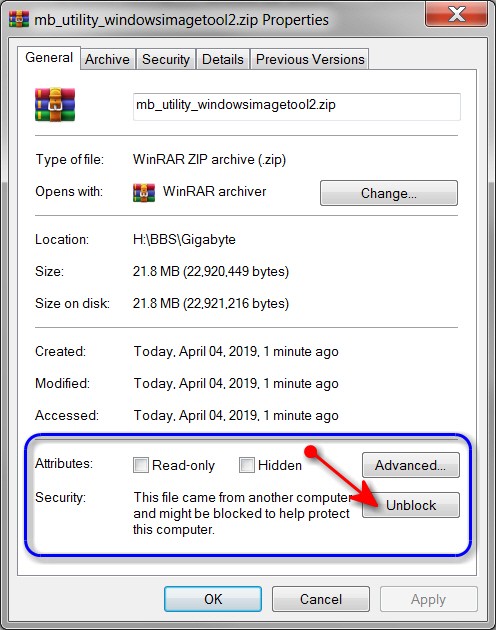
Second, I restate what I had noted in my original post that referenced the fact that it was MANDATORY that you first "UNBLOCK'ed" the download ZIP file of the Gigabyte utility, before you un-zipped it. This is crucial to allowing the imbedded files from then being "visible" after the ZIP file extraction is performed. If you don't first UNBLOCK the ZIP file the expansion doesn't accomplish anything and you won't be building new Win7 install media that contains the required Intel USB 3.0 drivers (which hopefully also will work with Ryzen, but I don't know that for sure):
Once you push the UNBLOCK button, the ZIP file will now be "unblocked" thus allowing all of its contents to now be expanded and named properly, and will now allow the Gigabyte utility to properly add the Intel USB 3.0 driver files to the newly created output bootable Win7 installer bootable USB flash media.
I just want to be sure you did do this UNBLOCK before un-zipping, which is CRITICAL.
If you did do that, and the resulting Win7 installer USB flash media wasn't successful in supporting USB mouse and keyboard early in your Win7/Ryzen install, then maybe these Intel USB 3.0 drivers aren't sufficient. As @
Megaherz07 says, seems there are unique Ryzen USB 3.0 drivers required, which are obviously not in the Gigabyte utility zip file unfortunately.
But if you didn't do that, please at least re-try the Gigabyte utility and this time be sure to UNBLOCK the ZIP file first before expanding it.