Reinstalling GRUB Menu

Done! What now sir?! :D
TG;

If you have been successful in installing Grub into the Red Hat Linux partition, you can now try this again:

Add this line to the end of your boot.ini:

c:\linux.bin="Red Hat Linux"

Then Dump Linux boot sector to a file. Boot to Linux and type the following:

dd if=/dev/hda2 of=/linux.bin bs=512 count=1

Copy the file: linux.bin from Linux to the C: of your Windows XP and reboot.


It should work this time, and you should be able to boot to Linux through the Windows boot manager.

Cheers!
Robert

Ok. You had me up to the Add the line to boot.ini part..

Dump the linux boot sector to a file? You lost me there

And how will i copy the file. Via flash drive?
 

My Computer My Computer

Computer type
PC/Desktop
Computer Manufacturer/Model Number
DELL VOSTRO 3650
OS
Windows 8.1 PRO
CPU
3rd Generation Intel Core i7‐3612QM CPU @ 2.10GHZ
Memory
8GB DDR3
Graphics Card(s)
NVIDIA GeForce GT 525M (128 bit), 1GB Grpahics
Screen Resolution
1920X1080
Hard Drives
750GB 5400RPM
Done! What now sir?! :D
TG;

If you have been successful in installing Grub into the Red Hat Linux partition, you can now try this again:

Add this line to the end of your boot.ini:

c:\linux.bin="Red Hat Linux"

Then Dump Linux boot sector to a file. Boot to Linux and type the following:

dd if=/dev/hda2 of=/linux.bin bs=512 count=1

Copy the file: linux.bin from Linux to the C: of your Windows XP and reboot.


It should work this time, and you should be able to boot to Linux through the Windows boot manager.

Cheers!
Robert

Ok. You had me up to the Add the line to boot.ini part..

Dump the linux boot sector to a file? You lost me there

And how will i copy the file. Via flash drive?

You type the line, and a file will appear (if i am not mistaken) probably in your home folder, then use a flash drive or an external harddrive to backup this file i.e take it.
 

My Computer My Computer

Computer Manufacturer/Model Number
Acer Veriton m261 (modded)
OS
Win 7 pro 64-bit, Ubuntu 9.10 64-bit
CPU
Intel Core 2 Duo 2.60 Ghz
Motherboard
Whatever came with the system
Memory
4 gb ddr2 667 Mhz
Graphics Card(s)
NVidia Geforce 9400 GS 1 gb ddr2 550 mhz GPU
Sound Card
Intergrated
Monitor(s) Displays
samsung SyncMaster 2494 24"
Screen Resolution
1080p
Hard Drives
80gb - IDE
750gb - SATA II
PSU
whatever came with the system
Case
whatever came with the system
Cooling
whatever came with the system
Keyboard
Apple Aluminium (Awesome)
Mouse
Some awesome Dell mouse, really good.
Internet Speed
100mbps
Ok. You had me up to the Add the line to boot.ini part..
Sorry, from your earlier post: http://www.sevenforums.com/installation-setup/47572-reinstalling-grub-menu-2.html#post449627
I had understood you were able to do this but there was no Grub installed, so you got the error. Now that you were able to install Grub in the Linux partition, it should work.

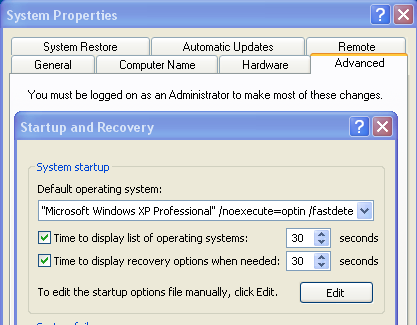
Yes, boot.ini is a file in the C: drive (the root). You can edit it with notepad or like here:


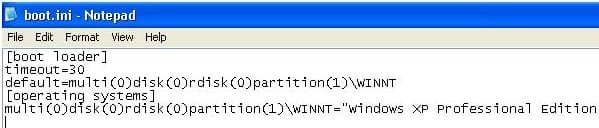
Click the Edit button and type the line: c:\linux.bin="Red Hat Linux" so that it appears as the last line in the file.

boot.jpg

Dump the linux boot sector to a file? You lost me there

And how will i copy the file. Via flash drive?

You type the line, and a file will appear (if i am not mistaken) probably in your home folder, then use a flash drive or an external harddrive to backup this file i.e take it.
Correct, you will need to boot to your Live Linux CD, and from a command prompt type: dd if=/dev/hda2 of=/linux.bin bs=512 count=1. This will "Dump the Linux boot sector" to the file * linux.bin *. Yes, use a flash drive, a floppy disk, or mount the Windows partition. Somehow copy linux.bin and put it in the C: drive, where boot.ini already is. Then when you boot your computer, you will have a menu selection for "Red Hat Linux". When you click on it it will find * linux.bin * and boot up your Red Hat Linux.

Hope this helps?
 

My Computer My Computer

OS
...
I get an error saying

dd: opening `/dev/hda2': No such file or directory

Edit..

I changed hda2 to sda3 but now I get

dd: opening `/linux.bin' :Permission denied.
 

My Computer My Computer

Computer type
PC/Desktop
Computer Manufacturer/Model Number
DELL VOSTRO 3650
OS
Windows 8.1 PRO
CPU
3rd Generation Intel Core i7‐3612QM CPU @ 2.10GHZ
Memory
8GB DDR3
Graphics Card(s)
NVIDIA GeForce GT 525M (128 bit), 1GB Grpahics
Screen Resolution
1920X1080
Hard Drives
750GB 5400RPM
I get an error saying

dd: opening `/dev/hda2': No such file or directory

Edit..

I changed hda2 to sda3 but now I get

dd: opening `/linux.bin' :Permission denied.

Try sda2 ?

The Red Hat partition is the second partition?
 

My Computer My Computer

OS
...
Tried sda2... Same thing. Permission denied.

Yes. Second partition.
 

My Computer My Computer

Computer type
PC/Desktop
Computer Manufacturer/Model Number
DELL VOSTRO 3650
OS
Windows 8.1 PRO
CPU
3rd Generation Intel Core i7‐3612QM CPU @ 2.10GHZ
Memory
8GB DDR3
Graphics Card(s)
NVIDIA GeForce GT 525M (128 bit), 1GB Grpahics
Screen Resolution
1920X1080
Hard Drives
750GB 5400RPM
Anything on this? :(
 

My Computer My Computer

Computer type
PC/Desktop
Computer Manufacturer/Model Number
DELL VOSTRO 3650
OS
Windows 8.1 PRO
CPU
3rd Generation Intel Core i7‐3612QM CPU @ 2.10GHZ
Memory
8GB DDR3
Graphics Card(s)
NVIDIA GeForce GT 525M (128 bit), 1GB Grpahics
Screen Resolution
1920X1080
Hard Drives
750GB 5400RPM
Anything on this? :(
The problem I see with giving you more specific advice is I have no experience with a computer dual booting XP and Red Hat, while fixing it with a Knoppix live CD. However, it seems to me that you will need to have "root" privileges (permissions) on the Red Hat system to "Dump the Linux boot sector" from the Red Hat partition. You may be able to gain access with the "root" password in a command prompt from the live cd. Or you might be able to boot to the Red Hat OS from the live CD. When you boot to the live Knoppix CD, are you a "User" or do you have "root" access? Do you open a "root" command promtp window (terminal) when you type the Dump command?
 

My Computer My Computer

OS
...
Er... I don't know.. the box i open has LXTerminal on it.. :|
 

My Computer My Computer

Computer type
PC/Desktop
Computer Manufacturer/Model Number
DELL VOSTRO 3650
OS
Windows 8.1 PRO
CPU
3rd Generation Intel Core i7‐3612QM CPU @ 2.10GHZ
Memory
8GB DDR3
Graphics Card(s)
NVIDIA GeForce GT 525M (128 bit), 1GB Grpahics
Screen Resolution
1920X1080
Hard Drives
750GB 5400RPM
That doesn't work. It seems like I have no kind of access to anything.

Any file i try to access under the /dev folder , i get permission denied. When iright click on dev and go to properties and then permissions.

Owner - root
Group - root.
 

My Computer My Computer

Computer type
PC/Desktop
Computer Manufacturer/Model Number
DELL VOSTRO 3650
OS
Windows 8.1 PRO
CPU
3rd Generation Intel Core i7‐3612QM CPU @ 2.10GHZ
Memory
8GB DDR3
Graphics Card(s)
NVIDIA GeForce GT 525M (128 bit), 1GB Grpahics
Screen Resolution
1920X1080
Hard Drives
750GB 5400RPM
That doesn't work. It seems like I have no kind of access to anything.

Any file i try to access under the /dev folder , i get permission denied. When iright click on dev and go to properties and then permissions.

Owner - root
Group - root.
Right. In Linux, 'root' is what we call 'Administrator' in Windows. Evidently, the 'root' (Administrator) account in the Knoppix live CD cannot get access to the 'root' (Administrator) account in Red Hat on the hard drive.

I would say you have three options here:
1) Get the 'root' password from the computer owner and figure out how to login as root to Red Hat.
2) My Linux 'rescue' CDs (I have some different ones) all have the option to boot to a Linux OS on the hard drive. When I first boot to the Linux CD, I am asked (amont other things) if I want to boot to the hard drive. If you can do that with your Knoppix CD then boot to Red Hat so you can finish this.
3) Use the Knoppix CD to install GRUB to the MBR and use GRUB to boot to both Windows and Linux.

Hope I have been of some help?
 

My Computer My Computer

OS
...
3) Use the Knoppix CD to install GRUB to the MBR and use GRUB to boot to both Windows and Linux.

Hope I have been of some help?

Haven't I done that already?

And yes, you have been very helpful.
 

My Computer My Computer

Computer type
PC/Desktop
Computer Manufacturer/Model Number
DELL VOSTRO 3650
OS
Windows 8.1 PRO
CPU
3rd Generation Intel Core i7‐3612QM CPU @ 2.10GHZ
Memory
8GB DDR3
Graphics Card(s)
NVIDIA GeForce GT 525M (128 bit), 1GB Grpahics
Screen Resolution
1920X1080
Hard Drives
750GB 5400RPM
So i went with this...

when i opened the terminal window, i typed sudo su..

then i did dd if=/dev/sda3 of=/linux.bin bs=512 count=1 and i get

dd:reading `/dev/sda3' :Is a directory
1+0 records in
1+0 records out
512 bytes (512b) copied, 5.6292e-05 s, 9.1 mb/s


? :D

where is the file copied to?
 

My Computer My Computer

Computer type
PC/Desktop
Computer Manufacturer/Model Number
DELL VOSTRO 3650
OS
Windows 8.1 PRO
CPU
3rd Generation Intel Core i7‐3612QM CPU @ 2.10GHZ
Memory
8GB DDR3
Graphics Card(s)
NVIDIA GeForce GT 525M (128 bit), 1GB Grpahics
Screen Resolution
1920X1080
Hard Drives
750GB 5400RPM
So i went with this...

when i opened the terminal window, i typed sudo su..

then i did dd if=/dev/sda3 of=/linux.bin bs=512 count=1 and i get

dd:reading `/dev/sda3' :Is a directory
1+0 records in
1+0 records out
512 bytes (512b) copied, 5.6292e-05 s, 9.1 mb/s


? :D

where is the file copied to?
It needs to go in the C: drive in Windows XP, where boot.ini is already.
 

My Computer My Computer

OS
...
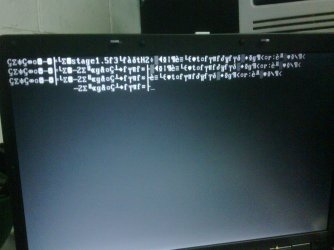
Ok this is bad. When i reboot the pc i get a weird msg on the screen witha bunch of characters.. uploading pic.. sigh..


*bangs head against desk*
 

Attachments

  • IMG00023-20100105-1551.jpg
    IMG00023-20100105-1551.jpg
    183.3 KB · Views: 4

My Computer My Computer

Computer type
PC/Desktop
Computer Manufacturer/Model Number
DELL VOSTRO 3650
OS
Windows 8.1 PRO
CPU
3rd Generation Intel Core i7‐3612QM CPU @ 2.10GHZ
Memory
8GB DDR3
Graphics Card(s)
NVIDIA GeForce GT 525M (128 bit), 1GB Grpahics
Screen Resolution
1920X1080
Hard Drives
750GB 5400RPM
That's knoppix 3.7.. I'm using Knoppix 6.. So the gui is different, but along the same lines...
 

My Computer My Computer

Computer type
PC/Desktop
Computer Manufacturer/Model Number
DELL VOSTRO 3650
OS
Windows 8.1 PRO
CPU
3rd Generation Intel Core i7‐3612QM CPU @ 2.10GHZ
Memory
8GB DDR3
Graphics Card(s)
NVIDIA GeForce GT 525M (128 bit), 1GB Grpahics
Screen Resolution
1920X1080
Hard Drives
750GB 5400RPM
That's knoppix 3.7.. I'm using Knoppix 6.. So the gui is different, but along the same lines...
What I would suggest to you, what I would try myself, is open the "file manager" (by what ever program it is called ... and I do not know which file manager knoppix is using) and find the GRUB folder in the Red Hat partition, and use the GUI Installer to reinstall GRUB and put it in the MBR.

What I was going to say in answer to your question earlier, was if you followed ManyBeers instructions, you would have put Grub in the Red Hat partition, which would work if we could get the correct DUMP. If you install GRUB in the MBR, it will find both Red Hat and Windows XP so you can choose to boot to either one.
 

My Computer My Computer

OS
...
on the side i have

Knoppix
desktop
/
/boot
55.1 GB vol

When I click on /boot , the address bar reads /media/sda2 and there is a grub folder there...

What now? :huh:
 

My Computer My Computer

Computer type
PC/Desktop
Computer Manufacturer/Model Number
DELL VOSTRO 3650
OS
Windows 8.1 PRO
CPU
3rd Generation Intel Core i7‐3612QM CPU @ 2.10GHZ
Memory
8GB DDR3
Graphics Card(s)
NVIDIA GeForce GT 525M (128 bit), 1GB Grpahics
Screen Resolution
1920X1080
Hard Drives
750GB 5400RPM
Back
Top