AHCI : Enable in Windows 7 / Vista

AHCI : Enable in Vista and Windows 7 after OS install


   Information
AHCI Advanced Host Controller Interface makes NCQ Native Command Queing along with hot-plugging or hot swapping through SATA Serial-ATA host controllers possible; Vista was the first to offer this feature. The issue with AHCI is it needs to be enabled in the BIOS prior to OS installation; doing so after you have installed the OS will disable the PC. The reason why is Windows disables the AHCI drivers not needed durring installation.

This tutorial will show you how to enable AHCI after you have installed the OS if you didn't already have AHCI enable in the BIOS when you installed the OS.

   Warning
Changing values in the Windows registry can disable your machine; if you're not sure how to do this please post a question in this tutorial and someone will be glad to help you.
   Note
This method will also work for Windows Vista though the default DWORD string value in Vista will be "4" where it will be "3" in Windows 7.

As a precaution it would be a good idea to create a "System Restore Point" before you start this, the tutorial can be found at the link below.

System Restore Point - Create


Let's get started!
1) In the Windows start menu search box type regedit, right click the entry, click Run as Administrator, enter your user credentials for the UAC prompt, then click yes to open regedit.

Start_Regedit.jpg
UAC_Regedit.jpg

2) In regedit navigate to HKEY_LOCAL_MACHINE\SYSTEM\CurrentControlSet\services.

3) In the left pane, click on msahci, in the right pane double click on Start to modify it.
RegEdit1.jpg
RegEdit2.jpg
4) In the window that opens change the value to 0 (zero), and click OK.
RegEdit3.jpg
5) In the left pane, click on iaStorV (if there), in the right pane double click on Start to modify it. Repeat step 4, and go to step 6 below.

NOTE: From: Error message occurs after you change the SATA mode of the boot drive

6) Close Registry Editor.
7) Now you'll need to restart the PC and go into the BIOS and enable AHCI. When Windows boots up, it will finish installing the AHCI drivers.

AHCI Driver.jpg
AHCI Driver2.jpg

8) You will need one final restart to finish the process after the drivers are installed.

Restart.jpg
   Note
For those with nForce boards, have a look at the Information post below.

The method was worked out by Everlong and credit for that goes to him, thanks mate!


Enjoy! :)


Last edited by a moderator:
Hello Dave, thanks!


Some do have issues with drivers, still.
 

My Computer My Computer

Computer Manufacturer/Model Number
* BFK Customs *
OS
W 7 64-bit Ultimate
CPU
Intel Q9550 Yorkfield
Motherboard
ASUS P5Q Pro
Memory
8GB Dominator 8500C5D
Graphics Card(s)
ATI : XFX 5870
Sound Card
Realtek HD Audio 7-1
Monitor(s) Displays
1x 47" LCD HDMI & 3x 26" LCD HDMI
Screen Resolution
1920x1080P & 1920x1200
Hard Drives
1x 80GB Intel X25-M G2 SSD : 1x 500GB & 1x 640GB WD Caviar Black(s)
PSU
Corsair 620HX
Case
Cooler Master RC-690
Cooling
Tuniq Tower 120, 2x 140mm and 3x 120mm case fans
Keyboard
Microsoft 500
Mouse
Razer Diamondback 3G
Internet Speed
14 Mb/s
Other Info
1x Koutech 3Gb/s SATA HDD Hot Swap Rack
Is there any performance gain by enabling AHCI ?
 

My Computer My Computer

Computer type
PC/Desktop
Computer Manufacturer/Model Number
Custom Build
OS
Windows 10 Pro x64, Arch Linux
CPU
Intel Core 2 Quad Q8200 OC'd 3.08GHz
Motherboard
Asus Rampage formula LGA775
Memory
8GB DDR2 900Mhz
Graphics Card(s)
MSI GT730 2GB GDDR5 (Kepler)
Sound Card
Supreme FX2
Monitor(s) Displays
Samsung LS22F350 LED
Screen Resolution
1080P
Hard Drives
Kingston SSDNow UV400 120GB, 500GB Hitachi, 2TB Samsung, 500GB Seagate FreeAgent, 640GB Samsung, 160GB Toshiba (Arch)
PSU
AeroCool 500W Bronze
Cooling
Cooler Master V6 + 3X fans
Keyboard
Prolink keyboard
Mouse
Logitech M705
Internet Speed
1MiB/s
Browser
Chrome Beta

My Computer My Computer

Computer Manufacturer/Model Number
* BFK Customs *
OS
W 7 64-bit Ultimate
CPU
Intel Q9550 Yorkfield
Motherboard
ASUS P5Q Pro
Memory
8GB Dominator 8500C5D
Graphics Card(s)
ATI : XFX 5870
Sound Card
Realtek HD Audio 7-1
Monitor(s) Displays
1x 47" LCD HDMI & 3x 26" LCD HDMI
Screen Resolution
1920x1080P & 1920x1200
Hard Drives
1x 80GB Intel X25-M G2 SSD : 1x 500GB & 1x 640GB WD Caviar Black(s)
PSU
Corsair 620HX
Case
Cooler Master RC-690
Cooling
Tuniq Tower 120, 2x 140mm and 3x 120mm case fans
Keyboard
Microsoft 500
Mouse
Razer Diamondback 3G
Internet Speed
14 Mb/s
Other Info
1x Koutech 3Gb/s SATA HDD Hot Swap Rack
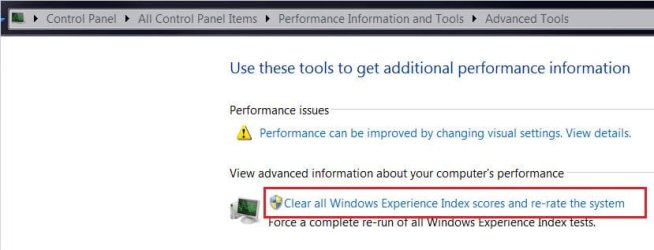
Just enabled it but my WEI score dropped from 5.9 to 1.0 :confused:
 

My Computer My Computer

Computer type
PC/Desktop
Computer Manufacturer/Model Number
Custom Build
OS
Windows 10 Pro x64, Arch Linux
CPU
Intel Core 2 Quad Q8200 OC'd 3.08GHz
Motherboard
Asus Rampage formula LGA775
Memory
8GB DDR2 900Mhz
Graphics Card(s)
MSI GT730 2GB GDDR5 (Kepler)
Sound Card
Supreme FX2
Monitor(s) Displays
Samsung LS22F350 LED
Screen Resolution
1080P
Hard Drives
Kingston SSDNow UV400 120GB, 500GB Hitachi, 2TB Samsung, 500GB Seagate FreeAgent, 640GB Samsung, 160GB Toshiba (Arch)
PSU
AeroCool 500W Bronze
Cooling
Cooler Master V6 + 3X fans
Keyboard
Prolink keyboard
Mouse
Logitech M705
Internet Speed
1MiB/s
Browser
Chrome Beta
Just enabled it but my WEI score dropped from 5.9 to 1.0 :confused:
Don't worry about the WEI score. You can try running it again if you want, but it really doesn't make any difference.
 

My Computer My Computer

Computer Manufacturer/Model Number
Custom
OS
Windows 7 Professional x64
CPU
Intel i7 2600K OC'd @ 4620 MHz
Motherboard
Asus P8Z68-V Pro
Memory
16GB GSkill Sniper 2133 Mhz (4x4GB)
Graphics Card(s)
EVGA GeForce GTX 480 SuperClocked+
Sound Card
Realtek High Definition Audio
Monitor(s) Displays
2x Acer S273HLbmii 27"
Screen Resolution
2 x 1920x1080
Hard Drives
64GB Crucial M4 SSD

Storage: Hitachi 1TB 5400RPM, Samsung 1.5TB 5400RPM
PSU
Corsair HW Series 750w (modular)
Case
Cooler Master HAF 932 Advanced Blue Edition
Cooling
CM Hyper 212+ CPU cooler, 3x 230mm + 1x 140mm case fans
Keyboard
Logitech MK320 (wireless)
Mouse
Logitech MK320 (wireless)
Internet Speed
30 Mb/s : 2 Mb/s

My Computer My Computer

Computer Manufacturer/Model Number
* BFK Customs *
OS
W 7 64-bit Ultimate
CPU
Intel Q9550 Yorkfield
Motherboard
ASUS P5Q Pro
Memory
8GB Dominator 8500C5D
Graphics Card(s)
ATI : XFX 5870
Sound Card
Realtek HD Audio 7-1
Monitor(s) Displays
1x 47" LCD HDMI & 3x 26" LCD HDMI
Screen Resolution
1920x1080P & 1920x1200
Hard Drives
1x 80GB Intel X25-M G2 SSD : 1x 500GB & 1x 640GB WD Caviar Black(s)
PSU
Corsair 620HX
Case
Cooler Master RC-690
Cooling
Tuniq Tower 120, 2x 140mm and 3x 120mm case fans
Keyboard
Microsoft 500
Mouse
Razer Diamondback 3G
Internet Speed
14 Mb/s
Other Info
1x Koutech 3Gb/s SATA HDD Hot Swap Rack

My Computer My Computer

Computer type
PC/Desktop
Computer Manufacturer/Model Number
Custom Build
OS
Windows 10 Pro x64, Arch Linux
CPU
Intel Core 2 Quad Q8200 OC'd 3.08GHz
Motherboard
Asus Rampage formula LGA775
Memory
8GB DDR2 900Mhz
Graphics Card(s)
MSI GT730 2GB GDDR5 (Kepler)
Sound Card
Supreme FX2
Monitor(s) Displays
Samsung LS22F350 LED
Screen Resolution
1080P
Hard Drives
Kingston SSDNow UV400 120GB, 500GB Hitachi, 2TB Samsung, 500GB Seagate FreeAgent, 640GB Samsung, 160GB Toshiba (Arch)
PSU
AeroCool 500W Bronze
Cooling
Cooler Master V6 + 3X fans
Keyboard
Prolink keyboard
Mouse
Logitech M705
Internet Speed
1MiB/s
Browser
Chrome Beta

My Computer My Computer

Computer Manufacturer/Model Number
* BFK Customs *
OS
W 7 64-bit Ultimate
CPU
Intel Q9550 Yorkfield
Motherboard
ASUS P5Q Pro
Memory
8GB Dominator 8500C5D
Graphics Card(s)
ATI : XFX 5870
Sound Card
Realtek HD Audio 7-1
Monitor(s) Displays
1x 47" LCD HDMI & 3x 26" LCD HDMI
Screen Resolution
1920x1080P & 1920x1200
Hard Drives
1x 80GB Intel X25-M G2 SSD : 1x 500GB & 1x 640GB WD Caviar Black(s)
PSU
Corsair 620HX
Case
Cooler Master RC-690
Cooling
Tuniq Tower 120, 2x 140mm and 3x 120mm case fans
Keyboard
Microsoft 500
Mouse
Razer Diamondback 3G
Internet Speed
14 Mb/s
Other Info
1x Koutech 3Gb/s SATA HDD Hot Swap Rack

My Computer My Computer

Computer type
PC/Desktop
Computer Manufacturer/Model Number
Custom Build
OS
Windows 10 Pro x64, Arch Linux
CPU
Intel Core 2 Quad Q8200 OC'd 3.08GHz
Motherboard
Asus Rampage formula LGA775
Memory
8GB DDR2 900Mhz
Graphics Card(s)
MSI GT730 2GB GDDR5 (Kepler)
Sound Card
Supreme FX2
Monitor(s) Displays
Samsung LS22F350 LED
Screen Resolution
1080P
Hard Drives
Kingston SSDNow UV400 120GB, 500GB Hitachi, 2TB Samsung, 500GB Seagate FreeAgent, 640GB Samsung, 160GB Toshiba (Arch)
PSU
AeroCool 500W Bronze
Cooling
Cooler Master V6 + 3X fans
Keyboard
Prolink keyboard
Mouse
Logitech M705
Internet Speed
1MiB/s
Browser
Chrome Beta

My Computer My Computer

Computer Manufacturer/Model Number
* BFK Customs *
OS
W 7 64-bit Ultimate
CPU
Intel Q9550 Yorkfield
Motherboard
ASUS P5Q Pro
Memory
8GB Dominator 8500C5D
Graphics Card(s)
ATI : XFX 5870
Sound Card
Realtek HD Audio 7-1
Monitor(s) Displays
1x 47" LCD HDMI & 3x 26" LCD HDMI
Screen Resolution
1920x1080P & 1920x1200
Hard Drives
1x 80GB Intel X25-M G2 SSD : 1x 500GB & 1x 640GB WD Caviar Black(s)
PSU
Corsair 620HX
Case
Cooler Master RC-690
Cooling
Tuniq Tower 120, 2x 140mm and 3x 120mm case fans
Keyboard
Microsoft 500
Mouse
Razer Diamondback 3G
Internet Speed
14 Mb/s
Other Info
1x Koutech 3Gb/s SATA HDD Hot Swap Rack
Thanks BFK!
Everything went as described in the tutorial.
This was something I was looking to do as I had forgot to do this prior to the OS install. (1st build in many years and too many other things to check!)
My WEI, FWIW, went from 7.6,7.6,7.0,7.0,5.8 to 7.6,7.5,7.1,7.1,5.9, and boot time decreased by 5 seconds. Not meaningful changes by any means, but every bit helps especially under a full load.
 

My Computer My Computer

Computer Manufacturer/Model Number
N/A
OS
Win 7 Professional 64bit
CPU
intel i7-860
Motherboard
Asus P7P55D-E
Memory
4GB Corsair XMS3 DHX DDR3 1333/PC3-10666
Graphics Card(s)
ATI Radeon HD5670 512MB
Sound Card
onboard Via HD
Monitor(s) Displays
Dell 2408WFP
Screen Resolution
1920x1200
Hard Drives
(1) 500GB Samsung F3
(2) 500GB Seagate
PSU
OCZ Modstream 600watt
Case
CM Centurion 534+
Cooling
(3) 120mm fans
Keyboard
MS Natural 4000
Mouse
Logitech Performance Mouse MX
Internet Speed
20Meg Fiber
Hello Samcro.


I'm pleased it could be a help to you!
 

My Computer My Computer

Computer Manufacturer/Model Number
* BFK Customs *
OS
W 7 64-bit Ultimate
CPU
Intel Q9550 Yorkfield
Motherboard
ASUS P5Q Pro
Memory
8GB Dominator 8500C5D
Graphics Card(s)
ATI : XFX 5870
Sound Card
Realtek HD Audio 7-1
Monitor(s) Displays
1x 47" LCD HDMI & 3x 26" LCD HDMI
Screen Resolution
1920x1080P & 1920x1200
Hard Drives
1x 80GB Intel X25-M G2 SSD : 1x 500GB & 1x 640GB WD Caviar Black(s)
PSU
Corsair 620HX
Case
Cooler Master RC-690
Cooling
Tuniq Tower 120, 2x 140mm and 3x 120mm case fans
Keyboard
Microsoft 500
Mouse
Razer Diamondback 3G
Internet Speed
14 Mb/s
Other Info
1x Koutech 3Gb/s SATA HDD Hot Swap Rack
enable ahci with existing raid0

Hello to all,

here is MY problem:

i have raid0 with win7 running, all ok.
now i want to activate ahci;
if i activate it in bios, i have 4 sata drives appearing in bios,
but windows does not boot;
how can i solve this issue?

thanks!
 

My Computer My Computer

OS
w7 ultimate x64
CPU
i7 920
Motherboard
gigabyte x58a-ud3r
Memory
24 gb
Graphics Card(s)
2x ati firepro 4800
Sound Card
onboard realtek
Monitor(s) Displays
4 x hannsg hh281 (27,5")
Screen Resolution
1920x1200
Hard Drives
2 x 500 gb seagate barracuda = raid0
1 x intel x25 ssd
1 x crucial realssd c300
1 x revodrive3 x2
First, did you change the registry key first?

I suspect that if you are using hardware RAID (which you are), you need to have your setting on RAID.

If you don't mind breaking the array, you could use a software RAID, like Windows striping and mirroring.
 

My Computer My Computer

Computer Manufacturer/Model Number
Custom
OS
Windows 7 Professional x64
CPU
Intel i7 2600K OC'd @ 4620 MHz
Motherboard
Asus P8Z68-V Pro
Memory
16GB GSkill Sniper 2133 Mhz (4x4GB)
Graphics Card(s)
EVGA GeForce GTX 480 SuperClocked+
Sound Card
Realtek High Definition Audio
Monitor(s) Displays
2x Acer S273HLbmii 27"
Screen Resolution
2 x 1920x1080
Hard Drives
64GB Crucial M4 SSD

Storage: Hitachi 1TB 5400RPM, Samsung 1.5TB 5400RPM
PSU
Corsair HW Series 750w (modular)
Case
Cooler Master HAF 932 Advanced Blue Edition
Cooling
CM Hyper 212+ CPU cooler, 3x 230mm + 1x 140mm case fans
Keyboard
Logitech MK320 (wireless)
Mouse
Logitech MK320 (wireless)
Internet Speed
30 Mb/s : 2 Mb/s
hello,
isnt it possible to have raid and ahci activated at the same time??
 

My Computer My Computer

OS
w7 ultimate x64
CPU
i7 920
Motherboard
gigabyte x58a-ud3r
Memory
24 gb
Graphics Card(s)
2x ati firepro 4800
Sound Card
onboard realtek
Monitor(s) Displays
4 x hannsg hh281 (27,5")
Screen Resolution
1920x1200
Hard Drives
2 x 500 gb seagate barracuda = raid0
1 x intel x25 ssd
1 x crucial realssd c300
1 x revodrive3 x2
hello,
isnt it possible to have raid and ahci activated at the same time??
Sorry, architect, it's one or the other. In your BIOS, you have to choose how the computer interacts with the hard disk controller. It can't choose to both interact with it as RAID, and as AHCI or IDE at the same time.
 

My Computer My Computer

Computer Manufacturer/Model Number
Custom
OS
Windows 7 Professional x64
CPU
Intel i7 2600K OC'd @ 4620 MHz
Motherboard
Asus P8Z68-V Pro
Memory
16GB GSkill Sniper 2133 Mhz (4x4GB)
Graphics Card(s)
EVGA GeForce GTX 480 SuperClocked+
Sound Card
Realtek High Definition Audio
Monitor(s) Displays
2x Acer S273HLbmii 27"
Screen Resolution
2 x 1920x1080
Hard Drives
64GB Crucial M4 SSD

Storage: Hitachi 1TB 5400RPM, Samsung 1.5TB 5400RPM
PSU
Corsair HW Series 750w (modular)
Case
Cooler Master HAF 932 Advanced Blue Edition
Cooling
CM Hyper 212+ CPU cooler, 3x 230mm + 1x 140mm case fans
Keyboard
Logitech MK320 (wireless)
Mouse
Logitech MK320 (wireless)
Internet Speed
30 Mb/s : 2 Mb/s
thanks for the info.
 

My Computer My Computer

OS
w7 ultimate x64
CPU
i7 920
Motherboard
gigabyte x58a-ud3r
Memory
24 gb
Graphics Card(s)
2x ati firepro 4800
Sound Card
onboard realtek
Monitor(s) Displays
4 x hannsg hh281 (27,5")
Screen Resolution
1920x1200
Hard Drives
2 x 500 gb seagate barracuda = raid0
1 x intel x25 ssd
1 x crucial realssd c300
1 x revodrive3 x2
I have already installed Windows 7 some time ago and just found out about AHCI. Can I follow these setps and have AHCI working when I am done or are there other things that I must do? Also is there a chance that Windows 7 will not work if I follow all the steps? Thanks for the help, atlcraig
 

My Computer My Computer

Computer Manufacturer/Model Number
Home buildt
OS
Windows 7
CPU
AMD 64 7750
Motherboard
Asus M3N78 PRO
Memory
4 gb
Graphics Card(s)
NVIDA GeForce 8600 GTS
Sound Card
on board
Monitor(s) Displays
View Sonic VA1912wb
Hard Drives
SATA and IDE total 1.6 tb
Case
CoolMaster CM690
Internet Speed
15 mbs
Welcome!

Changing this registry setting will not hurt anything. All it does is enable AHCI, not force it.

If you want to switch to AHCI in your BIOS, you first need to enable it in Windows, or it will not boot.

No problems are foreseen; however, as always, if you have any problems, let us know, and we'll walk you through how to fix it.
 

My Computer My Computer

Computer Manufacturer/Model Number
Custom
OS
Windows 7 Professional x64
CPU
Intel i7 2600K OC'd @ 4620 MHz
Motherboard
Asus P8Z68-V Pro
Memory
16GB GSkill Sniper 2133 Mhz (4x4GB)
Graphics Card(s)
EVGA GeForce GTX 480 SuperClocked+
Sound Card
Realtek High Definition Audio
Monitor(s) Displays
2x Acer S273HLbmii 27"
Screen Resolution
2 x 1920x1080
Hard Drives
64GB Crucial M4 SSD

Storage: Hitachi 1TB 5400RPM, Samsung 1.5TB 5400RPM
PSU
Corsair HW Series 750w (modular)
Case
Cooler Master HAF 932 Advanced Blue Edition
Cooling
CM Hyper 212+ CPU cooler, 3x 230mm + 1x 140mm case fans
Keyboard
Logitech MK320 (wireless)
Mouse
Logitech MK320 (wireless)
Internet Speed
30 Mb/s : 2 Mb/s
Hello atlcraig, welcome to Seven Forums!


It's always best to create a restore point first in case of any trouble.
 

My Computer My Computer

Computer Manufacturer/Model Number
* BFK Customs *
OS
W 7 64-bit Ultimate
CPU
Intel Q9550 Yorkfield
Motherboard
ASUS P5Q Pro
Memory
8GB Dominator 8500C5D
Graphics Card(s)
ATI : XFX 5870
Sound Card
Realtek HD Audio 7-1
Monitor(s) Displays
1x 47" LCD HDMI & 3x 26" LCD HDMI
Screen Resolution
1920x1080P & 1920x1200
Hard Drives
1x 80GB Intel X25-M G2 SSD : 1x 500GB & 1x 640GB WD Caviar Black(s)
PSU
Corsair 620HX
Case
Cooler Master RC-690
Cooling
Tuniq Tower 120, 2x 140mm and 3x 120mm case fans
Keyboard
Microsoft 500
Mouse
Razer Diamondback 3G
Internet Speed
14 Mb/s
Other Info
1x Koutech 3Gb/s SATA HDD Hot Swap Rack
Back
Top